2014 Peugeot 3008 Hybrid 4 display
[x] Cancel search: displayPage 70 of 378

Multifunction screens
68
16/9 retractable colour screen (with PEUGEOT Connect Navigation (RT6) or PEUGEOT Connect Media Navigation (NG4 3D))
When the screen is unfolded, it displays the following information: - time, - date, - altitude, - ambient temperature (the value displayed flashes if there is a risk of ice), - audio functions, - satellite navigation system information. - visual parking assistance, - the result of the measurement of free space, - contacts and telephone information, - configuration menus for the screen and the navigation system,
Controls
From the navigation system control panel:
press the dedicated "RADIO" , "MUSIC" , " N AV " , "TR AFFIC" , "SETUP" or "PHONE" button for access to the corresponding menu,
and with PEUGEOT Connect Navigation (RT6): - alert messages, - the image from the reversing camera, - trip computer information, - the configuration menu for vehicle systems.
press the this button to abandon the current operation and return to the previous display.
For operation of the retractable screen (opening, closing, adjustment of the position, etc.), refer to the paragraph "Access to the retractable screen".
The screen also displays hybrid system information. For details of the information displayed, refer to the "Hybrid System" section.
For more information on these applications, refer to the "Audio equipment and telematics" section.
turn the navigator to move the selection, press the navigator to confirm the selection, or
Displays in the screen
Page 71 of 378

2
Multifunction screens69
"SETUP" menu (PEUGEOT Connect Navigation (RT6)) PEUGEOT Connect Navigation (RT6)) PEUGEOT
Press the "SETUP" button for access to the "SETUP" menu. This allows you to select from the following functions: - "Languages", - "Date and time", - "Display", - " Vehicle parameters", - "Units", - "System".
"SETUP" menu (PEUGEOT Connect PEUGEOT Connect PEUGEOT
Media Navigation (NG4 3D))
Languages (PEUGEOT Connect Navigation (RT6))
This menu allows you to select the language
used by the display.
Languages and voice functions (PEUGEOT Connect Media Navigation (NG4 3D))
This menu allows you to: - select the language used by the display, - select the settings for voice recognition (on/off, instructions on use, personal voice training...), - adjust the volume of the voice synthesiser.
Display
This menu allows you to set the brightness of the screen, the screen colour scheme and the colour of the map (day/night or auto mode).
Vehicle parameters (PEUGEOTConnect Navigation (RT6))
This menu allows you to activate or deactivate certain driving and comfort equipment * : - wiper linked with reverse gear (refer to the "Visibility" section), - selective unlocking (refer to the "Access" section), - guide-me-home and welcome lighting
(refer to the " Visibility" section), - interior mood lighting (refer to the "Visibility" section), - directional headlamps (refer to the "Visibility" section), - automatic or manual parking brake (refer to the "Driving" section), - ...
Press the "SETUP" button for access to the "SETUP" menu. It allows you to adjust settings for the following functions: - "Languages and voice functions" - "Date and time", - "Display screen", - "Units", - "System parameters".
For safety reasons, configuration of the multifunction screen by the driver must only be done when stationary.
Date and time
Press "SETUP". Select "Display configuration" and confirm. Select "Adjust date and time" and confirm. Select "Synchronise minutes with GPS" for the adjustment of minutes to be done automatically by satellite reception. Select the setting to modify. Confirm by pressing "OK", then adjust the setting and confirm again. Adjust the settings one by one.
Select "OK" in the screen then confirm to save the settings.
Units
This menu allows you to select the units: temperature (°C or °F) and fuel consumption (km/l, l/100 or mpg).
System parameters
This menu allows you to restore the factory configuration, display the software version and activate scrolling text.
* According to country.
Page 72 of 378

Multifunction screens
70
Access to the retractable screen
The screen opens automatically when the ignition is switched on. It closes automatically three seconds after switching off the ignition if the audio and telematics system is switched off.
Adjusting the angle of the screen
You can adjust the angle of the screen to one of four defined positions, by repeated presses on the front or back of the control B . The position of the screen is memorised on closing.
If you have closed the screen, it will open again automatically: - on switching on the audio and navigation system (unless it had been closed manually while the
system was in operation), - when an outgoing telephone call is made, - when a voice command is given, - when a warning message linked with the STOP warning lamp is displayed (PEUGEOT Connect Navigation (RT6)).
You can open or close the screen at any time, with the ignition on, using control A . - Press button A : the screen folds. - Press button A again: the screen opens again.
Page 73 of 378
2
Multifunction screens71
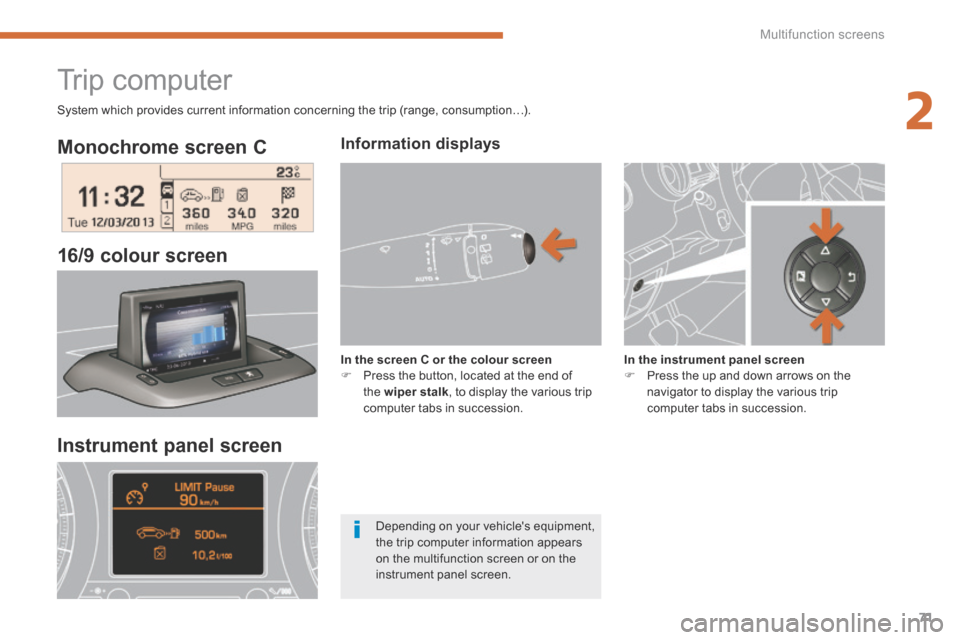
Monochrome screen C
16/9 colour screen
Trip computer
Information displays
In the screen C or the colour screen Press the button, located at the end of the wiper stalk , to display the various trip computer tabs in succession.
In the instrument panel screen Press the up and down arrows on the navigator to display the various trip computer tabs in succession.
Instrument panel screen
Depending on your vehicle's equipment, the trip computer information appears on the multifunction screen or on the instrument panel screen.
System which provides current information concerning the trip (range, consumption…).
Page 74 of 378
Multifunction screens
72
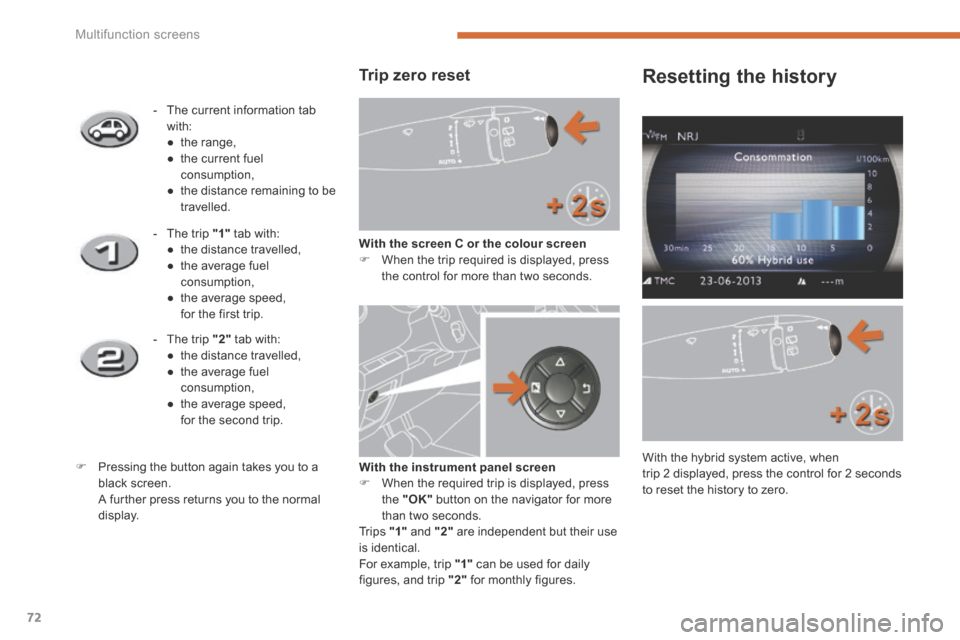
Trip zero reset
With the screen C or the colour screen When the trip required is displayed, press the control for more than two seconds.
- The current information tab with: ● t h e r a n g e , ● the current fuel consumption, ● the distance remaining to be travelled.
- The trip "1" tab with: ● the distance travelled, ● the average fuel consumption, ● the average speed, for the first trip.
- The trip "2" tab with: ● the distance travelled, ● the average fuel consumption, ● the average speed, for the second trip.
Pressing the button again takes you to a black screen. A further press returns you to the normal display.
Resetting the history
With the hybrid system active, when trip 2 displayed, press the control for 2 seconds to reset the history to zero.
With the instrument panel screen When the required trip is displayed, press the "OK" button on the navigator for more than two seconds. Tr i p s "1" and "2" are independent but their use is identical. For example, trip "1" can be used for daily figures, and trip "2" for monthly figures.
Page 75 of 378

2
Multifunction screens73
Trip computer, a few definitions…
When the range falls below 20 miles (30 km), zeros are displayed. After filling with at least 5 litres of fuel, the range is recalculated and is displayed when it exceeds 60 miles (100 km).
Range
(miles or km) The distance which can still be travelled with the fuel remaining in the tank. Related to the average fuel consumption over the last few miles (kilometres) travelled.
Current fuel consumption
(mpg or l/100 km or km/l) Calculated over the previous few seconds.
Average fuel consumption
(mpg or l/100 km or km/l) Calculated since the last reset of the trip information.
Distance travelled
(miles or km) Calculated since the last reset of the trip information.
Average speed
(mph or km/h) Calculated since the last reset of the trip information.
Distance remaining to destination
(miles or km) This is the distance remaining to be travelled to the final destination. It is either calculated instantly by the navigation system, if guidance is activated, or entered by the user. If the distance is not entered, dashes are displayed in place of the digits.
This function is only displayed from 20 mph (30 km/h).
This value may vary following a change in the style of driving or the relief, resulting in a significant change in the current fuel consumption.
If dashes are displayed continuously while driving in place of the digits, contact a PEUGEOT dealer.
The hybrid system and its electric motor do not provide additional range; follow the indications of the trip computer.
Page 78 of 378

Comfort
76
The air conditioning can only operate when the hybrid system is active (Ready lamp on). Its effectiveness will be reduced when in electric mode (see the ECO OFF section).
The driver and front passenger can each adjust the temperature to their requirements.
4. Automatic visibility programme
The automatic comfort programme may not be sufficient to quickly demist or defrost the windscreen and side windows (humidity, several passengers, ice, etc.). Automatic operation
Press the "AUTO" button. The indicator lamp in the button comes on.
2-3. Driver-passenger side adjustment
Dual-zone digital air conditioning
We recommend the use of this mode: it permits automatic and optimised adjustment of all of the functions, passenger compartment temperature, air flow, air distribution and air recirculation, in accordance with the comfort value that you have chosen. This system is designed to operate effectively in all seasons, with the windows closed.
The value indicated in the screen corresponds to a level of comfort and not to a temperature in degrees Celsius or Fahrenheit. Turn control 2 or 3 to the left or to the right respectively to decrease or increase this value. A setting around the value 21 provides optimum comfort. However, depending on your requirements, a setting between 18 and 24 is normal. You are advised to avoid a left / right setting difference of more than 3.
1. Automatic comfort programme
In this case, select the automatic visibility programme. The system automatically controls the air conditioning, the air flow and the air intake and provides optimum distribution of the ventilation to the windscreen and side windows. To switch it off, press the "visibility"button again or press the "AUTO" button, the indicator lamp in the button goes off or the indicator lamp in the "AUTO" button comes on.
To prevent too great a distribution of cold air when the engine is cold, the air flow will reach its optimum level gradually. In cold weather, it favours the distribution of warm air to the windscreen, side windows and footwells o n l y.
On entering the vehicle, if the interior temperature is much colder or warmer than the comfort value, there is no need to change the value displayed in order to obtain the comfort required more quickly. The system corrects the difference in temperature automatically and as quickly as possible.
Page 79 of 378

3
Comfort77
Manual operation
Press this button to switch off the air conditioning.
6. Air distribution adjustment
Press one or more buttons to direct the air flow towards:
7. Air fl ow adjustment
Turn this control to the left to decrease the air flow or to the right to increase the air flow.
5. Air conditioning On / Off
- the windscreen and side windows (demisting or defrosting), - the windscreen, the side windows and the vents, - the windscreen, the side windows, the vents and the footwells, - the vents and the footwells, - the vents, - the footwells, - the windscreen, the side windows and the footwells.
The air flow indicator lamps, between the two fans, come on progressively in relation to the value requested.
Switching the system off could result in some discomfort (humidity, condensation). Press this button again to return to automatic operation of the air conditioning. The indicator lamp in the "A /C " button comes on.
If you wish, you can make a different choice from that offered by the system by changing a setting. The other functions will still be controlled automatically. Pressing the "AUTO" button returns the system to completely automatic operation.
With Stop & Start, when demisting has been switched on, the Diesel engine does not stop.
For maximum cooling or heating of the passenger compartment, it is possible to exceed the minimum value 14 or the maximum value 28. Turn control 2 or 3 to the left until "LO" (low) is displayed or to the right until "HI" (high) is displayed.
To obtain cool air more quickly, you can use interior air recirculation for a few moments. The return to the intake of exterior air.
In winter, we recommend keeping the rear air vents closed.