2014 Peugeot 3008 Hybrid 4 display
[x] Cancel search: displayPage 359 of 378

07
357
SCREEN MENU MAP(S)
Audio functions
Alternative frequencies (RDS)
activate / deactivate
FM preferences
Regional mode (REG)
activate / deactivate
Radio-text information (RDTXT)
activate / deactivate
1
2
3
4
3
4
3
4
Play modes
Album repeat (RPT)
activate / deactivate
Track random play (RDM)
activate / deactivate
2
3
4
3
4
Trip computer
Distance: x miles
Enter distance to destination
Diagnostics
Alert log
Systems activated or deactivated
State of systems *
1
2
3
3
2
3
2
* The settings vary according to vehicle.
Screen C Pressing the MENU button displays:
Page 360 of 378
07
358
SCREEN MENU MAP(S)
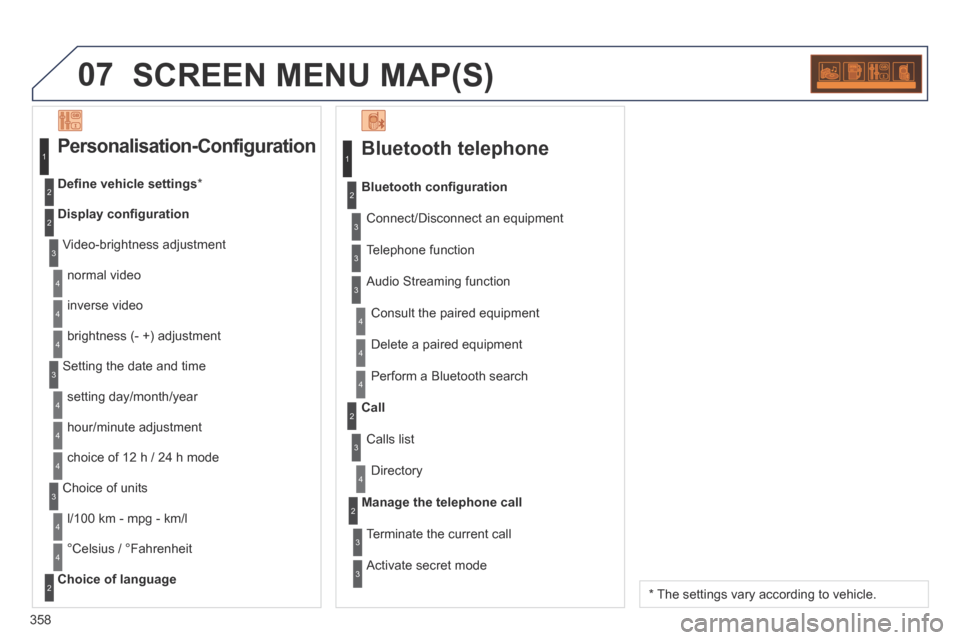
Bluetooth telephone
Connect/Disconnect an equipment
Consult the paired equipment
Bluetooth confi guration
Telephone function
Audio Streaming function
Delete a paired equipment
Perform a Bluetooth search
Calls list
Call
Directory
Terminate the current call
Manage the telephone call
Activate secret mode
1
2
3
3
3
4
4
4
2
3
4
2
3
3
Video-brightness adjustment
Display confi guration
Defi ne vehicle settings *
Personalisation-Configuration
normal video
inverse video
brightness (- +) adjustment
Setting the date and time
setting day/month/year
hour/minute adjustment
choice of 12 h / 24 h mode
Choice of units
l/100 km - mpg - km/l
°Celsius / °Fahrenheit
Choice of language
1
2
4
3
2
4
4
3
4
4
2
3
4
4
4
* The settings vary according to vehicle.
Page 361 of 378
359
FREQUENTLY ASKED QUESTIONS
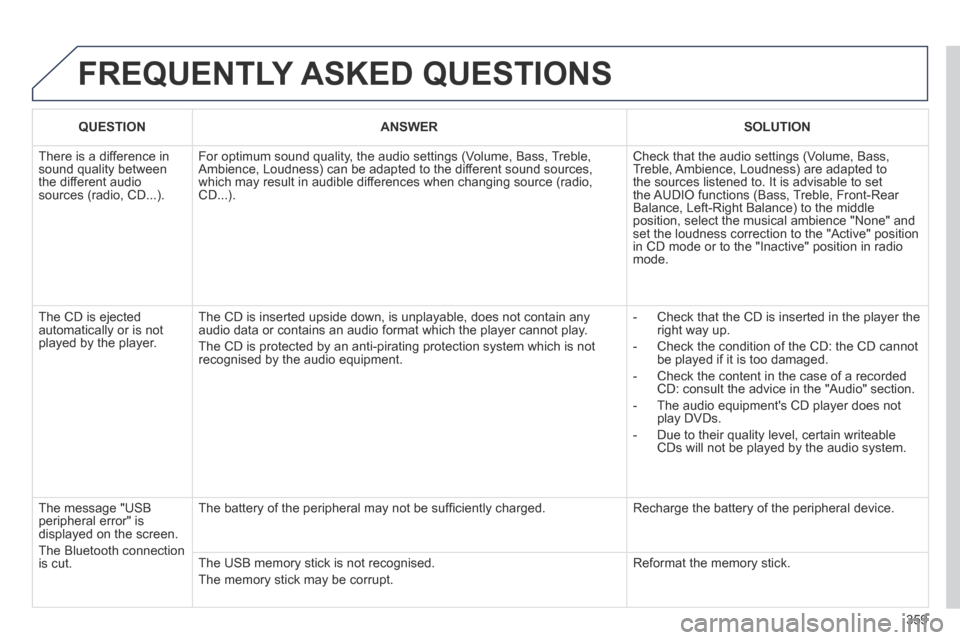
QUESTIONANSWERSOLUTION
There is a difference in sound quality between the different audio sources (radio, CD...).
For optimum sound quality, the audio settings (Volume, Bass, Treble, Ambience, Loudness) can be adapted to the different sound sources, which may result in audible differences when changing source (radio, CD...).
Check that the audio settings (Volume, Bass, Treble, Ambience, Loudness) are adapted to the sources listened to. It is advisable to set the AUDIO functions (Bass, Treble, Front-Rear Balance, Left-Right Balance) to the middle position, select the musical ambience "None" and set the loudness correction to the "Active" position in CD mode or to the "Inactive" position in radio mode.
The CD is ejected automatically or is not played by the player.
The CD is inserted upside down, is unplayable, does not contain any audio data or contains an audio format which the player cannot play.
The CD is protected by an anti-pirating protection system which is not recognised by the audio equipment.
- Check that the CD is inserted in the player the right way up.
- Check the condition of the CD: the CD cannot be played if it is too damaged.
- Check the content in the case of a recorded CD: consult the advice in the "Audio" section.
- The audio equipment's CD player does not play DVDs.
- Due to their quality level, certain writeable CDs will not be played by the audio system.
The message "USB peripheral error" is displayed on the screen.
The Bluetooth connection is cut.
The battery of the peripheral may not be suffi ciently charged. Recharge the battery of the peripheral device.
The USB memory stick is not recognised.
The memory stick may be corrupt.
Reformat the memory stick.
Page 362 of 378

360
FREQUENTLY ASKED QUESTIONS
QUESTIONANSWERSOLUTION
I am unable to access my voice mailbox. Few telephones or operators allow the use of this function.
The CD player sound is poor. The CD used is scratched or of poor quality. Insert good quality CDs and store them in suitable conditions.
The audio equipment settings (bass, treble, ambiences) are unsuitable.\
Set the treble or bass level to 0, without selecting an ambience.
The stored stations do not function (no sound, 87.5 Mhz is displayed...).
An incorrect waveband is selected. Press the BAND AST button to return to the waveband (FM1, FM2, FMAST) on which the stations are stored.
The traffi c announcement (TA) is displayed. I do not receive any traffi c information.
The radio station is not part of the regional traffi c information network. Tune to a radio station which broadcasts traffi c information.
The quality of reception of the radio station listened to gradually deteriorates or the stored stations do not function (no sound, 87.5 Mhz is displayed...).
The vehicle is too far from the transmitter used by the station listened\
to or there is no transmitter in the geographical area through which the\
vehicle is travelling.
Activate the RDS function to enable the system to check whether there is a more powerful transmitter in the geographical area.
The environment (hills, buildings, tunnels, basement car parks...) blo\
ck reception, including in RDS mode. This phenomenon is normal and does not indicate a failure of the audio equipment.
The aerial is absent or has been damaged (for example when going through a car wash or into an underground car park). Have the aerial checked by a PEUGEOT dealer.
Page 363 of 378
361
FREQUENTLY ASKED QUESTIONS
QUESTIONANSWERSOLUTION
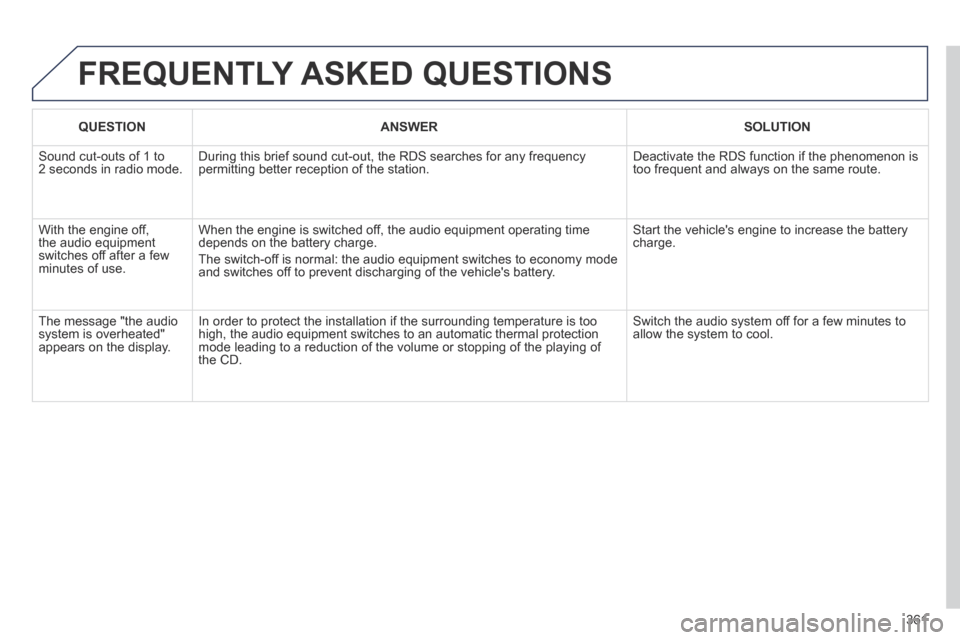
Sound cut-outs of 1 to 2 seconds in radio mode. During this brief sound cut-out, the RDS searches for any frequency permitting better reception of the station. Deactivate the RDS function if the phenomenon is too frequent and always on the same route.
With the engine off, the audio equipment switches off after a few minutes of use.
When the engine is switched off, the audio equipment operating time depends on the battery charge.
The switch-off is normal: the audio equipment switches to economy mode and switches off to prevent discharging of the vehicle's battery.
Start the vehicle's engine to increase the battery charge.
The message "the audio system is overheated" appears on the display.
In order to protect the installation if the surrounding temperature is t\
oo high, the audio equipment switches to an automatic thermal protection mode leading to a reduction of the volume or stopping of the playing of \
the CD.
Switch the audio system off for a few minutes to allow the system to cool.
Page 366 of 378

Alphabetical index
364
Filling with fuel .......................................105 -107Fitting a wheel ...............................................206Fitting roof bars .............................................231Fittings, boot .................................................132Flashing indicators ........................................151Flat bed lorry or trailer ............................Flat bed lorry or trailer ............................Flat bed lorry or trailer47, 228Foglamps, front .............................110, 209, 211Foglamps, rear ..............................Foglamps, rear ..............................Foglamps, rear110, 212, 213Folding the rear seats .....................................85Folding/unfolding the door mirrors .................88Front seats ..........................................80, 81, 84
Gearbox, electronic ......................................179Gear lever, electronic ....................................179Glove box ......................................................125G . P. S . ...................................................256, 295Grab handle on console ..................................................124Grab handles ................................................124Guidance ..............................................256, 295Guide-me-home ....................................113 , 114
Halogen headlamps ..............................209, 210Hands-free kit ...............................273, 312, 353Hazard warning lamps ..................................151Headlamp adjustment ...................................115Headlamp wash ............................................118Headlamp wash reservoir .............................Headlamp wash reservoir .............................Headlamp wash reservoir19 4Head restraints, front ......................................82
Identification plates .......................................239Indicator lamps, status ..............................50-59Indicators, direction ......................................151Inflating accessories (using the kit) ..............202Inflating tyres ..........................................40, 239Inputs for audio system ................125, 126, 272, 329, 350, 352Instrument panel lighting ................................64Instrument panels .....................................48, 49Instrument panel screen .................................49Interior fittings ...............................................124Interior mood lighting ....................................12 2ISOFIX ...................................................146 -148ISOFIX child seats ........................................147ISOFIX mountings.........................................146
Fuel........................................................105, 10 6Fuel consumption ......................................40, 42Fuel filler cap .................................................107Fuel filler flap .................................................107Fuel gauge ..............................................48, 105Fuel tank................................................105, 107Fusebox, dashboard .....................................215Fuses .............................................................214
F
E
G
H
I
Eco-driving .....................................................40Economy mode .............................................225Eco off .............................................................Eco off .............................................................Eco off36Electric window controls .................................98Electronic engine immobiliser.........................93Electronic gearbox ................................179, 196Electronic stability control (ESC) ..................15 4Emergency call ......................................241-243Emergency starting .......................................222Emergency warning lamps ...........................151Energy economy mode .................................225Engine compartment ..............................45, 191Engine compartment fusebox .......................218Engine, Diesel ...............106, 190, 191, 236, 237Engine oil level indicator .........................Engine oil level indicator .........................Engine oil level indicator63, 192Engines ................................................235, 236Environment .....................40, 95, 152, 194, 223Equipment settings .............................49, 65, 68ESC/ASR .......................................................15 4
Head restraints, rear ................................................................rear ................................................................rear85Head-up display ............................171, 173, 176Heated seats ...................................................83Heating ............................................................74Height and reach adjustment, steering wheel ..............................................87High voltage .....................43, 44, 159, 189, 223High voltage cables ........................................44Hill start assist ...............................................168History .......................................................42, 72Hooks ............................................................13 5Horn...............................................................151Hybrid flow ............................................4, 24, 33Hybrid selector ................................................Hybrid selector ................................................Hybrid selector29Hybrid system ............................4- 6, 24- 47, 221
Page 371 of 378

.
Visual search369
Instruments and controls
Front armrest 126 PEUGEOT Connect USB 126, 325, 352
Courtesy lamps 121, 122 Seat belt / passenger's front airbag warning lamps display 158, 161 Rear view mirror 89 Sun visor 125
Opening the bonnet 189
Electronic gearbox 179 -182 Hill start assist 168 -170 E c o - d r i v i n g 4 0 - 4 1
Ventilation 74-75 Digital air conditioning 76 -79
Interior fittings 124-127 - glove box - driver's storage compartments - mat
12 V accessory socket 127
PEUGEOT Connect Media PEUGEOT Connect Media PEUGEOTNavigation (NG4 3D) 24 5 -287 Setting the date/time 68 - 69
PEUGEOT Connect Navigation (RT6) 289 -341 Setting the date/time 68 - 69
PEUGEOT Connect Sound 343 -361 Setting the date/time 65 - 67 Dashboard fuses 214-217
Electric parking brake 164-167, 169 -170
Page 372 of 378
Visual search
370
Instruments and controls (cont.)
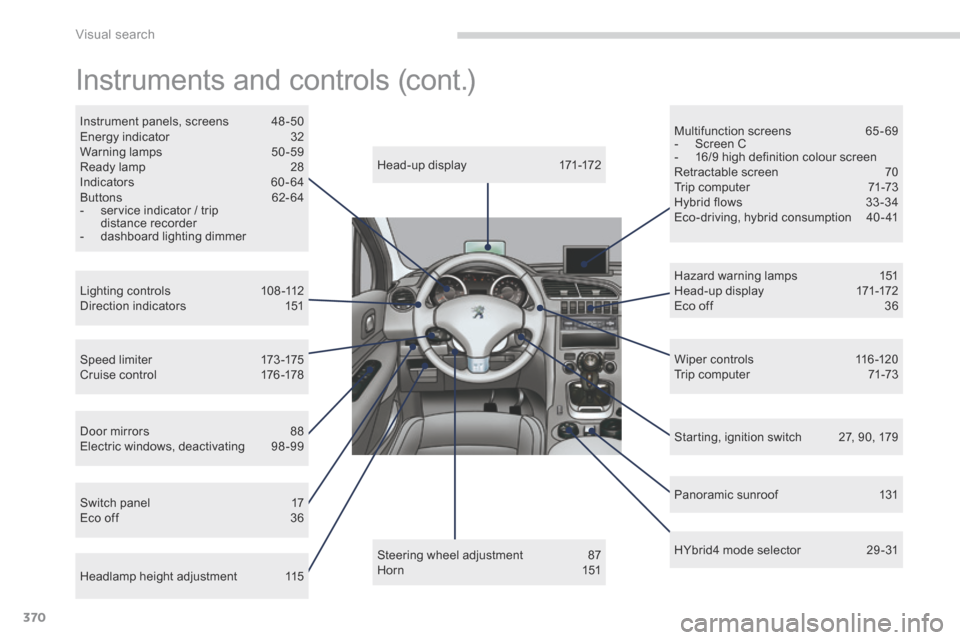
Head-up display 171-172
Lighting controls 108 -112 Direction indicators 151
Speed limiter 173 -175 Cruise control 176 -178
Headlamp height adjustment 115
Steering wheel adjustment 87 H o r n 1 5 1
Instrument panels, screens 48 -50 Energy indicator 32 Warning lamps 50 -59 Ready lamp 28 Indicators 60 - 64 Buttons 62- 64 - service indicator / trip distance recorder - dashboard lighting dimmer
Hazard warning lamps 151 Head-up display 171-172 Eco off 36
Wiper controls 116 -120 Trip computer 71-73
Starting, ignition switch 27, 90, 179
Multifunction screens 65 - 69 - Screen C - 16/9 high definition colour screen Retractable screen 70 Trip computer 71-73 Hybrid flows 33 -34 Eco-driving, hybrid consumption 40 - 41
Door mirrors 88 Electric windows, deactivating 98 -99
Switch panel 17 Eco off 36
Panoramic sunroof 131
HYbrid4 mode selector 29 -31