2014 NISSAN TEANA Tail light wiring
[x] Cancel search: Tail light wiringPage 918 of 4801
DLK-150
< DTC/CIRCUIT DIAGNOSIS >
HOMELINK UNIVERSAL TRANSCEIVER
HOMELINK UNIVERSAL TRANSCEIVER
DescriptionINFOID:0000000009461904
Homelink universal transceiver can store and transmit a maximum of 3 radio signals.
Allows operation of garage doors, gates, home and office lighting, entry door locks and security system, etc.
Homelink universal transceiver power supply uses vehicl e battery, which enables it to maintain every program
in case battery is discharged or removed.
Component Function CheckINFOID:0000000009461905
1.CHECK FUNCTION
Check that system receiver (garage door opener, et c.) operates with original hand-held transmitter.
Is the inspection result normal?
YES >> GO TO 2
NO >> Receiver or hand-held transmitter is malfunctioning.
2.CHECK ILLUMINATE
1. Turn ignition switch “OFF”.
2. Press each of the transmitter buttons and watch for the red light to illuminate with each button.
Is the inspection result normal?
YES >> GO TO 3
NO >> Refer to DLK-150, "Diagnosis Procedure"
.
3.CHECK TRANSMITTER
Check transmitter with Tool*.
*:For details, refer to Technical Service Bulletin.
Is the inspection result normal?
YES >> Receiver or hand-held transmitter malfunction, not vehicle related.
NO >> Replace auto anti-dazzling inside mirror (homelink universal transceiver). Refer to MIR-19,
"Removal and Installation".
Diagnosis ProcedureINFOID:0000000009461906
Regarding Wiring Diagram information, refer to DLK-49, "Wiring Diagram".
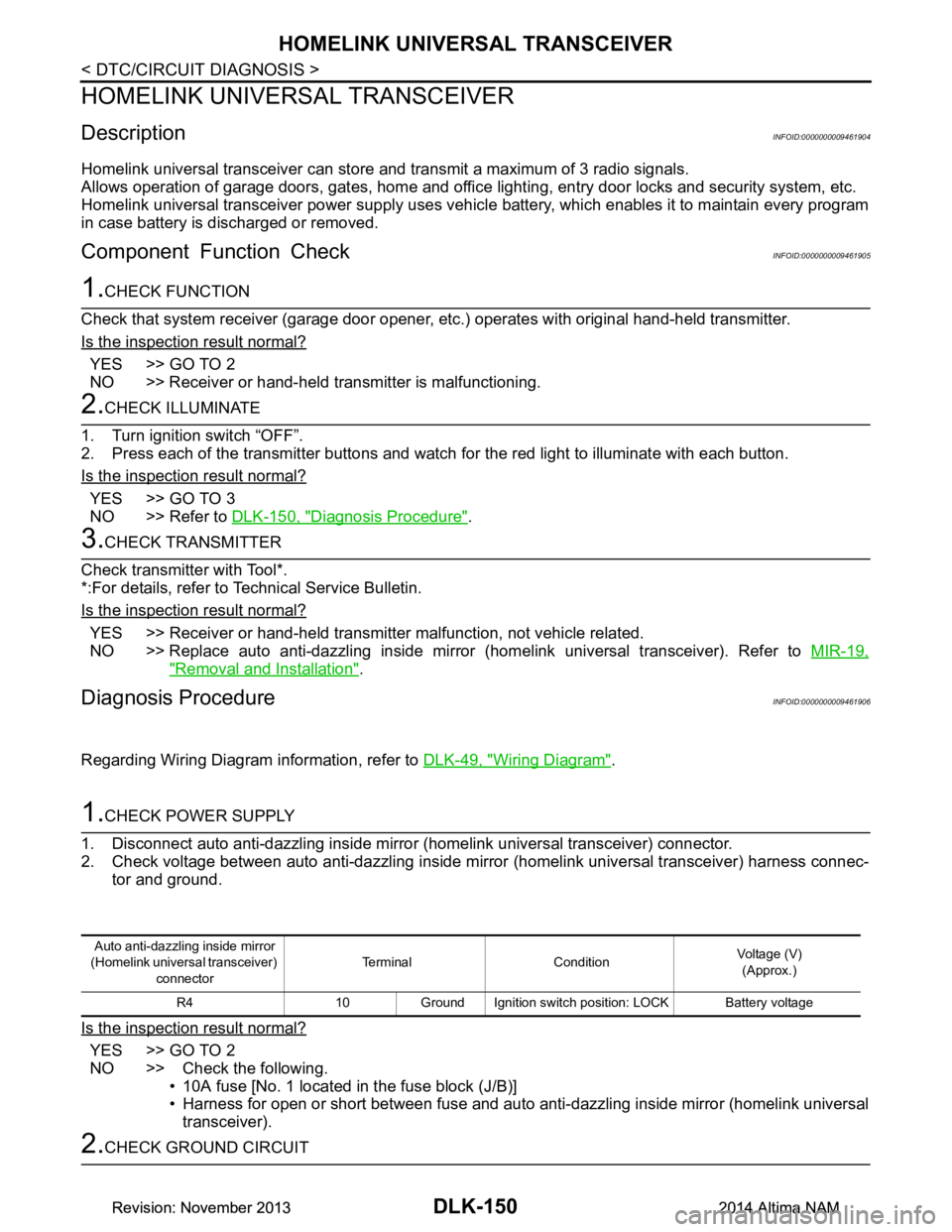
1.CHECK POWER SUPPLY
1. Disconnect auto anti-dazzling inside mirror (homelink universal transceiver) connector.
2. Check voltage between auto anti-dazzling inside mirror (homelink universal transceiver) harness connec-
tor and ground.
Is the inspection result normal?
YES >> GO TO 2
NO >> Check the following. • 10A fuse [No. 1 located in the fuse block (J/B)]
• Harness for open or short between fuse and auto anti-dazzling inside mirror (homelink universal
transceiver).
2.CHECK GROUND CIRCUIT
Auto anti-dazzling inside mirror
(Homelink universal transceiver) connector Terminal Condition
Voltage (V)
(Approx.)
R4 10 Ground Ignition switch position: LOCK Battery voltage
Revision: November 20132014 Altima NAMRevision: November 20132014 Altima NAM
Page 1064 of 4801
![NISSAN TEANA 2014 Service Manual
EC-64
< SYSTEM DESCRIPTION >[QR25DE]
SYSTEM
The ASCD operation status is indicated by two indica
tors (CRUISE and SET on the information display) on the
combination meter. If any malfunction occurs i](/manual-img/5/57390/w960_57390-1063.png "NISSAN TEANA 2014 Service Manual
EC-64
< SYSTEM DESCRIPTION >[QR25DE]
SYSTEM
The ASCD operation status is indicated by two indica
tors (CRUISE and SET on the information display) on the
combination meter. If any malfunction occurs i")
EC-64
< SYSTEM DESCRIPTION >[QR25DE]
SYSTEM
The ASCD operation status is indicated by two indica
tors (CRUISE and SET on the information display) on the
combination meter. If any malfunction occurs in AS CD system, SET indicator blinks and ASCD control is deac-
tivated.
NOTE:
Always drive vehicle in safe manner according to traffic conditions and obey all traffic laws.
SET OPERATION
Press MAIN switch. (CRUISE is indicated on the information display.)
When vehicle speed reaches a desired speed between approximately 40 km/h (25 MPH) and 144 km/h (89
MPH), press SET/COAST switch. (Then SET is indicated on the information display.)
ACCELERATE OPERATION
If the RESUME/ACCELERATE switch is pressed during cruise control driving, increase the vehicle speed until
the switch is released or vehicle speed r eaches maximum speed controlled by the system.
And then ASCD will keep the new set speed.
CANCEL OPERATION
When any of following conditions exist, cruise operation will be canceled.
• CANCEL switch is pressed
• More than 2 switches at ASCD steering switch are pressed at the same time (Set speed will be cleared)
• Brake pedal is depressed
• Selector lever is changed to N, P, R position
• Vehicle speed decreased to 13 km/h (8 MPH) lower than the set speed
• TCS system is operated
When the ECM detects any of the following conditions , the ECM will cancel the cruise operation and inform
the driver by blinking indicators.
• Engine coolant temperature is slightly higher than t he normal operating temperature, CRUISE indicator may
blink slowly.
When the engine coolant temperature decreases to the normal operating temperature, CRUISE indicator will
stop blinking and the cruise operation will be able to wo rk by pressing SET/COAST switch or RESUME/
ACCELERATE switch.
• Malfunction for some self-diagnoses regarding AS CD control: SET indicator will blink quickly.
If MAIN switch is turned to OFF during ASCD is acti vated, all of ASCD operations will be canceled and vehicle
speed memory will be erased.
COAST OPERATION
When the SET/COAST switch is press ed during cruise control driving, decrease vehicle set speed until the
switch is released. And then ASCD will keep the new set speed.
RESUME OPERATION
When the RESUME/ACCELERATE switch is pressed after cancel operation other than pressing MAIN switch
is performed, vehicle speed will return to last set s peed. To resume vehicle set speed, vehicle condition must
meet following conditions.
• Brake pedal is released
• Selector lever is in other than P and N positions
• Vehicle speed is greater than 40 km/h (25 MPH) and less than 144 km/h (89 MPH)
CAN COMMUNICATION
CAN COMMUNICATION : System DescriptionINFOID:0000000009462108
CAN (Controller Area Network) is a serial communication line for real time application. It is an on-vehicle mul-
tiplex communication line with high data communication s peed and excellent error detection ability. Many elec-
tronic control units are equipped onto a vehicle, and each control unit shares information and links with other
control units during operation (not independent). In CA N communication, control units are connected with 2
communication lines (CAN H line, CAN L line) allowing a high rate of information transmission with less wiring.
Each control unit transmits/receives data but selectively reads required data only.
Refer to LAN-32, "CAN COMMUNICA TION SYSTEM : CAN Communication Signal Chart"
, about CAN com-
munication for detail.
Revision: November 20132014 Altima NAMRevision: November 20132014 Altima NAM
Page 2268 of 4801

EXL-2
ECU DIAGNOSIS INFORMATION ..............26
BCM, IPDM E/R .............................................. ...26
List of ECU Reference ......................................... ...26
WIRING DIAGRAM .....................................27
HEADLAMP .................................................... ...27
Wiring Diagram - Halogen ................................... ...27
Wiring Diagram - Xenon .........................................33
DAYTIME LIGHT SYSTEM ................................39
Wiring Diagram .................................................... ...39
AUTO LIGHT SYSTEM ......................................47
Wiring Diagram .................................................... ...47
FRONT FOG LAMP ...........................................54
Wiring Diagram .................................................... ...54
TURN SIGNAL AND HAZARD WARNING
LAMPS ............................................................ ...
60
Wiring Diagram .................................................... ...60
PARKING, LICENSE PLATE AND TAIL
LAMPS ............................................................ ...
68
Wiring Diagram .................................................... ...68
STOP LAMP ......................................................76
Wiring Diagram .................................................... ...76
BACK-UP LAMP ................................................79
Wiring Diagram .................................................... ...79
BASIC INSPECTION ...................................86
DIAGNOSIS AND REPAIR WORKFLOW ...... ...86
Work Flow ............................................................ ...86
DTC/CIRCUIT DIAGNOSIS ...................... ...89
POWER SUPPLY AND GROUND CIRCUIT .. ...89
BCM (BODY CONTROL MODULE) ...................... ...89
BCM (BODY CONTROL MODULE) : Diagnosis
Procedure ............................................................ ...
89
IPDM E/R (INTELLIGENT POWER DISTRIBU-
TION MODULE ENGINE ROOM) .......................... ...
89
IPDM E/R (INTELLIGENT POWER DISTRIBU-
TION MODULE ENGINE ROOM) : Diagnosis Pro-
cedure .................................................................. ...
89
HEADLAMP (HI) CIRCUIT ................................91
Description ........................................................... ...91
Component Function Check ...................................91
Diagnosis Procedure ..............................................91
HEADLAMP (LO) CIRCUIT ...............................93
HEADLAMP (HALOGEN) ...................................... ...93
HEADLAMP (HALOGEN) : Description ..................93
HEADLAMP (HALOGEN) : Component Function
Check ................................................................... ...
93
HEADLAMP (HALOGEN) : Diagnosis Procedure ...93
HEADLAMP (XENON) ........................................... ...94
HEADLAMP (XENON) : Description .......................94
HEADLAMP (XENON) : Component Function
Check ................................................................... ...
94
HEADLAMP (XENON) : Diagnosis Procedure ........95
XENON HEADLAMP .........................................97
Description ........................................................... ...97
Diagnosis Procedure ...............................................97
DAYTIME LIGHT RELAY CIRCUIT ..................98
Description ........................................................... ...98
Diagnosis Procedure ...............................................98
Component Inspection ............................................99
FRONT FOG LAMP CIRCUIT ..........................101
Description ........................................................... .101
Component Function Check .................................101
Diagnosis Procedure .............................................101
PARKING LAMP CIRCUIT ...............................103
Description ........................................................... .103
Component Function Check .................................103
Diagnosis Procedure .............................................103
TURN SIGNAL LAMP CIRCUIT .......................106
Description ........................................................... .106
Component Function Check .................................106
Diagnosis Procedure .............................................106
OPTICAL SENSOR ..........................................110
Description ........................................................... .110
Component Function Check .................................110
Diagnosis Procedure .............................................110
HAZARD SWITCH .......................................... ..112
Component Function Check ................................ .112
Diagnosis Procedure .............................................112
SYMPTOM DIAGNOSIS ...........................114
EXTERIOR LIGHTING SYSTEM SYMPTOMS ..114
Symptom Table .................................................... .114
NORMAL OPERATING CONDITION ...............116
Description ........................................................... .116
BOTH SIDE HEADLAMPS DO NOT SWITCH
TO HIGH BEAM .............................................. ..
117
Description ........................................................... .117
Diagnosis Procedure .............................................117
DAYTIME LIGHT SYSTEM INOPERATIVE .....118
Description ........................................................... .118
Diagnosis Procedure .............................................118
BOTH SIDE HEADLAMPS (LO) ARE NOT
TURNED ON ................................................... ..
119
Revision: November 20132014 Altima NAMRevision: November 20132014 Altima NAM
Page 2539 of 4801
HOW TO READ WIRING DIAGRAMSGI-11
< HOW TO USE THIS MANUAL >
C
D E
F
G H
I
J
K L
M B
GI
N
O P
DescriptionINFOID:0000000009462978
SWITCH POSITIONS
Switches are shown in wiring diagrams as if the vehicle is in the “normal” condition.
A vehicle is in the “normal” condition when:
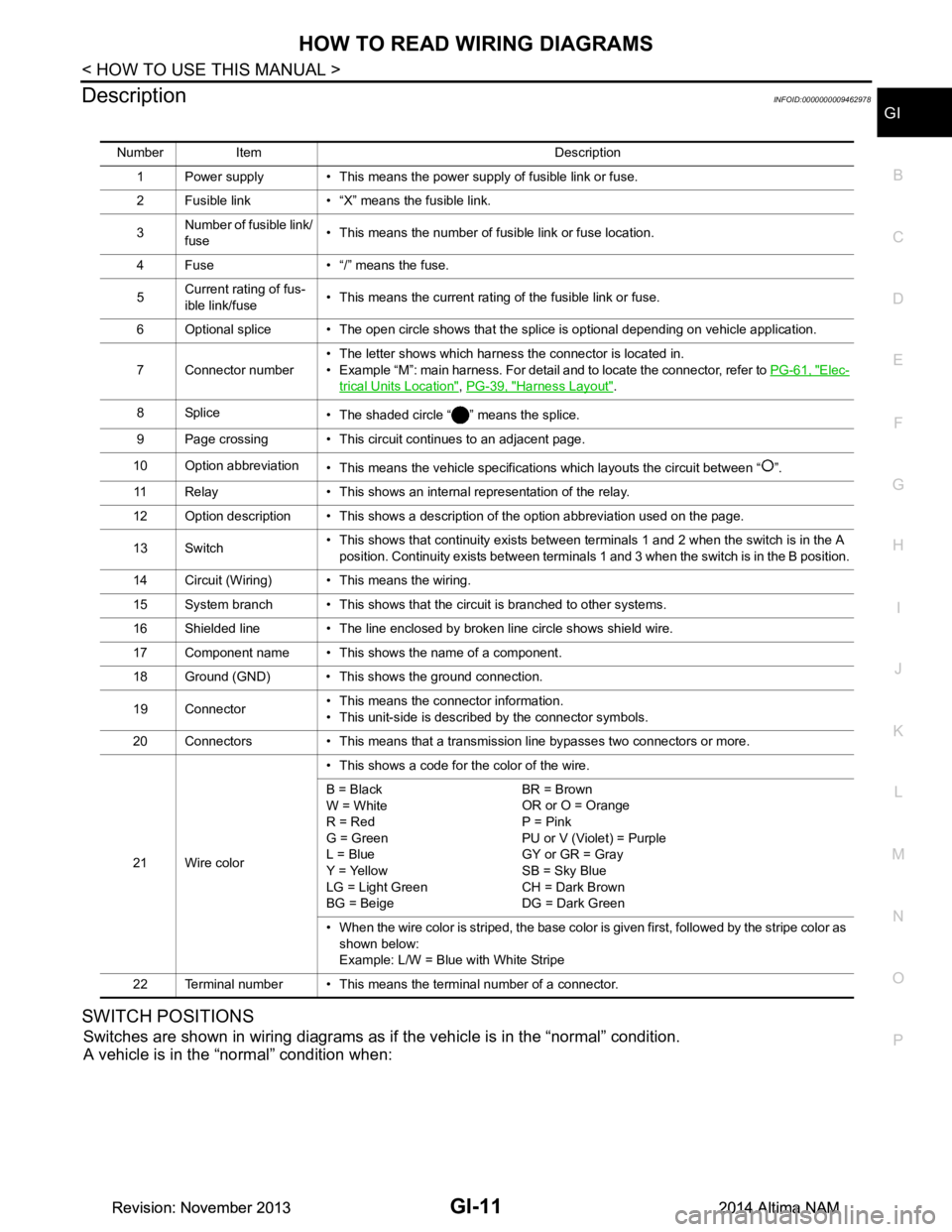
Number Item Description
1 Power supply • This means the power supply of fusible link or fuse.
2 Fusible link • “X” means the fusible link.
3 Number of fusible link/
fuse • This means the number of fusible link or fuse location.
4 Fuse • “/” means the fuse.
5 Current rating of fus-
ible link/fuse • This means the current rating of the fusible link or fuse.
6 Optional splice • The open circle shows that the splice is optional depending on vehicle application.
7 Connector number • The letter shows which harness the connector is located in.
• Example “M”: main harness. For detail and to locate the connector, refer to PG-61, "Elec-
trical Units Location", PG-39, "Harness Layout".
8Splice • The shaded circle “ ” means the splice.
9 Page crossing • This circuit continues to an adjacent page.
10 Option abbreviation • This means the vehicle specifications which layouts the circuit between “ ”.
11 Relay • This shows an internal representation of the relay.
12 Option description • This shows a description of the option abbreviation used on the page.
13 Switch • This shows that continuity exists between terminals 1 and 2 when the switch is in the A
position. Continuity exists between terminals 1 and 3 when the switch is in the B position.
14 Circuit (Wiring) • This means the wiring.
15 System branch • This shows that the circuit is branched to other systems.
16 Shielded line • The line enclosed by broken line circle shows shield wire.
17 Component name • This shows the name of a component.
18 Ground (GND) • This shows the ground connection.
19 Connector • This means the connector information.
• This unit-side is described by the connector symbols.
20 Connectors • This means that a transmission line bypasses two connectors or more.
21 Wire color • This shows a code for the color of the wire.
B = Black
W = White
R = Red
G = Green
L = Blue
Y = Yellow
LG = Light Green
BG = Beige BR = Brown
OR or O = Orange
P = Pink
PU or V (Violet) = Purple
GY or GR = Gray
SB = Sky Blue
CH = Dark Brown
DG = Dark Green
• When the wire color is striped, the base color is given first, followed by the stripe color as shown below:
Example: L/W = Blue with White Stripe
22 Terminal number • This means the terminal number of a connector.
Revision: November 20132014 Altima NAMRevision: November 20132014 Altima NAM
Page 2576 of 4801
GI-48
< BASIC INSPECTION >
SERVICE INFORMATION FOR ELECTRICAL INCIDENT
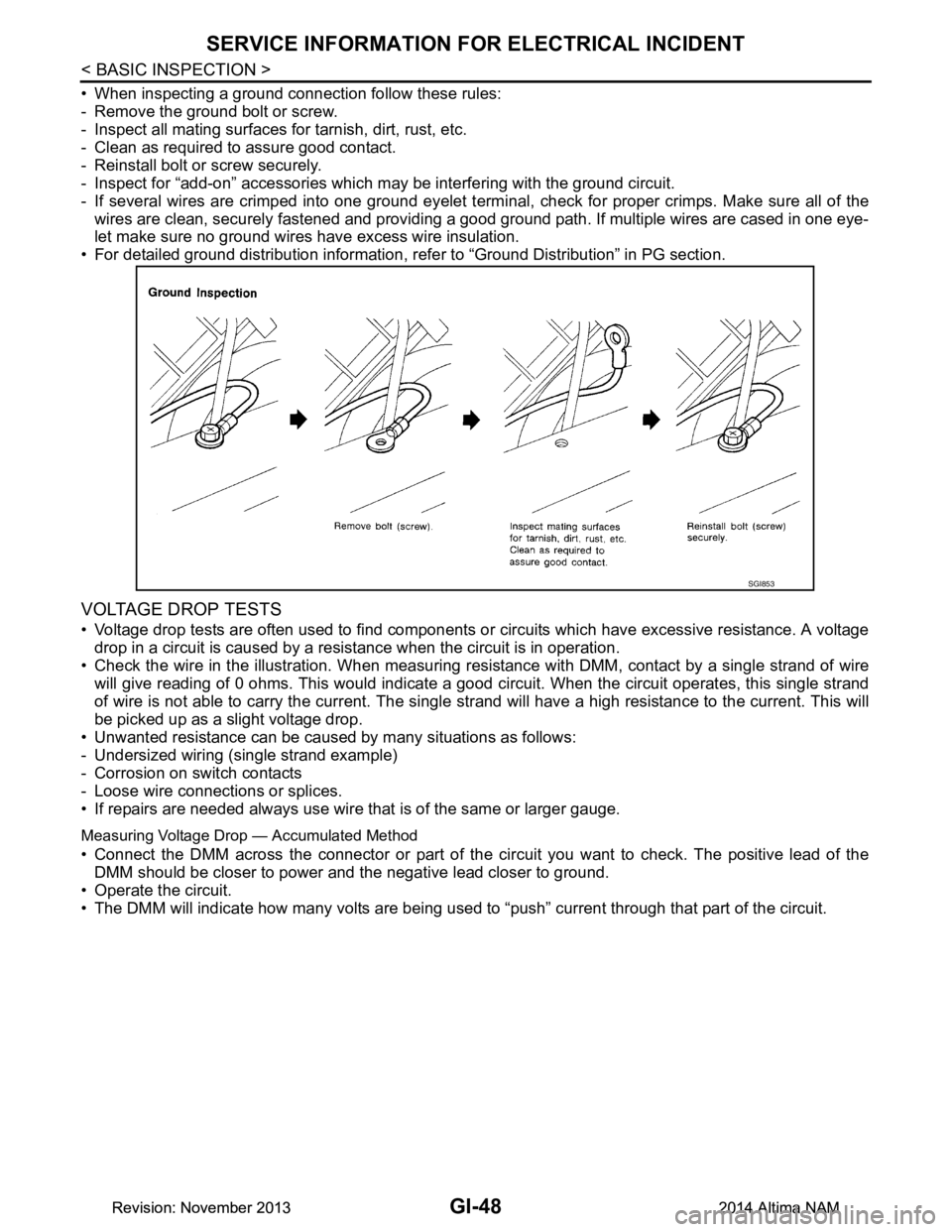
• When inspecting a ground connection follow these rules:
- Remove the ground bolt or screw.
- Inspect all mating surfaces for tarnish, dirt, rust, etc.
- Clean as required to assure good contact.
- Reinstall bolt or screw securely.
- Inspect for “add-on” accessories which may be interfering with the ground circuit.
- If several wires are crimped into one ground eyelet termi nal, check for proper crimps. Make sure all of the
wires are clean, securely fastened and providing a good ground path. If multiple wires are cased in one eye-
let make sure no ground wires have excess wire insulation.
• For detailed ground distribution information, re fer to “Ground Distribution” in PG section.
VOLTAGE DROP TESTS
• Voltage drop tests are often used to find components or circuits which have excessive resistance. A voltage
drop in a circuit is caused by a resistance when the circuit is in operation.
• Check the wire in the illustration. When measuring re sistance with DMM, contact by a single strand of wire
will give reading of 0 ohms. This would indicate a good circuit. When the circuit operates, this single strand
of wire is not able to carry the current. The single st rand will have a high resistance to the current. This will
be picked up as a slight voltage drop.
• Unwanted resistance can be caused by many situations as follows:
- Undersized wiring (single strand example)
- Corrosion on switch contacts
- Loose wire connections or splices.
• If repairs are needed always use wire that is of the same or larger gauge.
Measuring Voltage Drop — Accumulated Method
• Connect the DMM across the connector or part of the ci rcuit you want to check. The positive lead of the
DMM should be closer to power and the negative lead closer to ground.
• Operate the circuit.
• The DMM will indicate how many volts are being used to “push” current through that part of the circuit.
SGI853
Revision: November 20132014 Altima NAMRevision: November 20132014 Altima NAM