2014 NISSAN TEANA light
[x] Cancel search: lightPage 800 of 4801

DLK-32
< SYSTEM DESCRIPTION >
SYSTEM (INTELLIGENT KEY SYSTEM)
WELCOME LIGHT FUNCTION
WELCOME LIGHT FUNCTION : System DiagramINFOID:0000000009461786
WELCOME LIGHT FUNCTION : System DescriptionINFOID:0000000009461787
The welcome light function operates as per the following. When the Intelligent Key is within the outside key
antenna detection area, the BCM turns on interior room lamp
* and operates heart beat operation of the push-
button ignition switch.
*: Settings for map lamp, foot lamp, personal lamp, and puddle lamp are available.
OPERATION DESCRIPTION
• When the BCM detects that the Intelligent Key is within the outside key antenna detection area. BCM trans-
mits the request signal to the Intelli gent Key and check it is near the door.
• Intelligent Key receives the request signal and transmits the key ID signal to the BCM via remote keyless entry receiver.
• BCM receives the key ID signal and compares it with the registered key ID.
• BCM illuminates lamps that are set, when key ID verification is OK.
TIMER FUNCTION
BCM can operate welcome light function using the timer function for 9 days after key switch is turned OFF.
The timer function resets when the engine is started
*.Operating period of timer function may differ depending
on battery size.
Function
Intelligent Key
Door switch
Door lock actuator
Push-button ignition switch
CAN communication system
BCM
IPDM E/R
Horn
Combination meter
Hazard warning lamp
Door lock/unlock function ××× ×
Selective unlock function ××× ×
Auto door lock function ×××× ×
Hazard and horn reminder function ××××××
Remote engine start function ×××××××
JMKIA5072GB
Revision: November 20132014 Altima NAMRevision: November 20132014 Altima NAM
Page 801 of 4801

SYSTEM (INTELLIGENT KEY SYSTEM)DLK-33
< SYSTEM DESCRIPTION >
C
D E
F
G H
I
J
L
M A
B
DLK
N
O P
*: Timer function does not stop if another Intelligent Key that has a different key ID is detected within the inte-
rior antenna detection area when starting the engine.
OPERATION CONDITION
If the following condition are satisfi ed, welcome light function is operated.
OUTSIDE KEY ANTENNA DETECTION AREA
The outside key antenna detection area of door lock/unlock function
is in the range of approximately 80 cm (31.50 in) surrounding the
driver, passenger door handles (1) and rear bumper (2). However,
this operating range depends on the ambient conditions.
WELCOME LIGHT FUNCTION SETTING
Welcome light function operation mode can be changed using CONSULT
With CONSULT
Refer to BCS-22, "INTELLIGENT KEY : CONSUL T Function (BCM - INTELLIGENT KEY)"
.
Without CONSULT
The welcome light function ON/OFF can be s witched by performing the following operation.
1. Turn ignition switch: OFF →ON
2. Press and hold the driver side door request switch for 5 seconds or more within 20 seconds after turning
the ignition switch ON.
3. The switching is complete when combination meter buzzer sounds.
WARNING FUNCTION
WARNING FUNCTION : System DescriptionINFOID:0000000009461788
OPERATION DESCRIPTION
The warning function are as per the following items and are given to the user as warning information and
warnings using combinations of Intelligent Key warning buzzer, combination meter buzzer, KEY warning lamp
and information display in combination meter.
• Intelligent Key system malfunction
• OFF position warning
• P position warning
• ACC warning
• Take away warning
• Door lock operation warning
• Engine start information
• Intelligent Key low battery warning
• Key ID warning
• Key ID verification information
OPERATION CONDITION
Once the following condition from below is established, alert or warning is executed.
Function Operation condition
Welcome light function • All door are closed.
• All doors are locked.
• Ignition switch: OFF position.
• Shift position: P (Park) position.
• Intelligent Key is outside the vehicle.
• Timer function is activated.
JMKIA5224ZZ
Revision: November 20132014 Altima NAMRevision: November 20132014 Altima NAM
Page 916 of 4801

DLK-148
< DTC/CIRCUIT DIAGNOSIS >
WARNING CHIME FUNCTION
WARNING CHIME FUNCTION
DescriptionINFOID:0000000009461898
Performs operation method guide and warning with buzzer.
Component Function CheckINFOID:0000000009461899
1.CHECK FUNCTION
With CONSULT
1. Check the operation with “INSIDE BUZZER” in the Active Test.
2. Touch “TAKE OUT”, “KNOB”or “KEY”on screen.
Is the inspection result normal?
YES >> Warning buzzer into combination meter is OK.
NO >> Refer to DLK-148, "Diagnosis Procedure"
.
Diagnosis ProcedureINFOID:0000000009461900
1.CHECK METER BUZZER CIRCUIT
Operate the hazard lights by turni ng ON the hazard warning switch.
Is the inspection result normal?
YES >> GO TO 2
NO >> Replace combination meter. Refer to MWI-82, "Removal and Installation"
.
2.CHECK INTERMITTENT INCIDENT
Refer to GI-43, "Intermittent Incident"
.
>> Inspection End.
Revision: November 20132014 Altima NAMRevision: November 20132014 Altima NAM
Page 917 of 4801

HAZARD FUNCTIONDLK-149
< DTC/CIRCUIT DIAGNOSIS >
C
D E
F
G H
I
J
L
M A
B
DLK
N
O P
HAZARD FUNCTION
DescriptionINFOID:0000000009461901
Perform answer-back for each oper ation with number of blinks.
Component Function CheckINFOID:0000000009461902
1.CHECK FUNCTION
Check hazard warning lamp (“FLASHER”) in Active Test.
Is the inspection result normal?
YES >> Hazard warning lamp circuit is OK.
NO >> Refer to EXL-60, "Wiring Diagram"
.
Diagnosis ProcedureINFOID:0000000009461903
1.CHECK HAZARD SWITCH CIRCUIT
Operate the hazard lights by turni ng ON the hazard warning switch.
Is the inspection result normal?
YES >> GO TO 2
NO >> Repair or replace hazard warning switch circuit. Refer to EXL-86, "Work Flow"
.
2.CHECK INTERMITTENT INCIDENT
Refer to GI-43, "Intermittent Incident"
.
>> Inspection End.
Revision: November 20132014 Altima NAMRevision: November 20132014 Altima NAM
Page 918 of 4801
DLK-150
< DTC/CIRCUIT DIAGNOSIS >
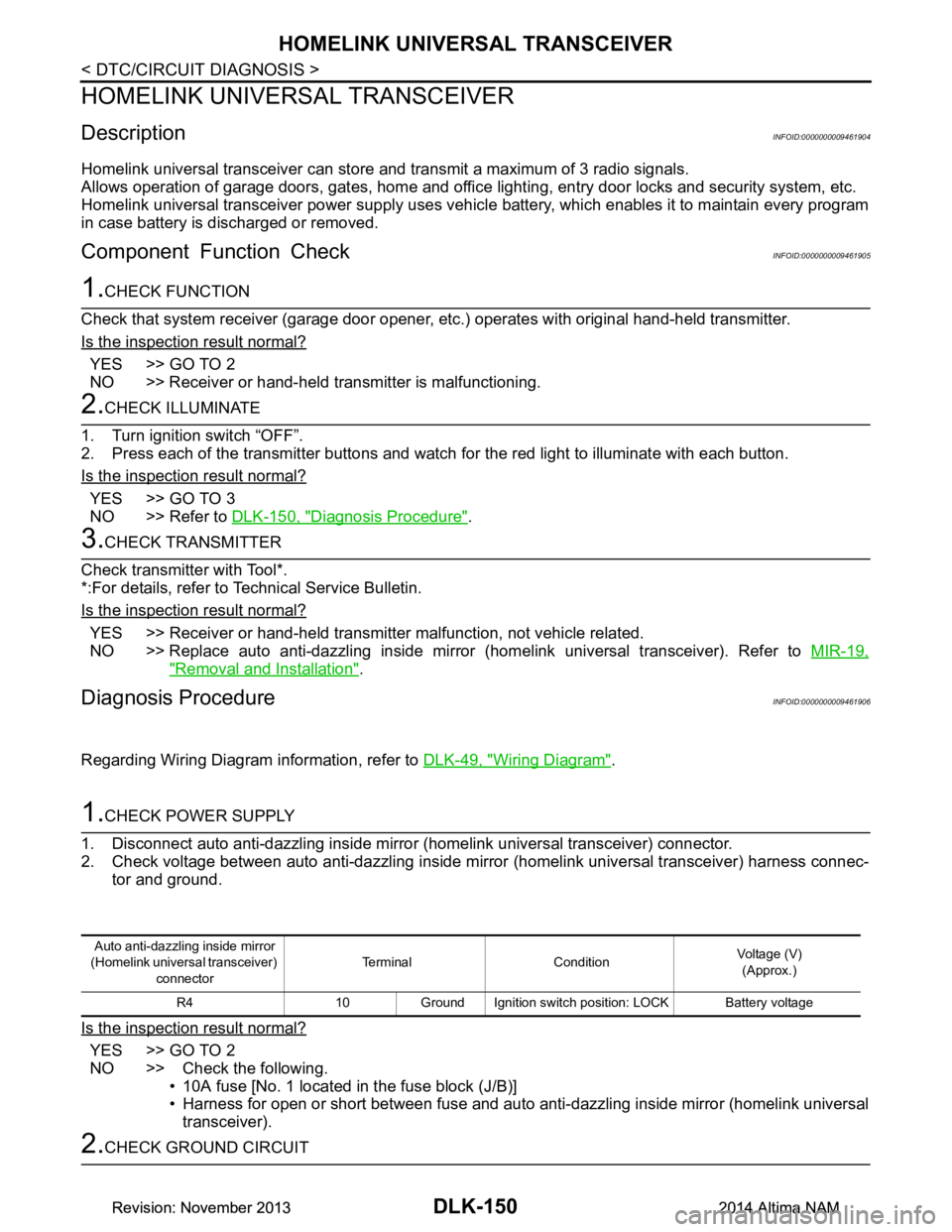
HOMELINK UNIVERSAL TRANSCEIVER
HOMELINK UNIVERSAL TRANSCEIVER
DescriptionINFOID:0000000009461904
Homelink universal transceiver can store and transmit a maximum of 3 radio signals.
Allows operation of garage doors, gates, home and office lighting, entry door locks and security system, etc.
Homelink universal transceiver power supply uses vehicl e battery, which enables it to maintain every program
in case battery is discharged or removed.
Component Function CheckINFOID:0000000009461905
1.CHECK FUNCTION
Check that system receiver (garage door opener, et c.) operates with original hand-held transmitter.
Is the inspection result normal?
YES >> GO TO 2
NO >> Receiver or hand-held transmitter is malfunctioning.
2.CHECK ILLUMINATE
1. Turn ignition switch “OFF”.
2. Press each of the transmitter buttons and watch for the red light to illuminate with each button.
Is the inspection result normal?
YES >> GO TO 3
NO >> Refer to DLK-150, "Diagnosis Procedure"
.
3.CHECK TRANSMITTER
Check transmitter with Tool*.
*:For details, refer to Technical Service Bulletin.
Is the inspection result normal?
YES >> Receiver or hand-held transmitter malfunction, not vehicle related.
NO >> Replace auto anti-dazzling inside mirror (homelink universal transceiver). Refer to MIR-19,
"Removal and Installation".
Diagnosis ProcedureINFOID:0000000009461906
Regarding Wiring Diagram information, refer to DLK-49, "Wiring Diagram".
1.CHECK POWER SUPPLY
1. Disconnect auto anti-dazzling inside mirror (homelink universal transceiver) connector.
2. Check voltage between auto anti-dazzling inside mirror (homelink universal transceiver) harness connec-
tor and ground.
Is the inspection result normal?
YES >> GO TO 2
NO >> Check the following. • 10A fuse [No. 1 located in the fuse block (J/B)]
• Harness for open or short between fuse and auto anti-dazzling inside mirror (homelink universal
transceiver).
2.CHECK GROUND CIRCUIT
Auto anti-dazzling inside mirror
(Homelink universal transceiver) connector Terminal Condition
Voltage (V)
(Approx.)
R4 10 Ground Ignition switch position: LOCK Battery voltage
Revision: November 20132014 Altima NAMRevision: November 20132014 Altima NAM
Page 932 of 4801

DLK-164
< SYMPTOM DIAGNOSIS >
SQUEAK AND RATTLE TROUBLE DIAGNOSES
SQUEAK AND RATTLE TROUBLE DIAGNOSES
Work FlowINFOID:0000000009889729
CUSTOMER INTERVIEW
Interview the customer if possible, to determine the conditions that exist when the noise occurs. Use the Diag-
nostic Worksheet during the interview to document the facts and conditions when the noise occurs and any
customer's comments; refer to DLK-168, "Diagnostic Worksheet"
. This information is necessary to duplicate
the conditions that exist when the noise occurs.
• The customer may not be able to provide a detailed description or the location of the noise. Attempt to obtain all the facts and conditions that exist w hen the noise occurs (or does not occur).
• If there is more than one noise in the vehicle, be sure to diagnose and repair the noise that the customer is
concerned about. This can be accomplished by test driving the vehicle with the customer.
• After identifying the type of noise, isolate the noise in terms of its characteristics. The noise characteristics
are provided so the customer, service adviser and technician are all speaking the same language when
defining the noise.
• Squeak —(Like tennis shoes on a clean floor)
Squeak characteristics include the light contact/fast movement/brought on by road conditions/hard surfaces
= higher pitch noise/softer surfaces = lower pitch noises/edge to surface = chirping.
• Creak—(Like walking on an old wooden floor)
Creak characteristics include firm contact/slow mo vement/twisting with a rotational movement/pitch depen-
dent on materials/often brought on by activity.
• Rattle—(Like shaking a baby rattle)
Rattle characteristics include the fast repeated contac t/vibration or similar movement/loose parts/missing
clip or fastener/incorrect clearance.
• Knock —(Like a knock on a door)
Knock characteristics include hollow sounding/someti mes repeating/often brought on by driver action.
• Tick—(Like a clock second hand) Tick characteristics include gentle contacting of light materials/loose components/can be caused by driver
action or road conditions.
• Thump—(Heavy, muffled knock noise) Thump characteristics include softer k nock/dead sound often brought on by activity.
• Buzz—(Like a bumble bee)
Buzz characteristics include hi gh frequency rattle/firm contact.
• Often the degree of acceptable noise level will vary depending upon the person. A noise that you may judge as acceptable may be very irritating to the customer.
• Weather conditions, especially humidity and temperat ure, may have a great effect on noise level.
DUPLICATE THE NOISE AND TEST DRIVE
If possible, drive the vehicle with the customer until the noise is duplicated. Note any additional information on
the Diagnostic Worksheet regarding the conditions or lo cation of the noise. This information can be used to
duplicate the same conditions when you confirm the repair.
SBT842
Revision: November 20132014 Altima NAMRevision: November 20132014 Altima NAM
Page 934 of 4801

DLK-166
< SYMPTOM DIAGNOSIS >
SQUEAK AND RATTLE TROUBLE DIAGNOSES
1. Cluster lid A and the instrument panel
2. Acrylic lens and combination meter housing
3. Instrument panel to front pillar finisher
4. Instrument panel to windshield
5. Instrument panel pins
6. Wiring harnesses behind the combination meter
7. A/C defroster duct and duct joint
These incidents can usually be located by tapping or moving the components to duplicate the noise or by
pressing on the components while driving to stop the noise. Most of these incidents can be repaired by apply-
ing felt cloth tape or silicone spray (in hard to reach areas). Urethane pads can be used to insulate wiring har-
ness.
CAUTION:
Do not use silicone spray to isolate a squeak or ra ttle. If you saturate the area with silicone, you will
not be able to recheck the repair.
CENTER CONSOLE
Components to pay attention to include:
1. Shift selector assembly cover to finisher
2. A/C control unit and cluster lid C
3. Wiring harnesses behind audio and A/C control unit
The instrument panel repair and isolation pr ocedures also apply to the center console.
DOORS
Pay attention to the:
1. Finisher and inner panel making a slapping noise
2. Inside handle escutcheon to door finisher
3. Wiring harnesses tapping
4. Door striker out of alignment causing a popping noise on starts and stops
Tapping or moving the components or pressing on them wh ile driving to duplicate the conditions can isolate
many of these incidents. You can usually insulate the areas with felt cloth tape or insulator foam blocks from
the NISSAN Squeak and Rattle Kit (J-50397) to repair the noise.
TRUNK
Trunk noises are often caused by a loose jack or loose items put into the trunk by the owner.
In addition look for:
1. Trunk lid bumpers out of adjustment
2. Trunk lid striker out of adjustment
3. The trunk lid torsion bars knocking together
4. A loose license plate or bracket
Most of these incidents can be repaired by adjusting, se curing or insulating the item(s) or component(s) caus-
ing the noise.
SUNROOF/HEADLINING
Noises in the sunroof/headlining area c an often be traced to one of the following:
1. Sunroof lid, rail, linkage or seals making a rattle or light knocking noise
2. Sun visor shaft shaking in the holder
3. Front or rear windshield touching headlining and squeaking
Again, pressing on the components to stop the noise while duplicating the conditions can isolate most of these
incidents. Repairs usually consist of insulating with felt cloth tape.
OVERHEAD CONSOLE (FRONT AND REAR)
Overhead console noises are often caused by the c onsole panel clips not being engaged correctly. Most of
these incidents are repaired by pushing up on the c onsole at the clip locations until the clips engage.
In addition look for:
1. Loose harness or harness connectors.
2. Front console map/reading lamp lens loose.
Revision: November 20132014 Altima NAMRevision: November 20132014 Altima NAM
Page 942 of 4801

DLK-174
< REMOVAL AND INSTALLATION >
HOOD
4. Temporarily tighten hood lock assembly bolts.
5. Adjust (A) and (B) as shown to the following val ue with hood's own weight by dropping it from approxi-
mately 200 mm (7.87 in) height or by pressing hood light ly [approximately 29 N-f (3.0 kg-f, 6.5 lb-f)].
6. After adjustment, tighten hood hinge nuts and bolts to the specified torque. CAUTION:
• Check hood hinge rotating part for poor lubrication. If necessary, apply a suitable multi-purpose
grease.
• After adjusting, apply touch-up paint (body color) onto the head of hood hinge bolts and nuts.
7. Tighten the hood lock assembly bolts to specified torque.
8. Install the radiator core support upper cover.
9. If the clearance measurements between the hood and fender cannot be corrected by adjusting the hood,
the fender must be adjusted. Refer to DLK-182, "Adjustment"
.
HOOD HINGE
HOOD HINGE : Removal and InstallationINFOID:0000000009461925
REMOVAL
1. Remove hood assembly. Refer to DLK-170, "HOOD ASSEMBLY : Removal and Installation".
2. Remove hood hinge bolts (A), and then remove hood hinge (1).
INSTALLATION
Installation is in the reverse order of removal.
Tighten hood hinge bolts to specified torque.
CAUTION:
• Before installing the hood hinge, apply anticorrosive agent onto the surface of the vehicle.
1. Hood striker 2. Primary latch 3. Secondary striker
4. Secondary latch A. 21 ± 1 mm (0.8 ± 0.04 in) B. 6.8 mm (0.27 in)
PIIB5794E
Hood lock assembly bolts 22 N·m (2.2 kg-m, 16 ft-lb)
ALKIA2682ZZ
Hood hinge bolts 13.5 N·m (1.4 kg-m, 10 ft-lb)
Revision: November 20132014 Altima NAMRevision: November 20132014 Altima NAM