2014 NISSAN TEANA light
[x] Cancel search: lightPage 669 of 4801
![NISSAN TEANA 2014 Service Manual
DAS-236
< ECU DIAGNOSIS INFORMATION >[MOD]
ITS CONTROL UNIT
ECU DIAGNOSIS INFORMATION
ITS CONTROL UNIT
Reference ValueINFOID:0000000009951659
VALUES ON THE DIAGNOSIS TOOL
Monitor item Condition Value](/manual-img/5/57390/w960_57390-668.png "NISSAN TEANA 2014 Service Manual
DAS-236
< ECU DIAGNOSIS INFORMATION >[MOD]
ITS CONTROL UNIT
ECU DIAGNOSIS INFORMATION
ITS CONTROL UNIT
Reference ValueINFOID:0000000009951659
VALUES ON THE DIAGNOSIS TOOL
Monitor item Condition Value")
DAS-236
< ECU DIAGNOSIS INFORMATION >[MOD]
ITS CONTROL UNIT
ECU DIAGNOSIS INFORMATION
ITS CONTROL UNIT
Reference ValueINFOID:0000000009951659
VALUES ON THE DIAGNOSIS TOOL
Monitor item Condition Value/Status
ST ANGLE SENSOR
SIGNAL Ignition switch ON Steering angle signal is received On
Steering angle signal is not received Off
REVERSE SIGNAL Ignition switch ON Shift selector in R (reverse) On
Shift selector is not in R (reverse) Off
VEHICLE SPEED
SIGNAL While driving Vehicle speed signal is received On
Vehicle speed signal is not received Off
CAMERA SWITCH
SIGNAL Ignition switch ON Camera switch is pressed On
Camera switch is not pressed Off
CAMERA OFF SIG-
NAL Ignition switch ON Purpose switch is pressed On
Purpose switch is not pressed Off
ST ANGLE SENSOR
TYPE Ignition switch ON Steering angle sensor type is displayed Absolute
Steering angle sensor type is not received Not
STEERING GEAR
RATIO TYPE Ignition switch ON Pattern 1 type of steering gear ratio displayed Pattern 1
Pattern 2 type of steering gear ratio displayed Pattern 2
STEERING POSI-
TION Ignition switch ON It recognizes steering position is left LHD
It recognizes steering position is right RHD
R-CAMERA COMM
STATUS Ignition switch ON Rear camera serial status is OK OK
Rear camera serial status is not OK NG
R-CAMERA COMM
LINE Ignition switch ON Rear camera serial communication signal is received OK
Rear camera serial communication signal is not received NG
ILL Ignition switch ON Illumination is ON On
Illumination is OFF Off
ITS SW 1 Ignition switch ON ITS switch is pressed On
ITS switch is not pressed Off
ITS SW 1 IND Ignition switch ON Indicator of ITS switch 1 is lighting On
Indicator of ITS switch 1 is not lighting Off
TURN SIGNAL Ignition switch ON Turn signal left is received Left
Turn signal neutral is received N
Turn signal right is received Right
REAR CAMERA IM-
AGE SIGNAL Ignition switch ON Camera image signal is received On
Camera image signal is not received Off
ITS SW 2 Ignition switch ON For this vehicle, the displaying is fixed No setting
ITS SW 2 IND Ignition switch ON For this vehicle, the displaying is fixed No setting
WASH SW Ignition switch ON Wash switch signal is pressed On
Wash switch signal is not pressed Off
PUMP COMM STA-
TUS Ignition switch ON Pump communication signal is received On
Pump communication signal is not received Off
Revision: November 20132014 Altima NAMRevision: November 20132014 Altima NAM
Page 690 of 4801
![NISSAN TEANA 2014 Service Manual
DAS
REAR VIEW CAMERA CALIBRATIONDAS-257
< BASIC INSPECTION > [MOD]
C
D E
F
G H
I
J
K L
M B
N P
A
>> Refer to DAS-257, "Work Procedure (Target Setting)".
Work Procedure (Target Setting)INFOID:00000](/manual-img/5/57390/w960_57390-689.png "NISSAN TEANA 2014 Service Manual
DAS
REAR VIEW CAMERA CALIBRATIONDAS-257
< BASIC INSPECTION > [MOD]
C
D E
F
G H
I
J
K L
M B
N P
A
>> Refer to DAS-257, \"Work Procedure (Target Setting)\".
Work Procedure (Target Setting)INFOID:00000")
DAS
REAR VIEW CAMERA CALIBRATIONDAS-257
< BASIC INSPECTION > [MOD]
C
D E
F
G H
I
J
K L
M B
N P
A
>> Refer to DAS-257, "Work Procedure (Target Setting)".
Work Procedure (Target Setting)INFOID:0000000009464908
CAUTION:
• Perform this operation in a horizontal position wh ere there is a clear view for 3 m (9.84 ft) backward
and 4 m (13.12 ft) wide.
• Place the target in a well-lig hted location. (Poor lighting may make it hard to adjust.)
• The target may not be detected when it shines by the reflected light of the sun or lighting.
• The target may not be detected when there is the same pattern of black and white as the target when
the pattern is within 0.5 m (1.64 ft) from either si de and upward/downward position from the target. (It
is desirable that the vehicle is pos itioned on a single-color floor.)
1.TARGET SETTING
1. Mark points “A”, “B”, “C” and “D” at the center of the lateral sur- face of each wheel.
NOTE:
Hang a string with a cone from the fender so as to pass through
the center of wheel, and then mark a point at the center of the
lateral surface of the wheel.
2. Draw line “LH” passing through points “A” and “B” on the left side of vehicle.
NOTE:
Approximately 2.2 m (7.22 ft) or more at the rear from the rear
axle.
3. Mark point “E” on the line “LH” at the positions 2125 mm (83.66
in) from point “B”.
4. Draw line “RH” passing through points “C” and “D” on the right side of vehicle in the same way as step 2.
5. Mark point “F” on the line “RH” at the positions 2125 mm (83.66 in) from point “D”.
6. Draw line “RW” passing through the points “E” and “F” on the rear of the vehicle. NOTE:
Approximately 1.8 m (5.91 ft) or more at bot h left and right sides from vehicle center.
7. Mark point “C
t” at the center of point “E” and “F” on the line “RW”.
CAUTION:
Make sure that “E” to “C
t” is equal to “F” to “Ct”.
8. Mark point "Lt" and "Rt" on the line "RW" at t he positions 1500 mm (59.06 in) from point "Ct".
9. Position the center of the ta rget mark to point of “Ct”.
Side distance (S
d): “B” – “E” (“D” – “F”)
: 2125 mm (83.66 in)
Left distance (L
d): “Ct” – “Lt” : 1500 mm (59.06 in)
Right distance (R
d): “Ct” – “Rt” : 1500 mm (59.06 in)
ALOIA0187GB
PKIB7667E
Revision: November 20132014 Altima NAMRevision: November 20132014 Altima NAM
Page 727 of 4801

DEF-2
Component Function Check ...................................32
Diagnosis Procedure ..............................................32
Component Inspection ............................................33
SYMPTOM DIAGNOSIS .............................34
DEFOGGER SYSTEM SYMPTOMS .............. ...34
Symptom Table ................................................... ...34
REAR WINDOW DEFOGGER AND DOOR
MIRROR DEFOGGER DO NOT OPERATE. .. ...
35
Diagnosis Procedure ........................................... ...35
REAR WINDOW DEFOGGER DOES NOT
OPERATE BUT BOTH OF DOOR MIRROR
DEFOGGER OPERATE. ................................ ...
36
Diagnosis Procedure ........................................... ...36
BOTH DOORS MIRROR DEFOGGER DON’T
OPERATE BUT REAR WINDOW DEFOG-
GER OPERATES ............................................ ...
37
Diagnosis Procedure ........................................... ...37
DRIVER SIDE DOOR MIRROR DEFOGGER
DOES NOT OPERATE. .................................. ...
38
Diagnosis Procedure ............................................ ...38
PASSENGER SIDE DOOR MIRROR DEFOG-
GER DOES NOT OPERATE. ......................... ...
39
Diagnosis Procedure ............................................ ...39
REAR WINDOW DEFOGGER SWITCH DOES
NOT LIGHT, BUT REAR WINDOW DEFOG-
GER OPERATES ............................................ ...
40
Diagnosis Procedure ............................................ ...40
REMOVAL AND INSTALLATION ..............41
FILAMENT ...................................................... ...41
Inspection and Repair .......................................... ...41
CONDENSER ....................................................43
Removal and Installation .........................................43
Revision: November 20132014 Altima NAMRevision: November 20132014 Altima NAM
Page 759 of 4801

DEF-34
< SYMPTOM DIAGNOSIS >
DEFOGGER SYSTEM SYMPTOMS
SYMPTOM DIAGNOSIS
DEFOGGER SYSTEM SYMPTOMS
Symptom TableINFOID:0000000009463053
*:if equippedSymptom Reference page
Rear window defogger and door mirror defoggers* do not operate. Refer to DEF-35, "Diagnosis Procedure"
.
Rear window defogger does not operate but both of the door mirror defoggers* operate. Refer to DEF-36, "Diagnosis Procedure"
.
Both door mirror defoggers* don’t operate but rear window defogger operates. Refer to DEF-37, "Diagnosis Procedure"
.
Driver side door mirror defogger* does not operate. Refer to DEF-38, "Diagnosis Procedure"
.
Passenger side door mirror defogger* does not operate. Refer to DEF-39, "Diagnosis Procedure"
.
Rear window defogger switch does not light, but rear window defogger operates. Refer to DEF-40, "Diagnosis Procedure"
.
Revision: November 20132014 Altima NAMRevision: November 20132014 Altima NAM
Page 765 of 4801
DEF-40
< SYMPTOM DIAGNOSIS >
REAR WINDOW DEFOGGER SWITCH DOES NOT LIGHT, BUT REAR WINDOW
DEFOGGER OPERATES
REAR WINDOW DEFOGGER SWITCH DOES NOT LIGHT, BUT REAR WIN-
DOW DEFOGGER OPERATES
Diagnosis ProcedureINFOID:0000000009463059
1. CHECK REAR WINDOW DEFOGGER SWITCH
Check that the rear window defogger switch is operating normally.
Is the inspection result normal?
YES >> Refer to GI-43, "Intermittent Incident".
NO >> Refer to DEF-19, "WITH MANUAL A/C : Diagnosis Procedure"
or DEF-22, "WITH AUTO A/C :
Diagnosis Procedure".
Revision: November 20132014 Altima NAMRevision: November 20132014 Altima NAM
Page 767 of 4801
DEF-42
< REMOVAL AND INSTALLATION >
FILAMENT
• Ruler 30 cm (11.8 in) long
• Drawing pen
• Heat gun
• Alcohol
• Cloth
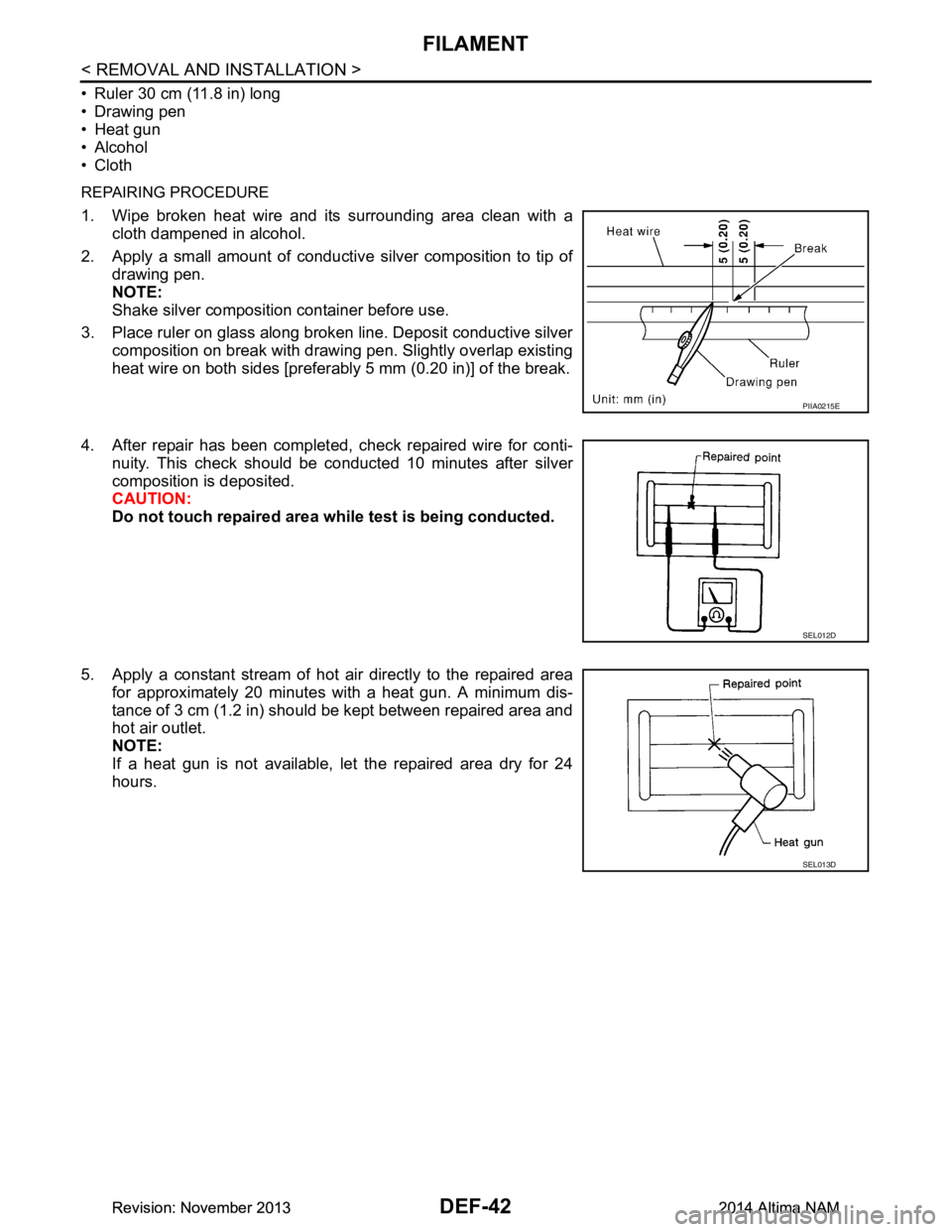
REPAIRING PROCEDURE
1. Wipe broken heat wire and its surrounding area clean with a
cloth dampened in alcohol.
2. Apply a small amount of conductive silver composition to tip of drawing pen.
NOTE:
Shake silver composition container before use.
3. Place ruler on glass along broken line. Deposit conductive silver composition on break with drawing pen. Slightly overlap existing
heat wire on both sides [preferably 5 mm (0.20 in)] of the break.
4. After repair has been completed, check repaired wire for conti- nuity. This check should be conducted 10 minutes after silver
composition is deposited.
CAUTION:
Do not touch repaired area wh ile test is being conducted.
5. Apply a constant stream of hot air directly to the repaired area for approximately 20 minutes with a heat gun. A minimum dis-
tance of 3 cm (1.2 in) should be kept between repaired area and
hot air outlet.
NOTE:
If a heat gun is not available, let the repaired area dry for 24
hours.
PIIA0215E
SEL012D
SEL013D
Revision: November 20132014 Altima NAMRevision: November 20132014 Altima NAM
Page 769 of 4801

DLK-1
BODY EXTERIOR, DOORS, ROOF & VEHICLE SECURITY
C
D E
F
G H
I
J
L
M
SECTION DLK
A
B
DLK
N
O P
CONTENTS
DOOR & LOCK
PRECAUTION ................ ...............................6
PRECAUTIONS .............................................. .....6
Precaution for Supplemental Restraint System
(SRS) "AIR BAG" and "SEAT BELT PRE-TEN-
SIONER" ............................................................. ......
6
Precaution for Procedure without Cowl Top Cover ......6
Precaution for Servicing Doors and Locks .......... ......6
PREPARATION ............................................8
PREPARATION .............................................. .....8
Special Service Tools .......................................... ......8
Commercial Service Tools ........................................9
CLIP LIST ...........................................................10
Descriptions for Clips .......................................... ....10
SYSTEM DESCRIPTION .............................14
COMPONENT PARTS ................................... ....14
POWER DOOR LOCK SYSTEM ........................... ....14
POWER DOOR LOCK SYSTEM :
Component Parts Location ................................ ....
14
POWER DOOR LOCK SYSTEM :
Component Description ...................................... ....
15
INTELLIGENT KEY SYSTEM ...................................15
INTELLIGENT KEY SYSTEM : Component Parts
Location ............................................................... ....
16
INTELLIGENT KEY SYSTEM :
Component Description ...................................... ....
19
INTEGRATED HOMELINK TRANSMITTER ......... ....19
INTEGRATED HOMELINK TRANSMITTER :
Component Parts Location .................................. ....
19
INTEGRATED HOMELINK TRANSMITTER :
Component Description ....................................... ....
19
TRUNK LID OPENER SYSTEM ............................ ....19
TRUNK LID OPENER SYSTEM :
Component Parts Location ................................ ....
20
TRUNK LID OPENER SYSTEM :
Component Description ...................................... ....
20
SYSTEM (POWER DOOR LOCK SYSTEM) ....21
System Diagram .................................................. ....21
System Description ..................................................21
SYSTEM (INTELLIGENT KEY SYSTEM) .........23
INTELLIGENT KEY SYSTEM ......................... ...........23
INTELLIGENT KEY SYSTEM : System Diagram ....23
INTELLIGENT KEY SYSTEM : System Descrip-
tion ....................................................................... ....
23
DOOR LOCK FUNCTION ...................................... ....24
DOOR LOCK FUNCTION : System Diagram ..........24
DOOR LOCK FUNCTION : System Description . ....24
REMOTE KEYLESS ENTRY FUNCTION ..................26
REMOTE KEYLESS ENTRY FUNCTION : Sys-
tem Diagram ........................................................ ....
27
REMOTE KEYLESS ENTRY FUNCTION : Sys-
tem Description .................................................... ....
27
KEY REMINDER FUNCTION ................................ ....29
KEY REMINDER FUNCTION : System Diagram ....29
KEY REMINDER FUNCTION : System Descrip-
tion ....................................................................... ....
29
REMOTE ENGINE START FUNCTION ................. ....30
REMOTE ENGINE START FUNCTION : System
Diagram ............................................................... ....
30
REMOTE ENGINE START FUNCTION : System
Description ........................................................... ....
30
WELCOME LIGHT FUNCTION ............................. ....32
WELCOME LIGHT FUNCTION : System Diagram
....
32
WELCOME LIGHT FUNCTION : System Descrip-
tion ....................................................................... ....
32
WARNING FUNCTION .......................................... ....33
WARNING FUNCTION : System Description ..........33
Revision: November 20132014 Altima NAMRevision: November 20132014 Altima NAM
Page 792 of 4801

DLK-24
< SYSTEM DESCRIPTION >
SYSTEM (INTELLIGENT KEY SYSTEM)
DOOR LOCK FUNCTION
DOOR LOCK FUNCTION : System DiagramINFOID:0000000009461778
DOOR LOCK FUNCTION : System DescriptionINFOID:0000000009461779
Only when pressing the door request switch (if equipped) it is possible to lock and unlock the door by carrying
the Intelligent Key.
Remote keyless entry Lock/unlock can be performed by pressing the remote controller
button of the Intelligent Key. DLK-27
Key reminderThe key reminder buzzer sounds a warning if the door is locked
with the key left inside the vehicle. DLK-29
Welcome lightWhen the Intelligent Key is carried, and vehicle doors are ap-
proached, the BCM illuminates interior room lamps and operates
heart beat operation of the push-button ignition switch. DLK-32
WarningIf an action that does not meet the operating condition of the In-
telligent Key system is taken, the buzzer sounds to inform the
driver. DLK-33
Engine start The engine can be turned on while carrying the Intelligent Key.
DLK-30
Interior room lamp controlInterior room lamp is controlled according to door lock/unlock
state. INL-7
Power windowPower window can be operated by Intelligent Key button opera-
tion. PWC-72
Panic alarm When Intelligent Key panic alarm button is pressed, horn sounds.
SEC-16
Intelligent Key interlockSetting of air conditioning system can be set according to key ID
of Intelligent Key to the setting value that is set before turning ig-
nition switch OFF. HAC-13Setting of multi AV system can be set according to key ID of In-
telligent Key to the setting value that is set before turning ignition
switch OFF. AV- 3 1 8
Function Description Refer
AWKIA2690GB
Revision: November 20132014 Altima NAMRevision: November 20132014 Altima NAM