Page 71 of 402
1-50Safety — Seats, seat belts and supplemental restraint system
rails. The side air bags and curtain air bags
inflate quickly in order to help protect the
occupants in the outboard seating positions.
Because of this, the force of the side air bags
and curtain air bags inflating can increase the
risk of injury if the occupant is too close to, or is
against, these air bag modules during inflation.
The side air bags and curtain air bags will remain
inflated for a short period of time.
The side air bags and curtain air bags
operate only when the ignition switch is in
the ON position.
After turning the ignition switch to the ON
position, the supplemental air bag warning
light illuminates. The supplemental air bag
warning light will turn off after about 7
seconds if the systems are operational.
WARNING
.Do not place any objects near the
seatback of the front seats. Also, do
not place any objects (an umbrella,
bag, etc.) between the front door
finisher and the front seat. Such
objects may become dangerous
projectiles and cause injury if a side
air bag inflates. .
Right after inflation, several side air
bag and curtain air bag system
components will be hot. Do not
touch them; you may severely burn
yourself.
. No unauthorized changes should be
made to any components or wiring
of the side air bag and curtain air
bag systems. This is to prevent
damage to or accidental inflation
of the side air bag and curtain air
bag systems.
. Do not make unauthorized changes
to your vehicle’s electrical system,
suspension system or side panel.
This could affect proper operation
of the side air bag and curtain air
bag systems.
. Tampering with the side air bag
system may result in serious perso-
nal injury. For example, do not
change the front seats by placing
material near the seatbacks or by
installing additional trim material,
such as seat covers, around the side
air bag.
. Work around and on the side air bag
and curtain air bag systems should
be done by a NISSAN dealer. In- stallation of electrical equipment
should also be done by a NISSAN
dealer. The Supplemental Restraint
System (SRS) wiring harnesses*
should not be modified or discon-
nected. Unauthorized electrical test
equipment and probing devices
should not be used on the side air
bag and curtain supplemental air
bag systems.
*The SRS wiring harness connectors are
yellow and orange for easy identification.
When selling your vehicle, we request that you
inform the buyer about the side air bag and
curtain air bag systems and guide the buyer to
the appropriate sections in this Owner’s Manual.
SEAT BELTS WITH PRETENSIONERS
(front seats)
WARNING
. The pretensioners cannot be reused
after activation. They must be re-
placed together with the retractor
and buckle as a unit.
. If the vehicle becomes involved in a
collision but a pretensioner is not
Page 73 of 402
1-52Safety — Seats, seat belts and supplemental restraint system
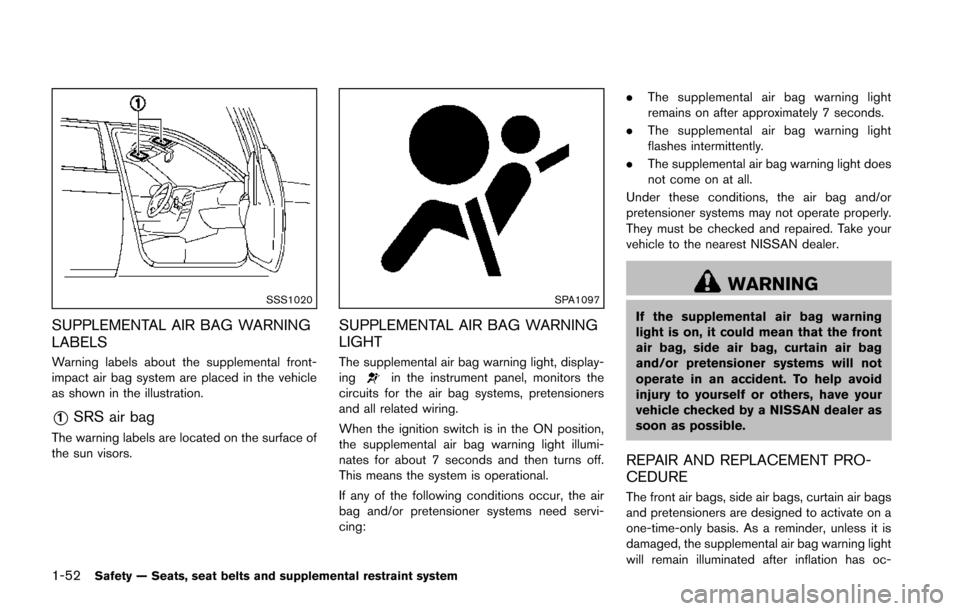
SSS1020
SUPPLEMENTAL AIR BAG WARNING
LABELS
Warning labels about the supplemental front-
impact air bag system are placed in the vehicle
as shown in the illustration.
*1SRS air bag
The warning labels are located on the surface of
the sun visors.
SPA1097
SUPPLEMENTAL AIR BAG WARNING
LIGHT
The supplemental air bag warning light, display-
ingin the instrument panel, monitors the
circuits for the air bag systems, pretensioners
and all related wiring.
When the ignition switch is in the ON position,
the supplemental air bag warning light illumi-
nates for about 7 seconds and then turns off.
This means the system is operational.
If any of the following conditions occur, the air
bag and/or pretensioner systems need servi-
cing: .
The supplemental air bag warning light
remains on after approximately 7 seconds.
. The supplemental air bag warning light
flashes intermittently.
. The supplemental air bag warning light does
not come on at all.
Under these conditions, the air bag and/or
pretensioner systems may not operate properly.
They must be checked and repaired. Take your
vehicle to the nearest NISSAN dealer.
WARNING
If the supplemental air bag warning
light is on, it could mean that the front
air bag, side air bag, curtain air bag
and/or pretensioner systems will not
operate in an accident. To help avoid
injury to yourself or others, have your
vehicle checked by a NISSAN dealer as
soon as possible.
REPAIR AND REPLACEMENT PRO-
CEDURE
The front air bags, side air bags, curtain air bags
and pretensioners are designed to activate on a
one-time-only basis. As a reminder, unless it is
damaged, the supplemental air bag warning light
will remain illuminated after inflation has oc-
Page 74 of 402
curred. Repair and replacement of these sys-
tems should be done only by a NISSAN dealer.
When maintenance work is required on the
vehicle, the front air bags, side air bags, curtain
air bags and pretensioners and related parts
should be pointed out to the person performing
the maintenance. The ignition switch should
always be in the LOCK position when working
under the hood or inside the vehicle.
WARNING
.Once a front air bag, side air bag or
curtain air bag has inflated, the air
bag module will not function again
and must be replaced. Additionally,
the activated pretensioners must
also be replaced. The air bag mod-
ule and pretensioner should be
replaced by a NISSAN dealer. The
air bag modules and pretensioner
system cannot be repaired.
. The front air bag, side air bag and
curtain air bag systems, and preten-
sioner system should be inspected
by a NISSAN dealer if there is any
damage to the front end or side
portion of the vehicle. .
If you need to dispose of a supple-
mental air bag or pretensioner or
scrap the vehicle, contact a NISSAN
dealer. Correct supplemental air
bag and pretensioner system dis-
posal procedures are set forth in the
appropriate NISSAN Service Man-
ual. Incorrect disposal procedures
could cause personal injury.
Safety — Seats, seat belts and supplemental restraint system1-53
Page 78 of 402
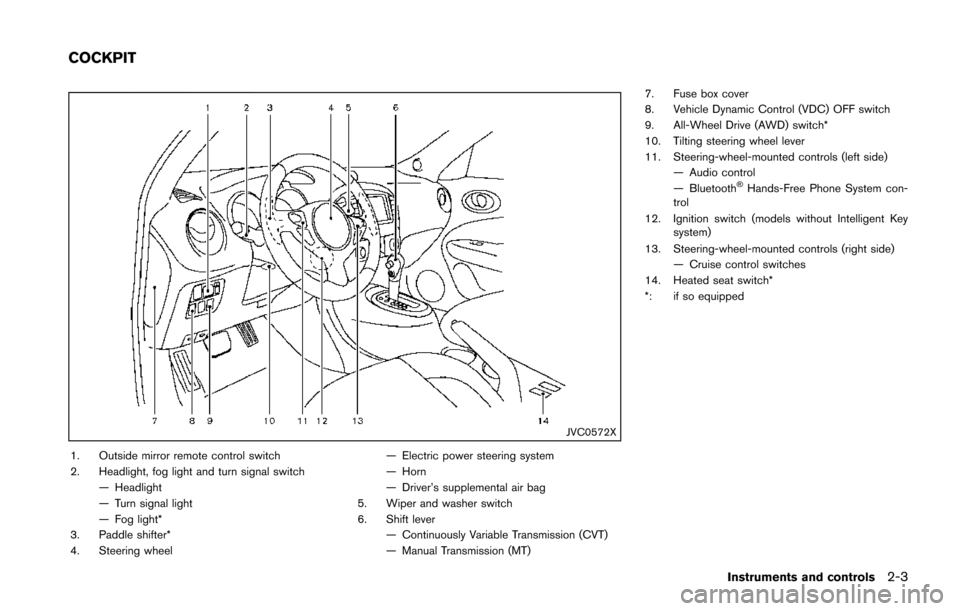
JVC0572X
1. Outside mirror remote control switch
2. Headlight, fog light and turn signal switch— Headlight
— Turn signal light
— Fog light*
3. Paddle shifter*
4. Steering wheel — Electric power steering system
— Horn
— Driver’s supplemental air bag
5. Wiper and washer switch
6. Shift lever
— Continuously Variable Transmission (CVT)
— Manual Transmission (MT) 7. Fuse box cover
8. Vehicle Dynamic Control (VDC) OFF switch
9. All-Wheel Drive (AWD) switch*
10. Tilting steering wheel lever
11. Steering-wheel-mounted controls (left side)
— Audio control
— Bluetooth
®Hands-Free Phone System con-
trol
12. Ignition switch (models without Intelligent Key system)
13. Steering-wheel-mounted controls (right side) — Cruise control switches
14. Heated seat switch*
*: if so equipped
Instruments and controls2-3
COCKPIT
Page 79 of 402
2-4Instruments and controls
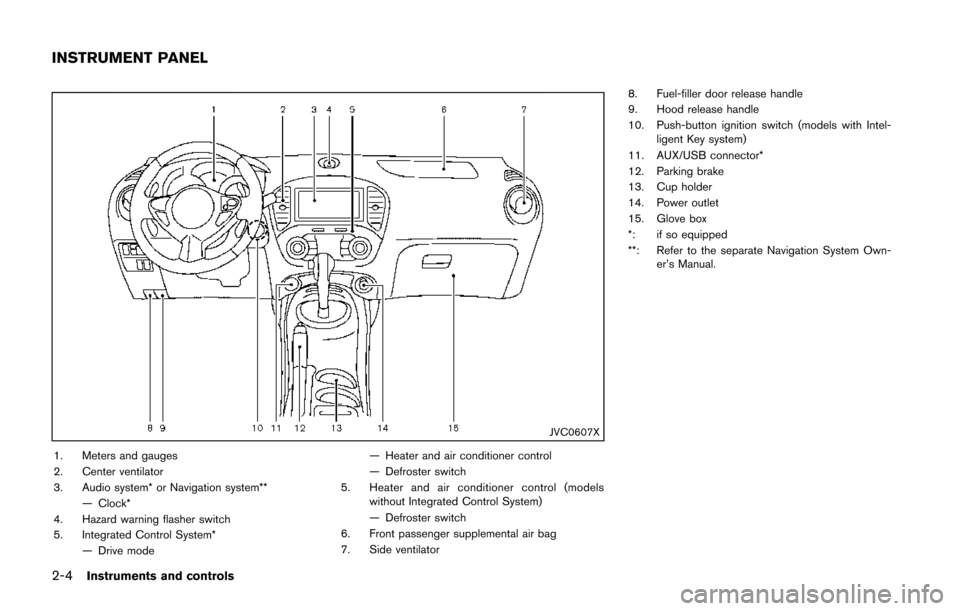
JVC0607X
1. Meters and gauges
2. Center ventilator
3. Audio system* or Navigation system**— Clock*
4. Hazard warning flasher switch
5. Integrated Control System* — Drive mode — Heater and air conditioner control
— Defroster switch
5. Heater and air conditioner control (models without Integrated Control System)
— Defroster switch
6. Front passenger supplemental air bag
7. Side ventilator 8. Fuel-filler door release handle
9. Hood release handle
10. Push-button ignition switch (models with Intel-
ligent Key system)
11. AUX/USB connector*
12. Parking brake
13. Cup holder
14. Power outlet
15. Glove box
*: if so equipped
**: Refer to the separate Navigation System Own- er’s Manual.
INSTRUMENT PANEL
Page 80 of 402
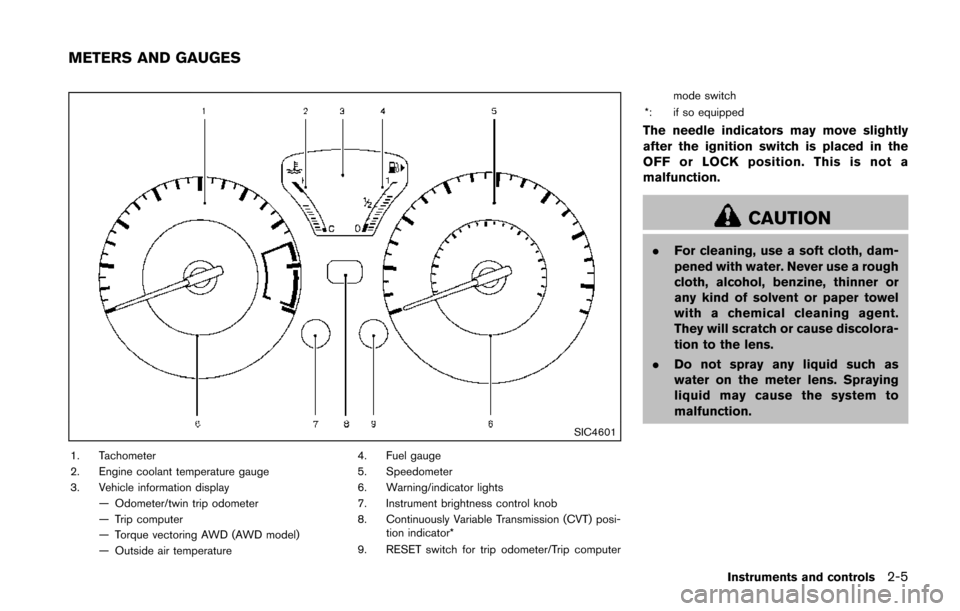
SIC4601
1. Tachometer
2. Engine coolant temperature gauge
3. Vehicle information display— Odometer/twin trip odometer
— Trip computer
— Torque vectoring AWD (AWD model)
— Outside air temperature 4. Fuel gauge
5. Speedometer
6. Warning/indicator lights
7. Instrument brightness control knob
8. Continuously Variable Transmission (CVT) posi-
tion indicator*
9. RESET switch for trip odometer/Trip computer mode switch
*: if so equipped
The needle indicators may move slightly
after the ignition switch is placed in the
OFF or LOCK position. This is not a
malfunction.
CAUTION
. For cleaning, use a soft cloth, dam-
pened with water. Never use a rough
cloth, alcohol, benzine, thinner or
any kind of solvent or paper towel
with a chemical cleaning agent.
They will scratch or cause discolora-
tion to the lens.
. Do not spray any liquid such as
water on the meter lens. Spraying
liquid may cause the system to
malfunction.
Instruments and controls2-5
METERS AND GAUGES
Page 81 of 402
2-6Instruments and controls
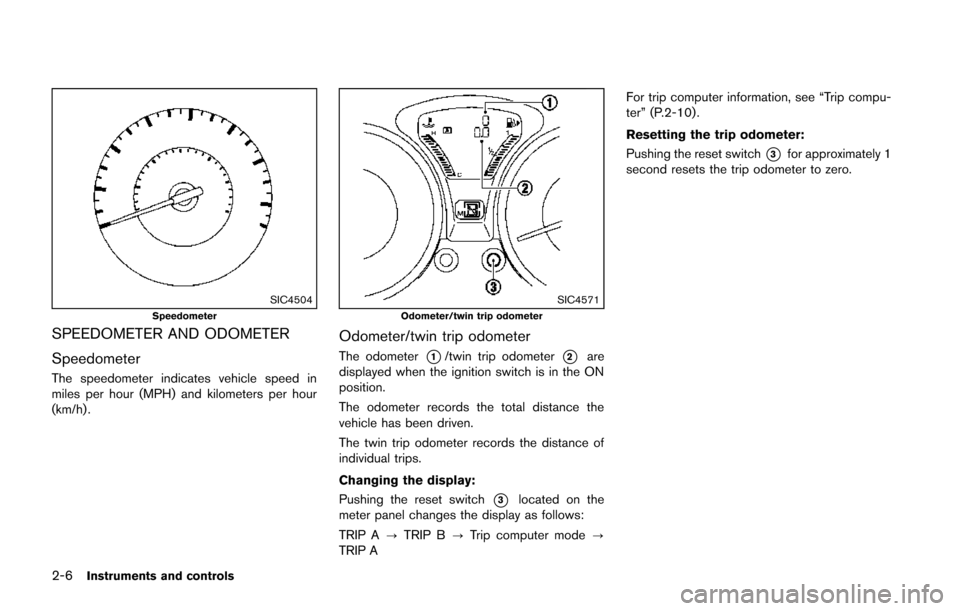
SIC4504Speedometer
SPEEDOMETER AND ODOMETER
Speedometer
The speedometer indicates vehicle speed in
miles per hour (MPH) and kilometers per hour
(km/h) .
SIC4571Odometer/twin trip odometer
Odometer/twin trip odometer
The odometer*1/twin trip odometer*2are
displayed when the ignition switch is in the ON
position.
The odometer records the total distance the
vehicle has been driven.
The twin trip odometer records the distance of
individual trips.
Changing the display:
Pushing the reset switch
*3located on the
meter panel changes the display as follows:
TRIP A ?TRIP B ?Trip computer mode ?
TRIP A For trip computer information, see “Trip compu-
ter” (P.2-10) .
Resetting the trip odometer:
Pushing the reset switch
*3for approximately 1
second resets the trip odometer to zero.
Page 82 of 402
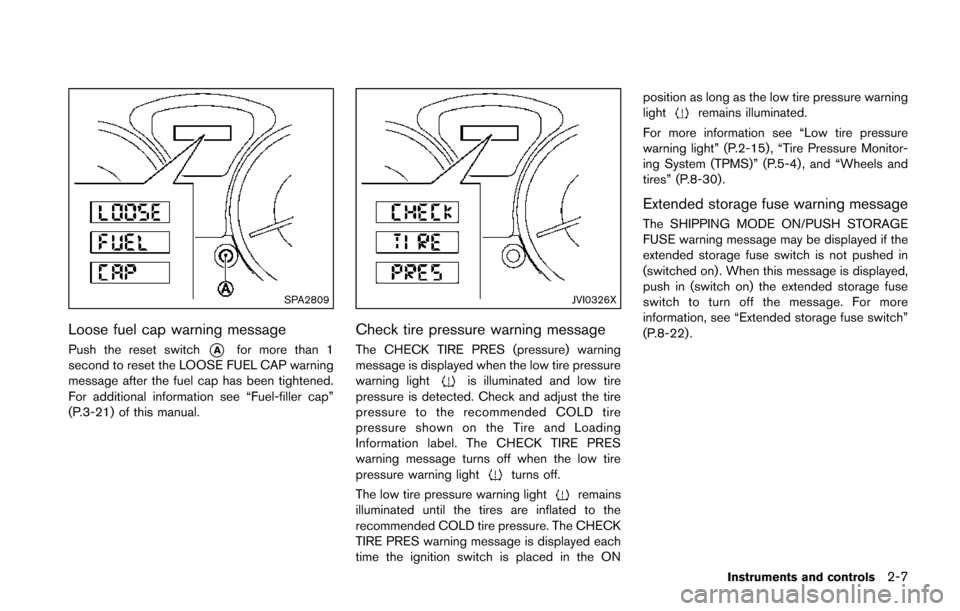
SPA2809
Loose fuel cap warning message
Push the reset switch*Afor more than 1
second to reset the LOOSE FUEL CAP warning
message after the fuel cap has been tightened.
For additional information see “Fuel-filler cap”
(P.3-21) of this manual.
JVI0326X
Check tire pressure warning message
The CHECK TIRE PRES (pressure) warning
message is displayed when the low tire pressure
warning light
is illuminated and low tire
pressure is detected. Check and adjust the tire
pressure to the recommended COLD tire
pressure shown on the Tire and Loading
Information label. The CHECK TIRE PRES
warning message turns off when the low tire
pressure warning light
turns off.
The low tire pressure warning light
remains
illuminated until the tires are inflated to the
recommended COLD tire pressure. The CHECK
TIRE PRES warning message is displayed each
time the ignition switch is placed in the ON position as long as the low tire pressure warning
light
remains illuminated.
For more information see “Low tire pressure
warning light” (P.2-15) , “Tire Pressure Monitor-
ing System (TPMS)” (P.5-4) , and “Wheels and
tires” (P.8-30).
Extended storage fuse warning message
The SHIPPING MODE ON/PUSH STORAGE
FUSE warning message may be displayed if the
extended storage fuse switch is not pushed in
(switched on) . When this message is displayed,
push in (switch on) the extended storage fuse
switch to turn off the message. For more
information, see “Extended storage fuse switch”
(P.8-22) .
Instruments and controls2-7