2014 NISSAN JUKE ABS
[x] Cancel search: ABSPage 20 of 402
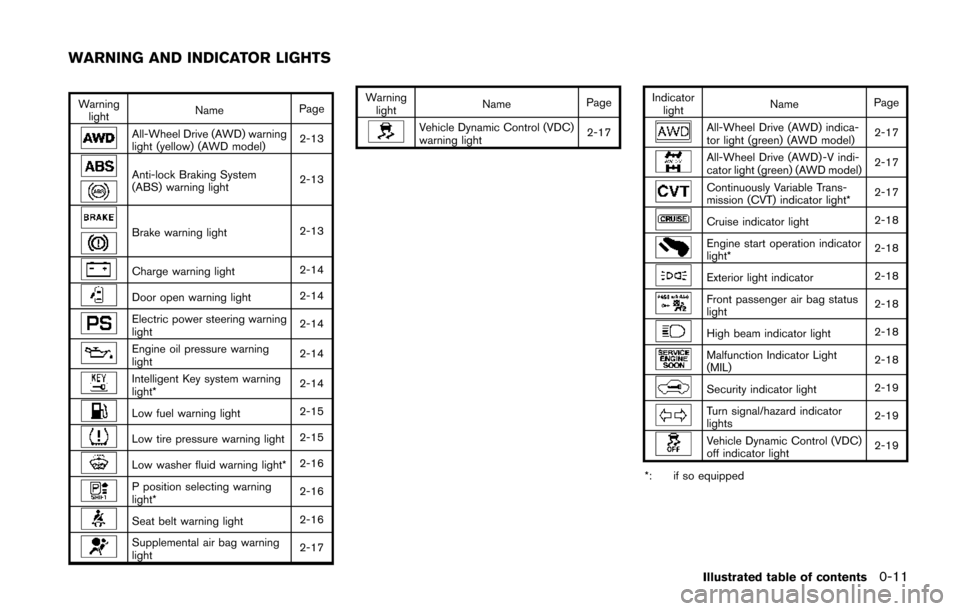
Warninglight Name
Page
All-Wheel Drive (AWD) warning
light (yellow) (AWD model) 2-13
Anti-lock Braking System
(ABS) warning light2-13
Brake warning light
2-13
Charge warning light2-14
Door open warning light2-14
Electric power steering warning
light2-14
Engine oil pressure warning
light2-14
Intelligent Key system warning
light*
2-14
Low fuel warning light
2-15
Low tire pressure warning light2-15
Low washer fluid warning light*2-16
P position selecting warning
light*2-16
Seat belt warning light
2-16
Supplemental air bag warning
light2-17Warning
light Name
Page
Vehicle Dynamic Control (VDC)
warning light 2-17Indicator
light Name
PageAll-Wheel Drive (AWD) indica-
tor light (green) (AWD model) 2-17
All-Wheel Drive (AWD) -V indi-
cator light (green) (AWD model)
2-17
Continuously Variable Trans-
mission (CVT) indicator light*2-17
Cruise indicator light
2-18
Engine start operation indicator
light*2-18
Exterior light indicator
2-18
Front passenger air bag status
light2-18
High beam indicator light
2-18
Malfunction Indicator Light
(MIL)2-18
Security indicator light
2-19
Turn signal/hazard indicator
lights2-19
Vehicle Dynamic Control (VDC)
off indicator light2-19
*: if so equipped
Illustrated table of contents0-11
WARNING AND INDICATOR LIGHTS
Page 30 of 402
SSS1036
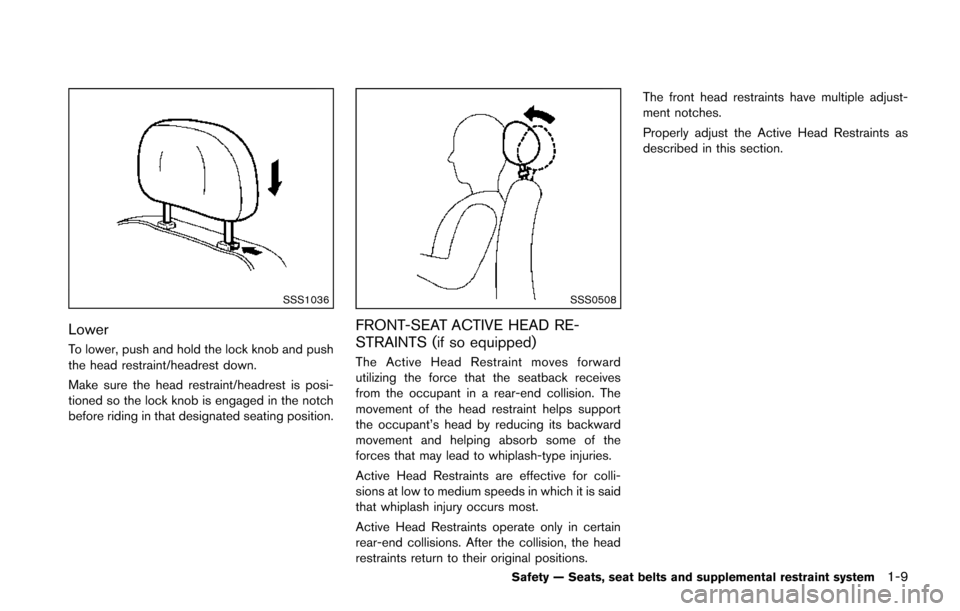
Lower
To lower, push and hold the lock knob and push
the head restraint/headrest down.
Make sure the head restraint/headrest is posi-
tioned so the lock knob is engaged in the notch
before riding in that designated seating position.
SSS0508
FRONT-SEAT ACTIVE HEAD RE-
STRAINTS (if so equipped)
The Active Head Restraint moves forward
utilizing the force that the seatback receives
from the occupant in a rear-end collision. The
movement of the head restraint helps support
the occupant’s head by reducing its backward
movement and helping absorb some of the
forces that may lead to whiplash-type injuries.
Active Head Restraints are effective for colli-
sions at low to medium speeds in which it is said
that whiplash injury occurs most.
Active Head Restraints operate only in certain
rear-end collisions. After the collision, the head
restraints return to their original positions.The front head restraints have multiple adjust-
ment notches.
Properly adjust the Active Head Restraints as
described in this section.
Safety — Seats, seat belts and supplemental restraint system1-9
Page 87 of 402
2-12Instruments and controls
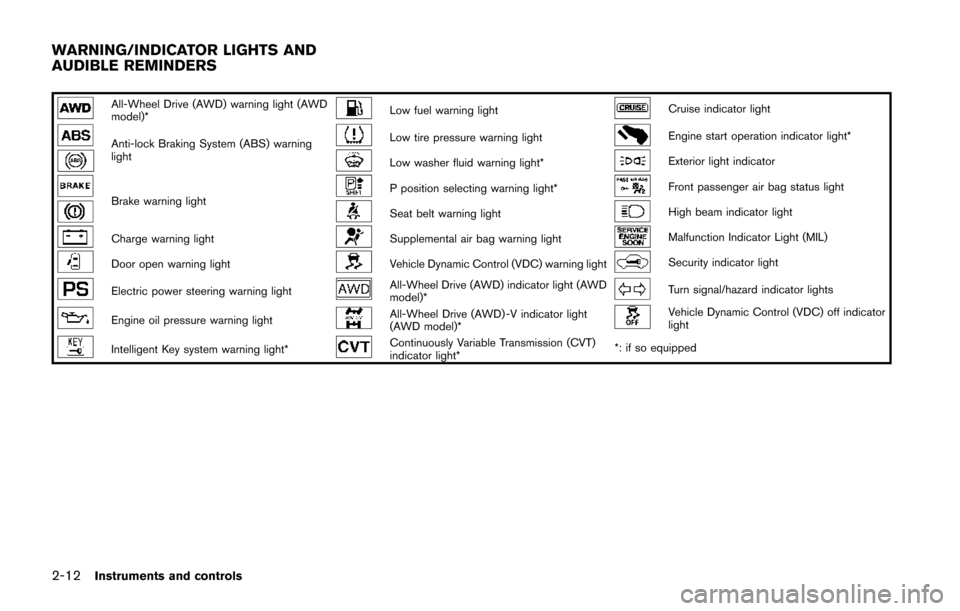
All-Wheel Drive (AWD) warning light (AWD
model)*Low fuel warning lightCruise indicator light
Anti-lock Braking System (ABS) warning
lightLow tire pressure warning lightEngine start operation indicator light*
Low washer fluid warning light*Exterior light indicator
Brake warning lightP position selecting warning light*Front passenger air bag status light
Seat belt warning lightHigh beam indicator light
Charge warning lightSupplemental air bag warning lightMalfunction Indicator Light (MIL)
Door open warning lightVehicle Dynamic Control (VDC) warning lightSecurity indicator light
Electric power steering warning lightAll-Wheel Drive (AWD) indicator light (AWD
model)*Turn signal/hazard indicator lights
Engine oil pressure warning lightAll-Wheel Drive (AWD) -V indicator light
(AWD model)*Vehicle Dynamic Control (VDC) off indicator
light
Intelligent Key system warning light*Continuously Variable Transmission (CVT)
indicator light**: if so equipped
WARNING/INDICATOR LIGHTS AND
AUDIBLE REMINDERS
Page 88 of 402
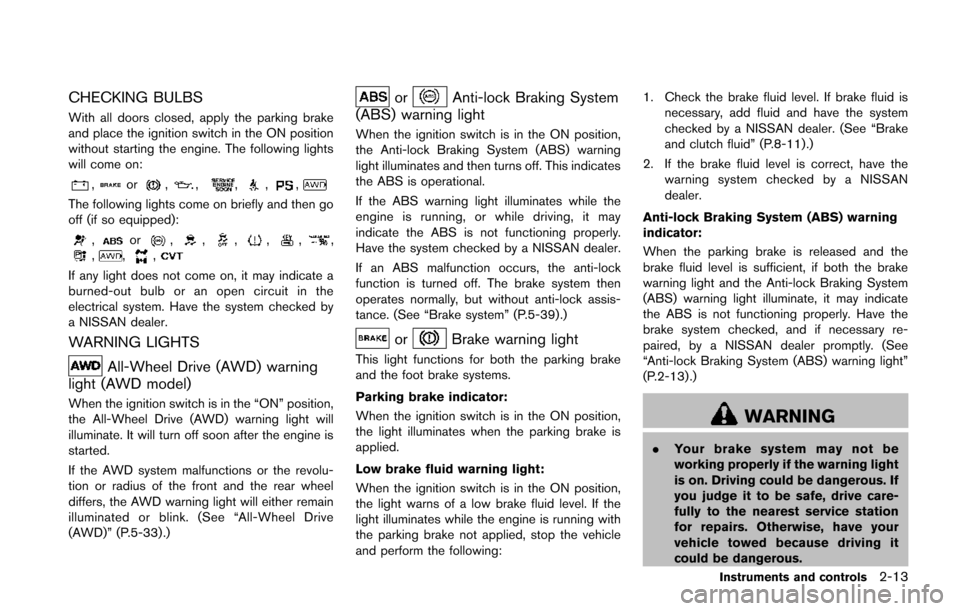
CHECKING BULBS
With all doors closed, apply the parking brake
and place the ignition switch in the ON position
without starting the engine. The following lights
will come on:
,or,,,,,
The following lights come on briefly and then go
off (if so equipped):
,or,,,,,,,,,
If any light does not come on, it may indicate a
burned-out bulb or an open circuit in the
electrical system. Have the system checked by
a NISSAN dealer.
WARNING LIGHTS
All-Wheel Drive (AWD) warning
light (AWD model)
When the ignition switch is in the “ON” position,
the All-Wheel Drive (AWD) warning light will
illuminate. It will turn off soon after the engine is
started.
If the AWD system malfunctions or the revolu-
tion or radius of the front and the rear wheel
differs, the AWD warning light will either remain
illuminated or blink. (See “All-Wheel Drive
(AWD)” (P.5-33) .)
orAnti-lock Braking System
(ABS) warning light
When the ignition switch is in the ON position,
the Anti-lock Braking System (ABS) warning
light illuminates and then turns off. This indicates
the ABS is operational.
If the ABS warning light illuminates while the
engine is running, or while driving, it may
indicate the ABS is not functioning properly.
Have the system checked by a NISSAN dealer.
If an ABS malfunction occurs, the anti-lock
function is turned off. The brake system then
operates normally, but without anti-lock assis-
tance. (See “Brake system” (P.5-39).)
orBrake warning light
This light functions for both the parking brake
and the foot brake systems.
Parking brake indicator:
When the ignition switch is in the ON position,
the light illuminates when the parking brake is
applied.
Low brake fluid warning light:
When the ignition switch is in the ON position,
the light warns of a low brake fluid level. If the
light illuminates while the engine is running with
the parking brake not applied, stop the vehicle
and perform the following: 1. Check the brake fluid level. If brake fluid is
necessary, add fluid and have the system
checked by a NISSAN dealer. (See “Brake
and clutch fluid” (P.8-11).)
2. If the brake fluid level is correct, have the warning system checked by a NISSAN
dealer.
Anti-lock Braking System (ABS) warning
indicator:
When the parking brake is released and the
brake fluid level is sufficient, if both the brake
warning light and the Anti-lock Braking System
(ABS) warning light illuminate, it may indicate
the ABS is not functioning properly. Have the
brake system checked, and if necessary re-
paired, by a NISSAN dealer promptly. (See
“Anti-lock Braking System (ABS) warning light”
(P.2-13) .)
WARNING
. Your brake system may not be
working properly if the warning light
is on. Driving could be dangerous. If
you judge it to be safe, drive care-
fully to the nearest service station
for repairs. Otherwise, have your
vehicle towed because driving it
could be dangerous.
Instruments and controls2-13
Page 254 of 402
5 Starting and driving
Precautions when starting and driving ................................ 5-3Exhaust gas (carbon monoxide) ...................................... 5-3
Three-way catalyst .............................................................. 5-4
Tire Pressure Monitoring System (TPMS) .................... 5-4
Avoiding collision and rollover ......................................... 5-7
Off-road recovery ................................................................ 5-7
Rapid air pressure loss ...................................................... 5-7
Drinking alcohol/drugs and driving ................................. 5-8
Driving safety precautions ................................................. 5-8
Ignition switch (models without Intelligent
Key system) ........................................................................\
..... 5-10 Continuously Variable Transmission (CVT) ................ 5-11
Manual Transmission (MT) ............................................. 5-11
Key positions ..................................................................... 5-12
Push-button ignition switch (models with Intelligent
Key system) ........................................................................\
..... 5-12
Operating range for engine start function ................. 5-12
Push-button ignition switch operation ........................ 5-13
Push-button ignition switch positions ......................... 5-14
Emergency engine shut off ............................................ 5-14
Intelligent Key battery discharge .................................. 5-14
Before starting the engine ................................................... 5-15
Starting the engine ................................................................ 5-15
Models without Intelligent Key system ....................... 5-15
Models with Intelligent Key system ............................. 5-16 Driving the vehicle ................................................................. 5-17
Continuously Variable Transmission (CVT) ............. 5-17
Manual Transmission (MT) ........................................... 5-23
Integrated control system (if so equipped) .................... 5-25 Drive mode ...................................................................... 5-25
Parking brake ........................................................................\
.. 5-29
Cruise control ........................................................................\
. 5-30 Precautions on cruise control ..................................... 5-30
Cruise control operations ............................................ 5-30
Break-in schedule ................................................................. 5-31
Fuel Efficient Driving Tips ................................................... 5-32
Increasing fuel economy ...................................................... 5-33
All-Wheel Drive (AWD) (if so equipped) ........................ 5-33
All-Wheel Drive (AWD) mode
switch operations ........................................................... 5-33
AWD warning light ........................................................ 5-35
Parking/parking on hills ........................................................ 5-37
Electric power steering system ......................................... 5-38
Brake system ........................................................................\
.. 5-39 Braking precautions ...................................................... 5-39
Brake assist ........................................................................\
.... 5-40 Brake assist ..................................................................... 5-40
Anti-lock Braking System (ABS) ............................... 5-40
Vehicle Dynamic Control (VDC) system ......................... 5-41
Cold weather driving ............................................................ 5-43
Page 293 of 402
5-40Starting and driving
BRAKE ASSIST
When the force applied to the brake pedal
exceeds a certain level, the Brake Assist is
activated generating greater braking force than a
conventional brake booster even with light pedal
force.
WARNING
The Brake Assist is only an aid to assist
braking operation and is not a collision
warning or avoidance device. It is the
driver’s responsibility to stay alert, drive
safely and be in control of the vehicle at
all times.
ANTI-LOCK BRAKING SYSTEM (ABS)
WARNING
.The Anti-lock Braking System (ABS)
is a sophisticated device, but it
cannot prevent accidents resulting
from careless or dangerous driving
techniques. It can help maintain
vehicle control during braking on
slippery surfaces. Remember that
stopping distances on slippery sur-
faces will be longer than on normal surfaces even with ABS. Stopping
distances may also be longer on
rough, gravel or snow covered
roads, or if you are using tire chains.
Always maintain a safe distance
from the vehicle in front of you.
Ultimately, the driver is responsible
for safety.
. Tire type and condition may also
affect braking effectiveness.
— When replacing tires, install the
specified size of tires on all four
wheels.
— When installing a spare tire, make sure that it is the proper
size and type as specified on the
Tire and Loading Information
label. See “Tire and Loading
Information label” (P.9-11) of
this manual.
— For detailed information, see “Wheels and tires” (P.8-30) of
this manual.
The Anti-lock Braking System (ABS) controls
the brakes so the wheels do not lock during hard
braking or when braking on slippery surfaces.
The system detects the rotation speed at each wheel and varies the brake fluid pressure to
prevent each wheel from locking and sliding. By
preventing each wheel from locking, the system
helps the driver maintain steering control and
helps to minimize swerving and spinning on
slippery surfaces.
Using the system
Depress the brake pedal and hold it down.
Depress the brake pedal with firm steady
pressure, but do not pump the brakes. The
ABS will operate to prevent the wheels from
locking up. Steer the vehicle to avoid obstacles.
WARNING
Do not pump the brake pedal. Doing so
may result in increased stopping dis-
tances.
Self-test feature
The ABS includes electronic sensors, electric
pumps, hydraulic solenoids and a computer. The
computer has a built-in diagnostic feature that
tests the system each time you start the engine
and move the vehicle at a low speed in forward
or reverse. When the self-test occurs, you may
hear a “clunk” noise and/or feel a pulsation in the
brake pedal. This is normal and does not
BRAKE ASSIST
Page 294 of 402
indicate a malfunction. If the computer senses a
malfunction, it switches the ABS off and
illuminates the ABS warning light on the
instrument panel. The brake system then oper-
ates normally, but without anti-lock assistance.
If the ABS warning light illuminates during the
self-test or while driving, have the vehicle
checked by a NISSAN dealer.
Normal operation
The ABS operates at speeds above 3 to 6 MPH
(5 to 10 km/h). The speed varies according to
road conditions.
When the ABS senses that one or more wheels
are close to locking up, the actuator rapidly
applies and releases hydraulic pressure. This
action is similar to pumping the brakes very
quickly. You may feel a pulsation in the brake
pedal and hear a noise from under the hood or
feel a vibration from the actuator when it is
operating. This is normal and indicates that the
ABS is operating properly. However, the pulsa-
tion may indicate that road conditions are
hazardous and extra care is required while
driving.The Vehicle Dynamic Control (VDC) system
uses various sensors to monitor driver inputs
and vehicle motion. Under certain driving con-
ditions, the VDC system helps to perform the
following functions.
.
Controls brake pressure to reduce wheel
slip on one slipping drive wheel so power is
transferred to a non slipping drive wheel on
the same axle.
. Controls brake pressure and engine output
to reduce drive wheel slip based on vehicle
speed (traction control function) .
. Controls brake pressure at individual wheels
and engine output to help the driver maintain
control of the vehicle in the following
conditions:
— understeer (vehicle tends to not follow
the steered path despite increased
steering input)
— oversteer (vehicle tends to spin due to certain road or driving conditions) .
The VDC system can help the driver to maintain
control of the vehicle, but it cannot prevent loss
of vehicle control in all driving situations.
When the VDC system operates, the VDC
warning light
in the instrument panel flashes
so note the following:
. The road may be slippery or the system may
determine some action is required to help keep the vehicle on the steered path.
. You may feel a pulsation in the brake pedal
and hear a noise or vibration from under the
hood. This is normal and indicates that the
VDC system is working properly.
. Adjust your speed and driving to the road
conditions.
If a malfunction occurs in the system, the VDC
warning light
illuminates in the instrument
panel. The VDC system automatically turns off.
The VDC OFF switch is used to turn off the VDC
system. The VDC off indicator
illuminates to
indicate the VDC system is off. When the VDC
switch is used to turn off the system, the VDC
system still operates to prevent one drive wheel
from slipping by transferring power to a non
slipping drive wheel. The VDC warning light
flashes if this occurs. All other VDC functions
are off, and the VDC warning lightwill not
flash. The VDC system is automatically reset to
on when the ignition switch is placed in the off
position then back to the on position.
See “Vehicle Dynamic Control (VDC) warning
light” (P.2-17) and “Vehicle Dynamic Control
(VDC) off indicator light” (P.2-19).
The computer has a built-in diagnostic feature
that tests the system each time you start the
engine and move the vehicle forward or in
reverse at a slow speed. When the self-test
Starting and driving5-41
VEHICLE DYNAMIC CONTROL (VDC)
SYSTEM
Page 295 of 402
5-42Starting and driving
occurs, you may hear a “clunk” noise and/or feel
a pulsation in the brake pedal. This is normal and
is not an indication of a malfunction.
WARNING
.The VDC system is designed to help
improve driving stability but does
not prevent accidents due to abrupt
steering operation at high speeds or
by careless or dangerous driving
techniques. Reduce vehicle speed
and be especially careful when driv-
ing and cornering on slippery sur-
faces and always drive carefully.
. Do not modify the vehicle’s suspen-
sion. If suspension parts such as
shock absorbers, struts, springs,
stabilizer bars, bushings and
wheels are not NISSAN recom-
mended for your vehicle or are
extremely deteriorated, the VDC
system may not operate properly.
This could adversely affect vehicle
handling performance, and the VDC
warning light
may illuminate. .
If brake related parts such as brake
pads, rotors and calipers are not
NISSAN recommended or are extre-
mely deteriorated, the VDC system
may not operate properly and the
VDC warning light
may illumi-
nate.
. If engine control related parts are
not NISSAN recommended or are
extremely deteriorated, the VDC
warning light
may illuminate.
. When driving on extremely inclined
surfaces such as higher banked
corners, the VDC system may not
operate properly and the VDC warn-
ing light
may illuminate. Do not
drive on these types of roads.
. When driving on an unstable sur-
face such as a turntable, ferry,
elevator or ramp, the VDC warning
light
may illuminate. This is not
a malfunction. Restart the engine
after driving onto a stable surface.
. If wheels or tires other than the
NISSAN recommended ones are
used, the VDC system may not
operate properly and the VDC warn-
ing light
may illuminate. .
The VDC system is not a substitute
for winter tires or tire chains on a
snow covered road.