2014 NISSAN JUKE climate control
[x] Cancel search: climate controlPage 96 of 402
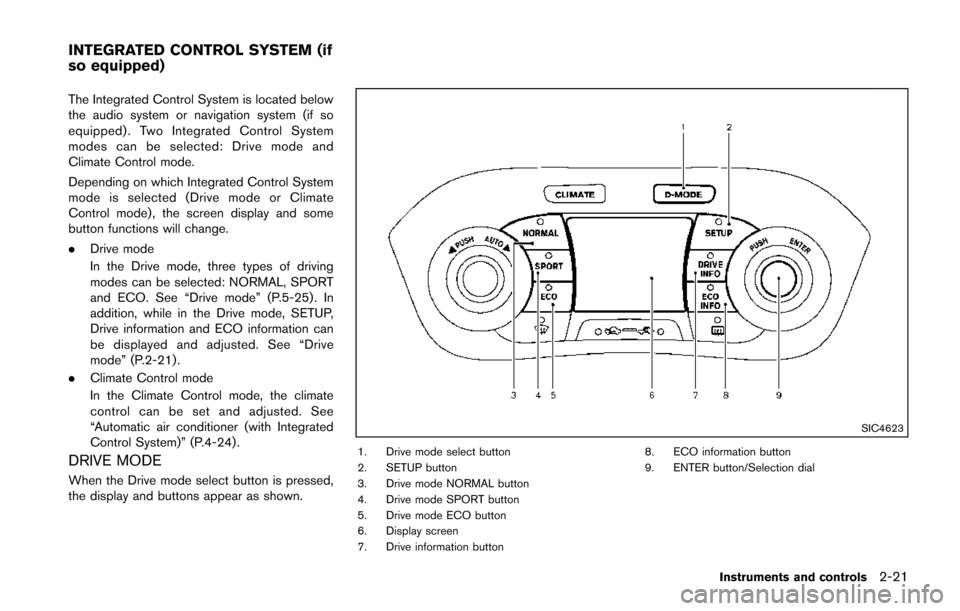
The Integrated Control System is located below
the audio system or navigation system (if so
equipped) . Two Integrated Control System
modes can be selected: Drive mode and
Climate Control mode.
Depending on which Integrated Control System
mode is selected (Drive mode or Climate
Control mode) , the screen display and some
button functions will change.
.Drive mode
In the Drive mode, three types of driving
modes can be selected: NORMAL, SPORT
and ECO. See “Drive mode” (P.5-25). In
addition, while in the Drive mode, SETUP,
Drive information and ECO information can
be displayed and adjusted. See “Drive
mode” (P.2-21) .
. Climate Control mode
In the Climate Control mode, the climate
control can be set and adjusted. See
“Automatic air conditioner (with Integrated
Control System)” (P.4-24) .
DRIVE MODE
When the Drive mode select button is pressed,
the display and buttons appear as shown.
SIC4623
1. Drive mode select button
2. SETUP button
3. Drive mode NORMAL button
4. Drive mode SPORT button
5. Drive mode ECO button
6. Display screen
7. Drive information button 8. ECO information button
9. ENTER button/Selection dial
Instruments and controls2-21
INTEGRATED CONTROL SYSTEM (if
so equipped)
Page 97 of 402
2-22Instruments and controls
SETUP FUNCTION
While in the Drive mode, the following items can
be set up by pressing the SETUP button.
.Display Brightness
. Button Brightness
. Clock Time Setting
. Select Language
. Select Units
. Auto Interior Illumination
. Selective Door unlock
. Auto Headlight Sensitivity (if so equipped)
. CLIMATE ECO
NOTE:
. The SETUP function cannot be ad-
justed while driving.
. When the battery is disconnected, the
SETUP memory is erased and reverts to
the default settings. If necessary, reset
the SETUP memory after reconnecting
the battery.
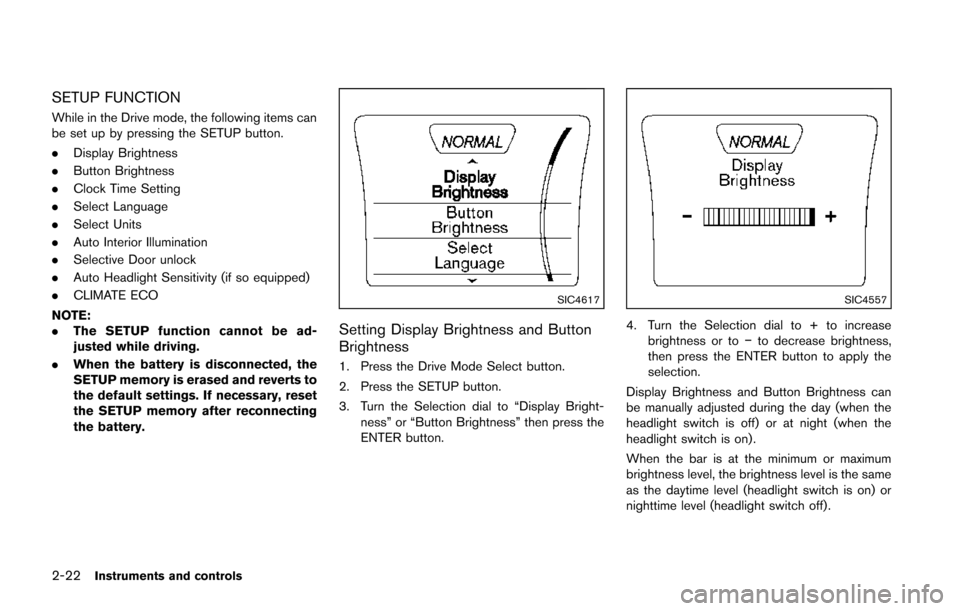
SIC4617
Setting Display Brightness and Button
Brightness
1. Press the Drive Mode Select button.
2. Press the SETUP button.
3. Turn the Selection dial to “Display Bright-
ness” or “Button Brightness” then press the
ENTER button.
SIC4557
4. Turn the Selection dial to + to increasebrightness or to −to decrease brightness,
then press the ENTER button to apply the
selection.
Display Brightness and Button Brightness can
be manually adjusted during the day (when the
headlight switch is off) or at night (when the
headlight switch is on) .
When the bar is at the minimum or maximum
brightness level, the brightness level is the same
as the daytime level (headlight switch is on) or
nighttime level (headlight switch off) .
Page 179 of 402
4-24Heater, air conditioner, audio and phone systems
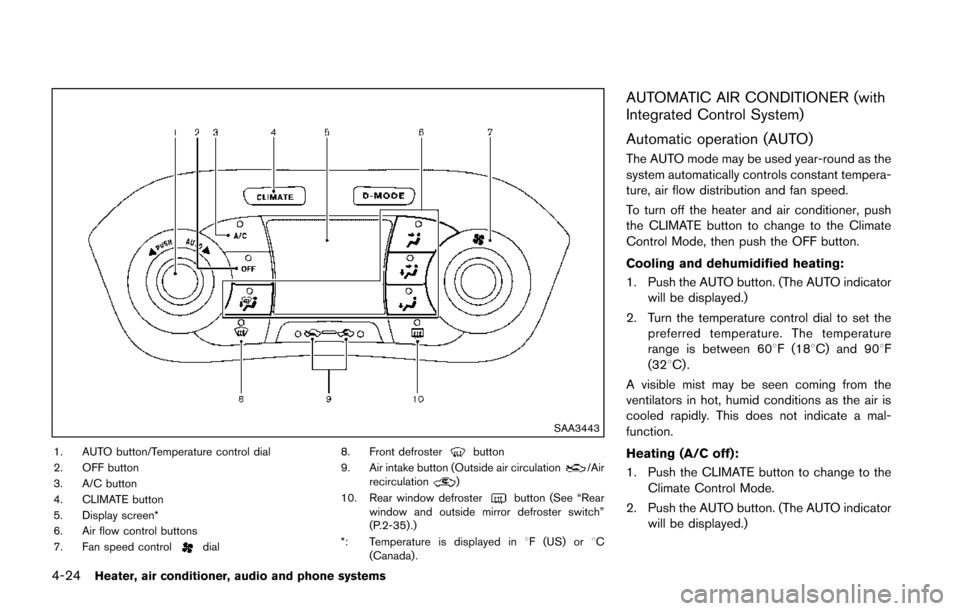
SAA3443
1. AUTO button/Temperature control dial
2. OFF button
3. A/C button
4. CLIMATE button
5. Display screen*
6. Air flow control buttons
7. Fan speed control
dial8. Front defroster
button
9. Air intake button (Outside air circulation/Air
recirculation)
10. Rear window defroster
button (See “Rear
window and outside mirror defroster switch”
(P.2-35) .)
*: Temperature is displayed in 8F (US) or 8C
(Canada) .
AUTOMATIC AIR CONDITIONER (with
Integrated Control System)
Automatic operation (AUTO)
The AUTO mode may be used year-round as the
system automatically controls constant tempera-
ture, air flow distribution and fan speed.
To turn off the heater and air conditioner, push
the CLIMATE button to change to the Climate
Control Mode, then push the OFF button.
Cooling and dehumidified heating:
1. Push the AUTO button. (The AUTO indicator will be displayed.)
2. Turn the temperature control dial to set the preferred temperature. The temperature
range is between 608F (188C) and 908F
(328C) .
A visible mist may be seen coming from the
ventilators in hot, humid conditions as the air is
cooled rapidly. This does not indicate a mal-
function.
Heating (A/C off):
1. Push the CLIMATE button to change to the Climate Control Mode.
2. Push the AUTO button. (The AUTO indicator will be displayed.)
Page 180 of 402
3. If the A/C indicator light illuminates, push theA/C button. (The A/C indicator light will turn
off.)
4. Turn the temperature control dial to set the preferred temperature. The temperature
range is between 608F (188C) and 908F
(328C) .
.Do not set the temperature lower than the
outside air temperature. Doing so may
cause the temperature to not be con-
trolled properly.
.If the windows fog up, use dehumidifiedheating by pushing the A/C button (the
A/C indicator light will illuminate) .
Dehumidified defrosting/defogging:
1. Push the front defroster
button. (The
indicator light will illuminate.)
2. Turn the temperature control dial to set the preferred temperature.
.To remove moisture or fog on the frontwindow quickly, set the temperature to
the high temperature and the fan speed
to their maximum level.
.After the windshield is cleared, push thefront defrosterbutton again. (The
indicator light will turn off.)
.When the front defrosterbutton is
pushed, the air conditioner will automa- tically turn on to defog the windshield.
The outside air circulation mode will be
selected to improve the defogging per-
formance.
.When theposition is selected, the
air recirculation mode cannot be turned
on to prevent the windows from being
fogged up.
Manual operation
The manual mode can be used to control the
heater and air conditioner to your desired
settings.
To turn off the heater and air conditioner, push
the OFF button.
If the Drive Mode is indicated on the screen,
push the CLIMATE button to change to the
Climate Control Mode, then push the OFF
button.
Fan speed control:
Turn the fan speed control
dial to adjust the
fan speed.
Air flow control:
Push the air flow control buttons to change the
air flow mode:
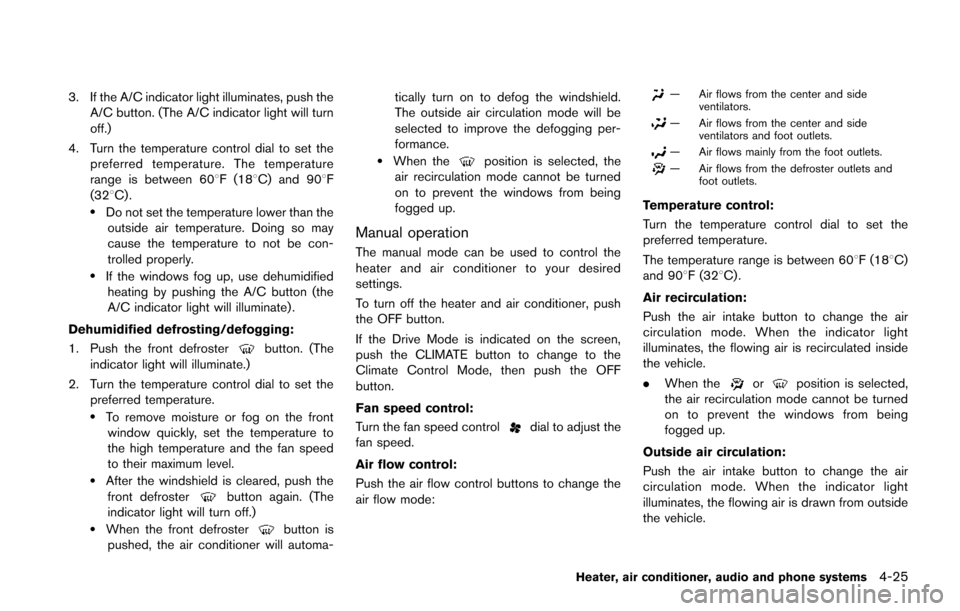
— Air flows from the center and side ventilators.
— Air flows from the center and sideventilators and foot outlets.
— Air flows mainly from the foot outlets.
— Air flows from the defroster outlets andfoot outlets.
Temperature control:
Turn the temperature control dial to set the
preferred temperature.
The temperature range is between 608F (188C)
and 908F (328C) .
Air recirculation:
Push the air intake button to change the air
circulation mode. When the indicator light
illuminates, the flowing air is recirculated inside
the vehicle.
. When the
orposition is selected,
the air recirculation mode cannot be turned
on to prevent the windows from being
fogged up.
Outside air circulation:
Push the air intake button to change the air
circulation mode. When the indicator light
illuminates, the flowing air is drawn from outside
the vehicle.
Heater, air conditioner, audio and phone systems4-25
Page 181 of 402
4-26Heater, air conditioner, audio and phone systems
Automatic air intake control:
Push and hold the outside air circulation “
”
/air recirculation “” button for more than 1.5
seconds to set the automatic control between
the outside air circulation and air recirculation
modes.
When the “
”or“” position is selected,
the air recirculation mode does not activate.
When setting the automatic control mode, the
indicator lights “
” and “” will blink twice
indicating that the system is in the automatic
control mode.
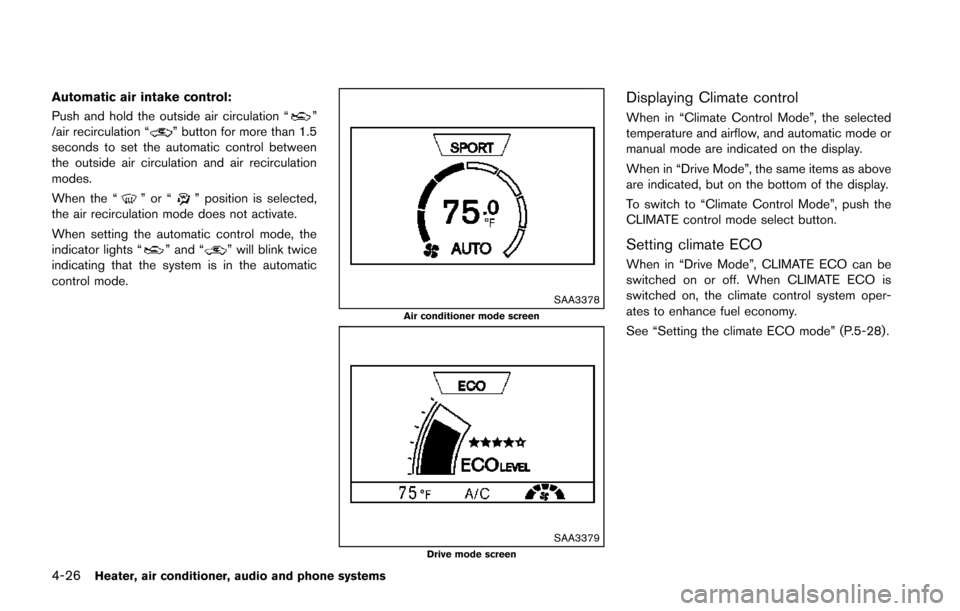
SAA3378Air conditioner mode screen
SAA3379Drive mode screen
Displaying Climate control
When in “Climate Control Mode”, the selected
temperature and airflow, and automatic mode or
manual mode are indicated on the display.
When in “Drive Mode”, the same items as above
are indicated, but on the bottom of the display.
To switch to “Climate Control Mode”, push the
CLIMATE control mode select button.
Setting climate ECO
When in “Drive Mode”, CLIMATE ECO can be
switched on or off. When CLIMATE ECO is
switched on, the climate control system oper-
ates to enhance fuel economy.
See “Setting the climate ECO mode” (P.5-28).
Page 278 of 402
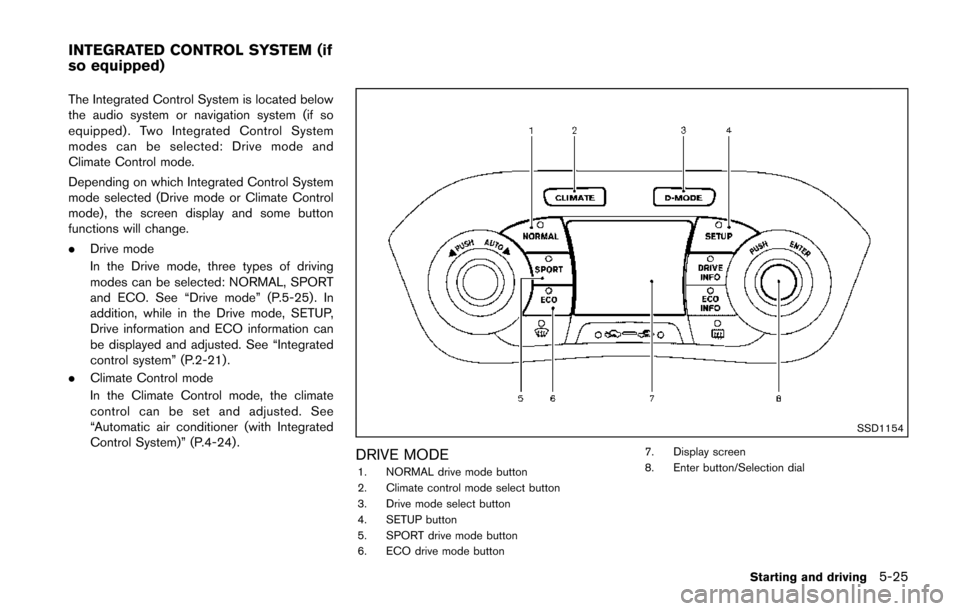
The Integrated Control System is located below
the audio system or navigation system (if so
equipped) . Two Integrated Control System
modes can be selected: Drive mode and
Climate Control mode.
Depending on which Integrated Control System
mode selected (Drive mode or Climate Control
mode) , the screen display and some button
functions will change.
.Drive mode
In the Drive mode, three types of driving
modes can be selected: NORMAL, SPORT
and ECO. See “Drive mode” (P.5-25). In
addition, while in the Drive mode, SETUP,
Drive information and ECO information can
be displayed and adjusted. See “Integrated
control system” (P.2-21).
. Climate Control mode
In the Climate Control mode, the climate
control can be set and adjusted. See
“Automatic air conditioner (with Integrated
Control System)” (P.4-24) .
SSD1154
DRIVE MODE1. NORMAL drive mode button
2. Climate control mode select button
3. Drive mode select button
4. SETUP button
5. SPORT drive mode button
6. ECO drive mode button 7. Display screen
8. Enter button/Selection dial
Starting and driving5-25
INTEGRATED CONTROL SYSTEM (if
so equipped)
Page 279 of 402
5-26Starting and driving
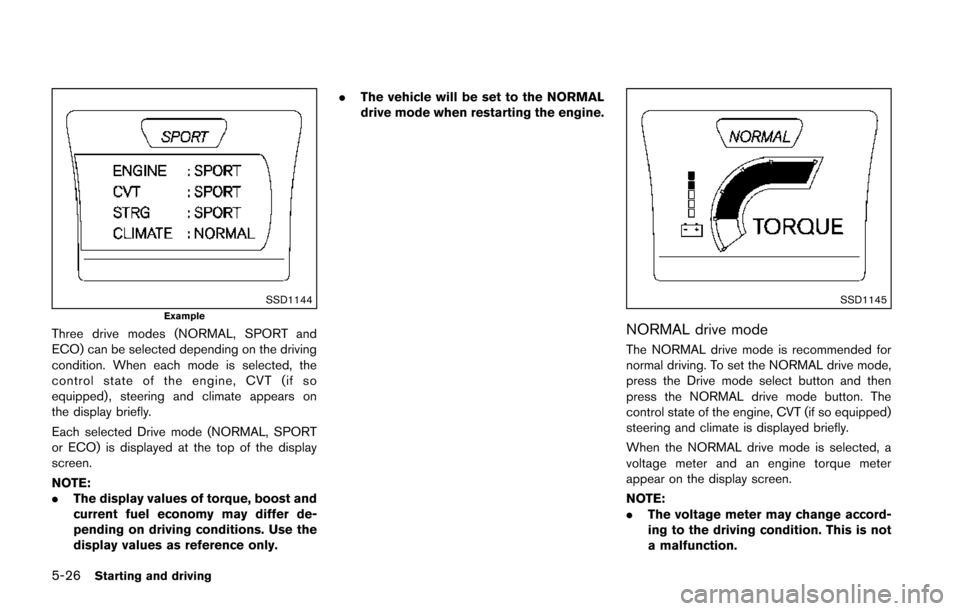
SSD1144Example
Three drive modes (NORMAL, SPORT and
ECO) can be selected depending on the driving
condition. When each mode is selected, the
control state of the engine, CVT (if so
equipped) , steering and climate appears on
the display briefly.
Each selected Drive mode (NORMAL, SPORT
or ECO) is displayed at the top of the display
screen.
NOTE:
.The display values of torque, boost and
current fuel economy may differ de-
pending on driving conditions. Use the
display values as reference only. .
The vehicle will be set to the NORMAL
drive mode when restarting the engine.
SSD1145
NORMAL drive mode
The NORMAL drive mode is recommended for
normal driving. To set the NORMAL drive mode,
press the Drive mode select button and then
press the NORMAL drive mode button. The
control state of the engine, CVT (if so equipped)
steering and climate is displayed briefly.
When the NORMAL drive mode is selected, a
voltage meter and an engine torque meter
appear on the display screen.
NOTE:
.The voltage meter may change accord-
ing to the driving condition. This is not
a malfunction.
Page 280 of 402
.At start up, the vehicle is automatically
set to the NORMAL drive mode.
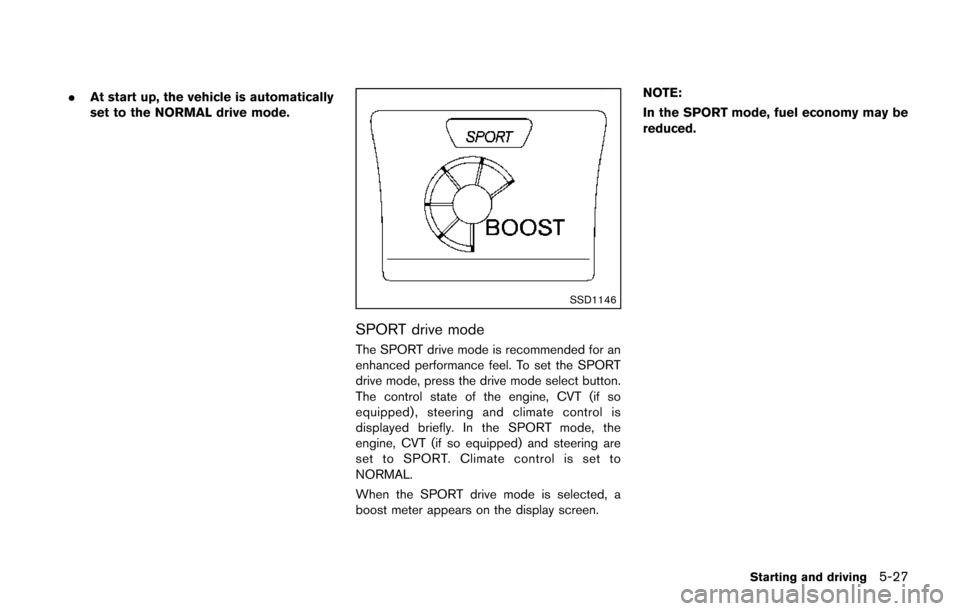
SSD1146
SPORT drive mode
The SPORT drive mode is recommended for an
enhanced performance feel. To set the SPORT
drive mode, press the drive mode select button.
The control state of the engine, CVT (if so
equipped), steering and climate control is
displayed briefly. In the SPORT mode, the
engine, CVT (if so equipped) and steering are
set to SPORT. Climate control is set to
NORMAL.
When the SPORT drive mode is selected, a
boost meter appears on the display screen. NOTE:
In the SPORT mode, fuel economy may be
reduced.
Starting and driving5-27