2014 MITSUBISHI OUTLANDER ESP
[x] Cancel search: ESPPage 209 of 451

Multi Information display - Type 1
Features and controls 5-131
5
The “---” display can be
reset while the igni-
tion switch or the operation mode is in OFF. When the display is reset, the time until thenext periodic inspection
is displayed and the
warning display is no longer displayed when the ignition switch is switched from the“OFF” or “LOCK” position to the “ON” position or the operation mode is changed from OFF to ON. 1. When you lightly press the multi informa- tion display switch, the information screen switches to the service reminderdisplay screen.
2. Press and hold the multi information dis- play switch (for about 2 seconds or more) to display “ ” and make it flash. (If there is no operation for about 10 seconds with this indicator flashing, the display returns to the previous screen.) 3. With this indicator flashing, if you lightly press the multi information display switch, the screen sw
itches from “---” to
“CLEAR”. After that, the time until thenext periodic inspection is shown.
N00578400022
When the ignition switch is turned to the “ON” position or the operation mode is put in ON, the system check screen is displayed forabout 4 seconds. If there is no fault, the infor- mation screen is displayed. If there is a fault, the screen changes to warn-ing display. Refer to “Warning display list” on page 5-150.
To reset
CAUTION The customer is responsible for making sure that regular inspections
and maintenance and
periodic inspections
and maintenance are
performed. Inspections and mainte
nance must be per-
formed to prevent accidents and malfunc- tions.
NOTE
The “---” display cannot
be reset while the
ignition switch or the operation mode is inON. When “---” is displaye
d, after a certain dis-
tance and a certain pe
riod of time, the dis-
play is reset and the time until the next periodic inspecti
on is displayed.
If you accidentally rese
t the display, consult
an authorized Mitsubishi Motors dealer for assistance.
System check screen
BK0200500US.book 131 ページ 2013年2月12日 火曜日 午前9時46分
Page 220 of 451

Multi Information display - Type 2 5-142 Features and controls
5
N00574901039
The odometer indicates the total distance the vehicle has traveled.
N00575001037
The trip odometer indicates the distance trav-eled between two points. To return the display to 0, hold down the multi information display switch for about 2seconds or more. Only the currently dis- played value will be reset. Example If trip odometer is
displayed, only trip
odometer wi
ll be reset.
Both trip odometers and can count up to 9999.9 miles/kilometers. When a trip odometer goes past 9999.9 miles/kilometers, it returns to 0.0 miles/kilometers. When disconnecting the battery terminal, the memories of trip odometer displays
and are cleared, and their displays
return to “0.0 miles/kilometers”.
N00578900027
Each time you press and hold the multi infor-mation display switch
for about 2 seconds or
more, there is a sound and the brightness ofthe instruments changes.
N00575201039
This displays the approximate driving range(how many more miles
or kilometers you can
drive). When the driving range falls below approximately 30 miles
(50 km), “---” is dis-
played.
Odometer Trip odometer Usage examples for trip odometer , trip odometer
It is possible to measure two currently traveled distances, from home using trip odometer and from a particular point on the way using trip odometer
.
To reset the trip odometer
Meter illumination control 1- Brightness level 2- Multi informati
on display switch
NOTE
You can adjust to 8 di
fferent levels respec-
tively for when the parking lights or head-lights are illuminated a
nd when they are not.
Each time you reduce tw
o brightness levels,
the segment display of the brightness level decreases one by one. If the vehicle is equipped with the automatic light control, when the lamp switch is in aposition other than th
e “OFF” position, the
meter illumination switches automatically to the adjusted bright
ness, depending on the
brightness outside the vehicle. The brightness level
of the instruments is
stored when the ignition switch is turned to the “OFF” position.
Driving range display
NOTE
The driving range is determined based on the fuel consumption data. This may vary depending on the drivi
ng conditions and hab-
its. Treat the distance
displayed as just a
rough guideline.
BK0200500US.book 142 ページ 2013年2月12日 火曜日 午前9時46分
Page 223 of 451
Multi Information display - Type 2
Features and controls 5-145
5
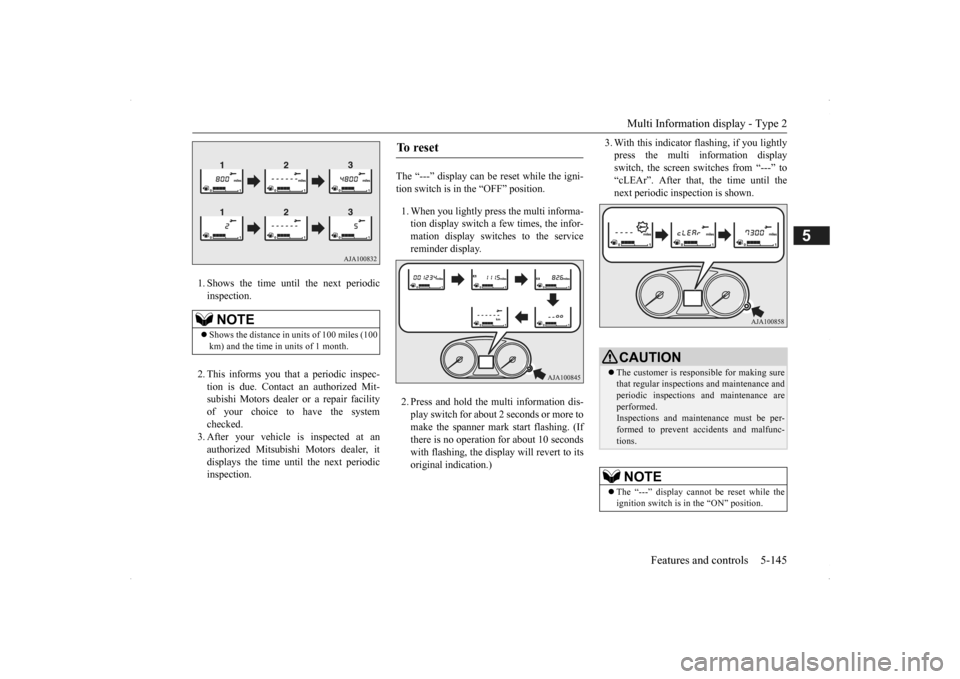
1. Shows the time until the next periodic inspection. 2. This informs you that a periodic inspec- tion is due. Contact
an authorized Mit-
subishi Motors dealer or a repair facilityof your choice to have the system checked. 3. After your vehicle
is inspected at an
authorized Mitsubishi Motors dealer, it displays the time unt
il the next periodic
inspection.
The “---” display can be reset while the igni- tion switch is in the “OFF” position. 1. When you lightly press the multi informa- tion display switch a few times, the infor-mation display switches to the service reminder display. 2. Press and hold the multi information dis- play switch for about
2 seconds or more to
make the spanner mark start flashing. (If there is no operation for about 10 secondswith flashing, the display will revert to its original indication.)
3. With this indicator
flashing, if you lightly
press the multi information displayswitch, the screen switches from “---” to “cLEAr”. After that, the time until the next periodic inspection is shown.
NOTE
Shows the distance in
units of 100 miles (100
km) and the time in units of 1 month.
To r e s e t
CAUTION The customer is responsible for making sure that regular inspections and maintenance andperiodic inspections
and maintenance are
performed. Inspections and mainte
nance must be per-
formed to prevent accidents and malfunc- tions.NOTE
The “---” display cannot
be reset while the
ignition switch is in
the “ON” position.
BK0200500US.book 145 ページ 2013年2月12日 火曜日 午前9時46分
Page 246 of 451

Warning lights 5-168 Features and controls
5
N00520601323
This light comes on in the event of a malfunc- tion in the charging system or when the igni-tion switch is turned to the “ON” position (engine off) or the operation mode is put in ON. On vehicle equipped with the multiinformation display - Type 1, a warning is also displayed in the multi information dis- play. When the engine is started, the lightshould go out. Check to make sure that the light has gone out before driving.
N00520701278
This light comes on when the engine oil pres- sure is below normal. If the light stays onwhile driving, stop the
engine as soon as pos-
sible. Do not run the engine until the cause of the low oil pressure is corrected.
CAUTION Driving for a long time with the engine mal- function indicator on
may cause more dam-
age to the emission control system. Thiscould also affect fuel economy and drivabil- ity. If this indicator does not come on when the ignition switch is turned to the “ON” posi- tion or the operation mode
is put in ON, have
the system checked at an authorized Mitsubi- shi Motors dealer or a repair facility of your choice. If the engine malfuncti
on indicator comes on
while the engine is running, avoid driving athigh speeds. During vehicle operation
with the indicator
on, the vehicle may not
accelerate when you
depress the accelerator pedal. When the vehicle is stat
ionary with the indi-
cator on, you must depress the brake pedalmore firmly than usual since the engine idling speed is higher than usual and a vehi- cle with an automatic transaxle or CVT has astronger tendency to creep forward.
NOTE
Do not disconnect the ba
ttery cable when the
engine malfunction i
ndicator (“SERVICE
ENGINE SOON” or “Che
ck engine light”) is
on. The engine electronic control module stores critical OBD information (especially exhaustemission data), which ma
y be lost if the bat-
tery cable is disconne
cted while the engine
malfunction indicator is
on. This will make it
difficult to diagnose the cause of future prob- lems.
Charging system warning light
CAUTION If the warning light stays on while the engine is running, park your ve
hicle in a safe place
as soon as possible and
contact an authorized
Mitsubishi Motors dealer
or a repair facility
of your choice to have the system checked.
Oil pressure warning light (Vehicle equipped with the multi information display - Type 2)
CAUTION If this light comes on when the engine oil level is not low, have
your vehicle checked at
an authorized Mitsubish
i Motors dealer or a
repair facility
of your choice.
This warning light does not show the amount of oil in the crankcase. This can only bedetermined by checking th
e oil level with the
dipstick with the engine turned off.
BK0200500US.book 168 ページ 2013年2月12日 火曜日 午前9時46分
Page 259 of 451

Wiper and washer switch
Features and controls 5-181
5
If your hands get trapped, you could suffer injuries or the wipers
could malfunction. Be
sure to turn the ignition switch to the “OFF” or “LOCK” position
or put the operation
mode in OFF, or move the lever to the “OFF”position to deactivate the rain sensor.
With the lever in the “AUTO” (rain sensor) position, it is possible to adjust the sensitivity of the rain sensor by turning the knob (B).
Move the lever in the direction of the arrow and release, to opera
te the wipers once.
NOTE
To protect the rubber parts of the wipers, this operation of the wipers
does not take place
when the vehicle is stationary and the ambi- ent temperature is about 32 °F (0 °C) or lower. Do not cover the sensor by affixing a sticker or label to the windshield. Also, do not putany water-repellent coating on the wind- shield. The rain sensor would not be able to detect the extent of rain, and the wipersmight stop working normally. In the following cases, the rain sensor may be malfunctioning. Have
the vehicle checked
at an authorized Mitsubishi Motors dealer or a repair facility
of your choice.
• When the wipers operate
at a constant inter-
val despite changes in the extent of rain. • When the wipers do not operate even though it is raining.
The wipers may automatically operate when things such as insects
or foreign objects are
affixed to the windshield on top of the rainsensor or when the windshield is frozen. Objects affixed to th
e windshield will stop
the wipers when the
wipers cannot remove
them. To operate the wi
pers again, move the
lever to the “LO” or “HI” position. Also, the wipers may operate automaticallydue to strong direct s
unlight or electromag-
netic wave. To stop the wipers, move the lever to the
“OFF” position.
Contact an authorized Mitsubishi Motors dealer or a repair fa
cility of your choice
when replacing the windshield glass.
To adjust the sensitivity of the rain sensor
NOTE
“+”- Higher sensitivity to rain “-”- Lower sensitivity to rain
NOTE
Automatic wiper opera
tion (rain sensitive)
can be changed to in
termittent operation,
either vehicle speed se
nsitive or not vehicle
speed sensitive. For further informati
on, please contact your
authorized MITSUBISHI MOTORS dealer or a repair facilit
y of your choice.
On vehicles equipped
with Mitsubishi Multi-
Communication System
, screen operations
can be used to make the adjustment. Refer to the separate owner’s manual fordetails.
Misting function
BK0200500US.book 181 ページ 2013年2月12日 火曜日 午前9時46分
Page 268 of 451

Bluetooth® 2.0 interface (if so equipped) 5-190 Features and controls
5
If a passcode has been set and the security function is enabled, the voice guide will say “Hands-free system is lo
cked. State the pass-
code to continue” when the SPEECH button (except for vehicles with Mitsubishi Multi- Communication System) or PICK-UP button(for vehicles with Mi
tsubishi Multi-Commu-
nication System) is pre
ssed to enter voice rec-
ognition mode. Say th
e 4-digit passcode
number to enter the passcode. If the entered passcode
is wrong, the voice
guide will say “<4-digi
t passcode>, Incorrect
passcode. Please try again.” Enter the correctpasscode.
Use the following procedure to turn off the security function by di
sabling the passcode.
1. Press the SPEECH button (except for vehicles with Mitsubishi Multi-Commu-nication System) or PICK-UP button (for vehicles with Mitsubishi Multi-Commu- nication System).2. Say “Setup.” 3. Say “Passcode.” 4. The voice guide w
ill say “Passcode is
enabled. Would you like to disable it?” Answer “Yes.” Answer “No” to cancel the disabling ofthe passcode and return to the main menu.
5. When the disabling of the passcode is completed, the voice
guide will say “Pass-
code is disabled” and the system will return to the main menu.
N00564700011
The Bluetooth
® 2.0 interface can use the
speaker enrollment func
tion to create a voice
model for one person per language. This makes it easier for the Bluetooth
® 2.0
interface to recognise
voice commands said
by you. You can turn a voice model registered with the speaker enrollment function on and offwhenever you want.
N00564801110
It takes about 2 to 3 minutes to complete thespeaker enrollment process. To ensure the best results, run through the process while in the driver’s seat, in an envi-ronment that is as qu
iet as possible (when
there is no rain or strong winds and the vehi- cle windows are closed). Please turn off yourphone while in speaker enrollment to prevent interruption of the process. Use the following procedure for speakerenrollment.
NOTE
Passcode will be require
d to access the sys-
tem after the next
ignition cycle.
It is required for a little time after engine stop that the entered passcode is actually recorded in the system.If the ignition switch
or the operation mode
is made to ACC or ON or the engine is started immediately afte
r engine stop, there
is a case when the entered passcode is not recorded in the system. At this time, please try to enter the passcode again.
Entering the passcode
NOTE
You can reenter the pa
sscode as many times
as you want. If you have forgot
ten your passcode, say
“Cancel” to quit the voice input mode and then check with an authorized MitsubishiMotors dealer.
Disabling the passcode
NOTE
System must be unlocke
d to disable the pass-
code.
Speaker enrollment function
Speaker enrollment
BK0200500US.book 190 ページ 2013年2月12日 火曜日 午前9時46分
Page 269 of 451

Bluetooth® 2.0 interface (if so equipped)
Features and controls 5-191
5
1. Stop your vehicle in a safe area, put the selector lever in the “P” (PARK) positionand pull the parking brake lever. 2. Press the SPEECH button (except for vehicles with Mitsubishi Multi-Commu-nication System) or PICK-UP button (for vehicles with Mitsubishi Multi-Commu- nication System).3. Say “Voice training.”
4. The voice guide will
say “This operation
must be performed in a quiet environmentwhile the vehicle is stopped. See the owner’s manual for th
e list of required
training phrases. Pr
ess and release the
SPEECH button when you are ready to begin. Press the HANG-UP button to can- cel at any time.”Press the SPEECH button to start the speaker enrollment process.
5. The voice guide will prompt for phrase 1. Repeat the correspondi
ng phrase listed in
table “Enrollment commands” on page 5-206. The system will register your voice andthen move on to the registration of the next command. Continue the process until all phrases have been registered. 6. When all enrollment commands have been read out, the voice guide will say “Speaker enrollment is complete.” The system will then end the speaker enroll-ment process and return to the main menu.
NOTE
Speaker enrollment is
not possible unless the
vehicle is parked. Ma
ke sure you park the
vehicle in a safe ar
ea before attempting
speaker enrollment.
NOTE
If you do not start the speaker enrollment process within 3 minut
es after pressing the
SPEECH button, the speaker enrollment function will time out. The voice guide will
say “Speaker enroll-
ment has timed out.” The system will then beep and the voice recognition mode will be deactivated.
NOTE
To repeat the most recent voice training com- mand, press and release the SPEECH button. If you press the HANG-UP button anytime during the process, the system will beep and stop the speaker enrollment process.NOTE
Completing the speaker enrollment process will turn on the voice
model automatically.
The commands “Help” a
nd “Cancel” will not
work in this mode.
BK0200500US.book 191 ページ 2013年2月12日 火曜日 午前9時46分
Page 272 of 451

Bluetooth® 2.0 interface (if so equipped) 5-194 Features and controls
5
matically connected to the Bluetooth
® 2.0
interface.You can connect to the
other paired cellular
phone or music player by following setting change procedures.
N00582200034
1. Press the SPEECH button (except for vehicles with Mitsubishi Multi-Commu- nication System) or
PICK-UP button (for
vehicles with Mitsubishi Multi-Commu- nication System).2. Say “Setup.” 3. Say “Select phone.”
4. After the voice guide
says “Please say,”
the numbers of the cellular phones anddevice tags of corresponding cellular phones will be read out in order, starting with the cellular phone that has been mostrecently connected. Say the number of the cellular phone that you want to connect to.When the confirmation function is on, the system will ask you again whether the phone that you want to connect to is cor- rect. Answer “Yes” to continue and con- nect to the cellular phone.Answer “No,” and th
e voice guide will
say “Please say.” Say the number of the phone that you want to connect to. 5. The selected phone will be connected to the Bluetooth
® 2.0 interface. The voice
guide will say “
and then the system will return to themain menu.
N00582300035
1. Press the SPEECH button (except forvehicles with Mitsubishi Multi-Commu- nication System) or
PICK-UP button (for
vehicles with Mitsubishi Multi-Commu-nication System). 2. Say “Setup.” 3. Say “Select music player.”4. After the voice guide says “Please say,” the numbers of the music players and device tags of corresponding music play- ers will be read out in order, starting with the music player that has been mostrecently connected. Say the number of the music player that you want to connect to.When the confirmation function is on, the system will ask you again whether the music player that you want to connect tois correct. Answer “Yes” to continue and connect to the music player. Answer “No,” and the voice guide willsay “Please say.” Say the number of the music player that you want to connect to.
To select a cellular phone
NOTE
You can connect to a
phone at any time by
pressing the SPEECH button and saying thenumber, even before all of the paired num- bers and device tags
of corresponding cellu-
lar phones are read out by the system.
To select a music player NOTE
You can connect to a music player at any time by pressing the SPEECH button and saying the number, even before all of the paired numbers and device tags of corre-sponding music players are read out by the system.
BK0200500US.book 194 ページ 2013年2月12日 火曜日 午前9時46分