2014 MITSUBISHI LANCER SPORTBACK alarm
[x] Cancel search: alarmPage 108 of 422
Inside rear hatch release
Features and controls 5-41
5
N00523100058
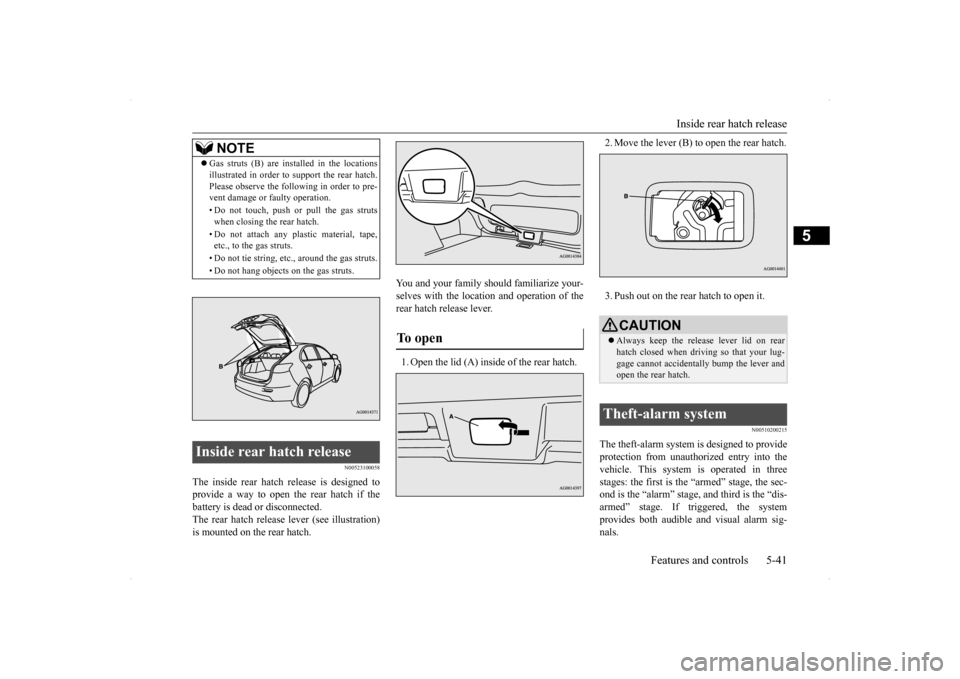
The inside rear hatch release is designed to provide a way to open the rear hatch if the battery is dead or disconnected. The rear hatch release lever (see illustration)is mounted on the rear hatch.
You and your family should familiarize your- selves with the location and operation of the rear hatch release lever. 1. Open the lid (A) inside of the rear hatch.
2. Move the lever (B) to open the rear hatch. 3. Push out on the rear hatch to open it.
N00510200215
The theft-alarm system is designed to provide protection from unauthorized entry into the vehicle. This system is operated in three stages: the first is the “armed” stage, the sec-ond is the “alarm” stage,
and third is the “dis-
armed” stage. If triggered, the system provides both audible and visual alarm sig-nals.
NOTE
Gas struts (B) are installed in the locations illustrated in order to support the rear hatch. Please observe the following in order to pre- vent damage or faulty operation. • Do not touch, push or pull the gas struts when closing the rear hatch. • Do not attach any plastic material, tape, etc., to the gas struts. • Do not tie string, etc., around the gas struts. • Do not hang objects
on the gas struts.
Inside rear hatch release
To open
CAUTIONAlways keep the release lever lid on rear hatch closed when driving so that your lug- gage cannot accidentally bump the lever and open the rear hatch.
Theft-alarm system
BK0200700US.bo
ok 41 ページ 2013年2月15日 金曜日 午後12時17分
Page 109 of 422
Theft-alarm system 5-42 Features and controls
5
N00510301196
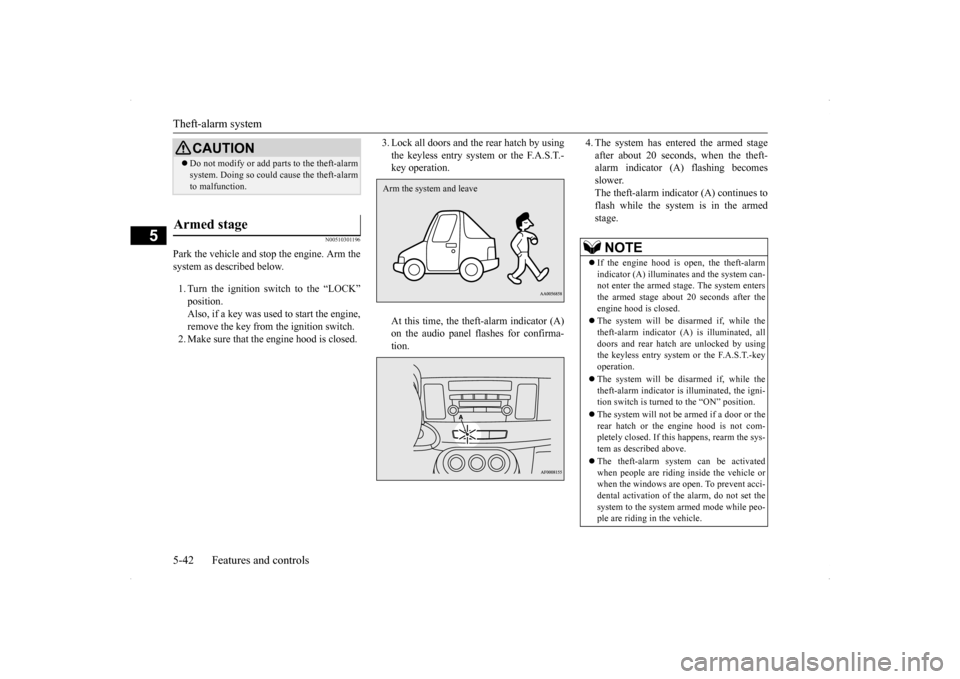
Park the vehicle and stop the engine. Arm the system as described below. 1. Turn the ignition switch to the “LOCK” position. Also, if a key was used to start the engine, remove the key from the ignition switch.2. Make sure that the engine hood is closed.
3. Lock all doors and the rear hatch by using the keyless entry system or the F.A.S.T.- key operation. At this time, the theft-alarm indicator (A) on the audio panel flashes for confirma- tion.
4. The system has entered the armed stage after about 20 seconds, when the theft- alarm indicator (A) flashing becomes slower.The theft-alarm indicator (A) continues to flash while the system is in the armed stage.
CAUTION Do not modify or add parts to the theft-alarm system. Doing so could cause the theft-alarm to malfunction.
Armed stage
Arm the system and leave
NOTE
If the engine hood is open, the theft-alarm indicator (A) illuminates and the system can-not enter the armed stage. The system enters the armed stage about 20 seconds after the engine hood is closed. The system will be disarmed if, while the theft-alarm indicator (A) is illuminated, alldoors and rear hatch are unlocked by using the keyless entry system or the F.A.S.T.-key operation. The system will be disarmed if, while the theft-alarm indicator is illuminated, the igni-tion switch is turned to the “ON” position. The system will not be
armed if a door or the
rear hatch or the engine hood is not com- pletely closed. If this happens, rearm the sys- tem as described above. The theft-alarm system can be activated when people are riding inside the vehicle or when the windows are open. To prevent acci- dental activation of the alarm, do not set thesystem to the system armed mode while peo- ple are riding in the vehicle.
BK0200700US.bo
ok 42 ページ 2013年2月15日 金曜日 午後12時17分
Page 110 of 422
Theft-alarm system
Features and controls 5-43
5
N00510401201
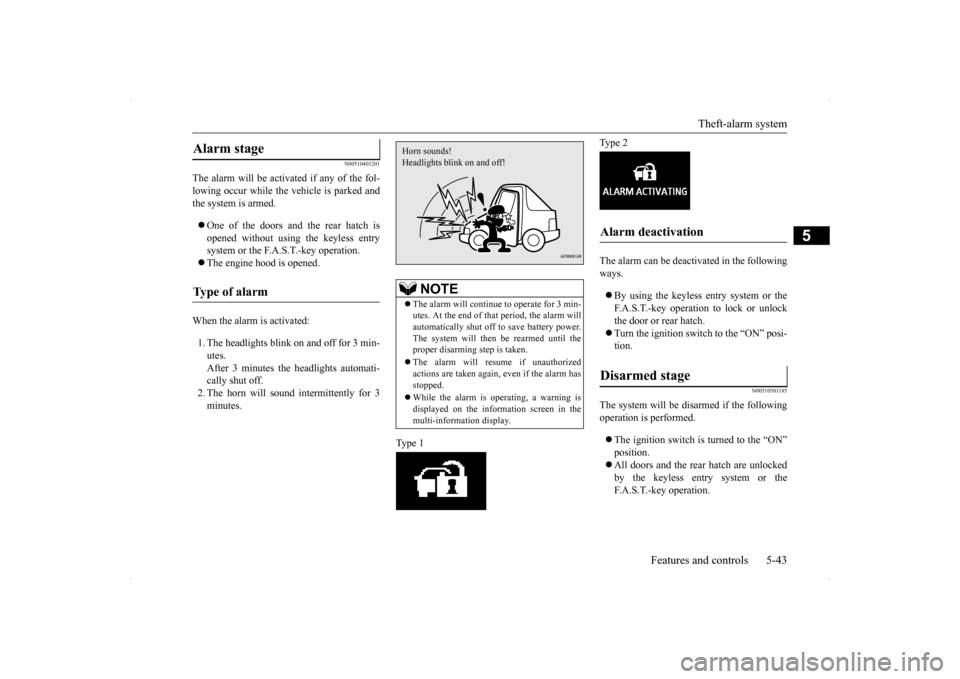
The alarm will be activated if any of the fol- lowing occur while the vehicle is parked andthe system is armed. One of the doors and the rear hatch is opened without using the keyless entry system or the F.A.S.T.-key operation. The engine hood is opened.
When the alarm is activated: 1. The headlights blink on and off for 3 min- utes.After 3 minutes the headlights automati- cally shut off. 2. The horn will sound intermittently for 3minutes.
Type 1
Type 2 The alarm can be deactivated in the following ways. By using the keyless entry system or the F.A.S.T.-key operation to lock or unlock the door or rear hatch. Turn the ignition switch to the “ON” posi- tion.
N00510501185
The system will be disarmed if the followingoperation is performed. The ignition switch is turned to the “ON” position. All doors and the rear hatch are unlocked by the keyless entry system or the F.A.S.T.-key operation.
Alarm stage Type of alarm
NOTE
The alarm will continue to operate for 3 min- utes. At the end of that period, the alarm will automatically shut off to save battery power. The system will then
be rearmed until the
proper disarming step is taken. The alarm will resume if unauthorized actions are taken again, even if the alarm has stopped. While the alarm is operating, a warning is displayed on the information screen in the multi-information display.Horn sounds! Headlights blink on and off!
Alarm deactivation Disarmed stage
BK0200700US.bo
ok 43 ページ 2013年2月15日 金曜日 午後12時17分
Page 111 of 422
Power windows 5-44 Features and controls
5
N00510601131
Use the following procedure to test the sys- tem:
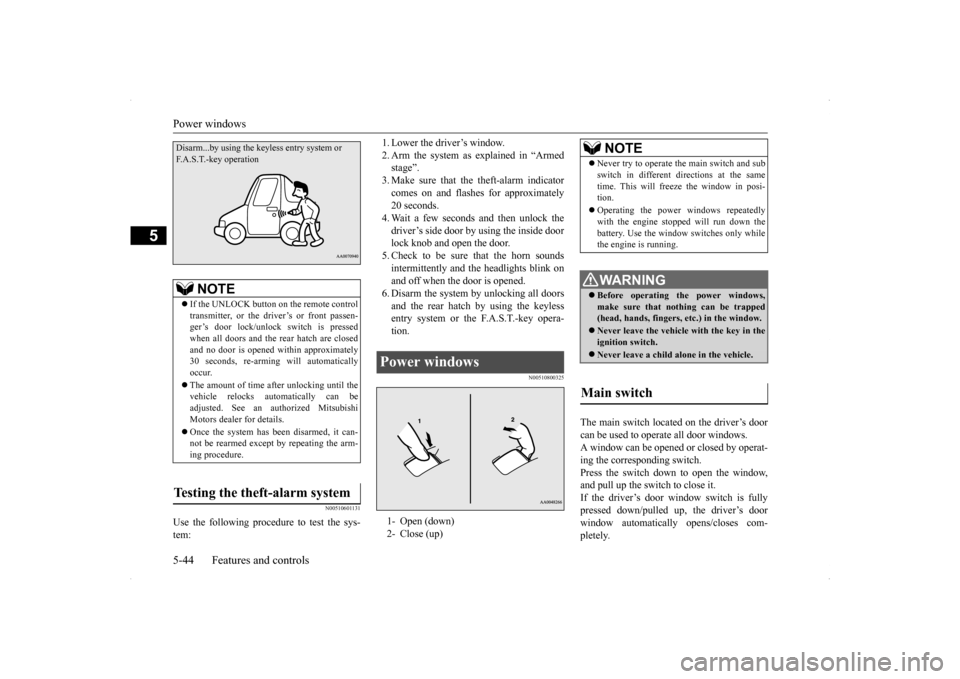
1. Lower the driver’s window. 2. Arm the system as explained in “Armed stage”. 3. Make sure that the theft-alarm indicatorcomes on and flashes for approximately 20 seconds. 4. Wait a few seconds and then unlock thedriver’s side door by using the inside door lock knob and open the door. 5. Check to be sure that the horn soundsintermittently and the headlights blink onand off when the door is opened. 6. Disarm the system by unlocking all doors and the rear hatch by using the keylessentry system or the F.A.S.T.-key opera- tion.
N00510800325
The main switch located on the driver’s door can be used to operate all door windows. A window can be opened or closed by operat- ing the corresponding switch.Press the switch down to open the window, and pull up the switch to close it. If the driver’s door window switch is fullypressed down/pulled up, the driver’s door window automatically opens/closes com- pletely.
NOTE
If the UNLOCK button on the remote control transmitter, or the driver’s or front passen- ger’s door lock/unlock switch is pressedwhen all doors and the rear hatch are closed and no door is opened
within approximately
30 seconds, re-arming will automaticallyoccur. The amount of time after unlocking until the vehicle relocks automatically can be adjusted. See an authorized Mitsubishi Motors dealer for details. Once the system has been disarmed, it can- not be rearmed except by repeating the arm-ing procedure.
Testing the theft-alarm system Disarm...by using the ke
yless entry system or
F.A.S.T.-key operation
Power windows 1- Open (down) 2- Close (up)
NOTE
Never try to operate the main switch and sub switch in different directions at the same time. This will freeze the window in posi- tion. Operating the power windows repeatedly with the engine stopped will run down the battery. Use the window switches only whilethe engine is running. WA R N I N G Before operating the power windows, make sure that nothing can be trapped(head, hands, fingers, etc.) in the window. Never leave the vehicle with the key in the ignition switch. Never leave a child alone in the vehicle.
Main switch
BK0200700US.bo
ok 44 ページ 2013年2月15日 金曜日 午後12時17分
Page 153 of 422

Hill start assist (for vehicles
equipped with Twin Clutch SST)
5-86 Features and controls
5
N00517600393
Your vehicle is equipped with power brakes for more braking force with minimal brake pedal effort.Your brakes are designed to operate at full capacity, even if the power assist is lost. If the power assist is lost, the effort needed topress the brake pedal is greater. If you should lose the power assist for some reason, the brakes will still work. If the power brake unit
or either of the two
brake hydraulic systems stops working prop-
erly, the rest of the br
ake system will still
work, but the vehicle will not slow down as quickly. You will know this has happened if you findyou need to depress the brake pedal down further, or harder when slowing down or stop- ping, or if the brake warning light and thewarning display in the multi-information dis- play come on.
N00532500087
The disc brakes have an alarm that makes ametallic squeal when the brake pads have worn down enough to need service. If youhear this sound, have the brake pads replaced at an authorized Mitsubishi Motors dealer or a repair facility of your choice.
N00562600061
The hill start assist makes it easy to start offon a steep uphill slope by preventing the vehicle from moving backwards. It keeps the braking force for about 2 seconds when youmove your foot from the brake pedal to the accelerator pedal.
WA R N I N G Do not leave any objects near the brake pedal or let a floor mat slide under it; doing so could prevent the full pedal stroke that would be necessary in an emergency. Make sure that the pedal canbe operated freely at all times. Make sure the floor mat is securely held in place.CAUTION It is important not to drive the vehicle with your foot resting on the brake pedal when braking is not required. This practice can result in very high brake temperatures, pre-mature pad and lining wear, and possible damage to the brakes.
Power brakes
WA R N I N G Never coast downhill with the engine OFF. Keep the engine running whenever your vehicle is in motion. If you turn off the engine while driving, the power brakebooster will stop working and your brakes will not work as well. If the power assist is lost or if either brake hydraulic system stops working properly, take your vehicle to an authorized Mit-subishi Motors dealer or a repair facility of your choice immediately.
Brake pad wear alarm
WA R N I N G Driving with worn brake pads will make it harder to stop, and can cause an accident.
Hill start assist (for vehicles equipped with Twin Clutch SST)
CAUTION Do not overly rely on the hill start assist to prevent backwards movement of the vehicle.Under certain circumstances, even when hill start assist is activated, the vehicle may move backwards if the brake pedal is not suf-ficiently depressed, if the vehicle is heavily loaded, or if the road is very steep or slip- pery. The hill start assist is not designed to keep the vehicle stopped in place on uphill slopes for more than 2 seconds.
BK0200700US.bo
ok 86 ページ 2013年2月15日 金曜日 午後12時17分
Page 193 of 422
Multi-information display 5-126 Features and controls
5
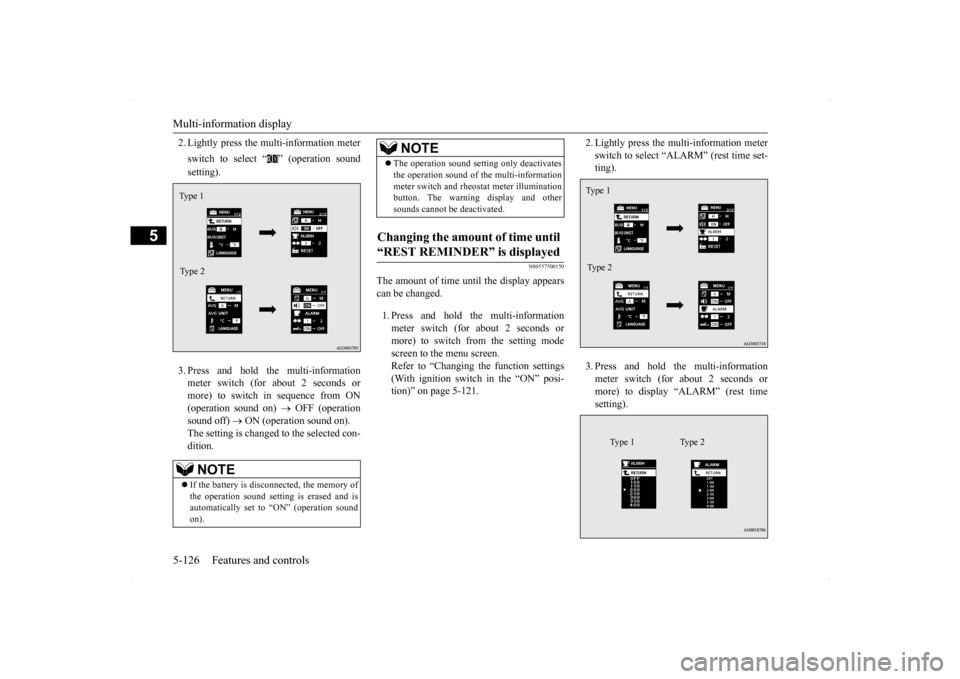
2. Lightly press the multi-information meter switch to select “ ” (operation sound setting). 3. Press and hold the multi-information meter switch (for about 2 seconds or more) to switch in sequence from ON(operation sound on)
OFF (operation
sound off)
ON (operation sound on).
The setting is changed to the selected con- dition.
N00557500150
The amount of time until the display appears can be changed. 1. Press and hold the multi-information meter switch (for about 2 seconds ormore) to switch from the setting mode screen to the menu screen. Refer to “Changing the function settings(With ignition switch in the “ON” posi- tion)” on page 5-121.
2. Lightly press the multi-information meter switch to select “ALARM” (rest time set- ting). 3. Press and hold the multi-information meter switch (for about 2 seconds or more) to display “ALARM” (rest timesetting).
NOTE
If the battery is disconnected, the memory of the operation sound setting is erased and isautomatically set to “ON” (operation sound on).Type 1 Type 2
The operation sound setting only deactivates the operation sound of the multi-information meter switch and rheostat meter illumination button. The warning display and other sounds cannot be deactivated.
Changing the amount of time until “REST REMINDER” is displayed
NOTE
Ty p e 1 Type 2
Type 1 Type 2
BK0200700US.book
126 ページ 2013年2月15日 金曜日 午後12時17分
Page 198 of 422
Indicator light, warning light, an
d information screen display list Features and controls 5-131
5
N00558001247
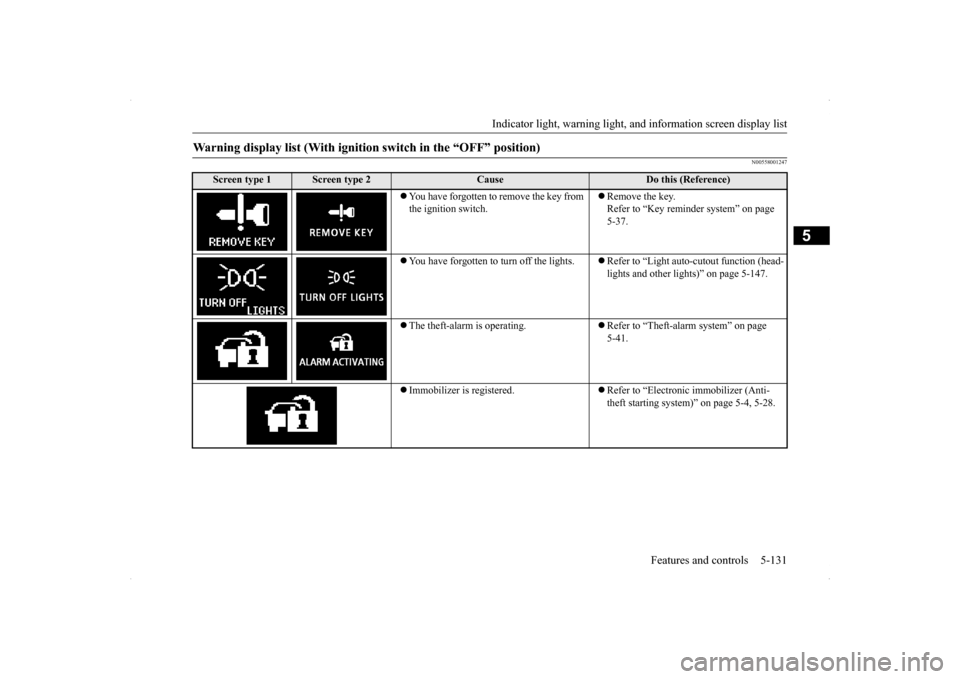
Warning display list (With ignition switch in the “OFF” position)
Screen type 1
Screen type 2
Cause
Do this (Reference)
You have forgotten to remove the key from the ignition switch.
Remove the key. Refer to “Key reminder system” on page 5-37.
You have forgotten to turn off the lights.
Refer to “Light auto-cutout function (head- lights and other lights)” on page 5-147.
The theft-alarm is operating.
Refer to “Theft-alarm system” on page 5-41.
Immobilizer is registered.
Refer to “Electronic immobilizer (Anti- theft starting system)” on page 5-4, 5-28.
BK0200700US.book
131 ページ 2013年2月15日 金曜日 午後12時17分
Page 420 of 422
Alphabetical index
12-5
12
T
Tail and stop lights
Bulb capacity
................
.................
9-33
Replacement
.................
.................
9-43
Tank capacity
..............................
3-4
, 11-6
Theft-alarm system
System
......................
.....................
5-41
Time Setting
..................
.....................
7-56
Tire pressure monitoring system
.........
5-100
Warning light/display
....................
5-101
Tires
..........................
........................
9-17
How to change a tire
.........................
8-6
Inflation pressure
............................
9-21
Maintenance
..................
.................
9-22
Quality grading
...............................
10-2
Replacing tires and wheels
...............
9-22
Rotation
....................
.....................
9-22
Size (tire and wheel)
.......................
11-5
Snow tires
.....................
.................
9-23
Tire and loading information placard
.6-7
,
11-3 Tire chains
....................
.................
9-24
Tread wear indicators
......................
9-22
Tissue holder
.....................
...............
5-189
Tools
.........................
..........................
8-6
Storage
.........................
...................
8-5
Towing
......................
........................
8-13
Trailer towing
....................
.................
6-11
Turbocharger operation
.......................
5-59
Turn signal lights
Bulb capacity
..................
...............
9-33
Indicators
....................
.................
5-141
Lever
......................
.....................
5-150
Replacement
...................
...............
9-40
Twin Clutch SST
Fluid
....................
.................
9-11
, 11-6
Gearshift lever operation
.................
5-70
Gearshift lever position display
........
5-72
Manual shift
....................
...............
5-76
Manual shift display
.......................
5-79
Twin Clutch SST control mode display
....
5-76Twin Clutch SST control mode switch
.....
5-76 Warning display
.............................
5-73
Twin Clutch SST (Sportronic Shift Transmission)
...................
...............
5-70
U
USB input terminal
............................
5-180
How to connect an iPod
.................
5-181
USB input terminal device
How to connect a USB memory
......
5-180
V
Vanity mirror
...................
.................
5-183
Vehicle care precautions
.....................
9-48
Vehicle dimensions
.............................
11-4
Vehicle labeling
.................
.................
11-2
Vehicle preparation before driving
..........
6-3
Vehicle weights
.................
.................
11-4
Vents
............................
.......................
7-2
W
Warning lights
...................
...............
5-142
Washer
Fluid
..................
...................
9-12
, 11-6
Rear window washer
.....................
5-156
Switch
......................
...................
5-155
Waxing
......................
........................
9-50
Weights
........................
.....................
11-4
Wheel
Covers
......................
.....................
8-12
Specification
.................
.................
11-5
Wiper
Rain sensor
.............
5-153
, 5-154
, 5-155
Rear window wiper
.......................
5-156
Switch
......................
...................
5-152
Wiper blades
.................
.................
9-25
BK0200700US.bo
ok 5 ページ 2013年2月15日 金曜日 午後12時17分