2014 MERCEDES-BENZ SPRINTER phone
[x] Cancel search: phonePage 241 of 338

You can use the 12 V sockets (15 A) for
accessories with a maximum power con-
sumption of 180 W. You can connect acces-
sories with a maximum power consumption
of 300 W to the 12 V socket (25 A) on the
lower section of the center console.
i The sockets are supplied with power even
when the key is removed from the ignition
lock. If accessories, e.g. a coolbox, remain
connected while the engine is not running,
the battery will discharge. Mobile phone
Important safety notes
G
WARNING
If you operate information systems and com-
munication equipment integrated in the vehi-
cle while driving, you will be distracted from
traffic conditions. You could also lose control
of the vehicle. There is a risk of an accident.
Only operate the equipment when the traffic
situation permits. If you are not sure that this
is possible, park the vehicle paying attention
to traffic conditions and operate the equip-
ment when the vehicle is stationary.
You must observe the legal requirements for
the country in which you are currently driving
when operating mobile phones.
Bear in mind that at a speed of just 30 mph
(approximately 50 km/h), your vehicle is cov-
ering a distance of 44 feet (approximately
14 m) every second.
You and others can suffer health-related dam-
age through electromagnetic radiation. By
using an exterior antenna, a possible health
risk caused by electromagnetic fields, as dis-
cussed in scientific circles, is taken into
account. Only have the exterior antenna
installed by a qualified specialist workshop.
We recommend the use of an approved exte-
rior antenna for operating the mobile phone.
Only in this way can optimal mobile phone
reception quality in the vehicle be ensured and mutual interference between the vehicle
electronics and mobile phones minimized.
Observe the legal requirements for each indi-
vidual country. Mobile phone pre-installation
The mobile phone pre-installation includes a
hands-free system integrated into the vehi-
cle. The microphone for the hands-free sys-
tem is installed in the overhead control panel
or in the overhead stowage compartment
together with the front interior light.
In order to use the hands-free system, you will
need a special bracket. The Sprinter acces-
sories include brackets for various mobile
phone models.
i Mobile phone brackets which are availa-
ble from various manufacturers on the
open market are not compatible with the
Sprinter telephone system. You can recog-
nize suitable holders for your mobile phone
by the imprinted star and the B6 spare part
number on the back of the bracket.
Detailed instructions for use can be found in
the operating instructions for the mobile
phone bracket and in the separate operating
instructions for the mobile phone pre-instal-
lation.
i The mobile phone battery is charged
depending on the condition of charge and
the position of the key in the ignition lock.
The mobile phone display indicates the
charging process. Additional communications equip-
ment
Important safety notes
G
WARNING
If you operate mobile communication equip-
ment while driving, you will be distracted from
traffic conditions. You could also lose control
of the vehicle. There is a risk of an accident. Additional communications equipment
239Stowing and features
Z
Page 256 of 338

For vehicles with a red oil dipstick, only check
the oil level when the engine is at normal
operating temperature:
X Stop your vehicle as far away from traffic
as possible on level ground.
X Secure the vehicle to prevent it from rolling
away.
X Switch off the engine.
X Wait for five minutes.
For vehicles with a yellow oil dipstick, only
check the oil level when the engine is cold.
X Stop your vehicle as far away from traffic
as possible on level ground.
X Secure the vehicle to prevent it from rolling
away.
X Open the hood (Y page 250).
X Pull out oil dipstick 0043.
X Wipe oil dipstick 0043using a lint-free cloth.
X Insert oil dipstick 0043back into the guide
tube as far as it will go and remove it again.
If the level is between minimum mark 0087
and maximum mark 0044, the oil level is cor-
rect.
X If the oil level has dropped to or below min-
imum mark 0087, open cap 0085and add
engine oil (Y page 254).
The difference in quantity between
marks 0044and 0087is approximately
2 US quarts (2 l).
X Close the hood.
OM651 4-cylinder diesel engine: At outside temperatures between 32 ‡
(–0 †) and 86
‡(30 †) you can measure the
oil level when cold.
Measuring the engine oil when the engine is
cold is less precise than measuring when the
engine is at normal operating temperature.
When the appropriate warning is shown in the
display
X Adding engine oil (Y page 254)
Or
X Have engine oil siphoned off.
Adding engine oil G
WARNING
If engine oil comes into contact with hot com-
ponents in the engine compartment, it may
ignite. There is a risk of fire and injury.
Make sure that engine oil is not spilled next
to the filler neck. Let the engine cool down
and thoroughly clean the engine oil off the
components before starting the engine.
! The alternator is located below the engine
oil filler neck. If engine oil spills onto the
alternator, there is a danger of alternator
damage. Be very careful when adding
engine oil. H
Environmental note
When adding oil, take care not to spill any. If
oil enters the soil or waterways, it is harmful
to the environment.
! Do not add too much oil. adding too much
engine oil can result in damage to the
engine or to the catalytic converter. Have
excess engine oil siphoned off.
! Do not use any additives in the engine oil.
This could damage the engine.
X Open the hood (Y page 250).
X Unscrew and remove cap 0085.
X Add engine oil. 254
Engine compartmentMaintenance and care
Page 270 of 338

!
Make sure that:
R the side windows and the roof are com-
pletely closed
R the climate control blower is switched off
R the windshield wiper switch is at position
0
The vehicle could otherwise be damaged.
You can wash the vehicle in an automatic car
wash from the very start.
Wash off excess dirt before cleaning the vehi-
cle in an automatic car wash.
After putting the vehicle through an auto-
matic car wash, wipe off wax from:
R the rear view camera lens (Y page 271)
R the windshield
R the windshield wiper blades
This will prevent smears and reduce wiping
noises caused by residue on the wind-
shield.
Washing by hand In some countries, washing by hand is only
allowed at specially equipped washing bays.
Observe the legal requirements for each indi-
vidual country.
X Do not use hot water and do not wash the
vehicle in direct sunlight.
X Use a soft car sponge.
X Use a mild cleaning agent, e.g. a car sham-
poo approved for use with Sprinter vehi-
cles.
X Thoroughly hose down the vehicle with a
gentle jet of water.
X Do not point the water jet directly towards
the air inlets.
X Use plenty of water and rinse out the
sponge frequently.
X Rinse the vehicle with clean water and dry
thoroughly with a chamois.
X Do not let the cleaning agents dry on the
paintwork. When using the vehicle in winter, remove all
traces of road salt deposits carefully and as
soon as possible.
High-pressure cleaning equipment G
WARNING
The water jet from a circular jet nozzle (dirt
blasters) can cause invisible exterior damage
to the tires or chassis components. Compo-
nents damaged in this way may fail unexpect-
edly. There is a risk of an accident.
Do not use power washers with circular jet
nozzles to clean the vehicle. Have damaged
tires or chassis components replaced imme-
diately.
! Under no circumstances use power wash-
ers in the vehicle interior. The pressurized
water and associated spray produced by
the power washer could cause extensive
damage to the vehicle.
! Observe the minimum distance to be
maintained between the nozzle of the
power washer and object to be cleaned, as
outlined below:
R approximately 2.2 ft(70 cm) when using
round-jet nozzles
R approximately 1 ft (30 cm) when using
25°flat-spray jets and dirt blasters
Keep the water jet moving while cleaning.
To avoid causing damage, do not point the
water jet directly at:
R door joints
R brake hoses
R electrical components
R electrical connections
R seals
R drive train, especially not at the inter-
mediate bearing of the propeller shaft
R rear view camera (camera lens and
microphone opening on the bottom)
Keep a minimum distance of
1.6 ft(50 cm). 268
CareMaintenance and care
Page 273 of 338

X
Clean all sensors 0043in the front and rear
bumpers with water, shampoo and a soft
cloth.
Cleaning the rear view camera !
Do not use dry, coarse or hard cloths and
do not scrub. Otherwise, you will scratch or
damage the lens of the rear-view camera.
If you clean the vehicle with a high-pressure
or steam cleaner, maintain a distance of at
least 1.650 cm from the rear-view camera.
Do not aim directly at the rear-view camera
or at the microphone opening on the under-
side of the rear-view camera. You could
otherwise damage the rear-view camera. Rear view camera in the middle of the roof above
the high-mounted brake lamp
0043 Camera lens
0044 Microphone openings
X Clean camera lens 0043with clear water and
a soft cloth.
Make sure that you do not apply any wax to
camera lens 0043when waxing the vehicle. If
necessary, remove the wax using water,
shampoo and a soft cloth.
Cleaning the sliding door X
Remove foreign objects from the vicinity of
the contact surfaces and contact pins of
the sliding door.
X Clean the contact surfaces and contact
pins with a mild cleaning agent and a soft
cloth. Do not oil or grease the contact plates and
contact pins.
Cleaning the electrical step Clean the electrical step at least once a
month. Make sure that no dirt accumulates in
the housing or on the step.
X
Extend the electrical step (Y page 73).
X Close the sliding door until the door lock
engages.
The electrical step remains extended for
cleaning.
X Clean the electrical step and the housing
with a power washer.
X After cleaning, spray the step guides on
each side with silicone spray when the
housing and electrical step are dry.
Do not use oil or grease as a lubricant.
X Retract the electric step.
Cleaning the trailer tow hitch !
Do not clean the ball coupling with a
power washer. Do not use solvents.
! Observe the notes on care in the Opera-
tor's Manual for the trailer tow hitch and
the ball coupling manufacturer.
You can also have the maintenance work on
the ball coupling and the trailer tow hitch car-
ried out by a qualified specialist workshop. Interior
Cleaning with a power washer !
When using liquids to clean the vehicle
interior, observe the following points:
R Under no circumstances use power
washers.
R Make sure that no fluids enter or remain
in gaps and cavities. Care
271Maintenance and care Z
Page 296 of 338

notes on the recommended tire pressure
(Y
page 290).
The tire pressure monitor is not able to warn
you of a sudden loss of pressure, e.g. follow-
ing penetration by a foreign object. In this
event, brake the vehicle until it comes to a
standstill. Do not carry out any sudden steer-
ing maneuvers.
The tire pressure monitor has a yellow 0077
warning lamp in the instrument cluster for
indicating pressure loss/malfunctions (USA)
or pressure loss (Canada). Depending on how
the warning lamp flashes or lights up, an
underinflated tire or a malfunction in the tire
pressure monitor is displayed:
R if the 0077 warning lamp is lit continuously,
the tire pressure on one or more tires is
significantly too low. The tire pressure mon-
itor is not malfunctioning.
R USA only: if the 0077warning lamp flashes
for 60 seconds and then remains lit con-
stantly, the tire pressure monitor is mal-
functioning.
Only vehicles with steering wheel buttons: the
on-board computer displays information on
tire pressure. After a few minutes of driving,
the current tire pressure of each tire is shown
in the on-board computer.
USA only: if the tire pressure monitor is mal-
functioning, it may be more than 10 minutes
before the malfunction is shown. The 0077
tire pressure warning lamp flashes for
60 seconds and then remains lit. When the
malfunction has been rectified, the 0077tire
pressure warning lamp goes out after a few
minutes of driving.
The tire pressure values indicated by the on-
board computer may differ from those meas-
ured at a gas station with a pressure gauge.
The tire pressures shown by the on-board
computer refer to those measured at sea
level. At high altitudes, the tire pressure value
indicated by a pressure gauge are higher than
those shown by the on-board computer. In
this case, do not reduce the tire pressures. If radio transmitting equipment (e.g. wireless
headphones, two-way radios) is operated
inside the vehicle or in the vicinity of the vehi-
cle, this can interfere with the operation of
the tire pressure monitor.
Checking the tire pressure electroni-
cally (vehicles with steering wheel but-
tons) Tire pressure display
Using the steering wheel buttons
X
Turn the key to position 2in the ignition
lock.
X Press the 0080or007F button repeatedly
until the standard display is shown
(Y page 189).
X Press the 0041or0068 button repeatedly
until the current pressure of the individual
tires is shown in the display.
If the vehicle is parked for longer than
20 minutes or you then drive at less than
18 mph (30 km/h), the Tire pres. dis‐
Tire pres. dis‐
played after driving for several played after driving for several
minutes minutes message appears.
i The tire pressure value shown in the dis-
play may differ from those measured at a
gas station using a pressure gauge. The on-
board computer will generally give you a
more exact value.
Tire pressure loss warning system Vehicles with steering wheel buttons
If the tire pressure monitor detects a signifi-
cant pressure loss on one or more tires, the
on-board computer displays a warning mes-
sage. The 0077tire pressure loss warning 294
Tire pressureWheels and tires
Page 321 of 338
magnetic compatibility must be checked and
verified.
If these devices are linked to functions asso-
ciated with resistance to interference, they
must have type approval. This applies to the
device or its interfaces to the vehicle elec-
tronics, e.g. charging brackets.
A telephone or two-way radio to be installed
in the vehicle must be approved. Further
information can be obtained from any
Sprinter Dealer.
For operation of mobile phones and two-way
radios, we recommend connection to an
approved exterior antenna. This is the only
way to ensure optimum reception quality
inside the vehicle and to minimize mutual
interference between the vehicle electronics,
mobile phones and two-way radios.
The transmission output of the mobile phone
or two-way radio may not exceed the follow-
ing maximum transmission output (PEAK): Frequency range Maximum trans-
mission output
(PEAK)
Short wave
(f < 50 MHz) 100 W
4 m waveband 30 W
2 m waveband 50 W
Trunked radio/Tetra 35 W
70 cm waveband 35 W
GSM 900/AMPS 10 W
GSM 1800 10 W
UMTS 10 W Identification plates
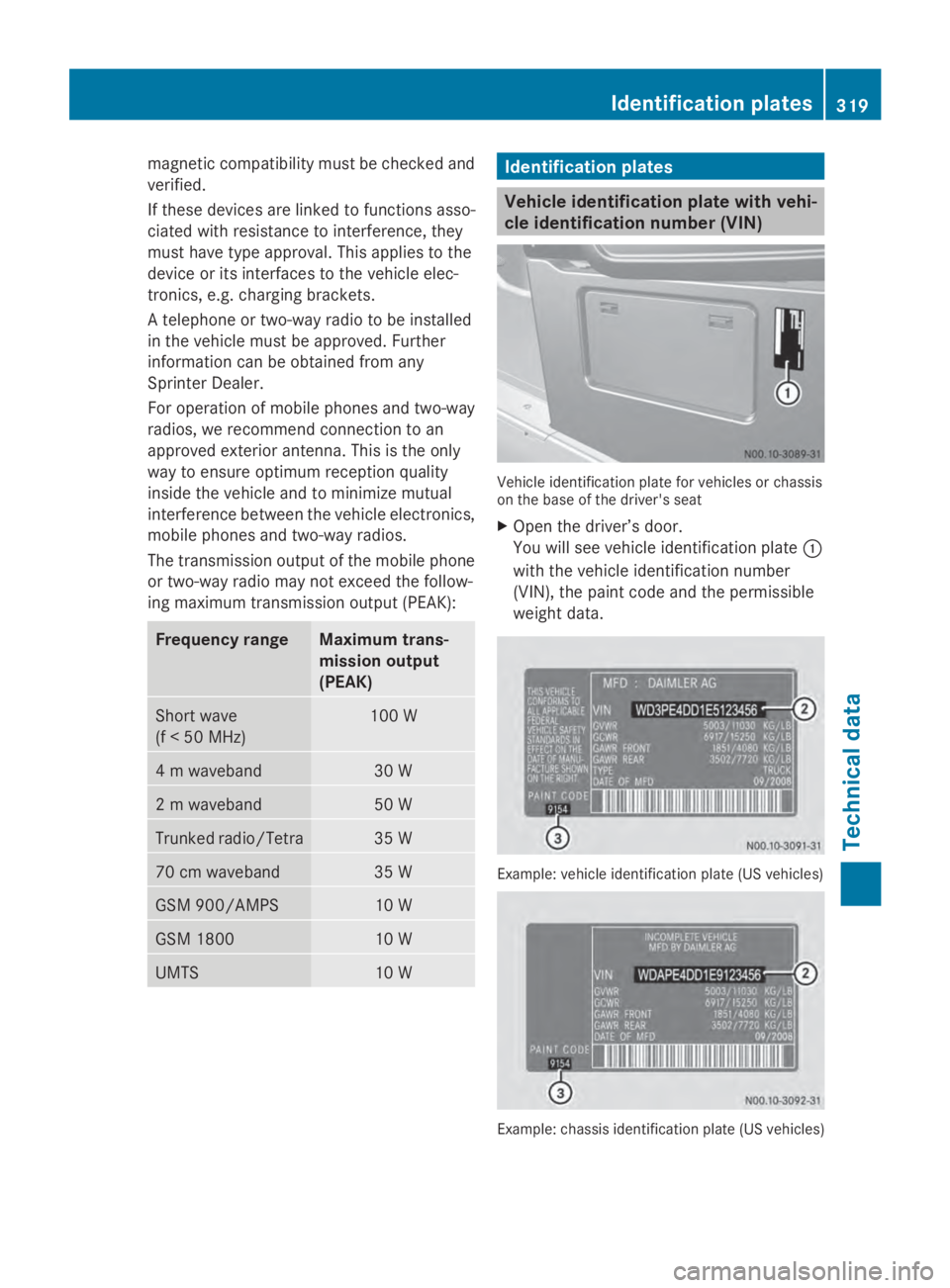
Vehicle identification plate with vehi-
cle identification number (VIN)
Vehicle identification plate for vehicles or chassis
on the base of the driver's seat
X
Open the driver’s door.
You will see vehicle identification plate 0043
with the vehicle identification number
(VIN), the paint code and the permissible
weight data. Example: vehicle identification plate (US vehicles)
Example: chassis identification plate (US vehicles) Identification plates
319Technical data Z
Page 329 of 338

Miscibility of engine oils
!
Mixing oils reduces the benefits of using
high grade engine oils.
We recommend that you only add engine oil
of the same quality grade and SAE class as
used when the engine oil was last changed.
If, in exceptional cases, oil of the type in the
engine is not available, top up using another
approved mineral or synthetic engine oil.
If the quality grade is not available for diesel
engines, you may also add engine oils meet-
ing the requirements in MB Sheet Number
228.5, 229.3 or 229.5. The topping-up quan-
tity is then limited to a maximum of 1 qt (1 l).
Engine oils are differentiated according to:
R engine oil brand
R quality grade (sheet number)
R SAE class (viscosity)
Subsequently have the engine oil changed at
the earliest possible opportunity.
Interval for oil change The on-board computer automatically shows
the date for the next oil change as an event
message in the display.
Only by using engine oil with a particularly
high quality grade, e.g. according to Sheet
Number 228.51 of the Mercedes-Benz Spec-
ifications for Service Products, can the maxi-
mum interval for oil change be achieved.
We recommend having the oil changed at a
qualified specialist workshop.
Engine oil for diesel engines Product name/number
see the Maintenance Booklet
MB Sheet Number 228.51, 229.31, 229.51
Capacities
!
Do not add too much oil. adding too much
engine oil can result in damage to the
engine or to the catalytic converter. Have
excess engine oil siphoned off. Oil change including oil filter Vehicles Engine oil
210 CDI, 213 CDI,
216 CDI, 310 CDI,
313 CDI, 316 CDI,
510 CDI, 513 CDI,
516 CDI Approximately
11.5 l 219 CDI, 319 CDI,
519 CDI Approximately
12.5 l 216, 316, 516 Approximately 8.0 l
Information about oil consumption
!
If the vehicle is predominantly used for
short-distance driving, this could lead to a
malfunction in the automatic cleaning func-
tion for the diesel particle filter. As a result,
fuel may accumulate in the engine oil and
cause engine failure.
Therefore, if you mainly drive short distan-
ces, you should drive on a highway or on
rural roads for 20 minutes every 310 miles
(500 km). This ensures sufficient regener-
ation of the diesel particle filter.
Depending on the driving style, the vehicle
consumes a maximum of 1.0 US qt (1.0 l)of
engine oil over a distance of 620 miles
(1000 km).
Oil consumption may be higher if:
R the vehicle is new.
R you mainly operate the vehicle under ardu-
ous operating conditions.
R you frequently drive at high engine speeds.
Regular maintenance is one of the precondi-
tions for moderate rates of consumption.
You can only estimate the oil consumption
after you have driven a considerable distance.
Check the engine oil level on a regular basis,
e.g. weekly or each time you refuel
(Y page 252). Service products and capacities
327Technical data Z