2014 MERCEDES-BENZ S-Class heating
[x] Cancel search: heatingPage 116 of 434

You can exit the reclined position and
adjust the seat position by:
R calling up a stored position using
memory buttons 1or 2(Y page 134)
R manually adjusting the seat to the
desired position ( Ypage 112).
i The steps for setting the reclined position
are not always carried out simultaneously.
The legrest folds down if overloaded. If this is
the case fold up the legrest and engage it. Adjusting the front-passenger seat
from the driver’s seat
Important safety notes G
WARNING
The front-air bags for could also injure the
vehicle occupants in the front If the front
seats are positioned too close to the
dashboard or steering wheel. This poses an
increased risk of injury or even fatal injury.
Always adjust the front seats so that they are
as far from the front air bags as possible. Also
observe the notes on the correct adjustment
of the seats. G
WARNING
Children could become trapped if they adjust
the seats, particularly when unattended.
There is a risk of injury.
When leaving the vehicle, always take the
SmartKey with you and lock the vehicle. Never
leave children unsupervised in the vehicle. G
WARNING
When you adjust a seat, you or other vehicle
occupants could become trapped, e.g. on the
seat guide rail. There is a risk of injury.
Make sure when adjusting a seat that no one
has any body parts in the sweep of the seat.
! Do not move the front-passenger seat
fully forwards if there are objects in the parcel net in the front-passenger footwell.
The objects could otherwise be damaged.
Adjusting the front-passenger seat X
To select the front-passenger seat:
press button 0043repeatedly until the
indicator lamp in the button lights up.
When the indicator lamp in button 0043lights
up, for the front-passenger seat you can
adjust:
R adjust the seat (Y page 112)
R seat heating/ventilation
R the memory function to call up or save
settings (Y page 133). Adjusting the front-passenger seat
from the rear
Important safety notes G
WARNING
The front-air bags for could also injure the
vehicle occupants in the front If the front
seats are positioned too close to the
dashboard or steering wheel. This poses an
increased risk of injury or even fatal injury.
Always adjust the front seats so that they are
as far from the front air bags as possible. Also
observe the notes on the correct adjustment
of the seats. 114
SeatsSeats, steering wheel and mirrors
Page 127 of 434
Adjusting the active multicontour
seat
The active multicontour seat can be adjusted
using COMAND (see the separate operating
instructions). Multicontour seat in the rear
You can use the Rear Seat Entertainment
System to adjust the multicontour seats for
the outer seats (see the separate operating
instructions). Adjusting the 4-way lumbar support
The 4-way lumbar support can be adjusted
with COMAND (see the separate operating
instructions). Switching the seat heating on/off
Activating/deactivating G
WARNING
Repeatedly switching on the seat heating can
cause the seat cushion and backrest pads to
become very hot. The health of persons with
limited temperature sensitivity or a limited
ability to react to excessively high
temperatures may be affected or they may
even suffer burn-like injuries. There is a risk
of injury.
Therefore, do not switch the seat heating on
repeatedly. For vehicles equipped with the Warmth
Comfort package: the armrest in the door and
the rear armrest or the rear-compartment
center console can also be heated when you
switch on the seat heating of one of the front
or rear seats. This can be set with COMAND
(see the separate operating instructions).
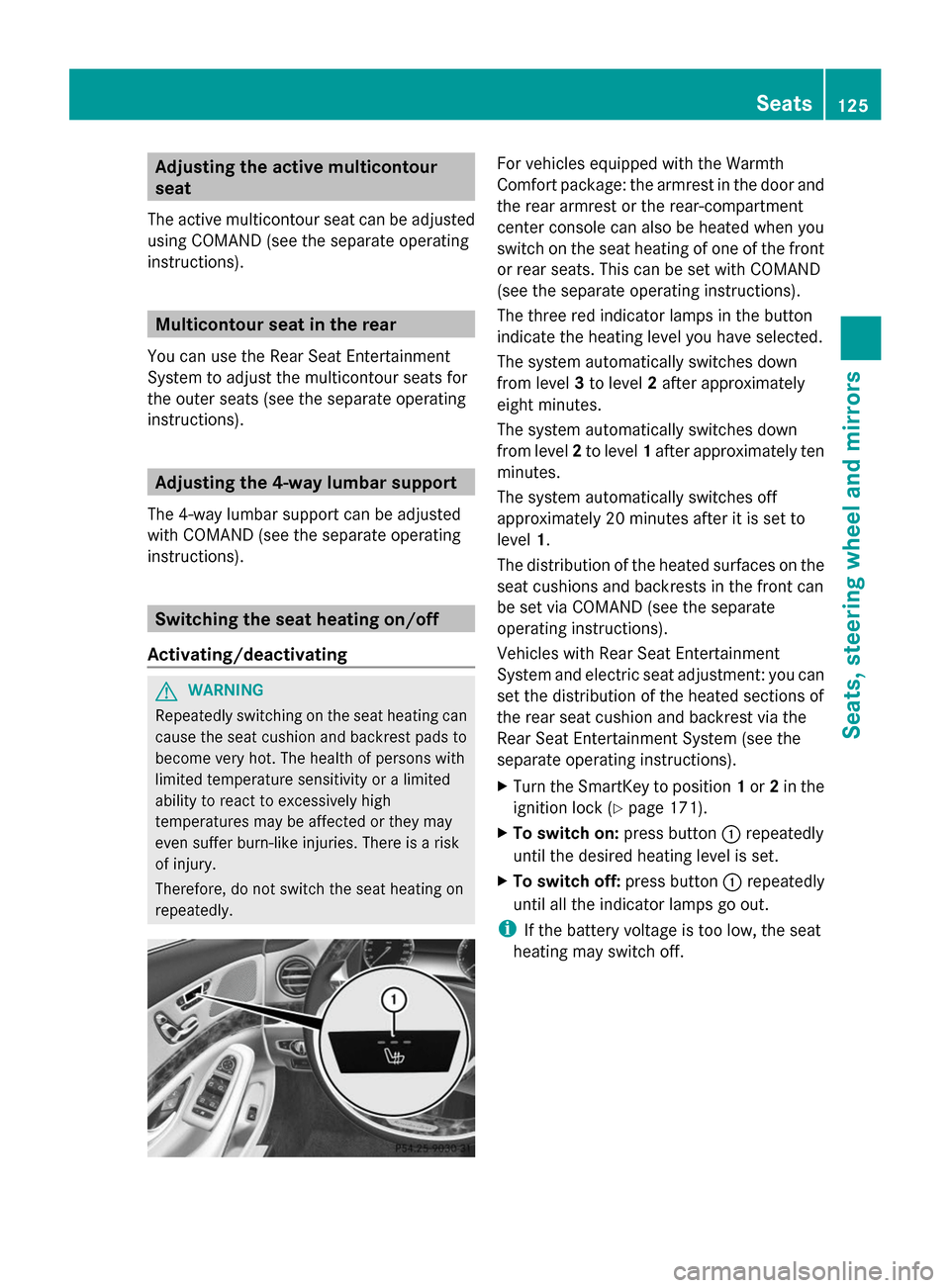
The three red indicator lamps in the button
indicate the heating level you have selected.
The system automatically switches down
from level
3to level 2after approximately
eight minutes.
The system automatically switches down
from level 2to level 1after approximately ten
minutes.
The system automatically switches off
approximately 20 minutes after it is set to
level 1.
The distribution of the heated surfaces on the
seat cushions and backrests in the front can
be set via COMAND (see the separate
operating instructions).
Vehicles with Rear Seat Entertainment
System and electric seat adjustment: you can
set the distribution of the heated sections of
the rear seat cushion and backrest via the
Rear Seat Entertainment System (see the
separate operating instructions).
X Turn the SmartKey to position 1or 2in the
ignition lock (Y page 171).
X To switch on: press button0043repeatedly
until the desired heating level is set.
X To switch off: press button0043repeatedly
until all the indicator lamps go out.
i If the battery voltage is too low, the seat
heating may switch off. Seats
125Seats, steering wheel and mirrors Z
Page 128 of 434
Problems with the seat heating
Problem Possible causes/consequences and
0050
0050Solutions The seat heating has
switched off
prematurely or cannot
be switched on. The on-board voltage is too low because too many electrical
consumers are switched on.
X Switch off electrical consumers that you do not need, such as
the rear window defroster or interior lighting.
Once the battery is sufficiently charged, the seat heating can be
switched back on manually. Switching the seat ventilation on/off
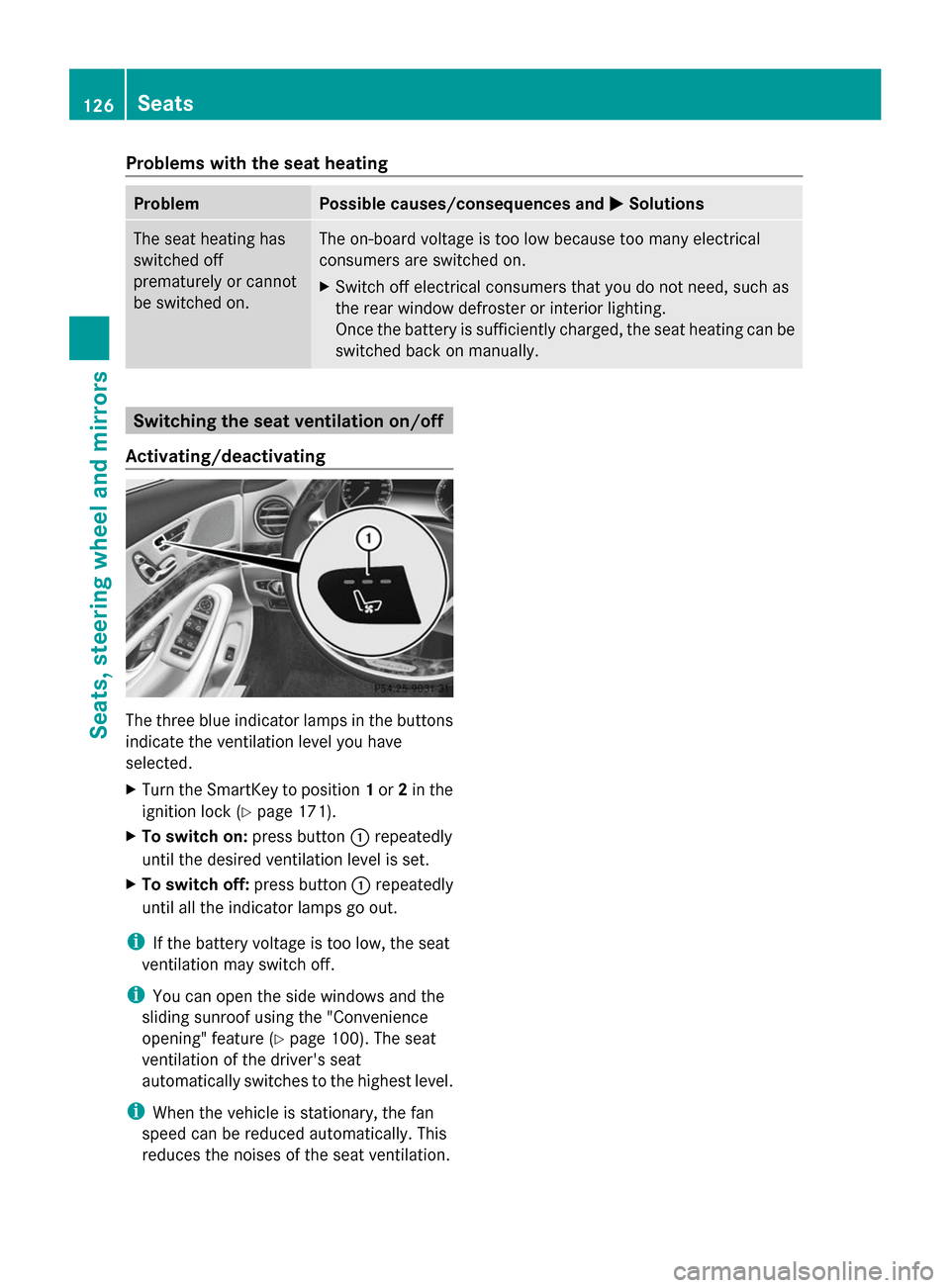
Activating/deactivating The three blue indicator lamps in the buttons
indicate the ventilation level you have
selected.
X Turn the SmartKey to position 1or 2in the
ignition lock (Y page 171).
X To switch on: press button0043repeatedly
until the desired ventilation level is set.
X To switch off: press button0043repeatedly
until all the indicator lamps go out.
i If the battery voltage is too low, the seat
ventilation may switch off.
i You can open the side windows and the
sliding sunroof using the "Convenience
opening" feature (Y page 100). The seat
ventilation of the driver's seat
automatically switches to the highest level.
i When the vehicle is stationary, the fan
speed can be reduced automatically. This
reduces the noises of the seat ventilation. 126
SeatsSeats, steering wheel and mirrors
Page 130 of 434
Steering wheel heating
Activating/deactivating X
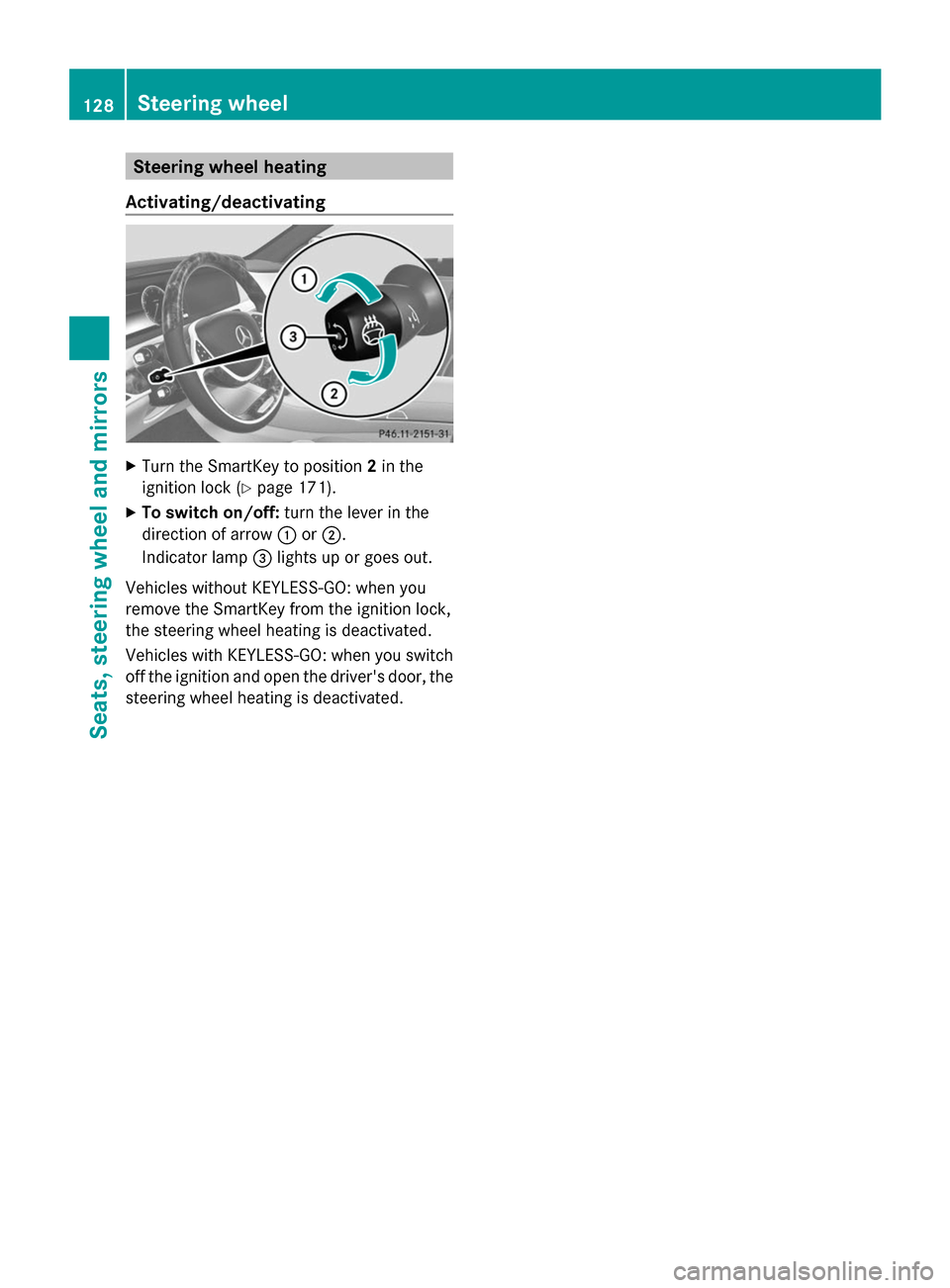
Turn the SmartKey to position 2in the
ignition lock (Y page 171).
X To switch on/off: turn the lever in the
direction of arrow 0043or0044.
Indicator lamp 0087lights up or goes out.
Vehicles without KEYLESS-GO: when you
remove the SmartKey from the ignition lock,
the steering wheel heating is deactivated.
Vehicles with KEYLESS-GO: when you switch
off the ignition and open the driver's door, the
steering wheel heating is deactivated. 128
Steering wheelSeats, steering wheel and mirrors
Page 131 of 434
Problems with the steering wheel heating
Problem Possible causes/consequences and
0050
0050Solutions The steering wheel
heating has switched
off prematurely or
cannot be switched on. The on-board voltage is too low because too many electrical
consumers are switched on.
X
Switch off electrical consumers that you do not need, such as
the rear window defroster or interior lighting. EASY-ENTRY/EXIT feature
Important safety notes G
WARNING
When the EASY-ENTRY/EXIT feature adjusts
the steering wheel and the driver's seat, you
and other vehicle occupants – particularly
children – could become trapped. There is a
risk of injury.
While the EASY-ENTRY/EXIT feature is
making adjustments, make sure that no one
has any body parts in the sweep of the seat
and the steering wheel.
If there is a danger of entrapment by the
steering column:
R move the steering wheel adjustment lever.
If there is a danger of entrapment by the seat:
R press the switch for seat adjustment.
The adjustment process is stopped. G
WARNING
If children activate the EASY-ENTRY/EXIT
feature, they can become trapped,
particularly when unattended. There is a risk
of injury.
When leaving the vehicle, always take the
SmartKey with you and lock the vehicle. Never
leave children unsupervised in the vehicle. G
WARNING
If you drive off while the EASY-ENTRY/EXIT
feature is making adjustments, you could lose
control of the vehicle. There is a risk of an
accident. Always wait until the adjustment process is
complete before driving off.
The EASY-ENTRY/EXIT feature makes getting
in and out of your vehicle easier.
You can activate and deactivate the EASY-
ENTRY/EXIT feature using COMAND (see the
separate operating instructions).
Position of the steering wheel and the
driver's seat when the EASY-ENTRY/
EXIT feature is active The steering wheel tilts upwards and the
driver's seat moves backwards if you:
R
remove the SmartKey from the ignition lock
R with KEYLESS-GO: open the driver's door;
KEYLESS-GO must be in position 1
R with the SmartKey: open the driver's
door; the SmartKey must be in position 0
or 1in the ignition lock (Y page 171)
R open the driver's door when the ignition is
switched off
i The steering wheel only tilts upwards and
the driver's seat only moves backwards, if
this driving position is stored after seat or
steering wheel adjustment (Y page 133).
The last position of the steering wheel or seat
is stored if:
R the ignition is switched off.
R the setting is stored with the memory
function (Y page 133).
i The steering wheel only moves upwards if
it has not already reached the upper end
stop. The driver's seat only moves Steering wheel
129Seats, steering wheel and mirrors Z
Page 136 of 434
backrest in the lumbar and shoulder
regions
R active multicontour seat: side bolsters of
the backrest, shoulder of the backrest,
contour of the backrest, dynamic function
level
R seat heating: distribution of the heated
sections of the seat cushion and backrest
R driver's side: position of the exterior
mirrors on the driver's and front-passenger
sides X
Adjust the seat accordingly (Y page 112).
X On the driver's side, adjust the steering
wheel (Y page 127 )and the exterior mirrors
(Y page 131).
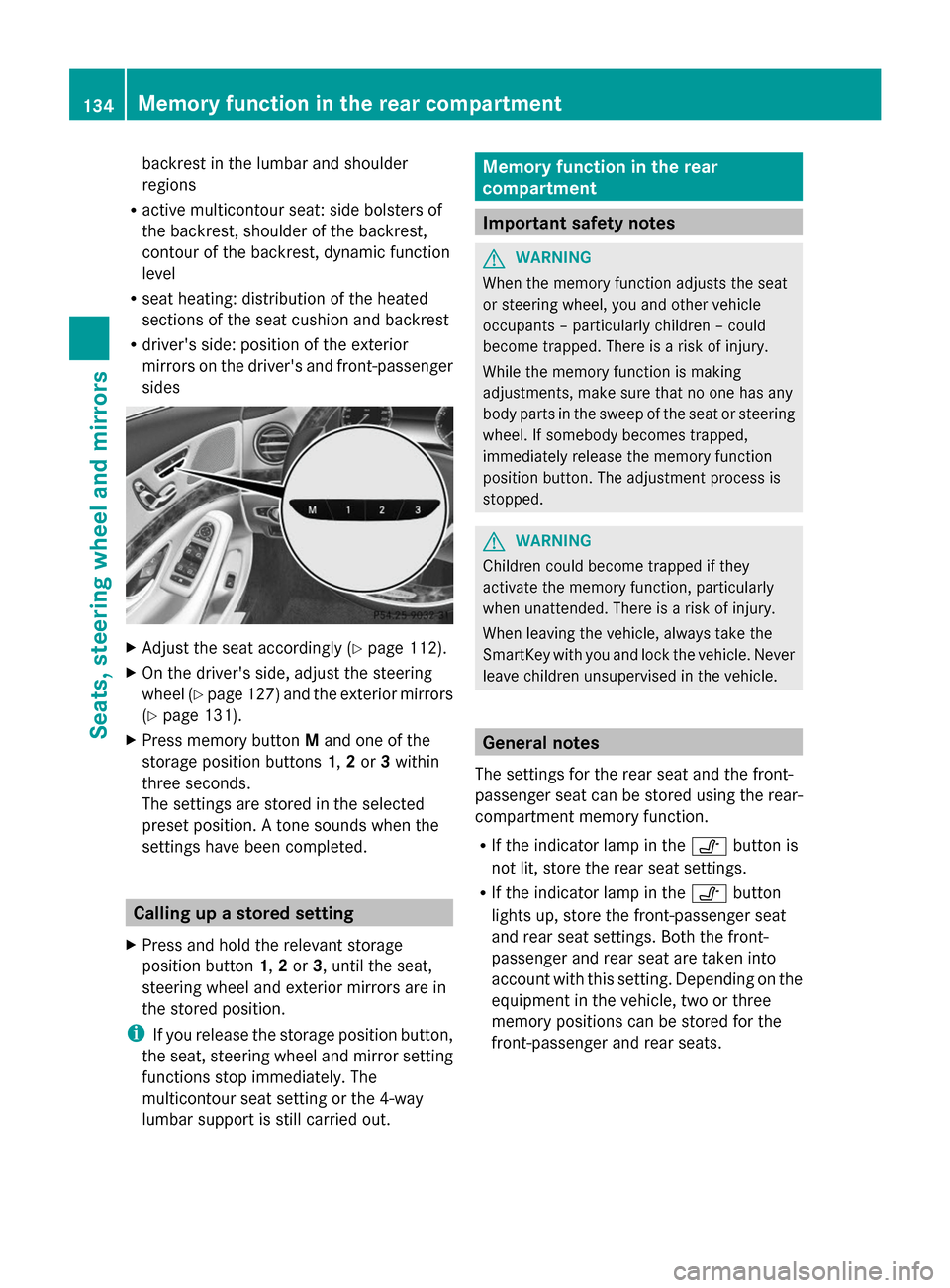
X Press memory button Mand one of the
storage position buttons 1,2or 3within
three seconds.
The settings are stored in the selected
preset position. A tone sounds when the
settings have been completed. Calling up a stored setting
X Press and hold the relevant storage
position button 1,2or 3, until the seat,
steering wheel and exterior mirrors are in
the stored position.
i If you release the storage position button,
the seat, steering wheel and mirror setting
functions stop immediately. The
multicontour seat setting or the 4-way
lumbar support is still carried out. Memory function in the rear
compartment
Important safety notes
G
WARNING
When the memory function adjusts the seat
or steering wheel, you and other vehicle
occupants – particularly children – could
become trapped. There is a risk of injury.
While the memory function is making
adjustments, make sure that no one has any
body parts in the sweep of the seat or steering
wheel. If somebody becomes trapped,
immediately release the memory function
position button. The adjustment process is
stopped. G
WARNING
Children could become trapped if they
activate the memory function, particularly
when unattended. There is a risk of injury.
When leaving the vehicle, always take the
SmartKey with you and lock the vehicle. Never
leave children unsupervised in the vehicle. General notes
The settings for the rear seat and the front-
passenger seat can be stored using the rear-
compartment memory function.
R If the indicator lamp in the 0095button is
not lit, store the rear seat settings.
R If the indicator lamp in the 0095button
lights up, store the front-passenger seat
and rear seat settings. Both the front-
passenger and rear seat are taken into
account with this setting. Depending on the
equipment in the vehicle, two or three
memory positions can be stored for the
front-passenger and rear seats. 134
Memory function in the rear compartmentSeats, steering
wheel and mirrors
Page 137 of 434
Storing settings
General notes With the memory function in the rear, you can
store up to three different settings, e.g. for
three different people.
The following settings are stored as a single
memory preset:
R position of the seat, backrest and head
restraint
R multicontour seat: the side bolsters of the
backrest as well as the contour of the
backrest in the lumbar and shoulder
regions
R seat heating: distribution of the heated
sections of the seat cushion and backrest
if the indicator lamp in the 0095button is
not lit.
The following settings are stored to a memory
position, if the indicator lamp in the 0095
button lights up:
R position of the footrest for the front-
passenger seat, if available
R position of the screen, if available
Vehicles without rear reclining seat X
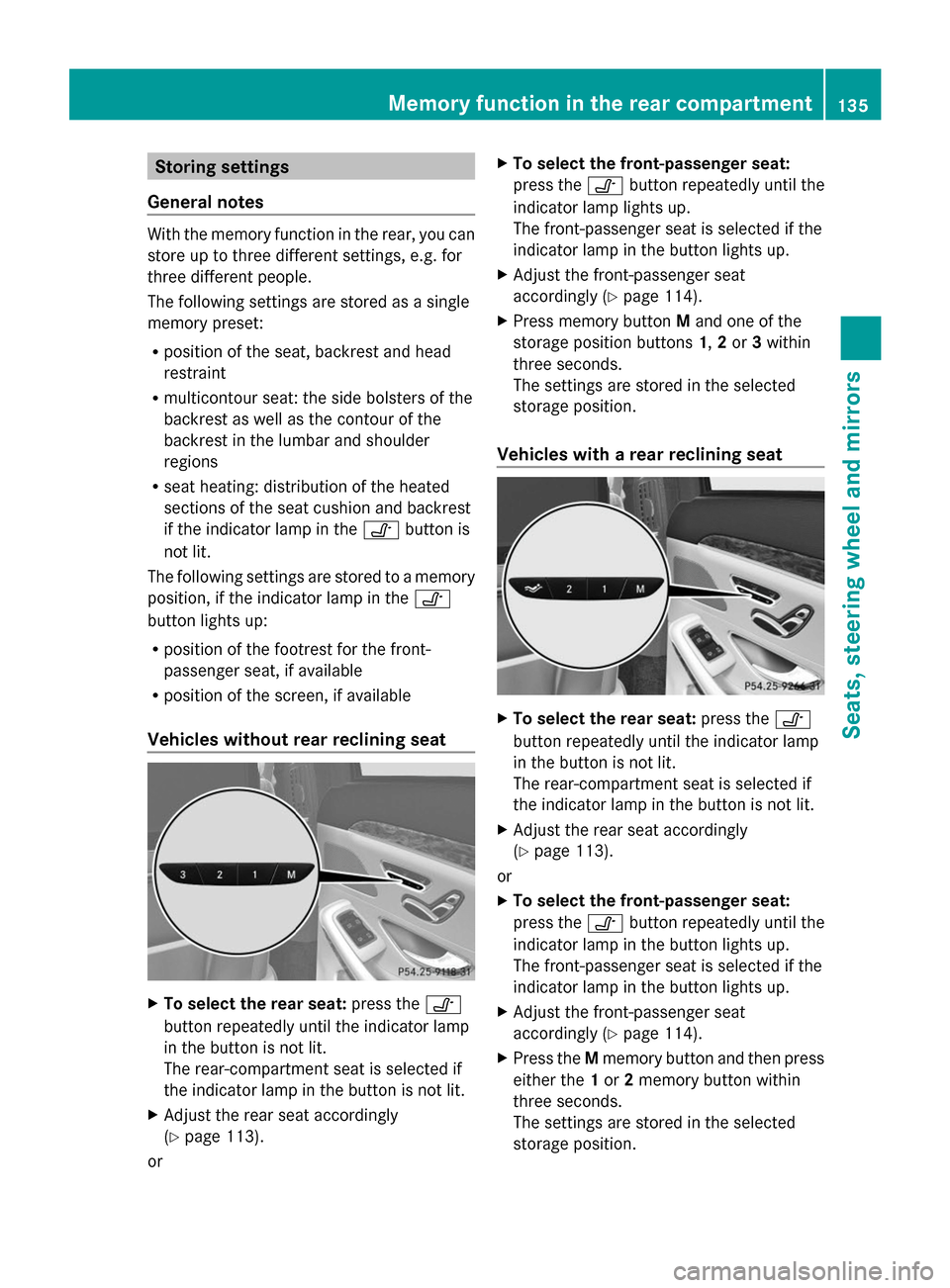
To select the rear seat: press the0095
button repeatedly until the indicator lamp
in the button is not lit.
The rear-compartment seat is selected if
the indicator lamp in the button is not lit.
X Adjust the rear seat accordingly
(Y page 113).
or X
To select the front-passenger seat:
press the 0095button repeatedly until the
indicator lamp lights up.
The front-passenger seat is selected if the
indicator lamp in the button lights up.
X Adjust the front-passenger seat
accordingly (Y page 114).
X Press memory button Mand one of the
storage position buttons 1,2or 3within
three seconds.
The settings are stored in the selected
storage position.
Vehicles with a rear reclining seat X
To select the rear seat: press the0095
button repeatedly until the indicator lamp
in the button is not lit.
The rear-compartment seat is selected if
the indicator lamp in the button is not lit.
X Adjust the rear seat accordingly
(Y page 113).
or
X To select the front-passenger seat:
press the 0095button repeatedly until the
indicator lamp in the button lights up.
The front-passenger seat is selected if the
indicator lamp in the button lights up.
X Adjust the front-passenger seat
accordingly (Y page 114).
X Press the Mmemory button and then press
either the 1or 2memory button within
three seconds.
The settings are stored in the selected
storage position. Memory function in the rear compartment
135Seats, steering wheel and mirrors Z
Page 163 of 434
Setting the rear compartment airflow
using the front control panel Observe the notes on controlling the rear-
compartment climate control using the front
control panel (Y page 155).
X Turn the SmartKey to position 2in the
ignition lock (Y page 171).
X Press the top or bottom section of the
008A rocker switch.
The COMAND climate control menu opens.
X Select "Rear adjustment" in the air-
conditioning setting bar (see the separate
COMAND operating instructions).
You can control the rear-compartment
climate control using the front control
panel or COMAND.
X To increase/reduce: press the0097
rocker switch on the front control panel up
or down.
or
X Set the airflow using COMAND (see the
separate operating instructions).
Setting the rear compartment airflow
using the rear control panel X
Turn the SmartKey to position 2in the
ignition lock (Y page 171).
X To increase/reduce: press rocker switch
0073 up or down (Y page 153). Switching the synchronization
function on/off
Climate control can be set centrally using the
synchronization function. The settings for
temperature, air distribution and airflow on
the driver's side are adopted for the front-
passenger side and the rear compartment
(vehicles with rear-compartment air
conditioning).
X To activate/deactivate: switch the
synchronization function on or off using COMAND (see the separate operating
instructions).
Vehicles with rear-compartment air
conditioning: the
SYNC
SYNC display appears on
the rear-compartment display.
The synchronization function is deactivated:
R if the settings for the front-passenger side
are changed
R vehicles with rear-compartment air
conditioning: the settings for the rear
compartment are changed. Defrosting the windshield
You can use this function to defrost the
windshield or to defrost the inside of the
windshield and the front side windows.
Switch off the "Windshield defrosting"
function as soon as the windshield is clear
again.
X Turn the SmartKey to position 2in the
ignition lock (Y page 171).
X To activate: press the0064rocker switch
on the front control unit up or down.
The indicator lamp in the 0064rocker
switch lights up.
The climate control system switches to the
following functions:
R high airflow
R high temperature
R air distribution to the windshield and
front side windows
R air-recirculation mode off
R windshield heating on
X To deactivate: press the0064rocker
switch up or down.
The indicator lamp in the 0064rocker
switch goes out. The previously selected
settings are restored. Air-recirculation
mode remains deactivated.
or
X Press the 0058rocker switch up or down. Operating the climate control systems
161Climate control