2014 KIA Sportage Auto start
[x] Cancel search: Auto startPage 95 of 457
43
Features of your vehicle
D010100AUN
Record your key number
The key code num-
ber is stamped on
the key code tag
attached to the key
set. Should you
lose your keys, this number will
enable an authorized Kia dealer to
duplicate the keys easily. Remove
the key code tag and store it in a safe
place. Also, record the key code
number and keep it in a safe and
handy place, but not in the vehicle.
D010200AAM
Key operations
• Used to start the engine.
Used to lock and unlock the doors.
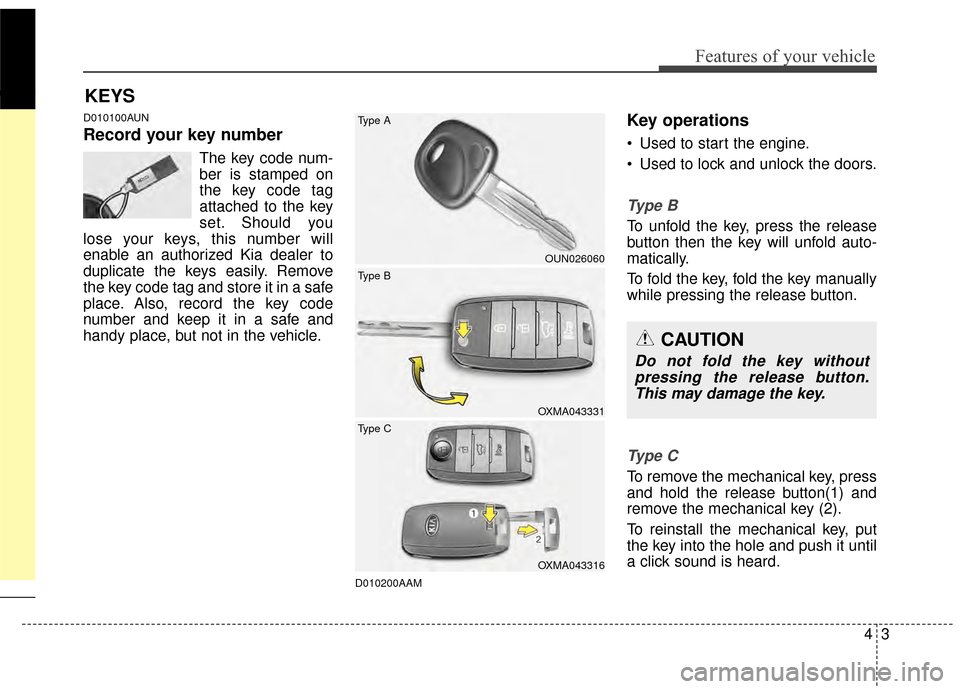
Ty p e B
To unfold the key, press the release
button then the key will unfold auto-
matically.
To fold the key, fold the key manually
while pressing the release button.
Ty p e C
To remove the mechanical key, press
and hold the release button(1) and
remove the mechanical key (2).
To reinstall the mechanical key, put
the key into the hole and push it until
a click sound is heard.
KEYS
CAUTION
Do not fold the key without pressing the release button.This may damage the key.
OUN026060
OXMA043331
OXMA043316
Type B Type A
Type C
Page 97 of 457
45
Features of your vehicle
To activate the immobilizer sys-tem:
Turn the ignition key to the OFF posi-
tion. The immobilizer system acti-
vates automatically. Without a valid
ignition key for your vehicle, the
engine will not start.
To deactivate the immobilizersystem:
Insert the ignition key into the key
cylinder and turn it to the ON posi-
tion.
✽ ✽ NOTICE
When starting the engine, do not use
the key with other immobilizer keys
around. Otherwise the engine may
not start or may stop soon after it
starts. Keep each key separately in
order to avoid a starting malfunc-
tion.
✽ ✽NOTICE
If you need additional keys or lose
your keys, consult an authorized Kia
dealer.
CAUTION
The transponder in your ignition
key is an important part of theimmobilizer system. It isdesigned to give years of trou-ble-free service, however youshould avoid exposure to mois-ture, static electricity and roughhandling. Immobilizer systemmalfunction could occur.
CAUTION
Do not change, alter or adjust theimmobilizer system because itcould cause the immobilizer sys-tem to malfunction and shouldonly be serviced by an author-ized Kia dealer.
Malfunctions caused by improp-er alterations, adjustments ormodifications to the immobilizersystem are not covered by yourvehicle manufacturer warranty.
CAUTION
Do not put metal accessories
near the ignition switch.
Metal accessories may interruptthe transponder signal and mayprevent the engine from beingstarted.
WARNING
In order to prevent theft of your
vehicle, do not leave spare keys
or your key number anywhere in
the vehicle. The ignition key and
key number are unique to your
vehicle, and therefore, should
be kept confidential.
Page 102 of 457
Features of your vehicle
10
4
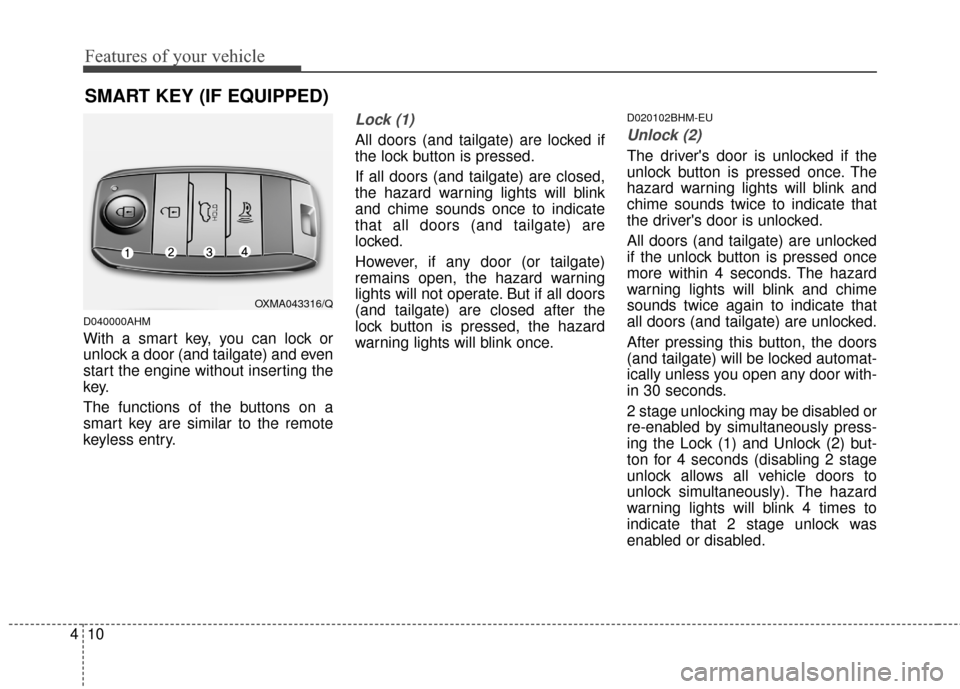
D040000AHM
With a smart key, you can lock or
unlock a door (and tailgate) and even
start the engine without inserting the
key.
The functions of the buttons on a
smart key are similar to the remote
keyless entry.
Lock (1)
All doors (and tailgate) are locked if
the lock button is pressed.
If all doors (and tailgate) are closed,
the hazard warning lights will blink
and chime sounds once to indicate
that all doors (and tailgate) are
locked.
However, if any door (or tailgate)
remains open, the hazard warning
lights will not operate. But if all doors
(and tailgate) are closed after the
lock button is pressed, the hazard
warning lights will blink once.
D020102BHM-EU
Unlock (2)
The driver's door is unlocked if the
unlock button is pressed once. The
hazard warning lights will blink and
chime sounds twice to indicate that
the driver's door is unlocked.
All doors (and tailgate) are unlocked
if the unlock button is pressed once
more within 4 seconds. The hazard
warning lights will blink and chime
sounds twice again to indicate that
all doors (and tailgate) are unlocked.
After pressing this button, the doors
(and tailgate) will be locked automat-
ically unless you open any door with-
in 30 seconds.
2 stage unlocking may be disabled or
re-enabled by simultaneously press-
ing the Lock (1) and Unlock (2) but-
ton for 4 seconds (disabling 2 stage
unlock allows all vehicle doors to
unlock simultaneously). The hazard
warning lights will blink 4 times to
indicate that 2 stage unlock was
enabled or disabled.
SMART KEY (IF EQUIPPED)
OXMA043316/Q
Page 103 of 457
411
Features of your vehicle
D020104AHM
Tailgate unlock (3)
The tailgate is unlocked if the button
is pressed for more than 1 second.
The hazard warning lights will blink
twice to indicate that the tailgate is
unlocked.
However, after pressing this button,
the tailgate will lock automatically
unless you open the tailgate within
30 seconds.
Also, once the tailgate is opened and
then closed, the tailgate will lock
automatically.
D020105AHM
Alarm (4)
The horn sounds and the hazard
warning lights blink for about 30 sec-
onds if this button is pressed for
more than 0.5 seconds. To stop the
horn and lights, press any button on
the transmitter.
D040100AHM
Smart key functions
Carrying the smart key, you may lock
and unlock the vehicle doors (and
tailgate). Also, you may start the
engine. Refer to the following, for
more details.
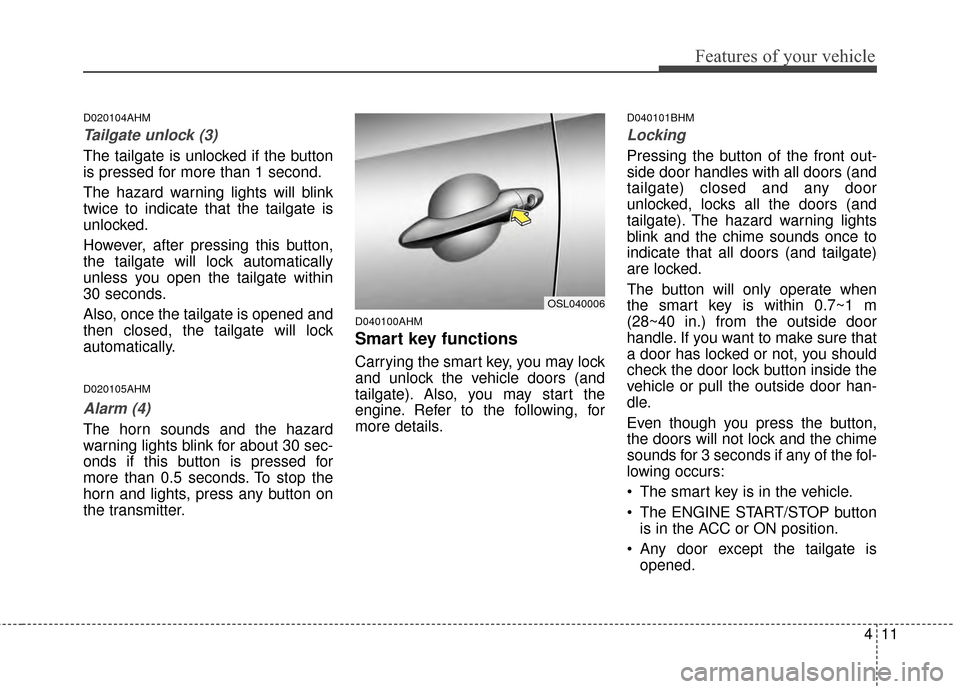
D040101BHM
Locking
Pressing the button of the front out-
side door handles with all doors (and
tailgate) closed and any door
unlocked, locks all the doors (and
tailgate). The hazard warning lights
blink and the chime sounds once to
indicate that all doors (and tailgate)
are locked.
The button will only operate when
the smart key is within 0.7~1 m
(28~40 in.) from the outside door
handle. If you want to make sure that
a door has locked or not, you should
check the door lock button inside the
vehicle or pull the outside door han-
dle.
Even though you press the button,
the doors will not lock and the chime
sounds for 3 seconds if any of the fol-
lowing occurs:
The smart key is in the vehicle.
The ENGINE START/STOP buttonis in the ACC or ON position.
Any door except the tailgate is opened.
OSL040006
Page 104 of 457
Features of your vehicle
12
4
D040102AEN-EU
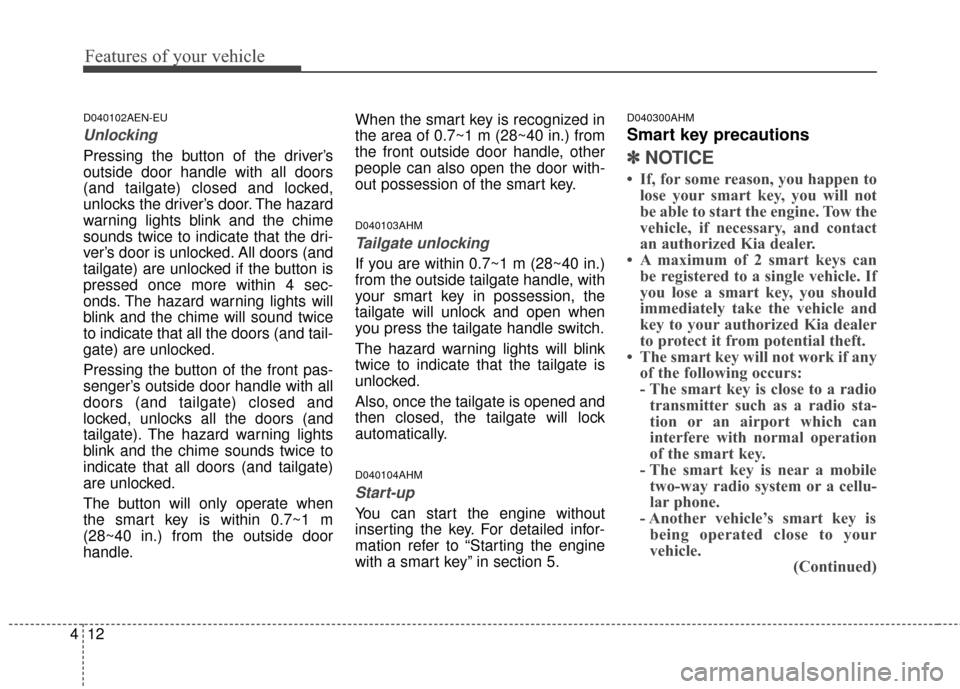
Unlocking
Pressing the button of the driver’s
outside door handle with all doors
(and tailgate) closed and locked,
unlocks the driver’s door. The hazard
warning lights blink and the chime
sounds twice to indicate that the dri-
ver’s door is unlocked. All doors (and
tailgate) are unlocked if the button is
pressed once more within 4 sec-
onds. The hazard warning lights will
blink and the chime will sound twice
to indicate that all the doors (and tail-
gate) are unlocked.
Pressing the button of the front pas-
senger’s outside door handle with all
doors (and tailgate) closed and
locked, unlocks all the doors (and
tailgate). The hazard warning lights
blink and the chime sounds twice to
indicate that all doors (and tailgate)
are unlocked.
The button will only operate when
the smart key is within 0.7~1 m
(28~40 in.) from the outside door
handle. When the smart key is recognized in
the area of 0.7~1 m (28~40 in.) from
the front outside door handle, other
people can also open the door with-
out possession of the smart key.
D040103AHM
Tailgate unlocking
If you are within 0.7~1 m (28~40 in.)
from the outside tailgate handle, with
your smart key in possession, the
tailgate will unlock and open when
you press the tailgate handle switch.
The hazard warning lights will blink
twice to indicate that the tailgate is
unlocked.
Also, once the tailgate is opened and
then closed, the tailgate will lock
automatically.
D040104AHM
Start-up
You can start the engine without
inserting the key. For detailed infor-
mation refer to “Starting the engine
with a smart key” in section 5.
D040300AHM
Smart key precautions
✽ ✽
NOTICE
• If, for some reason, you happen to
lose your smart key, you will not
be able to start the engine. Tow the
vehicle, if necessary, and contact
an authorized Kia dealer.
• A maximum of 2 smart keys can be registered to a single vehicle. If
you lose a smart key, you should
immediately take the vehicle and
key to your authorized Kia dealer
to protect it from potential theft.
• The smart key will not work if any of the following occurs:
- The smart key is close to a radiotransmitter such as a radio sta-
tion or an airport which can
interfere with normal operation
of the smart key.
- The smart key is near a mobile two-way radio system or a cellu-
lar phone.
- Another vehicle’s smart key is being operated close to your
vehicle. (Continued)
Page 126 of 457
Features of your vehicle
34
4
(Continued)
When using an approved
portable fuel container, be
sure to place the container on
the ground prior to refueling.
Static electricity discharge
from the container can ignite
fuel vapors causing a fire.
Once refueling has begun,
contact with the vehicle
should be maintained until the
filling is complete.
Use only approved portable
plastic fuel containers
designed to carry and store
gasoline.
Do not use cellular phones while refueling. Electric cur-
rent and/or electronic interfer-
ence from cellular phones can
potentially ignite fuel vapors
causing a fire.
(Continued)(Continued)
When refueling, always shutthe engine off. Sparks pro-
duced by electrical compo-
nents related to the engine
can ignite fuel vapors causing
a fire. Once refueling is com-
plete, check to make sure the
filler cap and filler door are
securely closed, before start-
ing the engine.
DO NOT use matches or a lighter and DO NOT SMOKE or
leave a lit cigarette in your
vehicle while at a gas station
especially during refueling.
Automotive fuel is highly
flammable and can, when
ignited, result in fire.
If a fire breaks out during refu- eling, leave the vicinity of the
vehicle, and immediately con-
tact the manager of the gas
station and then contact the
local fire department. Follow
any safety instructions they
provide.CAUTION
Make sure to refuel your vehi- cle according to the “Fuelrequirements” suggested insection 1.
If the fuel filler cap requires replacement, use only a gen-uine Kia cap or the equivalentspecified for your vehicle. Anincorrect fuel filler cap canresult in a serious malfunctionof the fuel system or emissioncontrol system.
Do not spill fuel on the exteri- or surfaces of the vehicle. Anytype of fuel spilled on paintedsurfaces may damage thepaint.
After refueling, make sure the fuel cap is installed securelyto prevent fuel spillage in theevent of an accident.
Page 132 of 457
Features of your vehicle
40
4
D130300AUN
Tilt steering/
Telescope steering
(if equipped)
Tilt steering allows you to adjust the
steering wheel before you drive.
You can also raise the steering wheel
to give your legs more room when
you exit and enter the vehicle (if
equipped).
The steering wheel should be posi-
tioned so that it is comfortable for
you to drive, while permitting you to
see the instrument panel warning
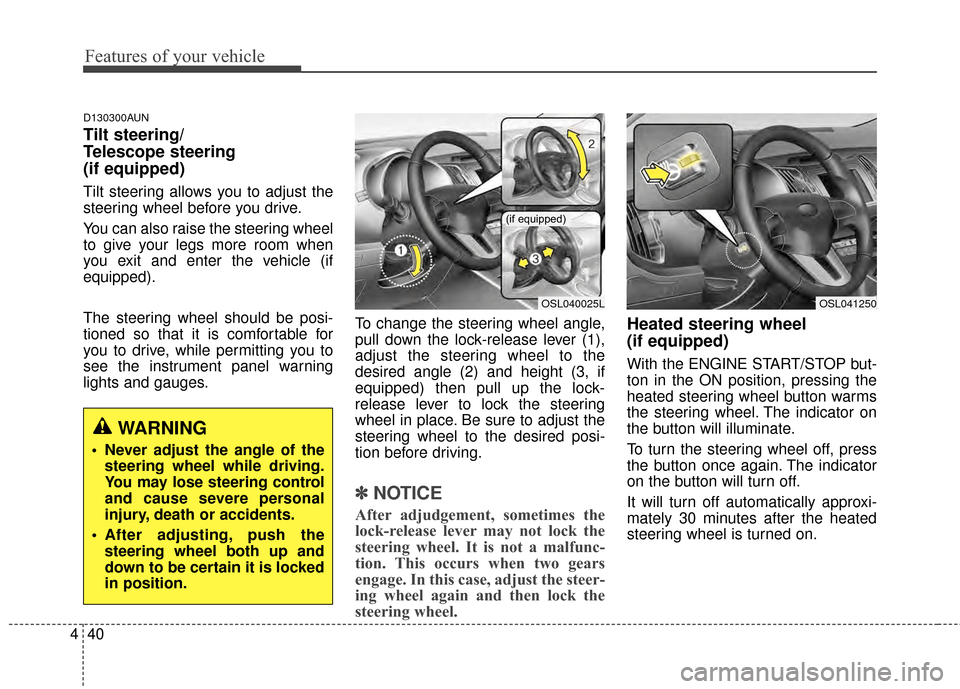
lights and gauges. To change the steering wheel angle,
pull down the lock-release lever (1),
adjust the steering wheel to the
desired angle (2) and height (3, if
equipped) then pull up the lock-
release lever to lock the steering
wheel in place. Be sure to adjust the
steering wheel to the desired posi-
tion before driving.
✽ ✽
NOTICE
After adjudgement, sometimes the
lock-release lever may not lock the
steering wheel. It is not a malfunc-
tion. This occurs when two gears
engage. In this case, adjust the steer-
ing wheel again and then lock the
steering wheel.
Heated steering wheel
(if equipped)
With the ENGINE START/STOP but-
ton in the ON position, pressing the
heated steering wheel button warms
the steering wheel. The indicator on
the button will illuminate.
To turn the steering wheel off, press
the button once again. The indicator
on the button will turn off.
It will turn off automatically approxi-
mately 30 minutes after the heated
steering wheel is turned on.
WARNING
Never adjust the angle of the
steering wheel while driving.
You may lose steering control
and cause severe personal
injury, death or accidents.
After adjusting, push the steering wheel both up and
down to be certain it is locked
in position.
OSL040025L
(if equipped)
OSL041250
Page 179 of 457
487
Features of your vehicle
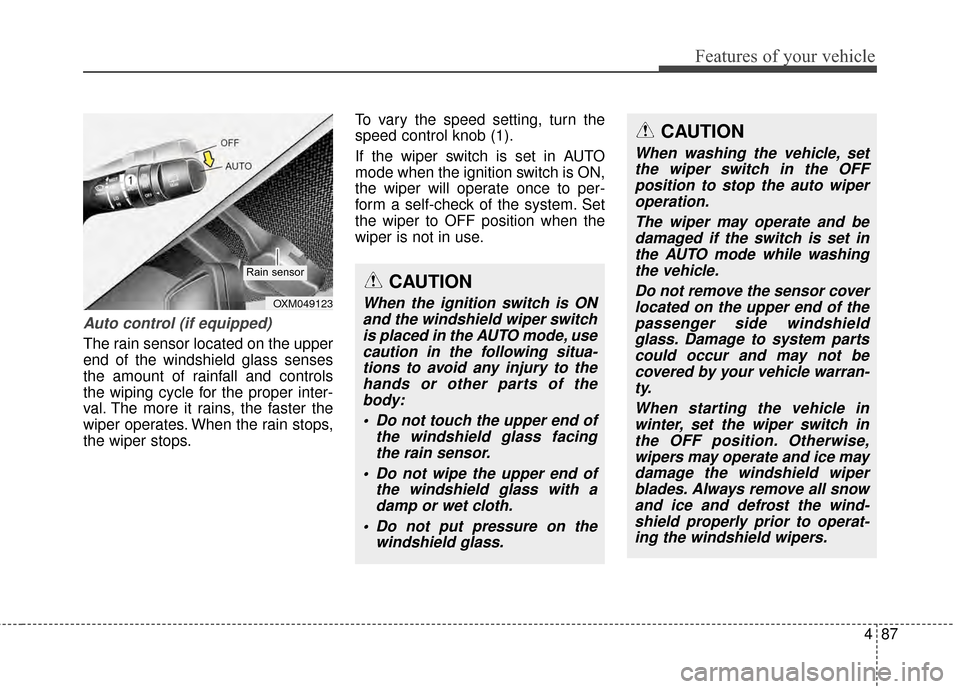
Auto control (if equipped)
The rain sensor located on the upper
end of the windshield glass senses
the amount of rainfall and controls
the wiping cycle for the proper inter-
val. The more it rains, the faster the
wiper operates. When the rain stops,
the wiper stops.To vary the speed setting, turn the
speed control knob (1).
If the wiper switch is set in AUTO
mode when the ignition switch is ON,
the wiper will operate once to per-
form a self-check of the system. Set
the wiper to OFF position when the
wiper is not in use.
CAUTION
When the ignition switch is ON
and the windshield wiper switchis placed in the AUTO mode, usecaution in the following situa-tions to avoid any injury to thehands or other parts of thebody:
Do not touch the upper end of the windshield glass facingthe rain sensor.
Do not wipe the upper end of the windshield glass with adamp or wet cloth.
Do not put pressure on the windshield glass.OXM049123
Rain sensor
CAUTION
When washing the vehicle, setthe wiper switch in the OFFposition to stop the auto wiperoperation.
The wiper may operate and bedamaged if the switch is set inthe AUTO mode while washingthe vehicle.
Do not remove the sensor coverlocated on the upper end of thepassenger side windshieldglass. Damage to system partscould occur and may not becovered by your vehicle warran-ty.
When starting the vehicle inwinter, set the wiper switch inthe OFF position. Otherwise,wipers may operate and ice maydamage the windshield wiperblades. Always remove all snowand ice and defrost the wind-shield properly prior to operat-ing the windshield wipers.