2014 Hyundai Sonata ECO mode
[x] Cancel search: ECO modePage 201 of 665
3-105
Convenient features of your vehicle
3
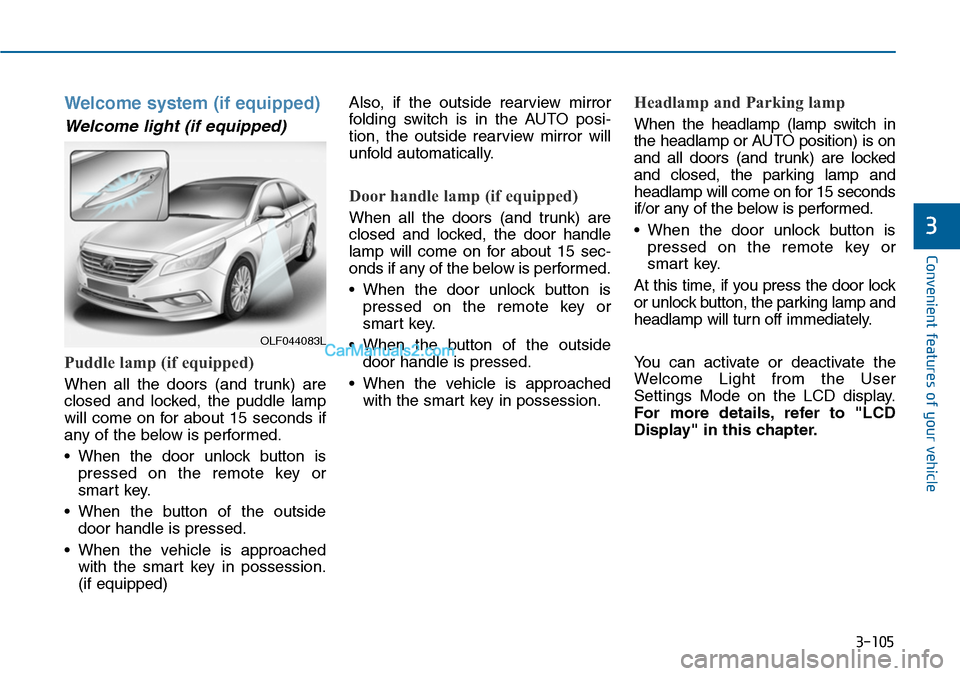
Welcome system (if equipped)
Welcome light (if equipped)
Puddle lamp (if equipped)
When all the doors (and trunk) are
closed and locked, the puddle lamp
will come on for about 15 seconds if
any of the below is performed.
•When the door unlock button is
pressed on the remote key or
smart key.
•When the button of the outside
door handle is pressed.
•When the vehicle is approached
with the smart key in possession.
(if equipped)
Also, if the outside rearview mirror
folding switch is in the AUTO posi-
tion, the outside rearview mirror will
unfold automatically.
Door handle lamp (if equipped)
When all the doors (and trunk) are
closed and locked, the door handle
lamp will come on for about 15 sec-
onds if any of the below is performed.
•When the door unlock button is
pressed on the remote key or
smart key.
•When the button of the outside
door handle is pressed.
•When the vehicle is approached
with the smart key in possession.
Headlamp and Parking lamp
When the headlamp (lamp switch in
the headlamp or AUTO position) is on
and all doors (and trunk) are locked
and closed, the parking lamp and
headlamp will come on for 15 seconds
if/or any of the below is performed.
•When the door unlock button is
pressed on the remote key or
smart key.
At this time, if you press the door lock
or unlock button, the parking lamp and
headlamp will turn off immediately.
Yo u c a n a c t i v a t e o r d e a c t i v a t e t h e
Welcome Light from the User
Settings Mode on the LCD display.
For more details, refer to "LCD
Display" in this chapter.
OLF044083L
Page 228 of 665

3-132
Convenient features of your vehicle
•Operating the air conditioning sys-
tem in the recirculated air position
provides maximum cooling, how-
ever, continual operation in this
mode may cause the air inside the
vehicle to become stale.
•During cooling operation, you may
occasionally notice a misty air flow
because of rapid cooling and
humid air intake. This is a normal
system operation characteristics.
System maintenance
Climate control air filter
The climate control air filter installed
behind the glove box filters the dust
or other pollutants that come into the
vehicle from the outside through the
heating and air conditioning system.
If dust or other pollutants accumulate
in the filter over a period of time, the
air flow from the air vents may
decrease, resulting in moisture accu-
mulation on the inside of the wind-
shield even when the outside (fresh)
air position is selected. If this hap-
pens, we recommend that the cli-
mate control air filter be replaced by
an authorized HYUNDAI dealer.
Information
• Replace the filter according to the
Maintenance Schedule.
If the car is being driven in severe con-
ditions such as dusty, rough roads,
more frequent climate control air filter
inspections and changes are required.
• When the air flow rate suddenly
decreases, we recommend that the
system be checked by an authorized
HYUNDAI dealer.
Information
It is important that the correct type
and amount of oil and refrigerant is
used. Otherwise, damage to the com-
pressor and abnormal system opera-
tion may occur.
i
i
1LDA5047
Outside air
Recirculatedair
Climate controlair filter
Blower
Evaporatorcore
Heater core
We recommend that the air con-
ditioning system be serviced by
an authorized HYUNDAI dealer.
Improper service may cause
serious injury to the person per-
forming the service.
WARNING
Page 236 of 665
3-140
Convenient features of your vehicle
Temperature conversion
If the battery has been discharged or
disconnected, the temperature mode
display will reset to Centigrade.
This is a normal condition. You can
switch the temperature mode between
Centigrade to Fahrenheit as follows;
-Automatic climate control system
While pressing the OFF button,
press the AUTO button for 3 seconds
or more. The display will change from
Centigrade to Fahrenheit, or from
Fahrenheit to Centigrade.
-“User setting mode”in the cluster :
Yo u c a n c h a n g e t h e t e m p e r a t u r e
unit in the “Other features -
Temperature unit”
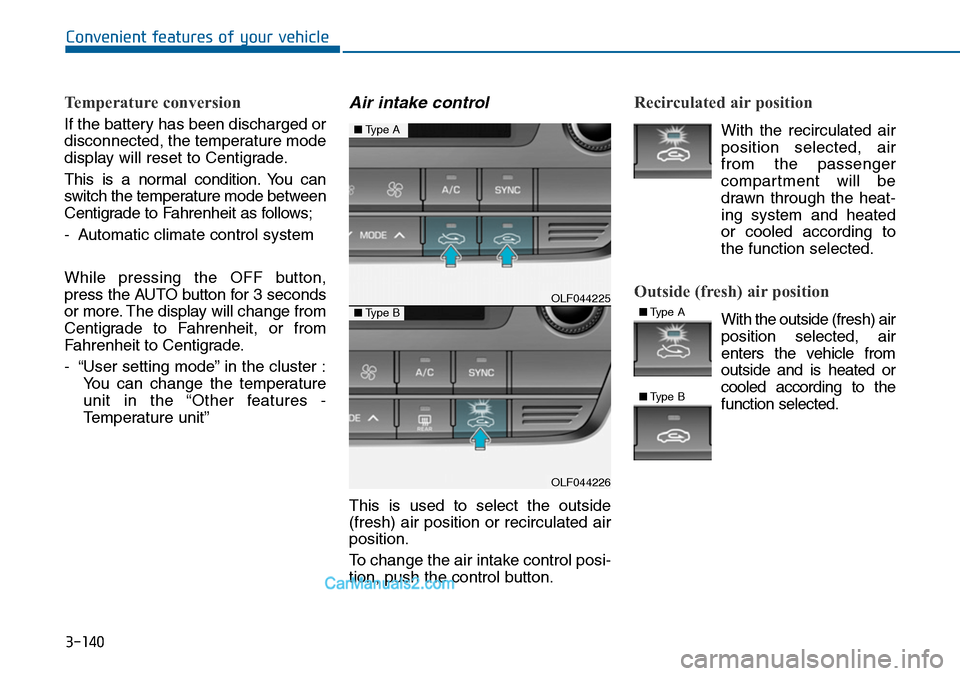
Air intake control
This is used to select the outside
(fresh) air position or recirculated air
position.
To change the air intake control posi-
tion, push the control button.
Recirculated air position
With the recirculated air
position selected, air
from the passenger
compartment will be
drawn through the heat-
ing system and heated
or cooled according to
the function selected.
Outside (fresh) air position
With the outside (fresh) air
position selected, air
enters the vehicle from
outside and is heated or
cooled according to the
function selected.
OLF044225
OLF044226
■Type A
■Type B■Type A
■Type B
Page 240 of 665
3-144
Convenient features of your vehicle
Information
• When using the air conditioning sys-
tem, monitor the temperature gauge
closely while driving up hills or in
heavy traffic when outside tempera-
tures are high. Air conditioning sys-
tem operation may cause engine
overheating. Continue to use the
blower fan but turn the air condi-
tioning system off if the temperature
gauge indicates engine overheating.
•When opening the windows in
humid weather air conditioning
may create water droplets inside the
vehicle. Since excessive water
droplets may cause damage to elec-
trical equipment, air conditioning
should only be used with the win-
dows closed.
Air conditioning system operation
tips
•If the vehicle has been parked in
direct sunlight during hot weather,
open the windows for a short time
to let the hot air inside the vehicle
escape.
•Use air conditioning to reduce
humidity and moisture inside the
vehicle on rainy or humid days.
•During air conditioning system
operation, you may occasionally
notice a slight change in engine
speed as the air conditioning com-
pressor cycles. This is a normal
system operation characteristic.
•Use the air conditioning system
ever y month only for a few minutes
to ensure maximum system per-
formance.
•When using the air conditioning
system, you may notice clear water
dripping (or even puddling) on the
ground under the passenger side
of the vehicle. This is a normal sys-
tem operation characteristic.
•Operating the air conditioning sys-
tem in the recirculated air position
provides maximum cooling, how-
ever, continual operation in this
mode may cause the air inside the
vehicle to become stale.
•During cooling operation, you may
occasionally notice a misty air flow
because of rapid cooling and
humid air intake. This is a normal
system operation characteristic.
i
Page 259 of 665
Multimedia System
Multimedia system .................................................4-2
AUX, USB and iPod®port ...............................................4-2
Antenna ...............................................................................4-3
Steering wheel audio control ........................................4-4
Audio / Video / Navigation system (AVN) ..................4-5
Bluetooth®Wireless Technology hands-free ............4-5
How Vehicle Audio Works ...............................................4-6
System controllers and functions
- 3.8 inch MONO TFT (Except Europe)............4-20
Setup (for RDS model) ...................................................4-26
Phone setup (for RDS, Bluetooth®Wireless Technology
equipped model) ..................................................................4-28
System settings ...............................................................4-32
Setup ..................................................................................4-33
RADIO (for RDS model)..................................................4-40
RADIO .................................................................................4-42
System controllers and functions
- 4.3 inch COLOR TFT LCD (Except Europe) ...4-52
Radio mode(for RDS model) .........................................4-56
Radio mode .......................................................................4-60
Media mode ......................................................................4-62
Audio CD mode ................................................................4-63
MP3 CD mode ..................................................................4-66
USB mode ........................................................................4-69
iPod®mode .......................................................................4-72
AUX mode ........................................................................4-75
My music mode................................................................4-76
Bluetooth®Wireless Technology audio mode ..........4-79
Voice recognition ............................................................4-99
Ending voice recognition ............................................4-100
Setup (for RDS, Bluetooth®Wireless Technology
equipped model) ............................................................4-107
Setup (for Bluetooth® WirelessTechnology equipped
model) ..............................................................................4-114
Rear view camera .........................................................4-120
System controllers and functions
- 3.8 inch MONO TFT (For Europe)................4-126
Setup ................................................................................4-128
Radio ................................................................................4-131
Basic method of use : Audio CD / MP3 CD / USB /
iPod®/ My Music .........................................................4-132
System controllers and functions
- 4.3 inch COLOR TFT LCD (For Europe) .......4-139
Radio mode .....................................................................4-143
Media mode ....................................................................4-145
Audio CD mode ..............................................................4-146
MP3 CD mode ................................................................4-148
USB mode ......................................................................4-151
iPod®mode .....................................................................4-154
AUX mode ......................................................................4-156
My music mode .............................................................4-157
Bluetooth® Wireless Technology audio mode ........4-160
Voice recognition ..........................................................4-172
Setup (for Bluetooth®Wireless Technology equipped
model) ..............................................................................4-180
Rear view camera .........................................................4-186
4
Page 262 of 665
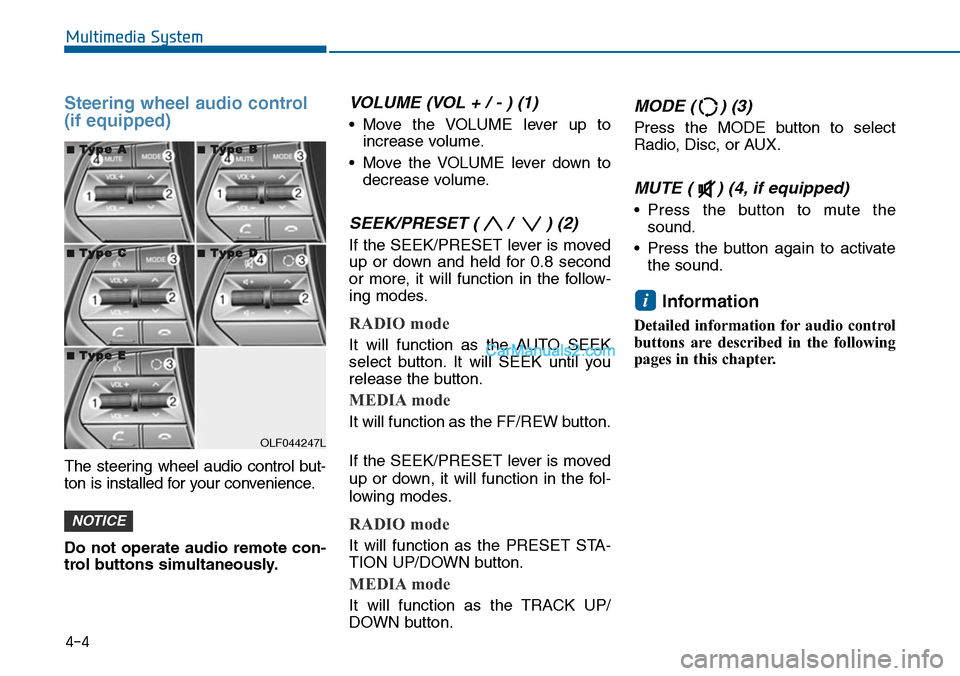
Steering wheel audio control
(if equipped)
The steering wheel audio control but-
ton is installed for your convenience.
Do not operate audio remote con-
trol buttons simultaneously.
VOLUME (VOL + / - ) (1)
•Move the VOLUME lever up to
increase volume.
•Move the VOLUME lever down to
decrease volume.
SEEK/PRESET ( / ) (2)
If the SEEK/PRESET lever is moved
up or down and held for 0.8 second
or more, it will function in the follow-
ing modes.
RADIO mode
It will function as the AUTO SEEK
select button. It will SEEK until you
release the button.
MEDIA mode
It will function as the FF/REW button.
If the SEEK/PRESET lever is moved
up or down, it will function in the fol-
lowing modes.
RADIO mode
It will function as the PRESET STA-
TION UP/DOWN button.
MEDIA mode
It will function as the TRACK UP/
DOWN button.
MODE ( ) (3)
Press the MODE button to select
Radio, Disc, or AUX.
MUTE ( ) (4, if equipped)
•Press the button to mute the
sound.
•Press the button again to activate
the sound.
Information
Detailed information for audio control
buttons are described in the following
pages in this chapter.
i
NOTICE
4-4
Multimedia System
OLF044247L
■■TTyyppee AA■■TTyyppee BB
■■TTyyppee CC■■TTyyppee DD
■■TTyyppee EE
Page 273 of 665
(Continued)
•When using mass storage USB
devices with separate logical drives,
only files saved to the root drive can
be played.
• Files may not properly operate if
application programs are installed
to the USBs.
• The device may not operate normal-
ly if MP3 Players, cellular phones,
digital cameras, or other electronic
devices (USB devices not recognized
as portable disk drives) are connect-
ed with the device.
• Charging through the USB may not
work for some mobile devices.
• The device may not support normal
operation when using a USB memo-
ry type besides (Metal Cover Type)
USB Memory.
(Continued)
(Continued)
• The device may not support normal
operation when using formats such
as HDD Type, CF, or SD Memory.
• The device will not support files
locked by DRM (Digital Rights
Management.)
•USB memory sticks used by con-
necting an Adaptor (SD Type or CF
Type) may not be properly recog-
nized.
• The device may not operate proper-
ly when using USB HDDs or USBs
subject to connection failures
caused by vehicle vibrations. (e.g. i-
stick type)
(Continued)
(Continued)
• Avoid use of USB mem-
ory products that can
also be used as key
chains or mobile phone
accessories. Use of such
products may cause damage to the
USB jack.
• Connecting an MP3 device or phone
through various channels, such as
AUX/BT or Audio/ USB mode may
result in pop noises or abnormal
operation.
4-15
Multimedia System
4
Page 274 of 665
4-16
Multimedia System
Information
-Using the iPod®device
•iPod®is a registered trademark of
Apple Inc.
• In order to use the iPod®while oper-
ating the keys, you must use a dedi-
cated iPod®cable. (the cable that is
supplied when purchasing iPod®
/iPhone®products)
• If the iPod®is connected to the vehi-
cle while it is playing, a high pitch
sound could occur for approximate-
ly 1-2 seconds immediately after
connecting. If possible, connect the
iPod to the vehicle with the iPod®
stopped/ paused.
• During ACC ON state, connecting
the iPod®through the iPod®cable
will charge the iPod®through the
car audio system.
•When connecting with the iPod®
cable, make sure to fully insert the
jack to prevent communication
interference.
(Continued)
(Continued)
• When the EQ features of an exter-
nal device, such as the iPod®, and
the audio system are both active, EQ
effects could overlap and cause
sound deterioration and distortion.
Whenever possible, turn off the EQ
feature within the external device
upon use by connecting with the
audio system.
•Noise may occurwhen an iPod®or
AUX device is connected. When
such devices are not being used, dis-
connect the device for storage.
•When the iPod®or AUX device
power is connected to the power
jack, playing the external device
may result in noise. In such cases,
disconnect the power connection
before use.
•Skipping or improper operation
may occur depending on the charac-
teristics of your iPod®/Phone®device.
(Continued)
(Continued)
•If youriPhone®is connected to both
the Bluetooth®Wireless Technology
and USB, the sound may not be
properly played. In your iPhone®,
select the Dock connector or
Bluetooth®Wireless Technology to
change the sound output (source).
• iPod mode cannot be operated when
the iPod®cannot be recognized due
to versions that do not support com-
munication protocols.
•For fifth generation iPod®Nano
devices, the iPod®may not be recog-
nized when the battery level is low.
Please charge the iPod®for use.
•Search/play orders shown within
the iPod®device may differ with the
orders shown within the audio sys-
tem.
•If the iPod®malfunctions due to an
iPod®device defect, reset the iPod®
and try again. (To learn more, refer to
your iPod®manual)
(Continued)
i