Page 164 of 665
3-68
Convenient features of your vehicle
Turn By Turn (TBT) mode
(if equipped)
This mode displays the state of the
navigation.
A/V mode (if equipped)
This mode displays the state of the
A/V system.
Information mode
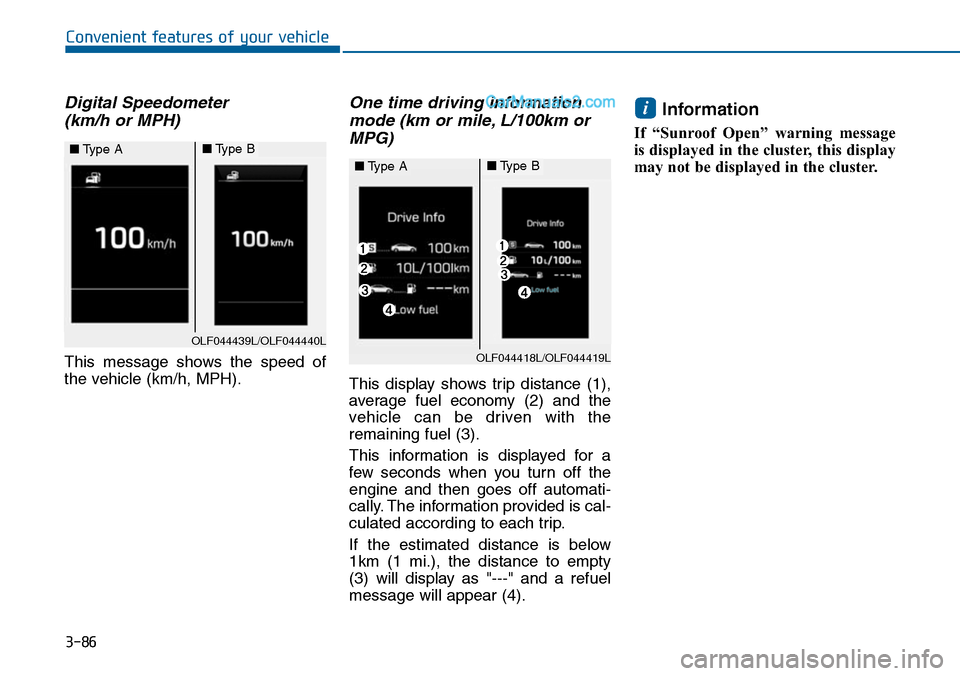
Service Interval
Service in
It calculates and displays when you
need a scheduled maintenance
service (mileage or days).
If the remaining mileage or time
reaches 1,500 km (900 miles) or 30
days, "Service in" message is dis-
played for several seconds each time
you set the ignition switch or Engine
Start/Stop button to the ON position.
For the setting of the service inter-
val, refer to "User Settings Mode"
of the LCD display.
OLF044172/OLF044173
■Type A■Type B
OLF044175/OLF044176
■Type A■Type B
OLF044179N/OLF044180N
■Type A■Type B
Page 165 of 665
3-69
Convenient features of your vehicle
3
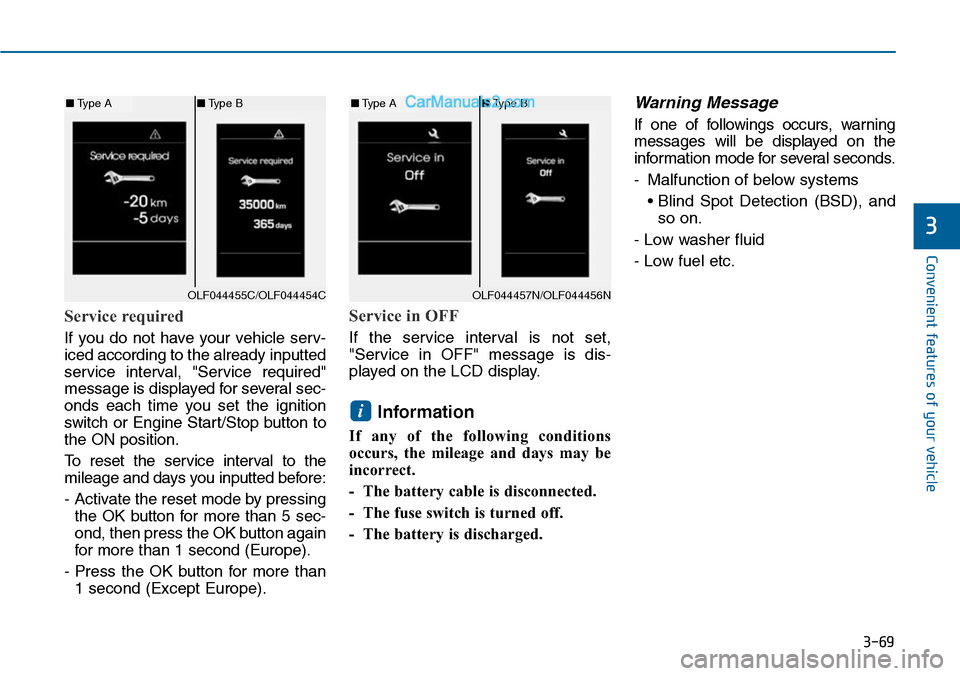
Service required
If you do not have your vehicle serv-
iced according to the already inputted
service interval, "Service required"
message is displayed for several sec-
onds each time you set the ignition
switch or Engine Star t/Stop button to
the ON position.
To r e s e t t h e s e r v i c e i n t e r v a l t o t h e
mileage and days you inputted before:
- Activate the reset mode by pressing
the OK button for more than 5 sec-
ond, then press the OK button again
for more than 1 second (Europe).
- Press the OK button for more than
1 second (Except Europe).
Service in OFF
If the service interval is not set,
"Service in OFF" message is dis-
played on the LCD display.
Information
If any of the following conditions
occurs, the mileage and days may be
incorrect.
- The battery cable is disconnected.
- The fuse switch is turned off.
- The battery is discharged.
Warning Message
If one of followings occurs, warning
messages will be displayed on the
information mode for several seconds.
-Malfunction of below systems
• Blind Spot Detection (BSD), and
so on.
- Low washer fluid
- Low fuel etc.
i
OLF044455C/OLF044454C
■Type A■Type B
OLF044457N/OLF044456N
■Type A■Type B
Page 179 of 665
3-83
Convenient features of your vehicle
3
Overview
Description
The trip computer is a microcomput-
er-controlled driver information sys-
tem that displays information related
to driving.
Information
Some driving information stored in
the trip computer (for example
Average Vehicle Speed) resets if the
battery is disconnected.
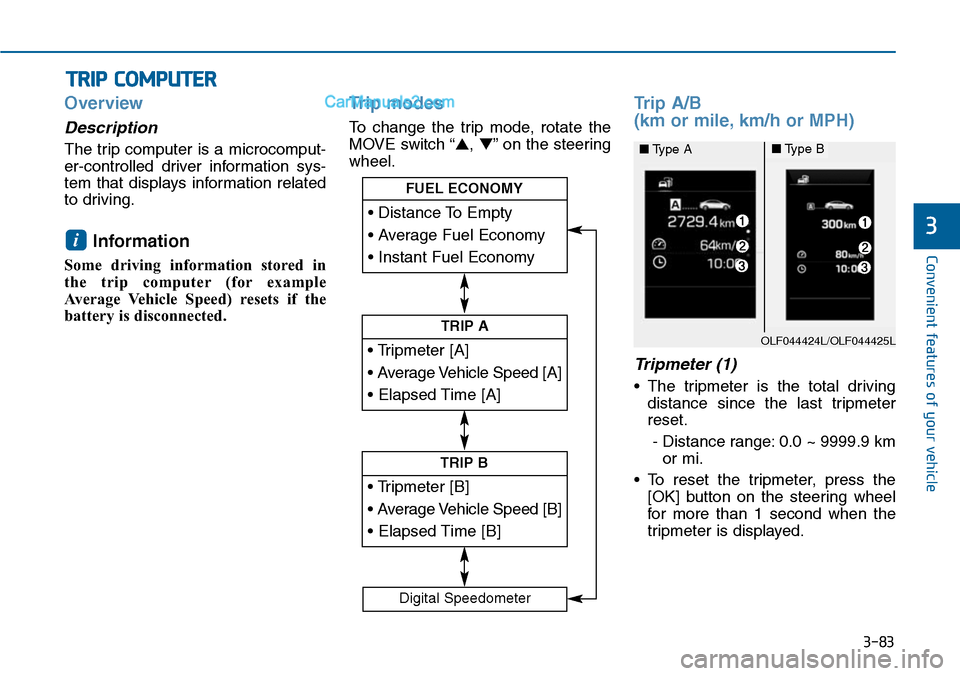
Trip modes
To change the trip mode, rotate the
MOVE switch “▲,▼”on the steering
wheel.
Trip A/B
(km or mile, km/h or MPH)
Tripmeter (1)
•The tripmeter is the total driving
distance since the last tripmeter
reset.
- Distance range: 0.0 ~ 9999.9 km
or mi.
•To reset the tripmeter, press the
[OK] button on the steering wheel
for more than 1 second when the
tripmeter is displayed.
i
TRIP COMPUTER
• Tripmeter [A]
• Average Vehicle Speed [A]
• Elapsed Time [A]
TRIP A
• Tripmeter [B]
• Average Vehicle Speed [B]
• Elapsed Time [B]
TRIP B
• Distance To Empty
• Average Fuel Economy
• Instant Fuel Economy
FUEL ECONOMY
Digital Speedometer
OLF044424L/OLF044425L
■Type A■Type B
Page 181 of 665
3-85
Convenient features of your vehicle
3
Information
• If the vehicle is not on level ground
or the battery power has been inter-
rupted, the distance to empty func-
tion may not operate correctly.
• The distance to empty may differ
from the actual driving distance as
it is an estimate of the available
driving distance.
• The trip computer may not register
additional fuel if less than 6 liters
(1.6 gallons) of fuel are added to the
vehicle.
• The fuel economy and distance to
empty may vary significantly based
on driving conditions, driving
habits, and condition of the vehicle.
Average Fuel Economy (2)
•The average fuel economy is calcu-
lated by the total driving distance
and fuel consumption since the last
average fuel economy reset.
- Fuel economy range: 0.0 ~ 99.9
L/100km, km/L or MPG
•The average fuel economy can be
reset both manually and automati-
cally.
Manual reset
To c l e a r t h e a v e r a g e f u e l e c o n o m y
manually, press the [OK] button on
the steering wheel for more than 1
second when the average fuel econo-
my is displayed.
Automatic reset
To m a k e t h e a v e r a g e f u e l e c o n o m y
be reset automatically whenever refu-
eling, select the “Auto Reset” mode in
User Setting menu of the LCD display
(Refer to “LCD Display”).
Under “Auto Reset” mode, the aver-
age fuel economy will be cleared to
zero (---) when the vehicle speed
exceeds 1 km/h after refueling more
than 6 liters (1.6 gallons).
Information
The average fuel economy is not dis-
played for more accurate calculation
if the vehicle does not drive more than
10 seconds or 300 meters (0.19 miles)
since the ignition switch or the Engine
Start/Stop button is turned to ON.
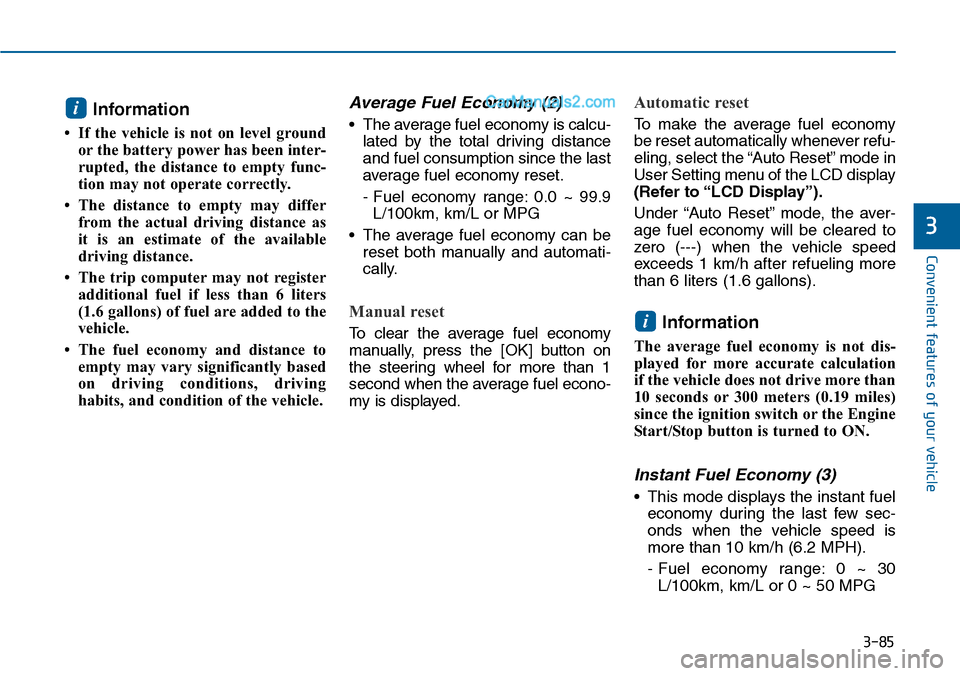
Instant Fuel Economy (3)
•This mode displays the instant fuel
economy during the last few sec-
onds when the vehicle speed is
more than 10 km/h (6.2 MPH).
- Fuel economy range: 0 ~ 30
L/100km, km/L or 0 ~ 50 MPG
i
i
Page 182 of 665
3-86
Convenient features of your vehicle
Digital Speedometer
(km/h or MPH)
This message shows the speed of
the vehicle (km/h, MPH).
One time driving information
mode (km or mile, L/100km or
MPG)
This display shows trip distance (1),
average fuel economy (2) and the
vehicle can be driven with the
remaining fuel (3).
This information is displayed for a
few seconds when you turn off the
engine and then goes off automati-
cally. The information provided is cal-
culated according to each trip.
If the estimated distance is below
1km (1 mi.), the distance to empty
(3) will display as "---" and a refuel
message will appear (4).
Information
If “Sunroof Open” warning message
is displayed in the cluster, this display
may not be displayed in the cluster.
i
OLF044439L/OLF044440L
■Type A■Type B
OLF044418L/OLF044419L
■Type A■Type B
Page 190 of 665
3-94
Convenient features of your vehicle
Indicator lights
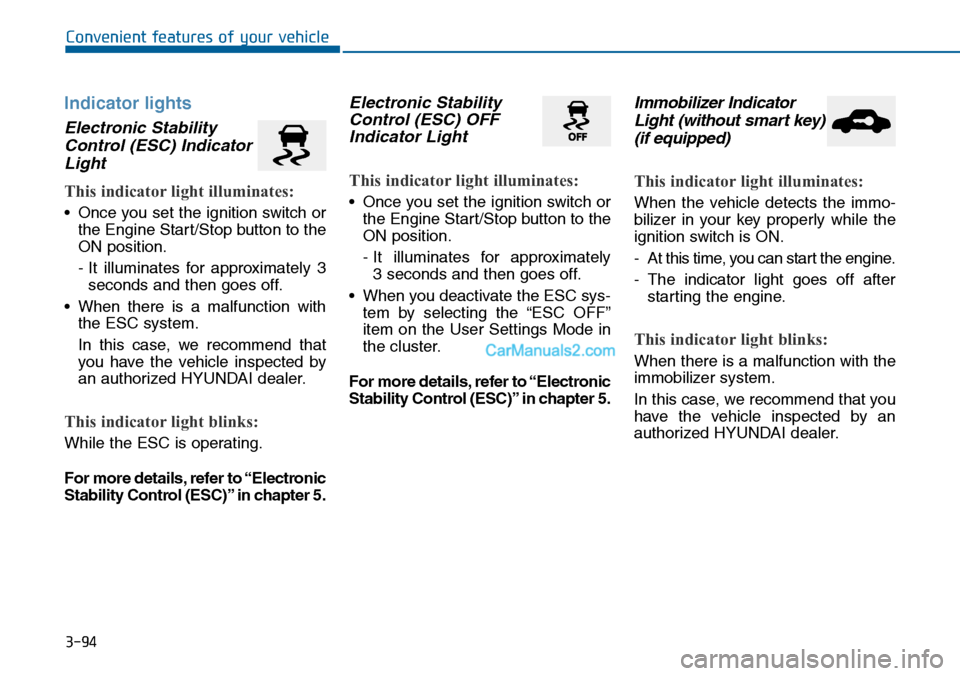
Electronic Stability
Control (ESC) Indicator
Light
This indicator light illuminates:
•Once you set the ignition switch or
the Engine Start/Stop button to the
ON position.
- It illuminates for approximately 3
seconds and then goes off.
•When there is a malfunction with
the ESC system.
In this case, we recommend that
you have the vehicle inspected by
an authorized HYUNDAI dealer.
This indicator light blinks:
While the ESC is operating.
For more details, refer to “Electronic
Stability Control (ESC)” in chapter 5.
Electronic Stability
Control (ESC) OFF
Indicator Light
This indicator light illuminates:
•Once you set the ignition switch or
the Engine Start/Stop button to the
ON position.
- It illuminates for approximately
3 seconds and then goes off.
•When you deactivate the ESC sys-
tem by selecting the “ESC OFF”
item on the User Settings Mode in
the cluster.
For more details, refer to “Electronic
Stability Control (ESC)” in chapter 5.
Immobilizer Indicator
Light (without smart key)
(if equipped)
This indicator light illuminates:
When the vehicle detects the immo-
bilizer in your key properly while the
ignition switch is ON.
-At this time, you can start the engine.
-The indicator light goes off after
starting the engine.
This indicator light blinks:
When there is a malfunction with the
immobilizer system.
In this case, we recommend that you
have the vehicle inspected by an
authorized HYUNDAI dealer.
Page 193 of 665
![Hyundai Sonata 2014 Owners Manual 3-97
Convenient features of your vehicle
3
AUTO HOLD Indicator
Light (if equipped)
This indicator light illuminates:
•[White] When you activate the auto
hold system by pressing the AUTO
HOLD butto](/manual-img/35/16805/w960_16805-192.png "Hyundai Sonata 2014 Owners Manual 3-97
Convenient features of your vehicle
3
AUTO HOLD Indicator
Light (if equipped)
This indicator light illuminates:
•[White] When you activate the auto
hold system by pressing the AUTO
HOLD butto")
3-97
Convenient features of your vehicle
3
AUTO HOLD Indicator
Light (if equipped)
This indicator light illuminates:
•[White] When you activate the auto
hold system by pressing the AUTO
HOLD button.
•[Green] When you stop the vehicle
completely by depressing the
brake pedal with the auto hold sys-
tem activated.
•[Yellow] When there is a malfunc-
tion with the auto hold system.
In this case, we recommend that
you have the vehicle inspected by
an authorized HYUNDAI dealer.
For more details, refer to “Auto
Hold” in chapter 5.
SPORT Mode Indicator
Light (if equipped)
This indicator light illuminates
•When you select "SPORT" mode
as drive mode.
For more details, refer to "Drive
Mode Integrated Control System"
in chapter 5.
ECO Mode Indicator
Light (if equipped)
This indicator light illuminates:
•When you select “ECO”mode as
drive mode.
For more details, refer to “Drive
Mode Integrated Control System”
in chapter 5.
AUTO
HOLDSPORTECO
Do not watch the ECO indicator
light while driving. This will dis-
tract you and may cause an
accident that results in severe
personal injury.
WARNING
Page 198 of 665
3-102
Convenient features of your vehicle
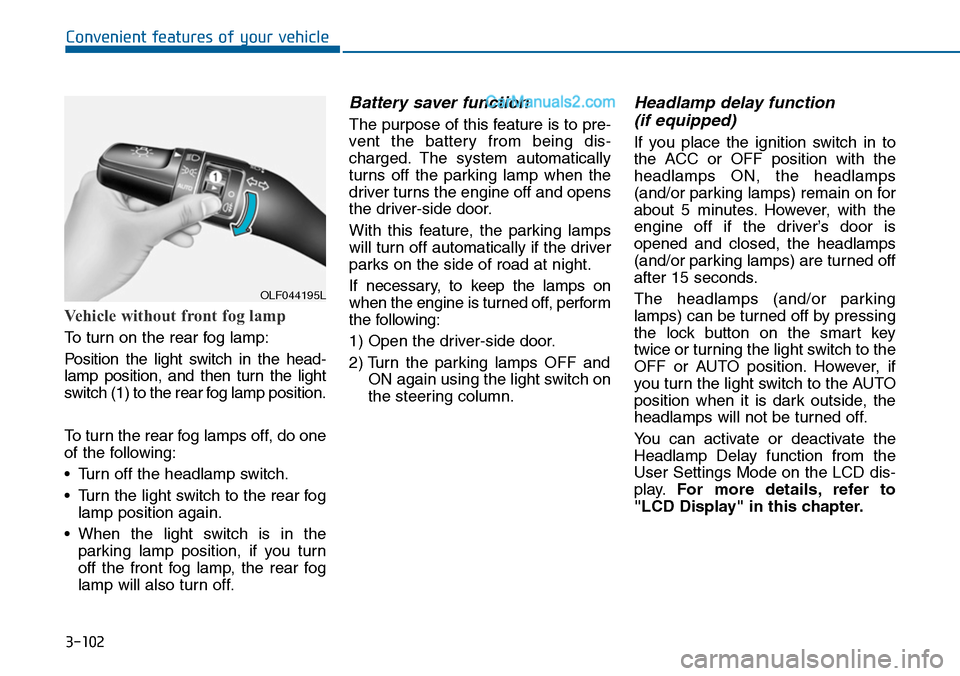
Vehicle without front fog lamp
To turn on the rear fog lamp:
Position the light switch in the head-
lamp position, and then turn the light
switch (1) to the rear fog lamp position.
To turn the rear fog lamps off, do one
of the following:
•Turn off the headlamp switch.
•Turn the light switch to the rear fog
lamp position again.
•When the light switch is in the
parking lamp position, if you turn
off the front fog lamp, the rear fog
lamp will also turn off.
Battery saver function
The purpose of this feature is to pre-
vent the batter y from being dis-
charged. The system automatically
turns off the parking lamp when the
driver turns the engine off and opens
the driver-side door.
With this feature, the parking lamps
will turn off automatically if the driver
parks on the side of road at night.
If necessary, to keep the lamps on
when the engine is turned off, perform
the following:
1) Open the driver-side door.
2) Turn the parking lamps OFF and
ON again using the light switch on
the steering column.
Headlamp delay function
(if equipped)
If you place the ignition switch in to
the ACC or OFF position with the
headlamps ON, the headlamps
(and/or parking lamps) remain on for
about 5 minutes. However, with the
engine off if the driver’s door is
opened and closed, the headlamps
(and/or parking lamps) are turned off
after 15 seconds.
The headlamps (and/or parking
lamps) can be turned off by pressing
the lock button on the smart key
twice or turning the light switch to the
OFF or AUTO position. However, if
you turn the light switch to the AUTO
position when it is dark outside, the
headlamps will not be turned off.
Yo u c a n a c t i v a t e o r d e a c t i v a t e t h e
Headlamp Delay function from the
User Settings Mode on the LCD dis-
play.For more details, refer to
"LCD Display" in this chapter.
OLF044195L