Page 316 of 469

315
uuWhen Driving uStarting the Engine
Continued
Driving
Starting the Engine
1. Make sure the parking brake is applied.
2. Check that the shift lever is in
(P
, then
depress the brake pedal.
u Although it is possible to start the vehicle
in
(N
, it is safer to start it in
(P
.
2. Check that the shift lever is in
(N
. Then
depress the brake pedal with your right
foot, and the clutch pedal with your left
foot.
u The clutch pedal must be fully depressed
to start the engine.
Models with smart entry system
1Starting the Engine
Keep your foot firmly on the brake pedal when
starting the engine.
The engine is harder to start in cold weather and in
thinner air found at altitudes above 8,000 feet (2,400
meters).
When starting the engine in cold weather, turn off all
electrical accessories such as the lights, climate
control system, and rear defogger in order to reduce
battery drain.
If you live in a region where winter is extremely cold,
an engine block heater will improve starting and
warming of the engine. If temperatures consistently
below -22°F (-30°C) are expected, the coolant
mixture should be changed to a higher concentration
to prevent freezing. Consult a dealer for details.
If the exhaust system sounds abnormal or you can
smell exhaust gas inside the vehicle, have your vehicle
checked by a dealer. There may be a problem with
the engine or exhaust system.
The immobilizer system protects your vehicle from
theft.
If an improperly coded device is used, the engine’s
fuel system is disabled.
2 Immobilizer System P. 125
Brake Pedal
Automatic transmission (CVT) models
Brake Pedal
Clutch Pedal
Manual transmission models
Page 321 of 469
320
uuWhen Driving uShifting
Driving
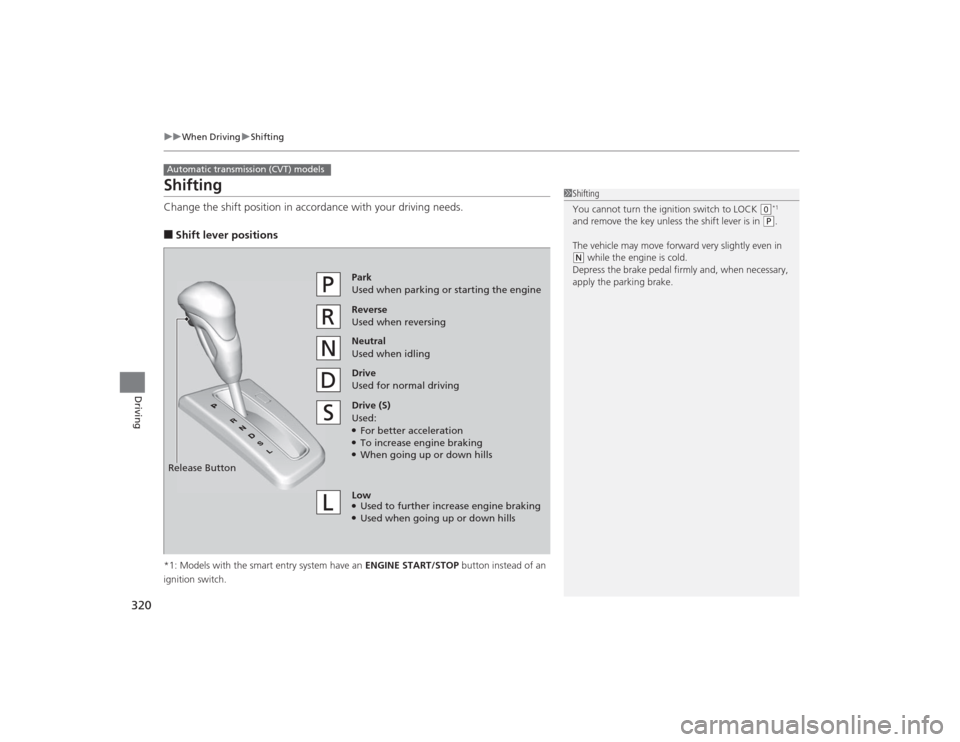
ShiftingChange the shift position in accordance with your driving needs.■Shift lever positions*1: Models with the smart entry system have an ENGINE START/STOP button instead of an
ignition switch.Automatic transmission (CVT) models
1 Shifting
You cannot turn the ignition switch to LOCK
(0*1
and remove the key unless the shift lever is in
( P.
The vehicle may move forward very slightly even in
( N while the engine is cold.
Depress the brake pedal firmly and, when necessary,
apply the parking brake.
Reverse
Used when reversingDrive
Used for normal drivingPark
Used when parking or starting the engine
Neutral
Used when idling
Release ButtonDrive (S)
Used:●For better acceleration●To increase engine braking●When going up or down hills
Low●Used to further increase engine braking●Used when going up or down hills
Page 322 of 469

321
uuWhen Driving uShifting
Driving
■
Shift Lever Operation
1Shift Lever OperationNOTICEWhen you change the shift lever from
(D to
( R and
vice versa, come to a complete stop and keep the
brake pedal depressed.
Operating the shift lever before the vehicle has come
to a complete standstill can damage the transmission.
Use the shift lever position indicator to check the
lever position before pulling away.
If the transmission indicator blinks when driving, in
any shift position, there is a problem with the
transmission.
Avoid sudden acceleration and have the transmission
checked by a dealer as soon as possible.
The fuel supply may be cut off if you drive at engine
speeds in or over the tachometer's red zone (engine
speed limit). If this happens, you may experience a
slight jolt.
It may not be possible to operate the shift lever if the
brake pedal is applied while the shift lever release
button is held down.
Depress the brake pedal first.
Shift Lever Position Indicator
Depress the brake pedal and
press the shift lever release
button to shift.
Shift without pressing the shift
lever release button.
Press the shift lever release
button and shift. Tachometer’s red zone
Page 324 of 469
Continued
323
uuWhen Driving uShifting
Driving
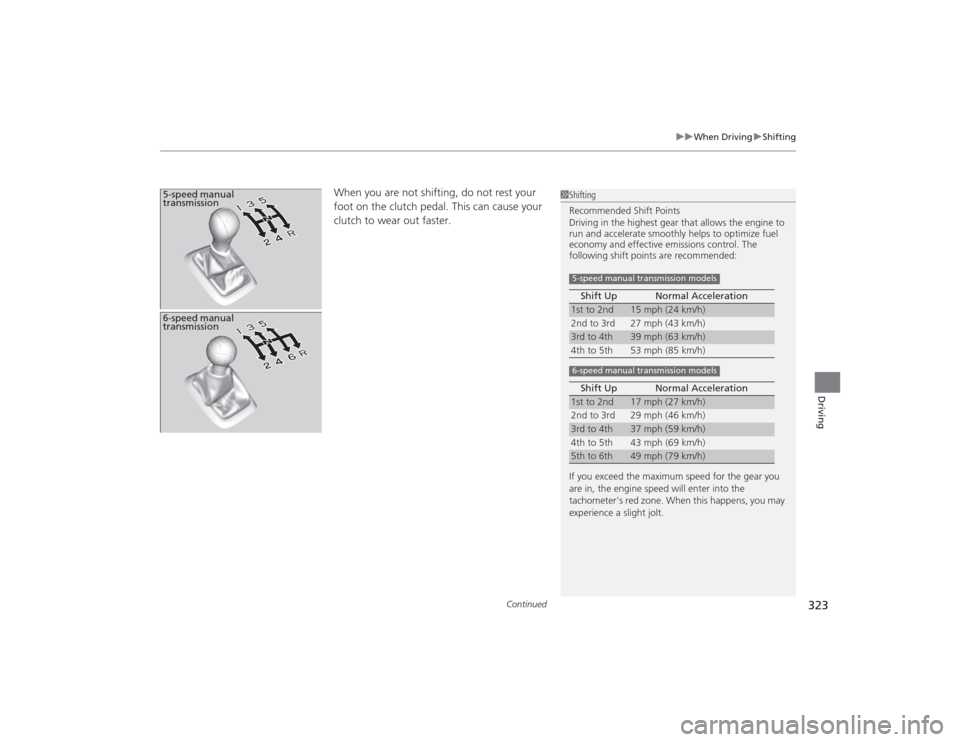
When you are not shifting, do not rest your
foot on the clutch pedal. This can cause your
clutch to wear out faster.
5-speed manual
transmission
1Shifting
Recommended Shift Points
Driving in the highest gear that allows the engine to
run and accelerate smoothly helps to optimize fuel
economy and effective emissions control. The
following shift points are recommended:
If you exceed the maximum speed for the gear you
are in, the engine speed will enter into the
tachometer's red zone. When this happens, you may
experience a slight jolt. Shift Up Normal Acceleration1st to 2nd
15 mph (24 km/h)
2nd to 3rd 27 mph (43 km/h)
3rd to 4th
39 mph (63 km/h)
4th to 5th 53 mph (85 km/h)
Shift Up Normal Acceleration
1st to 2nd
17 mph (27 km/h)
2nd to 3rd 29 mph (46 km/h)
3rd to 4th
37 mph (59 km/h)
4th to 5th 43 mph (69 km/h)
5th to 6th
49 mph (79 km/h)
5-speed manual transmission models6-speed manual transmission models
6-speed manual
transmission
Page 332 of 469
331
uuWhen Driving uLaneWatch
TM*
Continued
Driving
LaneWatch
TM
*
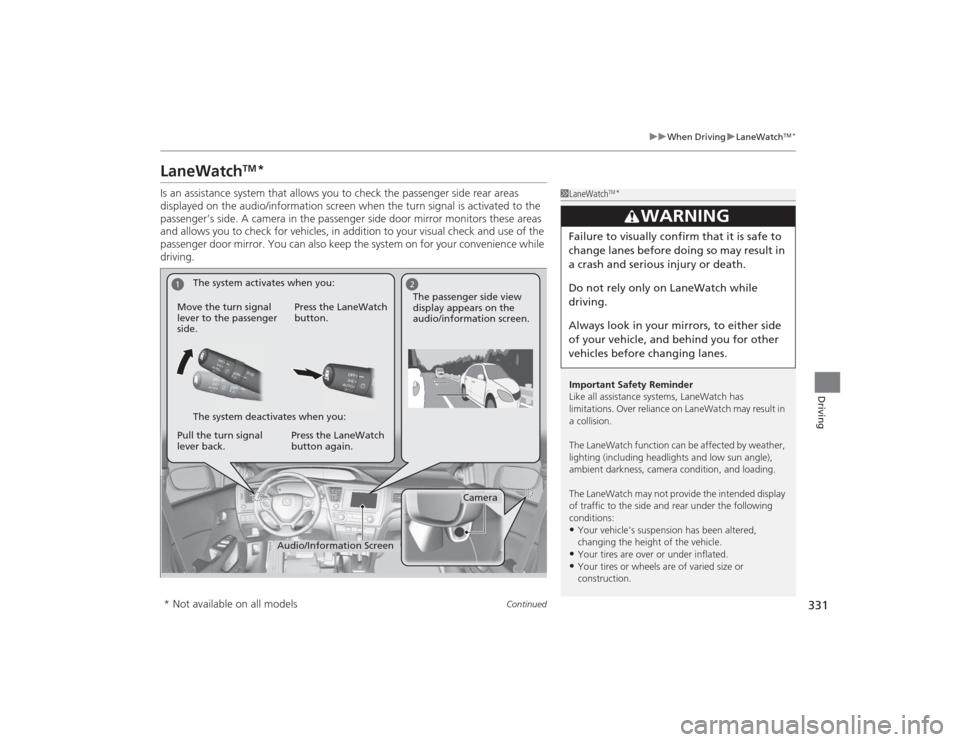
Is an assistance system that allows you to check the passenger side rear areas
displayed on the audio/information screen when the turn signal is activated to the
passenger’s side. A camera in the passenger side door mirror monitors these areas
and allows you to check for vehicles, in addition to your visual check and use of the
passenger door mirror. You can also keep the system on for your convenience while
driving.
1LaneWatch
TM*
Important Safety Reminder
Like all assistance systems, LaneWatch has
limitations. Over reliance on LaneWatch may result in
a collision.
The LaneWatch function can be af fected by weather,
lighting (including headlights and low sun angle),
ambient darkness, camera condition, and loading.
The LaneWatch may not provide the intended display
of traffic to the side and rear under the following
conditions:•Your vehicle’s suspension has been altered,
changing the height of the vehicle.•Your tires are over or under inflated.•Your tires or wheels are of varied size or
construction.
3
WARNING
Failure to visually confirm that it is safe to
change lanes before doing so may result in
a crash and serious injury or death.
Do not rely only on LaneWatch while
driving.
Always look in your mirrors, to either side
of your vehicle, and behind you for other
vehicles before changing lanes.
1
2
Camera
Audio/Information Screen
Move the turn signal
lever to the passenger
side.
Press the LaneWatch
button.
Pull the turn signal
lever back. Press the LaneWatch
button again. The passenger side view
display appears on the
audio/information screen.
The system activates when you:
The system deactivates when you:
* Not available on all models
Page 333 of 469
uuWhen Driving uLaneWatch
TM*
332Driving
■Customizing the LaneWatch settings
You can customize the following items using the audio/information screen.
• Show with Turn Signal: Selects whether LaneWatch monitor comes on when
you operate the turn signal light lever.
• Display Time after Turn Signal Off : Changes the length of time the LaneWatch
display stays on after you pull the turn signal lever back.
• Reference Lines : Selects whether the reference lines appear on the LaneWatch
monitor.
• Next Maneuver Pop up
*: Selects whether a turn direction screen of the
navigation system interrupts the LaneWatch display.
• Display : Allows for display adjustments of items, such as brightness, and tint.
This setting is part of the Audio setup group.
2Customized Features
* P. 233
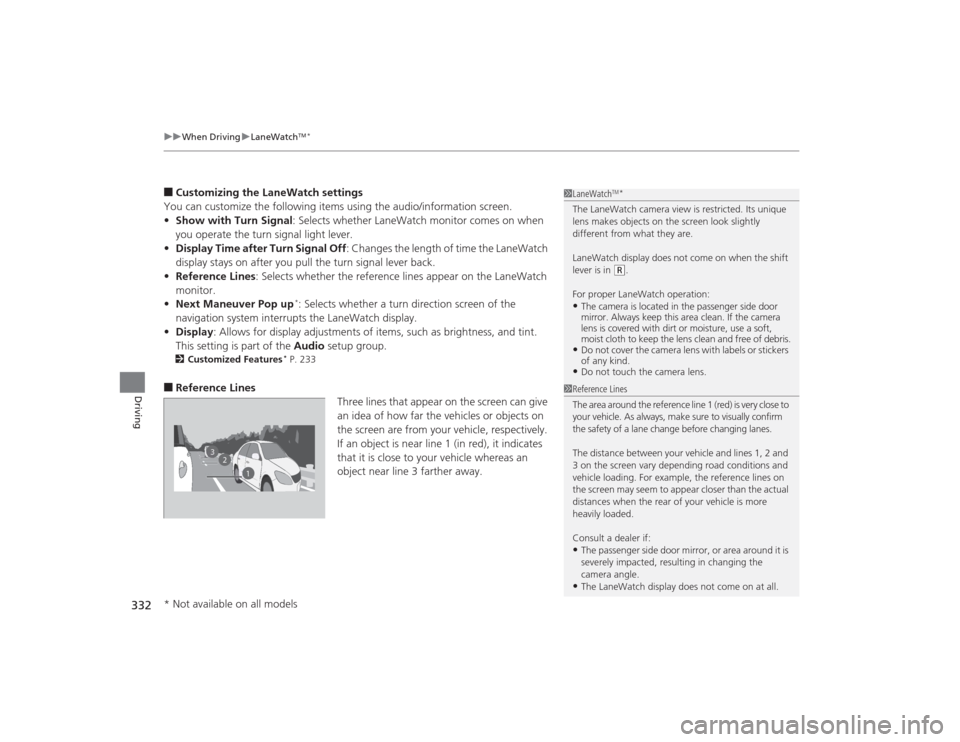
■Reference Lines
Three lines that appear on the screen can give
an idea of how far the vehicles or objects on
the screen are from your vehicle, respectively.
If an object is near line 1 (in red), it indicates
that it is close to your vehicle whereas an
object near line 3 farther away.
1LaneWatch
TM*
The LaneWatch camera view is restricted. Its unique
lens makes objects on the screen look slightly
different from what they are.
LaneWatch display does not come on when the shift
lever is in
(R.
For proper LaneWatch operation:
•The camera is located in the passenger side door
mirror. Always keep this area clean. If the camera
lens is covered with dirt or moisture, use a soft,
moist cloth to keep the lens clean and free of debris.•Do not cover the camera lens with labels or stickers
of any kind.•Do not touch the camera lens.
2
3
1
1 Reference Lines
The area around the reference line 1 (red) is very close to
your vehicle. As always, make sure to visually confirm
the safety of a lane change before changing lanes.
The distance between your vehicle and lines 1, 2 and
3 on the screen vary depending road conditions and
vehicle loading. For example, the reference lines on
the screen may seem to appear closer than the actual
distances when the rear of your vehicle is more
heavily loaded.
Consult a dealer if:•The passenger side door mirror, or area around it is
severely impacted, resulting in changing the
camera angle.•The LaneWatch display does not come on at all.
* Not available on all models
Page 338 of 469
337
Continued
Driving
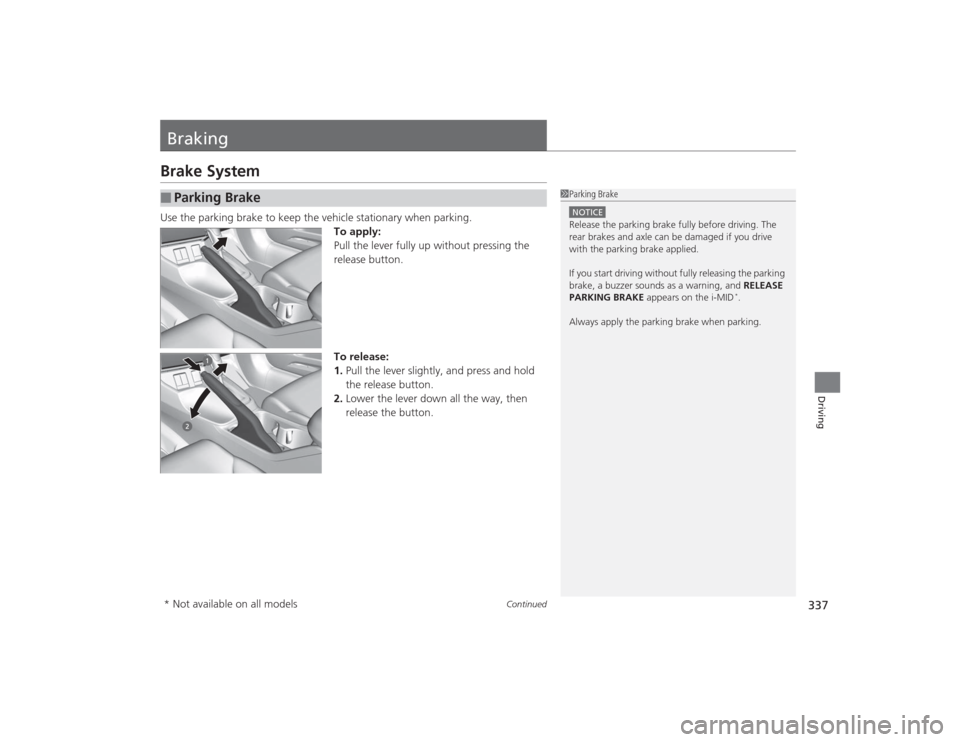
BrakingBrake SystemUse the parking brake to keep the vehicle stationary when parking.To apply:
Pull the lever fully up without pressing the
release button.
To release:
1.Pull the lever slightly, and press and hold
the release button.
2. Lower the lever down all the way, then
release the button.■
Parking Brake
1Parking BrakeNOTICERelease the parking brake fully before driving. The
rear brakes and axle can be damaged if you drive
with the parking brake applied.
If you start driving without fully releasing the parking
brake, a buzzer sounds as a warning, and RELEASE
PARKING BRAKE appears on the i-MID
*.
Always apply the parking brake when parking.
* Not available on all models
Page 339 of 469

uuBraking uBrake System
338Driving
Your vehicle is equipped with front disc brakes. The brakes on the rear wheels may
be disc or drum, depending on the model. A vacuum power assist helps reduce the
effort needed on the brake pedal. The brake assist system increases the stopping
force when you depress the brake pedal hard in an emergency situation. The anti-
lock brake system (ABS) helps you retain steering control when braking very hard.2 Brake Assist System P. 340
2 Anti-lock Brake System (ABS) P. 339■
Foot Brake
1Foot Brake
Check the brakes after driving through deep water,
or if there is a buildup of road surface water. If
necessary, dry the brakes by lightly depressing the
pedal several times.
If you hear a continuous metallic friction sound when
applying the brakes, the brake pads need to be
replaced. Have your vehicle checked by a dealer.
Constantly using the brake pedal while going down a
long hill builds up heat, which reduces the brake
effectiveness. Apply engine braking by taking your
foot off the accelerator pedal and downshifting to a
lower gear. With manual transmission use a lower
gear for greater engine braking.
Do not rest your foot on the brake pedal while
driving, as it will lightly apply the brakes and cause
them to lose effectiveness over time and reduce pad
life. It will also confuse drivers behind you.