Page 340 of 469

339
uuBraking uAnti-lock Brake System (ABS)
Driving
Anti-lock Brake System (ABS)Helps prevent the wheels from locking up, and helps you retain steering control by
pumping the brakes rapidly, much faster than you.
The electronic brake distribution (EBD) system, which is part of the ABS, also
balances the front-to-rear braking distribution according to vehicle loading.
You should never pump the brake pedal. Let the ABS work for you by always
keeping firm, steady pressure on the brake pedal. This is sometimes referred to as
“stomp and steer.”■ABS operation
The brake pedal may pulsate slightly when the ABS is working. Keep holding the
pedal firmly down. On dry pavement, you will need to press on the brake pedal very
hard before the ABS activates. However, you may feel the ABS activate immediately
if you are trying to stop on snow or ice.
When the vehicle speed goes under 6 mph (10 km/h), the ABS stops.■
ABS
1 Anti-lock Brake System (ABS)NOTICEThe ABS may not function correctly if you use an
incorrect tire type and size.
When the ABS indicator comes on while driving,
there may be a problem with the system.
While normal braking is not affected, there is a
possibility of the ABS not operating. Have the vehicle
checked by a dealer immediately.
The ABS does not reduce the time or distance it takes
to stop the vehicle. It only helps with steering control
during hard braking.
In the following cases, your vehicle may need more
stopping distance than a vehicle without the ABS:•When driving on rough road surfaces, including
when driving on uneven surfaces, such as gravel or
snow.•When snow chains are installed.
You may hear a motor sound coming from the
engine compartment while system checks are being
performed immediatel y after starting the engine or
while driving. This is normal.
Page 341 of 469
340
uuBraking uBrake Assist System
Driving
Brake Assist SystemDesigned to assist the driver by generating greater braking force when you depress
the brake pedal hard during emergency braking.■Brake assist system operation
Press the brake pedal firmly for more powerful braking.
When brake assist operates, the pedal may wiggle slightly and an operating noise
may be heard. This is normal. Keep holding the brake pedal firmly down.■
Brake Assist System
Page 343 of 469
342Driving
Rearview Camera
*
About Your Rearview CameraFor models with the navigation system, see the Navigation System Manual for the
rearview camera.
The i-MID can display your vehicle’s rear view.
The display automatically changes to a rear view when the shift lever is moved to (R
.
The audio/information screen can display your vehicle’s rear view. The display
automatically changes to the rear view when the shift lever is moved to
(R
.
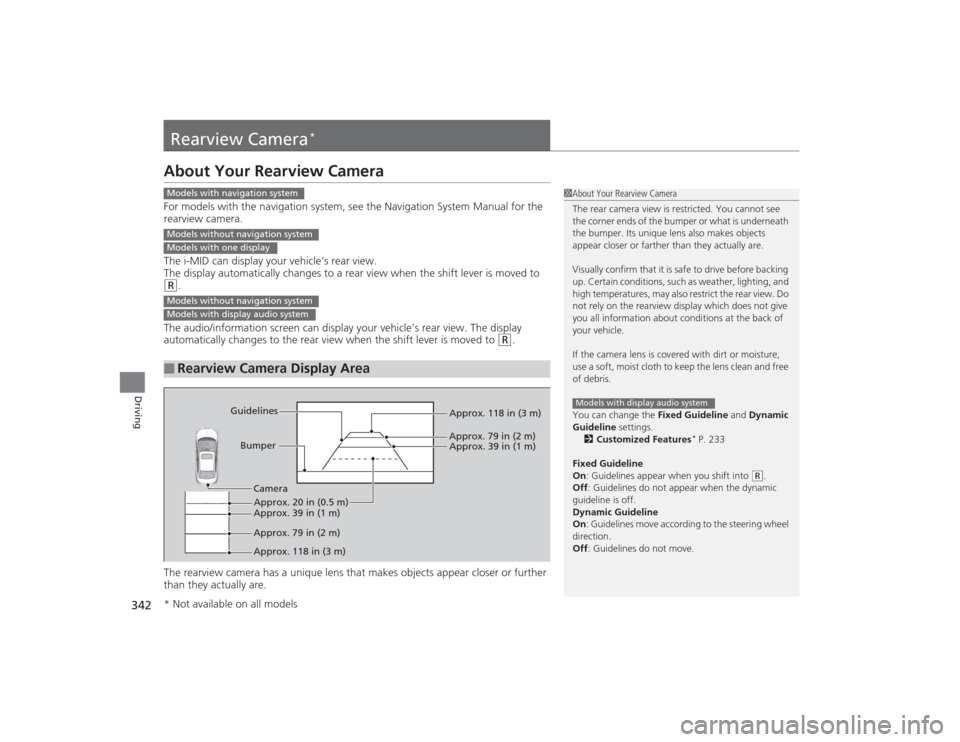
The rearview camera has a unique lens that makes objects appear closer or further
than they actually are.
■
Rearview Camera Display Area
1 About Your Rearview Camera
The rear camera view is restricted. You cannot see
the corner ends of the bumper or what is underneath
the bumper. Its unique lens also makes objects
appear closer or farther than they actually are.
Visually confirm that it is safe to drive before backing
up. Certain conditions, such as weather, lighting, and
high temperatures, may also restrict the rear view. Do
not rely on the rearview display which does not give
you all information about conditions at the back of
your vehicle.
If the camera lens is covered with dirt or moisture,
use a soft, moist cloth to keep the lens clean and free
of debris.
You can change the Fixed Guideline and Dynamic
Guideline settings.
2 Customized Features
* P. 233
Fixed Guideline
On : Guidelines appear when you shift into
(R.
Off : Guidelines do not appear when the dynamic
guideline is off.
Dynamic Guideline
On : Guidelines move according to the steering wheel
direction.
Off : Guidelines do not move.
Models with display audio system
Models with navigation systemModels without navigation systemModels with one displayModels without navigation systemModels with display audio system
Bumper
Guidelines
Approx. 118 in (3 m)
Approx. 79 in (2 m) Approx. 39 in (1 m)
Approx. 20 in (0.5 m)
Approx. 118 in (3 m) Approx. 79 in (2 m) Approx. 39 in (1 m)
Camera
* Not available on all models
Page 350 of 469

349
Maintenance
This chapter discusses basic maintenance.
Before Performing MaintenanceInspection and Maintenance ............ 350Safety When Performing Maintenance..... 351Parts and Fluids Used in Maintenance Service ........................................... 352
Maintenance Minder
TM..................... 353
Maintenance Under the Hood
Maintenance Items Under the Hood ..... 361Opening the Hood ........................... 363
Recommended Engine Oil ................ 364
Oil Check ......................................... 365
Adding Engine Oil ............................ 367Changing the Engine Oil and Oil Filter ..... 368
Engine Coolant ................................ 371
Transmission Fluid ............................ 373
Brake/Clutch Fluid ............................ 374
Refilling Window Washer Fluid......... 375
Replacing Light Bulbs ....................... 376Checking and Maintaining Wiper
Blades .......................................... 389Checking and Maintaining Tires
Checking Tires ................................. 391Tire and Loading Information Label ...... 392Tire Labeling .................................... 392DOT Tire Quality Grading (U.S. Vehicles)....... 394Wear Indicators................................ 396 Tire Service Life ................................ 396
Tire and Wheel Replacement ........... 397
Tire Rotation .................................... 398
Winter Tires ..................................... 399
Battery ............................................... 400
Remote Transmitter Care
*
Replacing the Button Battery ........... 401
Heating and Cooling System
*/Climate
Control System
* Maintenance ....... 403
Cleaning
Interior Care .................................... 404
Exterior Care.................................... 406
* Not available on all models
Page 351 of 469
350Maintenance
Before Performing MaintenanceInspection and MaintenanceFor your safety, perform all listed inspections and maintenance to keep your vehicle
in good condition. If you become aware of any abnormality (noise, smell, insufficient
brake fluid, oil residue on the ground, etc.), have your vehicle inspected by a dealer.
(Note, however, that service at a dealer is not mandatory to keep your \
warranties in
effect.) Refer to the separate maintenance booklet for detailed maintenance and
inspection information.■Daily inspections
Perform inspections before long distance trips, when washing the vehicle, or when
refueling.■Periodic inspections
• Check the continuously variable transmission fluid level monthly.2 Continuously Variable Transmission (CVT) Fluid P. 373
•Check the brake fluid level monthly.
2 Brake/Clutch Fluid P. 374
•Check the tire pressure monthly. Examine the tread for wear and foreign objects.
2 Checking and Maintaining Tires P. 391
•Check the operation of the exterior lights monthly.
2 Replacing Light Bulbs P. 376
•Check the condition of the wiper blades at least every six months.
2Checking and Maintaining Wiper Blades P. 389
■
Types of Inspection and Maintenance
1Inspection and Maintenance
Maintenance, replacement, or repair of
emissions control devices and systems may be
done by any automotive repair establishment or
individuals using parts that are “certified” to
EPA standards.
According to state and federal regulations, failure to
perform maintenance on the maintenance main
items marked with # will not void your emissions
warranties. However, all maintenance services should
be performed in accordance with the intervals
indicated by the information display
*/i-MID
*.
2 Maintenance Service Items P. 355, 359
If you want to perform complex maintenance tasks
that require mor e skills and tools, you can purchase a
subscription to the Service Express website at
www.techinfo.honda.com .
2 Authorized Manuals P. 455
If you want to perform maintenance yourself, make
sure that you have the necessary tools and skills first.
After performing maintenance, update the records in
the separate maintenance booklet.
U.S. models
* Not available on all models
Page 362 of 469
361
Continued
Maintenance
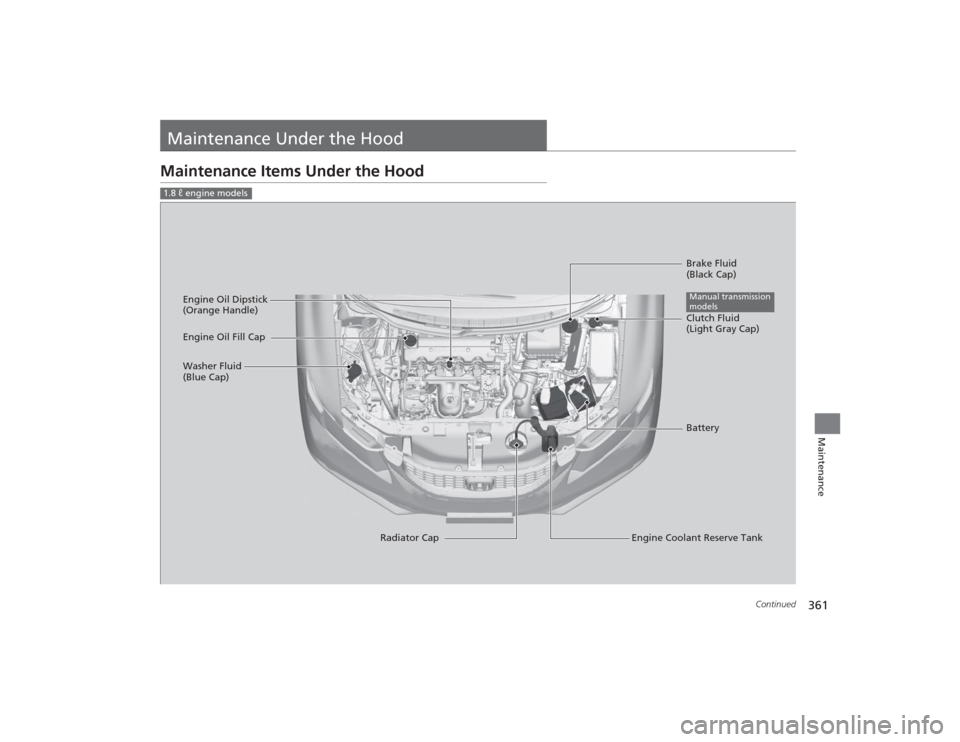
Maintenance Under the HoodMaintenance Items Under the Hood1.8 ℓ engine models
Brake Fluid
(Black Cap)
Engine Coolant Reserve Tank
Radiator Cap
Washer Fluid
(Blue Cap)
Engine Oil Dipstick
(Orange Handle)
Clutch Fluid
(Light Gray Cap)
Engine Oil Fill Cap
BatteryManual transmission
models
Page 363 of 469
362
uuMaintenance Under the Hood uMaintenance Items Under the Hood
Maintenance
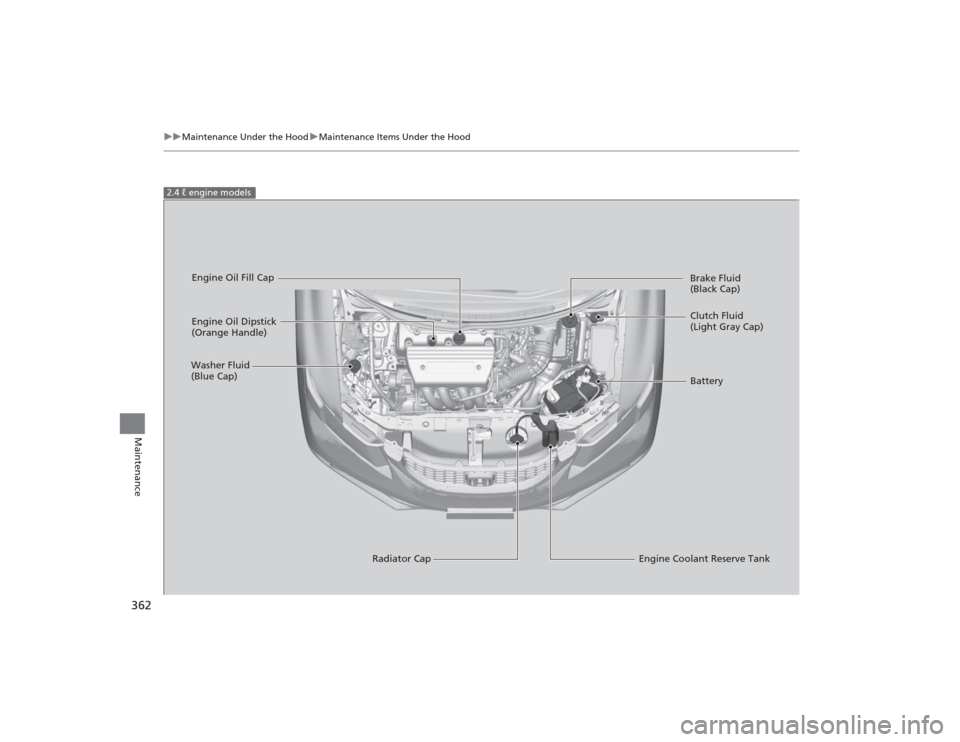
2.4 ℓ engine models
Engine Oil Dipstick
(Orange Handle)
Washer Fluid
(Blue Cap)
Engine Coolant Reserve Tank
Radiator Cap Brake Fluid
(Black Cap)
Engine Oil Fill Cap
Clutch Fluid
(Light Gray Cap)
Battery
Page 364 of 469
363
uuMaintenance Under the Hood uOpening the Hood
Maintenance
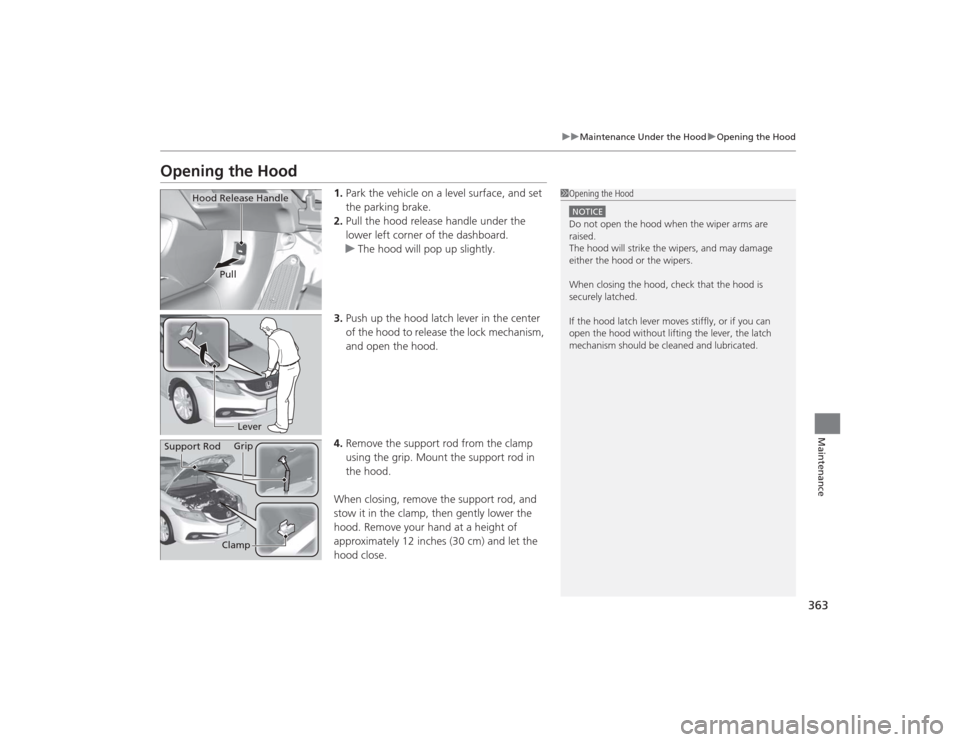
Opening the Hood
1. Park the vehicle on a level surface, and set
the parking brake.
2. Pull the hood release handle under the
lower left corner of the dashboard.
u The hood will pop up slightly.
3. Push up the hood latch lever in the center
of the hood to release the lock mechanism,
and open the hood.
4. Remove the support rod from the clamp
using the grip. Mount the support rod in
the hood.
When closing, remove the support rod, and
stow it in the clamp, then gently lower the
hood. Remove your hand at a height of
approximately 12 inches (30 cm) and let the
hood close.
1 Opening the HoodNOTICEDo not open the hood when the wiper arms are
raised.
The hood will strike the wipers, and may damage
either the hood or the wipers.
When closing the hood, check that the hood is
securely latched.
If the hood latch lever moves stiffly, or if you can
open the hood without lifting the lever, the latch
mechanism should be cleaned and lubricated.
Hood Release Handle
Pull
Lever
Support Rod Grip
Clamp