2014 FORD F150 cooling
[x] Cancel search: coolingPage 106 of 472
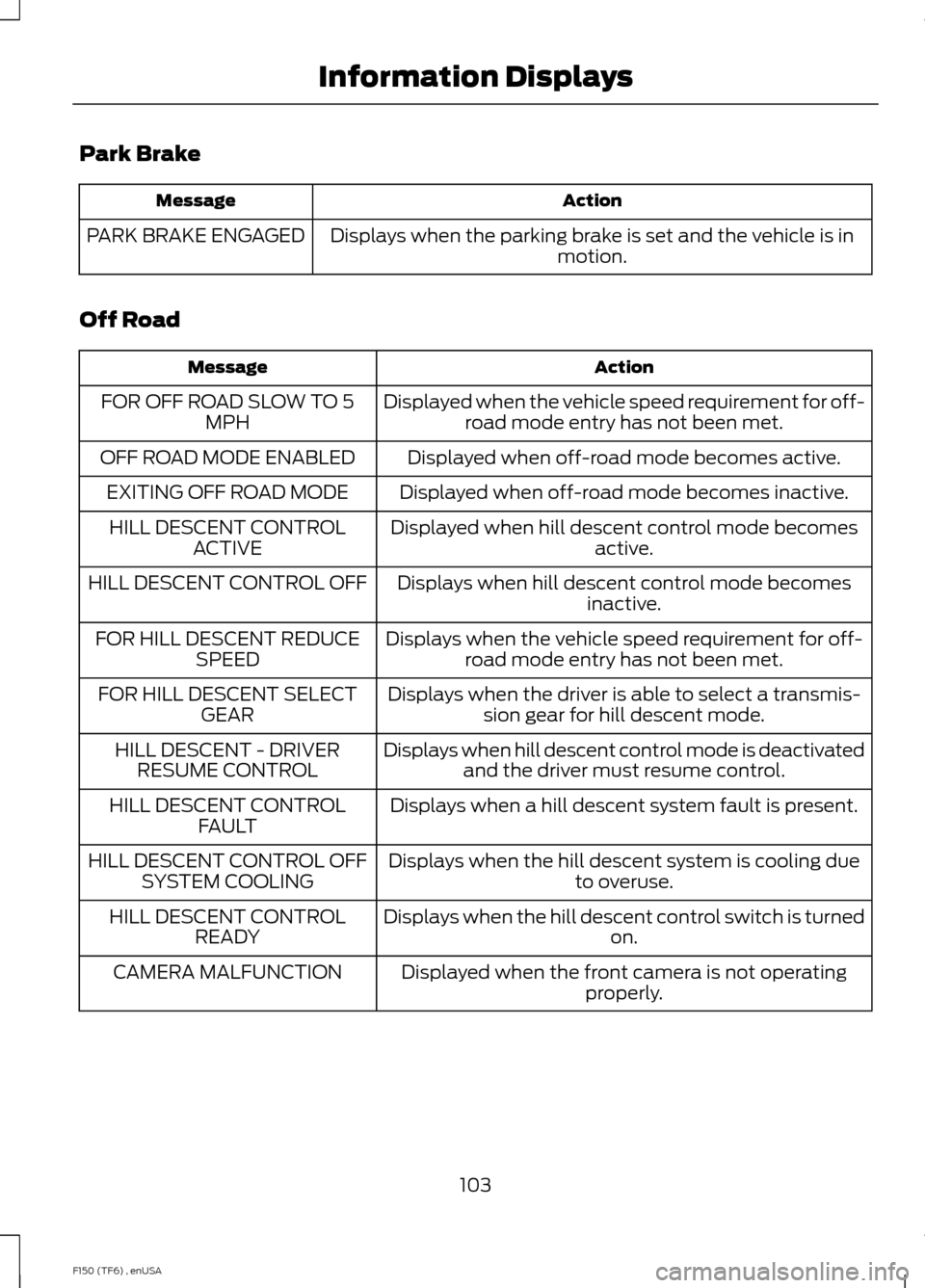
Park Brake
Action
Message
Displays when the parking brake is set and the vehicle is in motion.
PARK BRAKE ENGAGED
Off Road Action
Message
Displayed when the vehicle speed requirement for off-road mode entry has not been met.
FOR OFF ROAD SLOW TO 5
MPH
Displayed when off-road mode becomes active.
OFF ROAD MODE ENABLED
Displayed when off-road mode becomes inactive.
EXITING OFF ROAD MODE
Displayed when hill descent control mode becomesactive.
HILL DESCENT CONTROL
ACTIVE
Displays when hill descent control mode becomesinactive.
HILL DESCENT CONTROL OFF
Displays when the vehicle speed requirement for off-road mode entry has not been met.
FOR HILL DESCENT REDUCE
SPEED
Displays when the driver is able to select a transmis-sion gear for hill descent mode.
FOR HILL DESCENT SELECT
GEAR
Displays when hill descent control mode is deactivatedand the driver must resume control.
HILL DESCENT - DRIVER
RESUME CONTROL
Displays when a hill descent system fault is present.
HILL DESCENT CONTROL
FAULT
Displays when the hill descent system is cooling dueto overuse.
HILL DESCENT CONTROL OFF
SYSTEM COOLING
Displays when the hill descent control switch is turnedon.
HILL DESCENT CONTROL
READY
Displayed when the front camera is not operatingproperly.
CAMERA MALFUNCTION
103
F150 (TF6) , enUSA Information Displays
Page 109 of 472
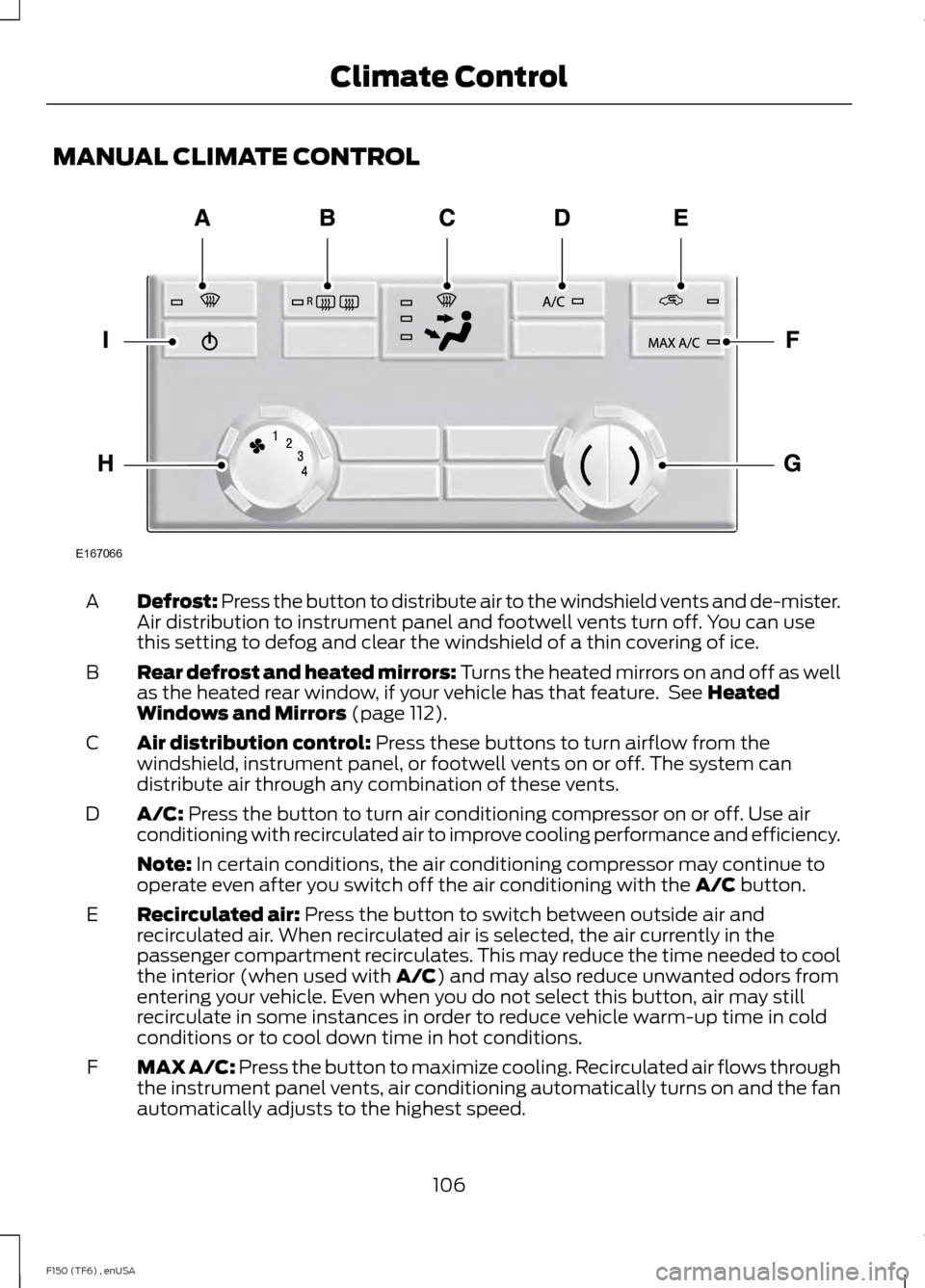
MANUAL CLIMATE CONTROL
Defrost: Press the button to distribute air to the windshield vents and de-mister.
Air distribution to instrument panel and footwell vents turn off. You can use
this setting to defog and clear the windshield of a thin covering of ice.
A
Rear defrost and heated mirrors: Turns the heated mirrors on and off as well
as the heated rear window, if your vehicle has that feature. See Heated
Windows and Mirrors (page 112).
B
Air distribution control:
Press these buttons to turn airflow from the
windshield, instrument panel, or footwell vents on or off. The system can
distribute air through any combination of these vents.
C
A/C:
Press the button to turn air conditioning compressor on or off. Use air
conditioning with recirculated air to improve cooling performance and efficiency.
D
Note:
In certain conditions, the air conditioning compressor may continue to
operate even after you switch off the air conditioning with the A/C button.
Recirculated air:
Press the button to switch between outside air and
recirculated air. When recirculated air is selected, the air currently in the
passenger compartment recirculates. This may reduce the time needed to cool
the interior (when used with
A/C) and may also reduce unwanted odors from
entering your vehicle. Even when you do not select this button, air may still
recirculate in some instances in order to reduce vehicle warm-up time in cold
conditions or to cool down time in hot conditions.
E
MAX A/C:
Press the button to maximize cooling. Recirculated air flows through
the instrument panel vents, air conditioning automatically turns on and the fan
automatically adjusts to the highest speed.
F
106
F150 (TF6) , enUSA Climate ControlE167066
Page 110 of 472
Temperature control: Controls the temperature of the airflow in your vehicle.
Adjust to select the desired temperature.
G
Fan speed control:
Controls the volume of air circulated in your vehicle. Adjust
to select the desired fan speed.
H
Power: Press the button to turn the system on and off. Switching off the climate
control system prevents outside air from entering the vehicle.
I
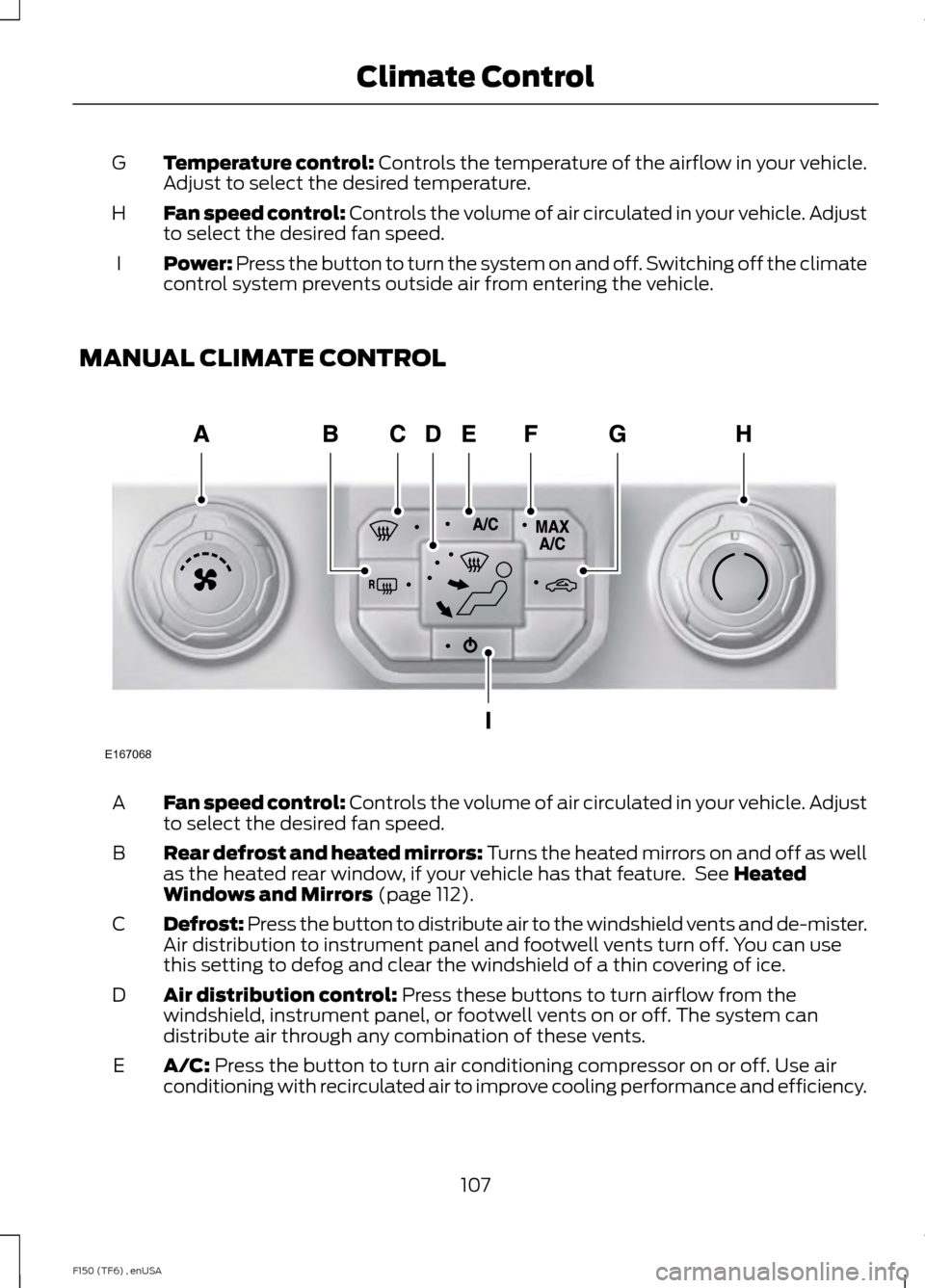
MANUAL CLIMATE CONTROL Fan speed control:
Controls the volume of air circulated in your vehicle. Adjust
to select the desired fan speed.
A
Rear defrost and heated mirrors: Turns the heated mirrors on and off as well
as the heated rear window, if your vehicle has that feature. See
Heated
Windows and Mirrors (page 112).
B
Defrost: Press the button to distribute air to the windshield vents and de-mister.
Air distribution to instrument panel and footwell vents turn off. You can use
this setting to defog and clear the windshield of a thin covering of ice.
C
Air distribution control:
Press these buttons to turn airflow from the
windshield, instrument panel, or footwell vents on or off. The system can
distribute air through any combination of these vents.
D
A/C:
Press the button to turn air conditioning compressor on or off. Use air
conditioning with recirculated air to improve cooling performance and efficiency.
E
107
F150 (TF6) , enUSA Climate ControlE167068
Page 111 of 472
Note: In certain conditions, the air conditioning compressor may continue to
operate even after you switch off the air conditioning with the A/C button.
MAX A/C:
Press the button to maximize cooling. Recirculated air flows through
the instrument panel vents, air conditioning automatically turns on and the fan
automatically adjusts to the highest speed.
F
Recirculated air:
Press the button to switch between outside air and
recirculated air. When recirculated air is selected, the air currently in the
passenger compartment recirculates. This may reduce the time needed to cool
the interior (when used with
A/C) and may also reduce unwanted odors from
entering your vehicle. Even when you do not select this button, air may still
recirculate in some instances in order to reduce vehicle warm-up time in cold
conditions or to cool down time in hot conditions.
G
Note:
Recirculated air engages automatically when you select MAX A/C, or
turn on manually in any airflow mode except defrost.
Note:
You may notice changes in sound between recirculated mode and other
airflow modes.
Note: For better cooling in hot conditions, recirculated air automatically engages
when the air distribution control is in panel or panel and floor modes and the
air conditioning is on. You can switch to fresh air by pressing the recirculated
air button again.
Temperature control:
Controls the temperature of the airflow in your vehicle.
Adjust to select the desired temperature.
H
Power: Press the button to turn the system on and off. Switching off the climate
control system prevents outside air from entering the vehicle.
I
108
F150 (TF6) , enUSA Climate Control
Page 112 of 472
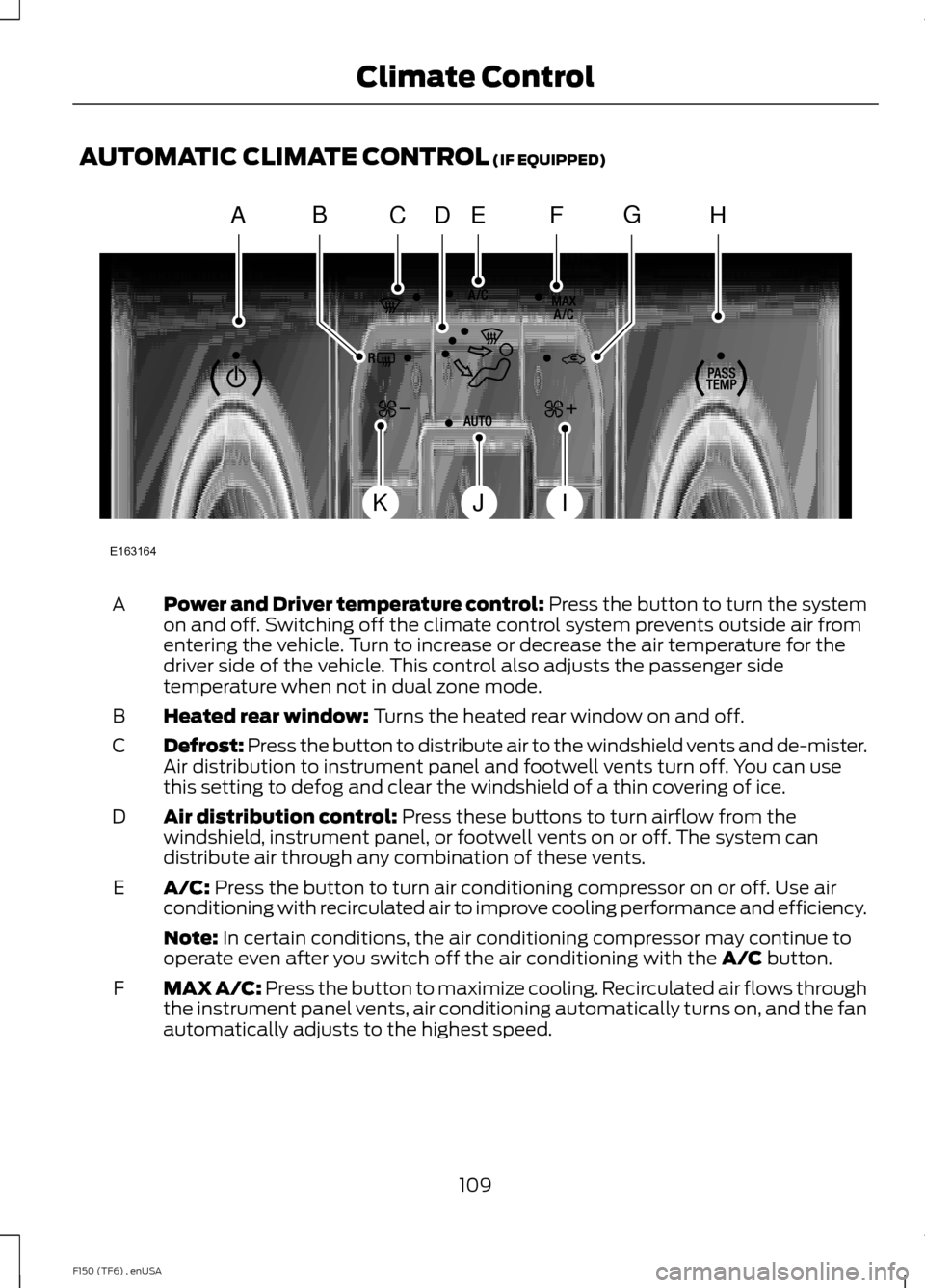
AUTOMATIC CLIMATE CONTROL (IF EQUIPPED)
Power and Driver temperature control: Press the button to turn the system
on and off. Switching off the climate control system prevents outside air from
entering the vehicle. Turn to increase or decrease the air temperature for the
driver side of the vehicle. This control also adjusts the passenger side
temperature when not in dual zone mode.
A
Heated rear window:
Turns the heated rear window on and off.
B
Defrost: Press the button to distribute air to the windshield vents and de-mister.
Air distribution to instrument panel and footwell vents turn off. You can use
this setting to defog and clear the windshield of a thin covering of ice.
C
Air distribution control:
Press these buttons to turn airflow from the
windshield, instrument panel, or footwell vents on or off. The system can
distribute air through any combination of these vents.
D
A/C:
Press the button to turn air conditioning compressor on or off. Use air
conditioning with recirculated air to improve cooling performance and efficiency.
E
Note:
In certain conditions, the air conditioning compressor may continue to
operate even after you switch off the air conditioning with the A/C button.
MAX A/C:
Press the button to maximize cooling. Recirculated air flows through
the instrument panel vents, air conditioning automatically turns on, and the fan
automatically adjusts to the highest speed.
F
109
F150 (TF6) , enUSA Climate ControlE163164
AHCEF
JIK
DBG
Page 113 of 472
Recirculated air: Press the button to switch between outside air and
recirculated air. When you select recirculated air, the air currently in the
passenger compartment recirculates. This may reduce the time needed to cool
the interior (when used with
A/C) and may reduce unwanted odors from
entering your vehicle.
G
Note:
Recirculated air may turn off automatically (or be prevented from turning
on) in all airflow modes except MAX A/C to reduce risk of fogging. Recirculated
air may also turn on and off automatically in Panel or Panel and Floor airflow
modes during hot weather in order to improve cooling efficiency.
PASS TEMP: Turn to increase or decrease the air temperature on the passenger
side of the vehicle. This turns on dual zone mode.
H
Fan speed control +:
Press to increase the volume of air circulated in your
vehicle.
I
AUTO:
Press the button to turn on automatic operation. Select the desired
temperature using the temperature control. The system adjusts fan speed, air
distribution, air conditioning operation, and selects outside air or recirculated
air to heat or cool the vehicle in order to maintain the desired temperature. You
can also use the
AUTO button to turn off dual zone operation by pressing and
holding the button for more than two seconds.
J
Fan speed control -:
Press to decrease the volume of air circulated in your
vehicle.
K
HINTS ON CONTROLLING THE
INTERIOR CLIMATE
General Hints
Note: Prolonged use of recirculated air may
cause the windows to fog up.
Note: You may feel a small amount of air
from the footwell air vents regardless of the
air distribution setting.
Note: To reduce humidity build-up inside
your vehicle, do not drive with the system
switched off or with recirculated air always
switched on.
Note: Do not place objects under the front
seats as this may interfere with the airflow
to the rear seats.
Note: Remove any snow, ice or leaves from
the air intake area at the base of the
windshield. Note:
To improve the time to reach comfort
in hot weather, drive with the windows
slightly open for 2-3 minutes after start-up
or until your vehicle airs out.
Manual Climate Control
Note: To reduce fogging of the windshield
during humid weather, adjust the air
distribution control to the windshield air
vents position.
Automatic Climate Control
Note: Adjusting the settings when your
vehicle interior is extremely hot or cold is
not necessary. The system automatically
adjusts to heat or cool the cabin to your
selected temperature as quickly as possible.
For the system to function efficiently, the
instrument panel and side air vents should
be fully open.
110
F150 (TF6) , enUSA Climate Control
Page 114 of 472
Note:
If you select AUTO during cold
outside temperatures, the system directs
airflow to the windshield and side window
vents. In addition, the fan may run at a
slower speed until the engine warms up. Note:
If you select AUTO during hot outside
temperatures, or when the inside of the
vehicle is hot, the system automatically uses
recirculated air to maximize interior cooling.
When the interior reaches the selected
temperature, the system automatically
switches to using outside air.
Heating the Interior Quickly Vehicle with automatic climate control
Vehicle with manual climate control
Press the
AUTO button.
Adjust the fan speed to the highest
speed setting.
1
Adjust the temperature control to the
desired setting.
Adjust the temperature control to the
highest setting.
2
Select the footwell air vents using the
air distribution buttons.
3
Recommended Settings for Heating Vehicle with automatic climate control
Vehicle with manual climate control
Press the
AUTO button.
Adjust the fan speed to the center
setting.
1
Adjust the temperature control to the
desired setting. Use 72°F (22°C) as a
starting point, then adjust the setting as
necessary.
Adjust the temperature control to the
midway point of the hot settings.
2
Select the footwell air vents using the
air distribution buttons.
3
Cooling the Interior Quickly Vehicle with automatic climate control
Vehicle with manual climate control
Press the
MAX A/C button.
Press the MAX A/C button.
1
Drive with the windows open for 2-3
minutes.
2
111
F150 (TF6) , enUSA Climate Control
Page 115 of 472
Recommended Settings for Cooling
Vehicle with automatic climate control
Vehicle with manual climate control
Press the AUTO button.
Adjust the fan speed to the center
setting.
1
Adjust the temperature control to the
desired setting. Use 72°F (22°C) as a
starting point, then adjust the setting as
necessary.
Adjust the temperature control to the
midway point of the cold settings.
2
Select the instrument panel air vents
using the air distribution buttons.
3
Side Window Defogging in Cold Weather Vehicle With Automatic Climate Control
Vehicle With Manual Climate Control
Press the defrost button.
Select the instrument panel and footwell
air vents positions through the air distri-
bution control.
1
Adjust the temperature control to the
desired setting. Use 72°F (22°C) as a
starting point, then adjust the setting as
necessary.
Press the
A/C button.
2
Adjust the temperature control to the
desired setting.
3
Adjust the fan speed to the highest
setting.
4
Direct the instrument panel side air vents
toward the side windows.
5
Close the instrument panel center vents.
6
HEATED WINDOWS AND
MIRRORS
Heated Rear Window
(If Equipped)
Note: The engine must be running to use
this feature. Note:
If your vehicle is equipped with a
sliding rear window, the feature does not
operate when you open the window.
Press the button to clear the rear window
of thin ice and fog. Press the button again
within 10 minutes to switch it off. It
switches off automatically after 10
minutes, or when you switch the ignition
off.
112
F150 (TF6) , enUSA Climate Control