2014 FORD F150 lock
[x] Cancel search: lockPage 296 of 472
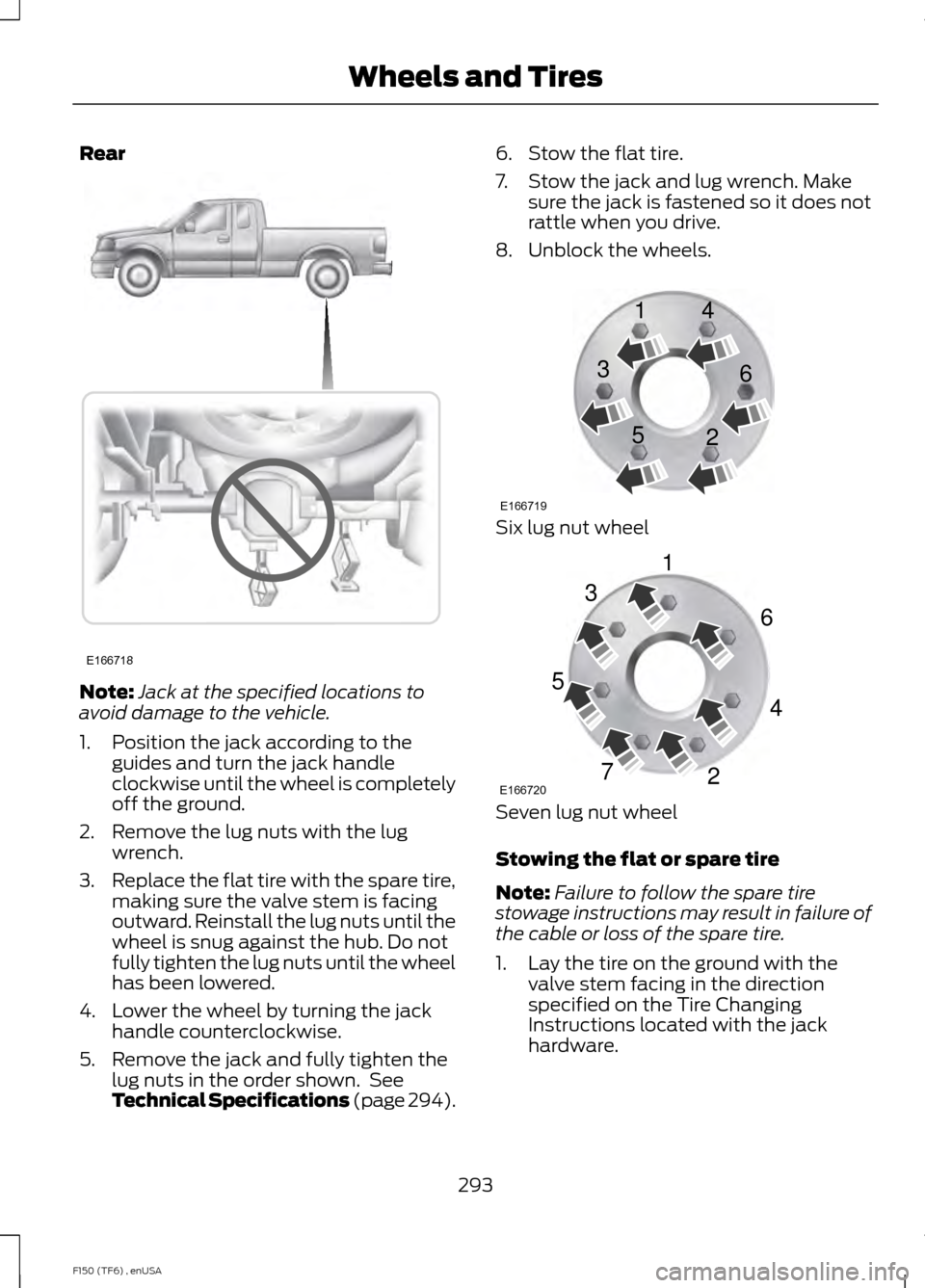
Rear
Note:
Jack at the specified locations to
avoid damage to the vehicle.
1. Position the jack according to the guides and turn the jack handle
clockwise until the wheel is completely
off the ground.
2. Remove the lug nuts with the lug wrench.
3. Replace the flat tire with the spare tire,
making sure the valve stem is facing
outward. Reinstall the lug nuts until the
wheel is snug against the hub. Do not
fully tighten the lug nuts until the wheel
has been lowered.
4. Lower the wheel by turning the jack handle counterclockwise.
5. Remove the jack and fully tighten the lug nuts in the order shown. See
Technical Specifications (page 294). 6. Stow the flat tire.
7. Stow the jack and lug wrench. Make
sure the jack is fastened so it does not
rattle when you drive.
8. Unblock the wheels. Six lug nut wheel
Seven lug nut wheel
Stowing the flat or spare tire
Note:
Failure to follow the spare tire
stowage instructions may result in failure of
the cable or loss of the spare tire.
1. Lay the tire on the ground with the valve stem facing in the direction
specified on the Tire Changing
Instructions located with the jack
hardware.
293
F150 (TF6) , enUSA Wheels and TiresE166718 E166719
1
3
5 4
6
2 E166720
1
3
5
7 6
4
2
Page 297 of 472
2. Slide the wheel partially under the
vehicle and install the retainer through
the wheel center. Pull on the cable to
align the components at the end of the
cable.
3. Turn the jack handle clockwise until the tire is raised to its stowed position
underneath the vehicle. The effort to
turn the jack handle increases
significantly and the spare tire carrier
ratchets or slips when the tire is raised
to the maximum tightness. Tighten to
the best of your ability, to the point
where the ratchet or slip occurs, if
possible. The spare tire carrier will not
allow you to overtighten. If the spare
tire carrier ratchets or slips with little
effort, take the vehicle to your
authorized dealer for assistance at your
earliest convenience. 4. Check that the tire lies flat against the
frame and is properly tightened. Try to
push or pull, then turn the tire to be
sure it will not move. Loosen and
retighten, if necessary. Failure to
properly stow the spare tire may result
in failure of the winch cable and loss
of the tire.
5. Repeat this tightness check procedure
when servicing the spare tire pressure
(every six months, as per your
scheduled maintenance information),
or at any time that the spare tire is
disturbed through service of other
components.
6. If removed, install the spare tire lock into the bumper drive tube with the
spare tire lock key and jack handle.
TECHNICAL SPECIFICATIONS
Wheel Lug Nut Torque Specifications WARNING
When a wheel is installed, always remove any corrosion, dirt or foreign materials
present on the mounting surfaces of the wheel or the surface of the wheel hub,
brake drum or brake disc that contacts the wheel. Make sure that any fasteners
that attach the rotor to the hub are secured so they do not interfere with the mounting
surfaces of the wheel. Installing wheels without correct metal-to-metal contact at the
wheel mounting surfaces can cause the wheel nuts to loosen and the wheel to come off
while your vehicle is in motion, resulting in loss of control. lb.ft (Nm)
Bolt size
148 lb.ft (200 Nm)
M14 x 2.0
* Torque specifications are for nut and bolt threads free of dirt and rust. Use only Ford
recommended replacement fasteners.
294
F150 (TF6) , enUSA Wheels and Tires
Page 304 of 472
TECHNICAL SPECIFICATIONS
Ford part number / Ford
specification
Ford part name or
equivalent
Capacity
Item
XL-1 (US); CXC-51-A(Canada) / --
Motorcraft Penet-
rating and Lock
Lubricant (US);
Motorcraft Penet- rating Fluid(Canada)
—
Lock cylinders
XL-5
Motorcraft Multi-
Purpose Grease Spray
—
Hinges, latches,
striker plates, fuel filler door hingeand seat tracks
PM-20 / WSS-M6C65-A2
Motorcraft DOT 4
LV High Perform-
ance Motor Vehicle Brake Fluid
Between MIN/MAX
on brake fluid reser- voir
Brake fluid
1
XO-5W30-QSP or XO-
5W30-QFS (US); CXO- 5W30-LSP12 or CXO-
5W30-LFS12 (Canada) / WSS-M2C946-A
Motorcraft SAE
5W-30 Motor Oil
6.0 qt (5.7L)
3.5L EcoBoost
engine oil 2,3
XO-5W20-QSP or XO-
5W20-QFS (US); CXO- 5W20-LSP12 or CXO-
5W20-LFS12 (Canada) / WSS-M2C945-A
Motorcraft SAE
5W-20 Motor Oil
6.0 qt (5.7L)
3.7L engine oil 2,3
7.7 qt (7.3L)
5.0L engine oil 2,3
7.0 qt (6.6L)
6.2L engine oil 2,3
VC-3DIL-B (US); CVC-
3DIL-B (Canada) / WSS- M97B44-D2
Motorcraft Orange
Antifreeze/Coolant Prediluted
16.5 qt (15.6L)
3.5L EcoBoost
engine coolant 4
16.0 qt (15.1L)
3.7L engine
coolant 4
17.0 qt (16.1L)
5.0L engine
coolant 4
19.5 qt (18.5L)
6.2L engine
coolant 4
301
F150 (TF6) , enUSA Capacities and Specifications
Page 311 of 472
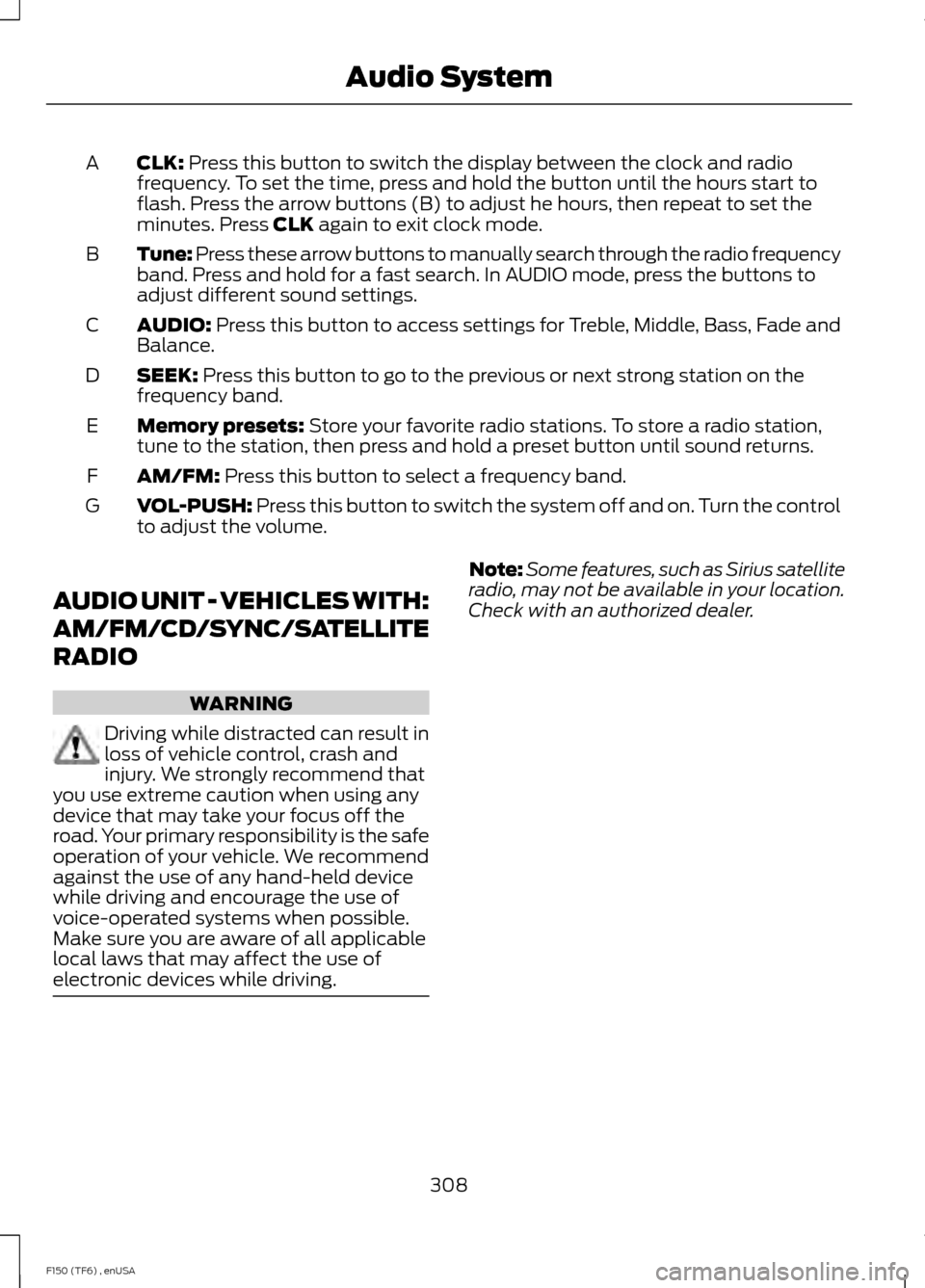
CLK: Press this button to switch the display between the clock and radio
frequency. To set the time, press and hold the button until the hours start to
flash. Press the arrow buttons (B) to adjust he hours, then repeat to set the
minutes. Press
CLK again to exit clock mode.
A
Tune: Press these arrow buttons to manually search through the radio frequency
band. Press and hold for a fast search. In AUDIO mode, press the buttons to
adjust different sound settings.
B
AUDIO:
Press this button to access settings for Treble, Middle, Bass, Fade and
Balance.
C
SEEK:
Press this button to go to the previous or next strong station on the
frequency band.
D
Memory presets:
Store your favorite radio stations. To store a radio station,
tune to the station, then press and hold a preset button until sound returns.
E
AM/FM:
Press this button to select a frequency band.
F
VOL-PUSH:
Press this button to switch the system off and on. Turn the control
to adjust the volume.
G
AUDIO UNIT - VEHICLES WITH:
AM/FM/CD/SYNC/SATELLITE
RADIO WARNING
Driving while distracted can result in
loss of vehicle control, crash and
injury. We strongly recommend that
you use extreme caution when using any
device that may take your focus off the
road. Your primary responsibility is the safe
operation of your vehicle. We recommend
against the use of any hand-held device
while driving and encourage the use of
voice-operated systems when possible.
Make sure you are aware of all applicable
local laws that may affect the use of
electronic devices while driving. Note:
Some features, such as Sirius satellite
radio, may not be available in your location.
Check with an authorized dealer.
308
F150 (TF6) , enUSA Audio System
Page 313 of 472
SIRIUS allows you to access different satellite radio options.
CLOCK#:
Press this button to set the time. Use the memory preset buttons to
enter the time, and then press OK.
F
PHONE:
Press this button to access the phone features of the SYNC system.
See Using SYNC™ With Your Phone (page 327). If your vehicle is not equipped
with SYNC, the display reads NO PHONE.
G
SOUND:
Press this button to access settings for Treble, Middle, Bass, Balance
and Fade. Use the SEEK or TUNE controls to change the settings.
H
Bass
levels can be increased or decreased.
Treble
levels can be increased or decreased.
Balance
adjusts the sound between left and right speakers.
Fade
adjusts the sound between the front and back speakers.
Speed Compensated Volume
adjusts the volume to compensate for speed
and wind noise. You can set the system between off and +7.
All Seat Mode/Driver Seat Mode
optimizes sound quality for the chosen
seating position.
DSP Mode
(if equipped) allows you to choose between STEREO SURROUND
mode and STEREO mode.
SEEK:
I
In radio mode, select a frequency band and press one of these buttons. The
system stops at the first station it finds in that direction.
In Sirius mode, press one of these buttons to select the previous or next channel.
If you select a specific category (such as Jazz, Rock or News), use these buttons
to find the previous or next channel in the selected category.
In CD and MP3 modes, press one of these buttons to select the previous or next
track.
CD:
Press this button to access CD and MP3 modes.
J
The disc begins to play where it left off. If no CD is loaded, NO DISC
appears
in the display.
Press the
SEEK buttons to access the previous or next track. Press and hold
the SEEK buttons to quickly reverse or fast-forward within the same track.
TUNE/OK/Play/Pause:
K
In radio mode, turn the control to search manually through the radio frequency
band.
In Sirius mode, turn the control to find the next or previous available satellite
radio station.
OK
allows you to confirm commands with phone and media features.
310
F150 (TF6) , enUSA Audio System
Page 316 of 472
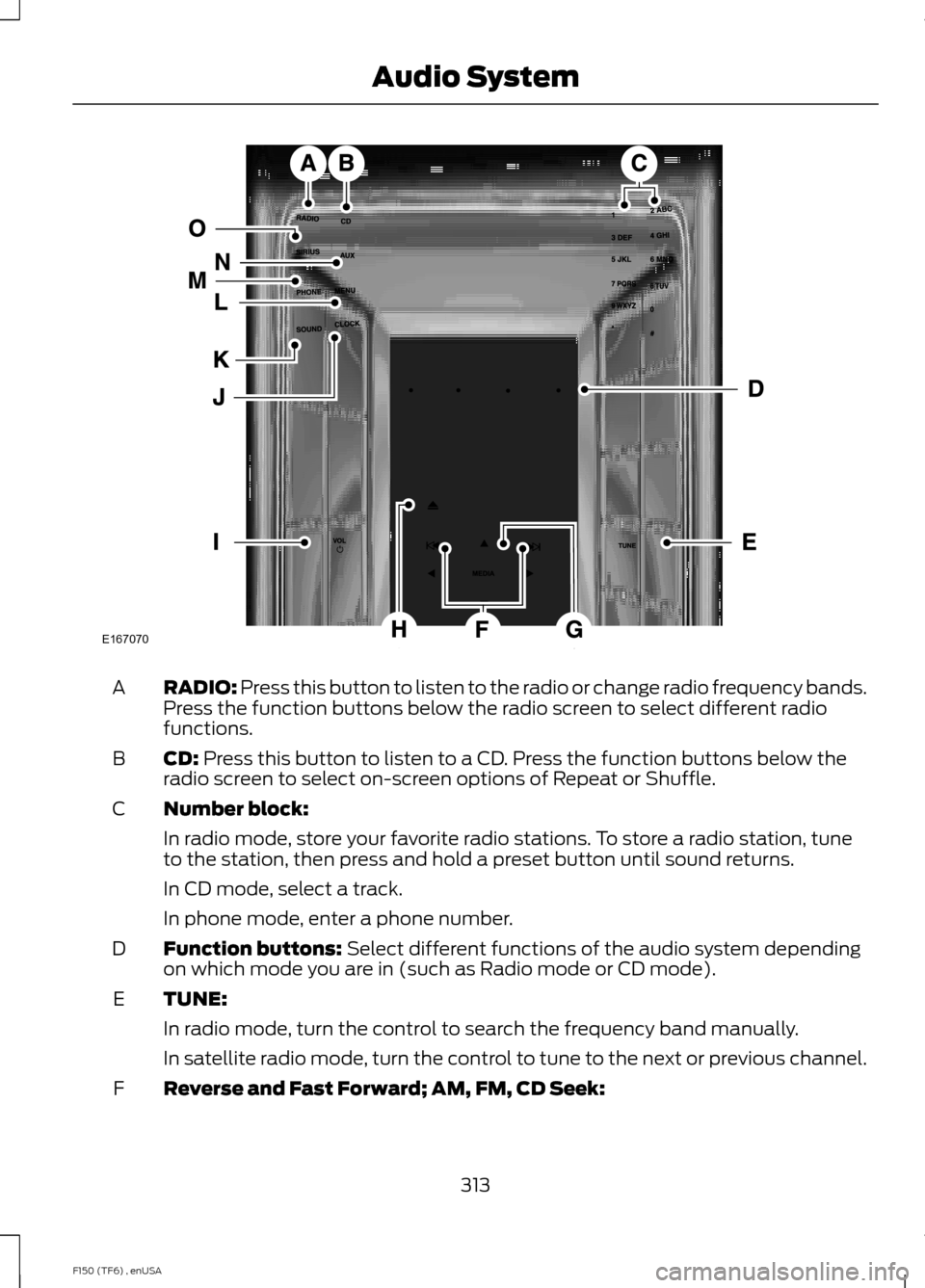
RADIO: Press this button to listen to the radio or change radio frequency bands.
Press the function buttons below the radio screen to select different radio
functions.
A
CD:
Press this button to listen to a CD. Press the function buttons below the
radio screen to select on-screen options of Repeat or Shuffle.
B
Number block:
C
In radio mode, store your favorite radio stations. To store a radio station, tune
to the station, then press and hold a preset button until sound returns.
In CD mode, select a track.
In phone mode, enter a phone number.
Function buttons:
Select different functions of the audio system depending
on which mode you are in (such as Radio mode or CD mode).
D
TUNE:
E
In radio mode, turn the control to search the frequency band manually.
In satellite radio mode, turn the control to tune to the next or previous channel.
Reverse and Fast Forward; AM, FM, CD Seek:
F
313
F150 (TF6) , enUSA Audio SystemE167070
Page 317 of 472

In radio mode, select a frequency band and press one of these buttons. The
system stops at the first station it finds in that direction. Press and hold one of
these buttons to move quickly in that direction to the next strong radio station
or memory preset.
In Sirius mode, press one of these buttons to select the previous or next channel.
If you select a specific category (such as Jazz, Rock or News), use these buttons
to find the previous or next channel in the selected category. Press and hold
one of these buttons to move quickly in that direction to the next channel or
category.
In CD mode, press one of these buttons to select the previous or next track.
Press and hold one of these buttons to move quickly in that direction within the
current track.
OK and arrow buttons: Press the up and down or left and right arrow buttons
to browse menu selections. Press OK to confirm menu selections.
G
Eject:
Press this button to eject a CD.
H
Power and Volume:
Press this button to switch the system off and on. Turn
it to adjust the volume.
I
CLOCK:
Press this button to access the clock setting. Use the center arrow
controls to change the hours and minutes.
J
SOUND:
Press this button to adjust settings for Treble, Middle, Bass, Balance
and Fade.
K
MENU:
Press this button to access different audio system features. See Menu
Structure later in this section.
L
PHONE:
Press this button to access the phone features of the SYNC system.
See Using SYNC™ With Your Phone (page 327).
M
AUX:
Press this button to access your auxiliary input jack or switch between
devices you plug into the input jack or USB port. See Using SYNC™ With Your
Media Player
(page 345).
N
SIRIUS:
Press this button to listen to Sirius satellite radio.
O
314
F150 (TF6) , enUSA Audio System
Page 323 of 472
Satellite Radio Electronic Serial
Number (ESN)
You need your ESN to activate, modify or
track your satellite radio account. When in
satellite radio mode, you can view this
number by pressing SIRIUS and memory
preset 1 at the same time, or tuning to
channel 0.
Troubleshooting Possible action
Condition
Radio display
No action required. This
message should disappear
shortly.
Radio requires more than
two seconds to produce
audio for the selected
channel.
Acquiring
If this message does not
clear shortly, or with an igni-
tion key cycle, your receiver
may have a fault. See an
authorized dealer for service.
There is an internal module
or system failure present.
Sat Fault/SIRIUS system
failure
Tune to another channel or
choose another preset.
The channel is no longer
available.
Invalid Channel
Contact SIRIUS at 1-888-
539-7474 to subscribe to
the channel, or tune to
another channel.
Your subscription does not
include this channel.
Unsubscribed Channel
The signal is blocked. When
you move into an open area,
the signal should return.
The signal is lost from the
SIRIUS satellite or SIRIUS
tower to your vehicle
antenna.
No Signal
No action required. The
process may take up to
three minutes.
Update of channel
programming in progress.
Updating
Contact SIRIUS at 1-888-
539-7474 to resolve
subscription issues.
Your satellite service is no
longer available.
Call SIRIUS 1-888-539-7474
Use the channel guide to
turn off the Lock or Skip
function on that station.
All the channels in the
selected category are either
skipped or locked.
None found. Check Channel
Guide.
No action required.
SIRIUS has updated the
channels available for your
vehicle.
Subscription Updated
320
F150 (TF6) , enUSA Audio System