Page 415 of 476
NOTE:
•FCA or your dealer may contact you directly regard-
ing software updates.
• To help further improve vehicle security and mini-
mize the potential risk of a security breach, vehicle
owners should:
• Routinely check www.driveuconnect.com/
software-update to learn about available Uconnect
software updates.
• Only connect and use trusted media devices (e.g.
personal mobile phones, USBs, CDs).
Privacy of any wireless and wired communications
cannot be assured. Third parties may unlawfully inter-
cept information and private communications without
your consent. For further information, refer to “On-
board Diagnostic System (OBD II) Cybersecurity” in
“Getting To Know Your Instrument Panel”.UCONNECT SETTINGS
The Uconnect system uses a combination of buttons on
the touchscreen and buttons on the faceplate located on
the center of the instrument panel that allow you to
access and change the customer programmable fea-
tures. Many features can vary by vehicle.
11
MULTIMEDIA 413
Page 416 of 476
Uconnect 5.0 Buttons On The Touchscreen And ButtonsOn The Faceplate
1 — Uconnect Buttons On The Touchscreen
2 — Uconnect Buttons On The Faceplate
Uconnect 6.5 NAV Buttons On The Touchscreen AndButtons On The Faceplate
1 — Uconnect Buttons On The Touchscreen
2 — Uconnect Buttons On The Faceplate
414 MULTIMEDIA
Page 417 of 476
Buttons On The Faceplate
Buttons on the faceplate are located below, and beside
the Uconnect system in the center of the instrument
panel. In addition, there is a Scroll/Enter control knob
located on the right side. Turn the control knob to scroll
through menus and change settings (i.e., 30, 60, 90),
push the center of the control knob one or more times to
select or change a setting (i.e., ON, OFF).
Your Uconnect system may also have Display Off and
back arrow buttons on the faceplate.
Push the Display Off button on the faceplate to turn off
the Uconnect screen. Push the Display Off button on the
faceplate a second time to turn the screen on.
Push the Back Arrow button on the faceplate to exit out
of a Menu or certain option on the Uconnect system.
Buttons On The Touchscreen
Buttons on the touchscreen are accessible on the
Uconnect touchscreen.
Customer Programmable Features — Uconnect
5.0 Settings
Push the Settingsbutton on the faceplate, to dis-
play the settings menu screen. In this mode the Uconnect system allows you to access programmable
features that may be equipped such as Display,
Units, Voice, Clock & Date, Safety/Assistance,
Lights, Doors & Locks, Engine Off Options, Audio,
Phone/Bluetooth, Radio Setup, Restore Settings and
Clear Personal Data.
NOTE:
Only one touchscreen area may be selected at a
time.
When making a selection, press the button on the
touchscreen to enter the desired mode. Once in the
desired mode, press and release the preferred setting
and make your selection. Once the setting is complete,
either press the Back Arrow button on the touchscreen
or the Back button on the faceplate to return to the
previous menu or press the “X” button on the touch-
screen to close out of the settings screen. Pressing the
Up or Down Arrow buttons on the right side of the
screen will allow you to toggle up or down through the
available settings.
NOTE: All settings should be changed with the ignition
in the “RUN” position.
11
MULTIMEDIA 415
Page 442 of 476
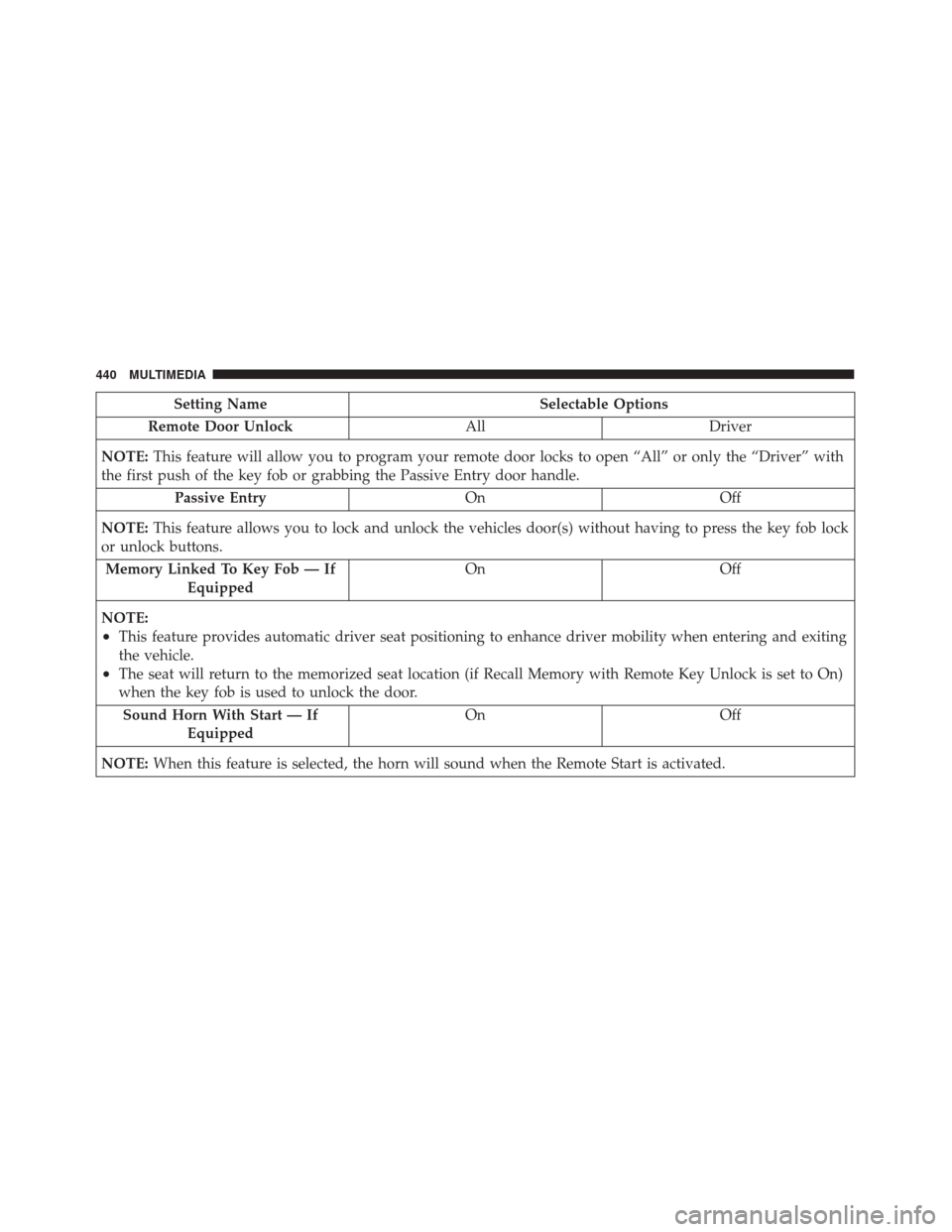
Setting NameSelectable Options
Remote Door Unlock AllDriver
NOTE: This feature will allow you to program your remote door locks to open “All” or only the “Driver” with
the first push of the key fob or grabbing the Passive Entry door handle.
Passive Entry OnOff
NOTE: This feature allows you to lock and unlock the vehicles door(s) without having to press the key fob lock
or unlock buttons.
Memory Linked To Key Fob — If Equipped On
Off
NOTE:
•This feature provides automatic driver seat positioning to enhance driver mobility when entering and exiting
the vehicle.
•The seat will return to the memorized seat location (if Recall Memory with Remote Key Unlock is set to On)
when the key fob is used to unlock the door. Sound Horn With Start — If Equipped On
Off
NOTE: When this feature is selected, the horn will sound when the Remote Start is activated.
440 MULTIMEDIA
Page 452 of 476
Get Started
All you need to control your Uconnect system with
your voice are the buttons on your steering wheel.
1. VisitUconnectPhone.com to check mobile device
and feature compatibility and to find phone pair-
ing instructions.
2. Reduce background noise. Wind and passenger con- versations are examples of noise that may impact
recognition.
3. Speak clearly at a normal pace and volume while facing straight ahead. The microphone is positioned
on the rearview mirror and aimed at the driver.
4. Each time you give a Voice Command, you must first push either the VR or Phone button, wait until after
the beep, then say your Voice Command.
5. You can interrupt the help message or system prompts by pushing the VR or Phone button and
saying a Voice Command from current category.
Uconnect Voice Command Buttons
1 — Push To Initiate Or To Answer A Phone Call, Send Or Re-
ceive A Text
2 — Push To Begin Radio, Navigation, Or Media Functions
3 — Push To End Call
450 MULTIMEDIA
Page 459 of 476
NOTE:Apush and release of thebutton will start
normal embedded VR functions. The push and hold,
then release of the
button will start Siri functions.
2. After the double beep, begin speaking to Siri.
Examples of Siri commands and questions:
•�Play Rolling Stones�
• �Send text message to John�
• �Read text message from Sarah�
• �Take me to the nearest coffee shop�
NOTE: •Speak clearly at a normal pace and volume while
facing straight ahead to ensure your command is
understood.
• Siri is available on iPhone 4S and later.
Uconnect Voice Command Buttons
1 — Phone Pick Up Button
2 — Voice Recognition/Siri Eyes Free Button
3 — Phone Hang Up Button
11
MULTIMEDIA 457