Page 403 of 476
across dirty surfaces. Do not use plastic sheeting
which will not allow the evaporation of moisture
present on the surface of the vehicle.
• Inflate the tires at a pressure of +7.25 psi (+0.5 bar)
higher than recommended on the tire placard and
check it periodically.
• Do not drain the engine cooling system.
• Whenever you leave the vehicle is stationary for two
weeks or more, idle the engine for approximately five
minutes with the air conditioning system on and
high fan speed. This will ensure a proper lubrication
of the system, thus minimizing the possibility of
damage to the compressor when the vehicle is put
back into operation.
NOTE: When the vehicle has not been started or driven
for at least 30 days, an Extended Park Start Procedure is
required to start the vehicle. Refer to “Starting The
Engine” in “Starting And Operating” for further infor-
mation.CAUTION!
Before removal of the positive and negative termi-
nals to the battery, wait at least a minute with
ignition switch in the OFF position and close the
drivers door. When reconnecting the positive and
negative terminals to the battery be sure the igni-
tion switch is in the OFF position and the drivers
door is closed.
9
MAINTAINING AND CARING FOR YOUR VEHICLE 401
Page 405 of 476
TECHNICAL DATA
CONTENTS
�VEHICLE IDENTIFICATION NUMBER ......404
� WHEEL AND TIRE TORQUE
SPECIFICATIONS .....................404
▫ Torque Specifications ..................405
� FLUID CAPACITIES ...................407 �
FLUIDS, LUBRICANTS, AND GENUINE
PARTS ............................ .408
▫ Engine ........................... .408
▫ Chassis .......................... .409
10
Page 409 of 476
FLUID CAPACITIES
U.SMetric
Fuel (Approximate)
1.4L Turbo/2.4L Engine 12.7 Gallons48 Liters
Engine Oil With Filter
1.4L Turbo Engine (SAE 5W-40 Synthetic, API Certified) 4.0 Quarts 3.8 Liters
2.4L Engine (SAE 0W-20, API Certified) 5.5 Quarts5.2 Liters
Cooling System *
1.4L Turbo Engine (Mopar Antifreeze/Engine Coolant 10
Year/150,000 Mile Formula) 5.5 Quarts
5.2 Liters
2.4L Engine (Mopar Antifreeze/Engine Coolant 10 Year/
150,000 Mile Formula) 6.8 Quarts
6.5 Liters
* Includes heater and coolant recovery bottle filled to MAX level.
10
TECHNICAL DATA 407
Page 410 of 476

FLUIDS, LUBRICANTS, AND GENUINE PARTS
Engine
ComponentFluid, Lubricant, or Genuine Part
Engine Coolant We recommend you use Mopar Antifreeze/Coolant 10 Year/
150,000 Mile Formula OAT (Organic Additive Technology) or
equivalent meeting the requirements of FCA Material Stan-
dard MS.90032.
Engine Oil – 1.4L Turbo Engine We recommend you use SAE 5W-40 API Certified Synthetic
Engine Oil, meeting the requirements of FCA Material Stan-
dard MS-12991. Refer to your engine oil filler cap for correct
SAE grade.
Engine Oil – 2.4L Engine We recommend you use SAE 0W-20 API Certified Engine Oil,
meeting the requirements of FCA Material Standard MS-6395.
Refer to your engine oil filler cap for correct SAE grade.
Engine Oil Filter We recommend you use a Mopar Engine Oil Filter.
Spark Plugs We recommend you use Mopar Spark Plugs.
Fuel Selection – 1.4L Turbo Engine 91 Octane Recommended, 87 Acceptable, 0-15% Ethanol.
Fuel Selection – 2.4L Engine 87 Octane, 0-15% Ethanol.
408 TECHNICAL DATA
Page 417 of 476
Buttons On The Faceplate
Buttons on the faceplate are located below, and beside
the Uconnect system in the center of the instrument
panel. In addition, there is a Scroll/Enter control knob
located on the right side. Turn the control knob to scroll
through menus and change settings (i.e., 30, 60, 90),
push the center of the control knob one or more times to
select or change a setting (i.e., ON, OFF).
Your Uconnect system may also have Display Off and
back arrow buttons on the faceplate.
Push the Display Off button on the faceplate to turn off
the Uconnect screen. Push the Display Off button on the
faceplate a second time to turn the screen on.
Push the Back Arrow button on the faceplate to exit out
of a Menu or certain option on the Uconnect system.
Buttons On The Touchscreen
Buttons on the touchscreen are accessible on the
Uconnect touchscreen.
Customer Programmable Features — Uconnect
5.0 Settings
Push the Settingsbutton on the faceplate, to dis-
play the settings menu screen. In this mode the Uconnect system allows you to access programmable
features that may be equipped such as Display,
Units, Voice, Clock & Date, Safety/Assistance,
Lights, Doors & Locks, Engine Off Options, Audio,
Phone/Bluetooth, Radio Setup, Restore Settings and
Clear Personal Data.
NOTE:
Only one touchscreen area may be selected at a
time.
When making a selection, press the button on the
touchscreen to enter the desired mode. Once in the
desired mode, press and release the preferred setting
and make your selection. Once the setting is complete,
either press the Back Arrow button on the touchscreen
or the Back button on the faceplate to return to the
previous menu or press the “X” button on the touch-
screen to close out of the settings screen. Pressing the
Up or Down Arrow buttons on the right side of the
screen will allow you to toggle up or down through the
available settings.
NOTE: All settings should be changed with the ignition
in the “RUN” position.
11
MULTIMEDIA 415
Page 427 of 476
Setting NameSelectable Options
Passive Entry On Off
Remote Door Unlock/ Door Unlock Driver
All
NOTE: When “Driver” is selected, only the driver’s door will unlock on the first push of the key fob unlock
button, you must push the key fob unlock button twice to unlock the passenger’s doors. When “All” is selected,
all of the doors will unlock on the first press of the key fob unlock button.
Engine Off Options
After pressing the “Engine Off Options” button on the
touchscreen, the following settings will be available:
Setting Name Selectable Options
Headlight Off Delay +–
NOTE: When this feature is selected, the driver can choose to have the headlights remain on for 0, 30, 60, or 90
seconds when exiting the vehicle.
Radio Off Delay 0 MIN20 MIN
11
MULTIMEDIA 425
Page 432 of 476
Customer Programmable Features — Uconnect
6.5 NAV Settings
Press the Settings button to display the menu setting
screen. In this mode the Uconnect system allows you to
access programmable features that may be equipped
such as Display, Clock, Safety & Driving Assistance,
Lights, Doors & Locks, Engine Off Options, Audio,
Phone/Bluetooth, SiriusXM Setup, Restore Settings De-
faults, Clear Personal Data and System Information.
NOTE:
•Only one touchscreen area may be selected at a time.
• Depending on the vehicles options, feature settings
may vary. When making a selection, press the button on the
touchscreen to enter the desired mode. Once in the
desired mode, press and release the preferred setting
and make your selection. Once the setting is complete,
either press the Back Arrow button on the touchscreen
to return to the previous menu, or press the “X” button
on the touchscreen to close out of the settings screen.
Pressing the Up or Down Arrow button on the right
side of the screen will allow you to toggle up or down
through the available settings.
430 MULTIMEDIA
Page 443 of 476
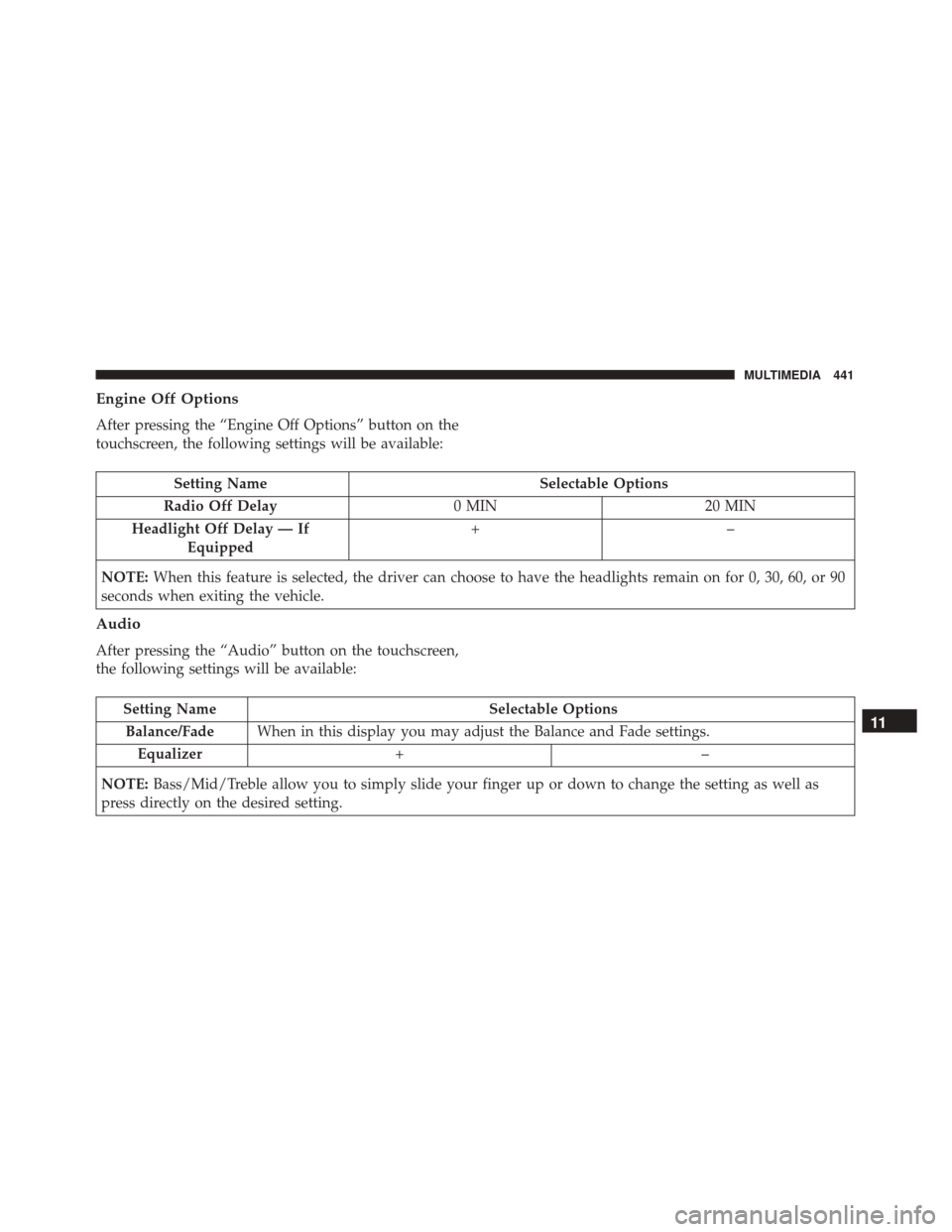
Engine Off Options
After pressing the “Engine Off Options” button on the
touchscreen, the following settings will be available:
Setting NameSelectable Options
Radio Off Delay 0 MIN20 MIN
Headlight Off Delay — If Equipped +–
NOTE: When this feature is selected, the driver can choose to have the headlights remain on for 0, 30, 60, or 90
seconds when exiting the vehicle.
Audio
After pressing the “Audio” button on the touchscreen,
the following settings will be available:
Setting Name Selectable Options
Balance/Fade When in this display you may adjust the Balance and Fade settings.
Equalizer +–
NOTE: Bass/Mid/Treble allow you to simply slide your finger up or down to change the setting as well as
press directly on the desired setting.11
MULTIMEDIA 441