2014 AUDI RS7 SPORTBACK heating
[x] Cancel search: heatingPage 4 of 292

2 Table of content s
Vehicle lite ratu re .. .. .. .. .. ... .
About thi s Owner' s Manual ...
C ontr ols and equi pm ent .. ... .
Instruments and controls .. . .
General illustration ...... ... .. ... .
Instruments and warning/
indicator lights ............... .
Instruments ............ ... .. ... .
Warning/indicator lights .. ... ... .. .
Driver information display ... ... ... .
Lap timer .. ................ ... . .
On-Board Diagnostic system (OBD) .. .
Opening and closing ......... .
Keys .. .. .................. ... . .
Power locking system .......... .. .
Rear lid .... .................. .. .
5
6
8
8
8
10
10
11
23
29
30
32
32
34
38
Child safety lock for the rear doors . . . 40
Power windows ................. .
Valet park ing ................... .
Sliding/ tilting sunroof ............ .
Clear vision ................... .
Lights ... .. ................ ... . .
I nterior lights .... ......... ... ... .
V1s1on ..... ... ............. .... .
Wiper and washer system ...... .. . .
Mirrors .. ............... ....... . 4
1
42
42
44
44
47
48
48
so
Seats and storage . . . . . . . . . . . . . 53
General recommendations ........ .
Front seats .................. ... .
Head restraints ................. .
Seat memory .. .... ...... .. .. .. . .
Ashtray .. .. ................ ... . .
C igarette lighter ................. .
12-vo lt sockets .................. .
Storage .. ............... ...... . .
Roof rack .. ... ............. .... .
Luggage compartment ..... ... ... .
Pass-through with ski sack ....... . . 53
54
56
57
59
59
60
60
62
64
67
Warm and cold . . . . . . . . . . . . . . . . 69
F our-zone automatic climate control . 69
Steering wheel heating . . . . . . . . . . . . 72
On the road ... .......... ... .. .
Steering .. .... .. .. ............. .
Starting and stopping the engine ... .
E lectromechanical parking brake ... .
Speed warning system ............ .
Cruise contro l .. .. ............... .
Audi adaptive cruise control
and braking guard .......... . .
Introduction ... .. ... .... ........ .
General information ............. .
Audi adaptive cruise control ....... .
Audi braking gua rd ............ .. .
Messages . .... .. ............. .. .
73
73
74
77
79
79
81 81
81
83
87
88
Audi active lane assist . . . . . . . . 90
Active lane assist .............. .. .
Audi side assist .............. .
Lane Change Assistant ............ .
90
93
93
Audi drive select . . . . . . . . . . . . . . 96
Driving settings . . . . . . . . . . . . . . . . . . 96
Raising/lower ing the veh icle . . . . . . . . 98
Driver messages . . . . . . . . . . . . . . . . . . 98
Night vision assistant . . . . . . . . . 100
Night vision assistant with detected
pedestrian marking . . . . . . . . . . . . . . . 100
Automatic Transmission . . . . . . 104
tiptronic . . . . . . . . . . . . . . . . . . . . . . . . 104
Parking systems ........... .. .
General information ............. .
Parking system plus ......... ... .. .
Rear view camera ................ .
Peripheral cameras .............. .
Adjusting the display and the warning
tones ........ .... .............. .
Error messages
Homelink .................... .
Universal remote control .......... . 110
110
111
112
115
120
120
121
121
Page 11 of 292

(!) Door handle
@
®
©
®
®
(j)
Audi side assist d isplay
Power locking sw itches
Memory function buttons . ... .
Aud i side assist button .. .. .. .
A ir vents with thumbwheel
Control lever for :
- T urn signal and high beam
- Audi act ive lane assist . .. .. .
@ Mu ltifunction steering wheel
with:
- Horn
- Driver's airbag
- Driver information system but-
tons ... ..... ....... ... .. .
- Audio/video , telephone, navi
gation and voice recognition
buttons
- Steering wheel heating . ... .
- Shift padd les ..... ... .. .. .
® Instrument cluster ..... .. .. .
@ H ead-up Display ....... .. .. .
@ Windsh ield washer system
l ever .... .... ...... ... .. .. .
@ Buttons for :
- MM I display
- Reset button for tr ip odome-
ter .. .. ............. .... .
@ Starting the eng ine if there is a
malfunction
~ Knee airbag ........... .... .
@ Steering whee l adjustment, de
pending on equipment:
- mechanical . ............. .
- electrical
@ Leverfo r:
- Cru ise contro l system
- Adaptive cruise cont ro l .. .. .
@ Button for switch ing the Head
up Display on/off , adjusting the
h eight .. ................ . .
@ Instrument illuminat ion ... .. .
@ Eng ine hood release .... .. .. .
@ D ata Link Connector for On
Board Diag nos tics ( OBD II) . .. .
93
37
57
93
46
90
146 23
72
108 10
28
48
26
76
159
73
73
79
8 1
28
47
213
30
In strument s and control s 9
@ Light switch ..... . .. .. ..... .
@ Buttons for :
- All -weathe r lights
- Night vision assistant . .. ... .
- Rear fog lights . .......... .
@ Power exterior mirror adjust-
ment . ... .... .. . .. .. ..... .
@ Rear lid switc h ............. .
@) Power w indows .... ........ .
@ MMI display
@ Emergency flashers
@ G love compar tment ........ .
@ Front passenger's airbag .... .
@ Valet parking feature ....... .
@ Drives (MMI)
@ Buttons/Indicator ligh ts for
- P arking system ........... .
- PASSENG ER AIR BAG OFF ... .
- Rear spoiler .. .. . .. .... ... .
- E lectron ic Stabili zation Con-
trol .. .. .. .. .. . ... ...... .
@) Four-zone automatic climate
control . .. .. .. .. .. ........ .
@ Storage compartment or ash-
tray with cigarette ligh ter .....
@) I STAR T ENGIN E ST OPI button
@ MMI controls
@ 12-volt socket , (upholde r
@ Elec tromechanical pa rking
brake . ... .. .... . ... ...... .
@ Selector lever
(D Tips
44
4 4
100
44
so
38
41
45
61
146
42
110
155
192
191
69
59,59
74
60,60
77
104
- Some of the equipment or features
shown in the genera l ill ustration may be
standard equ ipment on your vehicle or
may be opt ional equ ipment depending
on you r model. Always ask your autho r
ized Aud i dea le r i f you have a quest ion
about your ve hicl e.
- Ope rat ion of the Multi Med ia Interface
(MMI) is described in a separate manua l.
Page 22 of 292
20 Instruments and warning /indicator lights
accident. Have your vehicle repaired im
mediately by your authorized Audi dealer
or a qualified workshop. Drive slowly and
avoid sudden, hard brake applications .
(0) Worn brake pads
EIJ Brake pads!
If the warn ing light illuminates, immediately
contact your authorized Audi dealer or quali
fied workshop to have all brake pads inspect
ed. On USA models the warning light
EIJ
comes on together with the warn ing light
1111-Both sets of brake pads on an axle
must always be replaced at the same time.
A WARNING
Driv ing with bad brakes can cause a colli
sion and serious personal injury.
-If the warning light EIJ and the warning
light
11111> with the message Brake
pads!
comes on in the instrument cluster
display, immediately contact your au
thorized Audi dealer or qualified work
shop to have all brake pads checked or replaced if necessary.
EPC Electronic power control
App lies to vehicles: with gaso line engine
This warning/indicator light monitors the
electronic power control .
The ~ warning/indicator light (Electronic
Power Control) illuminates when you switch
the ignition on as a function check .
(D Tips
If this warning/indicator light illuminates
while you are driving, then there is a mal
function in the engine electronics. Have
the malfunction corrected as soon as pos sible by your authorized Aud i dealer or
qualified repair facility.
l) - : USA models only
-
o Malfunction Indicator Lamp (MIL)
T he Ma lfunction Indicator Lamp (MIL) is pa rt
of the On-Board Diagnostic (OBD II) system.
The symbo l
¢.j lights up when the ignition is
switched on and will turn off after the engine
has started and has settled at a constant idle
speed. This indicates that the MIL is work ing
properly.
The warning light illuminates when there is a
malfunction in the engine electronic system.
Contact your authorized Audi dea ler and have
the malfunction corrected.
An improperly closed fuel filler cap may a lso
cause the MIL light to illuminate
¢ page 210.
For more information
¢ page 30.
!?) Engine speed limitation
lfl Engine speed maximum XXXX RPM
The eng ine speed is automatically limited to
the speed displayed in the driver information
system. This protects the engine from over
heating.
T he eng ine speed limitation deactivates once
the engine is no longer in the critical tempera
ture range and you have re leased the accelera
tor pedal once.
If the engine speed limitation was activated
by an engine control malfunction, the indica
tor light ~ also turns on. Make s ure that the
speed does not go above the speed displayed.
Drive to your authorized Audi dealer immedi
ately to have the malfunction corrected.
@ Tips
The engine speed is limited when the en
gine is cold - the full engine output is not
available . When the engine is at operating
temperature, the red area in the tachome
ter moves to a h igher RPM range.
Page 24 of 292

22 Instruments and warning /indicator lights
@.D Light/rain sensor
II Automatic headlights/automatic wiper s:
sys tem fault
If the indicator light turns on and th is mes
sage appears, the light/ra in sensor is not
functioning correctly.
For safety reasons the low beams are turned
on permanently w ith the switch in
AUTO .
However, you can continue to turn the lights
on and off using the light switch. You can still
control all functions that are independent of
the rain sensor through the windshield wiper
lever.
Contact your author ized Audi dealer as soon
as possible to have the prob lem corrected.
; Adaptive dampers
Appl ies to vehicles: with adaptive dampers
B Suspension: System fault! You can contin
ue driving
If the B symbo l in the display comes on, the re
i s a malfunction in the adaptive dampers.
Please go to an authorized Audi dea ler or oth
er qualified workshop to have the ma lfunction
repaired.
!- I Sport differential
Applies to vehicles: with sport d ifferent ial
Ill Sport differential: system fault
There is a malfunction with the sport differen
tial.
Drive to your authorized Aud i dealer immedi
ately to have the mal function cor rected .
Ill Sport differential: overheating
The transmission temperature has increased
significantly due to the sporty driving manner .
Drive in a less sporty manner until the tem
pe rature returns to the normal range and the
indicator light switches of.
A WARNING
Contact your author ized Audi dealer or a
qualified workshop if the sport differential
i s faulty or malfunct ioning . The repair
must be performed by trained personnel
using the correct oil in order to ensure
safety.
¢¢ Turn signals
-
The indicator light blinks when you use either
turn signal.
Whenever you use the left II or the right B
turn signal, the indicator light blinks . When
you use the emergency flashers, both indica
tor lights flash .
If one of the turn signal light bulbs burn out,
the turn signal will blink twice as fast as nor
mal. Carefu lly dr ive to your authorized Audi
dealer immediate ly to have the malfunction
corrected.
(D Tips
For more information on the turn signals,
refer to ¢
page 46.
CRUISE /11
(') Cruise control
T he warning/indicator light lij;jl)~i~ (USA mod
els)/ lil (Canada models) illuminates when
the cruise control is activated ¢
page 79.
Page 63 of 292
Front cupholder
• To open the cupholder, tap the cover
¢fig. 61.
Rear cupholder*
• To open the rear cupholder, press on the
symbol
'i @ ¢ fig. 62.
• To adjust the arm@, swing it in the direc
t ion of the arrow.
• Place the beverage in the holder and release
the arm. The arm swings back by itself and
automatically secures the beverage.
• To close the rear cup holder, press on the
center section between the two arms and
push the cupholder in the slot as far as it
will go .
& WARNING
Spilled hot liquid can cause an accident
and personal injury.
- Never carry any beverage containers with
hot liquids, such as hot coffee or hot tea,
in the vehi cle while it is moving . In case
of an accident, sudden braking or other
vehicle movement, hot liquid could spill,
causing sca lding burns. Spilled hot liquid
can a lso cause an accident and personal
injury.
- Use only soft cups in the cupholder . Hard
cups and g lasses can cause injury in an
accident.
- Never use the cupholder or adapter as an
ashtray -risk of fire.
(D Note
On ly drink containers with lids should be
carried in the cupho lder. Liquid could spill
out and damage your vehicle's e lectronic
equipment or stain the upholstery, etc.
Seats and storage 61
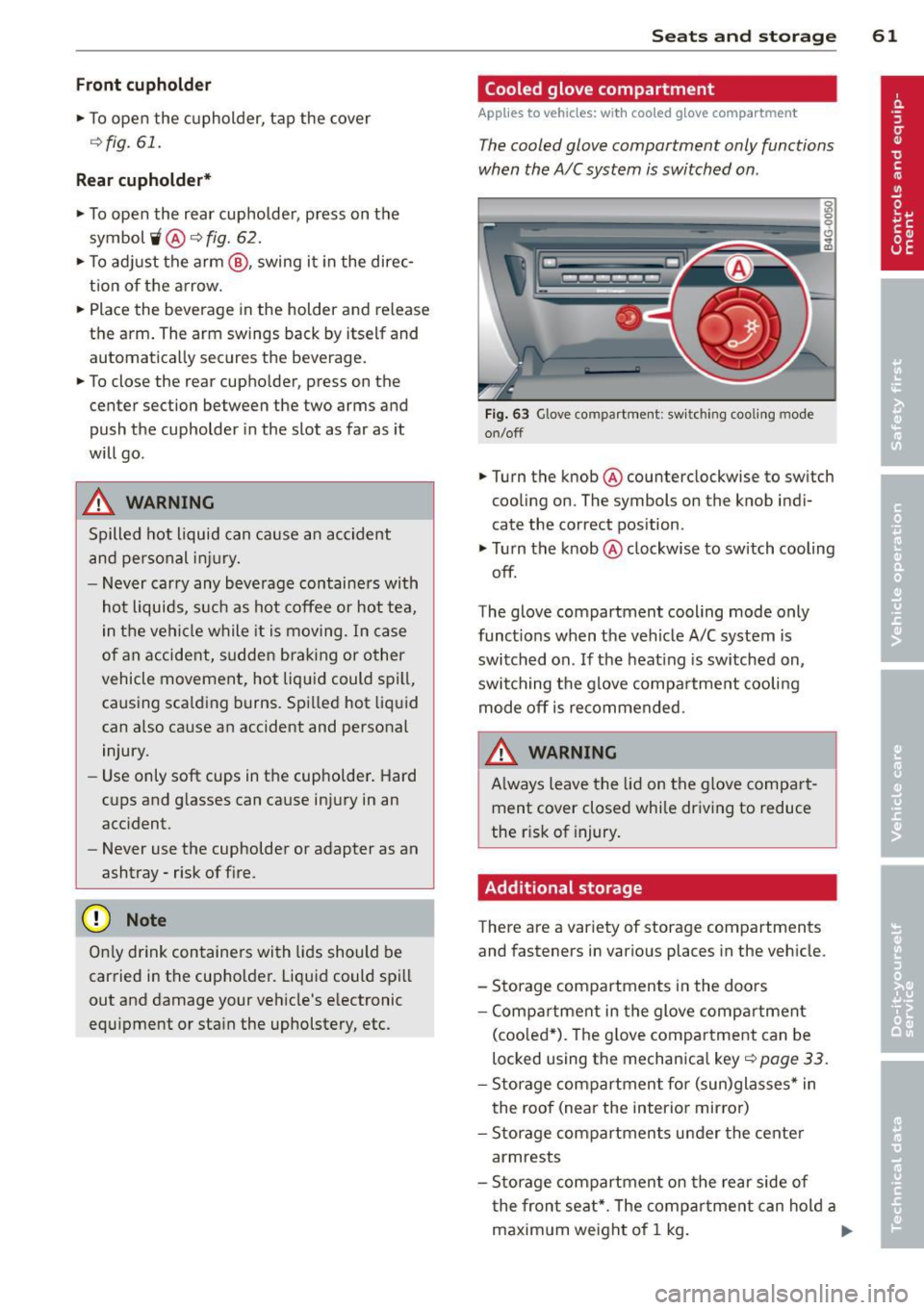
Cooled glove compartment
Applies to vehicles: w ith cooled g love compart men t
The cooled glove compartment only functions
when the AIC system is switched on .
Fig. 63 Glove compartment: sw it c h in g cooling mode
on/off
• Turn the knob@counterclockwise to switch
cooling on. The symbols on the knob indi
cate the correct position .
• Turn the knob @clockwise to switch cooling
off.
The glove compartment cooling mode only
functions when the vehicle A/C system is
switched on . If the heating is switched on,
switching the glove compa rtment cooling
mode off is recommended.
& WARNING ~ -
Always leave the lid on the glove compart
ment cover closed while driving to reduce
the r isk of injury.
Additional storage
There are a variety of storage compartments
and fasteners in various places in the vehicle .
- Storage compartments in the doors
- Compartment in the glove compartment
(coo led*) . Th e g love compartment can be
locked using the mechanica l key ¢
page 33.
-Storage compartment for (sun)glasses* in
the roof (near the interio r mirror)
- Storage compartments under the center
armrests
- Storage compartment on the rear side of
the front seat*. The compartment can hold a
maximum weight of 1 kg. ..,..
Page 64 of 292

62 Seats and storage
-Compartments* on the back of the front
seat backrests
- Garment hooks on the sides of the pillars in
the rear of the vehicle and in the rear grab
handles
- Compartment in the rear center armrest
- Storage in the trim panels in the luggage
compartment
~ WARNING
-
- Always remove objects from the instru
ment panel. Any items not stored could
slide around inside the vehicle while driv
ing or when accelerating or when apply
ing the brakes or when driving around a
corner.
- When you are driving make sure that
anything you may have placed in the cen
ter console or other storage locations
cannot fall out into the footwells. In case
of sudden braking you would not be able
to brake or accelerate.
-Always keep the lid of the compartment
for (sun)glasses* closed while driving to
reduce the risk of injury during a sudden
braking maneuver or in the event of an
accident.
- Any articles of clothing that you have
hung up must not interfere with the driv
er's view. The coat hooks are designed
only for lightweight clothing. Never hang
any clothing with hard, pointed or heavy
objects in the pockets on the coat hooks.
During sudden braking or in an accident -
especially
If the airbag is deployed -
these objects could injure any passen
gers inside the vehicle.
- To reduce the risk of personal injury in an
accident or sudden stop, always keep the
glove compartment closed while driving.
- Read and follow all WARNINGS
~ page 164, Important safety instruc
tions on the side airbag system.
-Hang clothes in such a way that they do
not impair the driver's vision.
- The coat hooks must only be used for
lightweight clothing. Do not leave any
heavy or sharp edged objects in the pock- ets which may interfere with the side cur
tain airbag deployment and can cause
personal
injury in a crash.
- Do not use coat hangers for hanging
clothing on the coat hooks as this can in
terfere with proper deployment of the side curtain airbags in an accident.
- Do not hang heavy objects on the coat
hooks, as they could cause personal in
jury in a sudden stop.
(D Note
Objects located on the rear shelf that rub
against the rear window could damage the heating wires for the rear window defog-
ger .
Roof rack
Description and mounting locations
Additional cargo can be carried with a roof
luggage rack.
Fig. 64 Roof rack attachment po ints
... Always read and follow the instructions pro
vided by the roof rack manufacturer when installing the roof rack system.
If luggage or cargo is to be carried on the
roof, you must observe the following:
- Only use roof racks approved for your vehi
cle. These approved roof racks are the basis
for a complete roof rack system. Additional
attachments or carrier systems are needed
to transport luggage and sports equipment.
We recommend using roof racks from the
Audi original accessories program . .,..
Page 67 of 292
Removing the cover in the rear lid
• Remove the knobs CD c::> fig. 66 from the ball
mounts.
• Pull the cover @out of the retainers@ in
the direct ion of the arrow .
Installing the cover in the rear lid
• Slide the cover upward into the retainers @.
• Press the knobs
CD onto the ball mounts.
Removing the cover behind th e rear bench
seat
• Pull the cover ¢ fig. 67 back.
• Pull the cover upward to release.
Installing the cover behind the rear bench
seat
• Insert the left and right sides of the cover
into the mounts on the side trim .
• Slide the cover forward until it locks into
place .
A WARNING
-To prevent accidents, never install the
luggage compartment cover unsecured.
- The luggage compartment cover is not a
surface for storing objects. Objects
placed on the cover could endanger all
vehicle occupants during sudden braking
maneuvers or in a crash.
(D Note
Objects located on the rear shelf that rub
aga inst the rear window could damage the
heating wires for the rear window defog
ger .
Seats and storage 65
Enlarging cargo capacity of the vehicle
, interior
The seat backs can be folded forward to en
large the cargo capacity.
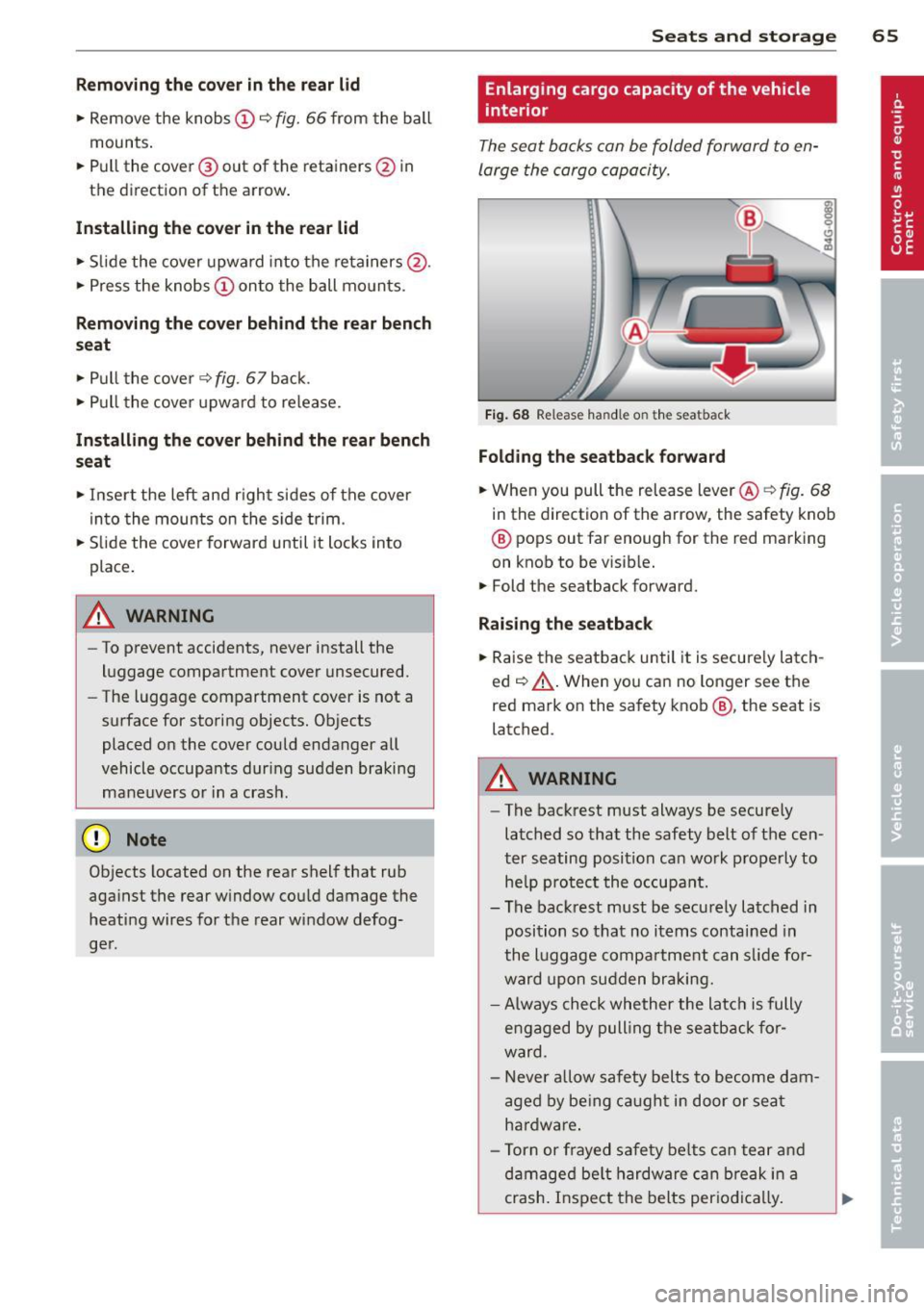
Fig. 68 Release handle on t he seatback
Folding the seatback forward
• When you pull the release lever @<=:> fig. 68
in the direction of the arrow, the safety knob
® pops out far enough for the red marking
on knob to be visib le.
.,. Fold the seatback forward.
Raising the seatback
.,. Raise the seatback until it is secure ly latch
ed¢ &,.. When you can no longer see the
red mark on the safety knob@, the seat is
latched .
_& WARNING
-
-The backrest must always be securely
latched so that the safety belt of the cen
ter seating position can work properly to he lp protect the occupant.
- The backrest must be securely latched in
position so that no items contained in
the luggage compartment can s lide for
ward upon sudden braking.
- Always check whether the latch is fully
engaged by pulling the seatback for
ward .
- N ever a llow safety belts to become dam
aged by being caught in door or seat
hardware .
- Torn or frayed safety belts can tear and
damaged be lt hardware can break in a
crash. Inspect the belts periodical ly.
Page 71 of 292
Warm and cold Four-zone automatic
climate control
Description
Applies to vehicles: with four-zone automat ic climate co n
tro l
The climate control system warms, cools and
adds humidity to the a ir in the veh icle inter io r.
It is the most effect ive when the windows and
sunroof* are closed.
If the temperature inside
the parked vehicle becomes very warm, open ing the window briefly will speed up the cool
ing process.
I n all heating mode functions except
defrost,
the blower on ly switches to a higher speed
once the engine coolant has reached a certain
temperature.
Condensation from the cooling system can
drip and form a puddle of water under the ve
hicle. This is normal and does not mean there
is a leak.
Pollutant filt er
The po llutant filter removes pollutants such
as dust and pollen from the air.
The air pollutants filter must be changed at
the intervals spec ified in your Wa rranty
&
Maintenance book let, so that the air condi
tioner can properly work.
I f you d rive your vehicle in an area with h igh
air po llution, the fi lter may need to be
changed more frequent ly than specified in
your Audi Warranty
& Maintenance booklet. If
in doubt, ask your authorized Audi Service Ad·
visor for advice.
Key coded setting s
The clima te control sett ings are a utomat ica lly
stored and assigned to the remote contro l key
that is in use .
Warm and c old 69
A WARNING
-
Reduced visibi lity is dangerous and can
cause acc idents .
- For safe driving it is very important that
all windows be free of ice, snow and con
densat ion.
- Comp letely fam il iarize yourse lf with the
proper use and funct ion of the heat ing
a nd ventilation system and especially
how to defog and defrost the w indows.
- Never use the windshield wiper/washer system in freez ing weathe r unt il you
have warmed the windshie ld first, using
the heating and ventilation system. The
washer sol ution may freeze on the wind
shie ld and red uce visibi lity.
CJ) Note
- If you s uspect that the air conditioner
has been damaged, switch the system
off to avoid furt her damage and have it
inspected by a qualified dea lership .
- Repairs to the Audi air conditioner re
quire specia l technical know ledge and
special tools. Contact an authorized Audi
dealer fo r ass istance.
@ For the sake of the envi ronment
By reducing the amount of f uel you use,
you also red uce the amount of pollutants
emitted into the air.
(D Tips
- Keep the air intake s lo ts ( in front of the
w indshield) free from ice, snow and de
bris in order to maintain the proper func
tion of the climate control system.
- The energy ma nagement system may
switch the seat heating* or rear window defroster off temporar ily. These systems
are available again as soon as the energy
balance has been restored .
- Air escapes through vents under the rear window. When plac ing items of cloth ing
on the luggage compartment cover, en
sure that the openings are not covered.