2014 AUDI Q5 instrument cluster
[x] Cancel search: instrument clusterPage 97 of 316

(30 km/h to 240 km/h). Settings can each be
adjusted in intervals of
5 mph (10 km/h) .
Cruise control
Switching on
The cruise control sys tem makes it possible to
drive at a constant speed starting at 20 mph
(30 km/h) .
0
f
®t
0
Fig. 10S Contro l lever wi th push -bu tton
Fig. 106 Di splay: Selec ted speed
.. Pull the lever to position (D c:? fig . 105 to
switch the system on .
.. Drive at the speed to be contro lled.
.. Press button @to set that speed .
The stored speed and the ind icator light
Bll!lm (US model)/ il (Canad ian model) ap
pear in the instrument cluster disp lay
<=> fig . 106. The display may vary, depending
on the type of display in your vehicle.
The speed is kept constant by modify ing en
gine power or through an active brake inter
vention.
A WARNING
- Always pay attention to the traffic around you when the cruise control is in
operation . You are always responsible for
c:o ;:g 0 ci: c:o al
On th e road 95
your speed and the distance between
your vehicle and other vehicles.
- For reasons of safety, cruise control
should not be used in the city, in stop
and-go traffic, on twisting roads and
when road conditions are poor (such as
ice, fog, gravel, heavy rain and hydro
plan ing) - you could have an accident.
- Switch the cruise control off temporarily
when dr iv ing in turning lanes, h ighway
exits or in construction zones .
- Please note that unconsciously "resting" your foot on the accelerator pedal causes cru ise contro l not to brake. This is due to
the control system be ing overridden by
the driver's acceleration.
- Never use the cruise control when driving off-road or on unpaved roads. The c ruise
con tro l is intended for use only when the
vehicle is being operated on paved roads,
and is not suitable for use off-road or on
unpaved roads.
- If a brake system malfunction such as overheating occurs when the cruise con
trol system is switched on, the braking
function in the system may be switched off. The other cruise control functions remain active as long as the indicator light
IR;\1 )~14 (US model)/ fil (Canadian model)
1s on .
(D Tips
The brake lights illuminate as soon as the
brakes apply automatically .
Changing speed
.. To increase/decrease the speed in incre
ments, tap the lever in the
0 10 direction
<=> page 95, fig. 105 .
.. To increase/decrease the speed quickly, hold
the lever in the
0 10 direction until the de
sired speed is displayed.
You can also press the accelerator pedal down
to increase your speed, e.g . if you want to
pass someone. The speed you saved earlier
Page 100 of 316

98 Hybrid -Do not transport fluids in open contain
ers in the luggage compartment. Spilled
fluids can seep underneath the cargo
floor. This can damage the high voltage
system.
Starting the vehicle
App lies to vehicles: with hybrid drive
The vehicle is started and turned off either
with the ignition key~
page 83 or with the
I START ENGIN E STOP ! button* ~ page 86 in
the same way as a conventional vehicle .
When starting the vehicle, the needles in the instrument cluster move upward briefly .
When the vehicle enters drive ready mode,
the status message
hybrid ready appears
briefly in the instrument cluster display and
the needle in the power meter points to
READY ~ page 98.
Depending on the operation mode of the hy
brid system, there are two possible drive
ready modes after the vehicle has been start
ed:
Power meter overview
Applies to vehicles: with hybrid dr ive
Drive ready mode with combustion engine
If the operating requirements~ page 100 for
electric drive mode are
not met, the combus
tion engine starts the vehicle as usual. You can start driving as usual.
Drive ready mode with the electric motor
If the operating requirements~ page 100 for
the electric drive mode are met, the combus
tion engine remains off after starting the ve
hicle.
(0 Tips
To prevent the 12 volt battery from dis
charging, never leave the vehicle parked in
the drive ready mode. Remove the key
from the ignition or press the
I START ENGINE STOP! button* . When
leaving the vehicle always take the key
with you.
The power meter shows the hybrid drive condition and the availability of the hybrid system.
Fig. 107 Power meter overv iew
An economical driving and recuperation range
is shown in green. A driving range that is not
economical is shown in orange. In addition, the battery status
provides information about
the high voltage battery charge status.
lill-
Page 101 of 316

(!) Fuel efficient driv ing within the
comb ustion engine's partia l
l oad range
@ System limits fo r electric d riving
i n the EV mode
® Elect ric driving or d riving w it h
the combustion engine (EFFI -
CI ENCY)
© Vehicle d rive ready (READY)
® H igh vo ltage bat tery c ha rge sta -
tus
® Recuperation (CHARGE)
0 Dr iving w it hi n the combus tion
engine's fu ll loa d range
® 100% combust io n engine
® Boost ing -the elect ric e ngine
assists the combus tion engine
( B OOST)
@ Engaging the conventiona l
brakes w ith recuperat ion
@ Vehicle not drive ready ( OFF)
@ EV mode active
The needle rema ins at
OFF when the igni tion
is tur ned on. W hen the veh icle en ters drive
ready mode, t he stat us message
hybrid ready
ap pears briefly in the instrument cluster dis
p lay and the needle in the power meter po ints
to
READY .
Indicator lights and messages
Applies to vehicles: with hybrid drive
The indicator lights in the instrument cluste r
b link or t urn on . Th ey i ndicate fu nctions o r
malfunct ions .
W ith some ind icator lights, messages may ap
pear and a warning tone may sound. Also note
the indicator lights in c::,;,
pag e 27.
Press brake pedal to start vehicle
This message appea rs if you do not press the
brake peda l when starting the vehicle.
Hybrid 99
Shift to N or P to start vehicle
T his mess age appears if the se lector lever for
the automatic t ransmission is not in t he N or
P positions when starting the vehicle.
- Hybrid drive: System fault! Power
brakes, steering malfunction possible
I f the indica tor ligh t turns on and this mes
sage a ppears, t here is a ma lf u nction in the hy
bri d system. The brake booster and the power
steering may stop working. Stop the vehicle i n
a safe l ocat io n as soo n as poss ible.
You may cont in ue dr iving if the indicator light
turns
off afte r start ing the ve hicle severa l
times. Dr ive to an a uthorized repa ir facility
immediately to have the malfunct ion correct
ed .
EHithjj,j Hybrid drive : Sy stem fault!
Contact dealer
If the indicator light turns on and this mes
sage appears , there is a malfunct ion in the hy
br id system . Drive to a n author ized repair fa
c ili ty immediat ely to hav e th e m alfunc tion
corrected.
Ill Hybrid system: Performance
restricted. Please contact dealer
If th e i ndica to r light turns on and this mes
sag e appea rs, there is an engine contro l ma l
f unct io n .
The @B indi cator light in t he instr u
m ent cluster also tur ns on. The engine ou tput
i s re duced. Drive to yo ur autho rize d Au di dea l
er or qualifie d repair facility immediately to
have the malfunct io n corrected .
Hybrid drive deactivated. Please restart
engine manually.
Th is message ap pears if the high vo ltage bat
te ry charge leve l has fallen below a certa in
range or if the ignition key is no longer inside
the ve hicle for ve hicles with the convenience
key *.
Start the eng ine with e it h er the ignitio n key
¢page 83 or with the !STAR T EN GINE STOPI
button* c::> page 86.
Page 102 of 316

100 Hybrid
Hybrid battery: Low battery charge.
B attery will be charged while driving.
This message appears if the high voltage bat
tery charge level has fa llen below a certain
range. If this message turns off after a little
while, the high voltage battery charged
enough while dr iv in g.
If the message does not turn off, have an au
thorized repair fac ility correct the malfunction
as soon as possible.
EV mode is currently unavailable .
This message appears if the conditions
¢
page 100 for enhanced e lectric driving are
not met. Try again at a later time.
Hybrid functions and operating modes
App lies to vehicles: with hybrid dr ive
Fig. 108 Center console: c:f,V button
.,. To turn on EV mode, press the 14'1 button.
The indicator light in the button will turn
on . The. indicator light a lso turns on in
the instrument cluster display.
The functions and operating modes described
be low are se lected automatica lly by the vehi
cle control system, depending on the vehicle
operat ing status. This ensures that the vehicle
is always in the correct operating mode. One
exception is the enhanced electric driving
mode (EV mode), which is activated by the
driver
¢pag e 100.
Driving with the combustion engine
The vehicle is powered by the combustion en
gine. The h igh voltage battery is charged si
multaneously, if needed.
Full acceleration (boost)
In full acceleration, the vehicle is powered by
both the combustion engine and the electric
motor . This operating mode is called
Boost
and is on ly available for a short amount of
time because it uses so much energy. Availa
bility depends on the high voltage battery
charge level.
The boost operating mode is activated by
pressing the accelerator pedal all the way
down.
Electric driving
The vehicle can be driven completely electri
ca lly depending on the high vo ltage battery
charge level and the driving resistance. The
combust ion eng ine turns off at that t ime.
The combustion engine starts when accelerat
ing or when the high voltage battery charge
level drops be low a certain threshold. The ve
hicle resumes e lectric driving once the accel
eration and the high voltage battery charge
level permit.
Enhanced electric driving mode (EV
mode)
Pressing the l~ I button ¢ fig. 108 can extend
the usual limits on electric driving so that you
can always drive in electric mode, if the condi
t ion of the e lectr ica l system permits . The op
erating mode is then set to maximum electric
drive @,@ ¢
page 98, fig. 107. It can be
driven complete ly elec trically for up to 1.8
miles (3 km) at a constant 37 mph (60 km/h) .
T he following conditions must be met to act i
vate the enhanced e lectr ic drive:
- The high voltage battery must be suffic ient
ly charged.
- The temperature of the 12 volt batter ies
and the hig h voltage battery must be suffi
cient.
- The vehicle speed must not be higher than
62 mph (100 km/h).
- The transmission must not be in tiptronic
mode.
Page 105 of 316

Hybrid 103
Driving situa- Conditions Vehicle behavior
tions
- Do not run the combustion en- The temperature of the comb ust ion eng ine
gine wh ile the vehicle is parked to rises very slowly and the fuel consumption
warm t he engine . increases considerably.
- Use the rear w indow/exterior This conserves the energy in the h igh vo lt-
Driv ing in cold mirro
r defroster and the seat heat- age battery so that it is ava ilab le to run the
weather i
ng sparingly. vehicl e in elect ric mode .
- Park the vehicle in a ga rage over-
This reduces exposure of the hig h voltage
night.
Energy flow display
Applies to vehicles: with hybrid drive
Fig. 10 9 Instrument cluster: e nergy flow disp lay
The energy flow of the hybrid system is shown
i n the instrument cluster display and in the
M MI disp lay. The image is animated in the
MMI display.
Image in the instrument cluster display
.,. Press the !RESET I button in the w indshield
wipe r lever repeated ly until the e ne rgy flow
display
c::> fig . 109 appears .
Component Color
@Combustion engine orange
gray
@ Props haft green
orange
green-o range
g ray battery to co
ld temperatures . The required
temperature range for the hig h voltage
battery will then be reached more quick ly
after you start driving.
Fi g. 1 10 MMI d isp lay: energy flow display
Image in the MMI display
.,. Sele ct: i ME NUI fu nct ion button> Hybrid
contro l button r=;, fig . 110.
Meaning
The combustio n engine is runni ng
The combust io n engine is off
Electric driving/ recuperating
D riving w ith th e combust io n engine
Driving with the combustio n engine and electric
motor (boost)
Vehi cle s ta ti onary/rolling in the N sele ctor lever
p osition
Page 107 of 316

Additional information about the vehicle tool kit may be found under
c::> page 268 and
about the tire repa ir set under
c::> page 2 71 .
(D Tips
The right storage compartment in the lug
gage compartment and its contents must
always be kept in the vehicle. The veh icle
m ust not be operated w ithout the tire re
pa ir set.
Charging the batteries
Applies to vehicles: with hybrid drive
The vehicle is equipped with two 12 volt bat
ter ies and a h igh voltage battery.
If the 12 volt batter ies are dead, they may be
charged with a charger or the vehicle may be
jump started with assistance from another ve
hicle in the same way as a conventional vehi
cle .
The same applies to the high voltage battery
if it is d ischarged . However, in this case, the
charg ing process is accompanied w ith mes
sages in the inst rument cluste r display. The
i gnit ion m ust be switched on and all unneces
sary electric components m ust be turned off.
The connections in the engine compartment
are used for both charging and jump starting
c::> page 244 or c::> page 283.
Vehicle not ready to start. See owner's
manual
This message appears if the high voltage bat
tery charge level is too low. The vehicle can no
l onge r be started with its own power. The
high voltage battery must be charged with a
charger or the vehicle must be jump started
with the aid of another vehicle.
Afte r the connecting the cha rger or jumper ca
b les, the ignition must be turned off for ap
proximately two minutes and then turned on
again. After no more than one m inute, one of
the following indicator lights turns on in the instrument cluster d isp lay. Hybrid 105
II Charging battery. Please wait ...
If
the indicator light turns on and this mes
sage appears, the high voltage battery is
charging or the vehicle is being jump started
with assistance from another vehicle.
If the 12 vo lt batteries are dead, the -
indicator light turns on. The charging proce
dure takes longer in this case because the 12
vo lt batteries are charged first. The procedure
goes faster with the ignition switched off.
Vehicle ready to start.
This message appears if the charging proce
dure was successfu l. The vehicle may be start
ed again.
Battery could not be charged enough to
start vehicle.
This message appears if the charging proce
dure was not successful or it was interrupted.
This may happen if the charger or the battery
in the veh icle that is assist ing is too weak.
If
the vehicle cannot be started, see an author
ized repa ir facility for assistance .
(D Tips
- The charger should deliver a current of at
least
30 A. Otherwise charging the high
voltage battery will take considerably longer. A current between
50 A and 70 A
is ideal.
- The ve hicle that is assist ing should be
somewhat within the same vehicle class
when jump starting a vehicle. A smaller
vehicle's battery may be drained.
- After approximately
30 minutes, the
c harging procedure ends because the ig
nition is automatically turned off.
If you
would like to continue to charge the bat
tery, turn the ignition on again.
Page 111 of 316
Audi adaptive cruise control and braking guard 109
Audi adaptive cruise
control
Description
A pp lies to vehicles: with Audi adaptive cruise control
Fig. 116 Detect ion range
What can adaptive cruise control do?
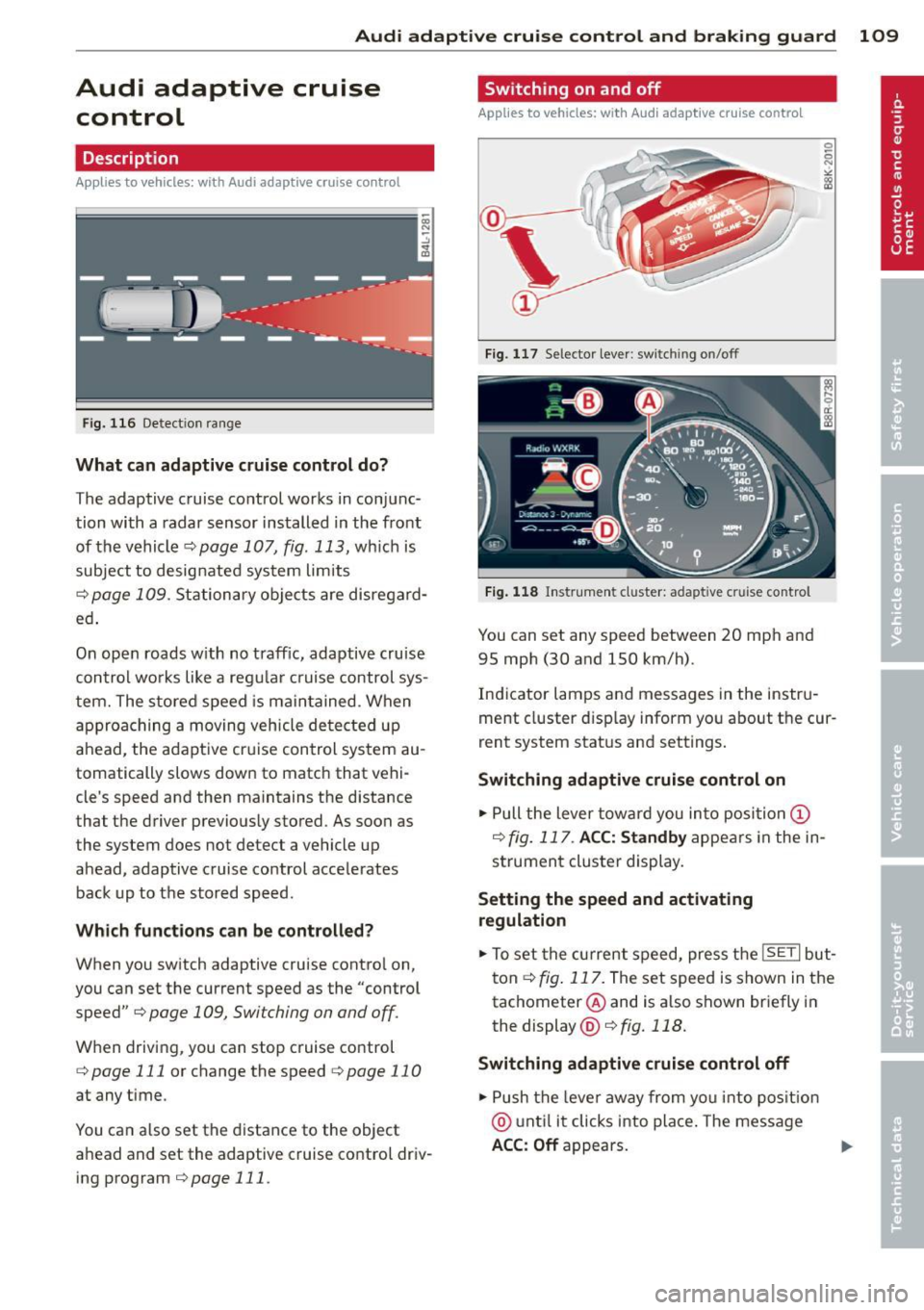
The adaptive cruise control works in conjunc
tion with a radar sensor installed in the front
of the vehicle
¢page 107, fig. 113, which is
subject to designated system limits
¢page 109. Stationary objects are disregard
ed .
On open roads w ith no traffic, adaptive cruise
control works like a regular cruise control sys
tem. The stored speed is maintained. When
approaching a moving vehicle detected up
ahead, the adaptive cruise control system au
tomatically slows down to match that vehi
cle's speed and then maintains the distance
that the driver previously stored. As soon as
the system does not detect a vehicle up ahead, adaptive cruise control accelerates back up to the stored speed.
Which functions can be controlled?
When you switch adaptive cruise control on,
you can set the current speed as the "control speed" ¢
page 109, Switching on and off.
When driving, you can stop cruise control
¢
page 111 or change the speed ¢ page 11 0
at any time.
You can also set the distance to the object
ahead and set the adaptive cruise control driv ing program
¢ page 111.
Switching on and off
Applies to vehicles: wi th Aud i adap tive crui se contro l
Fig. 117 Selector lever: switch ing on/off
Fig. 118 Instrument cluster: adapt ive c ruise control
You can set any speed between 20 mph and
95 mph (30 and 150 km/h).
Indicator lamps and messages in the instru
ment cluster display inform you about the cur
rent system status and settings.
Switching adaptive cruise control on
.,. Pull the lever toward you into position (I)
¢fig. 117 . ACC: Standby appears in the in
strument cluster display.
Setting the speed and activating
regulation
.,. To set the current speed, press the ISETI but
ton ¢
fig. 117. The set speed is shown in the
tachometer @and is a lso shown briefly in
the display @¢fig.118.
Switching adaptive cruise control off
.,. Push the lever away from you into position
@ until it clicks into place. The message
ACC: Off appears. ..,.
Page 113 of 316

Audi adaptive cruise control and braking guard 111
Interrupting cruise control
Applies to vehicles: with Audi adaptive cruise control
Fig. 120 Selector lever
Requirement: adaptive cruise control must be
switched on
¢ fig. 120 (D .
Overriding cruise control
• To accelerate manually, press the accelera
tor pedal. The message
ACC: override ap
pears.
• To resume adaptive cruise control, remove
your foot from the gas pedal. The system re
turns again to the speed that was saved be
fore.
• You can save a new speed at any time by
pressing thelSETI button ¢fig. 120.
Canceling cruise control while driving
• Move the lever into position @. The mes
sage
ACC: Standby appears. Or
• press the brake pedal.
• To resume the stored speed, move the lever
into position @.
_& WARNING
Never resume the stored speed if the
speed is too high for prevailing road, traf
fic or weather conditions.
Setting the distance
App lies to vehicles: wit h Aud i adapt ive cr uise contro l
Fig. 121 Selector lever: setting the distance
• Tap the switch to display the current set dis
tance ¢fig. 121.
• To increase or reduce the distance by incre
ments, tap the switch again to the left or
r ight. The distance between the two vehicles
w ill c hange in the instrument cluster dis
p lay .
When approach ing a moving vehicle up ahead,
the adapt ive cruise control system brakes to
match that object's speed and then mainta ins
the stored distance. If the vehicle ahead ac
ce lerates, adaptive cruise control will also ac
celerate up to the stored speed.
T he higher the speed, the greater the distance
in yards (meters) ¢& .The
Distance 3 setting
is recommended.
T he distances provided are specified va lues .
Depend ing on the driv ing s ituation and the
how the vehicle ahead is driving, the actual
distance may be more or less than these tar
get distances.
T he var ious symbols for the time increments
appear briefly in the informat ion line @
¢ page 109, fig . 118 when you change the
settings.
c:::::,_c:::::, ___ Distance 1: This setting corre-
sponds to a distance of 92 feet/28 meters
when traveling at 62 mph (100 km/h), or a
time interval of 1 second.
c:::::, __ c:::::, __ Distance 2 : This setting corre
sponds to a distance of 118 feet/36 meters
when traveling at 62 mph (100 km/h), or a
time interval of 1.3 seconds.