2014 AUDI Q5 instrument cluster
[x] Cancel search: instrument clusterPage 51 of 316
Clear vision Lights
Switching the lights on and off
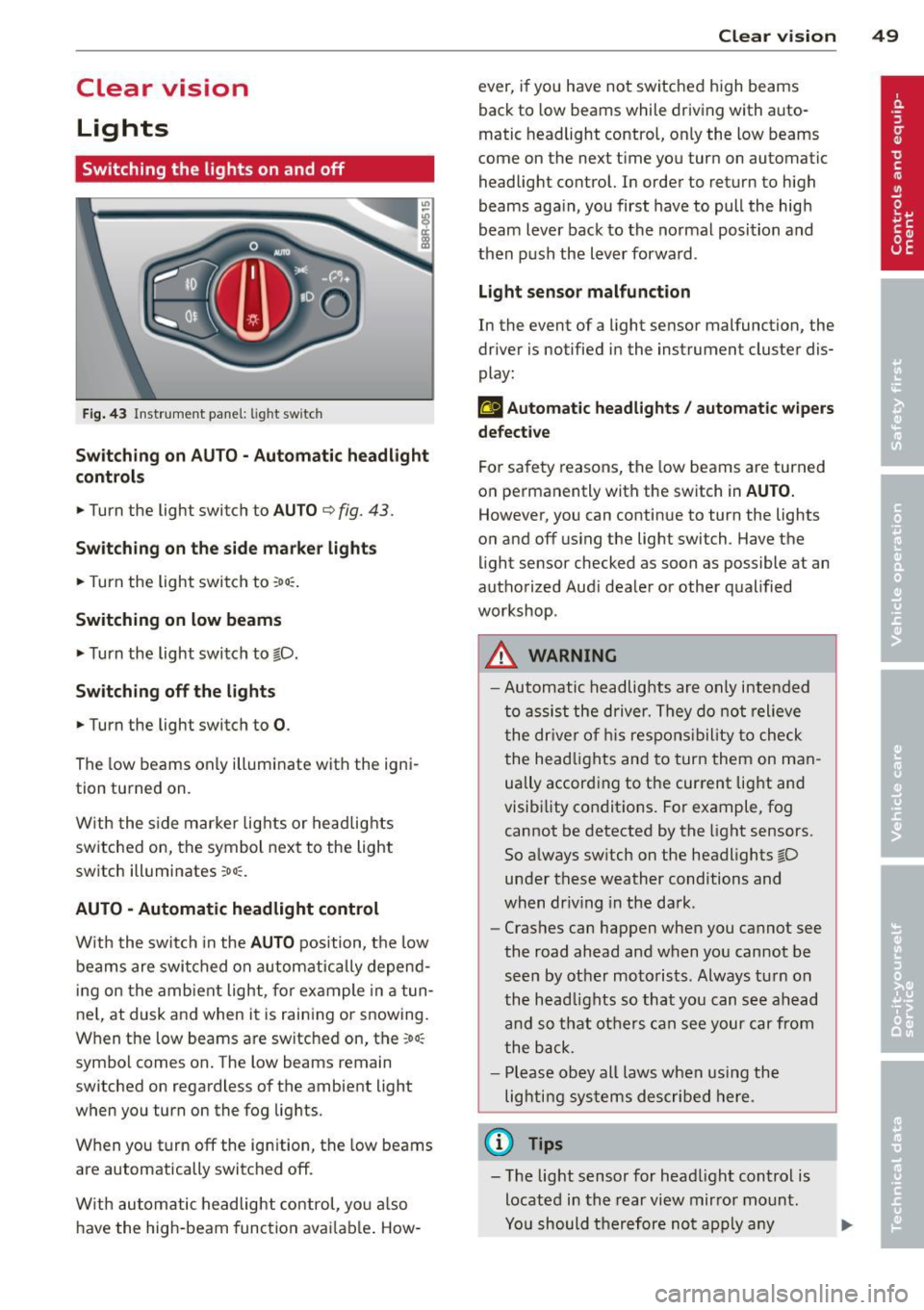
F ig . 43 Instrument pane l: light sw itch
Sw itching on AUTO - Automatic headlight
contr ols
• Turn the light switch to AUTO ¢ fig. 43.
Switchin g on the side m arker light s
• Turn the light switch to :oo:.
Switching on low beams
• Turn the light switch to @.D.
Swi tching off the lights
• Turn the light switch to 0 .
The low beams only illuminate with the igni
tion turned on.
With the s ide marker lights or headlights
switched on, the symbol next to the light
switch illuminates
:oo:.
AUTO -Automatic headlight control
With the switch in the AUTO position, the low
beams are swi tched on a utomatica lly depend
ing on the amb ient light, for example in a tun
ne l, at dusk and when it is raining or snowing.
When the low beams are switched on, the
:oo:
symbol comes on. The low beams remain
switched on regardless of the ambient light
when you turn on the fog lights.
When you turn
off the ign ition, the low beams
are automatically switched
off.
W ith automatic headlight control, yo u also
have the high-beam function avai lab le . How -
Clear vi sion 49
ever, if you have not switched high beams
back to low beams while driving with auto
matic headlight control, only the low beams
come on the next time you turn on automatic
headlight control. In order to return to high
beams aga in, you first have to pull the high
beam lever back to the normal position and
then push the lever forward .
Light sen so r malfunct ion
In the event of a light sensor malfunction, the
driver is notified in the instrument cluster dis
play :
fal Autom atic he adlights / autom ati c wi pers
defecti ve
For safety reasons, the low beams are turned
on permanently with the switch in
AUTO.
However, you can continue to turn the lights
on and
off us ing the light switch . Have the
light sensor checked as soon as possible at an
authorized Audi dealer or other qualified
workshop.
A WARNING
- Automatic headlights are only intended
to assist the driver. They do not relieve
the dr iver of h is respons ibility to check
the head lights and to turn them on man
ually accord ing to the current light and
visibility conditions. For example, fog cannot be detected by the light sensors.
So always sw itch on the headlights @.D
under these weather conditions and
when dr iv ing in the da rk .
- Crashes can happen when you cannot see
the road ahead and when you cannot be
seen by other motorists. Always tu rn on
the head lights so that you can see ahead
and so that others can see your car from
the back.
- Please obey all laws when using the
lighting systems described here.
(l'} Tips
- T he light sensor for head light control is
located in the rear view mirror mount.
Yo u should therefore not apply any
Page 53 of 316

Canada models : The function cannot be
turned off.
It is activated a utomatica lly each
time the ignition is switched on.
Travel mod e (Canada models)*
The headlight beam is asymmetrical. This pro
vides stronge r illum ination on the s ide of the
road on which you are driving . If you are driv
ing in a co untry that drives on the opposite
side of the road from your own country, this
will cause glare for oncoming drivers. To pre
vent glare:
- Trave l mode must be selected in vehicles
with Xenon headlights*.
- In vehicles with halogen headlights, certain
areas of the head light lenses must be cov
ered with waterproof adhesive covers that
prevent light from passing through. For
more information, please see your author
ized Audi dealer or author ized repair facility .
@ Tips
When travel mode* is activated, a d isp lay
in the drive r information system ind icates
this each time you switch the ignit io n on .
Instrument lighting
The basic brightness of the illumination for
the instruments, the center console and the
display can be adjusted .
Fig. 45 Inst rume nt lighting
.. Press the knob to release it.
.. Ro ta ting t he knob to the right" +" will in
crease the basic brightness when it is dark .
.. Rotating the knob to the left"-" will de
crease the basic br ightness when it is dark. Clear vi
sion 51
.. Pressing the knob will p revent unintentional
changes.
(D Tips
T he ill umination for the inst rument cluster
lights up w henever you switch on the igni
tion with the vehicle headlights off. As the
day light fades, the instrument cluster i llu
mination likewise dims automatically and
will go out completely when the outside light is very low. This feature is meant to
r emind you to switch on the head lights
whe n outs ide light conditions become
p oor .
Adaptive light
Applies to vehicles: wi th adaptive light
Wh en driving around bends, the relevant area
of the road is be tter illuminated.
Fi g. 4 6 Adapt ive light w hen driv ing
Switching on adapt ive light
.. Tu rn the light sw itch to AUTO ~ page 49,
fig. 43 .
The adaptive lig ht system is a combin ation o f
the dynam ic and the static corneri ng lights.
Wi th the lights switched on, the dynamic cor
ner ing light adapts to driving on curves. This
is dependent upon t he vehicle speed and
steering ang le. This provides better lighting
through the curve. The system operates in a
speed range from approximate ly 6 mph
(10 km/h) to 68 mph (110 km/h) .
The static cornering light switches on at
speeds of up to approximately 25 mph
Page 55 of 316

Notes o n these featur es
-The turn signals only work with the ignition
turned on. The indicator lights
II or Ill in
the instrument cluster
¢page 14 also b link.
- After you have turned a corner, the turn sig-
nal switches off automatica lly.
- The
high beam works only when the head
lights are on. The indicator light
II in th e
instrument cluster illuminates when the
high beams are on.
- The
headlight flasher wo rks only as long as
you hold the lever -even if there are no
lights turned on. The indicator light
II in
the instrument cluster illuminates when you
use the headlight flasher.
A WARNING
Do not use the high beam or headlight
flasher if you know that thes e cou ld blind
oncoming traffic.
Interior lights
Front interior lights
-
The front interior lights also contain reading
lights for the driver and passenger .
r ,,,,, , 11111
~8 ,~
G) Gl
,o . . o
I
Fig. 49 Headliner: Fro nt inte rior/rea ding lights
The rocker switch @¢ fig. 49 for operating
the interior lighting has the following func
tions :
Door cont act swi tch
.,. Place the switch @ in the midd le position.
Interior light switched on
.,. Pla ce the switch @ in position I.
Clear vision 5 3
Interior light swit ch ed off
.,. Place the switch @ in position 0 .
Front read ing lights ~
.,. Press one of the switches@ to turn the
r ight or left reading light on or off .
With the door contact switch turned on, the
interior lights turn on as soon as you unlock
the vehicle or open the doors. The lighting is
also turned on when the ignition key is re
moved. The lights go out about 30 seconds af
ter the doors are closed. When the vehicle is locked or when the ignition is turned on, the
interior lights are turned off.
When a doo r is open, the interior lights are
tu rned off after about 10 minutes to prevent
draining of the battery .
The brightness of the lights is controlled au
tomat ica lly by a d immer when they are
swi tched on and off.
Rear interior lights
There are reading lights in the rear for the
passengers .
Fig . 50 Headliner: Rear read ing lig hts
The read ing l ights are switched on and off us
ing the buttons ~-
Depending on your model, the appearance
and the location of the reading lights may be
different .
Page 91 of 316

-When starting on inclines, the starting as
sist prevents the vehicle from unintentional
ly rolling back. The braking force of the
parking brake is not released until sufficient
driv ing force has been built up at the
wheels .
Emergency brake function
An emergency brake ensures that the vehicle
can be slowed down even if the
normal brakes
fa il
c::> page 90, Emergency braking.
Indicator light s
-If the parking brake is closed with the igni
tion
s witched on the indicator lights come
on . (USA mode ls)/ . (Canada mode ls) in
the instrument cluster and the switch.
- If the parking brake is closed with the igni
tion
s witched off the indicator lights come
on . (USA mode ls)/ . (Canada mode ls) in
the instrument cluster and the switch for
about 20 seconds.
A WARNING
If a drive range is engaged with the veh icle
stat iona ry and the engine running, you
must in no instance accele rate ca re lessly.
Otherw ise the vehicle will sta rt to move
immediately -risk of an accident .
(D Note
If the symbo l. in the display or the ind i
cato r light .. (USA models) . (Cana
da mode ls) in the instrument clus ter flash
es, the re is a malfunction in the brake sys
tem . By pressing the
ISETI button, you can
bring up a driver message which explains
the malfunction in more detail.
If the driv
er message
Parking brake system fault!
See owner's manua l
appears, there is an
operating malfunction in the park ing brake
which you should have repaired immedi ately by an author ized Audi dealer or other
qua lified workshop
c::> page 29.
@ Tips
- You can apply the pa rking brake at any
time -even w ith the ignition switched
'
On th e ro ad 89
off. The ignition must be turned on and
the brake pedal must be pressed in order
to release the parking b rake .
- Occasional noises w hen the parking
brake is app lied and released are normal
and are not a cause for concern.
- When the vehicle is pa rked, the parking
brake goes through a self -test cycle at
regu lar inte rva ls. Any associated noises
are normal.
Parking
"' Press the brake pedal to stop the veh icle.
"' Pull the sw itch
c::> page 88, fig. 100 to set
the parking b rake.
"' Move the selector lever to P.
"' Tu rn the engine off
c::> ,&. .
"'When on inclines or decl ines, turn the steer
ing wheel so that the vehicle will roll into
the cu rb if it begins to move.
A WARNING
-When you leave your vehicle -even if on
ly briefly- always remove the ignition
key. T his app lies particularly whe n chil
dren remain in the vehicle. Otherwise the
children could start the eng ine, release
the par king brake or operate elect rical
eq uipment (e.g. power w indows). The re
is the risk of an acc ident.
- When the veh icle is locked, no one -par
ticularly not children should rema in in
the vehicle. Locked doors make it more difficult for emergency workers to get in
to the vehicle -putting lives at risk.
Starting from rest
The starting assist function ensures that the
parking brake is released automatically upon
starting .
Stopping and applying parking brake
"' Pull the sw itch to app ly the parking b rake. .,.
Page 92 of 316

90 On the road
Startin g and automati cally r ele a s ing the
p ark ing b rake
.. When you start to drive as usua l, the park
ing brake is automatically re leased and your
vehicle begins to move.
When stopping at a traffic signa l or stopping
in city traffic on vehicles with an automatic
transmission, the park ing brake can be ap
plied. The vehicle does not have to be held
with the footbrake. The park ing brake elimi
nates the tendency to creep with a drive range
engaged . As soon as you dr ive off as usual,
the park ing brake is released automatically
and the veh icle starts to move .
Starting on slopes
When starting on incline s, the start ing ass ist
prevents the vehicle from unintentionally roll
ing back. The braking force of the parking
b rake is not released until sufficient dr iving
fo rce has been bu ilt up at the whee ls.
(D Tips
For safety reasons, the park ing brake is re
leased automatically only when the dr iv
er 's safety belt is engaged in the bu ck le.
Starting off with a trailer
To prevent rolling back unintentionally on an
incline, do the following:
.. Keep the switch pulled and depress the ac
celerator. The parking brake stays applied
and prevents the vehicle from ro lling back
ward.
.. You can release the switch once you are sure
th at you are developing enough driving
force at the wheels by depressing the accel
erator.
Depending on the weight o f the rig (vehicle
and trai ler) and the severity of the incline , you
may roll backwards as you start . Yo u can pre
vent roll ing backwards by holding the parking
brake switch pulled out and acce lerat ing -just
as you would when starting on a h ill with a
conventional hand brake .
Emergency braking
In the event that the conventional brake sys
tem fails or locks .
.. In an emergency, pull the switch and contin
ue to pull it t o slow your vehicle down with
the parking brake .
.. As soon as you release the switch or acceler-
ate, the b rak ing process stops .
If you pull the switch and ho ld it above a
speed of about 5 mph (8 km/h), the emergen
cy brak ing f unct ion is init iated . T he veh icle is
braked at all fou r whee ls by activating the hy
draulic brake sys tem. The brake performance
is similar to making an emergency stop~&. .
In order not to act ivate the emergency brak
ing by mis take, an audib le warning tone (buz
zer) sounds whe n the switch is pulled. As soon
as the switch is re leased, or the accelerator
peda l is depressed, emergency braking stops.
A WARNING
Emergency braking should only be used in
an emergency, when the norma l foot brake
has fa iled or the brake pedal is obstructed.
Using the park ing brake to perform emer
gency braking will s low your veh icle down
as if you had made a full brake application .
The laws of phys ics cannot be suspended
even with ESC and its asso ciated compo
nents (ABS, ASR, EDS). In corners and
when road or weather cond itions are bad,
a full brake application can ca use the vehi
cle to skid or the rear end to break away -
risking an accident .
Driver messages in the instrument
cluster
Caution: Vehicle parked too steep
This message appears when the parking brake
is app lied on a n incline that exceeds about
30% .
In this case the braking power of the park ing
brake may
not b e adequate to prevent the ve-
hicle from ro lling un intent io na lly. ...
Page 93 of 316

Press brake pedal to release parking brake
This driver message appears when the switch
to release the parking brake was pressed. The
parking brake can only be released if yo u step
on the brake pedal and at the same time press
the switch or you automatically re lease the
parking brake with the starting assist
<=>page 89.
fpii Parking brake malfunction!
This driver message appears together with
the yellow
rm symbol when there is a parking
brake malfunction.
Start-Stop-System
Descript ion
A ppl ies to vehicles: with Sta rt-Stop-System
The Start-Stop -System can help increase fuel
economy and reduce CO
2 emissions.
In the Start-Stop-mode, the eng ine shuts off
automatically when the vehicle is stopped,
such as at a traffic light. The ignition remains
sw itched on during this stop phase. The en
gine will be automatically restarted when
needed.
The last Start-Stop-System setting (o n/off us
ing the button
lr.;, .. I) will be restored when the
ignition is turned on. The LED in the
1r.;, .. 1 but
ton turns on when the Start-Stop-System is
switched off manually.
Basic requirements for the Start-Stop
mode
- The driver's door is closed .
- The driver's seat belt is latched.
- The hood is closed.
- The vehicle must have been driven faster
than 2.5 mph (4 km/h) since the last stop .
- A tra iler is not hitched to the veh icle .
A WARNING
- Never turn off the engine before the ve
hicle has come to a complete stop. The
full function of the brake booster and the
power steering is not guaranteed. You
On the road 91
must use more force to turn or brake if
necessary. Because you cannot steer and
brake as you usually would, this could
lead to crashes and ser ious injuries.
- To reduce the risk of injuries, make sure
that the Start-Stop-System is turned off
when working in the engine compart
ment
c:> page 93.
(D Note
Always switch off the Start-Stop-System
when driving through water
c:> page 93.
Starting /stopping the engine
App lies to vehicles: wit h Start -Stop -System
Fig. 101 Instrum ent cluster: Engine switched off (stop
phase)
.,. Slow the veh icle to a stop using the brake
and keep pressing the brake pedal. The en
gine will switch off. The
ti] indicator light
appears in the instrument cluster disp lay
and - also appears in the trip com
puter .
.,. When you take your foot off the brake ped
al, the engine restarts . The indicator light
turns off.
Additional information
T he engine will switch off in the P, D/S and N
positions as well as in ma nual mode. In the P
position, the engine will also remain off if you
take your foot off the brake pedal. The engine
starts again when you select another selector lever position and take your foot off the brake
pedal.
If you se lect the R position during a Stop
phase, the engine will start again .
Page 95 of 316

marker lights will switch off after approxi
mately 30 minutes or when you lock the vehi
cle.
If the Start-Stop-System has not turned off
the engine or if you have switched the Start
Stop-System off manually, the ignition will
not be automatically switched off and the en
g ine will continue to run
i::> &. .
A WARNING
Never allow the engine to run in confined
spaces -danger of asphyxiation .
@ Tips
If you shift into the D/S or N positions af
ter shift ing into reverse, the vehicle must
be driven faster than 6 mph (10 km/h) in
order for the engine to switch off again .
Switching the Start-Stop-System on/off
manually
Applies to vehicles: with Start-Stop-System
If you do not wish to use the system, you can
switch it off manually.
Fig. 103 Ce nter con sole : Star t-Stop-Sy stem butto n
.. To switch the Start -Stop-System on/off
manua lly, press the
1/A) "'I button. The LED in
the button turns on when the system is
switched off.
In vehicles witho ut the MMI *, the
1/A) "'I b utton
is found underneath the se lector lever.
(D Tips
If you switch the system off during a stop
phase, the engine will start again auto
matically.
On the road 93
Messages in the instrument cluster
display
Appl ies to vehicles: with Start-Stop-System
Start-stop system: deactivated. Please
restart engine manually
This message appears when specific condi
tions are not met during a stop phase and the
Start-Stop-System will
not be able to restart
the engine. The engine mus t be started with
the key or with the
I START ENGIN E STOP !*
button .
Start-stop system: system fault. Function
unavailable
There is a malfunction in the Start -Stop -Sys
tem . Drive the vehicle to an author ized repair
facility for servicing as soon as possible to cor
rect the malfunction .
Transmission: Car may roll! Shift to park!
This message appears if the selector lever is
not in the P position when the driver 's door is
opened . You will also hear a warning tone.
Sh ift the selector lever to the P position. Oth
erwise, the vehicle could roll.
Speed warning system
Overview
The speed warning system helps you to keep
your driving speed below a set speed limit.
T he speed warning system warns if the driver
exceeds a previous ly stored maximum speed.
A warning tone will sound as soon as the vehi
cle speed exceeds the set speed by about
3 mph (3 km/h) . At the same time, a warning
symbol appears in the display . The symbol 's
appearance might be different in some mod
els .
The speed warning system has
two warning
thresholds
tha t function independen tly of
each other and that have somewhat different
purposes :
Speed warning 1
You can use speed warning 1 to set the m axi
mum speed while you are driving . This setting ..,.
Page 96 of 316

94 On the road
will remain in effect until you turn off the igni
tion, assuming that you have not changed or reset the setting .
The speed warning symbol. (USA models)/
• (Canada mode ls) in the warning 1 display
appears when you exceed the maximum
speed. It goes out when the speed falls below
the stored maximum speed.
The speed warning symbol wi ll also go out i f
the speed exceeds the stored maximum speed
by more than about
25 mph (40 km/h) for at
least
10 seconds. The stored maximum speed
is deleted.
Setting speed warning
1 9 page 94.
Speed warn ing 2
Sto ring warning 2 is recomme nded if you al
ways
want to be reminded of a certa in speed,
for example when yo u are traveling i n a cou n
try that has a general maximum speed limit,
or if you do not want to exceed a specified
speed for winter tires.
The speed warning
2 symbol ,. (USA mod
e ls)/ . (Canada models) appears in the dis
p lay when you exceed the stored speed limit.
Unlike warning
1, it will not go out until the
vehicle speed drops below the stored speed limit.
Setting speed warning
2 9 page 94.
(D Tips
Even tho ugh your vehicle is equipped with
a speed warning system, you shou ld still
watch the speedomete r to make sure you
are not driving faster than the speed lim it.
Speed warning 1: setting a speed limit
Warning threshold 1 is set by the I SET I but
ton .
Fig . 1 04 SET butto n in th e ins trume nt cluster
Storing the maximum speed
• Drive at the desired maximum speed.
• Press the
ISE TI b utton in the instrument
panel display ~
fig. 104 for 1 second .
Resett ing the m aximum spe ed
• Drive the vehicle at a speed of at least
3 mph (5 km/h)
• Press the
IS ET I button for more than 2 sec-
onds.
T he speed warn ing symbol . (USA models)/
• (Canada models) will appear b riefly in the
display when you release the
! SE T! bu tton to
i ndica te that the max imum speed has been
stored successfully .
T he maximum speed remains stored until it is
changed by pressing the
! SE T! bu tton aga in
briefly or until it is deleted by a lengthy push
on the button .
Speed warning 2: setting a speed limit
The MM!* or the radio control unit is used to
set, change or delete warning threshold 2.
• Select: !CARlfunction button>
In strum ent
cl us te r > Spee d warning .
Or
.. Select: !CAR I function button> C ar sys te m s*
contro l button > Dri ver a ssist > Speed w arn
i n g .
Warning threshold 2 can be set in the speed
range starting from
20 mph to 150 mph ..,.