2014.5 Citroen C4 DAG instrument panel
[x] Cancel search: instrument panelPage 23 of 340

21
C4-2_en_Chap01_controle-de-marche_ed01-2014
Warning/indicator lampis onCause Action/Observations
Foot on the clutch** fixed.In
the STOP
mode of Stop &
Start,
changing to START
mode
is refused because the
clutch
pedal is not fully down.You
must declutch fully to allow the
change
to engine START
mode.
**
Only on the two-tone instrument panel without audio system.
Dynamic
stability control (DSC/ASR) flashing.
Regulation by the system is
active.
The
system optimises traction and
improves
the directional stability of the
vehicle.
fixed, associated with
illumination of
the
indicator lamp
in
the deactivation
button,
accompanied
by
an audible signal
and
a message.
The DSC/ASR or hill start assist system has a fault.Have
it checked by a CITROËN dealer or a
qualified workshop.
Power
steering fixed.The
power steering has a
fault. Drive
carefully at reduced speed.
Have
it checked by a CITROËN dealer or
a
qualified workshop.
Under-inflation fixed.
The
pressure in one or more
wheels
is too low. Check
the pressure of the tyres as soon
as
possible.
This
check should preferably be carried
out
when the tyres are cold.
+ flashing
then
fixed,
accompanied
by the Service warning
lamp. The
tyre pressure monitoring
system
has a fault or no
sensor
is detected on one of
the
wheels. Under-inflation
detection is not assured.
Have
the
system
checked
by
a
CITROËN
dealer
or a qualified workshop.
Directional
headlamps flashing.The
directional headlamps
system
has a fault. Have
it checked by a CITROËN dealer or
a
qualified workshop.
1
MONITORING
Page 30 of 340

28
C4-2_en_Chap01_controle-de-marche_ed01-2014
Deactivation indicator lamps
If one of the following indicator lamps comes on, this confirms that the corresponding system has been switched off intentionally.
This
is may be accompanied by an audible signal and a message on the multifunction screen.
Warning/indicator lamp is onCause Action/Observations
Passenger's
airbag system fixed
in the
instrument
panel
and/or
seat
belt
and front
passenger's
airbag
warning
lamps
display.The
control switch, located
in
the glove box, is set to the
"
OFF" position.
The
passenger's front airbag
is
deactivated.Set the control to the "ON" position to
activate
the passenger's front airbag.
In
this
case,
do
not
fit
a
child
seat
in
the
rearward
facing position.
1
MONITORING
Page 31 of 340
29
C4-2_en_Chap01_controle-de-marche_ed01-2014
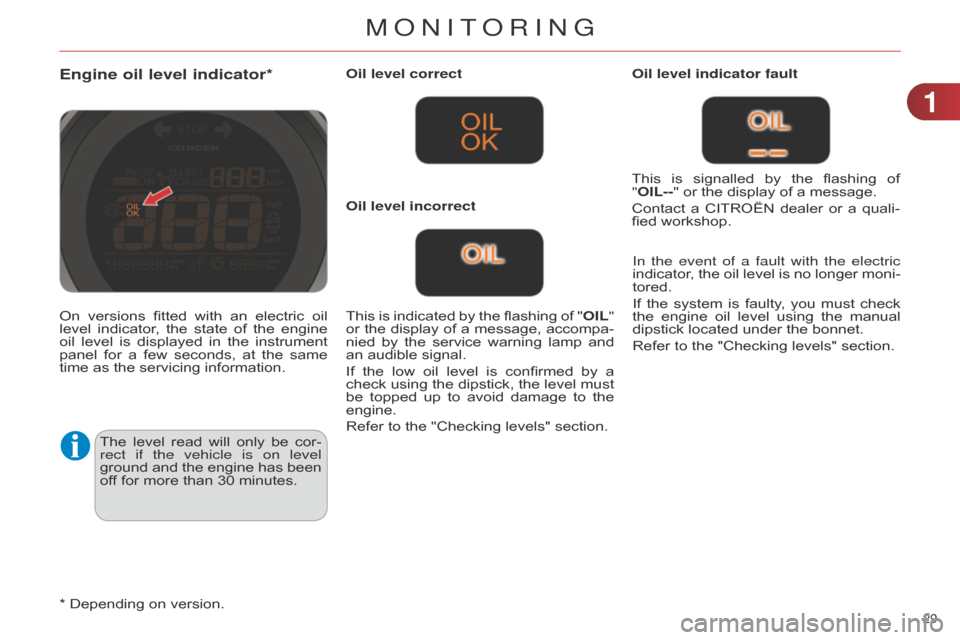
Engine oil level indicator*
The level read will only be cor -
rect if the vehicle is on level
ground
and
the
engine
has
been
of
f for more than 30 minutes.Oil level correct
This
is
indicated
by
the
flashing
of
"
OIL"
or
the
display
of
a
message,
accompa
-
nied
by
the
service
warning
lamp
and
an
audible signal.
If
the
low
oil
level
is
confirmed
by
a
check
using
the
dipstick,
the
level
must
be
topped
up
to
avoid
damage
to
the
engine.
Refer
to the "Checking levels" section.Oil level indicator fault
In the event of a fault with the electric
indicator,
the
oil
level
is
no
longer
moni
-
tored.
If
the
system
is
faulty
,
you
must
check
the
engine
oil
level
using
the
manual
dipstick
located under the bonnet.
Refer to the "Checking levels" section.
Oil level incorrect
This
is
signalled
by
the
flashing
of
"
OIL--" or the display of a message.
Contact
a
CITROËN
dealer
or
a
quali
-
fied workshop.
On
versions
fitted
with
an
electric
oil
level
indicator
,
the
state
of
the
engine
oil
level
is
displayed
in
the
instrument
panel
for
a
few
seconds,
at
the
same
time
as the servicing information.
*
Depending on version.
1
MonIToRInG
Page 32 of 340

30
C4-2_en_Chap01_controle-de-marche_ed01-2014
Service indicator
System that informs the driver when the next
service is due, in accordance with
the
manufacturer's service schedule.
The
point
at
which
the
service
is
due
is
calculated
from
the
last
service
indica
-
tor
zero
reset,
according
to
the
distance
covered
and
the
time
elapsed
since
the
last
service.
For
b lueH d i d iesel versions, the level
of
deterioration
of
the
engine
oil
may
also
be
taken
into
account,
depending
on
the country of sale.
More than 1800 miles (3000 km)
remain before the next service is due
When the ignition is switched on, no service
information appears in the in -
strument
panel central screen.
Between 600 miles (1 000 km) and
1800 miles (3 000 km) remain before
the next service is due
For a few seconds after the ignition is switched
on, the spanner symbolising
the
service
operations
comes
on.
The
distance
recorder
display
line
or
a
spe
-
cific
message
in
the
instrument
panel
central
screen
indicates
the
distance
re
-
maining
before the next service is due.
For example:
1
700
miles
(2
800
km)
remain
before the next service is due.
For
a
few
seconds
after
the
ignition
is
switched
on, the screen indicates:
Less than 600 miles (1 000 km)
remain before the next service is due
Example: 560 miles (900 km) remain before
the next service is due.
For
a
few
seconds
after
the
ignition
is
switched
on, the screen indicates:
A
few
seconds
after
the
ignition
is
switched
on,
the spanner goes off
; the
distance
recorder
resumes
its
normal
operation.
The
screen
then
indicates
the
total
and
trip
distances. A
few
seconds
after
the
ignition
is
switched
on,
the
distance
recorder
resumes
its
normal
operation.
The
spanner remains on
to
indicate
that
a
service
must be carried out soon.
1
MONITORING
Page 34 of 340

32
C4-2_en_Chap01_controle-de-marche_ed01-2014
Distance recorders
The total and trip distances are dis -
played for thirty seconds when the ig -
nition
is
switched
of
f,
when
the
driver's
door
is
opened
and
when
the
vehicle
is
locked
or unlocked.
Trip distance recorder Total distance recorder
Setting the time and the time
format in the instrument panel
without audio system
On the two-tone instrument panel with -
out audio system, to adjust the time,
use buttons
A
and
B
then carry out the
operations
in the following order:
F
press buttons
A
and
B
simultane
-
ously:
the minutes flash,
F
press A
to
increase
the
minutes
or
B
to reduce the minutes,
F
press buttons
A
and
B
simultane
-
ously:
the hours flash,
F
press A to increase the hours or B
to
reduce the hours,
F
press buttons
A
and
B
simultane
-
ously:
24
H
or
12
H
is
displayed
and
flashes,
F
press button
A or B
to
change
the
format,
F
press buttons
A
and
B
simultane
-
ously
to exit from time setting.
After approximately 30 seconds without any ac -
tion, the screen returns to the normal display.
Measures the total distance travelled by
the vehicle since its first registration.
Measures
the
distance
travelled
since
it
was
last reset to zero by the driver.
F
With
the
ignition
on,
press
and
hold
this
button until zeros appear. On
the
two-tone
instrument
panel
with
-
out
audio
system,
to
change
the
display
units, use buttons
A
and
B
then carry
out the operations in the following order:
F
press buttons
A
and
B
simultane
-
ously
for
three
seconds:
km/h
or
mph
flashes,
F
press button
A or B
to
change
the
units,
F
press buttons
A
and
B
simultane
-
ously to exit from setting units.
After approximately 30 seconds without any action, the screen returns to the
normal
display
Setting units in the instrument
panel without audio system
Setting the time and units in the
multifunction screen
The other instrument panels are as -
sociated with an audio system and a
multifunction
screen.
Refer
to
the
cor
-
responding
screens.
1
MONITORING
Page 35 of 340

33
C4-2_en_Chap01_controle-de-marche_ed01-2014
System allowing certain screens to be switched
off for night driving.
The
instrument
panel
remains
on
with
the
vehicle
speed,
electronic
or
auto
-
matic
gearbox
gear
selected,
cruise
control
or
speed
limiter
information,
if
in
use,
and
the
low
fuel
alerts
as
ap
-
propriate.
If
there
is
an
alert
or
a
change
in
a
function
or
to
a
setting,
the
black
panel
mode
is interrupted.
Black panel (black screen)
Activation
F
With
the
vehicle
lighting
on,
press
this
button
again
to
activate
the
black
panel.
F
Press
once
more
to
illu
minate
on
the
various screens again.
Permits manual adjustment of the bright -
ness of the instruments and controls in relation
to
the
exterior
brightness.
Only operates
when
the
vehicle
lighting
is
on
in night
mode.
Lighting dimmer
Activation
F
Press button
A
to
change
the
bright
-
ness
of the instruments and controls.
F
When
the
lighting
reaches
the
mini
-
mum
setting,
release
the
button,
then
press again to increase it.
or
F
When
the
lighting
reaches
the
maxi
-
mum
setting,
release
the
button,
then
press again to reduce it.
F
When
the
lighting
reaches
the
level
of
brightness
required,
release
the
button.Deactivation
When
the
vehicle
lighting
is
of
f,
or
in
day
mode
(daytime
running
lamps
on),
pressing
the
button
or
turning
the
thumb
wheel does not have any effect.
You
can also modify the level of lighting
by
turning
the
thumb
wheel
B
,
located
on
the left of the steering wheel:
F
upwards;
to reduce the level,
F
downwards;
to increase the level.
This
indicator
and
the
lighting
value
appear
in
the
middle
of
the
instrument
panel
during
adjustment
to
show
the
lighting
level
compared
to
the
16
levels
avail
-
able.
1
MONITORING
Page 36 of 340

34
C4-2_en_Chap01_controle-de-marche_ed01-2014
In the instrument panel, you can change the
colour of its dials (button A)
indepen -
dently
from that of the screens (button B).
There
are
five
colour
variants,
from
white
to blue.
F
press
the appropriate button as
many
times
as
needed
to
obtain
the
desired
colour. This
menu
allows
you
to
choose
a
fam
-
ily
of
polyphonic
sounds
from
the
four
available.
These
sounds
are
grouped
together
in
a
family
and
are
adapted
to
suit
the
situation
and
context
(alert,
confirmation,
rejection,
direction
indica
-
tors, lighting left on, key in ignition...).
Customising the instrument
panel colours
Customising the polyphonic
sounds
For the customisable colour
instrument panel with audio or
navigation system
F
Press the
"MENU" button for ac-
cess
to the main menu.
F
Select
the
"Personalisation-confi
-
guration"
menu and confirm.
F
Select
the
"Choice
of
sounds"
line
and
confirm.
F
Select
the
desired
family
of
sounds
and
confirm.
F
Save
the
modifications
by
confirm
-
ing
"OK". For
safety
reasons,
the
driver must
only
carry
out
these
opera
-
tion when stationary.
1
MONITORING
Page 84 of 340

55
82
C4-2_en_Chap05_visibilite_ed01-2014
Model without AUTO lightingModel with AUTO lighting A.
Main lighting mode selection ring: turn
it to position the symbol re -
quired
facing the mark.
Manual controls
The lighting is controlled directly by the driver
by means of the ring A and the
stalk
B.
Lighting off / daytime running lamps.
Automatic illu mination of head -
lamps.
B.
Stalk
for
switching
headlamps:
pull
the
stalk
towards
you
to
switch
the
lighting
between
dipped
and
main
beam
headlamps.
In
the
lamps
of
f
and
sidelamps
modes,
the driver
can
switch
on
the
main
beam
head
-
lamps
temporarily
("headlamp
flash")
by maintaining
a pull on the stalk.
Sidelamps.
Dipped
headlamps
or
main
beam
headlamps.
Displays
Illumination of the corresponding indica -
tor lamp in the instrument panel confirms that
the lighting selected is on.
Daytime running lamps
Daytime lighting, compulsory in certain countries,
which comes on automati -
cally
when
the
engine
is
started
making
the
vehicle more visible to other users.
This
function is assured:
-
in
countries
where
it
is
imposed
by
regulations,
by
illu
mination
of
the
dipped
beam
headlamps
with
the
sidelamps
and
number
plate
lamps;
this
function
cannot
be deactivated.
-
for
other
countries
where
it
is
pro
-
vided,
by
the
use
of
dedicated
lamps;
this
function
can
be
activated
or
deac
-
tivated
via
the
vehicle
configuration
menu.
The
instruments
and
controls
(instru
-
ment
panel,
multifunction
screen,
air
conditioning
control
panel,
...)
are
not
illu
minated,
except
in
night
mode
with
manual
or
automatic
illu
mination
of
headlamps.
VISIBILITY