2013 VOLVO V60 audio
[x] Cancel search: audioPage 81 of 422
03 Your driving environment
Key positions
03
* Option/accessory, for more information, see Introduction.79
Choosing key position/level
Key position 0
•Unlock the car - this means that the car's
electrical system is at level 0.
Key position I
•With the remote control key fully inserted
into the ignition switch1 - Briefly press
START/STOP ENGINE.
NOTE
To reach level I or II without starting the
engine - do not depress the brake/clutch
pedal when these key positions are due to
be selected.
Key position II
•With the remote control key fully inserted
into the ignition switch1 - Give a long2 press
on START/STOP ENGINE.
Back to key position 0
•To return to key position 0 from position II
and I - Briefly press on START/STOP
ENGINE.
Audio systemFor information on the audio system's func-
tions with remote control key removed - see
page 234.
Starting and stopping the engineFor information about starting/switching off the
engine - see page 113.
TowingFor important information about the remote
control key during towing - see page 304.
1Not necessary for cars with the Keyless* function.2Approx. 2 seconds.
ProCarManuals.com
Page 87 of 422
03 Your driving environment
Steering wheel
03
* Option/accessory, for more information, see Introduction.85 Adjusting
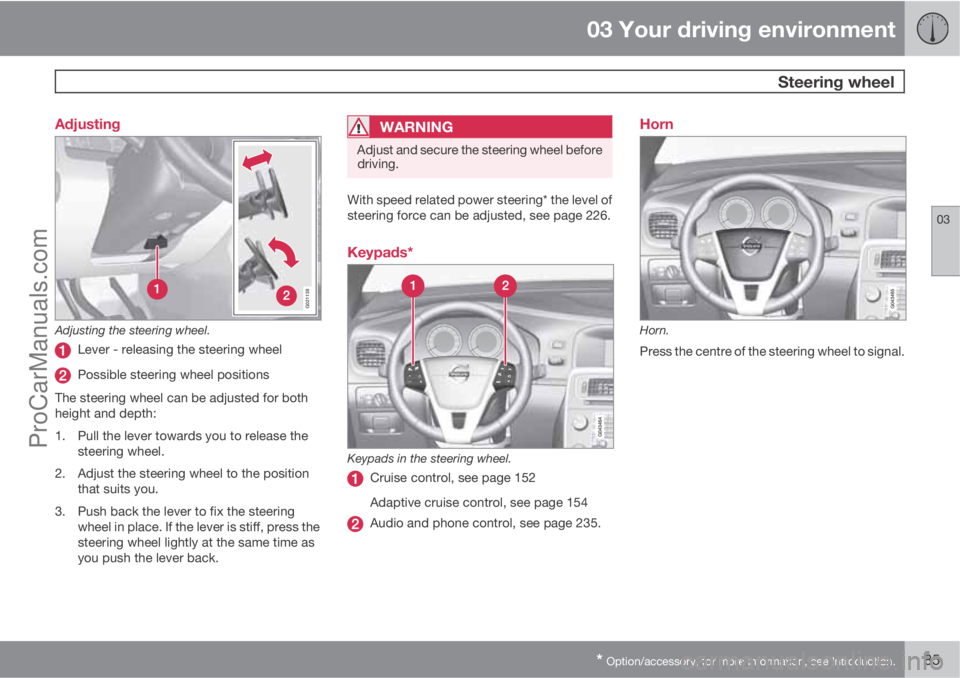
G021138
Adjusting the steering wheel.
Lever - releasing the steering wheel
Possible steering wheel positions
The steering wheel can be adjusted for both
height and depth:
1. Pull the lever towards you to release the
steering wheel.
2. Adjust the steering wheel to the position
that suits you.
3. Push back the lever to fix the steering
wheel in place. If the lever is stiff, press the
steering wheel lightly at the same time as
you push the lever back.
WARNING
Adjust and secure the steering wheel before
driving.
With speed related power steering* the level of
steering force can be adjusted, see page 226.
Keypads*
Keypads in the steering wheel.
Cruise control, see page 152
Adaptive cruise control, see page 154
Audio and phone control, see page 235.
Horn
Horn.
Press the centre of the steering wheel to signal.
ProCarManuals.com
Page 117 of 422

03 Your driving environment
Starting the engine
03
115
Operation
Remote control buttons for remote start.
Locking
Approach lighting
Information3
Remote starting the engineMaximum distance for enabling remote star-
ting of the engine is approx. 30 metres in unob-
structed space - in addition, the car must be
locked.
To remote start the engine:1. Briefly press on the remote control key's
lock button (1).
2. Follow this immediately afterwards with a
long press - at least 2 seconds - on
button (2).
If the conditions for ERS are fulfilled then the
following takes place:
1. All direction indicators flash quickly several
times.
2. The engine starts.
3. All direction indicators illuminate with a
constant glow for 3 seconds to verify that
the engine has started.
NOTE
After remote starting, the car continues to
be locked but with the alarm deactivated.
With PCC4 keyThe light indication for Approach
lighting5 flashes several times when
the button is pressed and then goes
to constant glow if all criteria for ERS
have been fulfilled. However, this does not
mean that ERS has started the engine.
To check whether ERS has started the engine,
the user can press the Information button (3) -
if the engine has started, there is a light indi-
cation on the button for Approach lighting (2).
Active functionsThe following functions are activated with a
remote started engine:
•Ventilation system
•Audio/video system.
Deactivated functionsThe following functions are deactivated with a
remote started engine:
•headlamps
•Position lamps
•Number plate lighting
•Windscreen wiper.
the engine is switched offThe following steps switch off an ERS-started
engine:
•The remote control key's lock button (1) is
depressed
•The car is unlocked
•A door is opened
3Only on PCC key, see page 47.4Read about the PCC key on page 47.5Read about Approach lighting on page 46 and 94.
ProCarManuals.com
Page 130 of 422
03 Your driving environment
DRIVe Start/Stop*
03
128* Option/accessory, for more information, see Introduction.
tem's fan speed or extremely high volume on
the audio system.
Auto-stopping the engineThe following is required for the engine to auto-
stop:
ConditionsM/AA
Declutch, set the gear lever in
neutral position and release the
clutch pedal - the engine is
switched off.M
Stop the car with the foot brake
and then keep your foot on the
pedal - the engine stops automat-
ically.A
AM = Manual gearbox, A = Automatic gearbox.
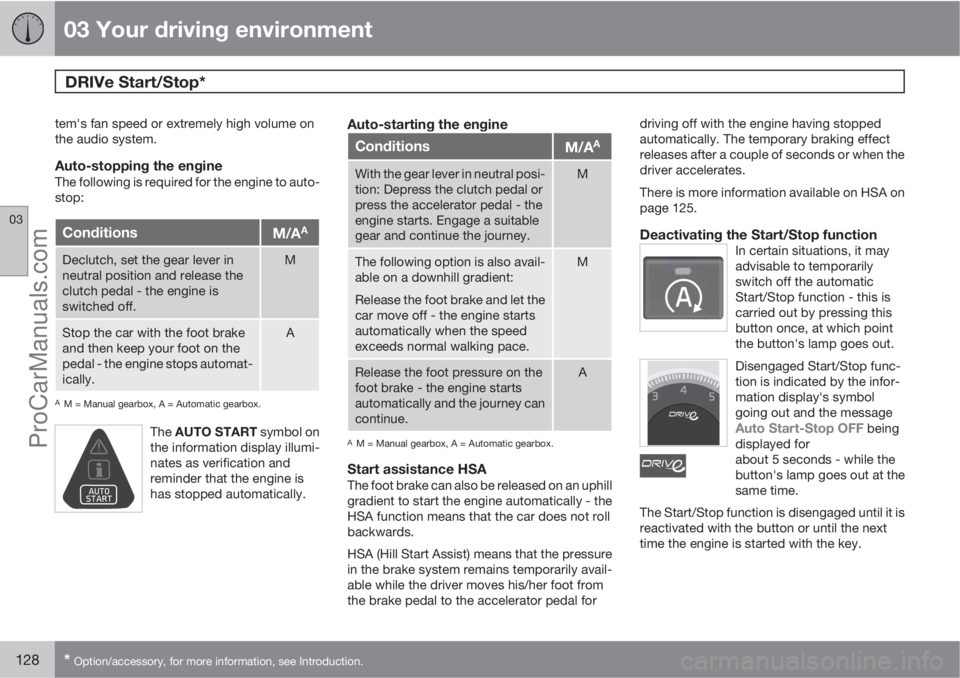
The AUTO START symbol on
the information display illumi-
nates as verification and
reminder that the engine is
has stopped automatically.
Auto-starting the engine
ConditionsM/AA
With the gear lever in neutral posi-
tion: Depress the clutch pedal or
press the accelerator pedal - the
engine starts. Engage a suitable
gear and continue the journey.M
The following option is also avail-
able on a downhill gradient:
Release the foot brake and let the
car move off - the engine starts
automatically when the speed
exceeds normal walking pace.M
Release the foot pressure on the
foot brake - the engine starts
automatically and the journey can
continue.A
AM = Manual gearbox, A = Automatic gearbox.
Start assistance HSAThe foot brake can also be released on an uphill
gradient to start the engine automatically - the
HSA function means that the car does not roll
backwards.
HSA (Hill Start Assist) means that the pressure
in the brake system remains temporarily avail-
able while the driver moves his/her foot from
the brake pedal to the accelerator pedal fordriving off with the engine having stopped
automatically. The temporary braking effect
releases after a couple of seconds or when the
driver accelerates.
There is more information available on HSA on
page 125.
Deactivating the Start/Stop functionIn certain situations, it may
advisable to temporarily
switch off the automatic
Start/Stop function - this is
carried out by pressing this
button once, at which point
the button's lamp goes out.
Disengaged Start/Stop func-
tion is indicated by the infor-
mation display's symbol
going out and the message
Auto Start-Stop OFF being
displayed for
about 5 seconds - while the
button's lamp goes out at the
same time.
The Start/Stop function is disengaged until it is
reactivated with the button or until the next
time the engine is started with the key.
ProCarManuals.com
Page 175 of 422
04 Driver support
Collision Warning with Auto Brake & Pedestrian Protection*
04
* Option/accessory, for more information, see Introduction.173 General
"Collision Warning with Auto Brake & Pedes-
trian Detection" is an aid to assist the driver
when there is a risk of colliding with a pedes-
trian or vehicle in front that is stationary or
moving in the same direction.
Collision Warning with Auto Brake & Pedestrian
Detection is activated in situations where the
driver should have started braking earlier,
which is why it cannot help the driver in every
situation.
Collision Warning with Auto Brake & Pedestrian
Detection is designed to be activated as late as
possible in order to avoid unnecessary inter-
vention.
Collision Warning with Auto Brake & Pedestrian
Detection may prevent a collision or reduce the
collision speed.
Collision Warning with Auto Brake & Pedestrian
Detection must not be used as an excuse for
the driver to change his/her driving style. If the
driver solely relies on Collision Warning with
Auto Brake to do the braking, there will be a
collision sooner or later.
Two system levelsDepending on how the car equipped, the Col-
lision Warning with Auto Brake & Pedestrian
Detection function may appear in two variants:
Level 1 and Level 2.
Level 1The driver is merely warned of occurring obsta-
cles by means of visual and acoustic signals -
no automatic braking intervenes, the driver
must himself brake.
Level 2The driver is warned of occurring obstacles by
means of visual and acoustic signals - the car
is braked automatically if the driver himself
does not act within a reasonable time.
IMPORTANT
Maintenance of components included in
Collision Warning with Auto Brake & Pedes-
trian Detection must only be carried out in a
workshop - an authorised Volvo workshop
is recommended.
Function
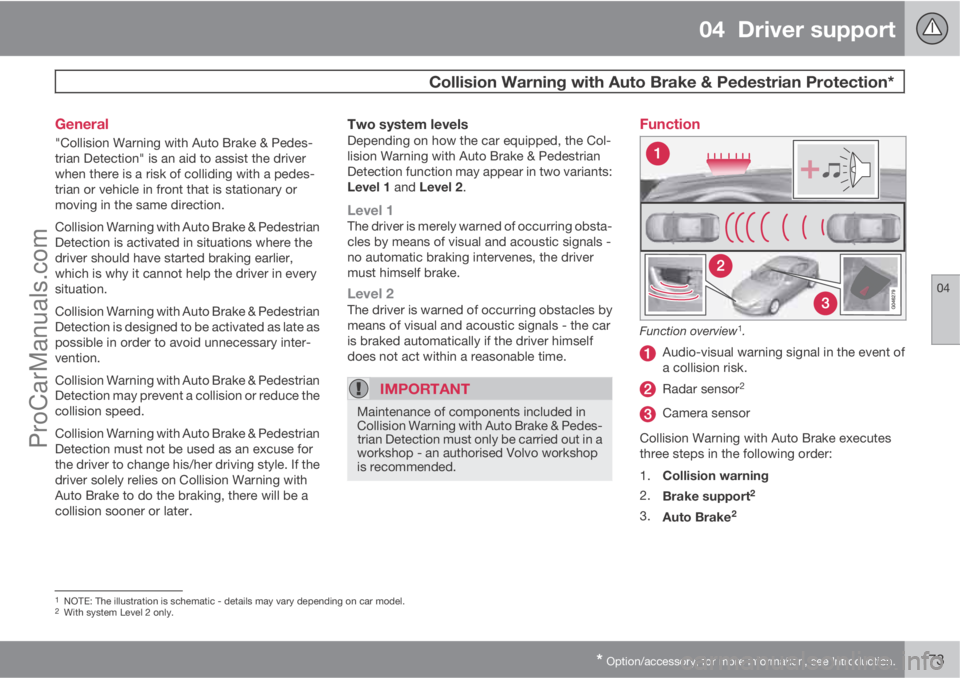
Function overview1.
Audio-visual warning signal in the event of
a collision risk.
Radar sensor2
Camera sensor
Collision Warning with Auto Brake executes
three steps in the following order:
1.
Collision warning
2.
Brake support
2
3.
Auto Brake2
1NOTE: The illustration is schematic - details may vary depending on car model.2With system Level 2 only.
ProCarManuals.com
Page 190 of 422

04 Driver support
Park assist syst*
04
188* Option/accessory, for more information, see Introduction.
General
Parking assistance is used as an aid to parking.
An acoustic signal as well as symbols on the
centre console's display screen indicate the
distance to the detected obstacle.
Parking assistance sound level can be
adjusted during the ongoing acoustic signal
using the centre console's VOL knob or in the
car's menu system MY CAR - see page 202.
Parking assistance is available in two variants:
•Rear only
•Both front and rear.
NOTE
When a towbar is configured with the car's
electrical system, the protrusion of the tow-
bar is included when the function measures
the parking space.
WARNING
•Parking assistance does not relinquish
the driver's own responsibility during
parking.
•The sensors have blind spots where
obstacles cannot be detected.
•Be aware of e.g. people or animals near
the car.
Function
The system is automatically activated when the
engine is started - the switch's On/Off lamp is
illuminated. If parking assistance is switched
off with the button, the lamp goes out.
Display screen view - showing an obstacle left
front and right rear.
The centre console's display screen shows an
overview of the relationship between the car
and detected obstacle.
Marked sectors show which of the four sen-
sor(s) detected an obstacle. The closer to the
car symbol a selected sector box is, the shorter
the distance between the car and a detected
obstacle.
The frequency of the signal increases the
shorter the distance to an obstacle, in front of
or behind the car. Other sound from the audio
system is muted automatically.
When the distance is within 30 cm the tone is
constant and the active sensor's field nearest
the car is filled in. If the detected obstacle is
within the distance for the constant tone both
ProCarManuals.com
Page 192 of 422

04 Driver support
Park assist syst*
04
190* Option/accessory, for more information, see Introduction.
IMPORTANT
When fitting auxiliary lamps: Remember that
they must not obscure the sensors – the
auxiliary lamps could then be detected as
obstacles.
Fault indicator
If the information symbol illuminates
with constant glow and the informa-
tion display shows
Park assist syst Service
required then parking assistance is disen-
gaged.
IMPORTANT
In certain conditions the parking assistance
system may produce incorrect warning sig-
nals that are caused by external audio
sources that emit the same ultrasonic fre-
quencies that the system works with.
Examples of such sources include horns,
wet tyres on asphalt, pneumatic brakes and
exhaust noises from motorcycles etc.
Cleaning the sensors
Sensor location, front.
Sensor location, rear.
The sensors must be cleaned regularly to
ensure that they work properly. Clean them
with water and car shampoo.
NOTE
Dirt, ice and snow covering the sensors may
cause incorrect warning signals.
ProCarManuals.com
Page 203 of 422
05 Comfort and driving pleasure
Menus and messages
05
201
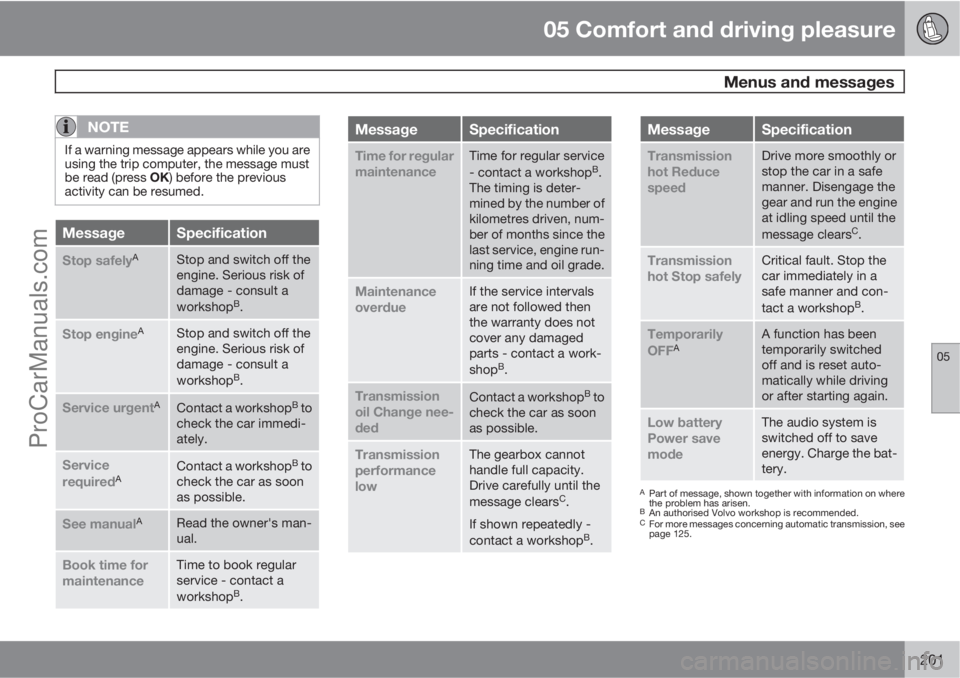
NOTE
If a warning message appears while you are
using the trip computer, the message must
be read (press OK) before the previous
activity can be resumed.
MessageSpecification
Stop safelyAStop and switch off the
engine. Serious risk of
damage - consult a
workshop
B.
Stop engineAStop and switch off the
engine. Serious risk of
damage - consult a
workshop
B.
Service urgentAContact a workshopB to
check the car immedi-
ately.
Service
requiredAContact a workshopB to
check the car as soon
as possible.
See manualARead the owner's man-
ual.
Book time for
maintenanceTime to book regular
service - contact a
workshop
B.
MessageSpecification
Time for regular
maintenanceTime for regular service
- contact a workshopB.
The timing is deter-
mined by the number of
kilometres driven, num-
ber of months since the
last service, engine run-
ning time and oil grade.
Maintenance
overdueIf the service intervals
are not followed then
the warranty does not
cover any damaged
parts - contact a work-
shop
B.
Transmission
oil Change nee-
dedContact a workshopB to
check the car as soon
as possible.
Transmission
performance
lowThe gearbox cannot
handle full capacity.
Drive carefully until the
message clears
C.
If shown repeatedly -
contact a workshop
B.
MessageSpecification
Transmission
hot Reduce
speedDrive more smoothly or
stop the car in a safe
manner. Disengage the
gear and run the engine
at idling speed until the
message clears
C.
Transmission
hot Stop safelyCritical fault. Stop the
car immediately in a
safe manner and con-
tact a workshop
B.
Temporarily
OFFAA function has been
temporarily switched
off and is reset auto-
matically while driving
or after starting again.
Low battery
Power save
modeThe audio system is
switched off to save
energy. Charge the bat-
tery.
APart of message, shown together with information on where
the problem has arisen.
BAn authorised Volvo workshop is recommended.CFor more messages concerning automatic transmission, see
page 125.
ProCarManuals.com