2013 VOLVO V60 warning
[x] Cancel search: warningPage 197 of 422

04 Driver support
BLIS* – Blind Spot Information System
04
* Option/accessory, for more information, see Introduction.195 Activate/deactivate
Button for activating/deactivating.
BLIS is activated when the engine is started.
The indicator lamps in the door panels flash
three times when BLIS is activated.
The system can be deactivated/activated after
starting the engine with one press on the
BLIS button.
Some combinations of the selected equipment
leave no vacant space for a button in the centre
console - in which case the function is handled
by the car's menu system MY CAR under
Settings
Car settingsBLIS. (For a
description of the menu system - see
page 202).When BLIS is deactivated, the lamp in the but-
ton goes out and a message is shown in the
instrument panel display.
When BLIS is activated the light in the button
illuminates, a new text message is shown on
the display and the indicator lamps in the door
panels flash 3 times. Press the OK button to
delete the text message. (For a description of
messages - see page 200).
When BLIS operates
The system operates when the car is driven at
a speed above 10 km/h.
OvertakingThe system is designed to react if:
•you overtake another vehicle at a speed of
up to 10 km/h faster than the other vehicle
•you are overtaken by a vehicle travelling up
to 70 km/h faster than you are travelling.
WARNING
BLIS does not work in sharp bends.
BLIS does not work when the car is revers-
ing.
A wide trailer coupled to the car can conceal
other vehicles in adjacent lanes. It can pre-
vent the vehicle in the screened area from
being detected by BLIS.
Daylight and darknessIn daylight the system reacts to the shape of
the surrounding vehicles. The system is
designed to detect motor vehicles such as
cars, trucks, buses and motorcycles.
In darkness the system reacts to the head-
lamps of surrounding vehicles. If the head-
lamps of surrounding vehicles are not switched
on then the system does not detect the vehi-
cles. This means for example that the system
does not react to a trailer without headlamps
which is towed behind a car or truck.
WARNING
The system does not react to cyclists or
moped riders.
The BLIS cameras have limitations similar to
those of the human eye, i.e. they do not
"see" as well e.g. in heavy snowfall, against
strong light or in thick fog.
ProCarManuals.com
Page 202 of 422
05 Comfort and driving pleasure
Menus and messages
05
200* Option/accessory, for more information, see Introduction.
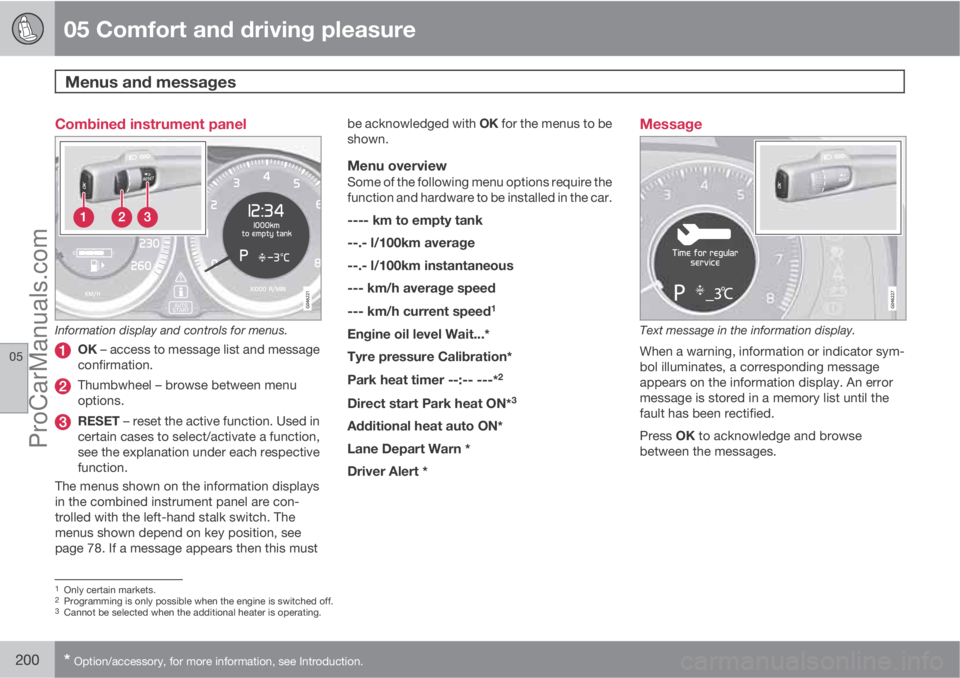
Combined instrument panel
Information display and controls for menus.
OK – access to message list and message
confirmation.
Thumbwheel – browse between menu
options.
RESET – reset the active function. Used in
certain cases to select/activate a function,
see the explanation under each respective
function.
The menus shown on the information displays
in the combined instrument panel are con-
trolled with the left-hand stalk switch. The
menus shown depend on key position, see
page 78. If a message appears then this mustbe acknowledged with OK for the menus to be
shown.
Menu overviewSome of the following menu options require the
function and hardware to be installed in the car.
---- km to empty tank
--.- l/100km average
--.- l/100km instantaneous
--- km/h average speed
--- km/h current speed
1
Engine oil level Wait...*
Tyre pressure Calibration*
Park heat timer --:-- ---*2
Direct start Park heat ON*3
Additional heat auto ON*
Lane Depart Warn *
Driver Alert *
Message
Text message in the information display.
When a warning, information or indicator sym-
bol illuminates, a corresponding message
appears on the information display. An error
message is stored in a memory list until the
fault has been rectified.
Press OK to acknowledge and browse
between the messages.
1Only certain markets.2Programming is only possible when the engine is switched off.3Cannot be selected when the additional heater is operating.
ProCarManuals.com
Page 203 of 422
05 Comfort and driving pleasure
Menus and messages
05
201
NOTE
If a warning message appears while you are
using the trip computer, the message must
be read (press OK) before the previous
activity can be resumed.
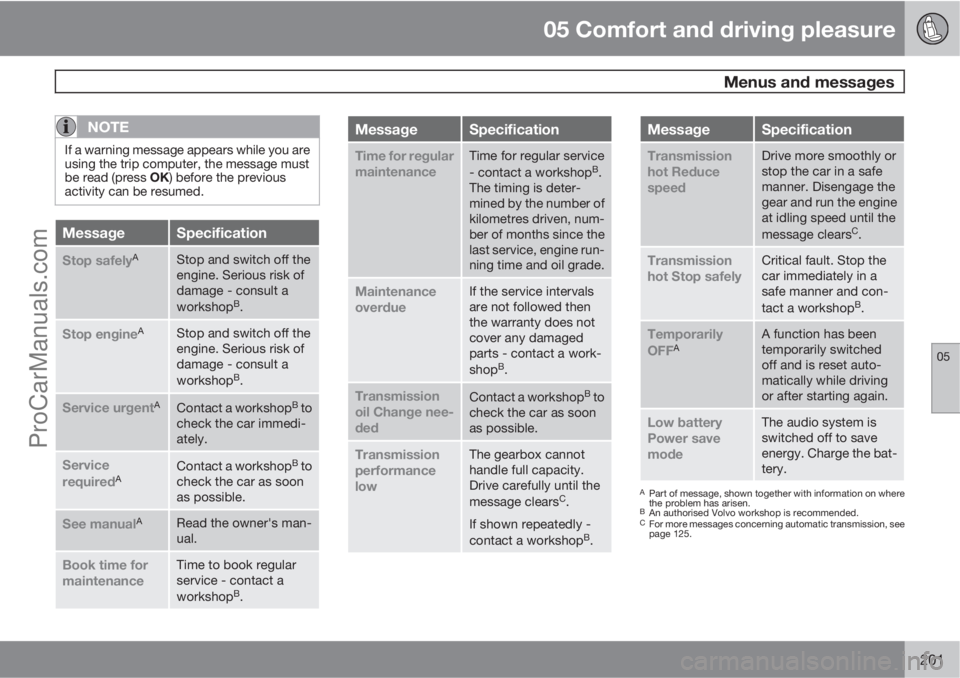
MessageSpecification
Stop safelyAStop and switch off the
engine. Serious risk of
damage - consult a
workshop
B.
Stop engineAStop and switch off the
engine. Serious risk of
damage - consult a
workshop
B.
Service urgentAContact a workshopB to
check the car immedi-
ately.
Service
requiredAContact a workshopB to
check the car as soon
as possible.
See manualARead the owner's man-
ual.
Book time for
maintenanceTime to book regular
service - contact a
workshop
B.
MessageSpecification
Time for regular
maintenanceTime for regular service
- contact a workshopB.
The timing is deter-
mined by the number of
kilometres driven, num-
ber of months since the
last service, engine run-
ning time and oil grade.
Maintenance
overdueIf the service intervals
are not followed then
the warranty does not
cover any damaged
parts - contact a work-
shop
B.
Transmission
oil Change nee-
dedContact a workshopB to
check the car as soon
as possible.
Transmission
performance
lowThe gearbox cannot
handle full capacity.
Drive carefully until the
message clears
C.
If shown repeatedly -
contact a workshop
B.
MessageSpecification
Transmission
hot Reduce
speedDrive more smoothly or
stop the car in a safe
manner. Disengage the
gear and run the engine
at idling speed until the
message clears
C.
Transmission
hot Stop safelyCritical fault. Stop the
car immediately in a
safe manner and con-
tact a workshop
B.
Temporarily
OFFAA function has been
temporarily switched
off and is reset auto-
matically while driving
or after starting again.
Low battery
Power save
modeThe audio system is
switched off to save
energy. Charge the bat-
tery.
APart of message, shown together with information on where
the problem has arisen.
BAn authorised Volvo workshop is recommended.CFor more messages concerning automatic transmission, see
page 125.
ProCarManuals.com
Page 208 of 422

05 Comfort and driving pleasure
Menu source MY CAR
05
206* Option/accessory, for more information, see Introduction.
Tyre pressure system*
Warns if tyre pressure is
too low
Calibrate tyre pressurep. 319
Steering wheel force
Low
Medium
High
p. 226
Reset car settings
All menus in Car settings are
given original factory settings.
Driver support systems
Collision Warning
On
Off
Warning distance
Long
Normal
Short
Warning sound
On
Off
p. 173
Lane Departure Warning
On
Off
On at start-up
On
Off
Increased sensitivity
On
Off
p. 185
DSTC
On
Off
p. 146
City Safety
On
Off
p. 9
and
168
BLIS
On
Off
p. 194
Distance Alert
On
Off
p. 165
Driver Alert
On
Off
p. 182
System options
Time
The instrument panel clock is set
here.
p. 75
ProCarManuals.com
Page 217 of 422

05 Comfort and driving pleasure
Climate control
05
* Option/accessory, for more information, see Introduction.215 Operating the controls
Heated seats*
Front seats
Current heat level is shown in the centre console
TV screen.
One press on the button gives
the highest heat level - three
orange lamps illuminate in the
centre console TV screen (see
figure above).
Press the button twice for a
lower heat level – two orange lamps illuminate
in the TV screen.
Press the button three times for the lowest heat
level – one orange lamp illuminates in the TV
screen.
Press the button four times to switch off the
heat – no lamps illuminate.
WARNING
The heated seat should not be used by peo-
ple who find it difficult to perceive tempera-
ture increase because of sensory loss or for
any reason have difficulty in managing to
use the control of the heated seat. Other-
wise, burn injuries may arise.
Rear seat2
Press the button once for the highest heat level
– three lamps illuminate.
Press the button twice for a lower heat level –
two lamps illuminate.
Press the button three times for the lowest heat
level – one lamp illuminates.
Press the button four times to switch off the
heat – no lamps illuminate.
Fan
NOTE
If the fan is fully switched off then the air
conditioning is not engaged - which can
cause a risk of misting on the windows.
Fan knob for ECC*Turn the knob to increase or
decrease fan speed. If AUTO
is selected then fan speed is
regulated automatically. The
previously set fan speed is
disengaged.
2Not included if 2-stage booster cushion is selected.
ProCarManuals.com
Page 222 of 422

05 Comfort and driving pleasure
Fuel-driven engine block heater and passenger compartment heater*
05
220* Option/accessory, for more information, see Introduction.
Fuel-driven heater
General information about the parking
heater
The parking heater heats the engine and pas-
senger compartment and can be started
directly or with the timer.
Two different times can be selected using the
timer. Here, time refers to the time when the car
is heated and ready. The car's electronic sys-
tem calculates when heating should be started
based on the outside temperature.
The heater cannot start if the outside tempera-
ture exceeds 15 °C. At –5 °C or lower the
maximum running time of the parking heater is
50 minutes.
WARNING
The car must be outdoors when the parking
heater is used.
NOTE
When the parking heater is active there may
be smoke from the right-hand wheel hous-
ing, which is perfectly normal.
Refuelling
Warning label on fuel filler flap.
WARNING
Fuel which spills out can be ignited. Switch
off the fuel-driven heater before starting to
refuel.
Check the information display to see that
the parking heater is switched off. When it
is running, the information display shows
Park heat ON.
Parking on a hillIf the car is parked on a steep hill, the front of
the car should point downhill to ensure that
there is a supply of fuel to the parking heater.
Battery and fuelIf the battery has insufficient charge or the fuel
level is too low, the parking heater will be
switched off automatically and a message
appears on the information display. Acknowl-
edge the message by pressing the indicator
stalk OK button once, see page 221.
IMPORTANT
Repeated use of the parking heater com-
bined with short journeys may discharge the
battery and impair starting.
The car should be driven for the same time
as the heater is used to ensure that the car's
battery is recharged adequately to replace
the energy consumed by the heater when it
is used on a regular basis.
ProCarManuals.com
Page 226 of 422

05 Comfort and driving pleasure
Trip computer
05
224* Option/accessory, for more information, see Introduction.
General
Information display and controls.
OK - confirms.
Thumbwheel – browse between menus
and options in the trip computer list.
RESET – resets.
The trip computer's menu is in a variable loop.
One of the menu options is a blank display - it
also marks the beginning/end of the loop.
Functions
NOTE
If a warning message appears when the trip
computer is used then the message must
first be acknowledged before the trip com-
puter can be reactivated. Acknowledge the
warning message by pressing OK.
To change unit for distance and speed - go to
MY CAR
SettingsSystem options
Distance and fuel units, see page 202.
Average speedAverage speed is calculated from the last
resetting. Reset using RESET.
InstantaneousCurrent fuel consumption is calculated every
second. The information on the display is
updated every couple of seconds. When the
car is stationary, "
----" appears on the display.
AverageAverage fuel consumption is calculated from
the last resetting. Reset using RESET.
NOTE
There may be a slight error in the reading if
a fuel-driven supplementary and/or parking
heater* has been used.
Km to empty tankThe calculation is based on the average fuel
consumption over the last 30 km and the
remaining driveable fuel quantity. The display
shows the approximate distance that can be
driven with the fuel quantity remaining in the
tank.
An economic driving style generally results in a
longer driving distance. For more information
on how fuel consumption can be influenced,
see page 11.
No guaranteed range remains when the display
shows "
---- km to empty tank". Refuel as
soon as possible.
NOTE
There may be a slight error in the reading if
the driving style has been changed.
Resetting1.
Select --- km/h average speed or --.- l/
100km average.
ProCarManuals.com
Page 230 of 422
05 Comfort and driving pleasure
Comfort inside the passenger compartment
05
228* Option/accessory, for more information, see Introduction.
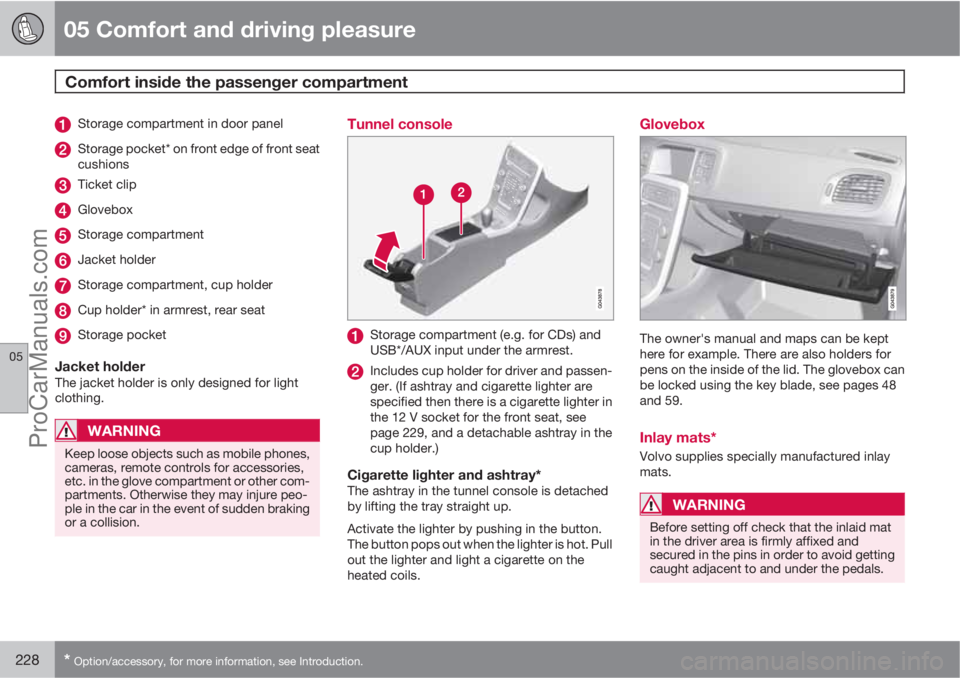
Storage compartment in door panel
Storage pocket* on front edge of front seat
cushions
Ticket clip
Glovebox
Storage compartment
Jacket holder
Storage compartment, cup holder
Cup holder* in armrest, rear seat
Storage pocket
Jacket holderThe jacket holder is only designed for light
clothing.
WARNING
Keep loose objects such as mobile phones,
cameras, remote controls for accessories,
etc. in the glove compartment or other com-
partments. Otherwise they may injure peo-
ple in the car in the event of sudden braking
or a collision.
Tunnel console
Storage compartment (e.g. for CDs) and
USB*/AUX input under the armrest.
Includes cup holder for driver and passen-
ger. (If ashtray and cigarette lighter are
specified then there is a cigarette lighter in
the 12 V socket for the front seat, see
page 229, and a detachable ashtray in the
cup holder.)
Cigarette lighter and ashtray*The ashtray in the tunnel console is detached
by lifting the tray straight up.
Activate the lighter by pushing in the button.
The button pops out when the lighter is hot. Pull
out the lighter and light a cigarette on the
heated coils.
Glovebox
The owner's manual and maps can be kept
here for example. There are also holders for
pens on the inside of the lid. The glovebox can
be locked using the key blade, see pages 48
and 59.
Inlay mats*
Volvo supplies specially manufactured inlay
mats.
WARNING
Before setting off check that the inlaid mat
in the driver area is firmly affixed and
secured in the pins in order to avoid getting
caught adjacent to and under the pedals.
ProCarManuals.com