2013 VOLVO V60 lock
[x] Cancel search: lockPage 172 of 422

04 Driver support
City Safety™
04
170
When City Safety™ has prevented a collision
with a stationary object the car remains sta-
tionary for a maximum of 1.5 seconds. If the car
is braked for a vehicle in front that is moving,
then speed is reduced to the same speed as
that maintained by the vehicle in front.
On a car with manual gearbox the engine stops
when City Safety™ has stopped the car, unless
the driver manages to depress the clutch pedal
beforehand.
NOTE
•Keep the windscreen surface in front of
the laser sensor free from ice, snow and
dirt (see the illustration for sensor loca-
tion, page 168).
•Do not affix or mount anything on the
windscreen in front of the laser sensor
•Remove ice and snow from the bonnet
- snow and ice must not exceed a height
of 5 cm.
Fault tracing and action
If the message Windscreen Sensors
blocked is shown on the instrument panel dis-
play, it indicates that the laser sensor is
blocked and cannot detect vehicles in front of
the car. This means that City Safety™ is not
operational.The
Windscreen Sensors blocked message
is not shown for all situations in which the laser
sensor is blocked. The driver must therefore be
diligent about keeping the windscreen and
area in front of the laser sensor clean.
The following table presents possible causes
for the message being shown, along with sug-
gestions for appropriate action.
CauseAction
The windscreen sur-
face in front of the
laser sensor is dirty
or covered with ice
or snow.Clean the wind-
screen surface in
front of the sensor
from dirt, ice and
snow.
The laser sensor
field of vision is
blocked.Remove the block-
ing object.
IMPORTANT
If there are cracks, scratches or stone chips
in the windscreen in front of either of the
laser sensor's "windows" and they cover a
surface of approx. 0.5 x 3.0 mm (or larger),
then a workshop must be contacted for
repair or replacement of the windscreen
(see the illustration for sensor location, page
168) - an authorised Volvo workshop is rec-
ommended.
Failure to take action may result in reduced
performance for City Safety™.
To avoid the risk of reducing City Safety™
performance the following also applies:
•Before replacing a windscreen, contact
an authorised Volvo workshop to verify
that the correct windscreen is ordered
and fitted. Using the wrong windscreen
may result in the City Safety function
failing to operate or operating incor-
rectly.
•The same type or Volvo-approved
windscreen wipers must be fitted during
replacement.
ProCarManuals.com
Page 174 of 422
04 Driver support
City Safety™
04
172
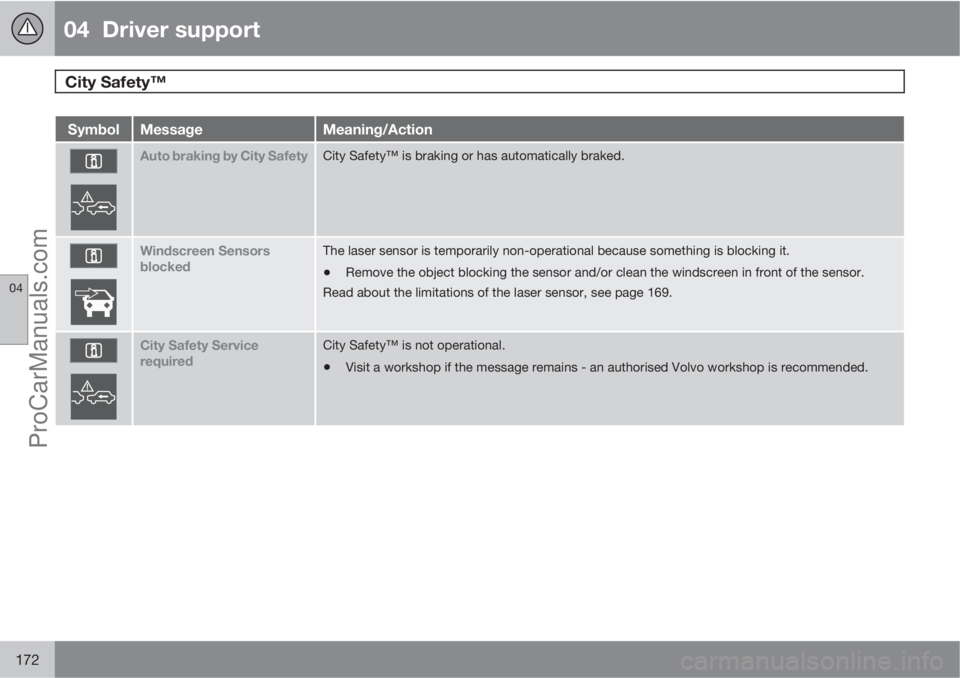
SymbolMessageMeaning/Action
Auto braking by City SafetyCity Safety™ is braking or has automatically braked.
Windscreen Sensors
blockedThe laser sensor is temporarily non-operational because something is blocking it.
•Remove the object blocking the sensor and/or clean the windscreen in front of the sensor.
Read about the limitations of the laser sensor, see page 169.
City Safety Service
requiredCity Safety™ is not operational.
•Visit a workshop if the message remains - an authorised Volvo workshop is recommended.
ProCarManuals.com
Page 180 of 422
04 Driver support
Collision Warning with Auto Brake & Pedestrian Protection*
04
178* Option/accessory, for more information, see Introduction.
Collision Warning with Auto Brake is tempo-
rarily deactivated with reverse gear engaged.
Collision Warning with Auto Brake is not acti-
vated at low speeds - under 4 km/h, which is
why the system does not intervene in situations
where the car is approaching a vehicle in front
very slowly, e.g. when parking.
In situations where the driver demonstrates
active, aware driving behaviour, a collision
warning may be postponed slightly in order to
keep unnecessary warnings to a minimum.
When Auto Brake has prevented a collision
with a stationary object the car remains sta-
tionary for a maximum of 1.5 seconds. If the car
is braked for a vehicle in front that is moving,
then speed is reduced to the same speed as
that maintained by the vehicle in front.
On a car with manual gearbox the engine stops
when Auto Brake has stopped the car, unless
the driver manages to depress the clutch pedal
beforehand.
Camera sensor limitationsThe car’s camera sensor is also used - as well
as by Collision Warning with Auto Brake - by
the functions:
•Automatic main/dipped beam dimming -
see page 88
•Road sign information - see page 148
•Driver Alert Control – see page 182
•Lane Departure Warning – see page 185.
NOTE
Keep the windscreen surface in front of the
camera sensor clean from ice, snow, mist
and dirt.
Do not attach or fit anything to the wind-
screen in front of the camera sensor, as this
could reduce or prevent the function of one
or more camera-dependent systems.
The camera sensors have limitations similar to
the human eye, i.e. they "see" worse in dark-
ness, heavy snowfall or rain and in thick fog for
example. Under such conditions the functions
of camera-dependent systems could be sig-
nificantly reduced or temporarily disengaged.
Strong oncoming light, reflections in the car-
riageway, snow or ice on the road surface, dirty
road surfaces or unclear lane markings could
also significantly reduce camera sensor func-
tion when it is used to scan the carriageway
and detect pedestrians and other vehicles.
The field of vision of the camera sensor is lim-
ited, which is why pedestrians and vehicles
cannot be detected in some situations, or they
are detected later than anticipated.
During very high temperatures the camera is
temporarily switched off for about 15 minutesafter the engine is started in order to protect
camera functionality.
Fault tracing and action
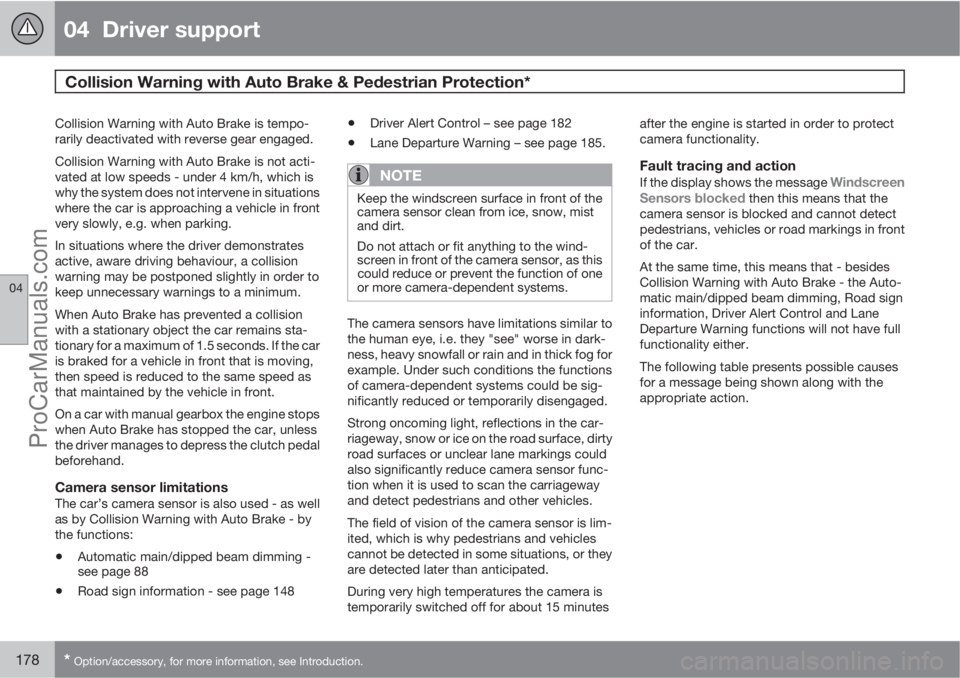
If the display shows the message Windscreen
Sensors blocked then this means that the
camera sensor is blocked and cannot detect
pedestrians, vehicles or road markings in front
of the car.
At the same time, this means that - besides
Collision Warning with Auto Brake - the Auto-
matic main/dipped beam dimming, Road sign
information, Driver Alert Control and Lane
Departure Warning functions will not have full
functionality either.
The following table presents possible causes
for a message being shown along with the
appropriate action.
ProCarManuals.com
Page 182 of 422
04 Driver support
Collision Warning with Auto Brake & Pedestrian Protection*
04
180* Option/accessory, for more information, see Introduction.
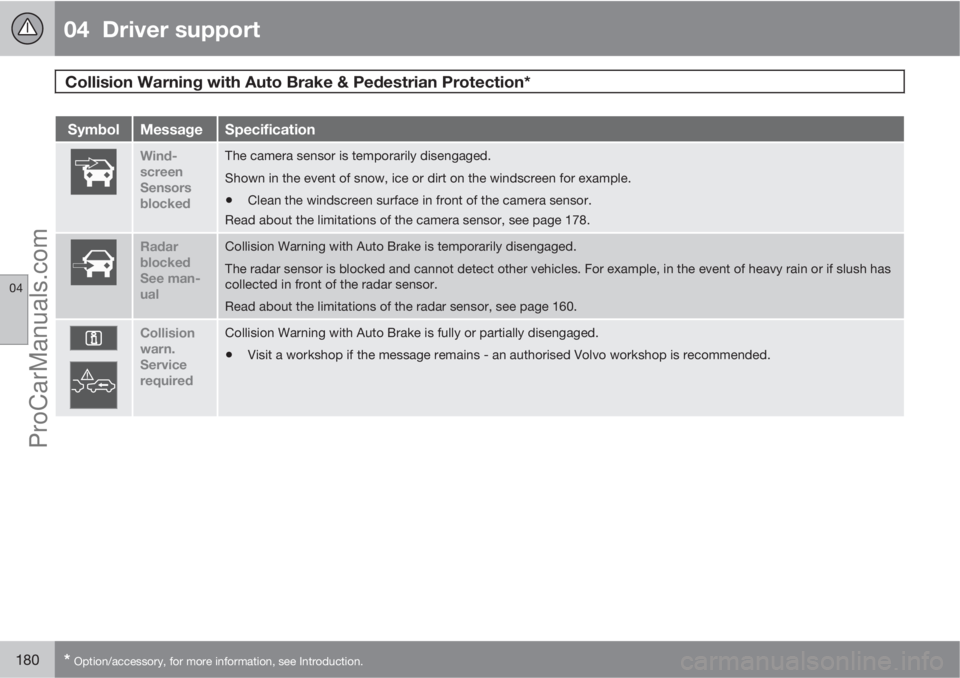
SymbolMessageSpecification
Wind-
screen
Sensors
blockedThe camera sensor is temporarily disengaged.
Shown in the event of snow, ice or dirt on the windscreen for example.
•Clean the windscreen surface in front of the camera sensor.
Read about the limitations of the camera sensor, see page 178.
Radar
blocked
See man-
ualCollision Warning with Auto Brake is temporarily disengaged.
The radar sensor is blocked and cannot detect other vehicles. For example, in the event of heavy rain or if slush has
collected in front of the radar sensor.
Read about the limitations of the radar sensor, see page 160.
Collision
warn.
Service
requiredCollision Warning with Auto Brake is fully or partially disengaged.
•Visit a workshop if the message remains - an authorised Volvo workshop is recommended.
ProCarManuals.com
Page 186 of 422

04 Driver support
Driver Alert System - DAC*
04
184* Option/accessory, for more information, see Introduction.
SymbolMessageSpecification
Driver Alert Time for a
breakThe vehicle has been driven inconsistently - the driver is alerted by an acoustic warning signal + text.
Windscreen Sensors
blockedThe camera sensor is temporarily disengaged.
Shown in the event of snow, ice or dirt on the windscreen for example.
•Clean the windscreen surface in front of the camera sensor.
Read about the limitations of the camera sensor, see page 178.
Driver Alert Sys Service
requiredThe system is disengaged.
•Visit a workshop if the message remains - an authorised Volvo workshop is recommended.
ProCarManuals.com
Page 189 of 422

04 Driver support
Driver Alert System - LDW*
04
* Option/accessory, for more information, see Introduction.187
SymbolMessageSpecification
Windscreen Sensors
blockedThe camera sensor is temporarily disengaged.
Shown in the event of snow, ice or dirt on the windscreen for example.
•Clean the windscreen surface in front of the camera sensor.
Read about the limitations of the camera sensor, see page 178.
Driver Alert Sys Service
requiredThe system is disengaged.
•Visit a workshop if the message remains - an authorised Volvo workshop is recommended.
Personal preferences
Settings are made from the centre console's
display screen via the menu system in MY
CAR. From there, search and locate Settings
Car settingsDriver support systems
Lane Departure Warning. For information
on how the menu system is used - see
page 202.
Select from the options:
•On at start-up - The function enters
standby mode every time the engine isstarted. Otherwise the same value as when
the engine was switched off is obtained.
•Increased sensitivity - The sensitivity
increases, an alarm is triggered earlier and
fewer limitations apply.
ProCarManuals.com
Page 198 of 422
04 Driver support
BLIS* – Blind Spot Information System
04
196* Option/accessory, for more information, see Introduction.
Cleaning
In order to work most effectively the BLIS cam-
era lenses must be clean. The lenses can be
cleaned with a soft cloth or damp sponge.
Clean the lenses carefully so that they are not
scratched.
IMPORTANT
The lenses are electrically heated to melt ice
or snow. If necessary, brush snow away
from the lenses.
Messages on the display
MessageSpecification
Blind-spot info
system ONThe BLIS system is
activated.
Blind spot syst.
Service requiredBlind spot syst. dis-
engaged - contact a
workshop.
Blind spot syst.
Camera blockedThe BLIS camera is
blocked by dirt,
snow or ice - clean
the lenses.
MessageSpecification
Blind spot syst.
Reduced functionReduced function in
the data transmis-
sion between the
BLIS system's cam-
era and the car's
electrical system.
The camera resets
itself when the data
transmission
between the BLIS
system's camera
and the car's electri-
cal system returns to
normal.
Blind-spot info
system OFFThe BLIS system is
deactivated.
IMPORTANT
Repair of the BLIS system components
must only be performed by a workshop - an
authorised Volvo workshop is recom-
mended.
Limitations
In some situations the BLIS indicator lamp may
illuminate despite there being no other vehicle
within the blind spot.
NOTE
If the BLIS indicator lamp illuminates on iso-
lated occasions despite there being no
other vehicle within the blind spot then this
does not mean that a fault has arisen in the
system.
In the event of a fault in the BLIS system the
display shows the text
Blind spot syst.
Service required.
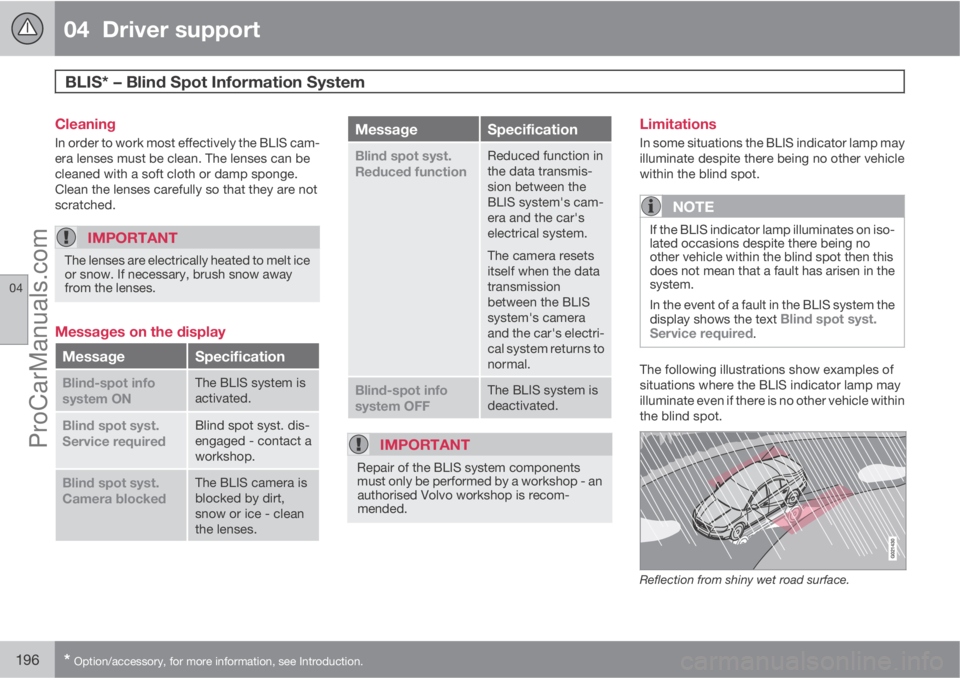
The following illustrations show examples of
situations where the BLIS indicator lamp may
illuminate even if there is no other vehicle within
the blind spot.
Reflection from shiny wet road surface.
ProCarManuals.com
Page 200 of 422
198* Option/accessory, for more information, see Introduction.
Menus and messages........................................................................... 200
Menu source MY CAR.......................................................................... 202
Climate control...................................................................................... 210
Fuel-driven engine block heater and passenger compartment heater* 220
Additional heater*.................................................................................. 223
Trip computer........................................................................................ 224
Adapting driving characteristics........................................................... 226
Comfort inside the passenger compartment........................................ 227
ProCarManuals.com