Page 338 of 422

09 Maintenance and service
Lamps 09
336
3. (Second illustration)
Detach the headlamp connector by
pressing down the clip with your thumb.
At the same time, guide out the con-
nector with your other hand.
4. Lift out the headlamp and place it on a soft
surface to avoid scratching the lens.
5. Replace the bulb in question.
Securing the headlamp
1. Plug in the connector, a clicking sound
should be heard.
2. Reinstall the headlamp and locking pins.
The short pin is fitted closest to the grille.
Check that they are correctly inserted.
3. Check the lighting.The headlamp must be mounted and the con-
nector correctly installed before the lighting is
switched on or the remote control key is
inserted into the ignition switch.
Removing the cover
Before starting to replace a bulb, see
page 335.
1. Unscrew the cover's four screws with the
tool (1) in the tool kit, see page 310. They
should not be detached completely.
(3 - 4 turns are sufficient.)
IMPORTANT
Use the tool in the toolkit to remove and
attach this correctly.
2. Slide the cover to one side.
3. Remove the cover.
Reinstall the cover in reverse order.
Dipped beam, halogen
1. Detach the headlamp, see page 335.
2. Remove the cover.
3. Unplug the connector from the bulb.
4. Detach the bulb by pulling it straight out.
5. The guide pin on the lamp should be
straight up when it is fitted and a clicking
sound should be heard when it clicks into
place.
Reinstall the parts in reverse order.
ProCarManuals.com
Page 339 of 422

09 Maintenance and service
Lamps09
��
* Option/accessory, for more information, see Introduction.337 Main beam, Halogen
1. Detach the headlamp.
2. Remove the cover, see page 336
3. Detach the bulb by turning anticlockwise
and then pulling straight out
4. Unplug the connector from the bulb.
5. Replace the bulb and align it in the socket
and turn clockwise in order to secure it. It
can be secured in one position.
Reinstall the parts in reverse order.
Extra main beam, ABL headlamps*
1. Detach the headlamp.
2. Remove the cover, see page 336.
3. Detach the bulb by turning anticlockwise
and then pulling straight out
4. Unplug the connector from the bulb.
5. Replace the bulb and align it in the socket
and turn clockwise in order to secure it. It
can only be secured in one position.
Reinstall the parts in reverse order.
Direction indicators
1. Detach the headlamp.
2. Detach the cover by pulling it straight out.
3. Pull the bulb holder in order to extract the
bulb.
4. Press and simultaneously turn the bulb to
detach it.
Reinstall the parts in reverse order.
ProCarManuals.com
Page 340 of 422
09 Maintenance and service
Lamps 09
338
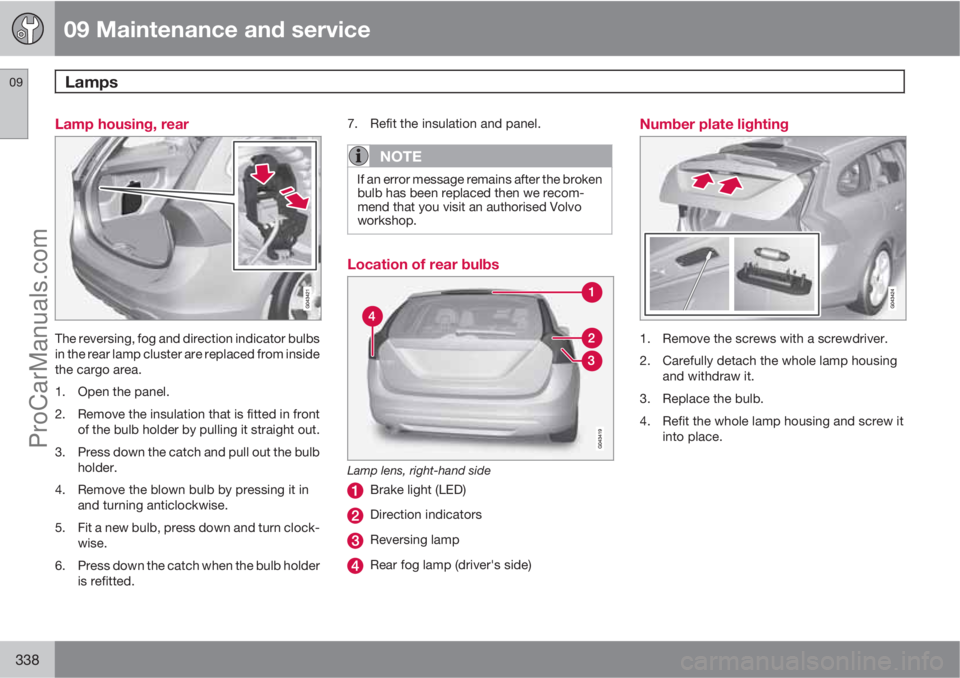
Lamp housing, rear
The reversing, fog and direction indicator bulbs
in the rear lamp cluster are replaced from inside
the cargo area.
1. Open the panel.
2. Remove the insulation that is fitted in front
of the bulb holder by pulling it straight out.
3. Press down the catch and pull out the bulb
holder.
4. Remove the blown bulb by pressing it in
and turning anticlockwise.
5. Fit a new bulb, press down and turn clock-
wise.
6. Press down the catch when the bulb holder
is refitted.7. Refit the insulation and panel.
NOTE
If an error message remains after the broken
bulb has been replaced then we recom-
mend that you visit an authorised Volvo
workshop.
Location of rear bulbs
Lamp lens, right-hand side
Brake light (LED)
Direction indicators
Reversing lamp
Rear fog lamp (driver's side)
Number plate lighting
1. Remove the screws with a screwdriver.
2. Carefully detach the whole lamp housing
and withdraw it.
3. Replace the bulb.
4. Refit the whole lamp housing and screw it
into place.
ProCarManuals.com
Page 344 of 422

09 Maintenance and service
Wiper blades and washer fluid 09
342
Fold up the wiper arm when it is in service
position. Press the button located on the
wiper blade mounting and pull straight out
parallel with the wiper arm.
Slide in the new wiper blade until a "click"
is heard.
Check that the blade is firmly installed.
4. Fold the wiper arm back towards the wind-
screen.
The wipers return from service position to their
starting position when you briefly press the
START/STOP ENGINE button to set the car’s
electrical system to key position I (or when the
car is started).
G021763
NOTE
The wiper blades are different lengths. The
blade on the driver's side is longer than the
blade on the passenger side.
Replacing the wiper blades, rear window
1. Fold out the wiper arm.
2. Grip the inner section of the blade (by the
arrow).
3. Turn anticlockwise to use the blade's end
position against the wiper arm as a lever to
detach the blade more easily.
4. Press the new wiper blade into position.
Check that it is firmly installed.
5. Lower the wiper arm.
CleaningFor cleaning wiper blades and windscreen, see
page 361 and onwards.
IMPORTANT
Check the wiper blades regularly.
Neglected maintenance shortens the serv-
ice life of the wiper blades.
ProCarManuals.com
Page 358 of 422

09 Maintenance and service
Fuses 09
356* Option/accessory, for more information, see Introduction.
Box AFunctionA
--
Infotainment control module5
Audio control unit (ampli-
fier)*
Digital radio*; TV*10
Audio15
Telematics*; Bluetooth*5
--
Sunroof*; Interior lighting
roof; Climate sensor*;
Damper motors, air intake5
12 V socket, tunnel console15
Seat heating, rear right*15
Seat heating, rear left*15
--
Seat heating (passenger
side)15
Seat heating (driver's side)15
Box AFunctionA
Parking assistance*; Park-
ing camera*; Towbar control
module *
BLIS*5
AWD control module*15
Active chassis Four-C*10
Box BFunctionA
Rear window wiper15
--
Interior lighting; Driver's
door control panel, power
windows; Power seats,
front*; Remote controlled
garage door opener*7.5
Information display (DIM)5
Adaptive cruise control,
ACC*; collision warning sys-
tem*10
Interior lighting; Rain sensor7.5
Steering wheel module7.5
Box BFunctionA
Central locking system, fuel
filler flap10
Rear window washer15
Windscreen washers15
Unlocking, tailgate10
Folding head restraint*10
Fuel pump20
Movement detector alarm*;
Climate panel5
Steering lock15
Siren alarm*; Data link con-
nector OBDII5
--
Airbags10
Collision warning system*5
Accelerator pedal sensor,
PTC element air preheater*;
Dimming, interior rearview
mirror*; Seat heating, rear*7.5
ProCarManuals.com
Page 363 of 422

09 Maintenance and service
Car care09
361 Washing the car
Wash the car as soon as it becomes dirty.
Wash the car in a car wash with oil separator.
Use car shampoo.
•Remove bird droppings from the paintwork
as soon as possible. Bird droppings con-
tain chemicals that affect and discolour
paintwork very quickly. An authorised
Volvo workshop is recommended for the
removal of any discoloration.
•Hose down the underbody.
•Rinse the whole car until the loose dirt has
been removed in order to reduce the risk
of scratches from washing. Do not spray
directly onto the locks.
•If necessary, use cold degreasing agent on
very dirty surfaces. Note that the surfaces
must not then be warmed up by the sun!
•Wash using a sponge, car shampoo and
plenty of lukewarm water.
•Clean the wiper blades with a lukewarm
soap solution or car shampoo.
•Use cold degreasing agent on very dirty
surfaces.
•Dry the car using a clean, soft chamois or
a water scraper. If you avoid allowing water
droplets to dry in strong sunlight then the
risk of water stains that may need to be
polished away is reduced.
WARNING
Always have the engine cleaned by a work-
shop. There is a risk of fire if the engine is
hot.
IMPORTANT
Dirty headlamps have impaired functional-
ity. Clean them regularly, when refuelling for
example.
Do not use any corrosive cleaning agents
but use water and a non-scratching sponge
instead.
NOTE
Outside lighting such as headlamps, fog
lamps and rear lamps may temporarily have
condensation on the inside of the lens. This
is normal, all exterior lighting is designed to
withstand this. Condensation is normally
vented out of the lamp housing when the
lamp has been switched on for a time.
Cleaning the wiper bladesAsphalt, dust and salt residue on wiper blades,
as well as insects, ice etc. on the windscreen,
impair the service life of wiper blades.For cleaning:
–Set the wiper blades in service position,
see page 341.
NOTE
Wash the wiper blades and windscreen reg-
ularly with lukewarm soap solution or car
shampoo.
Do not use any strong solvents.
Automatic car washesAn automatic car wash is a simple and quick
way of washing the car, but it cannot reach
everywhere. Handwashing the car is recom-
mended for achieving optimum results.
NOTE
During the first few months a new car must
only be handwashed. This is because the
paintwork is more sensitive when it is new.
High-pressure washingWhen using high-pressure washing, use
sweeping movements and make sure that the
nozzle does not come closer than 30 cm to the
surface of the car (the distance applies to all
exterior parts). Do not spray directly onto the
locks.
ProCarManuals.com
Page 394 of 422
10 Specifications
Type approval
10
392* Option/accessory, for more information, see Introduction.
Remote control key system
Lock system, standard
Country
EU, China
Keyless lock system (Keyless drive)
Country
EU
Korea
Country
China
Hong Kong
Radar system
Country
Singapore
IDA: Infocomm Development
Authority of Singapore.
Brazil
Sensors, tyre pressure monitoring -
TPMS (Tyre Pressure Monitoring
System)*
Country
Brazil
ProCarManuals.com
Page 407 of 422

10 Specifications
Symbols in the display
10
��
* Option/accessory, for more information, see Introduction.405
SymbolMeaningPage
Left-hand direc-
tion indicators72
Right-hand
direction indica-
tors72
DRIVe - Start/
Stop*72, 127, 131
Tyre pressure
system*319
Other information symbols in the
combined instrument panel
SymbolMeaningPage
Adaptive cruise
control*152,
156, 162
Adaptive cruise
control*162
Adaptive cruise
control*, Distance
Warning* (Distance
Alert)162, 167
SymbolMeaningPage
Adaptive cruise
control*, Distance
Warning* (Distance
Alert)162, 167
Adaptive cruise
control*162
Adaptive cruise
control*, Distance
Warning* (Distance
Alert)157, 165
Adaptive cruise
control*, Distance
Warning* (Distance
Alert)157, 165
Adaptive cruise
control*156
Radar sensor*162,
167, 179
Start/Stop*, Adap-
tive cruise control*131, 162
SymbolMeaningPage
Speed limiter150
Camera sensor*,
Laser sensor*171,
179,
183, 186
Auto Brake*, Dis-
tance Warning*
(Distance Alert), City
Safety
TM, Collision
warning system*
167,
171, 179
G025102
Fuel-driven engine
block heater and
passenger com-
partment heater*221
ABL system*90
Fuel filler flap, right-
hand side287
Low battery221
Parking brake139
ProCarManuals.com
