Page 11 of 308

.
9
Familiarisation
Interior
Interior mood lighting
This subdued passenger compar tment lighting
improves visibility inside the vehicle in low light conditions.
Head-up display
This system projects speed and cruise control/speed limiter information onto a smoked strip
in the driver's field of vision, so that they do not need to take their eyes off the road.
Digital air conditioning
After setting the desired level of comfor t, the system then automatically controls this level
according to the ambient conditions.
Dual-zone
Audio and communication system
This system benefits from the latest technology: MP3 compatible audio system, USB player,
Bluetooth hands-free system, satellite
navigation system with colour screen, auxiliary
inputs, Hi-Fi audio s
ystem, ...
16
1
135112 239
115 Quad-zone
If your vehicle is fitted with aJBL Hi-Fi audio system, this
is designed specifically for thepassenger compar tment of your
vehicle. Peu
geot Connect Navigation (RT6)
R
efer to the "Audio and telematics" section.
Page 14 of 308

12
Familiarisation
11.Front door window demisting/defrostingvent.
12.Windscreen demisting/defrosting vent.
13
. Steering lock and star ting with the key. 14 .
Starting using the electronic key.
15. Audio equipment steering wheel controls.
16.Wiper / screenwash / trip computer stalk.
17. Central locking and hazard warningbuttons.
18. Screen.
19.Central adjustable air vents.
20.Passenger's airbag. 21. Side adjustable air vents.
Instruments and controls
1.
Cruise control / speed limiter controls. 2.
Headlamp height adjustment. 3.
Lighting and direction indicator stalk
4.
Instrument panel. 5.
Driver's airbag.Horn.
6.Gear selector.
7. HYbrid4 mode selector. 8.12 V accessory socket
USB por t / auxiliary socket. 9. Bonnet release lever.10.Fusebox.
22.
Glove box / Passenger's airbag deactivation. 23.
Electric parking brake.
24.
Central armrest with storage. 25.Storage (according to version).26.Audio system. 27.
Heating / air conditioning controls.28.
Alarm / Peugeot Connect SOS - PeugeotConnect Assistance. 29.
Peugeot Connect Navigation (RT6)controls. 30.
Massage / Adaptive lighting / Parkingspace sensor.
Page 71 of 308
1
69
Instruments and controls
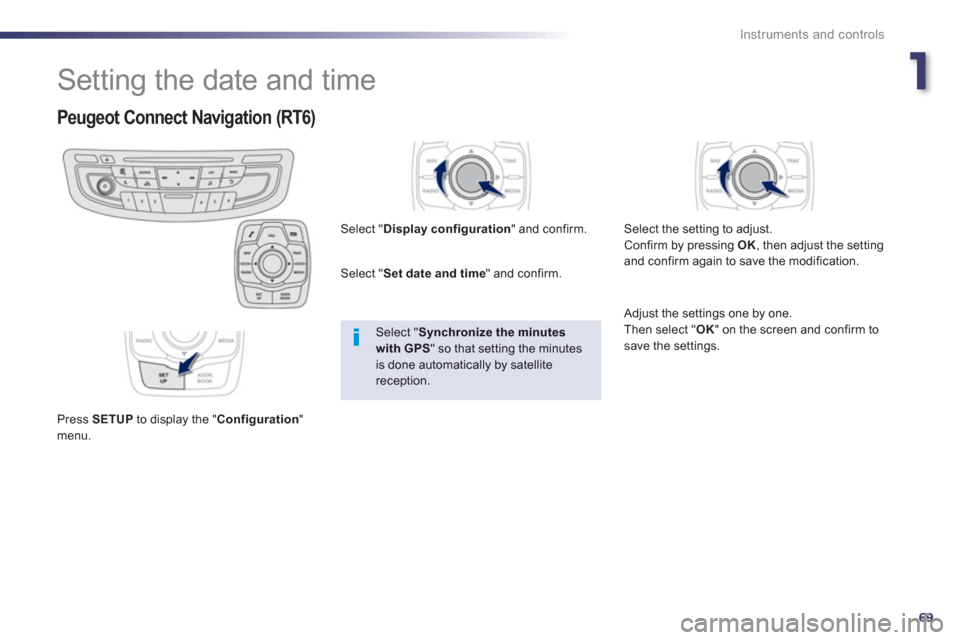
Setting the date and time
Peugeot Connect Navigation (RT6)
Press SETUPto display the "Configuration
"menu. Select "
Display configuration
" and confirm.
Select " Set date and time" and confirm.
Select "Synchronize the minutes with GPS
" so that setting the minutes is done automatically by satellite reception.
Select the settin
g to adjust.
Confirm by pressing OK, then adjust the settingand confirm again to save the modification.
Adjust the settings one by one.
Then select "OK
" on the screen and confirm tosave the settings.
Page 241 of 308
239
The system is protected in such a way that it will onlyoperate in your vehicle.
Peugeot Connect Navigation (RT6)
01 First steps - Control panel
For safety reasons, the driver must carry out operations
which require prolonged attention while the vehicle is stationary.
When the en
gine is switched off and to prevent
discharging of the battery, the system switches off following the activation of the energy economy mode.
CONTENTS
02 Steering mounted controls
03 General operation
04 Navigation - Guidance
05 Traffic information
06 Using the telephone
07 Contacts - ADDR BOOK
08 Radio
09 Music media players
10 Audio settings
11 Configuration
12 Screen menu map p.
p.
p.
p.
p.
p.
p.
p.
p.
p.
p.
p.
240
2
42
243
245
2
58
261
269
272
275
2
81
282
283
Frequently asked questions p. 286
SATELLITE NAVIGATION SYSTEM
MULTIMEDIA BLUETOOTH TELEPHONE AUDIO
SYSTEM
Page 245 of 308
243
03
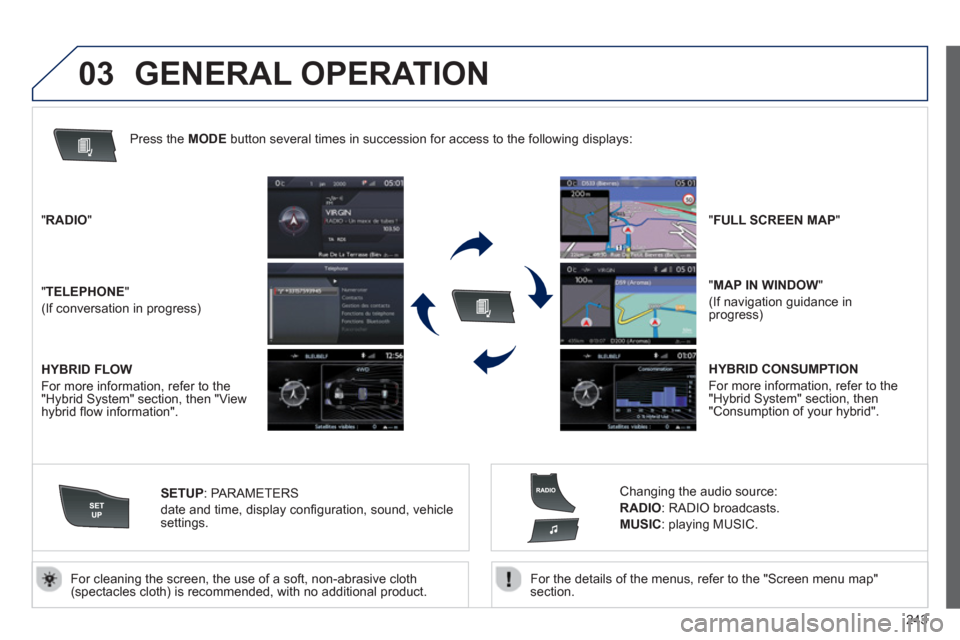
For the details of the menus, refer to the "Screen menu map"section.
For cleaning the screen, the use of a soft, non-abrasive cloth (spectacles cloth) is recommended, with no additional product. "RADIO
"
"TELEPHONE"
(If conversation in progress)
SETUP:
PARAMETER
S
date and time, display confi guration, sound, vehicle settings.
Changing the audio source:
RADIO:
RADIO broadcasts.
MUSIC: playing MUSIC. Pr
ess the MODE button several times in succession for access to the following displays:
GENERAL OPERATION
"FULL SCREEN MAP"
"
MAP IN WINDOW"
(If navigation guidance inprogress)
HYBRID FLOW
For more information, refer to the "Hybrid System" section, then "View
hybrid fl ow information".
HYBRID CONSUMPTION
For more in
formation, refer to the "Hybrid System" section, then"Consumption of your hybrid".