2013 JEEP GRAND CHEROKEE wheel
[x] Cancel search: wheelPage 236 of 408

•If there is a need to restart the engine, be
sure to cycle the ignition to the OFF
position before restarting. Transmission
gear engagement may be delayed after
restarting the engine if the key is not
cycled to the OFF position first.
PARK
This range supplements the parking brake by
locking the transmission. The engine can be
started in this range. Never attempt to use
PARK while the vehicle is in motion. Apply the
parking brake when leaving the vehicle in this
range.
When parking on a level surface, you may place
the shift lever in PARK first, and then apply the
parking brake.
When parking on a hill, apply the parking brake
before placing the shift lever in PARK, otherwise
the load on the transmission locking mecha-
nism may make it difficult to move the shift lever
out of PARK. As an added precaution, turn the
front wheels toward the curb on a downhill
grade and away from the curb on an uphill
grade.WARNING!
• Never use the PARK position as a substi-
tute for the parking brake. Always apply
the parking brake fully when parked to
guard against vehicle movement and pos-
sible injury or damage.
• Your vehicle could move and injure you
and others if it is not completely in PARK.
Check by trying to move the shift lever out
of PARK with the brake pedal released.
Make sure the transmission is in PARK
before leaving the vehicle.
• It is dangerous to shift out of PARK or
NEUTRAL if the engine speed is higher
than idle speed. If your foot is not firmly
pressing the brake pedal, the vehicle could
accelerate quickly forward or in reverse.
You could lose control of the vehicle and
hit someone or something. Only shift into
gear when the engine is idling normally
and your foot is firmly pressing the brake
pedal.
(Continued)
WARNING!(Continued)
•Unintended movement of a vehicle could
injure those in or near the vehicle. As with
all vehicles, you should never exit a ve-
hicle while the engine is running. Before
exiting a vehicle, always apply the parking
brake, shift the transmission into PARK
turn the engine OFF, and remove the key
fob. When the ignition is in the LOCK/OFF
position, the shift lever is locked in PARK,
securing the vehicle against unwanted
movement.
• When leaving the vehicle, always remove
the key fob and lock your vehicle.
• Never leave children alone in a vehicle, or
with access to an unlocked vehicle.
• Allowing children to be in a vehicle unat-
tended is dangerous for a number of rea-
sons. A child or others could be seriously
or fatally injured. Children should be
warned not to touch the parking brake,
brake pedal or the shift lever.
(Continued)
232
Page 239 of 408

In the event of a momentary problem, the
transmission can be reset to regain all forward
gears by performing the following steps:
1. Stop the vehicle.
2. Shift the transmission into PARK.
3. Turn the ignition switch to the LOCK/OFF
position.
4. Wait approximately 10 seconds.
5. Restart the engine.
6.
Shift into the desired gear range. If the prob-
lem is no longer detected, the transmission will
return to normal operation.
NOTE:
Even if the transmission can be reset, we
recommend that you visit your authorized
dealer at your earliest possible conve-
nience. Your authorized dealer has diagnos-
tic equipment to determine if the problem
could recur. If the transmission cannot be
reset, authorized dealer service is required. Electronic Range Select (ERS) Operation
The Electronic Range Select (ERS) shift control
allows the driver to limit the highest available
gear when the shift lever is in the DRIVE
position. For example, if you shift the transmis-
sion into 3 (third gear), the transmission will
never shift above third gear, but will shift down
into second and first gears normally.
Use of ERS (or TOW/HAUL mode) also enables
an additional underdrive gear which is not nor-
mally used during through-gear accelerations.
This additional gear can improve vehicle perfor-
mance and cooling capability when towing a
trailer on certain grades. In ERS mode, gears 1
though 3 are underdrive gears, and ERS 4 is
direct drive. ERS 5 and 6 (Overdrive gears ) are
the same as the normal fourth and fifth gears.
You can switch between DRIVE and ERS mode at
any vehicle speed. When the shift lever is in the
DRIVE position, the transmission will operate
automatically, shifting between all available
gears. Tapping the shift lever to the left (-) will
activate ERS mode, display the current gear in
the instrument cluster, and maintain that gear as
the top available gear. Once in ERS mode, tap-
ping the shift lever to the left (-) or right (+) will
change the top available gear.
The instrument cluster display will show the
requested top gear limit, however the transmis-
sion will not downshift to the requested gear if
doing so would overspeed the engine. The
transmission will downshift once the vehicle
speed has slowed sufficiently.
To exit ERS mode, simply press and hold the
shift lever to the right (+) until “D” is once again
displayed in the shift lever position indicator in
the instrument cluster.
WARNING!
Do not downshift for additional engine brak-
ing on a slippery surface. The drive wheels
could lose their grip and the vehicle could
skid, causing a collision or personal injury.
NOTE:
To select the proper gear position for maxi-
mum deceleration (engine braking), simply
press and hold the shift lever to the left (-).
The transmission will shift to the range from
which the vehicle can best be slowed down.
235
Page 241 of 408

•If the vehicle has not been driven for
several days, the first few seconds of
operation after shifting the transmission
into gear may seem sluggish. This is due
to the fluid partially draining from the
torque converter into the transmission.
This condition is normal and will not
cause damage to the transmission. The
torque converter will refill within five sec-
onds after starting the engine.
FOUR-WHEEL DRIVE
OPERATION
Quadra-Trac II® Operating
Instructions/Precautions
The Quadra-Trac II® transfer case is fully auto-
matic in the normal driving 4WD AUTO mode.
The Quadra-Trac II® transfer case provides
three mode positions:
•4WD HI
• NEUTRAL
• 4WD LOW This transfer case is fully automatic in the 4WD
HI mode.
When additional traction is required, the 4WD
LOW position can be used to lock the front and
rear driveshafts together and force the front and
rear wheels to rotate at the same speed. The
4WD LOW position is intended for loose, slip-
pery road surfaces only. Driving in the 4WD
LOW position on dry, hard-surfaced roads may
cause increased tire wear and damage to drive-
line components.
When operating your vehicle in 4WD LOW, the
engine speed is approximately three times that
of the 4WD HI position at a given road speed.
Take care not to overspeed the engine and do
not exceed 25 mph (40 km/h).
Proper operation of four-wheel drive vehicles
depends on tires of equal size, type, and cir-
cumference on each wheel. Any difference will
adversely affect shifting and cause damage to
the transfer case.
Because four-wheel drive provides improved
traction, there is a tendency to exceed safe
turning and stopping speeds. Do not go faster
than road conditions permit.
WARNING!
You or others could be injured if you leave
the vehicle unattended with the transfer case
in the NEUTRAL (N) position without first
fully engaging the parking brake. The trans-
fer case NEUTRAL (N) position disengages
both the front and rear driveshafts from the
powertrain and will allow the vehicle to move
regardless of the transmission position. The
parking brake should always be applied
when the driver is not in the vehicle.
237
Page 242 of 408

Shift PositionsFor additional information on the appropriate
use of each transfer case mode position, see
the information below:
4WD AUTO
This range is used on surfaces such as ice,
snow, gravel, sand, and dry hard pavement.
NOTE:
Refer to “Selec-Terrain® – If Equipped” in
“Starting and Operating” for further infor-
mation on the various positions and their
intended usages.
NEUTRAL
This range disengages both the front and rear
driveshafts from the powertrain. It is to be used
for flat towing behind another vehicle. Refer to
“Recreational Towing” in “Starting and Operat-
ing” for further information.4WD LOW
This range is for low speed four-wheel drive. It
locks the front and rear driveshafts together and
forces the front and rear wheels to rotate at the
same speed. It provides additional traction and
maximum pulling power for loose, slippery road
surfaces only. Do not exceed 25 mph (40 km/h).
NOTE:
Refer to “Selec-Terrain® – If Equipped” for
further information on the various positions
and their intended usages.
Shifting Procedures
4WD HI To 4WD LOW
With the vehicle at speeds of 0 to 3 mph (0 to
5 km/h), the ignition switch in the ON position or
the engine running, shift the transmission into
NEUTRAL, and press the “4WD LOW” button
once on the transfer case switch. The “4WD
LOW” indicator light in the instrument cluster will
begin to flash and remain on solid when the shift
is complete.
NOTE:
If shift conditions/interlocks are not met, or
a transfer case motor temperature protec-
tion condition exists, a “For 4x4 Low Slow
Below 3 MPH or 5 KPH Put Trans in N Press
4 Low” message will flash from the Elec-
tronic Vehicle Information Center (EVIC). Re-
fer to “Electronic Vehicle Information Center
(EVIC)” in “Understanding Your Instrument
Panel” for further information.
Transfer Case Switch
238
Page 244 of 408
Quadra-Drive® II System – If
Equipped
The optional Quadra-Drive® II System features
two torque transfer couplings. The couplings
include an Electronic Limited-Slip Differential
(ELSD) rear axle and the Quadra-Trac II®
transfer case. The optional ELSD axle is fully
automatic and requires no driver input to oper-
ate. Under normal driving conditions, the unit
functions as a standard axle, balancing torque
evenly between left and right wheels. With a
traction difference between left and right
wheels, the coupling will sense a speed differ-
ence. As one wheel begins to spin faster than
the other, torque will automatically transfer from
the wheel that has less traction, to the wheel
that has traction. While the transfer case and
axle coupling differ in design, their operation is
similar. Follow the Quadra-Trac II® transfer
case shifting information, preceding this sec-
tion, for shifting this system.
SELEC-TERRAIN™ — IF
EQUIPPED
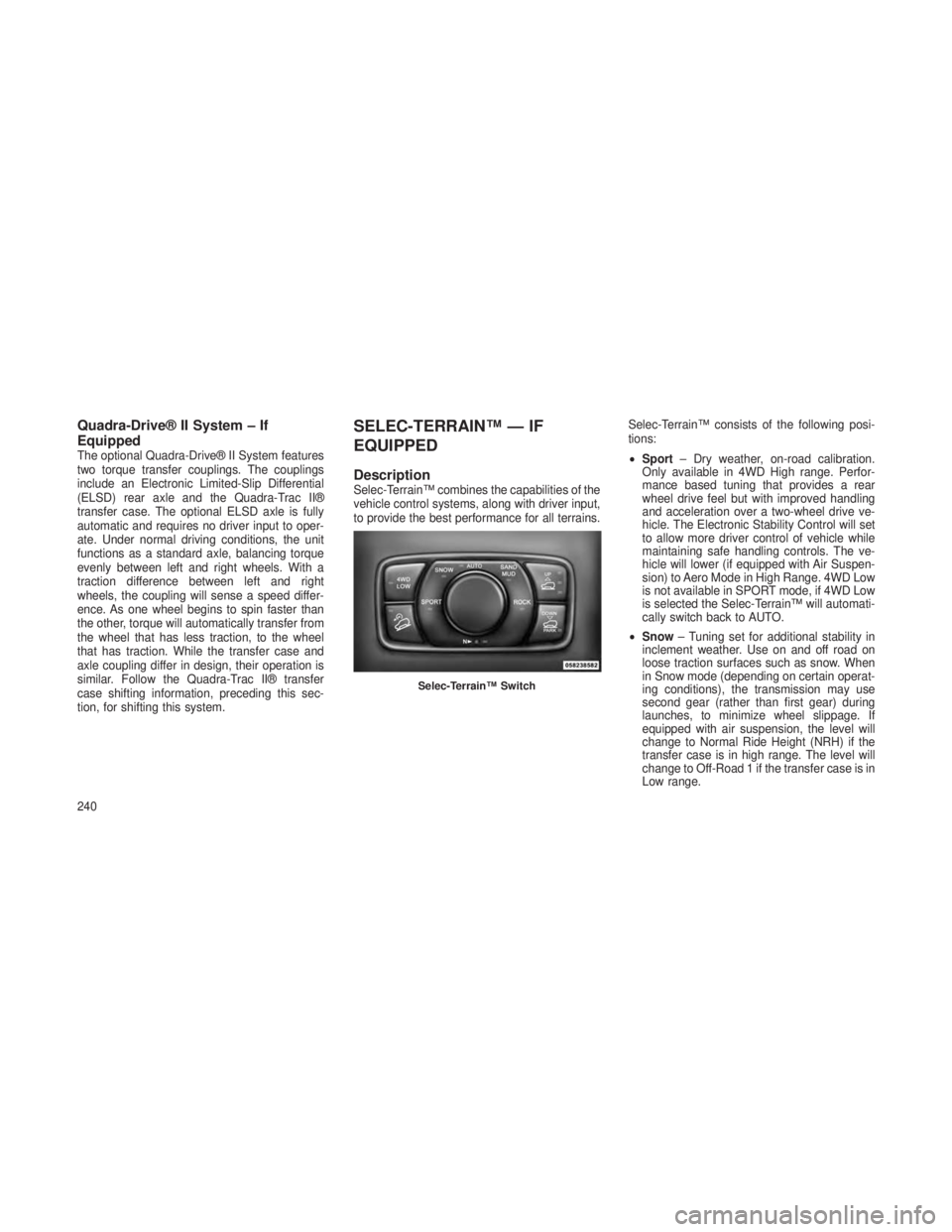
DescriptionSelec-Terrain™ combines the capabilities of the
vehicle control systems, along with driver input,
to provide the best performance for all terrains.Selec-Terrain™ consists of the following posi-
tions:
•
Sport – Dry weather, on-road calibration.
Only available in 4WD High range. Perfor-
mance based tuning that provides a rear
wheel drive feel but with improved handling
and acceleration over a two-wheel drive ve-
hicle. The Electronic Stability Control will set
to allow more driver control of vehicle while
maintaining safe handling controls. The ve-
hicle will lower (if equipped with Air Suspen-
sion) to Aero Mode in High Range. 4WD Low
is not available in SPORT mode, if 4WD Low
is selected the Selec-Terrain™ will automati-
cally switch back to AUTO.
• Snow – Tuning set for additional stability in
inclement weather. Use on and off road on
loose traction surfaces such as snow. When
in Snow mode (depending on certain operat-
ing conditions), the transmission may use
second gear (rather than first gear) during
launches, to minimize wheel slippage. If
equipped with air suspension, the level will
change to Normal Ride Height (NRH) if the
transfer case is in high range. The level will
change to Off-Road 1 if the transfer case is in
Low range.
Selec-Terrain™ Switch
240
Page 245 of 408

•Auto – Fully automatic full time four-wheel
drive operation can be used on and off road.
Balances traction with seamless steering feel
to provide improved handling and accelera-
tion over two-wheel drive vehicles. If
equipped with air suspension, the level will
change to NRH.
•
Sand/Mud–Off road calibration for use on low
traction surfaces such as mud, sand, or wet
grass. Driveline is maximized for traction.
Some binding may be felt on less forgiving
surfaces. The electronic brake controls are set
to limit traction control management of throttle
and wheel spin. If equipped with air suspen-
sion, the level will change to Off-Road 1.
• Rock – Off-road calibration only available in
4WD Low range. The vehicle is raised (if
equipped with Air Suspension) for improved
ground clearance. Traction based tuning with
improved steer-ability for use on high traction
off-road surfaces. Activate the Hill Descent
Control for steep downhill control. Use for low
speed obstacles such as large rocks, deep ruts, etc. If equipped with air suspension, the
vehicle level will change to Off-Road 2. If the
Selec-Terrain™ switch is in ROCK mode,
and the transfer case is switched from 4WD
Low to 4WD High, the Selec-Terrain™ sys-
tem will return to AUTO.
Electronic Vehicle Information
Center (EVIC) Display Messages
When the appropriate conditions exist, a mes-
sage will appear in the EVIC display. Refer to
“Electronic Vehicle Information Center (EVIC)”
in “Understanding Your Instrument Panel” for
further information.
QUADRA-LIFT™ — IF
EQUIPPED
DescriptionThe Quadra-Lift™ air suspension system pro-
vides full time load leveling capability along with
the benefit of being able to adjust vehicle height
by the push of a button.
•
Normal Ride Height (NRH) – This is the
standard position of the suspension and is
meant for normal driving.
Selec-Terrain™ Switch
1—UpButton
2 — Down Button
3 — Park Mode Indicator Lamp
4 — Normal Ride Height Indicator Lamp
5 — Off-Road 1 Indicator Lamp
6 — Off-Road 2 Indicator Lamp
241
Page 248 of 408

Pressing the “DOWN” button once will move the
suspension one position lower from the current
level, assuming all conditions are met (i.e. en-
gine running, doors closed, speed below
threshold, etc). The “DOWN” button can be
pressed multiple times. Each press will lower
the requested level by one position down to a
minimum of Park Mode or the lowest position
allowed based on current conditions (i.e. ve-
hicle speed, etc.)
Automatic height changes will occur based on
vehicle speed and the current vehicle height.
The indicator lamps and EVIC messages will
operate the same for automatic changes and
user requested changes.
•Off-Road 2 (OR2) – Indicator lamps 4, 5, and
6 will be illuminated when the vehicle is in
OR2.
• Off-Road 1 (OR1) – Indicator lamps 4 and 5
will be illuminated when the vehicle is in
OR1.
• Normal Ride Height (NRH) – Indicator lamp 4
will be illuminated when the vehicle is in this
position. •
Park Mode – Indicator lamp 3 will be illumi-
nated when the vehicle is in Park Mode. If
Park Mode is requested while vehicle speed
is between 15 mph (24 km/h) and 25 mph
(40 km/h), indicator lamp 4 will remain on
solid and indicator lamp 3 will flash as the
system waits for the vehicle to reduce speed.
If vehicle speed is reduced to, and kept
below, 15 mph (24 km/h) indicator lamp 4 will
turn off and indicator lamp 3 will flash until
Park Mode is achieved at which point indica-
tor lamp 3 will go solid. If during the height
change to Park Mode, the vehicle speed
exceeds 15 mph (24 km/h), the height
change will be paused until the vehicle speed
either goes below 15 mph (24 km/h) and the
height change continues to Park Mode, or
exceeds 25 mph (40 km/h) and the vehicle
height will return to NRH. Park Mode may be
selected while the vehicle is not moving
provided that the engine is still running and
all doors remain closed.ON-ROAD DRIVING TIPS
Utility vehicles have higher ground clearance
and a narrower track to make them capable of
performing in a wide variety of off-road applica-
tions. Specific design characteristics give them
a higher center of gravity than ordinary cars.
An advantage of the higher ground clearance is
a better view of the road, allowing you to
anticipate problems. They are not designed for
cornering at the same speeds as conventional
two-wheel drive vehicles any more than low-
slung sports cars are designed to perform sat-
isfactorily in off-road conditions. If at all pos-
sible, avoid sharp turns or abrupt maneuvers.
As with other vehicles of this type, failure to
operate this vehicle correctly may result in loss
of control or vehicle rollover.
244
Page 250 of 408

CAUTION!
When driving through water, do not exceed
5 mph (8 km/h). Always check water depth
before entering, as a precaution, and check all
fluids afterward. Driving through water may
cause damage that may not be covered by the
new vehicle limited warranty.
Driving through water more than a few inches/
centimeters deep will require extra caution to
ensure safety and prevent damage to your
vehicle. If you must drive through water, try to
determine the depth and the bottom condition
(and location of any obstacles) prior to entering.
Proceed with caution and maintain a steady
controlled speed less than 5 mph (8 km/h) in
deep water to minimize wave effects.Flowing Water
If the water is swift flowing and rising (as in
storm run-off), avoid crossing until the water
level recedes and/or the flow rate is reduced. If
you must cross flowing water avoid depths in
excess of 9 inches (23 cm). The flowing water
can erode the streambed, causing your vehicle
to sink into deeper water. Determine exit
point(s) that are downstream of your entry point
to allow for drifting.
Standing Water
Avoid driving in standing water deeper than
20 inches (51 cm), and reduce speed appropri-
ately to minimize wave effects. Maximum speed
in 20 inches (51 cm) of water is less than 5 mph
(8 km/h).
Maintenance
After driving through deep water, inspect your
vehicle fluids and lubricants (engine oil, trans-
mission oil, axle, transfer case) to assure the
fluids have not been contaminated. Contami-
nated fluid (milky, foamy in appearance) should
be flushed/changed as soon as possible to
prevent component damage.
Driving In Snow, Mud And SandIn heavy snow, when pulling a load, or for
additional control at slower speeds, shift the
transmission to a low gear and shift the transfer
case to 4WD LOW if necessary. Refer to “Four-
Wheel Drive Operation” in “Starting and Oper-
ating” for further information. Do not shift to a
lower gear than necessary to maintain forward
motion. Over-revving the engine can spin the
wheels and traction will be lost.
Avoid abrupt downshifts on icy or slippery roads,
because engine braking may cause skidding and
loss of control.
Hill Climbing
NOTE:
Before attempting to climb a hill, determine
the conditions at the crest and/or on the
other side.
Before climbing a steep hill,
shift the trans-
mission to a lower gear and shift the transfer
case to 4WD LOW. Use first gear and 4WD
LOW for very steep hills.
246