2013 JEEP GRAND CHEROKEE wheel
[x] Cancel search: wheelPage 195 of 408

•Press the SCANbutton to use iPod®/USB/
MP3 device scan mode, which will play the
first 10 seconds of each track in the current
list and then forward to the next song. To stop
SCAN mode and start playing the desired
track, when it is playing the track, press the
SCAN button again. During Scan mode,
pressing the << SEEKandSEEK >> buttons
will select the previous and next tracks.
•
RNDbutton (available on sales code RES
radio only): Pressing this button toggles be-
tween Shuffle ON and Shuffle OFF modes for
the iPod® or external USB device, or press
the VR button and say "Shuffle ON"or
"Shuffle Off".IftheRND icon is showing on
the radio display, then the shuffle mode is
ON.
List Or Browse ModeDuring Play mode, pressing any of the buttons
described below, will bring up List mode. List
mode enables scrolling through the list of
menus and tracks on the audio device. •
TUNE control knob: The TUNEcontrol knob
functions in a similar manner as the scroll
wheel on the audio device or external USB
device.
• Turning it clockwise (forward) and counter-
clockwise (backward) scrolls through the
lists, displaying the track detail on the radio
display. Once the track to be played is
highlighted on the radio display, press the
TUNE control knob to select and start
playing the track. Turning the TUNEcon-
trol knob fast will scroll through the list
faster. During fast scroll, a slight delay in
updating the information on the radio dis-
play may be noticeable.
• During all List modes, the iPod® displays
all lists in “wrap-around” mode. So if the
track is at the bottom of the list, just turn
the wheel backward (counterclockwise) to
get to the track faster.
• In List mode, the radio PRESETbuttons
are used as shortcuts to the following lists
on the iPod® or external USB device.
• Preset 1 – Playlists
• Preset 2 – Artists •
Preset 3 – Albums
• Preset 4 – Genres
• Preset 5 – Audiobooks
• Preset 6 – Podcasts
• Pressing a PRESET button will display the
current list on the top line and the first item
in that list on the second line.
• To exit List mode without selecting a track,
press the same PRESETbutton again to
go back to Play mode.
• LIST button: The LISTbutton will display the
top level menu of the iPod® or external USB
device. Turn the TUNEcontrol knob to list the
top-menu item to be selected and press the
TUNE control knob. This will display the next
sub-menu list item on the audio device, then
follow the same steps to go to the desired
track in that list. Not all iPod® or external
USB device sub-menu levels are available
on this system.
• MUSIC TYPE button: TheMUSIC TYPE
button is another shortcut button to the genre
listing on your audio device.
191
Page 211 of 408
If your vehicle is not equipped with the separate
DVD player, the following events in the Radio
will cause the screen(s) to automatically switch
to Radio Disc mode.
•Loading a disc in the radio CD/DVD player
• AM/FM band selection via Radio
Auxiliary InputsFor each video screen there is an auxiliary (Aux
jack) device input which is used to connect exter-
nal audio/video sources to the VES™. Examples
of devices that can be connected to the Aux inputs
include portable music players, video cameras,
VCR’s, game systems, and other devices with
audio and/or video outputs. The Aux jacks are
typically located on the back of the center console
or on one of the vehicles side panels in the rear
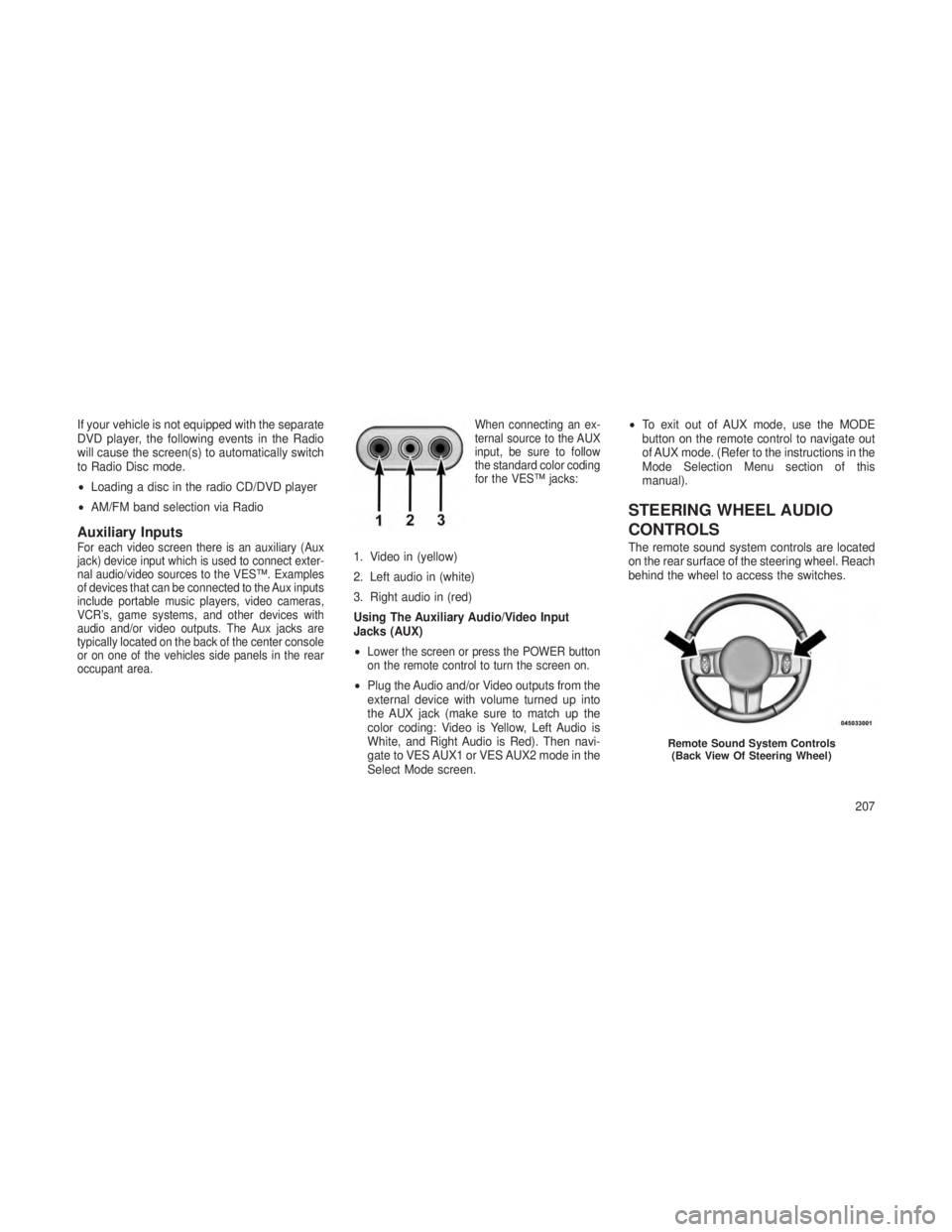
occupant area. When connecting an ex-
ternal source to the AUX
input, be sure to follow
the standard color coding
for the VES™ jacks:1. Video in (yellow)
2. Left audio in (white)
3. Right audio in (red)
Using The Auxiliary Audio/Video Input
Jacks (AUX)
•
Lower the screen or press the POWER button
on the remote control to turn the screen on.
•
Plug the Audio and/or Video outputs from the
external device with volume turned up into
the AUX jack (make sure to match up the
color coding: Video is Yellow, Left Audio is
White, and Right Audio is Red). Then navi-
gate to VES AUX1 or VES AUX2 mode in the
Select Mode screen. •
To exit out of AUX mode, use the MODE
button on the remote control to navigate out
of AUX mode. (Refer to the instructions in the
Mode Selection Menu section of this
manual).
STEERING WHEEL AUDIO
CONTROLS
The remote sound system controls are located
on the rear surface of the steering wheel. Reach
behind the wheel to access the switches.
Remote Sound System Controls
(Back View Of Steering Wheel)
207
Page 216 of 408
Panel ModeAir comes from the outlets in the in-
strument panel. Each of these outlets
can be individually adjusted to direct
the flow of air. The air vanes of the center
outlets and outboard outlets can be moved up
and down or side to side to regulate airflow
direction. There is a shut off wheel located
below the air vanes to shut off or adjust the
amount of airflow from these outlets.
Bi-Level Mode
Air comes from the instrument panel
outlets, floor outlets and defrost outlets.
NOTE:
In many temperature positions, the Bi–Level
mode is designed to provide cooler air out of
the panel outlets and warmer air from the
floor outlets.
Floor Mode
Air comes from the floor outlets. A slight
amount of air is directed through the
defrost and side window demister outlets.
Mix Mode
Air comes from the floor, defrost and
side window demist outlets. This mode
works best in cold or snowy conditions.
It allows you to stay comfortable while keeping
the windshield clear.
Defrost Mode
Air comes from the windshield and
side window demist outlets. Use De-
frost mode with maximum temperature
settings for best windshield and side window
defrosting. When the defrost mode is selected,
the blower will automatically default to medium-
high unless the blower is controlled manually.
NOTE:
While operating in the other modes, the
system will not automatically sense the
presence of fog, mist or ice on the wind-
shield. Defrost mode must be manually se-
lected to clear the windshield and side
glass. Air Conditioning (A/C)
The Air Conditioning (A/C) button allows the
operator to manually activate or deactivate the
air conditioning system. When in A/C mode and
the ATC is set to a cool temperature, dehumidi-
fied air flows through the air outlets. If Economy
mode is desired, press the A/C button to turn off
the A/C mode in the ATC display and deactivate
the A/C system. Also, make sure to select only
Panel, Bi-Level or Floor modes.
NOTE:
•
If the system is in Mix, Floor or Defrost
Mode, the A/C can be turned off, but the
A/C system shall remain active to prevent
fogging of the windows.
• If fog or mist appears on the windshield or
side glass, select Defrost mode and in-
crease blower speed.
212
Page 220 of 408

•FOUR-WHEEL DRIVE OPERATION ....................237•Quadra-Trac II® Operating Instructions/Precautions .........237
• Shift Positions ............................... .238
• Shifting Procedures ............................ .238
• Quadra-Drive® II System – If Equipped .................240
•SELEC-TERRAIN™ — IF EQUIPPED ...................240•Description ................................. .240
• Electronic Vehicle Information Center (EVIC) Display Messages . .241
•QUADRA-LIFT™ — IF EQUIPPED .....................241•Description ................................. .241
• Electronic Vehicle Information Center (EVIC) Display Messages . .243
• Operation .................................. .243
•ON-ROAD DRIVING TIPS ..........................244
• OFF-ROAD DRIVING TIPS ..........................245
•Quadra-Lift™ – If Equipped ........................245
• When To Use 4WD LOW Range – If Equipped .............245
• Driving Through Water .......................... .245
• Driving In Snow, Mud And Sand .....................246
• Hill Climbing ................................ .246
• Traction Downhill ............................. .247
• After Driving Off-Road .......................... .247
•FUEL SAVER TECHNOLOGY 5.7L ENGINE ONLY – IF
EQUIPPED ....................................248
• POWER STEERING ..............................248
•3.6L And 5.7L Engine ........................... .248
• 3.0L Diesel Engine ............................ .249
• Power Steering Fluid Check ...................... .250
216
Page 221 of 408

•PARKING BRAKE .............................250
• ELECTRONIC BRAKE CONTROL SYSTEM .............252
•Anti-Lock Brake System (ABS) ...................252
• Traction Control System (TCS) ....................252
• Brake Assist System (BAS) ..................... .252
• Electronic Roll Mitigation (ERM) ...................253
• Electronic Stability Control (ESC) ..................253
• Trailer Sway Control (TSC) ..................... .255
• Hill Start Assist (HSA) ........................ .256
• Ready Alert Braking ......................... .257
• Rain Brake Support .......................... .257
• Hill Descent Control (HDC) — Four-Wheel Drive Models With
MP3023 Two-Speed Transfer Case Only ..............257
• ESC Activation/Malfunction Indicator Light And ESC OFF
Indicator Light ............................ .258
•TIRES — GENERAL INFORMATION ..................259•Tire Pressure ............................. .259
• Tire Inflation Pressures ........................260
• Tire Pressures For High Speed Operation .............260
• Radial Ply Tires ............................ .261
• All Season Tires – If Equipped ....................261
• Summer Or Three Season Tires – If Equipped ...........261
• Snow Tires .............................. .261
• Spare Tire Matching Original Equipped Tire And Wheel – If
Equipped ................................ .262
• Compact Spare Tire – If Equipped ..................262
• Full Size Spare – If Equipped .................... .262
217
Page 223 of 408

•TRAILER TOWING ............................278•Common Towing Definitions .................... .278
• Breakaway Cable Attachment .................... .279
• Trailer Towing Weights (Maximum Trailer Weight Ratings) . . .281
• Trailer And Tongue Weight ..................... .281
• Towing Requirements ........................ .282
• Towing Tips .............................. .285
•RECREATIONAL TOWING (BEHIND MOTORHOME, ETC.) ....287•Towing This Vehicle Behind Another Vehicle ............287
• Recreational Towing – Quadra–Trac II® /Quadra–Drive® II
Four-Wheel Drive Models ...................... .287
219
Page 231 of 408

The transmission shift lever has only PARK,
REVERSE, NEUTRAL, and DRIVE shift posi-
tions. Manual downshifts can be made using
the Electronic Range Select (ERS) shift control
(refer to “Electronic Range Select (ERS) Opera-
tion” in this section). Moving the shift lever to the
left or right (-/+) while in the DRIVE position will
select the highest available transmission gear,
and will display that gear in the instrument
cluster as 4, 3, 2, 1.Gear RangesDO NOT race the engine when shifting from
PARK or NEUTRAL into another gear range.
NOTE:
•After selecting any gear range, wait a
moment to allow the selected gear to
engage before accelerating. This is espe-
cially important when the engine is cold.
• If there is a need to restart the engine, be
sure to cycle the ignition to the OFF
position before restarting. Transmission
gear engagement may be delayed after
restarting the engine if the key is not
cycled to the OFF position first.
PARK
This range supplements the parking brake by
locking the transmission. The engine can be
started in this range. Never attempt to use
PARK while the vehicle is in motion. Apply the
parking brake when leaving the vehicle in this
range. When parking on a level surface, you may place
the shift lever in PARK first, and then apply the
parking brake.
When parking on a hill, apply the parking brake
before placing the shift lever in PARK, otherwise
the load on the transmission locking mechanism
may make it difficult to move the shift lever out of
PARK. As an added precaution, turn the front
wheels toward the curb on a downhill grade and
away from the curb on an uphill grade.
WARNING!
•
Never use the PARK position as a substi-
tute for the parking brake. Always apply
the parking brake fully when parked to
guard against vehicle movement and pos-
sible injury or damage.
• Your vehicle could move and injure you
and others if it is not completely in PARK.
Check by trying to move the shift lever out
of PARK with the brake pedal released.
Make sure the transmission is in PARK
before leaving the vehicle.
(Continued)
Shift Lever
227
Page 234 of 408
In the event of a momentary problem, the
transmission can be reset to regain all forward
gears by performing the following steps:
1. Stop the vehicle.
2. Shift the transmission into PARK.
3. Turn the ignition switch to the LOCK/OFF
position.
4. Wait approximately 10 seconds.
5. Restart the engine.
6. Shift into the desired gear range. If the
problem is no longer detected, the transmission
will return to normal operation.
NOTE:
Even if the transmission can be reset, we
recommend that you visit your authorized
dealer at your earliest possible conve-
nience. Your authorized dealer has diagnos-
tic equipment to determine if the problem
could recur. If the transmission cannot be
reset, authorized dealer service is required.Electronic Range Select (ERS) Operation
The Electronic Range Select (ERS) shift control
allows the driver to limit the highest available
gear when the shift lever is in the DRIVE
position. For example, if you shift the transmis-
sion into 3 (third gear), the transmission will
never shift above third gear, but will shift down
into second and first gears normally.
You can switch between DRIVE and ERS mode
at any vehicle speed. When the shift lever is in
the DRIVE position, the transmission will oper-
ate automatically, shifting between all available
gears. Tapping the shift lever to the left (-) will
downshift the transmission, activate ERS mode,
display the current gear in the instrument clus-
ter, and maintain that gear as the top available
gear. Once in ERS mode, tapping the shift lever
to the left (-) or right (+) will change the top
available gears.
To exit ERS mode, simply press and hold the
shift lever to the right (+) until “D” is once again
displayed in the shift lever position indicator in
the instrument cluster.WARNING!
Do not downshift for additional engine brak-
ing on a slippery surface. The drive wheels
could lose their grip and the vehicle could
skid, causing a collision or personal injury.
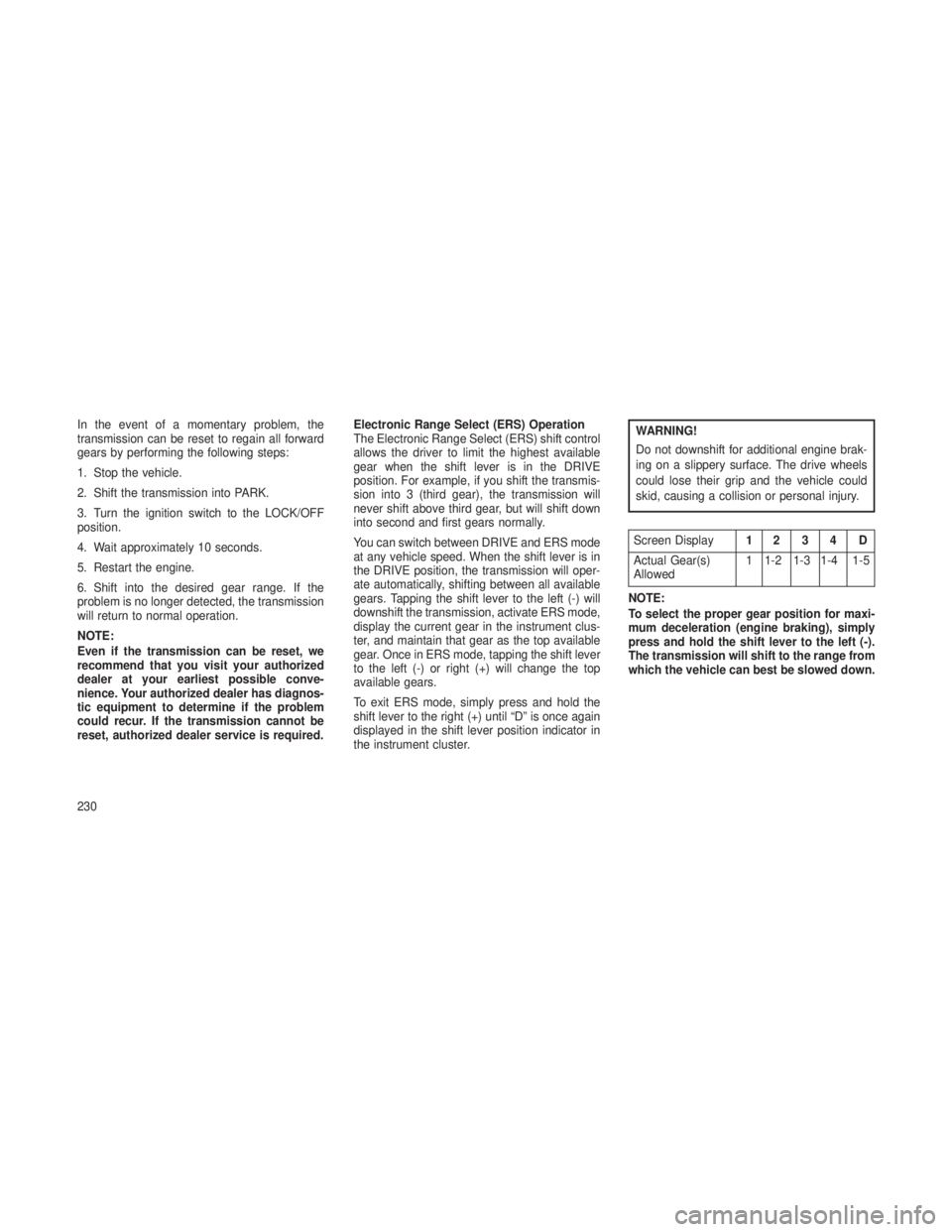
Screen Display
12 3 4 D
Actual Gear(s)
Allowed 1 1-2 1-3 1-4 1-5
NOTE:
To select the proper gear position for maxi-
mum deceleration (engine braking), simply
press and hold the shift lever to the left (-).
The transmission will shift to the range from
which the vehicle can best be slowed down.
230