2013 HONDA ODYSSEY roof
[x] Cancel search: roofPage 138 of 433
137
uuOpening and Closing the WindowsuOpening/Closing the Power Windows
Continued
Controls
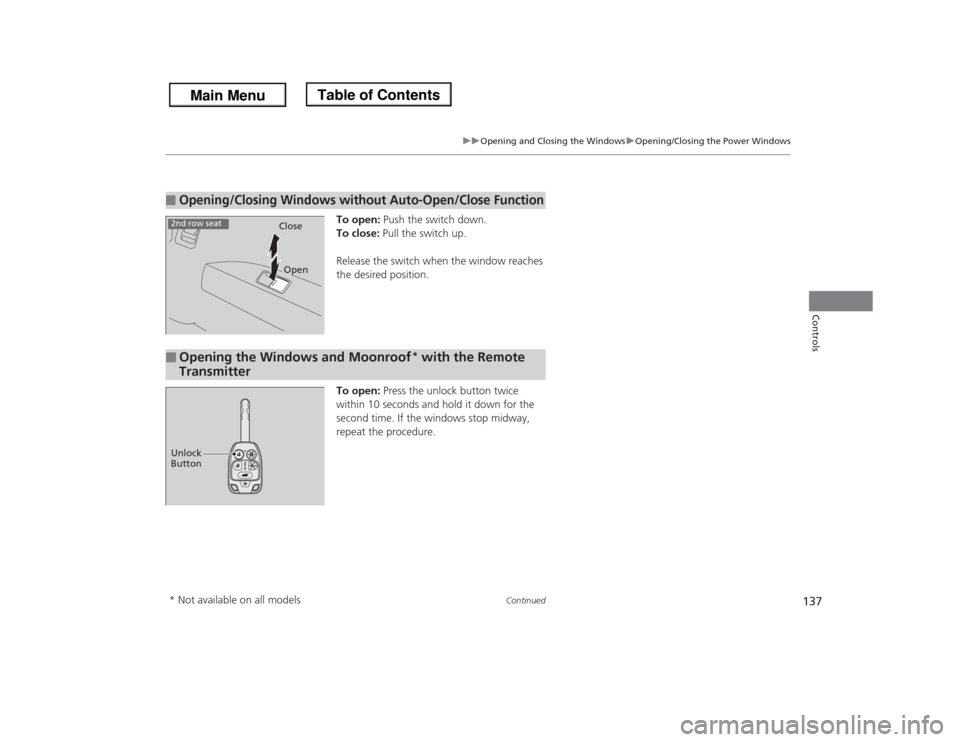
To open: Push the switch down.
To close: Pull the switch up.
Release the switch when the window reaches
the desired position.
To open: Press the unlock button twice
within 10 seconds and hold it down for the
second time. If the windows stop midway,
repeat the procedure.
■
Opening/Closing Windows without Auto-Open/Close Function
CloseOpen
2nd row seat■
Opening the Windows and Moonroof
* with the Remote
Transmitter
Unlock
Button* Not available on all models
Page 139 of 433
138
uuOpening and Closing the WindowsuOpening/Closing the Power Windows
Controls
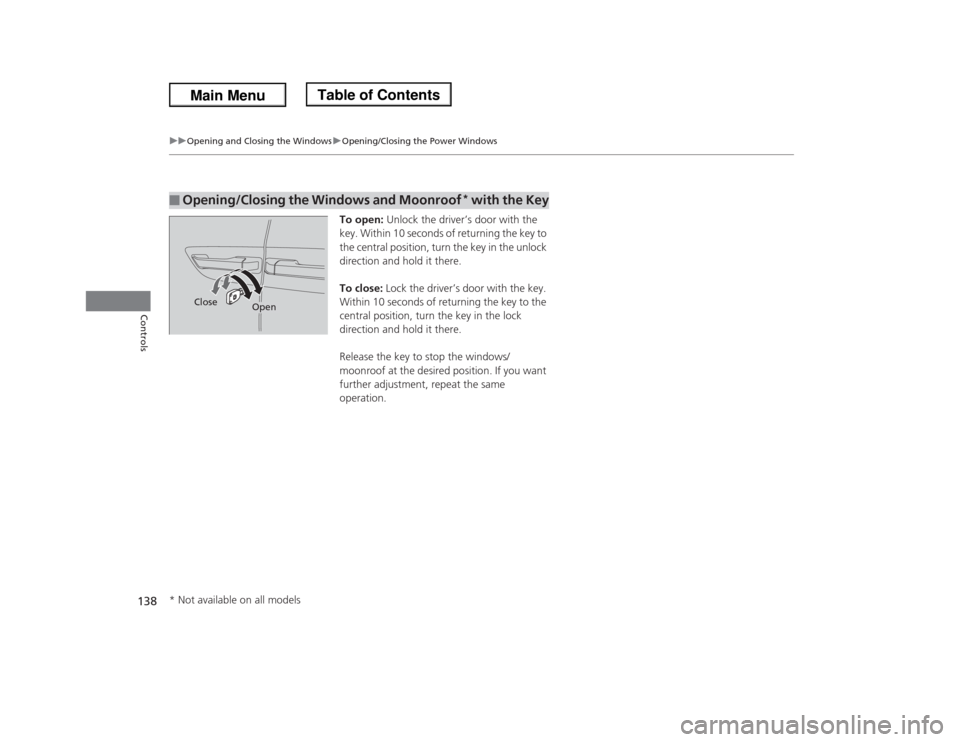
To open: Unlock the driver’s door with the
key. Within 10 seconds of returning the key to
the central position, turn the key in the unlock
direction and hold it there.
To close: Lock the driver’s door with the key.
Within 10 seconds of returning the key to the
central position, turn the key in the lock
direction and hold it there.
Release the key to stop the windows/
moonroof at the desired position. If you want
further adjustment, repeat the same
operation.
■
Opening/Closing the Windows and Moonroof
* with the Key
Close
Open
* Not available on all models
Page 140 of 433
139Controls
Opening and Closing the Moonroof
*
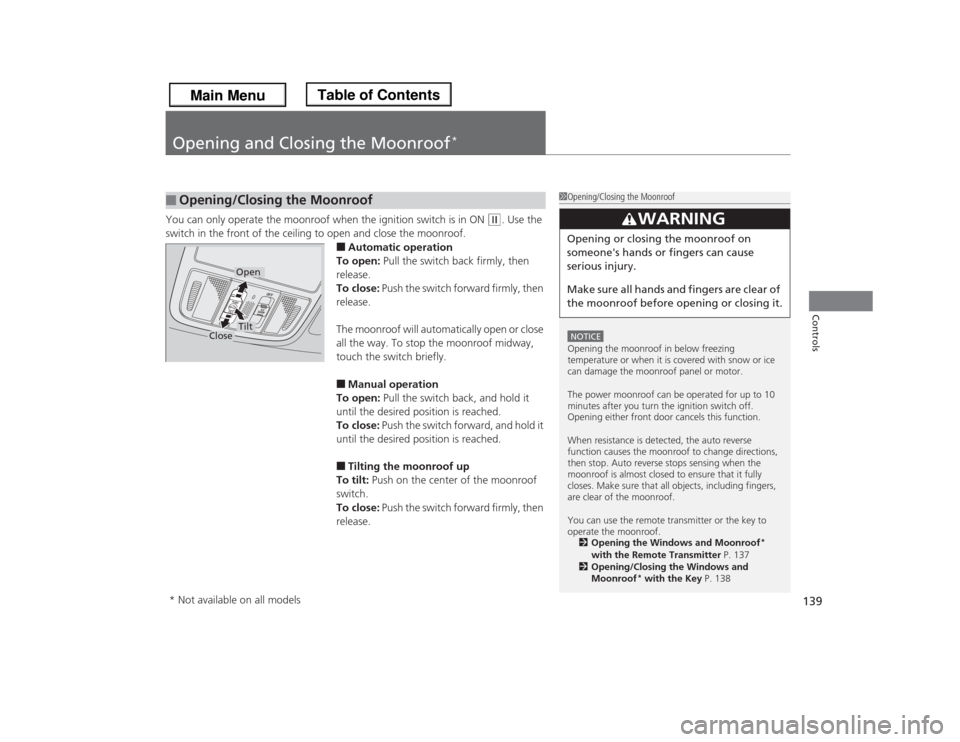
You can only operate the moonroof when the ignition switch is in ON
(w
. Use the
switch in the front of the ceiling to open and close the moonroof.
■Automatic operation
To open: Pull the switch back firmly, then
release.
To close: Push the switch forward firmly, then
release.
The moonroof will automatically open or close
all the way. To stop the moonroof midway,
touch the switch briefly.■Manual operation
To open: Pull the switch back, and hold it
until the desired position is reached.
To close: Push the switch forward, and hold it
until the desired position is reached.■Tilting the moonroof up
To tilt: Push on the center of the moonroof
switch.
To close: Push the switch forward firmly, then
release.
■
Opening/Closing the Moonroof
1Opening/Closing the MoonroofNOTICEOpening the moonroof in below freezing
temperature or when it is covered with snow or ice
can damage the moonroof panel or motor.
The power moonroof can be operated for up to 10
minutes after you turn the ignition switch off.
Opening either front door cancels this function.
When resistance is detected, the auto reverse
function causes the moonroof to change directions,
then stop. Auto reverse stops sensing when the
moonroof is almost closed to ensure that it fully
closes. Make sure that all objects, including fingers,
are clear of the moonroof.
You can use the remote transmitter or the key to
operate the moonroof.
2Opening the Windows and Moonroof
*
with the Remote Transmitter P. 137
2Opening/Closing the Windows and
Moonroof
* with the Key P. 138
3
WARNING
Opening or closing the moonroof on
someone's hands or fingers can cause
serious injury.
Make sure all hands and fingers are clear of
the moonroof before opening or closing it.
Open
Close
Tilt
* Not available on all models
Page 233 of 433
232Features
General Information on the Audio SystemXM® Radio Service
*
1.You need your radio ID ready before registering for subscription.
To see the ID on the display: Turn the selector knob until 0 appears.
2.Have your radio ID and credit card number ready, and either call or visit the XM®
website to subscribe.
Press the (XM®) button and stay in this mode for about 30 minutes until the
service is activated. Make sure your vehicle is in an open area with good reception.
LOADING: XM® is loading the audio or program information.
OFF AIR: The channel is not currently broadcasting.
UNAUTHORIZED: The encryption code is being updated. Channels 0 and 1 still
work normally.
NO SIGNAL: The signal is too weak in the current location.
UNAVAILABLE: No such channel exists, the channel is not part of your subscription,
or the artist or title information is unavailable.
CHECK ANTENNA: There is a problem with the XM® antenna. Contact a dealer.■
Subscribing to XM® Radio
■
Receiving XM® Radio
■
XM® Radio Display Messages
1Subscribing to XM® RadioContact Information for XM
® Radio:
US: XM® Radio at www.siriusxm.com or (800) 852-
9696
Canada: XM® Canada at www.xmradio.ca, or (877)
209-00791Receiving XM® RadioThe XM
® satellites are in orbit over the equator,
therefore, objects south of the vehicle may cause
satellite reception interruptions. Satellite signals are
more likely to be blocked by tall buildings and
mountains the farther north you travel from the
equator.
You may experience reception problems under the
following circumstances:•In a location with an obstruction to the south of
your vehicle.•In tunnels•On the lower level of a multi-tiered road•Large items carried on the roof rack
* Not available on all models
Page 278 of 433
277Features
Compass
*
When you turn the ignition switch to ON
(w
, the compass self-calibrates, and the
compass display appears.
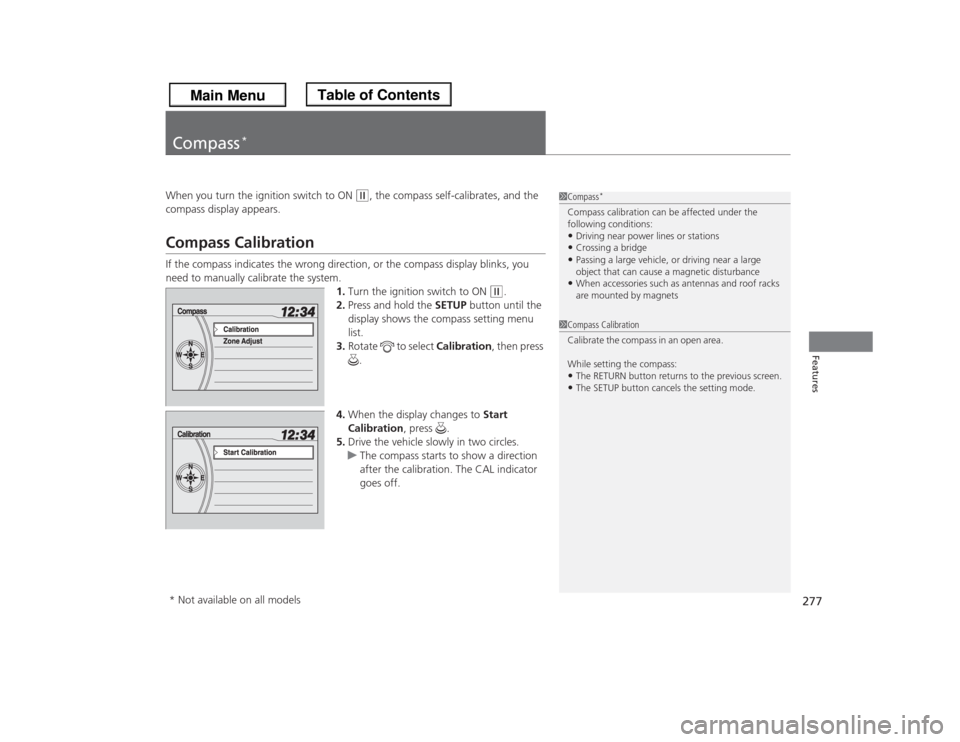
Compass CalibrationIf the compass indicates the wrong direction, or the compass display blinks, you
need to manually calibrate the system.
1.Turn the ignition switch to ON
(w
.
2.Press and hold the SETUP button until the
display shows the compass setting menu
list.
3.Rotate to select Calibration, then press
.
4.When the display changes to Start
Calibration, press .
5.Drive the vehicle slowly in two circles.
uThe compass starts to show a direction
after the calibration. The CAL indicator
goes off.
1Compass
*
Compass calibration can be affected under the
following conditions:•Driving near power lines or stations•Crossing a bridge•Passing a large vehicle, or driving near a large
object that can cause a magnetic disturbance•When accessories such as antennas and roof racks
are mounted by magnets
1Compass Calibration
Ca libra te the comp as s in a n ope n are a .
While setting the compass:•The RETURN button returns to the previous screen.•The SETUP button cancels the setting mode.
* Not available on all models
Page 281 of 433

280Driving
Before DrivingDriving PreparationCheck the following items before you start driving.
•Make sure there are no obstructions on the windows, door mirrors, exterior
lights, or other parts of the vehicle.
uRemove any frost, snow, or ice.
uRemove any snow on the roof, as this can slip down and obstruct your field of
vision while driving. If frozen solid, remove ice once it has softened.
uWhen removing ice from around the wheels, be sure not to damage the wheel
or wheel components.
•Make sure the hood is securely closed.
uIf the hood opens while driving, your front view will be blocked.
•Make sure the tires are in good condition.
uCheck air pressure, and check for damage and excessive wear.
2Checking and Maintaining Tires P. 362
•Make sure there are no people or objects behind or around the vehicle.
uThere are blind spots from the inside.■
Exterior Checks
1Exterior ChecksNOTICEWhen doors are frozen shut, use warm water around
the door edges to melt any ice. Do not try to force
them open, as this can damage the rubber trim
around the doors. When done, wipe dry to avoid
further freezing.
Do not pour warm water into the key cylinder.
You will be unable to insert key if the water freezes in
the hole.
Heat from the engine and exhaust can ignite
flammable materials left under the hood, causing a
fire. If you've parked your vehicle for an extended
period, inspect and remove any debris that may have
collected, such as dried grass and leaves that have
fallen or have been carried in for use as a nest by a
small animal.
Also check under the hood for leftover flammable
materials after you or someone else has performed
maintenance on your vehicle.
Page 406 of 433

405
uuFusesuFuse Locations
Continued
Handling the Unexpected
Located under the dashboard.
Fuse locations are shown on the label on
the side panel.
Locate the fuse in question by the fuse
number and label number.■
Driver Side Fuse Box
Fuse Label
■Circuit protected and fuse rating
Circuit Protected
Amps
1
Door Lock Motor 1 (Lock)
7.5 A
2
Door Lock Motor 2 (Lock)
7.5 A
3
Driver’s Door Lock Motor
(Lock)
7.5 A
4
Door Lock Motor 1 (Unlock)
7.5 A
5
Door Lock Motor 2 (Unlock)
7.5 A
6
Driver’s Door Unlock
7.5 A
7
Door Lock Main
20 A
8
Not Used
−
9
Driver’s Side Power Slide
Door Closer
*
20 A
10 Rear Fuse Box 15 A
11
Meter
7.5 A
12Primary Under-hood Fuse
Box20 A
13
Accessory
7.5 A
14 STS 7.5 A
15
Driver’s Power Seat Sliding
20 A
16 Moonroof
*
20 A
17
Rear Left Power Window
20 A
18 − −
19
Driver’s Power Window
20 A
20 − −
21
Fuel Pump
20 A
22 Passenger’s Side Fuse Box 15 A
23
VSA
7.5 A
24 ACG AS 7.5 A25
STRLD
7.5 A
26 HAC 7.5 A
27
DRL
7.5 A
28 ACC Key Lock 7.5 A
29
Driver’s Power Seat
*
Lumbar Support
7.5 A
30 TPMS 7.5 A
31
−
−
32Driver’s Power Seat
Reclining20 A
33
Driver’s Side Power Slide
Door Motor
*
40 A
34 − −
Circuit Protected
Amps
* Not available on all models
Page 427 of 433

426Index
Blind Spot Information (BSI) System........ 306
Bluetooth® Audio..................................... 225
Bluetooth® HandsFreeLink®..................... 254
Booster Seats (For Children)....................... 67
Brake System............................................. 308
Anti-lock Brake System (ABS) ................... 310
Brake Assist System ................................. 311
Fluid ........................................................ 345
Foot Brake ............................................... 309
Indicator ............................................ 72, 400
Parking Brake .......................................... 308
Brightness Control (Instrument Panel).... 146
BSI (Blind Spot Information) System........ 306
Bulb Replacement..................................... 347
Back-Up/Taillight...................................... 355
Brake/Rear Side Marker/Taillight and Rear Turn
Signal Lights .......................................... 353
Fog Lights ................................................ 351
Front Turn Signal/Parking/
Side Marker Lights ................................. 352
Headlights ............................................... 347
High-Mount Brake Light .......................... 357
Rear License Plate Light............................ 356
Bulb Specifications.................................... 412CCarbon Monoxide Gas................................ 68
Cargo Hooks.............................................. 177
Carrying Cargo.................................. 281, 283
CD Library.................................................. 211CD Player................................................... 207
Center Pocket........................................... 172
Certification Label.................................... 414
Changing Bulbs........................................ 347
Charging System Indicator................. 73, 398
Child Safety................................................. 54
Childproof Door Locks............................. 114
Child Seat.................................................... 54
Booster Seats ............................................ 67
Child Seat for Infants................................. 56
Child Seat for Small Children ..................... 57
Installing a Child Seat with a Lap/Shoulder
Seat Belt .................................................. 62
Larger Children ......................................... 66
Rear-facing Child Seat ............................... 56
Selecting a Child Seat ................................ 58
Using a Tether ........................................... 64
Childproof Door Locks............................. 114
Cleaning the Exterior............................... 379
Cleaning the Interior................................ 377
Climate Control System............................ 186
Changing the Mode ................................ 186
Defrosting the Windshield
and Windows ........................................ 187
Dust and Pollen Filter............................... 376
Recirculation/Fresh Air Mode ................... 186
Sensors ................................................... 191
Using Automatic Climate Control ............ 186
Clock.......................................................... 108
Coat Hooks............................................... 177
Compact Spare Tire.......................... 383, 413Controls.................................................... 107
Coolant (Engine)...................................... 342
Adding to the Radiator ........................... 343
Adding to the Reserve Tank .................... 342
Overheating ............................................ 396
Temperature Gauge .................................. 86
Creeping (Automatic Transmission)........ 294
Cruise Control.......................................... 297
Indicator ................................................... 81
Cup Holders.............................................. 173
Customer Service Information................ 422
Customized Features............................... 101
DDaytime Running Lights.......................... 143
Dead Battery............................................ 393
Defrosting the Windshield
and Windows................................. 184, 187
Devices that Emit Radio Waves............... 415
Dimming
Headlights .............................................. 141
Rearview Mirror ...................................... 151
Dipstick (Engine Oil)................................ 338
Directional Signals (Turn Signal)............. 141
Display/Information Button...................... 98
Door Mirrors............................................. 152
Doors........................................................ 109
Auto Door Locking.................................. 115
Auto Door Unlocking .............................. 115
Door and Tailgate Open Indicator ....... 29, 77