Page 92 of 346
Continued
91
uuGauges and intelligent Multi-Information Display (i-MID)uintelligent Multi-Information Display (i-MID)
Instrument Panel
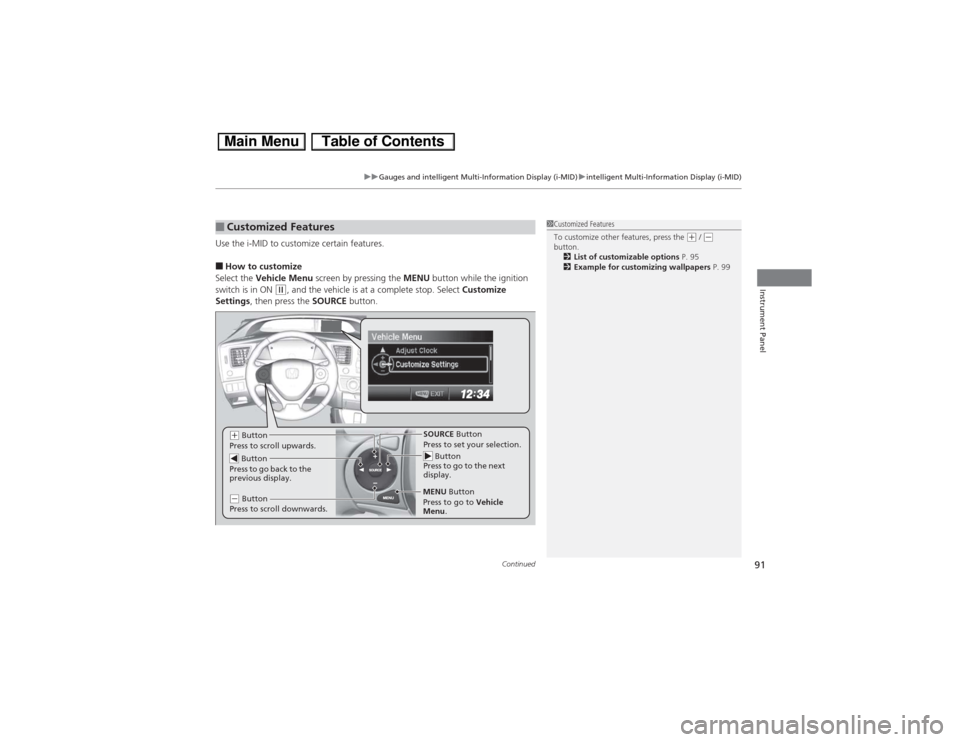
Use the i-MID to customize certain features.■How to customize
Select the Vehicle Menu screen by pressing the MENU button while the ignition
switch is in ON
(w, and the vehicle is at a complete stop. Select Customize
Settings, then press the SOURCE button.
■Customized Features
1Customized Features
To customize other features, press the
(+ / (-
button.
2List of customizable options P. 95
2Example for customizing wallpapers P. 99
Button
Press to go to the next
display.SOURCE Button
Press to set your selection.
MENU Button
(+ Button
Press to scroll upwards.
Button
Press to go back to the
previous display.(- Button
Press to scroll downwards.
Press to go to Vehicle
Menu.
Page 93 of 346
92
uuGauges and intelligent Multi-Information Display (i-MID)uintelligent Multi-Information Display (i-MID)
Instrument Panel
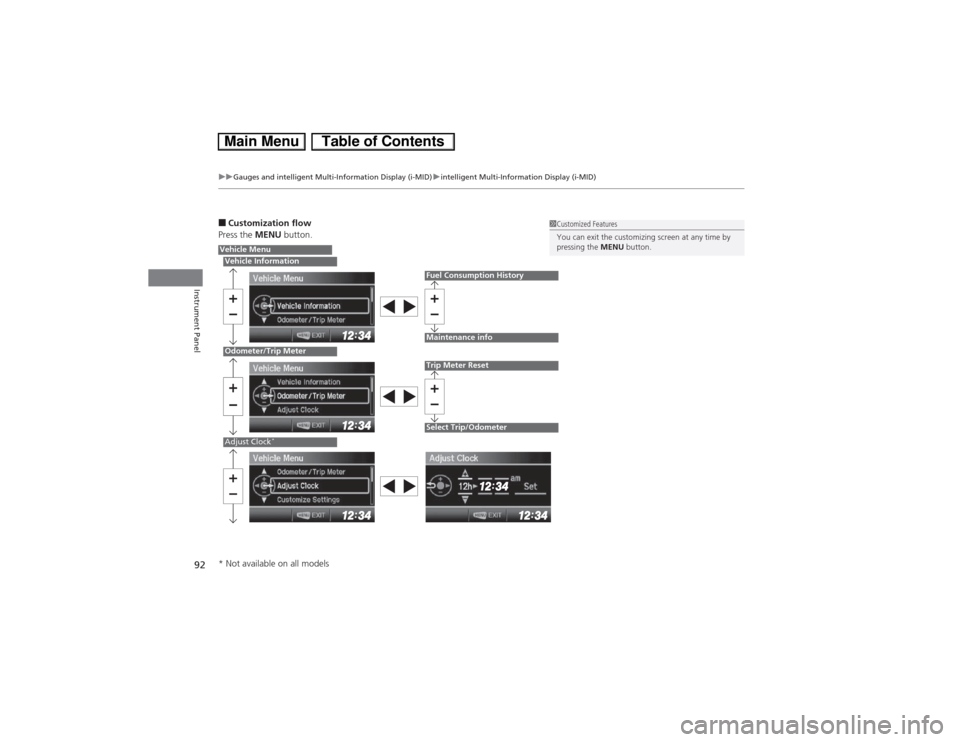
■Customization flow
Press the MENU button.
1Customized Features
You can exit the customizing screen at any time by
pressing the MENU button.
Vehicle MenuVehicle InformationOdometer/Trip MeterAdjust Clock
*
Fuel Consumption HistoryMaintenance infoTrip Meter ResetSelect Trip/Odometer
* Not available on all models
Page 94 of 346
93
uuGauges and intelligent Multi-Information Display (i-MID)uintelligent Multi-Information Display (i-MID)
Continued
Instrument Panel
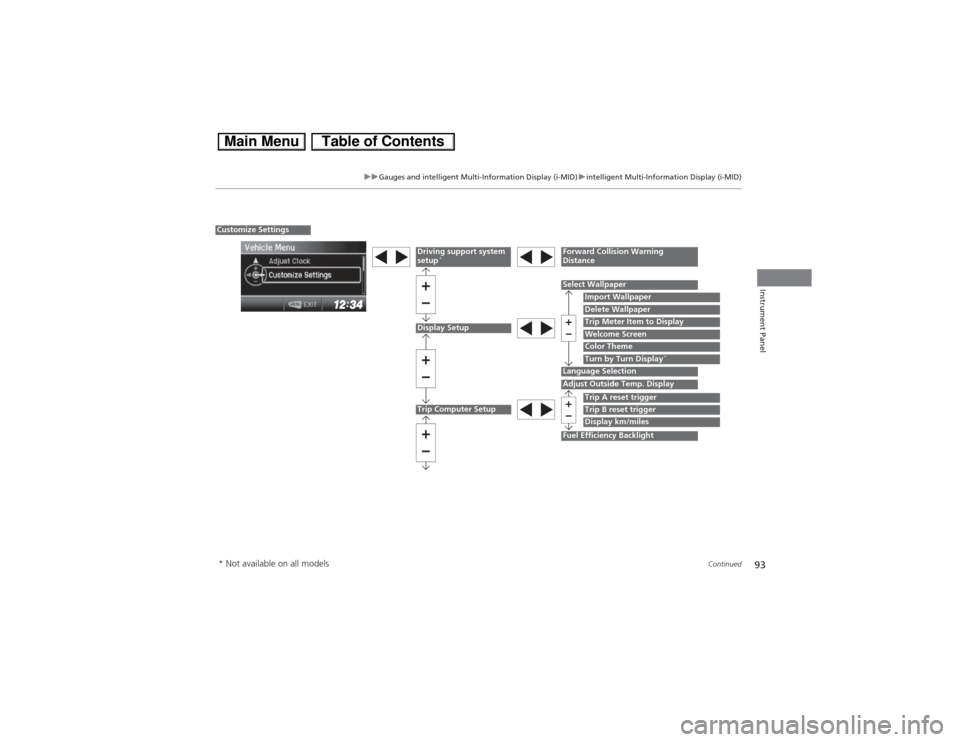
Display Setup
Select Wallpaper
Import WallpaperDelete Wallpaper
Language Selection
Trip Meter Item to DisplayWelcome ScreenColor Theme
Customize Settings
Turn by Turn Display
*
Driving support system
setup
*
Forward Collision Warning
Distance
Trip Computer Setup
Adjust Outside Temp. Display
Trip A reset triggerDisplay km/miles
Fuel Efficiency Backlight
Trip B reset trigger
* Not available on all models
Page 95 of 346
94
uuGauges and intelligent Multi-Information Display (i-MID)uintelligent Multi-Information Display (i-MID)
Instrument Panel
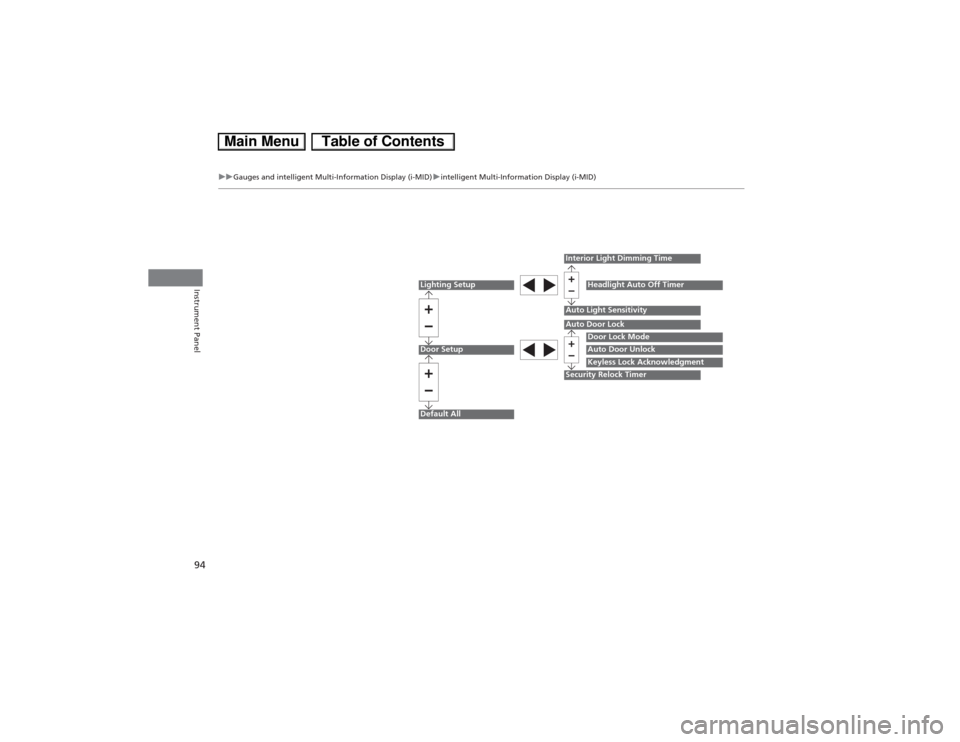
Lighting SetupDoor SetupDefault All
Auto Light Sensitivity
Door Lock ModeAuto Door UnlockKeyless Lock Acknowledgment
Auto Door LockSecurity Relock TimerInterior Light Dimming Time
Headlight Auto Off Timer
Page 96 of 346
95
uuGauges and intelligent Multi-Information Display (i-MID)uintelligent Multi-Information Display (i-MID)
Continued
Instrument Panel
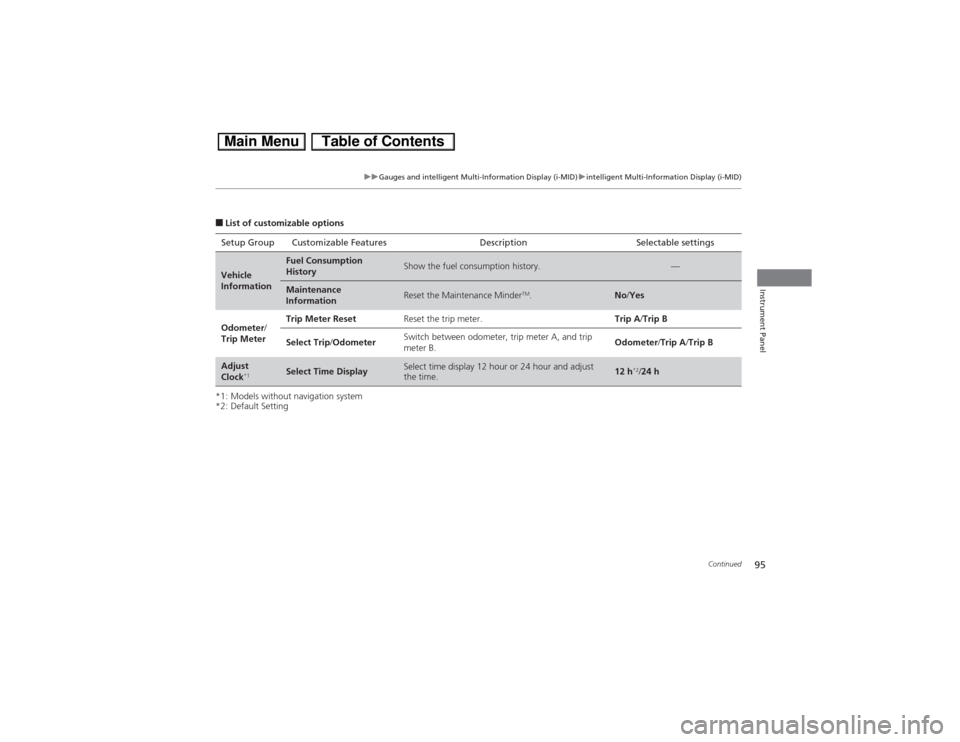
■List of customizable options
*1: Models without navigation system
*2: Default SettingSetup Group Customizable Features Description Selectable settingsVehicle
Information
Fuel Consumption
History
Show the fuel consumption history.
—
Maintenance
Information
Reset the Maintenance Minder
TM.
No/Yes
Odometer/
Trip MeterTrip Meter ResetReset the trip meter.Trip A/Trip B
Select Trip/OdometerSwitch between odometer, trip meter A, and trip
meter B.Odometer/Trip A/Trip B
Adjust
Clock
*1
Select Time Display
Select time display 12 hour or 24 hour and adjust
the time.
12 h
*2/24 h
Page 97 of 346
96
uuGauges and intelligent Multi-Information Display (i-MID)uintelligent Multi-Information Display (i-MID)
Instrument Panel
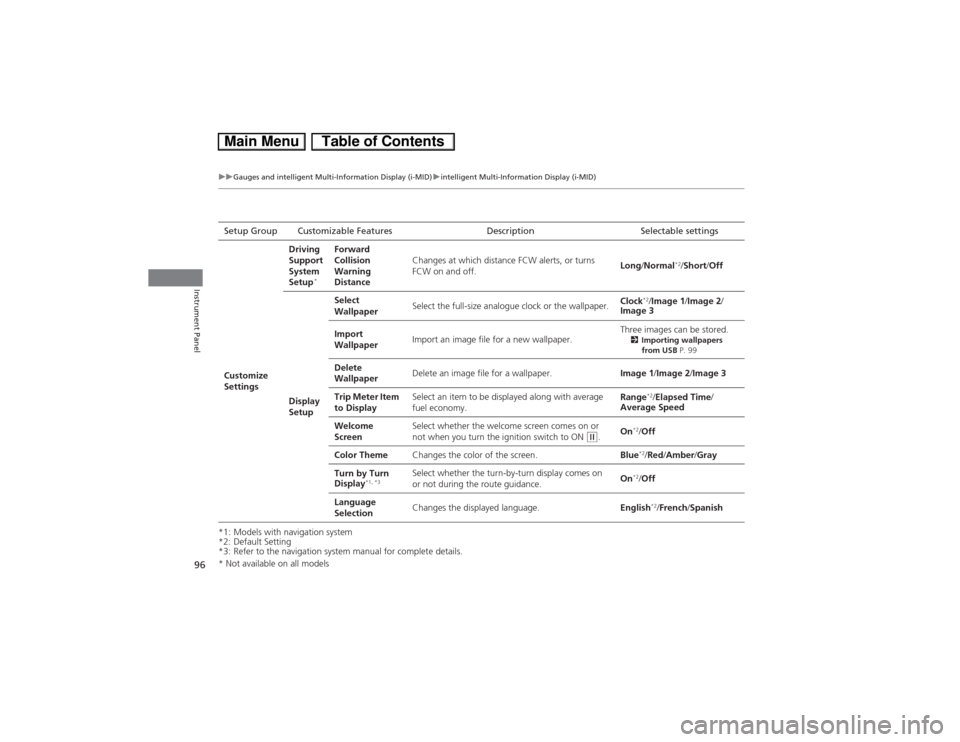
*1: Models with navigation system
*2: Default Setting
*3: Refer to the navigation system manual for complete details.Setup Group Customizable Features Description Selectable settings
Customize
SettingsDriving
Support
System
Setup
*
Forward
Collision
Warning
DistanceChanges at which distance FCW alerts, or turns
FCW on and off.Long/Normal
*2/Short/Off
Display
SetupSelect
WallpaperSelect the full-size analogue clock or the wallpaper.Clock
*2/Image 1/Image 2/
Image 3
Import
WallpaperImport an image file for a new wallpaper.Three images can be stored.
2Importing wallpapers
from USB P. 99
Delete
WallpaperDelete an image file for a wallpaper.Image 1/Image 2/Image 3
Trip Meter Item
to DisplaySelect an item to be displayed along with average
fuel economy.Range
*2/Elapsed Time/
Average Speed
Welcome
ScreenSelect whether the welcome screen comes on or
not when you turn the ignition switch to ON
(w.On
*2/Off
Color ThemeChanges the color of the screen.Blue*2/Red/Amber/Gray
Turn by Turn
Display
*1, *3
Select whether the turn-by-turn display comes on
or not during the route guidance.On
*2/Off
Language
SelectionChanges the displayed language.English*2/French/Spanish
* Not available on all models
Page 98 of 346
97
uuGauges and intelligent Multi-Information Display (i-MID)uintelligent Multi-Information Display (i-MID)
Continued
Instrument Panel
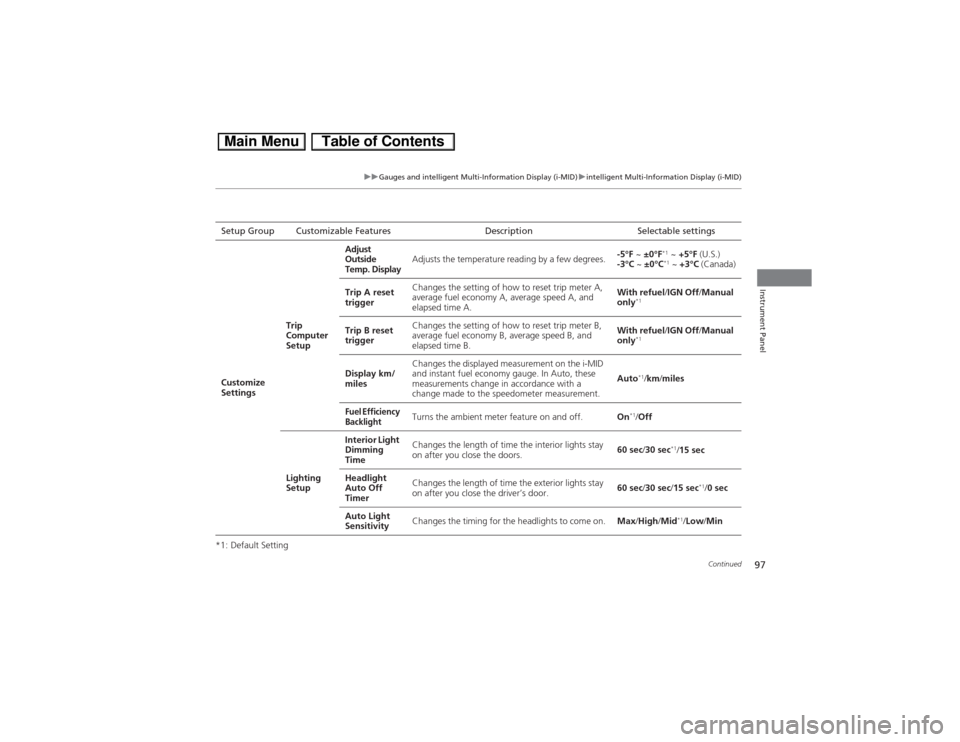
*1: Default SettingSetup Group Customizable Features Description Selectable settings
Customize
SettingsTrip
Computer
SetupAdjust
Outside
Temp. DisplayAdjusts the temperature reading by a few degrees.-5°F ~ ±0°F
*1 ~ +5°F (U.S.)
-3°C ~ ±0°C*1 ~ +3°C (Canada)
Trip A reset
triggerChanges the setting of how to reset trip meter A,
average fuel economy A, average speed A, and
elapsed time A.With refuel/IGN Off/Manual
only
*1
Trip B reset
triggerChanges the setting of how to reset trip meter B,
average fuel economy B, average speed B, and
elapsed time B.With refuel/IGN Off/Manual
only
*1
Display km/
milesChanges the displayed measurement on the i-MID
and instant fuel economy gauge. In Auto, these
measurements change in accordance with a
change made to the speedometer measurement.Auto
*1/km/miles
Fuel Efficiency
Backlight
Turns the ambient meter feature on and off.On
*1/Off
Lighting
SetupInterior Light
Dimming
TimeChanges the length of time the interior lights stay
on after you close the doors.60 sec/30 sec
*1/15 sec
Headlight
Auto Off
TimerChanges the length of time the exterior lights stay
on after you close the driver’s door.60 sec/30 sec/15 sec
*1/0 sec
Auto Light
SensitivityChanges the timing for the headlights to come on.Max/High/Mid
*1/Low/Min
Page 99 of 346
98
uuGauges and intelligent Multi-Information Display (i-MID)uintelligent Multi-Information Display (i-MID)
Instrument Panel
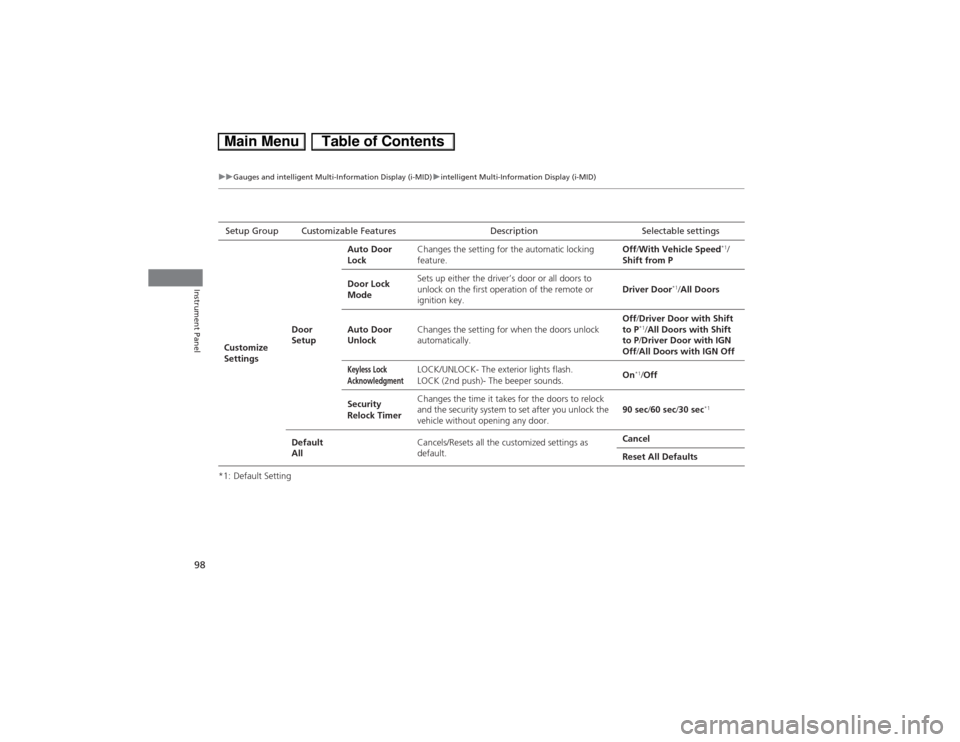
*1: Default SettingSetup Group Customizable Features Description Selectable settings
Customize
SettingsDoor
SetupAuto Door
LockChanges the setting for the automatic locking
feature.Off/With Vehicle Speed
*1/
Shift from P
Door Lock
ModeSets up either the driver’s door or all doors to
unlock on the first operation of the remote or
ignition key.Driver Door
*1/All Doors
Auto Door
UnlockChanges the setting for when the doors unlock
automatically.Off/Driver Door with Shift
to P
*1/All Doors with Shift
to P/Driver Door with IGN
Off/All Doors with IGN Off
Keyless Lock
Acknowledgment
LOCK/UNLOCK- The exterior lights flash.
LOCK (2nd push)- The beeper sounds.On
*1/Off
Security
Relock TimerChanges the time it takes for the doors to relock
and the security system to set after you unlock the
vehicle without opening any door.90 sec/60 sec/30 sec
*1
Default
AllCancels/Resets all the customized settings as
default.Cancel
Reset All Defaults