Page 164 of 346
163
uuAudio System Basic OperationuPlaying a USB Flash Drive
Continued
Features
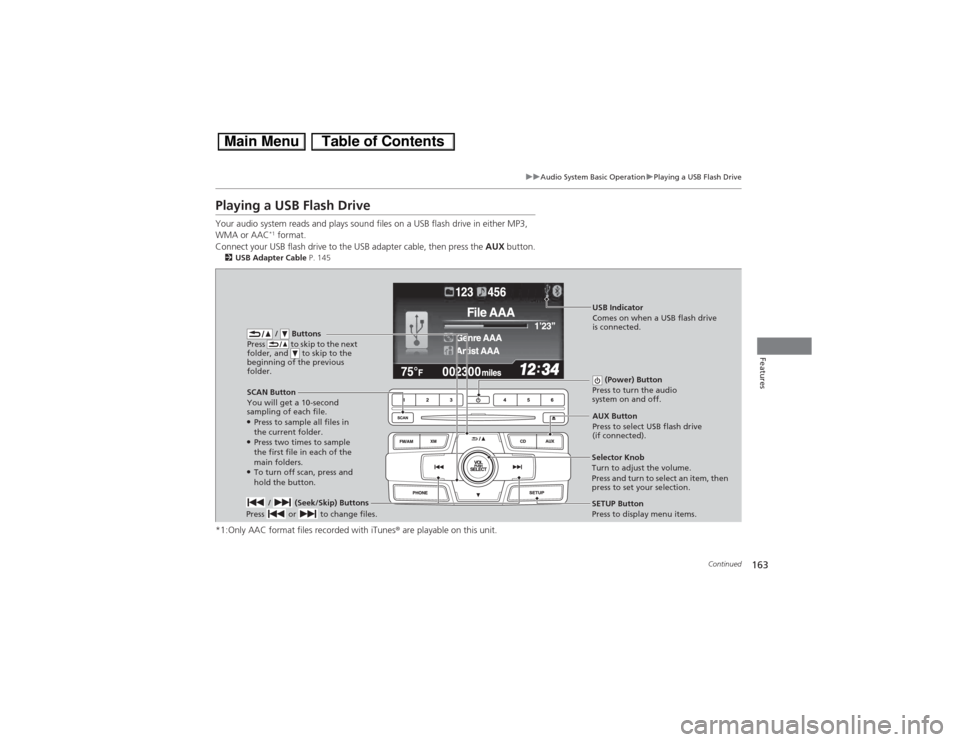
Playing a USB Flash DriveYour audio system reads and plays sound files on a USB flash drive in either MP3,
WMA or AAC
*1 format.
Connect your USB flash drive to the USB adapter cable, then press the AUX button.
2USB Adapter Cable P. 145*1:Only AAC format files recorded with iTunes® are playable on this unit.
/ Buttons
Press to skip to the next
folder, and to skip to the
beginning of the previous
folder.
SCAN Button
You will get a 10-second
sampling of each file.●Press to sample all files in
the current folder.●Press two times to sample
the first file in each of the
main folders.●To turn off scan, press and
hold the button. (Power) Button
Press to turn the audio
system on and off. / (Seek/Skip) Buttons
Press or to change files.
SETUP Button
Press to display menu items. Selector Knob
Turn to adjust the volume.
Press and turn to select an item, then
press to set your selection.AUX Button
Press to select USB flash drive
(if connected).USB Indicator
Comes on when a USB flash drive
is connected.
Page 165 of 346
uuAudio System Basic OperationuPlaying a USB Flash Drive
164Features
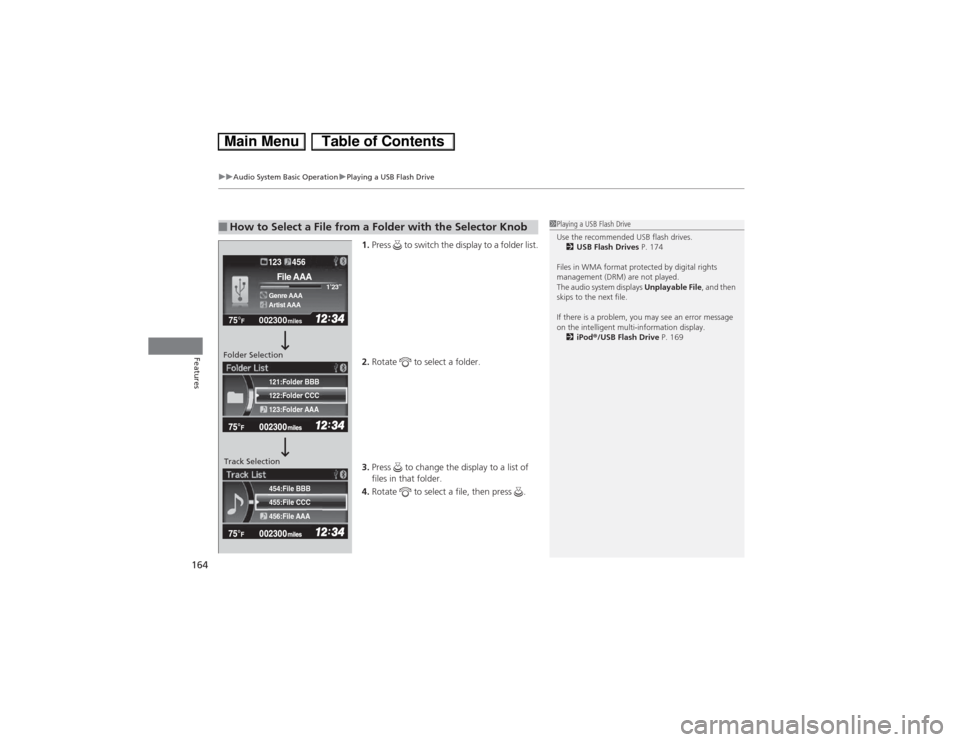
1.Press to switch the display to a folder list.
2.Rotate to select a folder.
3.Press to change the display to a list of
files in that folder.
4.Rotate to select a file, then press .
■How to Select a File from a Folder with the Selector Knob
1Playing a USB Flash Drive
Use the recommended USB flash drives.
2USB Flash Drives P. 174
Files in WMA format protected by digital rights
management (DRM) are not played.
The audio system displays Unplayable File, and then
skips to the next file.
If there is a problem, you may see an error message
on the intelligent multi-information display.
2iPod®/USB Flash Drive P. 169
455:File CCC
456:File AAA 454:File BBB122:Folder CCC
123:Folder AAA 121:Folder BBB002300 75°
F miles
Genre AAA1’23’’File AAAArtist AAA123 456
Folder Selection
Track Selection
Page 167 of 346
166
uuAudio System Basic OperationuPlaying Bluetooth® Audio
Features
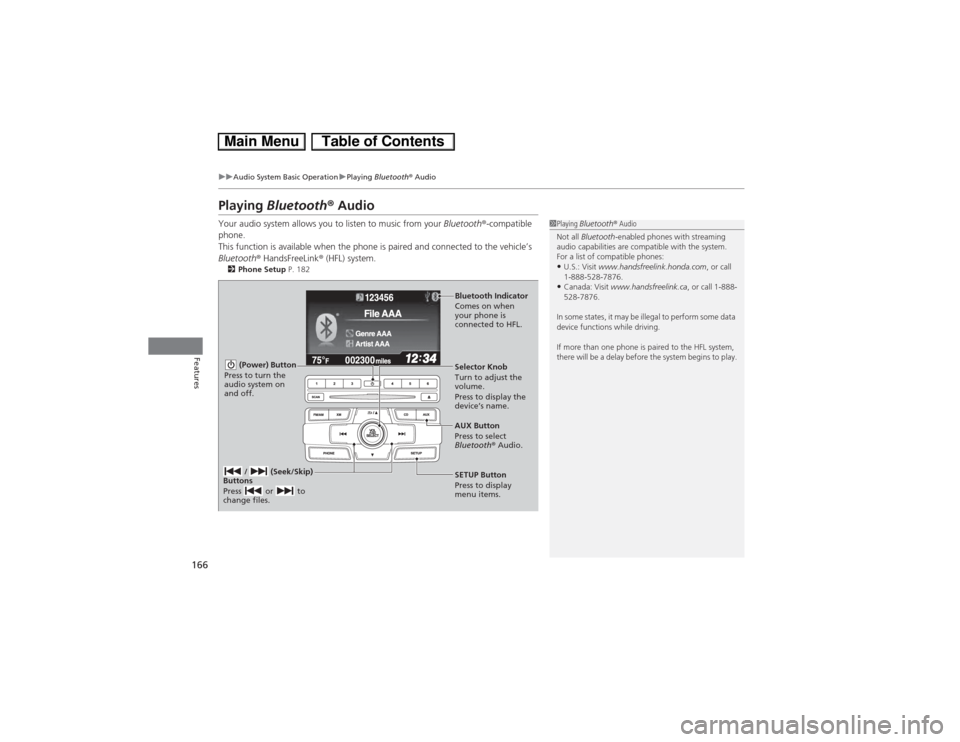
Playing Bluetooth® AudioYour audio system allows you to listen to music from your Bluetooth®-compatible
phone.
This function is available when the phone is paired and connected to the vehicle’s
Bluetooth® HandsFreeLink® (HFL) system.2Phone Setup P. 182
1Playing Bluetooth® Audio
Not all Bluetooth-enabled phones with streaming
audio capabilities are compatible with the system.
For a list of compatible phones:•U.S.: Visit www.handsfreelink.honda.com, or call
1-888-528-7876.•Canada: Visit www.handsfreelink.ca, or call 1-888-
528-7876.
In some states, it may be illegal to perform some data
device functions while driving.
If more than one phone is paired to the HFL system,
there will be a delay before the system begins to play.
(Power) Button
Press to turn the
audio system on
and off.
SETUP Button
Press to display
menu items. Selector Knob
Turn to adjust the
volume.
Press to display the
device’s name.
AUX Button
Press to select
Bluetooth® Audio.
/ (Seek/Skip)
Buttons
Press or to
change files.Bluetooth Indicator
Comes on when
your phone is
connected to HFL.
Page 172 of 346
171Features
General Information on the Audio SystemXM® Radio Service
*
1.You need your radio ID ready before registering for subscription. To see the ID in
the display: Turn the selector knob until 0 appears.
2.Have your radio ID and credit card number ready, and either call or visit the XM®
website to subscribe.
Press the XM (XM®) button and stay in this mode for about 30 minutes until the
service is activated. Make sure your vehicle is in an open area with good reception.
Loading...:
XM® is loading the audio or program information.
Channel Off Air:
The channel is not currently broadcasting.
Channel Not Authorized:
XM® radio is receiving information update from the network.
No Signal:
The signal is too weak in the current location.
--------:
No such channel exists, the channel is not part of your subscription, or the artist or
title information is unavailable.
Check Antenna:
There is a problem with the XM® antenna. Contact a dealer.■Subscribing to XM® Radio■Receiving XM® Radio■XM® Radio Display Messages
1Subscribing to XM® Radio
Contact Information for XM® Radio:
US: XM® Radio at www.siriusxm.com or (800) 852-
9696
Canada: XM® Canada at www.xmradio.ca, or (877)
209-00791Receiving XM® Radio
The XM® satellites are in orbit over the equator;
therefore, objects south of the vehicle may cause
satellite reception interruptions. Satellite signals are
more likely to be blocked by tall buildings and
mountains the farther north you travel from the
equator.
You may experience reception problems under the
following circumstances:•In a location with an obstruction to the south of
your vehicle.•In tunnels•On the lower level of a multi-tiered road•Large items carried on the roof rack
* Not available on all models
Page 173 of 346
172
uuGeneral Information on the Audio SystemuRecommended CDs
Features
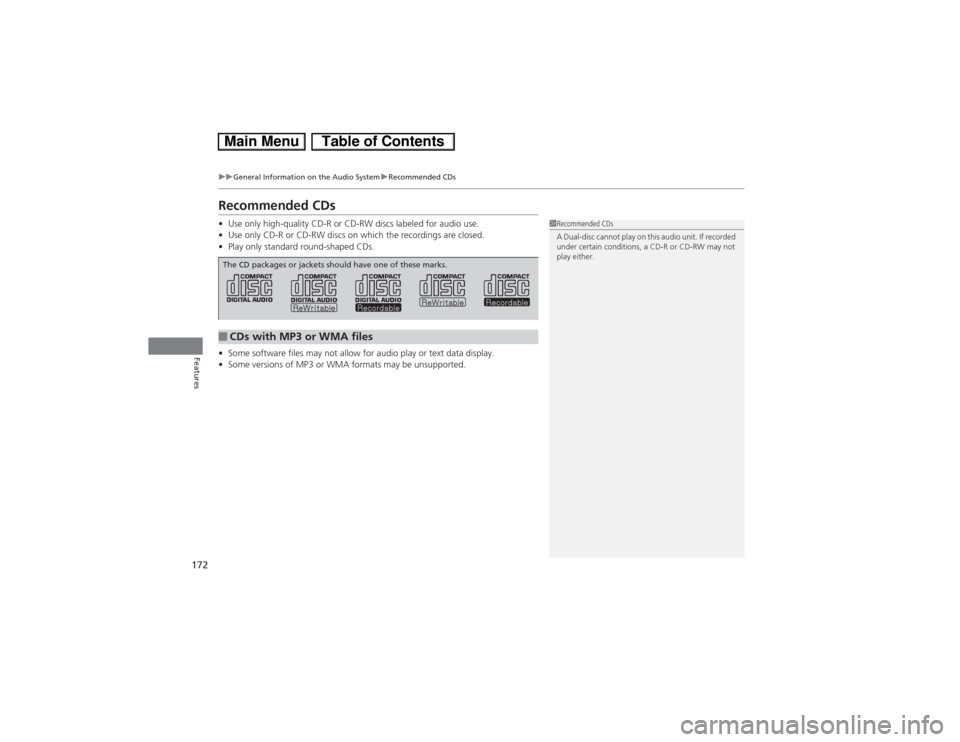
Recommended CDs•Use only high-quality CD-R or CD-RW discs labeled for audio use.
•Use only CD-R or CD-RW discs on which the recordings are closed.
•Play only standard round-shaped CDs.
•Some software files may not allow for audio play or text data display.
•Some versions of MP3 or WMA formats may be unsupported.
1Recommended CDs
A Dual-disc cannot play on this audio unit. If recorded
under certain conditions, a CD-R or CD-RW may not
play either.
■CDs with MP3 or WMA filesThe CD packages or jackets should have one of these marks.
Page 175 of 346
174
uuGeneral Information on the Audio SystemuCompatible iPod®, iPhone® and USB Flash Drives
Features
Compatible iPod®, iPhone® and USB Flash Drives•Use a recommended USB flash drive of 256 MB or higher.
•Some digital audio players may not be compatible.
•Some USB flash drives (e.g., a device with security lockout) may not work.
•Some software files may not allow for audio play or text data display.
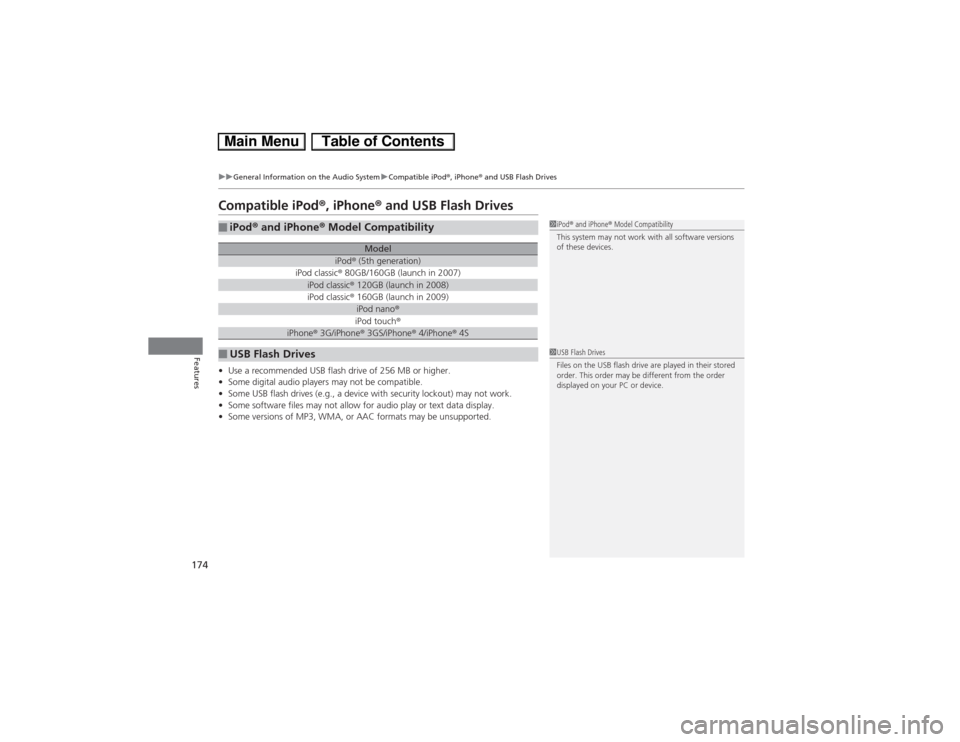
•Some versions of MP3, WMA, or AAC formats may be unsupported.■iPod® and iPhone® Model Compatibility
Model
iPod® (5th generation)
iPod classic® 80GB/160GB (launch in 2007)iPod classic® 120GB (launch in 2008)iPod classic® 160GB (launch in 2009)
iPod nano®iPod touch®
iPhone® 3G/iPhone® 3GS/iPhone® 4/iPhone® 4S
■USB Flash Drives
1iPod® and iPhone® Model Compatibility
This system may not work with all software versions
of these devices.1USB Flash Drives
Files on the USB flash drive are played in their stored
order. This order may be different from the order
displayed on your PC or device.
Page 177 of 346
uuBluetooth® HandsFreeLink®uUsing HFL
176Features
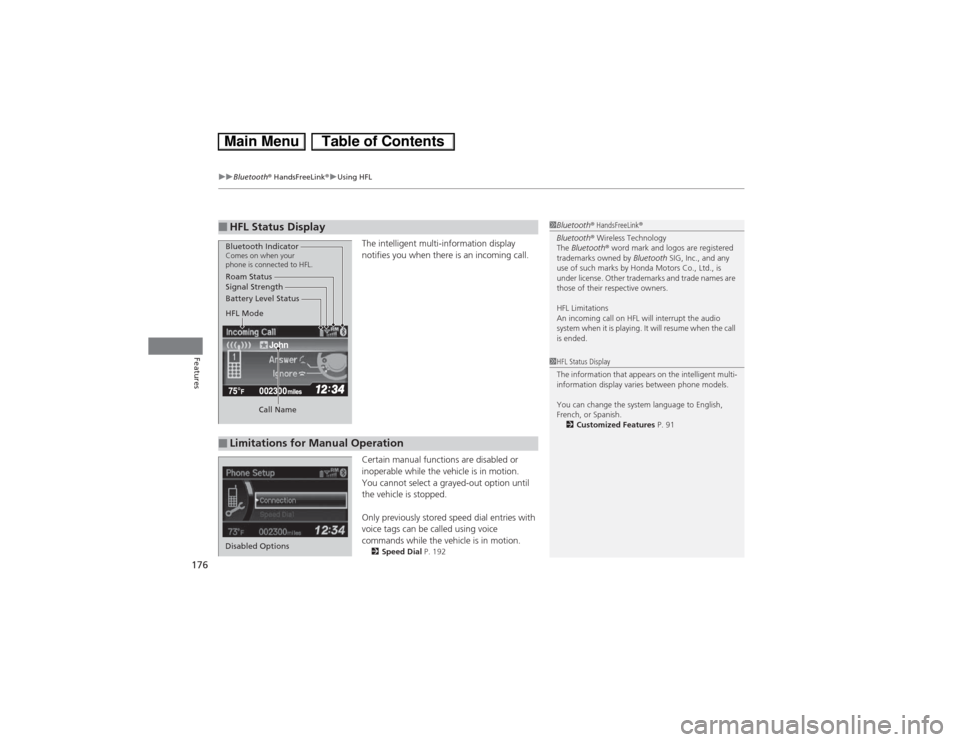
The intelligent multi-information display
notifies you when there is an incoming call.
Certain manual functions are disabled or
inoperable while the vehicle is in motion.
You cannot select a grayed-out option until
the vehicle is stopped.
Only previously stored speed dial entries with
voice tags can be called using voice
commands while the vehicle is in motion.2Speed Dial P. 192
■HFL Status Display
1Bluetooth® HandsFreeLink®
Bluetooth® Wireless Technology
The Bluetooth® word mark and logos are registered
trademarks owned by Bluetooth SIG, Inc., and any
use of such marks by Honda Motors Co., Ltd., is
under license. Other trademarks and trade names are
those of their respective owners.
HFL Limitations
An incoming call on HFL will interrupt the audio
system when it is playing. It will resume when the call
is ended.
John
Signal Strength
HFL Mode Battery Level Status Roam Status
Call NameBluetooth IndicatorComes on when your
phone is connected to HFL.■Limitations for Manual Operation
1HFL Status Display
The information that appears on the intelligent multi-
information display varies between phone models.
You can change the system language to English,
French, or Spanish.
2Customized Features P. 91
Disabled Options
Page 178 of 346
177
uuBluetooth® HandsFreeLink®uHFL Menus
Continued
Features
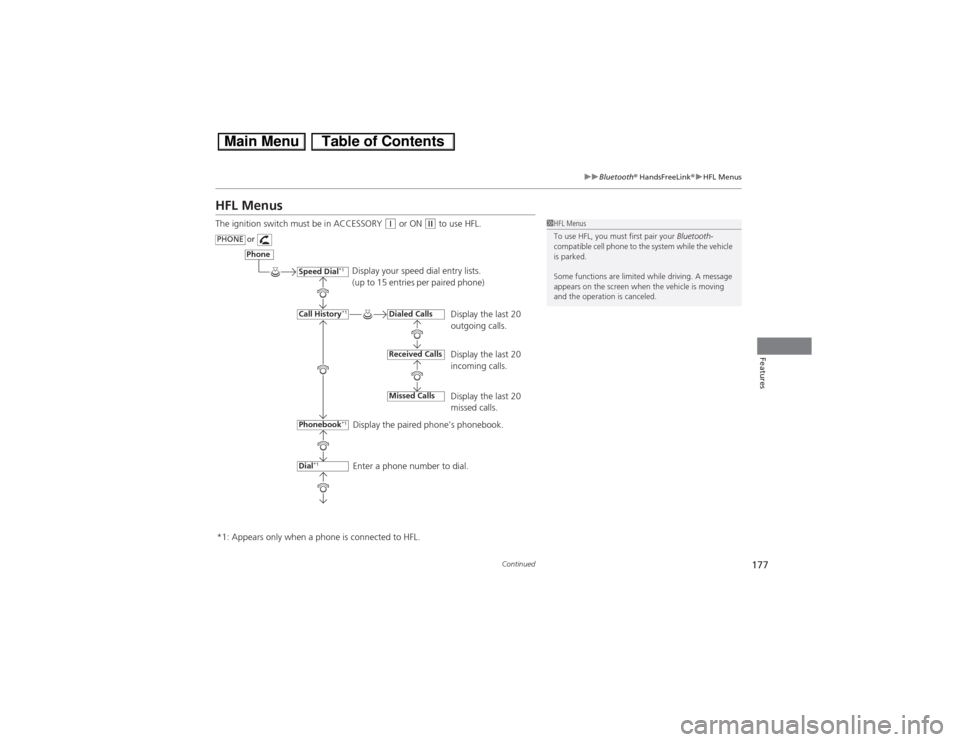
HFL MenusThe ignition switch must be in ACCESSORY
(q or ON
(w to use HFL.
1HFL Menus
To use HFL, you must first pair your Bluetooth-
compatible cell phone to the system while the vehicle
is parked.
Some functions are limited while driving. A message
appears on the screen when the vehicle is moving
and the operation is canceled.
Display your speed dial entry lists.
(up to 15 entries per paired phone)
Display the last 20
outgoing calls.
Display the last 20
incoming calls.
Display the last 20
missed calls.
Display the paired phone’s phonebook.
Enter a phone number to dial.
Phone
Speed Dial
*1
Call History
*1
PHONE
or
Phonebook
*1
Dial
*1
Dialed CallsReceived CallsMissed Calls
*1: Appears only when a phone is connected to HFL.