2013 HONDA CIVIC HYBRID dead battery
[x] Cancel search: dead batteryPage 22 of 346

Quick Reference Guide21
Handling the Unexpected
(P295)
Flat Tire
(P297)
●Park in a safe location and repair the flat
tire using the temporary tire repair kit.
●Park in a safe location and replace the
flat tire with the compact spare tire in the
trunk.
Indicators Come On (P317)
●Identify the indicator and consult the
owner’s manual.Models with an optional compact spare tire
Engine Won’t Start
(P311)
●If the battery is dead, jump start using a
booster battery.
Blown Fuse
(P321)
●Check for a blown fuse if an electrical
device does not operate.
Overheating
(P315)
●Park in a safe location. If you do not see
steam under the hood, open the hood,
and let the engine cool down.
Emergency Towing
(P324)
●Call a professional towing service if you
need to tow your vehicle.
Page 108 of 346
107
uuLocking and Unlocking the DoorsuLocking/Unlocking the Doors from the Outside
Continued
Controls
Locking/Unlocking the Doors from the Outside
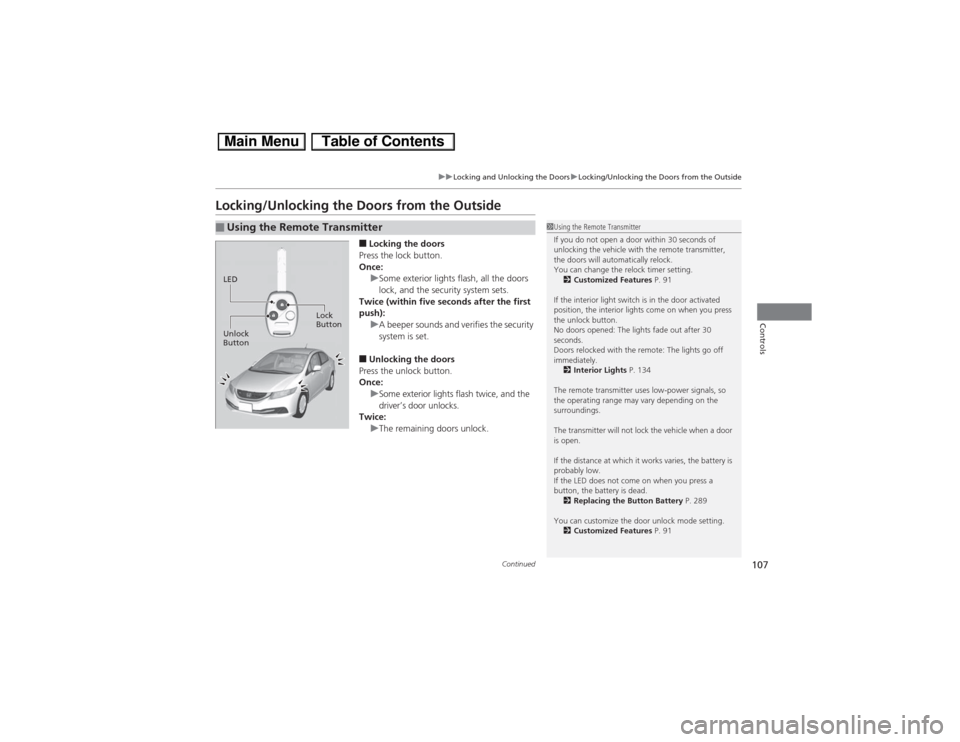
■Locking the doors
Press the lock button.
Once:
uSome exterior lights flash, all the doors
lock, and the security system sets.
Twice (within five seconds after the first
push):
uA beeper sounds and verifies the security
system is set.■Unlocking the doors
Press the unlock button.
Once:
uSome exterior lights flash twice, and the
driver’s door unlocks.
Twice:
uThe remaining doors unlock.
■Using the Remote Transmitter
1Using the Remote Transmitter
If you do not open a door within 30 seconds of
unlocking the vehicle with the remote transmitter,
the doors will automatically relock.
You can change the relock timer setting.
2Customized Features P. 91
If the interior light switch is in the door activated
position, the interior lights come on when you press
the unlock button.
No doors opened: The lights fade out after 30
seconds.
Doors relocked with the remote: The lights go off
immediately.
2Interior Lights P. 134
The remote transmitter uses low-power signals, so
the operating range may vary depending on the
surroundings.
The transmitter will not lock the vehicle when a door
is open.
If the distance at which it works varies, the battery is
probably low.
If the LED does not come on when you press a
button, the battery is dead.
2Replacing the Button Battery P. 289
You can customize the door unlock mode setting.
2
Customized Features P. 91
LED
Unlock
ButtonLock
Button
Page 117 of 346
uuSecurity SystemuSecurity System Alarm
116Controls
■Setting the security system alarm
The security system alarm automatically sets when the following conditions have
been met:
•The ignition switch is in LOCK
(0, and the key has been removed from the
ignition switch.
•The hood and trunk are closed.
•All doors are locked with the key or the remote transmitter.
■When the security system alarm sets
The security system indicator in the instrument panel blinks. When the blinking
interval changes after about 15 seconds, the security system is set.■To cancel the security system alarm
The security system is canceled when the vehicle is unlocked using the key or remote
transmitter, or the ignition switch is turned to ON
(w. The security system indicator
goes off at the same time.
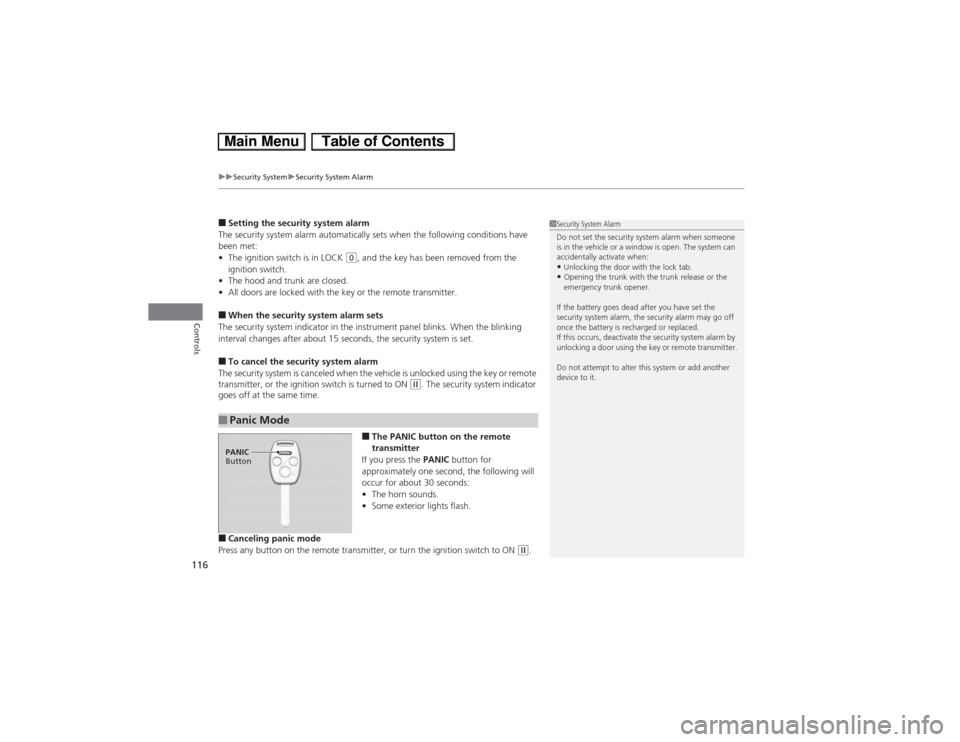
■The PANIC button on the remote
transmitter
If you press the PANIC button for
approximately one second, the following will
occur for about 30 seconds:
•The horn sounds.
•Some exterior lights flash.
■Canceling panic mode
Press any button on the remote transmitter, or turn the ignition switch to ON
(w.
■Panic Mode
1Security System Alarm
Do not set the security system alarm when someone
is in the vehicle or a window is open. The system can
accidentally activate when:•Unlocking the door with the lock tab.•Opening the trunk with the trunk release or the
emergency trunk opener.
If the battery goes dead after you have set the
security system alarm, the security alarm may go off
once the battery is recharged or replaced.
If this occurs, deactivate the security system alarm by
unlocking a door using the key or remote transmitter.
Do not attempt to alter this system or add another
device to it.
PANIC
Button
Page 147 of 346
146
uuAudio SystemuAuxiliary Input Jack
Features
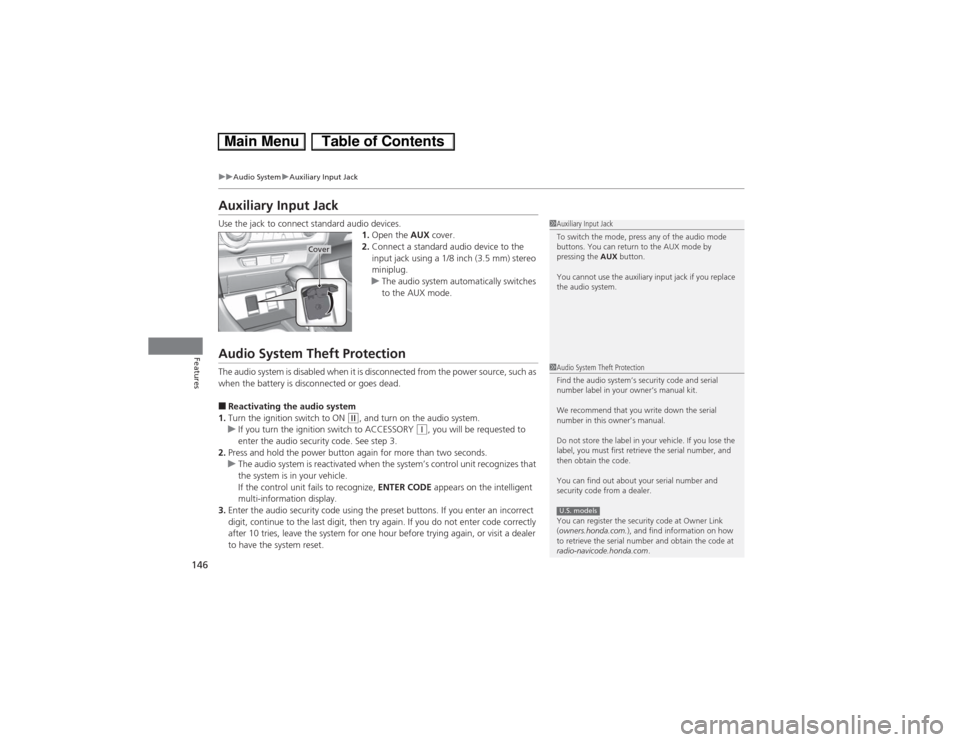
Auxiliary Input JackUse the jack to connect standard audio devices.
1.Open the AUX cover.
2.Connect a standard audio device to the
input jack using a 1/8 inch (3.5 mm) stereo
miniplug.
uThe audio system automatically switches
to the AUX mode.Audio System Theft ProtectionThe audio system is disabled when it is disconnected from the power source, such as
when the battery is disconnected or goes dead.■Reactivating the audio system
1.Turn the ignition switch to ON
(w, and turn on the audio system.
uIf you turn the ignition switch to ACCESSORY
(q, you will be requested to
enter the audio security code. See step 3.
2.Press and hold the power button again for more than two seconds.
uThe audio system is reactivated when the system’s control unit recognizes that
the system is in your vehicle.
If the control unit fails to recognize, ENTER CODE appears on the intelligent
multi-information display.
3.Enter the audio security code using the preset buttons. If you enter an incorrect
digit, continue to the last digit, then try again. If you do not enter code correctly
after 10 tries, leave the system for one hour before trying again, or visit a dealer
to have the system reset.
1Auxiliary Input Jack
To switch the mode, press any of the audio mode
buttons. You can return to the AUX mode by
pressing the AUX button.
You cannot use the auxiliary input jack if you replace
the audio system.
Cover
1Audio System Theft Protection
Find the audio system’s security code and serial
number label in your owner’s manual kit.
We recommend that you write down the serial
number in this owner’s manual.
Do not store the label in your vehicle. If you lose the
label, you must first retrieve the serial number, and
then obtain the code.
You can find out about your serial number and
security code from a dealer.
You can register the security code at Owner Link
(owners.honda.com.), and find information on how
to retrieve the serial number and obtain the code at
radio-navicode.honda.com.U.S. models
Page 289 of 346
288Maintenance
12 Volt BatteryChecking the 12 Volt BatteryCheck the battery condition monthly and check the terminals for corrosion.
If your vehicle’s battery is disconnected or goes dead:
•The audio system is disabled.
2Reactivating the audio system P. 146
•The clock resets.
2Setting the Clock P. 104
•The navigation system
* is disabled.
2Refer to the navigation system manual
Charging the BatteryDisconnect both battery cables to prevent damaging your vehicle’s electrical system.
Always disconnect the negative (-) cable first, and reconnect it last.
112 Volt BatteryWARNING: Battery post, terminals,
and related accessories contain lead
and lead compounds.
Wash your hands after handling.When you find corrosion, clean the battery terminals
by applying a baking powder and water solution.
Clean the terminals with a damp towel. Cloth/towel
dry the battery. Coat the terminals with grease to
help prevent future corrosion.
3
WARNING
The battery gives off explosive hydrogen
gas during normal operation.
A spark or flame can cause the battery to
explode with enough force to kill or
seriously hurt you.
When conducting any battery
maintenance, wear protective clothing and
a face shield, or have a skilled technician do
it.
* Not available on all models
Page 312 of 346
311Handling the Unexpected
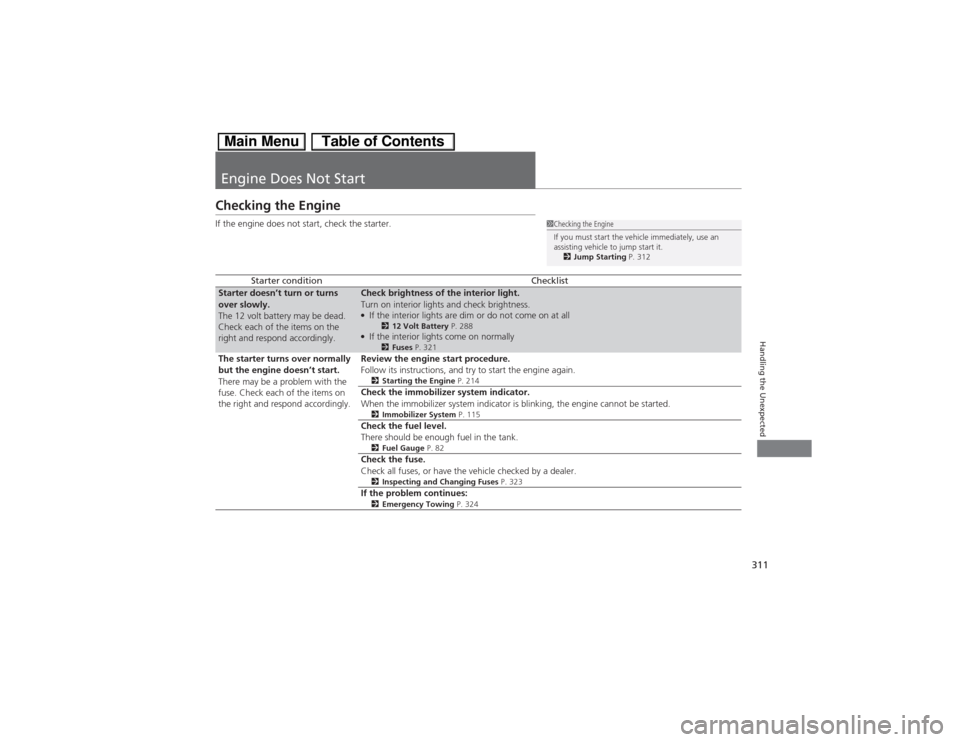
Engine Does Not StartChecking the EngineIf the engine does not start, check the starter.
Starter condition
Checklist
Starter doesn’t turn or turns
over slowly.
The 12 volt battery may be dead.
Check each of the items on the
right and respond accordingly.
Check brightness of the interior light.
Turn on interior lights and check brightness.●If the interior lights are dim or do not come on at all
212 Volt Battery P. 288
●If the interior lights come on normally
2Fuses P. 321
The starter turns over normally
but the engine doesn’t start.
There may be a problem with the
fuse. Check each of the items on
the right and respond accordingly.
Review the engine start procedure.
Follow its instructions, and try to start the engine again.2Starting the Engine P. 214Check the immobilizer system indicator.
When the immobilizer system indicator is blinking, the engine cannot be started.2Immobilizer System P. 115Check the fuel level.
There should be enough fuel in the tank.2Fuel Gauge P. 82Check the fuse.
Check all fuses, or have the vehicle checked by a dealer.2Inspecting and Changing Fuses P. 323If the problem continues:2Emergency Towing P. 324
1Checking the Engine
If you must start the vehicle immediately, use an
assisting vehicle to jump start it.
2Jump Starting P. 312
Page 332 of 346
331
Continued
Information
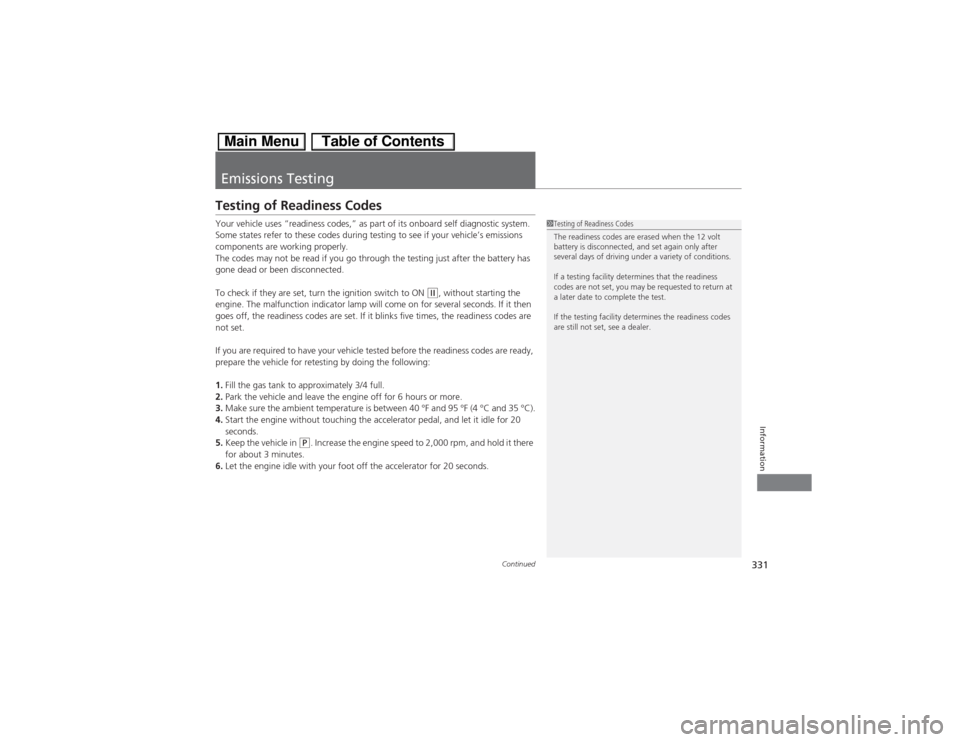
Emissions TestingTesting of Readiness CodesYour vehicle uses “readiness codes,” as part of its onboard self diagnostic system.
Some states refer to these codes during testing to see if your vehicle’s emissions
components are working properly.
The codes may not be read if you go through the testing just after the battery has
gone dead or been disconnected.
To check if they are set, turn the ignition switch to ON
(w, without starting the
engine. The malfunction indicator lamp will come on for several seconds. If it then
goes off, the readiness codes are set. If it blinks five times, the readiness codes are
not set.
If you are required to have your vehicle tested before the readiness codes are ready,
prepare the vehicle for retesting by doing the following:
1.Fill the gas tank to approximately 3/4 full.
2.Park the vehicle and leave the engine off for 6 hours or more.
3.Make sure the ambient temperature is between 40 °F and 95 °F (4 °C and 35 °C).
4.Start the engine without touching the accelerator pedal, and let it idle for 20
seconds.
5.Keep the vehicle in
(P. Increase the engine speed to 2,000 rpm, and hold it there
for about 3 minutes.
6.Let the engine idle with your foot off the accelerator for 20 seconds.
1Testing of Readiness Codes
The readiness codes are erased when the 12 volt
battery is disconnected, and set again only after
several days of driving under a variety of conditions.
If a testing facility determines that the readiness
codes are not set, you may be requested to return at
a later date to complete the test.
If the testing facility determines the readiness codes
are still not set, see a dealer.
Page 339 of 346

338Index
Brake System............................................. 240
Anti-lock Brake System (ABS) ................... 242
Brake Assist System ................................. 243
Brake System Indicator....................... 68, 319
Fluid ........................................................ 269
Foot Brake ............................................... 241
Indicator ............................................ 68, 319
Parking Brake .......................................... 240
Brightness Control (Instrument Panel).... 125
Bulb Replacement..................................... 271
Bulb Specifications ................................... 326
Front Turn Signal/Parking/Side Marker
Light ...................................................... 273
Headlights ............................................... 271
High-Mount Brake Light .......................... 276
Rear License Plate Light............................ 276
Side Turn Signal/Emergency Indicator....... 273CCarbon Monoxide Gas................................ 64
Carrying Cargo.................................. 209, 211
CD Player................................................... 155
Certification Label.................................... 328
Changing Bulbs......................................... 271
Charging System Indicator................. 69, 317
Child Safety................................................. 52
Childproof Door Locks ............................. 110
Emergency Trunk Opener ........................ 114
Child Seat.................................................... 52
Booster Seats ............................................. 63Child Seat for Infants................................. 54
Child Seat for Small Children ..................... 55
Installing a Child Seat with a Lap/Shoulder
Seat Belt .................................................. 59
Larger Children ......................................... 62
Rear-facing Child Seat ............................... 54
Selecting a Child Seat ................................ 56
Using a Tether ........................................... 61
Childproof Door Locks............................. 110
Cleaning the Exterior............................... 293
Cleaning the Interior................................ 291
Climate Control System............................ 140
Changing the Mode ................................ 140
Defrosting the Windshield and
Windows ............................................... 141
Dust and Pollen Filter............................... 290
Recirculation and Fresh Air Mode ............ 140
Sensors ................................................... 142
Using Automatic Climate Control ............ 140
Clock.......................................................... 104
Coat Hook................................................. 138
Compact Spare Tire.......................... 305, 327
Console Compartment............................. 135
Controls..................................................... 103
Coolant (Engine)...................................... 266
Adding to the Radiator ............................ 267
Adding to the Reserve Tank..................... 266
High Temperature Indicator ....................... 76
Low Temperature Indicator........................ 76
Overheating ............................................ 315
Creep Aid System..................................... 216Creeping................................................... 218
Cruise Control.......................................... 225
Indicator ................................................... 75
Cup Holders.............................................. 136
Customer Service Information................ 336
Customized Features................................. 91
DDaytime Running Lights.......................... 123
Dead Battery............................................ 312
Defrosting the Windshield and
Windows................................................. 141
Devices that Emit Radio Waves............... 329
Dimming
Headlights .............................................. 120
Rearview Mirror ...................................... 128
Dipstick (Engine Oil)................................ 262
Directional Signals (Turn Signal)............. 120
Display/Information Button...................... 83
Door Mirrors............................................. 128
Doors........................................................ 105
Auto Door Locking.................................. 111
Auto Door Unlocking .............................. 111
Door Open Indicator ........................... 31, 72
Keys........................................................ 105
Locking/Unlocking the Doors from the
Inside .................................................... 109
Locking/Unlocking the Doors from the
Outside ................................................. 107
Lockout prevention system ...................... 108