2013 FORD SUPER DUTY seats
[x] Cancel search: seatsPage 289 of 563
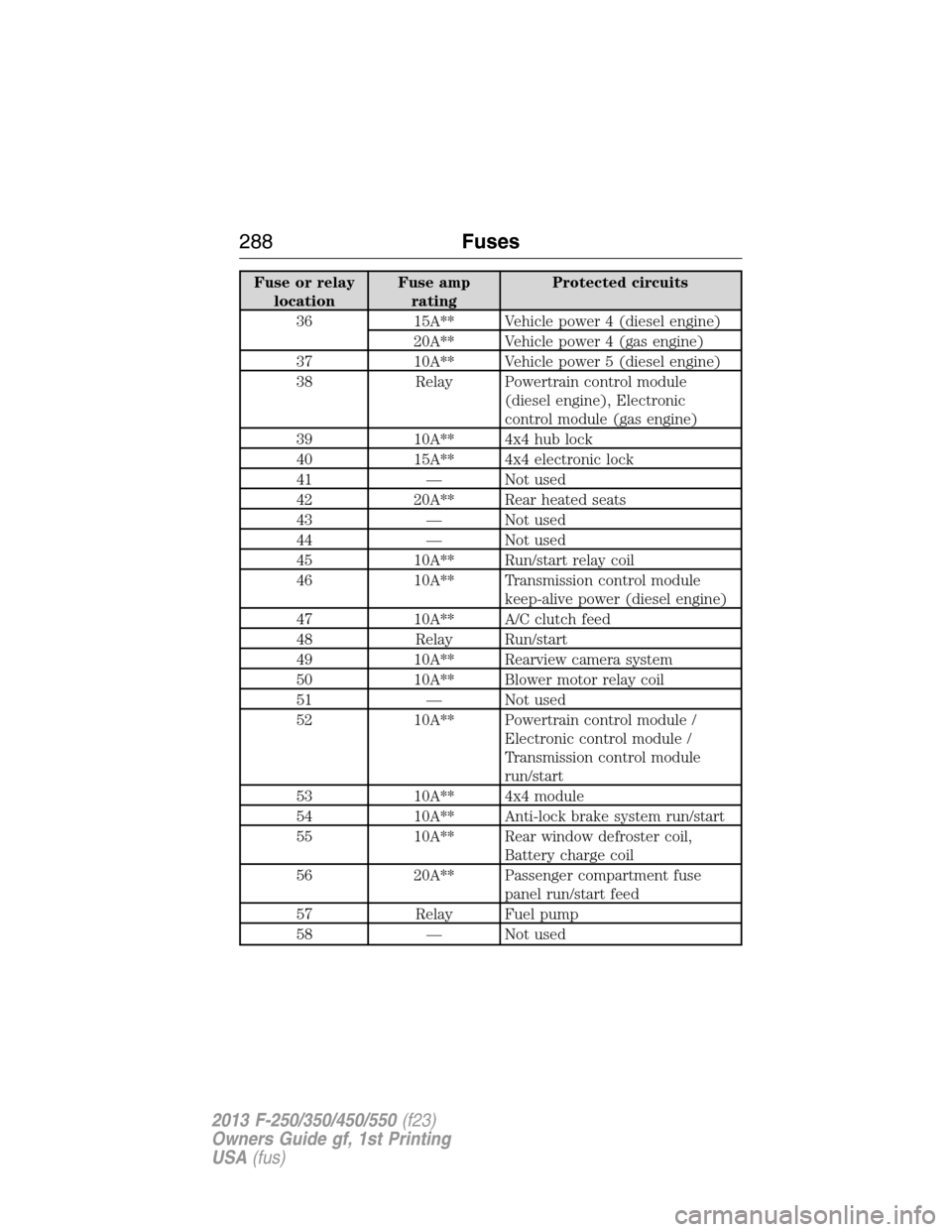
Fuse or relay
locationFuse amp
ratingProtected circuits
36 15A** Vehicle power 4 (diesel engine)
20A** Vehicle power 4 (gas engine)
37 10A** Vehicle power 5 (diesel engine)
38 Relay Powertrain control module
(diesel engine), Electronic
control module (gas engine)
39 10A** 4x4 hub lock
40 15A** 4x4 electronic lock
41 — Not used
42 20A** Rear heated seats
43 — Not used
44 — Not used
45 10A** Run/start relay coil
46 10A** Transmission control module
keep-alive power (diesel engine)
47 10A** A/C clutch feed
48 Relay Run/start
49 10A** Rearview camera system
50 10A** Blower motor relay coil
51 — Not used
52 10A** Powertrain control module /
Electronic control module /
Transmission control module
run/start
53 10A** 4x4 module
54 10A** Anti-lock brake system run/start
55 10A** Rear window defroster coil,
Battery charge coil
56 20A** Passenger compartment fuse
panel run/start feed
57 Relay Fuel pump
58 — Not used
288Fuses
2013 F-250/350/450/550(f23)
Owners Guide gf, 1st Printing
USA(fus)
Page 290 of 563
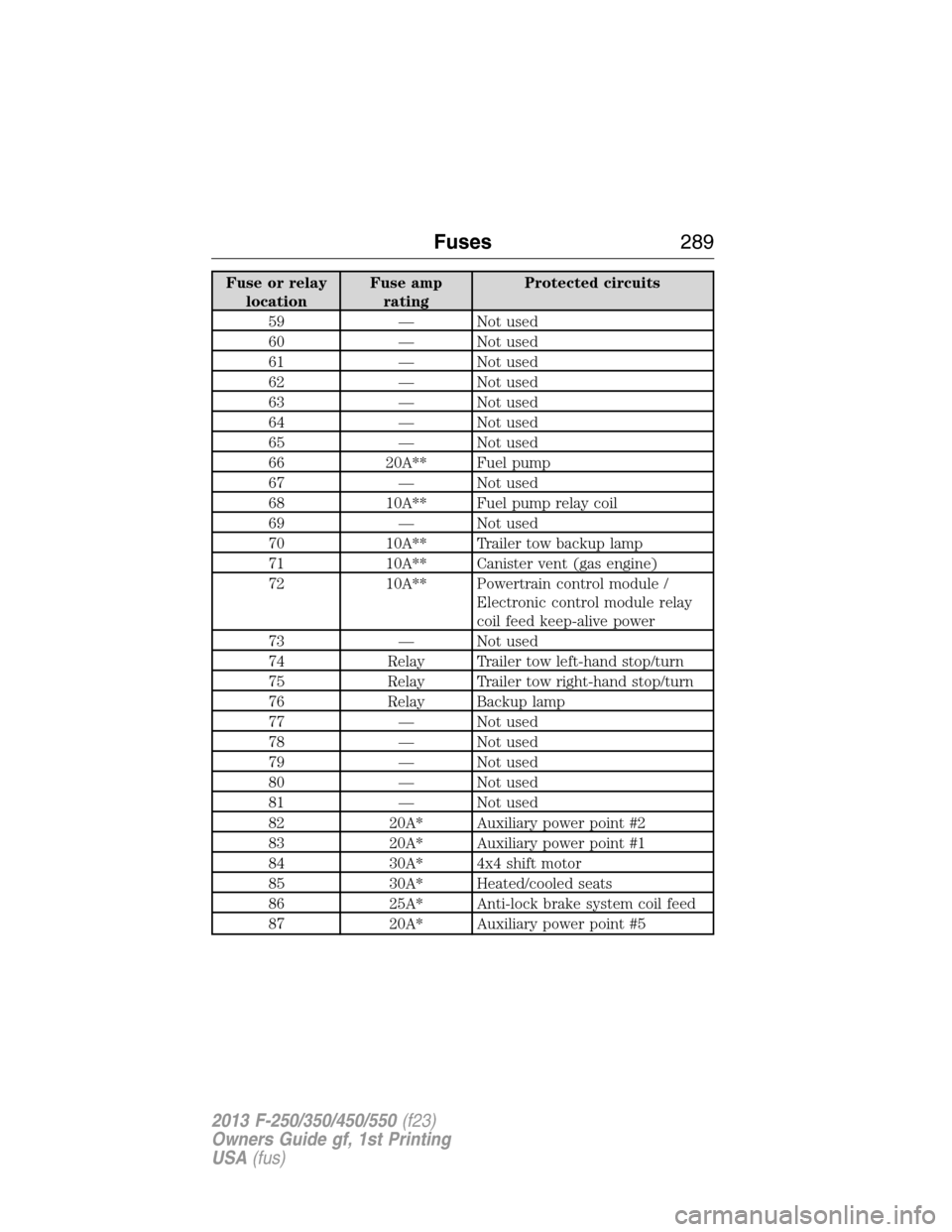
Fuse or relay
locationFuse amp
ratingProtected circuits
59 — Not used
60 — Not used
61 — Not used
62 — Not used
63 — Not used
64 — Not used
65 — Not used
66 20A** Fuel pump
67 — Not used
68 10A** Fuel pump relay coil
69 — Not used
70 10A** Trailer tow backup lamp
71 10A** Canister vent (gas engine)
72 10A** Powertrain control module /
Electronic control module relay
coil feed keep-alive power
73 — Not used
74 Relay Trailer tow left-hand stop/turn
75 Relay Trailer tow right-hand stop/turn
76 Relay Backup lamp
77 — Not used
78 — Not used
79 — Not used
80 — Not used
81 — Not used
82 20A* Auxiliary power point #2
83 20A* Auxiliary power point #1
84 30A* 4x4 shift motor
85 30A* Heated/cooled seats
86 25A* Anti-lock brake system coil feed
87 20A* Auxiliary power point #5
Fuses289
2013 F-250/350/450/550(f23)
Owners Guide gf, 1st Printing
USA(fus)
Page 294 of 563

Fuse or relay
locationFuse amp
ratingProtected circuits
24 15A Steering wheel control module,
Diagnostic connector, Power fold
mirror relay, Remote keyless
entry, Electronic finish panel
25 15A Not used (spare)
26 5A Steering wheel control module
27 20A Not used (spare)
28 15A Ignition switch
29 20A SYNC, GPS module, Radio
faceplate
30 15A Parking lamp relay, Trailer tow
parking lamp relay
31 5A Trailer brake controller (brake
signal), Customer access
32 15A Moonroof motor, Telescoping
mirror switch, Auto dimming
mirrors, Power inverter, Driver
and passenger door lock switch
illumination, Rear heated seat
switch illumination
33 10A Restraint control module
34 10A Heated steering wheel module,
Rear heated seats module
35 5A Select shift switch, Reverse park
aid module, Trailer brake control
module
36 10A Fuel tank select switch
37 10A PTC heater
38 10A AM/FM radio faceplate
39 15A High beam headlamps
40 10A Parking lamps (in mirrors), Roof
marker lamps
Fuses293
2013 F-250/350/450/550(f23)
Owners Guide gf, 1st Printing
USA(fus)
Page 316 of 563

Battery Management System (If Equipped)
The battery management system (BMS) monitors battery conditions and
takes actions to extend battery life. If excessive battery drain is
detected, the system may temporarily disable certain electrical features
to protect the battery. Those electrical accessories affected include the
rear defrost, heated/cooled seats, climate control fan, heated steering
wheel, audio and navigation system. A message may be shown in the
information displays to alert the driver that battery protection actions
are active. These messages are only for notification that an action is
taking place, and not intended to indicate an electrical problem or that
the battery requires replacement.
Electrical accessory installation
To ensure proper operation of the BMS, any electrical devices that are
added to the vehicle should not have their ground connection made
directly at the negative battery post. A connection at the negative
battery post can cause inaccurate measurements of the battery condition
and potential incorrect system operation.
Note:Electrical or electronic accessories added to the vehicle by the
dealer or the owner may adversely affect battery performance and
durability, and may also affect the performance of other electrical
systems in the vehicle.
When a battery replacement is required, the battery should only be
replaced with a Ford recommended replacement battery which matches
the electrical requirements of the vehicle. After battery replacement, or
in some cases after charging the battery with the external charger, the
BMS requires eight hours of vehicle sleep time (key off with doors
closed) to relearn the new battery state of charge. Prior to relearning the
state of charge, the BMS may disable electrical features (to protect the
battery) earlier than normal.
CHECKING THE WIPER BLADES
Run the tip of your fingers over the edge of the blade
to check for roughness.
Clean the wiper blades with washer fluid or water
applied with a soft sponge or cloth.
Maintenance315
2013 F-250/350/450/550(f23)
Owners Guide gf, 1st Printing
USA(fus)
Page 332 of 563
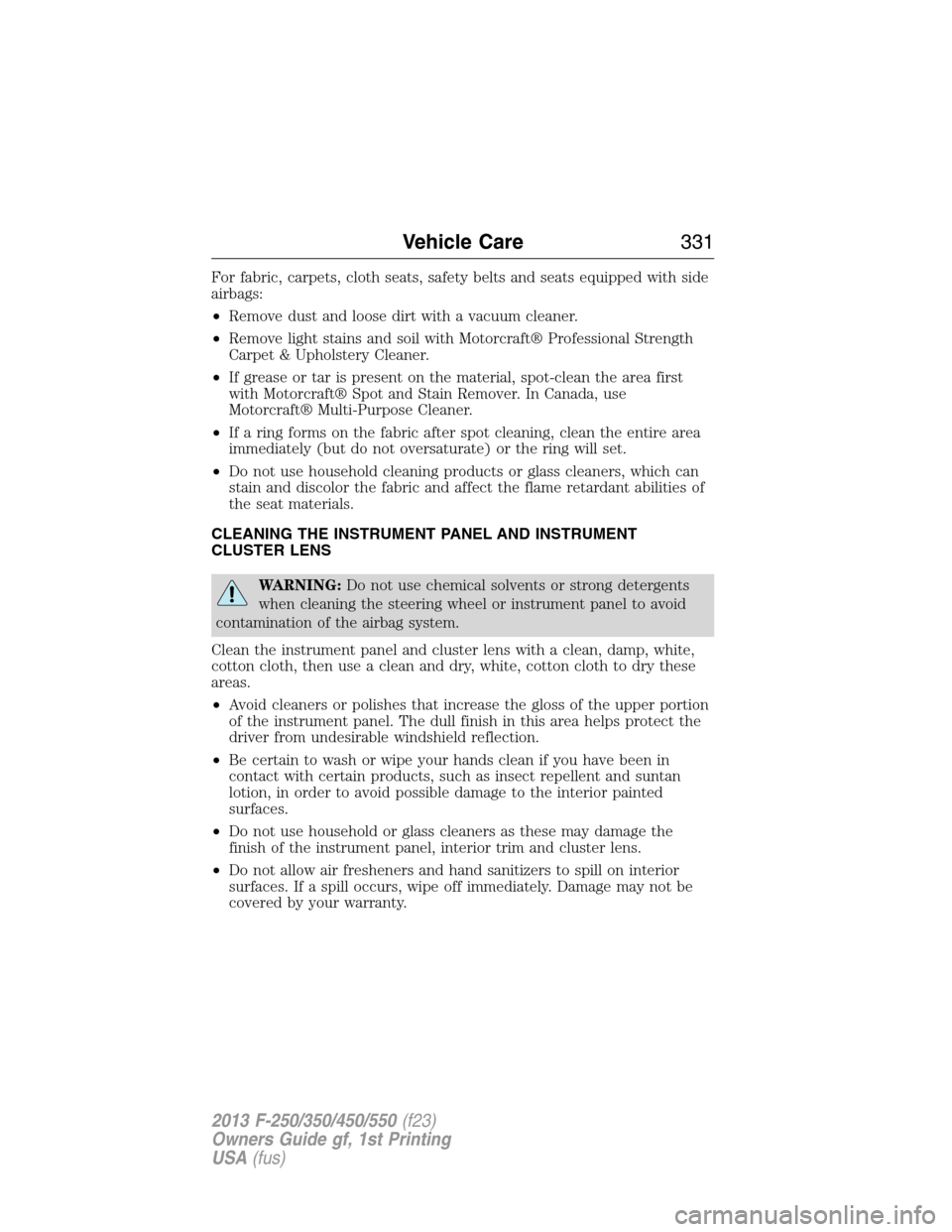
For fabric, carpets, cloth seats, safety belts and seats equipped with side
airbags:
•Remove dust and loose dirt with a vacuum cleaner.
•Remove light stains and soil with Motorcraft® Professional Strength
Carpet & Upholstery Cleaner.
•If grease or tar is present on the material, spot-clean the area first
with Motorcraft® Spot and Stain Remover. In Canada, use
Motorcraft® Multi-Purpose Cleaner.
•If a ring forms on the fabric after spot cleaning, clean the entire area
immediately (but do not oversaturate) or the ring will set.
•Do not use household cleaning products or glass cleaners, which can
stain and discolor the fabric and affect the flame retardant abilities of
the seat materials.
CLEANING THE INSTRUMENT PANEL AND INSTRUMENT
CLUSTER LENS
WARNING:Do not use chemical solvents or strong detergents
when cleaning the steering wheel or instrument panel to avoid
contamination of the airbag system.
Clean the instrument panel and cluster lens with a clean, damp, white,
cotton cloth, then use a clean and dry, white, cotton cloth to dry these
areas.
•Avoid cleaners or polishes that increase the gloss of the upper portion
of the instrument panel. The dull finish in this area helps protect the
driver from undesirable windshield reflection.
•Be certain to wash or wipe your hands clean if you have been in
contact with certain products, such as insect repellent and suntan
lotion, in order to avoid possible damage to the interior painted
surfaces.
•Do not use household or glass cleaners as these may damage the
finish of the instrument panel, interior trim and cluster lens.
•Do not allow air fresheners and hand sanitizers to spill on interior
surfaces. If a spill occurs, wipe off immediately. Damage may not be
covered by your warranty.
Vehicle Care331
2013 F-250/350/450/550(f23)
Owners Guide gf, 1st Printing
USA(fus)
Page 334 of 563
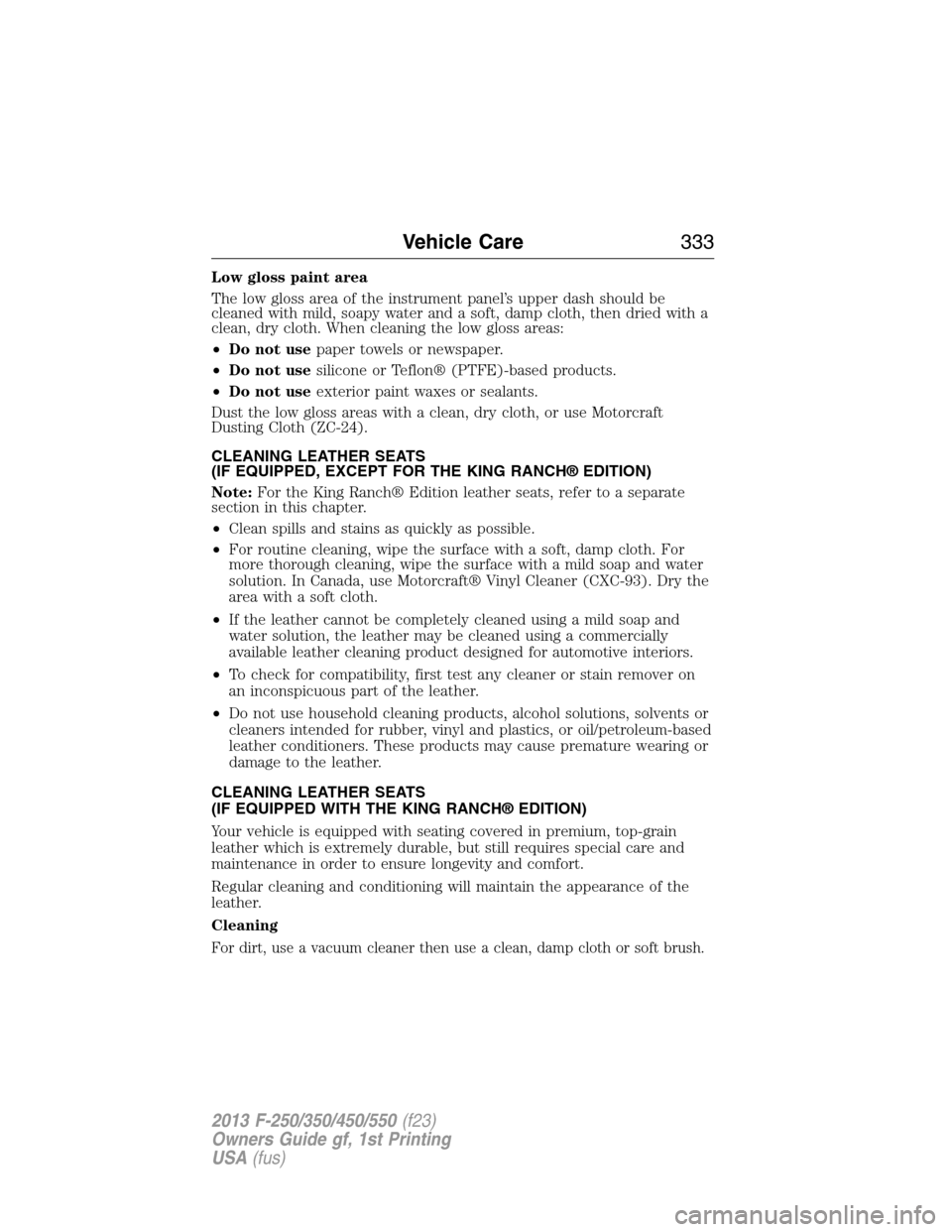
Low gloss paint area
The low gloss area of the instrument panel’s upper dash should be
cleaned with mild, soapy water and a soft, damp cloth, then dried with a
clean, dry cloth. When cleaning the low gloss areas:
•Do not usepaper towels or newspaper.
•Do not usesilicone or Teflon® (PTFE)-based products.
•Do not useexterior paint waxes or sealants.
Dust the low gloss areas with a clean, dry cloth, or use Motorcraft
Dusting Cloth (ZC-24).
CLEANING LEATHER SEATS
(IF EQUIPPED, EXCEPT FOR THE KING RANCH® EDITION)
Note:For the King Ranch® Edition leather seats, refer to a separate
section in this chapter.
•Clean spills and stains as quickly as possible.
•For routine cleaning, wipe the surface with a soft, damp cloth. For
more thorough cleaning, wipe the surface with a mild soap and water
solution. In Canada, use Motorcraft® Vinyl Cleaner (CXC-93). Dry the
area with a soft cloth.
•If the leather cannot be completely cleaned using a mild soap and
water solution, the leather may be cleaned using a commercially
available leather cleaning product designed for automotive interiors.
•To check for compatibility, first test any cleaner or stain remover on
an inconspicuous part of the leather.
•Do not use household cleaning products, alcohol solutions, solvents or
cleaners intended for rubber, vinyl and plastics, or oil/petroleum-based
leather conditioners. These products may cause premature wearing or
damage to the leather.
CLEANING LEATHER SEATS
(IF EQUIPPED WITH THE KING RANCH® EDITION)
Your vehicle is equipped with seating covered in premium, top-grain
leather which is extremely durable, but still requires special care and
maintenance in order to ensure longevity and comfort.
Regular cleaning and conditioning will maintain the appearance of the
leather.
Cleaning
For dirt, use a vacuum cleaner then use a clean, damp cloth or soft brush.
Vehicle Care333
2013 F-250/350/450/550(f23)
Owners Guide gf, 1st Printing
USA(fus)
Page 415 of 563
GENERAL INFORMATION
Ensure that you review your device’s user guide before using it with SYNC.
Support
The SYNC support team is available to help you with any questions you
cannot answer on your own.
Monday-Saturday, 8:30am-8:00pm EST
In the United States, call: 1–888–270–1055
In Canada, call: 1–800–565–3673
Times are subject to change due to holidays.
SYNC Owner Account
Why do I need a SYNC owner account?
•Required to activate Vehicle Health Report and to view the reports
online.
•Required to activate the subscription-based SYNC Services and to
personalize your Saved Points and Favorites.
•Essential for keeping up with the latest software downloads available
for SYNC.
•Access to customer support for any questions you may have.
Driving Restrictions
For your safety, certain features are speed-dependent and restricted
when your vehicle is traveling over 3 mph (5 km/h).
Safety Information
WARNING:Driving while distracted can result in loss of vehicle
control, accident and injury. Ford strongly recommends that
drivers use extreme caution when using any device that may take their
focus off the road. Your primary responsibility is the safe operation of
the vehicle. We recommend against the use of any handheld device
while driving, encourage the use of voice-operated systems when
possible and that you become aware of applicable state and local laws
that may affect use of electronic devices while driving.
When using SYNC:
•
Do not operate playing devices if the power cords or cables are broken,
split or damaged. Place cords and cables out of the way, so they do not
interfere with the operation of pedals, seats, compartments or safe
driving abilities.
414SYNC®
2013 F-250/350/450/550(f23)
Owners Guide gf, 1st Printing
USA(fus)
Page 462 of 563
Support
The SYNC support team is available to help you with any questions you
aren’t able to answer on your own.
Monday-Saturday, 8:30 am-8pm EST
In the United States, call: 1–888–270–1055
In Canada, call: 1–800–565–3673
Times are subject to change due to holidays.
Safety information
WARNING:Driving while distracted can result in loss of vehicle
control, accident and injury. Ford strongly recommends that
drivers use extreme caution when using any device that may take their
focus off the road. Your primary responsibility is the safe operation of
the vehicle. We recommend against the use of any handheld device
while driving, encourage the use of voice-operated systems when
possible and that you become aware of applicable state and local laws
that may affect use of electronic devices while driving.
•Do not attempt to service or repair SYNC®. See your authorized
dealer.
•Do not operate playing devices if the power cords and/or cables are
broken, split or damaged. Carefully place cords and/or cables where
they will not be stepped on or interfere with the operation of pedals,
seats and/or compartments, or safe driving abilities.
•Do not leave playing devices in the vehicle in extreme conditions as it
could cause damage to your device. Refer to your device’s user guide
for further information.
•For your safety, some SYNC® functions are speed dependent and
cannot be performed when the vehicle is traveling at speeds greater
than 3 mph (5 km/h).
•Ensure that you review your device’s user guide before using with
SYNC®.
MyFord Touch® (If Equipped)461
2013 F-250/350/450/550(f23)
Owners Guide gf, 1st Printing
USA(fus)