2013 FORD SUPER DUTY buttons
[x] Cancel search: buttonsPage 256 of 563
The Ford TBC has been tested to be compatible with several major
brands of electric-over-hydraulic trailer brakes; contact your authorized
dealer for information on which brands can be used.
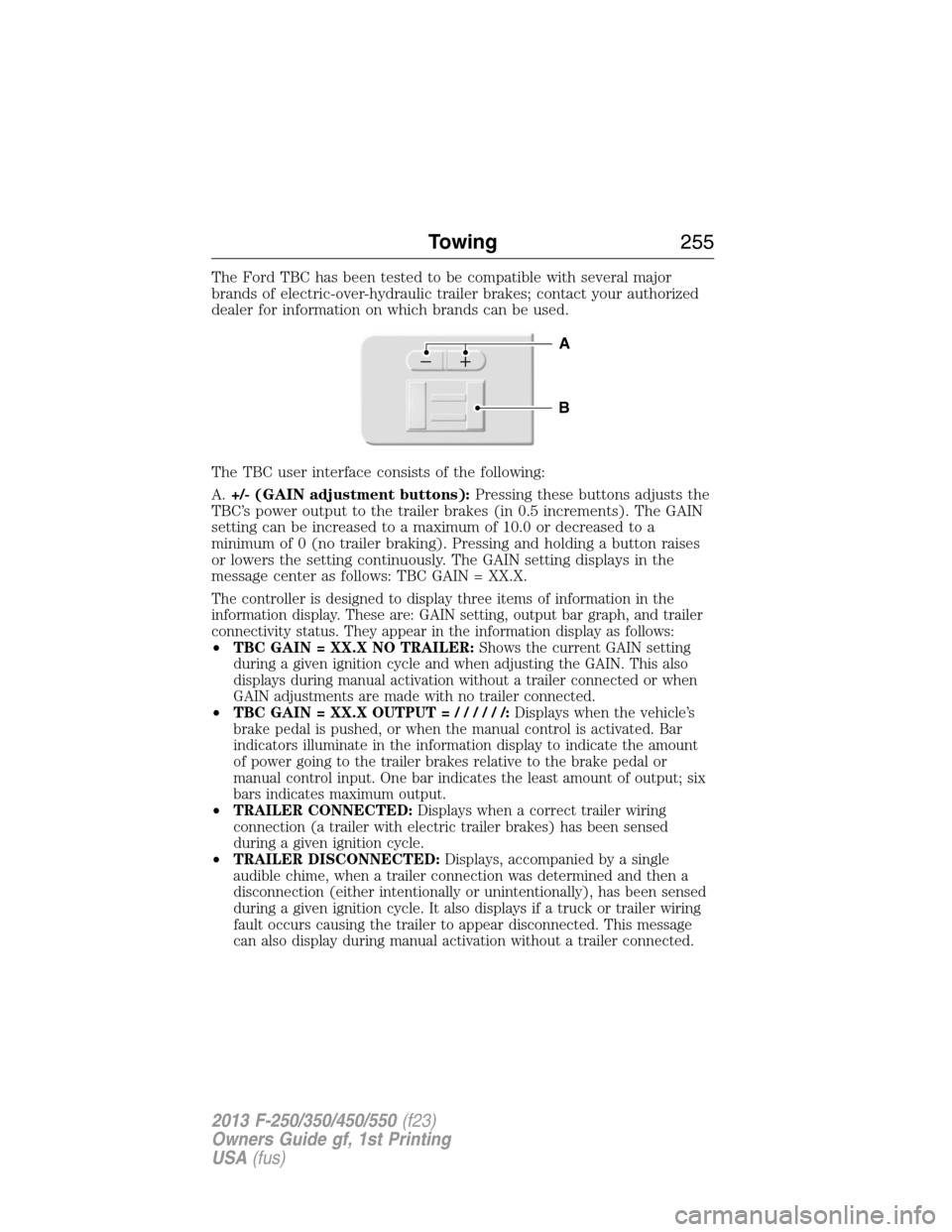
The TBC user interface consists of the following:
A.+/- (GAIN adjustment buttons):Pressing these buttons adjusts the
TBC’s power output to the trailer brakes (in 0.5 increments). The GAIN
setting can be increased to a maximum of 10.0 or decreased to a
minimum of 0 (no trailer braking). Pressing and holding a button raises
or lowers the setting continuously. The GAIN setting displays in the
message center as follows: TBC GAIN = XX.X.
The controller is designed to display three items of information in the
information display. These are: GAIN setting, output bar graph, and trailer
connectivity status. They appear in the information display as follows:
•TBC GAIN = XX.X NO TRAILER:Shows the current GAIN setting
during a given ignition cycle and when adjusting the GAIN. This also
displays during manual activation without a trailer connected or when
GAIN adjustments are made with no trailer connected.
•TBC GAIN = XX.X OUTPUT=//////:Displays when the vehicle’s
brake pedal is pushed, or when the manual control is activated. Bar
indicators illuminate in the information display to indicate the amount
of power going to the trailer brakes relative to the brake pedal or
manual control input. One bar indicates the least amount of output; six
bars indicates maximum output.
•TRAILER CONNECTED:Displays when a correct trailer wiring
connection (a trailer with electric trailer brakes) has been sensed
during a given ignition cycle.
•TRAILER DISCONNECTED:Displays, accompanied by a single
audible chime, when a trailer connection was determined and then a
disconnection (either intentionally or unintentionally), has been sensed
during a given ignition cycle. It also displays if a truck or trailer wiring
fault occurs causing the trailer to appear disconnected. This message
can also display during manual activation without a trailer connected.
B
A
Towing255
2013 F-250/350/450/550(f23)
Owners Guide gf, 1st Printing
USA(fus)
Page 257 of 563

B.Manual control lever:Slide the control lever to the left to activate
power to the trailer’s electric brakes independent of the tow vehicle’s
brakes (see the followingProcedure for adjusting GAINsection for
instructions on proper use of this feature). If the manual control is
activated while the brake is also applied, the greater of the two inputs
determines the power sent to the trailer brakes.
•Stop lamps:Activating the manual control lever illuminates both the
trailer brake lamps and the tow vehicle brake lamps except the
center high-mount stop lamp (if the proper electrical connection has
been made to the trailer). Pressing the vehicle brake pedal also
illuminates both trailer and vehicle brake lamps.
Procedure for Adjusting GAIN
Note:This should only be performed in a traffic-free environment at
speeds of approximately 20–25 mph (30–40 km/h).
The GAIN setting is used to set the TBC for the specific towing
condition and should be changed as towing conditions change. Changes
to towing conditions include trailer load, vehicle load, road conditions
and weather.
The GAIN should be set to provide the maximum trailer braking
assistance while making sure the trailer wheels do not lock when
braking. Locked trailer wheels may lead to trailer instability.
1. Make sure the trailer brakes are in good working condition,
functioning normally and properly adjusted. See your trailer dealer if
necessary.
2. Hook up the trailer and make the electrical connections according to
the trailer manufacturer’s instructions.
3. When a trailer with electric or EOH brakes is plugged in, TRAILER
CONNECTED appears in the information display.
4. Use the GAIN adjustment (+/-) buttons to increase or decrease the
GAIN setting to the desired starting point. A GAIN setting of 6.0 is a
good starting point for heavier loads.
5. In a traffic-free environment, tow the trailer on a dry, level surface at
a speed of 20–25 mph (30–40 km/h) and squeeze the manual control
lever completely.
6. If the trailer wheels lock up (indicated by squealing tires), reduce the
GAIN setting. If the trailer wheels turn freely, increase the GAIN
setting. Repeat Steps 5 and 6 until the GAIN setting is at a point just
below trailer wheel lock-up. If towing a heavier trailer, trailer wheel
lock-up may not be attainable even with the maximum GAIN setting
of 10.
256Towing
2013 F-250/350/450/550(f23)
Owners Guide gf, 1st Printing
USA(fus)
Page 423 of 563
Phone Options during an Active Call
During an active call, you have additional menu features which become
available such as putting a call on hold, joining calls, etc. Use the arrow
buttons to scroll through the menu options.
To access:
1. Press MENU during an active call.
2. When Active Call Menu is selected, press OK.
3. Scroll to cycle through the following options:
When you select: You can:
Mute Call
?Mute the call.
PrivacySwitch a call from an active hands-free environment to
your cellular phone for a more private conversation.
Press OK when Privacy on/off appears. (The display
indicates In Privacy and the system transfers your call.)
Call HoldPut an active call on hold.
Press OK when Place Call on Hold? appears. To answer
another call at this time, press the phone button.
Join CallsJoin two separate calls.
1. Press the phone button.
2. Access the desired contact through SYNC or use
voice commands to place the second call. Once actively
in the second call, press MENU.
3. Scroll until Join Calls appears and press OK. Press
OK again when Join Calls?appears.
Note:SYNC supports a maximum of three callers on a
multiparty/conference call.
Enter TonesEnter “tones” such as numbers for passwords.
Scroll until the desired number appears in the display,
then press OK; a tone sounds as confirmation. Repeat
as necessary.
PhonebookAccess your phonebook contacts.
1. Press OK to select, then scroll through your
phonebook contacts.
2. Press OK again when the desired selection appears
in the display.
3. Press the phone button.
422SYNC®
2013 F-250/350/450/550(f23)
Owners Guide gf, 1st Printing
USA(fus)
Page 430 of 563
System Settings
System Settings provide access to your Bluetooth Devices and
Advanced menu features. Use the arrow buttons to scroll through the
menu options.
The Bluetooth Devices menu allows you to add, connect, delete and set a
phone as primary as well as turn your Bluetooth feature on and off.
The Advanced menu allows you to access and set prompts, languages,
defaults, perform a master reset, install an application and view system
information.
Bluetooth Devices Menu Options
This menu allows you to add, connect, delete, set a phone as primary,
and turn Bluetooth on or off.
1. Press the phone button to enter the Phone Menu.
2. Scroll until System Settings appears and press OK.
3. Scroll until Bluetooth Devices appears and select OK.
4. Scroll to select from the following options:
If you select: You can:
Add Bluetooth
Device
*SeeUsing SYNC with your phoneearlier in
this chapter for pairing instructions.
Connect Bluetooth
DeviceConnect a previously paired
Bluetooth-enabled phone.
1. Press OK to select and view a list of
previously paired phones.
2. Scroll until the desired device is chosen,
then press OK to connect the phone.
Note:Only one device can be connected at a
time. When another phone is connected, the
previous one is disconnected.
Set Primary PhoneSet a previously paired phone as your primary
phone.
Press OK to select and scroll to select the
desired phone. Press OK to confirm.
Note:SYNC attempts to connect with the
primary phone at every ignition cycle. When a
phone is selected as primary, it appears first
in the list and is marked with an *.
SYNC®429
2013 F-250/350/450/550(f23)
Owners Guide gf, 1st Printing
USA(fus)
Page 461 of 563
HOME
Press to access your home screen. Depending on your vehicle’s
option package and software, your screens may vary in
appearance from the descriptions in this section. Your features may also
be limited depending on your market. Check with your authorized dealer
for availability.
Using the Touch-sensitive Controls on Your System
To turn a feature on and off, just touch the graphic with your finger. To
get the best performance from the touch-sensitive controls:
•Do not press hard on the controls. They are sensitive to light touch.
•Use your bare finger to touch the center of a touch-control graphic.
Touching off-center of the graphic may affect operation of a nearby
control.
•Make sure your hands are clean and dry.
•Since the touchscreen operates based on the touch of a finger, you
may have trouble using it if you are wearing gloves.
•Keep metal and other conductive material away from the surface of
the touchscreen as this may cause electronic interference (for
example, inadvertently turning on a feature other than the one you
meant to turn on).
Depending on your vehicle and option package, you may also have these
controls on your bezel:
•Power: Switch the media or climate features off and on.
•VOL:Control the volume of playing media.
•Fan: Control the speed of the climate system fan.
•Seek and Tune buttons: Use as you normally would in media modes.
•Eject: Eject a CD from the entertainment system.
•Radio preset buttons: Located below the touchscreen, you can use
these buttons to enter a radio preset in addition to using the
touchscreen.
•MEDIA:Touch the word repeatedly to see all available media modes.
The screen does not change, but you see the media change in the
lower left status bar.
•Hazard flasher: Switch the hazard flashers off and on.
Cleaning the Touchscreen Display
Use a clean, soft cloth such as one used for cleaning glasses. If dirt or
fingerprints are still visible, apply a small amount of alcohol to the cloth.
Do not pour or spray alcohol onto the display. Do not use detergent or
any type of solvent to clean the display.
460MyFord Touch® (If Equipped)
2013 F-250/350/450/550(f23)
Owners Guide gf, 1st Printing
USA(fus)
Page 467 of 563
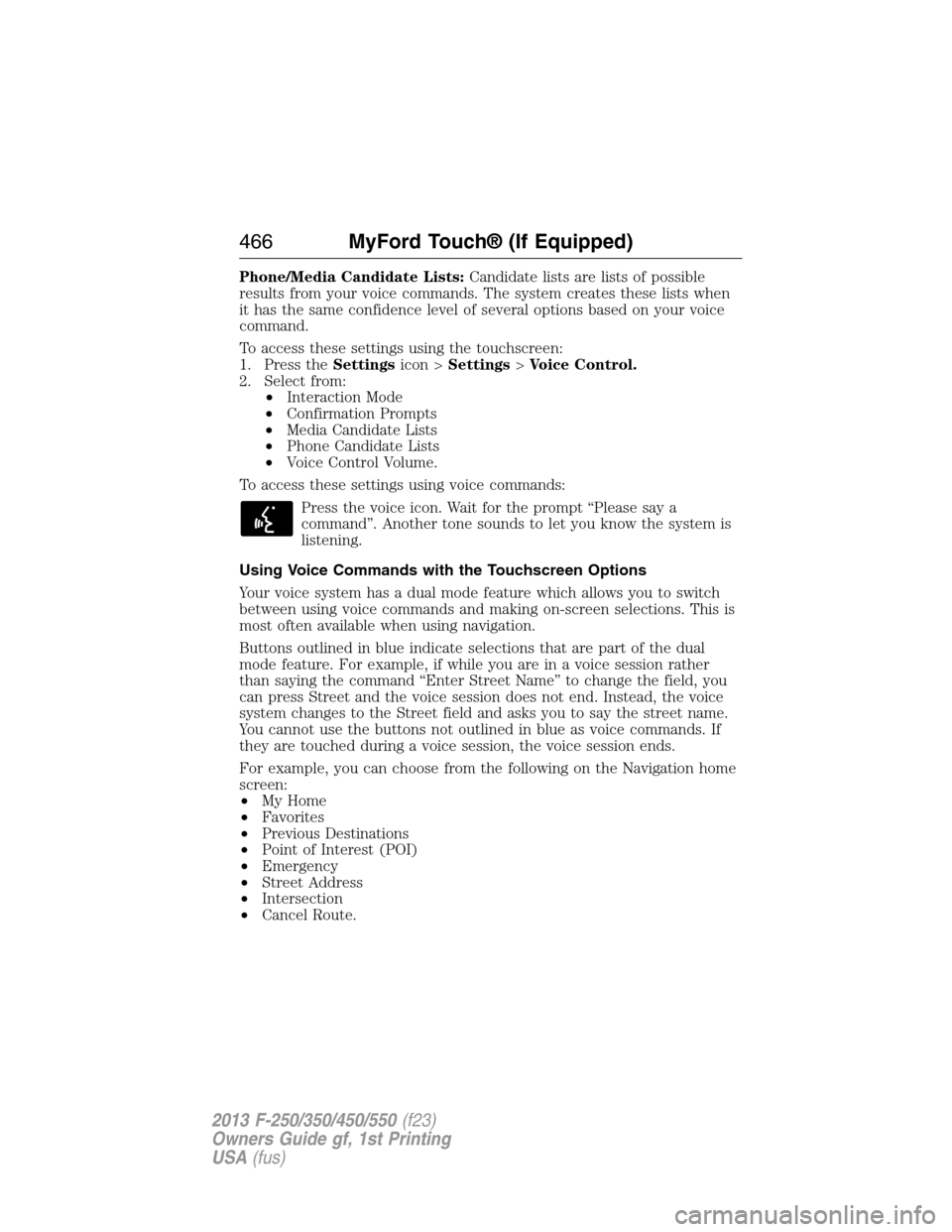
Phone/Media Candidate Lists:Candidate lists are lists of possible
results from your voice commands. The system creates these lists when
it has the same confidence level of several options based on your voice
command.
To access these settings using the touchscreen:
1. Press theSettingsicon >Settings>Voice Control.
2. Select from:
•Interaction Mode
•Confirmation Prompts
•Media Candidate Lists
•Phone Candidate Lists
•Voice Control Volume.
To access these settings using voice commands:
Press the voice icon. Wait for the prompt “Please say a
command”. Another tone sounds to let you know the system is
listening.
Using Voice Commands with the Touchscreen Options
Your voice system has a dual mode feature which allows you to switch
between using voice commands and making on-screen selections. This is
most often available when using navigation.
Buttons outlined in blue indicate selections that are part of the dual
mode feature. For example, if while you are in a voice session rather
than saying the command “Enter Street Name” to change the field, you
can press Street and the voice session does not end. Instead, the voice
system changes to the Street field and asks you to say the street name.
You cannot use the buttons not outlined in blue as voice commands. If
they are touched during a voice session, the voice session ends.
For example, you can choose from the following on the Navigation home
screen:
•My Home
•Favorites
•Previous Destinations
•Point of Interest (POI)
•Emergency
•Street Address
•Intersection
•Cancel Route.
466MyFord Touch® (If Equipped)
2013 F-250/350/450/550(f23)
Owners Guide gf, 1st Printing
USA(fus)
Page 478 of 563
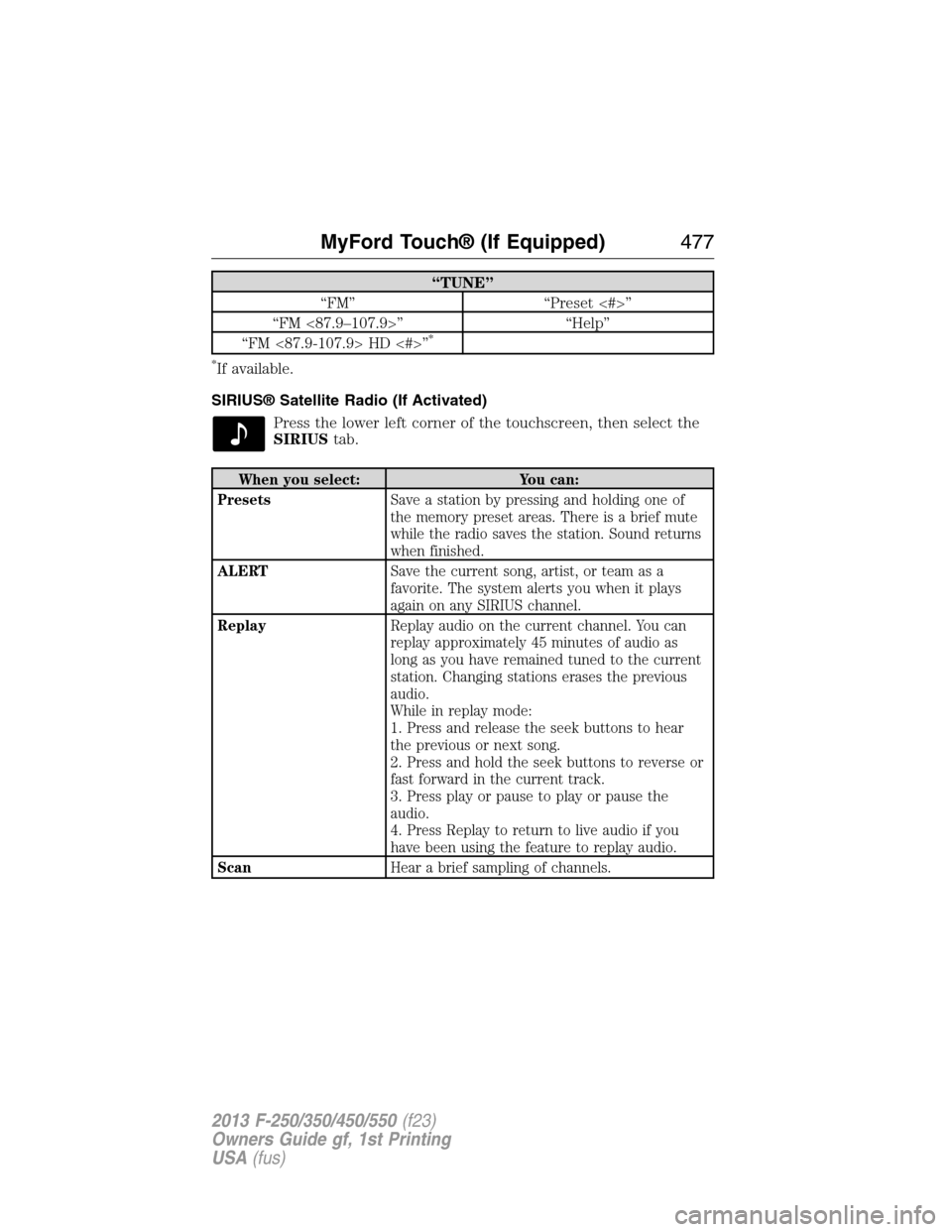
“TUNE”
“FM” “Preset <#>”
“FM <87.9–107.9>” “Help”
“FM <87.9-107.9> HD <#>”
*
*
If available.
SIRIUS® Satellite Radio (If Activated)
Press the lower left corner of the touchscreen, then select the
SIRIUStab.
When you select: You can:
PresetsSave a station by pressing and holding one of
the memory preset areas. There is a brief mute
while the radio saves the station. Sound returns
when finished.
ALERTSave the current song, artist, or team as a
favorite. The system alerts you when it plays
again on any SIRIUS channel.
ReplayReplay audio on the current channel. You can
replay approximately 45 minutes of audio as
long as you have remained tuned to the current
station. Changing stations erases the previous
audio.
While in replay mode:
1. Press and release the seek buttons to hear
the previous or next song.
2. Press and hold the seek buttons to reverse or
fast forward in the current track.
3. Press play or pause to play or pause the
audio.
4. Press Replay to return to live audio if you
have been using the feature to replay audio.
ScanHear a brief sampling of channels.
MyFord Touch® (If Equipped)477
2013 F-250/350/450/550(f23)
Owners Guide gf, 1st Printing
USA(fus)
Page 522 of 563

Help
Press theSettingsicon >Help,then select from the following:
Help
Where Am I?View your vehicle’s current location, if your
vehicle is equipped with navigation. If your
vehicle is not equipped with navigation,
nothing displays.
System InformationTouchscreen system serial number.
Your vehicle identification number (VIN).
Touchscreen system software version.
Navigation system version.
Map database version.
Sirius satellite radio electronic serial number
(ESN).
Gracenote® Database Information and Library
version.
Software LicensesView the licenses for any software and
applications installed on your system.
Driving RestrictionsCertain features are not accessible when your
vehicle is moving.
911 AssistTurn on and turn off the 911 Assist feature.
See911 Assistin theSYNC applications
and servicessection.
In Case of Emergency (ICE) Speed Dial
allows you to save up to two numbers as ICE
contacts for quick access if there is an
emergency. SelectEditto access your
phonebook and then select the desired
contacts. The numbers then appear as options
on this screen for the ICE 1 and ICE 2
buttons. The ICE contacts you select appear
at the end of the 911 Assist call process.
Voice Command ListView categorized lists of voice commands.
To access Help using the voice commands, press the voice button, then,
after the tone, say “Help”. The system provides allowable voice
commands for the current mode.
MyFord Touch® (If Equipped)521
2013 F-250/350/450/550(f23)
Owners Guide gf, 1st Printing
USA(fus)