Page 59 of 386
The dual mode feature is also available when the voice system displays a
list of items to pick from during a voice session, where you would be
able to touch the line item or say “Line 2”. If a command is not
understood or there are multiple options, the system returns a list for
you to choose from.
ENTERTAINMENT
Your system offers many media options. You can access these options
using the touchscreen or voice commands.
Browsing Device Content
When listening to any type of audio, you can browse through other
devices without having to change sources. For example, if you are
currently listening to the radio, you can browse all the artists that are
stored on your USB device.
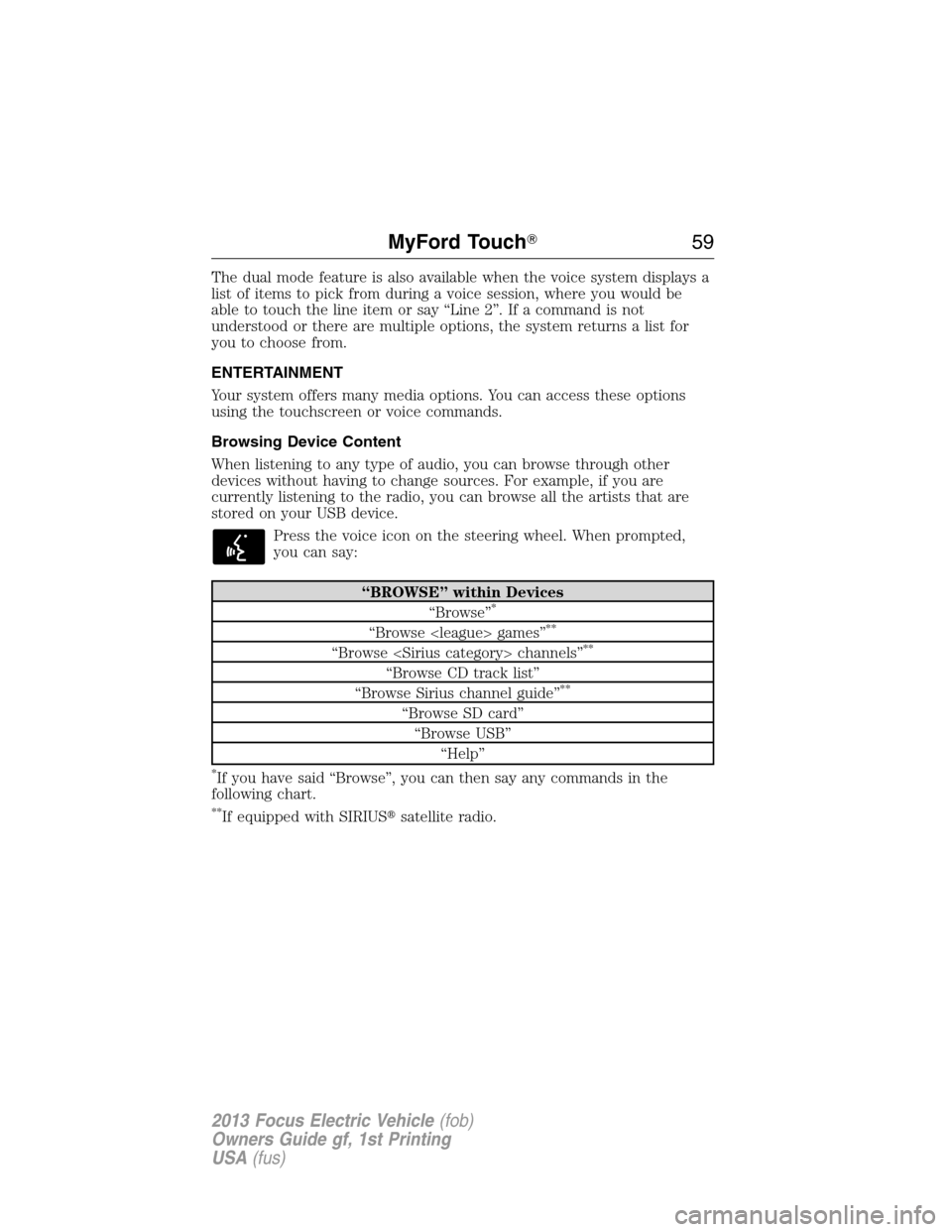
Press the voice icon on the steering wheel. When prompted,
you can say:
“BROWSE” within Devices
“Browse”*
“Browse games”**
“Browse channels”**
“Browse CD track list”
“Browse Sirius channel guide”**
“Browse SD card”
“Browse USB”
“Help”
*If you have said “Browse”, you can then say any commands in the
following chart.
**If equipped with SIRIUS�satellite radio.
MyFord Touch�59
2013 Focus Electric Vehicle(fob)
Owners Guide gf, 1st Printing
USA(fus)
Page 61 of 386
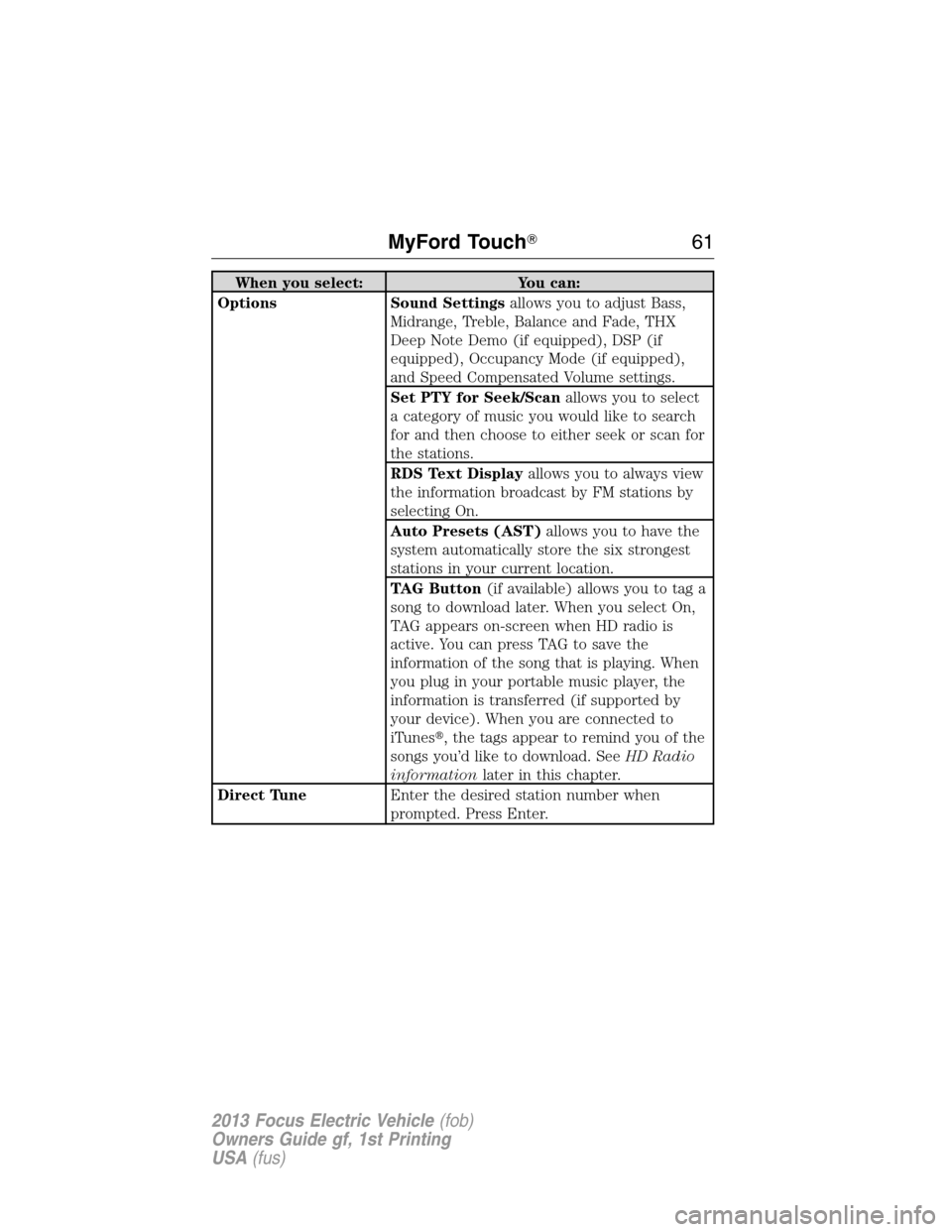
When you select: You can:
Options Sound Settingsallows you to adjust Bass,
Midrange, Treble, Balance and Fade, THX
Deep Note Demo (if equipped), DSP (if
equipped), Occupancy Mode (if equipped),
and Speed Compensated Volume settings.
Set PTY for Seek/Scanallows you to select
a category of music you would like to search
for and then choose to either seek or scan for
the stations.
RDS Text Displayallows you to always view
the information broadcast by FM stations by
selecting On.
Auto Presets (AST)allows you to have the
system automatically store the six strongest
stations in your current location.
TAG Button(if available) allows you to tag a
song to download later. When you select On,
TAG appears on-screen when HD radio is
active. You can press TAG to save the
information of the song that is playing. When
you plug in your portable music player, the
information is transferred (if supported by
your device). When you are connected to
iTunes�, the tags appear to remind you of the
songs you’d like to download. SeeHD Radio
informationlater in this chapter.
Direct TuneEnter the desired station number when
prompted. Press Enter.
MyFord Touch�61
2013 Focus Electric Vehicle(fob)
Owners Guide gf, 1st Printing
USA(fus)
Page 71 of 386
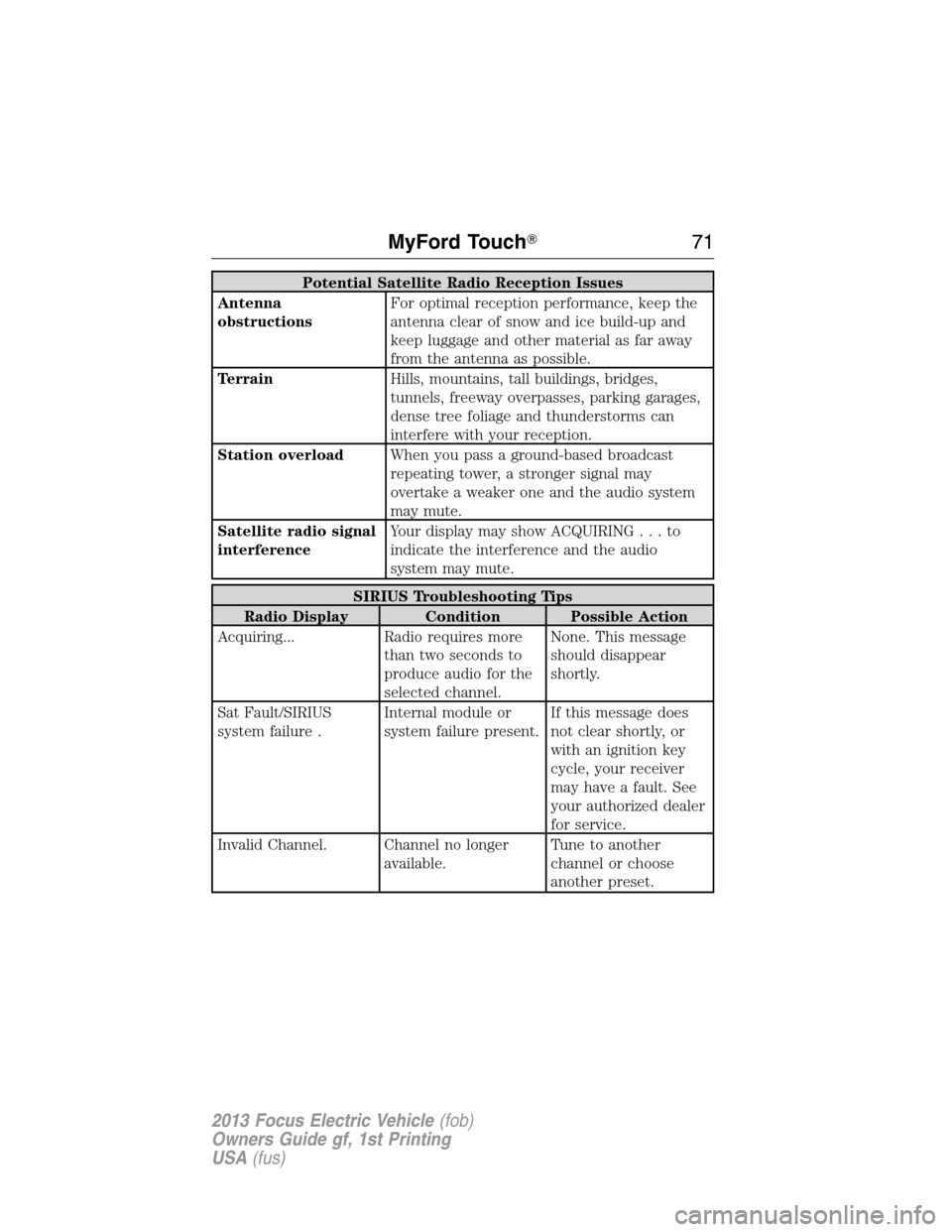
Potential Satellite Radio Reception Issues
Antenna
obstructionsFor optimal reception performance, keep the
antenna clear of snow and ice build-up and
keep luggage and other material as far away
from the antenna as possible.
TerrainHills, mountains, tall buildings, bridges,
tunnels, freeway overpasses, parking garages,
dense tree foliage and thunderstorms can
interfere with your reception.
Station overloadWhen you pass a ground-based broadcast
repeating tower, a stronger signal may
overtake a weaker one and the audio system
may mute.
Satellite radio signal
interferenceYour display may show ACQUIRING...to
indicate the interference and the audio
system may mute.
SIRIUS Troubleshooting Tips
Radio Display Condition Possible Action
Acquiring... Radio requires more
than two seconds to
produce audio for the
selected channel.None. This message
should disappear
shortly.
Sat Fault/SIRIUS
system failure .Internal module or
system failure present.If this message does
not clear shortly, or
with an ignition key
cycle, your receiver
may have a fault. See
your authorized dealer
for service.
Invalid Channel. Channel no longer
available.Tune to another
channel or choose
another preset.
MyFord Touch�71
2013 Focus Electric Vehicle(fob)
Owners Guide gf, 1st Printing
USA(fus)
Page 72 of 386
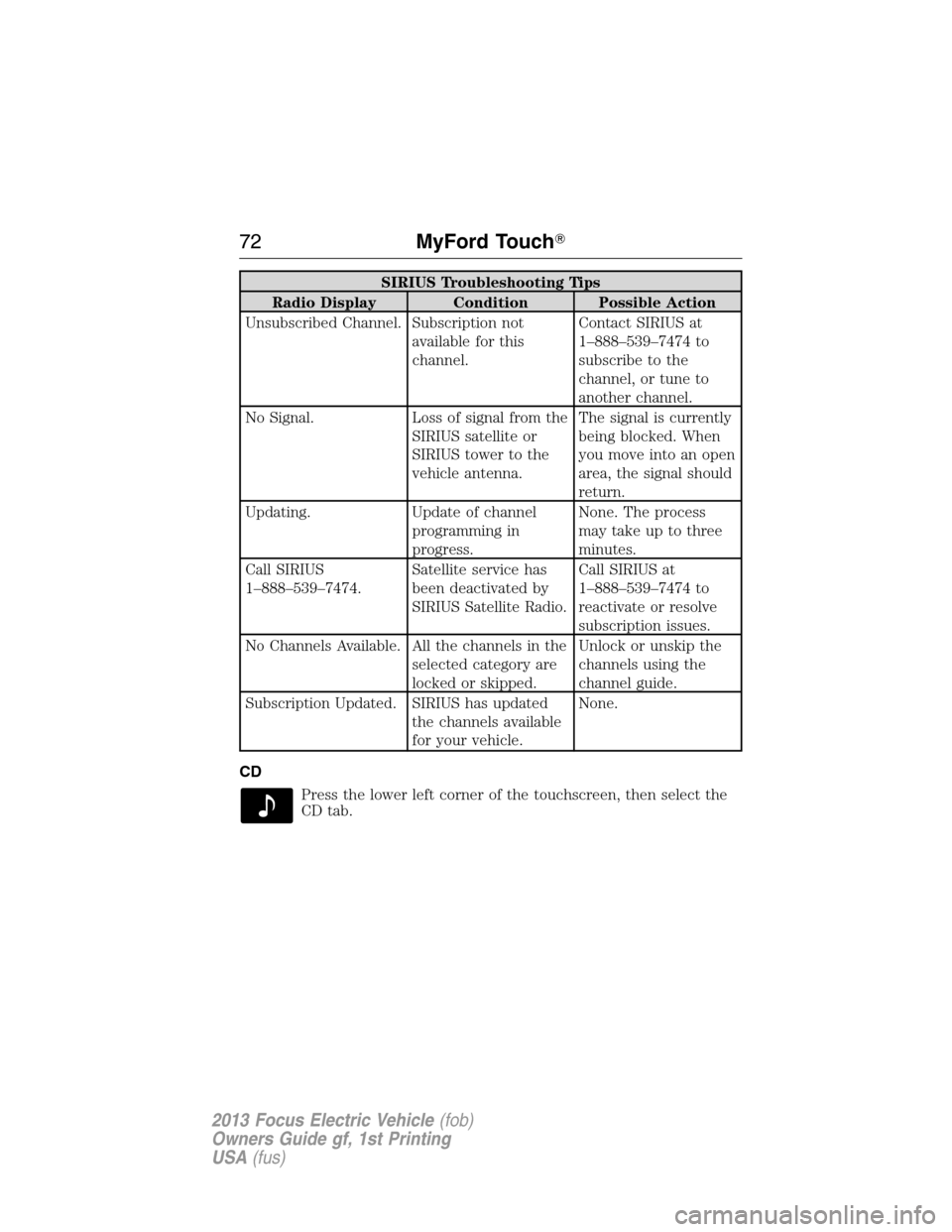
SIRIUS Troubleshooting Tips
Radio Display Condition Possible Action
Unsubscribed Channel. Subscription not
available for this
channel.Contact SIRIUS at
1–888–539–7474 to
subscribe to the
channel, or tune to
another channel.
No Signal. Loss of signal from the
SIRIUS satellite or
SIRIUS tower to the
vehicle antenna.The signal is currently
being blocked. When
you move into an open
area, the signal should
return.
Updating. Update of channel
programming in
progress.None. The process
may take up to three
minutes.
Call SIRIUS
1–888–539–7474.Satellite service has
been deactivated by
SIRIUS Satellite Radio.Call SIRIUS at
1–888–539–7474 to
reactivate or resolve
subscription issues.
No Channels Available. All the channels in the
selected category are
locked or skipped.Unlock or unskip the
channels using the
channel guide.
Subscription Updated. SIRIUS has updated
the channels available
for your vehicle.None.
CD
Press the lower left corner of the touchscreen, then select the
CD tab.
72MyFord Touch�
2013 Focus Electric Vehicle(fob)
Owners Guide gf, 1st Printing
USA(fus)
Page 75 of 386
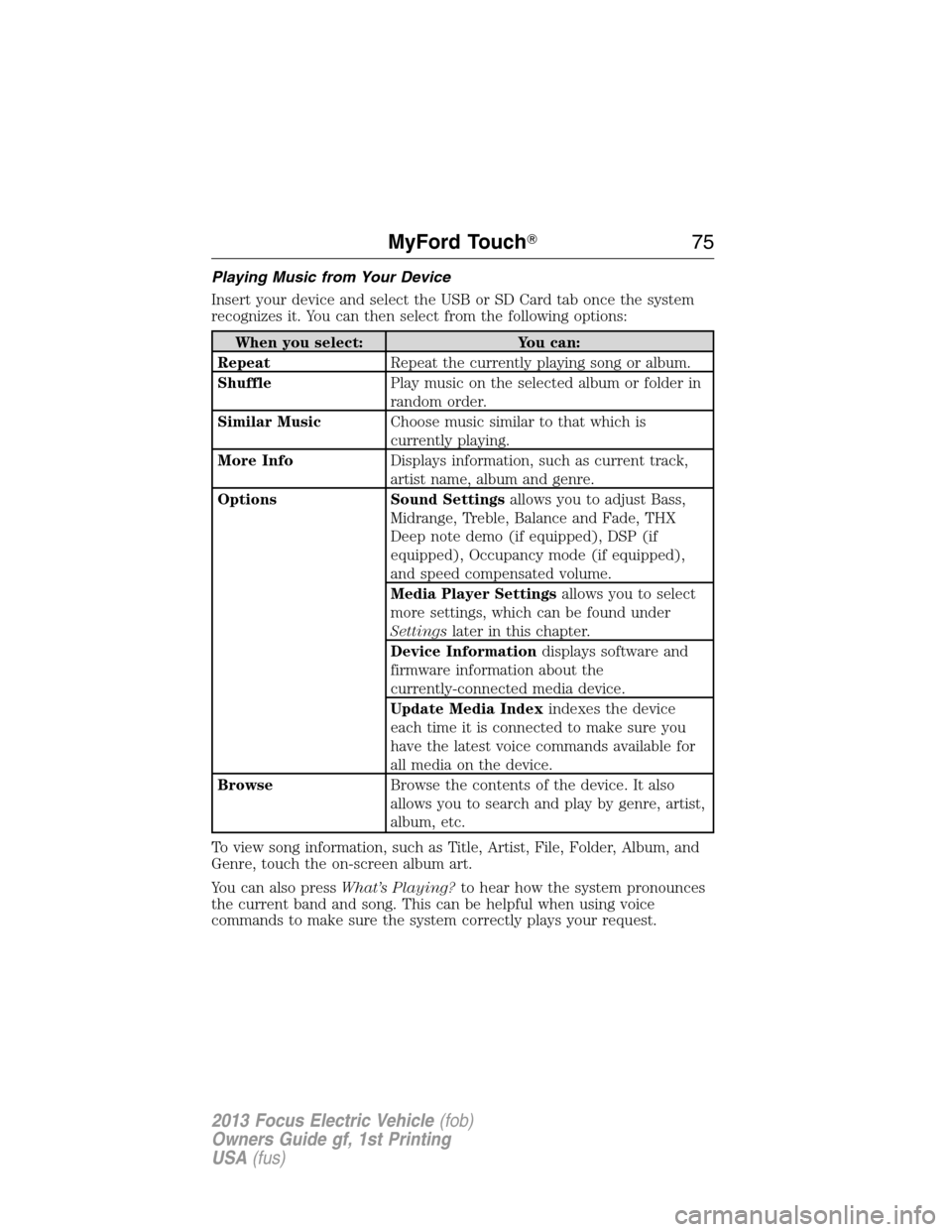
Playing Music from Your Device
Insert your device and select the USB or SD Card tab once the system
recognizes it. You can then select from the following options:
When you select: You can:
RepeatRepeat the currently playing song or album.
ShufflePlay music on the selected album or folder in
random order.
Similar MusicChoose music similar to that which is
currently playing.
More InfoDisplays information, such as current track,
artist name, album and genre.
Options Sound Settingsallows you to adjust Bass,
Midrange, Treble, Balance and Fade, THX
Deep note demo (if equipped), DSP (if
equipped), Occupancy mode (if equipped),
and speed compensated volume.
Media Player Settingsallows you to select
more settings, which can be found under
Settingslater in this chapter.
Device Informationdisplays software and
firmware information about the
currently-connected media device.
Update Media Indexindexes the device
each time it is connected to make sure you
have the latest voice commands available for
all media on the device.
BrowseBrowse the contents of the device. It also
allows you to search and play by genre, artist,
album, etc.
To view song information, such as Title, Artist, File, Folder, Album, and
Genre, touch the on-screen album art.
You can also pressWhat’s Playing?to hear how the system pronounces
the current band and song. This can be helpful when using voice
commands to make sure the system correctly plays your request.
MyFord Touch�75
2013 Focus Electric Vehicle(fob)
Owners Guide gf, 1st Printing
USA(fus)
Page 81 of 386
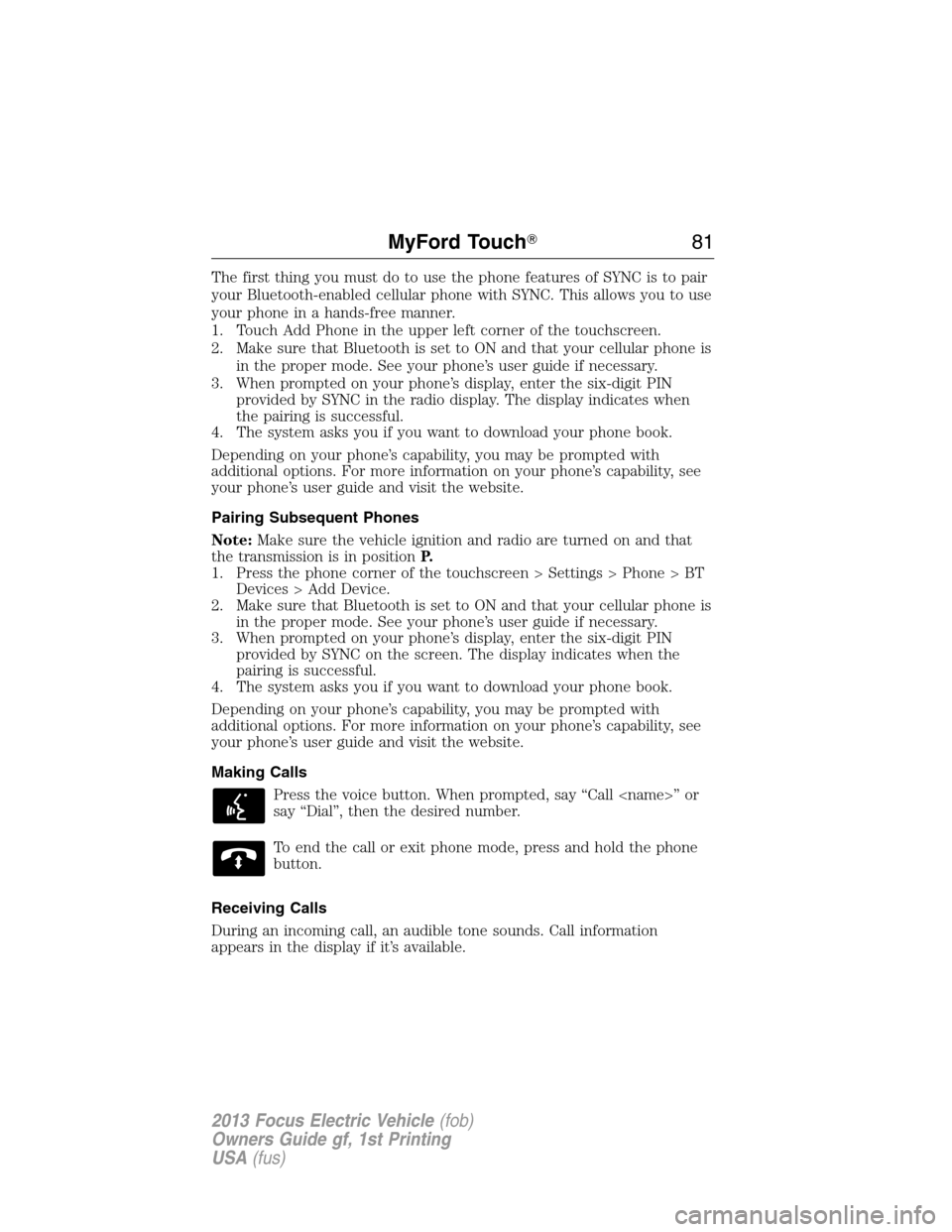
The first thing you must do to use the phone features of SYNC is to pair
your Bluetooth-enabled cellular phone with SYNC. This allows you to use
your phone in a hands-free manner.
1. Touch Add Phone in the upper left corner of the touchscreen.
2. Make sure that Bluetooth is set to ON and that your cellular phone is
in the proper mode. See your phone’s user guide if necessary.
3. When prompted on your phone’s display, enter the six-digit PIN
provided by SYNC in the radio display. The display indicates when
the pairing is successful.
4. The system asks you if you want to download your phone book.
Depending on your phone’s capability, you may be prompted with
additional options. For more information on your phone’s capability, see
your phone’s user guide and visit the website.
Pairing Subsequent Phones
Note:Make sure the vehicle ignition and radio are turned on and that
the transmission is in positionP.
1. Press the phone corner of the touchscreen > Settings > Phone > BT
Devices > Add Device.
2. Make sure that Bluetooth is set to ON and that your cellular phone is
in the proper mode. See your phone’s user guide if necessary.
3. When prompted on your phone’s display, enter the six-digit PIN
provided by SYNC on the screen. The display indicates when the
pairing is successful.
4. The system asks you if you want to download your phone book.
Depending on your phone’s capability, you may be prompted with
additional options. For more information on your phone’s capability, see
your phone’s user guide and visit the website.
Making Calls
Press the voice button. When prompted, say “Call ” or
say “Dial”, then the desired number.
To end the call or exit phone mode, press and hold the phone
button.
Receiving Calls
During an incoming call, an audible tone sounds. Call information
appears in the display if it’s available.
MyFord Touch�81
2013 Focus Electric Vehicle(fob)
Owners Guide gf, 1st Printing
USA(fus)
Page 83 of 386
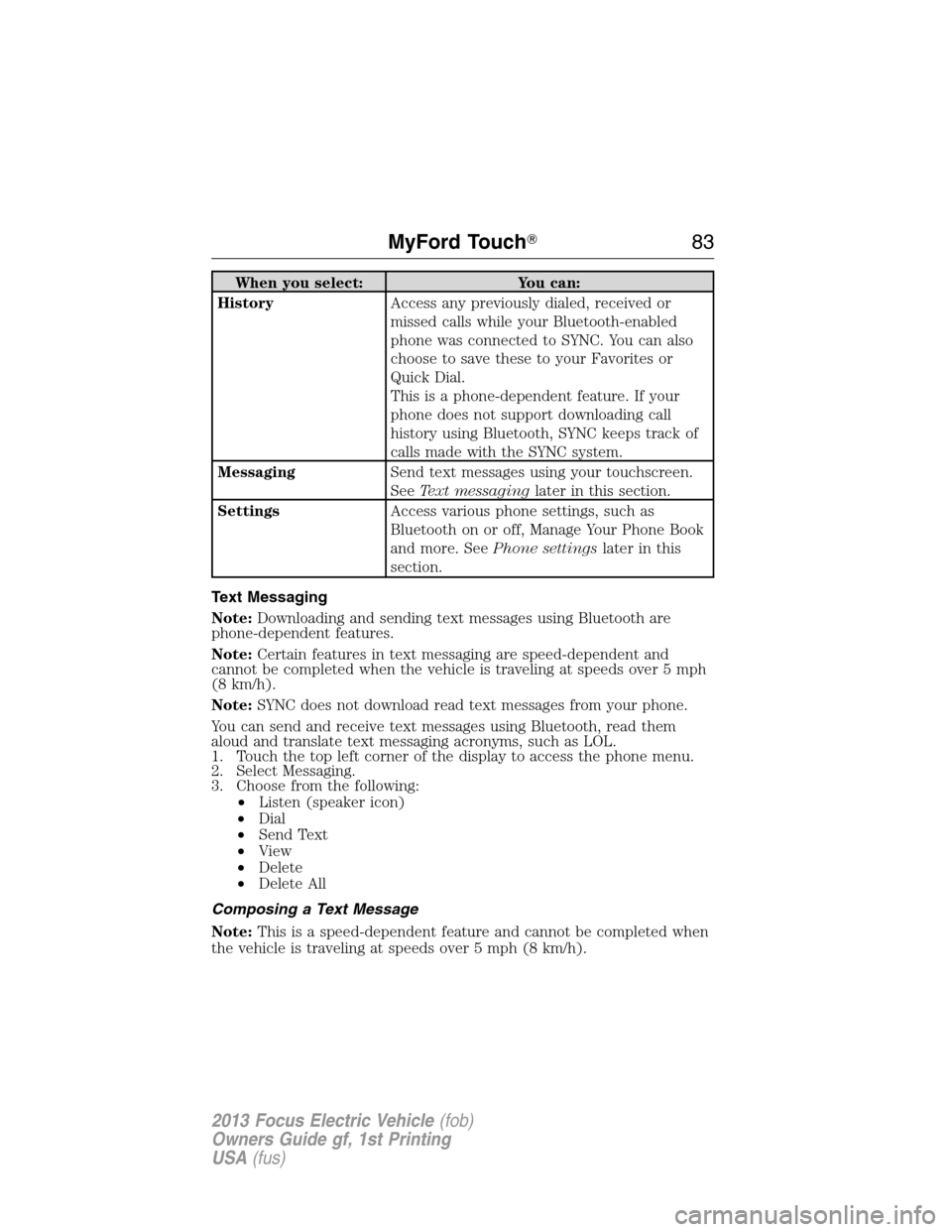
When you select: You can:
HistoryAccess any previously dialed, received or
missed calls while your Bluetooth-enabled
phone was connected to SYNC. You can also
choose to save these to your Favorites or
Quick Dial.
This is a phone-dependent feature. If your
phone does not support downloading call
history using Bluetooth, SYNC keeps track of
calls made with the SYNC system.
MessagingSend text messages using your touchscreen.
SeeText messaginglater in this section.
SettingsAccess various phone settings, such as
Bluetooth on or off, Manage Your Phone Book
and more. SeePhone settingslater in this
section.
Text Messaging
Note:Downloading and sending text messages using Bluetooth are
phone-dependent features.
Note:Certain features in text messaging are speed-dependent and
cannot be completed when the vehicle is traveling at speeds over 5 mph
(8 km/h).
Note:SYNC does not download read text messages from your phone.
You can send and receive text messages using Bluetooth, read them
aloud and translate text messaging acronyms, such as LOL.
1. Touch the top left corner of the display to access the phone menu.
2. Select Messaging.
3. Choose from the following:
•Listen (speaker icon)
•Dial
•Send Text
•View
•Delete
•Delete All
Composing a Text Message
Note:This is a speed-dependent feature and cannot be completed when
the vehicle is traveling at speeds over 5 mph (8 km/h).
MyFord Touch�83
2013 Focus Electric Vehicle(fob)
Owners Guide gf, 1st Printing
USA(fus)
Page 84 of 386
Note:Downloading and sending text messages using Bluetooth are
phone-dependent features.
1. Touch the top left corner of the display to access the phone menu.
2. Press Messaging > Send Text.
3. Enter a phone number or choose from your phone book.
4. You can select from the following options:
•Sendsends the message as it is.
•Edit Textallows you to customize the pre-defined message or
create a message on your own
You can then preview the message and verify the recipient as well as
update the message list and send it to a connected device (i.e., USB
drive).
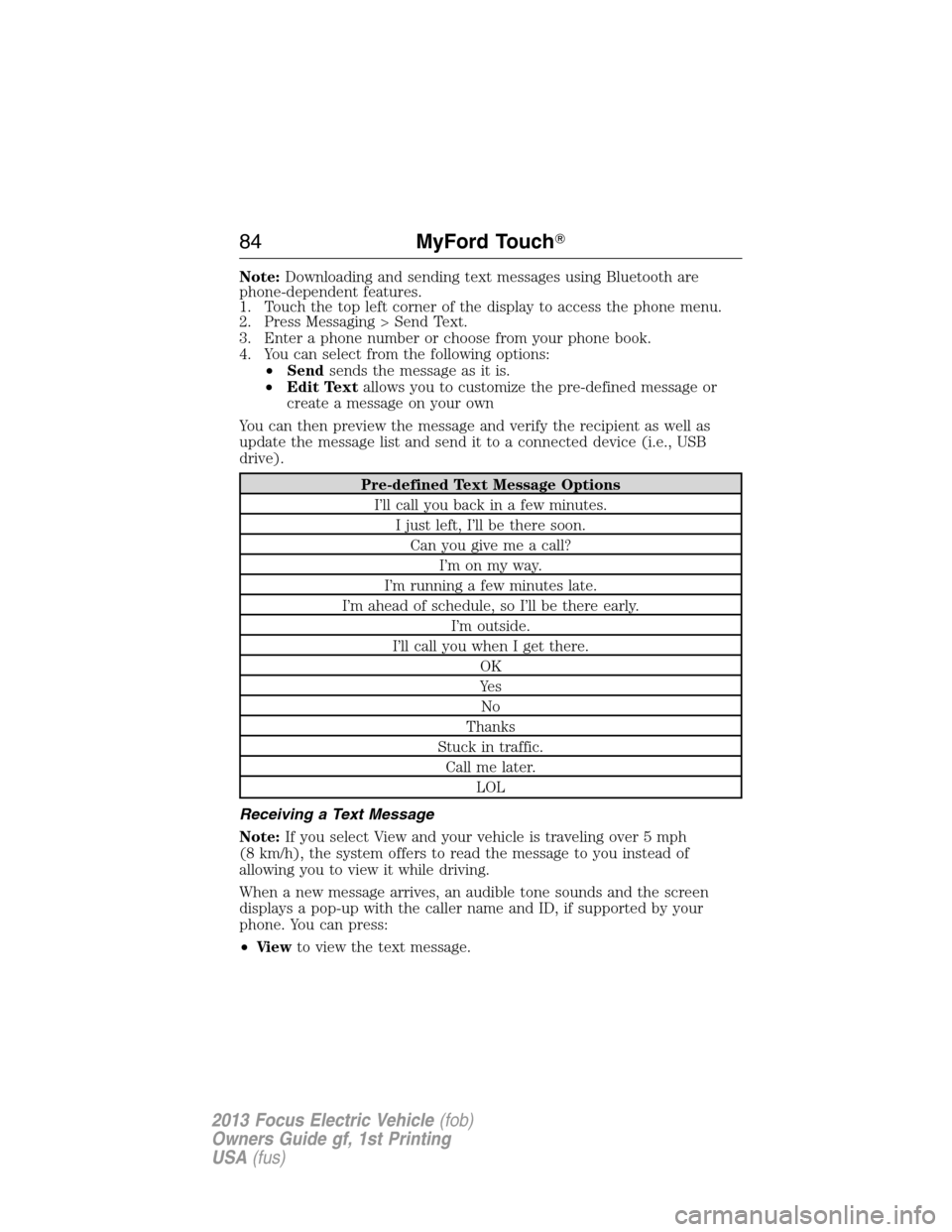
Pre-defined Text Message Options
I’ll call you back in a few minutes.
I just left, I’ll be there soon.
Can you give me a call?
I’m on my way.
I’m running a few minutes late.
I’m ahead of schedule, so I’ll be there early.
I’m outside.
I’ll call you when I get there.
OK
Ye s
No
Thanks
Stuck in traffic.
Call me later.
LOL
Receiving a Text Message
Note:If you select View and your vehicle is traveling over 5 mph
(8 km/h), the system offers to read the message to you instead of
allowing you to view it while driving.
When a new message arrives, an audible tone sounds and the screen
displays a pop-up with the caller name and ID, if supported by your
phone. You can press:
•Vi e wto view the text message.
84MyFord Touch�
2013 Focus Electric Vehicle(fob)
Owners Guide gf, 1st Printing
USA(fus)