2013 AUDI A5 COUPE battery
[x] Cancel search: batteryPage 37 of 294

@ For the sake of the environment
Dispose of dead batteries properly so as
not to pollute the environment.
@ Tips
The replacement battery must be the
same specification as the original.
Emergency unlocking of the ignition key
In the event of malfunctions in the electrical
system, it may happen that you cannot re move the ignition key .
• Remove the mechanical key<:? page 34.
• Lock the vehicle using the mechanical key
<:?page 37.
• Have the e lectrica l system inspected by an
authori zed Audi dealership .
Locking and unlocking the vehicle with
the remote control
Fig. 22 Remote master key: function but tons
• Press button @to unlock the vehicle
Qfig . 22.
• Press button fij to lock the vehicle QA in
General description on page
32 .
• Press button ,c:;5 briefly to unlock the rear
lid .
• Press the button
,c:;5 for at least one second
to open the rear lid .
• Push the red
I PANIC I button to activate the
panic function. The horn sounds and the
turn s ignals flash . Push the red
I PANIC ! but
ton again to deactivate the panic function.
If the vehicle is unlocked and no door, the rear
lid or the hood is opened within 60 seconds,
Opening and closing 35
the vehicle locks itself again automat ica lly.
This feature prevents the vehicle from being
accidentally left unlocked over a long period of time.
It depends on the settings in the radio or
MMI* whether the entire vehicle is unlocked
or only certain doors <:?
page 37.
On vehicles with automatic transmission, the
selector lever must be in the P position, other
wise the vehicle cannot be locked.
A WARNING
Read and follow all WARNINGS ¢.&. in
General description on page
32.
(D Tips
- In order to make sure the locking func
tion is working, you should a lways keep
your eye on the vehicle to make sure it is properly locked.
- Do not use the remote control if you are
inside the car, otherwise you may unin
tentionally lock the vehicle, and then you
would set off the anti-theft alarm when
you try to start the eng ine or open a
door . In case this happens anyhow, push
t he unlock button@.
- Use the pan ic function only if you are in
an emergency s ituation.
-Add itional remote control key functions
¢page 40 .
Page 38 of 294

36 Opening and clo sing
locking and unlocking with convenience
key
Appl ies t o vehicles : wit h convenience key
The doors ond the rear lid can be unlocked
and locked without operating the master key.
Fig . 23 Door hand le: lock ing the v ehi cle
Unlocking vehicl e
.. Take hold of the door hand le . The door is
unlocked automatically .
.. Pull the handle to open th e door .
locking vehicle
.. Move the selecto r lever to the P position
(a ut oma tic transmiss ion *) , othe rwi se the
vehicle cannot be locked.
.. To lock the vehicle , close the door and touch
the sensor in th e door hand le
onc e¢ fig. 23
c:> A in General description on page 32 . Do
not reach inside the door handle .
The vehicle ca n be locked and unlocked at any
door. The remote control key cannot be more
t han 1.5 m away from the door hand le. It
makes no difference whether the m aster key
is in your jacket pocket or i n your brief ca se .
If you grip the door handle while lo cking, th is
can adversely affect the lock ing funct ion.
I t is not possible to re-open the door for a
brief period direct ly after closing it. This al
l ows you to ensure that the doors are properly
locked.
I t depends on the sett ings in the radio or
MMI* whether the e ntire vehicle is unlocked
or one of the doors
c:> page 3 7 .
A WARNING
-
Read and follow all WARNINGS c:> .&. in
General description on page
32 .
(D Tips
If your vehicle has been standing for an ex
tended per iod, please note the following:
- The proximity sensors are deactivated af-
ter a few days to save power. You then
have to pull on the door handle once to
unlock the vehicle and a second t ime to
open the vehicle .
- To prevent the battery from being d is
charged and to preserve yo ur vehicle 's
ability to start for as long as possib le,
the energy managemen t system gra du
ally switches off u nnecessa ry c onven
ience func tions.
It is possib le th at you
w ill not be able to unloc k your veh icle us
ing these convenience func tions.
- F or Declar ation of Comp lian ce to Unite d
States FC C and Ind ustry Canada reg ula
tions
¢ page 276.
locking and unlocking the vehicle from
inside
Fi g. 24 Drive r's doo r: pow er lock ing sw it c h
.. Press the b utton B to lock the vehicle c::> ,& .
.. Press the button @ to unlock the vehicle
c::> fig. 24.
If you lock the veh icle using the power loc king
switch, p lease note the followi ng:
- I f a door is open, the veh icle canno t be
loc ked u sing the power loc king system
sw itch.
Page 43 of 294

.. Insert the key into the lock of the driver's
door.
.. Turn the key to position ~
fig. 31 @ until a ll
the windows have reached the desired posi
tion and the panoramic tilting sunroof is tilt
ed .
Con venie nce clo sing f eature
.. Use the emergency key or pull the mechani
ca l key out of the master key¢
page 34.
.,. Turn the key in the lock of the driver's door
to the lock position ® until the windows
and the panoram ic tilting sunroof are closed
~A .
When the panoramic tilting sunroof is tilted/
closed , the electric sun shade* is also opened/
closed .
A WARNING
-Never close the windows and thepanor
amic t ilting sunroof inatten tively and
without checking -there is r is k of injury .
- You must always watch when the win
dows are being ra ised so that no one can
be trapped. If you release the key, the
closing action is immediately canceled.
- Always read and heed WARNING
¢ &. in
General description on page
32 .
Correcting window regulator
malfunction
After disconnecting the vehicle battery, the
one-touch up and down feature must be acti
vated again.
.. Pull and hold t he power w indow switch un
ti l the window is completely closed .
.. Re lease the switch and pull the switch again
for one second.
Openin g an d clos ing 41
Panoramic tilting
sunroof
Operation
=r.;-;-1= _..::__:J_
B ([j' G
o .. o
l
Fig. 32 Section of hea dline r: sw it c h for su nroof
.,. To ti lt the sunroof, press the switch briefly .
.. To close the sunroof, pull the switch briefly.
.,. To set an intermediate position, press/pull
the switch unt il the roof reaches the desired
position.
After the ignition is switched off, you can still
operate the sunroof for about 10 minutes. As
soon as the driver's o r passenger's doo r is
opened, the switch is inoperative.
Sun blind
The sun blind can be opened and closed man
ually in any posit ion.
A WARNING
Pay careful attention when closing the
sunroof -otherw ise serio us in jury could re
sult! For this reason, always remove the ig
nition key when leaving the vehicle .
(D Note
Always close your sun roof when leav ing
your vehicle . Sudden rain can cause dam
age to the interior equipment of your vehi
cle, particu larly the electronic equipment.
(D Tips
-In format ion on convenience opening/
closing
¢ page 40 .
Page 90 of 294

88 Transmission
Emergency release of the selector lever
App lies to vehicles: with tiptronic
If the vehicle's power supply foils, the selec
tor lever con be released in on emergency.
Fig. 88 Removing ashtray insert
Fig. 89 Emergency release for selector lever
The emergency release is located under the in
sert for the ashtray.
.. Slide open the cover for the ashtray.
.. Release the ashtray by push ing the switch
@¢fig. 88 to the right.
.. Remove the ashtray insert@.
.. Now you can see a small cover in the ash
tray holder on the front of the ashtray re
cess.
.. Re lease and remove this cover .
.. You now have access to a bolt. Using a
screwdriver or similar, press the bolt down
and hold it down ¢
fig. 89.
.. Now press the interlock and move the selec-
tor lever to the N pos ition .
The selector lever can only be moved from the
P position if the ignition key is in the lock and
the ignition is turned on. If the vehicle has to
be pushed or towed if the power supply fa ils
(e.g. battery is discharged), the selector lever
must first be moved to the N position using
the emergency locking device.
S tronic ®
Introduction
Applies to vehicles: with S tronic transm ission
Your vehicle is equipped with an electronical
ly-controlled manual transmission called S
tronic ®. Two independent clutches transfer
the power between the engine and transmis
sion . They rep lace the torque converter used
in conventional automatic transmissions and
allow the vehicle to accelerate without a no
ticeable interruption in traction.
You can also shift the gears
manually using
tiptronic , if you like ¢ page 92.
Selector lever positions
Applies to vehicles: wit h S t ronic tra nsmi ssio n
Fig. 90 Display: Se lector lever posit ions
The instrument cluster display shows the cur
rent se lector lever position and current gear .
P -Park
The wheels are mechanically locked in this po
sition. You can only shift into Park when the
vehicle is
stationary ¢ /1. .
To shift in and out of P, press the interlock
button in the selector lever
while press ing the
brake pedal.
R - Reverse
Only shift into reverse gear when the vehicle is
stationary and the engine is running at idle
speed ¢
/1..
To select R, press the interlock button while
pressing the brake pedal. The back-up lights
switch on in the R position if the ignition is
switched on .
Page 96 of 294
94 Transmi ssion
There is a syste m ma lf un ction in t he tr ansmis
sion. The transm ission is switching to emer
gency mode. Th is mode only sh ifts into cer
tain gears or will no longer shift at all. The en
gine may stall. Drive to your authorized Audi
dealer o r qualified repair facility immediately
to have the malfunction co rrected .
[O] Ii) Transmi ssion malfunct ion: No re verse
You can conti nue d riving
There is a system ma lf u nction in the transmis
sion. The transmission is sw itching to emer
gency mode. Th is mode only shifts into cer
tain gears or will no longer shift at a ll. The en
g ine may stall. You cannot engage the reve rse
gear . D rive to your authorized A udi dealer or
qua lified r epai r faci lity immediate ly to have
the ma lf u nction co rrec ted .
[O] Tran smission malfunct ion : Stop veh icle
and shift to park .
Do not continue driving. Select the P se lector
lever pos ition and see your authorized Audi
dealer o r qualified repair facility for assis
tance.
({D Note
If the transmiss io n sw itches to emergency
mode, you sho uld take the vehicle to an
author ized Audi dealersh ip as soon as pos
sib le to have the cond ition co rrected.
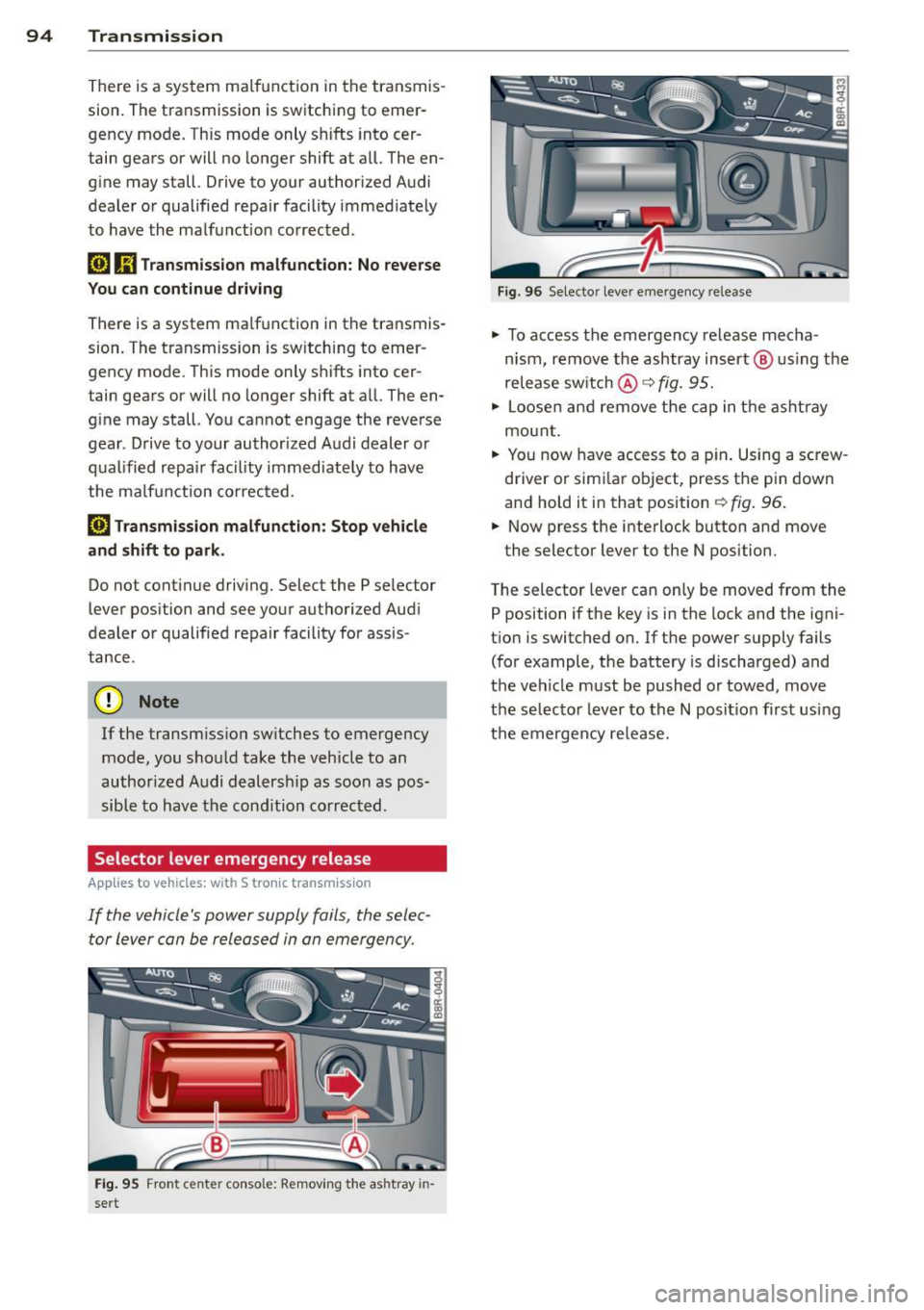
Selector lever emergency release
App lies to vehicles: with S tronic tr ansmiss ion
If the vehicle's power supply fails , the selec
tor lever can be released in an emergency .
Fig. 95 Fron t cen te r con so le: Remov ing the ashtray in
sert
F ig. 96 Selec to r lever eme rge ncy re lease
"' To access the emergency re lease mecha
n ism , remove the ashtray insert @ us ing the
release switch @q
fig. 95.
"' Loosen an d remove the cap in t he asht ray
mou nt.
"' Yo u n ow have access to a p in . Using a sc rew
driver or simi la r object, press the pin down
and hold it in that position
¢ fig . 96.
"' Now press the i nterlock button and move
the selector lever to the N posi tion .
T he selector lever can only be moved from the
P position i f the key is in the lock and the igni
t ion is switched on. If the power supply fails
(for example, the battery is discharged) and
t h e veh icle must be pushed or towed, move
the selecto r lever to th e N position fi rst usi ng
the emergency re lease.
Page 110 of 294

108 Audi side assist
- Side assist is not active while you are
making the adjustment.
- Your settings are automatically stored
and assigned to the remote control key
being used.
Driver messages
App lies to vehicles: with side assist
If side assist switches off by itself, the LED in
the button turns off and a message will ap
pear in the instrument cluster display:
Audi side assist unavailable: Sensors blocked
The radar sensors' vision is affected. Do not
cover the area in front of the sensors with bike
wheels, stickers, dirt or other objects. Clean
the area in front of the sensors, if necessary
c:::;,page 106, fig. 111.
Audi side assist: Currently unavailable
Side assist cannot be switched on temporarily
because there is a malfunction (for example,
the battery charge level may be too low) .
Audi side assist: System fault!
The system cannot guarantee that it will de
tect vehicles correctly and it is switched off .
The sensors have been displaced or are faulty .
Have the system checked by an authorized
Aud i dealer or authorized Audi Service Facility
soon .
Audi side assist: Unavailable when towing
Side assist switches off automatically when a
factory-installed trailer hitch is connected to
the electrical connector on the trailer . There is
no guarantee the system will switch off when
using a retrofitted trailer hitch. Do not use
side assist when towing a trailer.
Page 158 of 294

156 Airbag system
There are some important things you have to
know to make sure that the effectiveness of
the system will not be impaired and that dis
carded components do not cause injury or pol
lute the environment.
A WARNING
Improper care, servicing and repair proce
dures can increase the risk of personal in
jury and death by preventing an airbag
from deploying when needed or deploying an airbag unexpectedly:
- Never cover, obstruct, or change the
steering wheel horn pad or airbag cover
or the instrument panel or modify them
in any way.
- Never attach any objects such as cu
pholders or telephone mountings to the
surfaces covering the airbag units.
- For cleaning the horn pad or instrument
panel, use only a soft, dry cloth or one
moistened with plain water. Solvents or
cleaners could damage the airbag cover
or change the stiffness or strength of the
material so that the airbag cannot de
ploy and protect properly.
- Never repair, adjust, or change any parts
of the airbag system .
- All work on the steering wheel, instru
ment panel, front seats or electrical sys
tem (including the installation of audio
equipment, cellular telephones and CB
radios, etc .) must be performed by a
qualified technician who has the training
and special equipment necessary.
- For any work on the airbag system, we
strongly recommend that you see your
authorized Audi dealer or qualified work shop.
- Never modify the front bumper or parts
of the vehicle body.
- Always make sure that the side airbag
can inflate without interference:
- Never install seat covers or replace
ment upholstery over the front seat
backs that have not been specifically
approved by Audi . -
Never use additional seat cushions that
cover the areas where the side airbags
inflate.
- Damage to the original seat covers or
to the seam in the area of the side air
bag module must always be repaired
immediately by an authorized Audi
dealer .
- The airbag system can be activated only
once. After an airbag has inflated, it
must be replaced by an authorized Audi
dealer or qualified technician who has
the technical information, training and
special equipment necessary.
- The airbag system can be deployed only
once . After an airbag has been deployed,
it must be replaced with new replace
ment parts designed and approved espe
cially for your Audi model version. Re
placement of complete airbag systems
or airbag components must be per
formed by qualified workshops only.
Make sure that any airbag service action
is entered in your Audi Warranty
& Main
tenance booklet under
AIRBAG REPLACE
MENT RECORD .
-In accidents when an airbag is deployed,
the vehicle battery separates the alterna
tor and the starter from the vehicle elec
trical system for safety reasons with a pyrotechnic circuit interrupter.
- Work on the pyrotechnic circuit inter
rupter must only be performed by a
qualified dealer -risk of an accident!
- If the vehicle or the circuit interrupter
is scrapped, all applicable safety pre
cautions must be followed.
@ For the sake of the environment
Undeployed airbag modules and preten
sioners might be classified as Perchlorate Material -special handling may apply, see
www.dtsc.ca.gov/hazardouswaste/per
chlorate. When the vehicle or parts of the restraint system including airbag modules
safety belts with pretensioners are scrap
ped, all applicable laws and regulations
must be observed. Your authorized Audi
1J1-
Page 193 of 294

will have no warning from a sudden in
crease in engine speed as with a front
wheel drive vehicle. A lways drive at
speeds wh ich are suited to the road con
ditions -risk of crash .
Energy management
Starting ability is optimized
Energy management controls the distribution
of electrical energy and thus optimizes the
availability of electrical energy for starting
the engine.
If a vehicle with a conventional energy system
i s not driven for a long period of time, the bat
tery is discharged by idling current consumers
(e.g. immobilizer) . In certain circumstances it
can result in there being insufficient energy
avai lab le to start the engine.
I ntelligen t energy management in your vehi
cle handles the distribution of electrical ener
gy . Starting ability is marked ly improved and
the life of the battery is extended .
Basically, energy management consists o f
battery diagnosis, idling current manage
ment
and dynamic energy management.
Battery diagnosis
Batt ery d iagnosis continuously dete rmines
the state of the battery. Sensors determine
battery voltage, battery current and battery
temperature. This determines the current
state of charge and the power of the battery.
Idling current management
I dling current management reduces energy
consumption while the vehicle is stand ing.
With the ignition switched off, it contro ls the
energy supply to the various electrica l compo
nents . Data from battery diagnosis is consid
ered.
Depending on the battery's state of charge,
individual consumers are gradually turned off
to prevent excessive discharge of the battery
and thus mainta in start ing capability.
Intelligent technology 191
Dynamic energy management
While the vehicle is being driven, dynamic en
ergy management distrib utes the energy gen
erated according to the needs of the individ u
al components. It regulates consumption, so
that more e lectrical energy is not being used
than is being generated and ensures an opti
mal state of charge fo r the battery .
{!) Tips
- But even energy management cannot
negate the limits of physics. Consider
that the power and life of a battery are
limited .
- If start ing ability is threatened, the indi
cator light(•] appears¢
page 17.
What you should know
The highest priority is given to maintaining
starting capability.
The battery is severe ly taxed in short-distance
driv ing, in city traff ic and during the cold time
of year. Abundant electrical energy is re
quired, but on ly a little is generated . It is also
c rit ical if the engine is not running and electri
ca l components are turned on. In this in
stance ene rgy is be ing consumed but none is
being generated .
It is in precisely these situations that you will
notice energy management actively regulat
in g the distribution of energy.
Vehicle stands for an extended period
If you do not drive your vehicle over a period
of several days or weeks, electr ical compo
nents are gradually cut back or switched off .
T h is reduces energy consumption and main
tains starting capability over a longer period .
Some of the convenience functions may not
operate, such as the interior lights or the
power seat adjustment. The convenience
functions will be available again when you
switch on the ignition and start the engine.
•
•