2013 AUDI A5 CABRIOLET instrument cluster
[x] Cancel search: instrument clusterPage 85 of 290

Speed warning 2
Storing w arning 2 is recomme nded if you al
ways want to be rem inded of a certa in speed ,
for example when yo u are traveling in a coun
try that has a general ma ximum speed limit,
or if you do not want to exceed a spec ified
speed for winter tires.
The . (U SA mode ls)
I. (Canada mode ls)
speed warn ing 2 symbo l appears in the dis
p lay when you exceed the stored speed lim it.
Unlike warning 1, it will not go out u ntil the
ve hicle speed drops below the stored speed
limit.
Sett ing speed warning 2 ¢page
83.
(D Tips
Even tho ugh you r vehicle is equip ped with
a speed wa rni ng system, you should st ill
watch the speedometer to make sure you are not d riving faster tha n the speed lim it.
Speed warning 1: setting a speed limit
Warning threshold 1 is set by the !SET I but
ton.
F ig . 93 S ET button in the ins trument cluste r
Storing the maximum speed
.,. Drive at the desired max imum speed .
.,. Press the !SET I button in the instrument
pan el display ¢ fig . 9 3 for
1 secon d.
Resetting the maximum speed
.,. Driv e the vehicle at a speed of at least
3 mph (5 km/h)
.,. Press the !SET I bu tton for mo re tha n 2 sec
onds .
On the road 83
The . (U SA mode ls) /. (Canada mode ls)
s peed warning sym bo l wi ll appea r brief ly in
the d isplay when yo u re lease the
I SETI button
to indicate t hat the maximum speed has been
stored successfully.
The maxim um s peed rema in s stored until it is
c h anged by pressing the !SE TI button aga in
briefly or until it is deleted by a lengthy push
o n the button .
Speed warning 2: setting a speed limit
The radio or MMI* control unit is used to set ,
change or delete warning threshold
2.
.,. Se lect: !CAR ifunction b utton> Instrument
cluster > Speed warning .
Or
.,. Select: I CAR I function butt on > Car sys
tems *
contro l butto n > Driver assist >
Speed warning .
Warning threshold 2 can be set in the speed
range starting from 20 mph to 150 mph (30
km/ h to 240 km/h). Sett ings ca n eac h be ad
justed in interva ls of 6 mph ( 10 km/h) .
Page 89 of 290

N -Neutral
The transmission is in neutra l in this position .
Shift to this posit ion for standing with the
brakes applied
~ &. in Driving the automatic
transmission on page 89.
When the veh icle is stationary or at speeds
below 1 mph (2 km/h) , you must always apply
the footbrake before and while moving the lever out of N.
DIS -Normal position for driving forward
In the D/S position, the transmission can be
operated e ither in the normal mode Dor in
the sport mode S . To select the sport mode S,
pu ll the se lector lever back briefly. Pulling the
lever back again will select the normal mode
D. The instrument cluster display shows the
selected driving mode .
In the
normal mode D, the transmission auto
matica lly selects the suitable gear ratio. It de
pends on engine load, vehicle speed and driv
ing style .
Select the
sport mode S for sporty driving .
The vehicle makes full use of the engine's
power . Shifting may become noticeable when
accelerating.
When the vehicle is stationary or at speeds be low 1 mph (2 km/h), you must always apply
the foot brake before and while moving the lever to D/S out of N .
A WARNING
Read and follow all WARNINGS 9 &. in
Driving the automatic transmission on
page 89.
(D Note
Coasting downhill with the transmission in
N and the engine not running will result in
damage to the automatic transmission
and possibly the catalytic converter .
(D Tips
-On vehicles with drive select*, you can
adjust the sporty shift characteristics in
the
Dynamic driving mode .Swill appear
Transmission 87
in the instrument cluster display instead
ofD.
- If you accidentally select N whi le driving,
take your foot
off the accelerator pedal
immediately and wait for the engine to
slow down to idle before selecting D/S.
- If there is a power failure, the selector
lever will not move out of the P position .
The emergency release can be used if
this happens
9 page 92.
Automatic Shift Lock (ASL)
Applies to vehicles: with multitro nic/S tronic/t iptronic
The Automatic Shift Lock safeguards you
against accidentally shifting into a forward or the reverse gear and causing the vehicle to
move unintentionally.
Fig. 97 Shift gate: selecto r lever lock posit ions and re
lease b utto n highlighted
The selector lever lock is released as follows:
.,. Turn the ignition on.
.,. Step on the brake pedal.
At the same time
press and hold the re lease button on the
side of the gear selector knob
9 fig . 97 with
your thumb until you have moved the selec
tor lever to the desired position .
Automatic selector lever lock
The selector lever is locked in the P and N po
sitions when the ignition is turned on. You
must press the brake pedal and the release
button to select another position . As a re
minder to the driver, the following warning
appears in the instrument cluster display
when the selector is in P and N:
When stationary apply brake pedal while se-
lecting gear .,,_
Page 92 of 290

90 Transmi ssion
Hill descent control
App lies to vehicles: with multitronic/5 tronic/t iptronic
The hill descent control system assists th e
driver when driving down declines .
Hill descent control is activated when these
lector lever is in D/S and you press the brake
pedal. The transmission automatically selects
a gea r that is su itab le for the incl ine. Hill de
scent control tries to maintain the spe ed ach
i eved at the t ime of bra king , wi thin physical
a nd techn ica l limita tions. It m ay st il l be nec
essary to adjust the speed with the brakes .
Hill descent control switches off once the de
cline levels out or you press the accelerator pedal.
On vehicles w ith the cruise control system*
c::> page 84, hill descent contro l is also act ivat
ed when the speed is set.
.&, WARNING
H ill descen t control cannot overcome
physical limita tions, so it may not be able
to maintain a constant speed under all
conditions . Always be ready to app ly the
brakes.
Manual shift program
App lies to vehicles: with multitronic/S tronic/tiptron ic
Using the manual shift program you can
manually select gears.
F ig . 99 Ce nte r console: sh ifting t he gea rs man ually
Fig. 10 0 Stee ring w hee l: S hift b uttons*
Gear select ion with selector lever
N
--N
"' gi
The tiptronic mode can be selected ei ther with
the veh icle s tat io nary or on the move .
• Push the se lector lever to the right from D/
S. An M appears in the instrument cluster
display as soon as the transm ission has
shifted .
• To upshift, push t he se lector lever forwa rd
to the plus position
0 c::> fig. 99.
• To downshift, push the lever to the mi nus
posi tion
0 .
Gear selection with paddle levers*
The shift buttons are activated when these
lector lever is in D/S o r the tiptronic manua l
shift program .
• To upshift, touch the button on the r ight
0
c::> fig. 100 .
• To downshift, to uch the but ton on the left
0 .
• If you do not press a sh ift b utton wi thin a
sh ort time w hile in t he D/S posit ion, the
t ransmiss ion w ill retur n to automatic mode .
To kee p shifting using the shift b uttons,
move the selector lever to the r ight out of
the D/S pos it ion.
T he transm iss io n automatically sh ifts up or
down before cr itical engine speed is reached .
T he tran sm iss io n only al lows manual sh ifting
when the eng ine speed is with in the permit
ted range .
(D Tips
-Whe n you s hift into the ne xt l ower ge ar,
t he transmission will downshift only
Page 98 of 290

96 Audi adaptive cruise control and braking guard
Audi adaptive cruise
control
Description
Applies to vehicles: with Audi adap tive cruise control
Fig. 106 Detect ion range
What can Audi adaptive cruise control do?
The adaptive cruise control works in conjunc
tion with a radar sensor installed in the front
of the vehicle
c::> fig. 103, which is subject to
des ignated system limits
c::> page 96. Station
a ry objects are disregarded.
On open roads w ith no traff ic, adaptive cruise
control works like a regu lar cruise control sys
tem. The stored speed is main tained. When
approaching a moving vehicle detected up
ahead, the adaptive cruis e control system au
tomatically s lows down to match that vehi
cle's speed and then maintains the distance
that the driver previous ly stored. As soon as
the system does not detect a vehicle up
ahead, adaptive cruise control accelerates
back up to the stored speed .
Which functions can be controlled?
When you switch adaptive cruise contro l on,
you can set the current speed as the "control
speed"
c::> page 96, Switching on and off.
When driving, you can stop cruise control
c::> page 98 or change the speed c::> page 9 7
at any time.
You can a lso set the distance to the object
ahead and set the adaptive cruise control driv
i ng program
c::>page 98.
Switching on and off
Applies to vehicles: with Audi adaptive cruise control
Fig. 107 Selector lever : sw itc hin g on/off
Fig. 108 Instrument cluster: Audi adaptive cruise con
trol
You can set any speed between 20 mph and
95 mph (30 and 150 km/h).
Indicator lamps and messages in the instru
ment cluster disp lay inform you about the cur
rent system status and settings.
Switching Audi adaptive cruise control on
.,. Pull the lever toward you into position (D
c::> fig. 107. ACC standby appears in the in
strument cluster display.
Setting the speed and activating
regulation
.,. To set the current speed, press the ISETI
button c::> fig. 4. The set speed is shown in
Page 100 of 290

98 Audi adapti ve cruise control and bra king gu ard
Interrupting cruise control
App lies to vehicles: with Audi adaptive cruise control
Fig. 110 Selector lever
Requirement: adaptive cruise contro l must be
switched on
¢fig.110 (i).
Ove rrid ing crui se contr ol
.. To accelerate manually, press the accelera
tor pedal. The message
ACC o ver ride ap
pears .
.. To resume adaptive cruise control, remove
your foot from the gas pedal. The system re
turns again to the speed that was saved be
fore .
.. You can save a new speed at any t ime by
pressing the
I SETI button ¢ fig. 4 .
Canceling crui se control while dri ving
.. Move the lever into posit ion @. The mes
sage
ACC sta ndb y appears . Or
.. press the brake pedal.
.. To resume the stored speed, move the leve r
into position @.
&_ WARNING
Never resume the stored speed if the
speed is too high for prevailing road, traf
fic or weather cond itions.
Setting the distance
Applies to vehicles: wit h Audi adapt ive cr uise contro l
Fig. 111 Selector lever : sett ing t he d istance
.. Tap the switch to display the current set dis
tance
¢ fig. 111 .
.. To increase or reduce the distance by incre
ments, tap the switch again to the left or
r ight. The distance between the two vehicles
w ill change in the instrument cluster dis
p lay .
When approach ing a mov ing vehicle up ahead,
the adaptive cruise control system brakes to
match that object's speed and then ma inta ins
the stored dis tance. If the vehicle ahead ac
ce le rates, adaptive cruise contro l will also ac
ce lerate up to the stored speed.
T he higher the speed, the greater t he d istance
in yards (mete rs)
c:::> /1. . The Di stan ce 3 setting
is recommended .
T he distances provided are specified va lues .
Depend ing on the dr iv ing s ituation and the
how the veh icle ahead is driving, the actual
distance may be more or less than these tar
get d istances.
T he various symbo ls for the time inc reme nts
appear briefly in the information line @
¢ fig. 108 when you change the se ttings .
,:;:::::,_c:::::, ___ Distance 1 : This setting corre-
sponds to a d istance of 92 feet/28 meters
when traveling at 62 mph (100 km/h), or a
t ime interval of 1 second.
,:;:::::, __ ,:;:::::, __ Distanc e 2: This setting corre
sponds to a d istance of 118 feet/36 meters
when traveling at 62 mph (100 km/h), or a
t ime interval of 1.3 seconds .
Page 101 of 290
Audi adaptive cruise control and braking guard 99
~--- ~-Di stance 3: This setting corre
sponds to a distance of 164 feet/SO meters
when traveling at 62 mph (100 km/h), or a
time interva l of 1.8 seconds .
~---- ~ Distance 4: This setting corre
sponds to a distance of 210 feet/64 meters
when traveling at 62 mph (100 km/h), or a
time interva l of 2.3 seconds .
A WARNING
Following other vehicles too closely in
creases the risk of collisions and serious
personal injury.
- Setting short distances to the traffic
ahead reduces the time and distance
available to br ing your vehicle to a safe
stop and ma kes it
even more necessary
to pay close attention to traffic.
- Always obey applicable traffic laws, use
good judgment, and select a safe follow
ing distance for the traffic, road and
weather conditions .
¢j) Tips
- Distance 3
is set automatically each time
you switch the ignition on.
- Your standa rd settings are automatically
stored and assigned to the remote con
trol key being used.
Setting the driving program
Applies to vehicles: with Audi adaptive cruise control
Depending on the se lected driv ing program
and distance, driving behavior when accelerat
ing will
vary from dynamic to comfortab le .
Setting the driving program for vehicles
without Audi drive select*
~ In the rad io/MM I*, select: I CAR ! function
button
> Adaptive cruise control > Driving
prog .
> comfort, standard or dynamic. Or
~ Select : ICARI function button > Car sys
tems *
control button > Driver assist > Adap
tive cruise control
> Driving program * >
Comfort, Standard or Dynamic. Setting the driving mode for
vehicles with
Audi drive select*
Refer to ¢ page 108.
(D Tips
Your settings are automatica lly stored and
assigned to the remote control key being
used.
Request for driver intervention
Applies to vehicles : with Audi adaptive cruise contro l
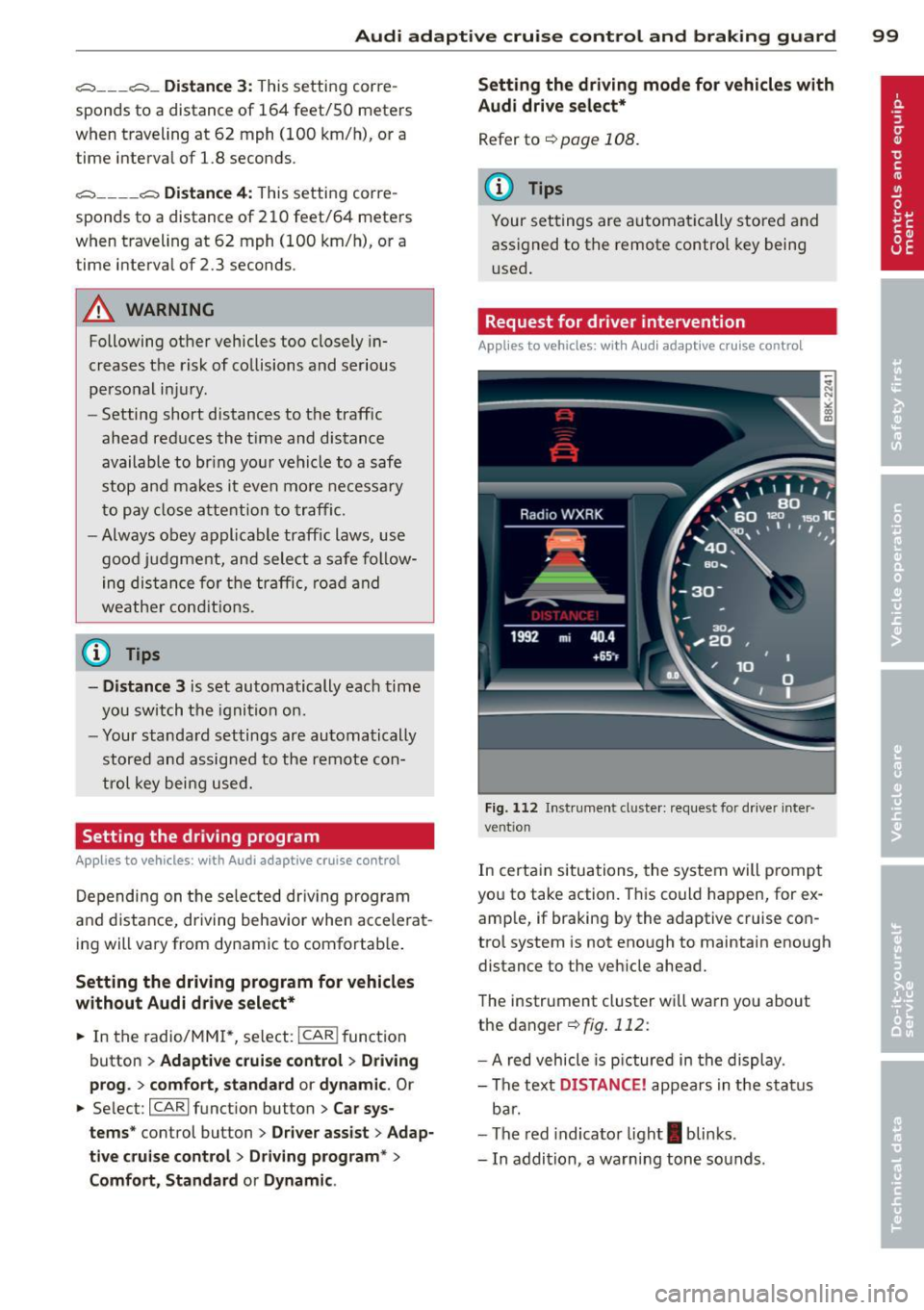
Fig. 112 Instrument d uste r: request for drive r inte r
ve ntion
In certain situations, the system will p rompt
you to take action. This could happen, for ex
amp le, if braking by the adaptive cruise con
trol system is not enough to maintain enough
distance to the vehicle ahead.
The instrument cluster will warn you about
the danger ¢
fig. 112:
-A red vehicle is pictured in the display.
- The text
DISTANCE! appears in the status
bar.
- The red indicator light
I blinks .
- In addition, a warning tone sounds .
Page 134 of 290

13 2 Safety belts
Safety belts
General notes
Always wear safety belts!
Wearing safety belts correctly saves lives!
This chapter explains why safety be lts are nec
essary, how they work and how to adjust and
wear them correctly .
.. Read a ll the information that fo llows and
heed all of the instruct ions and WARNINGS.
A WARNING
Not wearing safety belts or wearing them
improperly increases the risk of ser ious
personal in jury and death .
- Safety belts are the sing le most effective
means avai lab le to reduce the risk of se
r ious injury and dea th in a utomob ile acci
dents. For your protection and that of
yo ur passenge rs, always co rrectly wear
safety belts when the vehicle is moving.
- P regnant women, injured, or physically
im paired perso ns mu st also use safety
bel ts. Lik e all veh icle occup ants, they are
more like ly to be ser iously injured if they
do not wea r safety be lts . The best way to
protect a fetus is to protect the mother -
throughout the entire pregnancy.
Number of seats
Your Audi has a total of four seating positions: two in the front and two in the rear. Each seat
ing position has a safety belt .
A WARNING
Not wearing safety belts or weari ng them
improp erly increases th e risk of ser ious
pe rsonal i njury and dea th.
- N ever st rap more than one pe rson, in
cl uding small ch ild ren, into any belt.
It is
e speci ally dange rous to pla ce a safety
belt over a child s itting on yo ur lap.
- N ever le t mo re people ride in the ve hicl e
than there are s afe ty be lts avail able. -
Be s ure everyone riding in the vehicle is
properly restrained w ith a separate safe
ty belt or child restra int.
Safety belt warning light
Your vehicle hos o warning system for the
driver and (on USA models only) front seat
passenger to remind you about the impor
tance of buckling-up .
Fi g. 139 Safety belt warni ng lig ht in the instrument
cluster -en larged
Before driving off, always :
.. Fasten you r safety belt and make sure you
are wearing it properly .
.. Make s ure that yo ur passengers a lso buck le
up and properly wear their safety be lts.
.. Protect your children w ith a child rest raint
system approp riate fo r the size and age of
t he children.
The . war ning light in the instrument cluster
lights up when the ignit ion is switched on as a
rem inder to faste n the safety belts. In addi
t ion, you will hea r a warning tone for a certa in
per iod of t ime.
Fasten your safety b elt now and make sure
that your pas sengers also properly put on
their safety belts.
Page 144 of 290

142 Airbag system
Even though your vehicle is equipped with an
Advanced Airbag System, make certain that
all chi ldren, especially those 12 years and
younger, a lways ride in the back seat properly
restrained for their age and size. The airbag
on the passenger side makes the front seat a potentially dangerous place for a ch ild to ride.
The front seat is not the safest place for a
child in a forward-facing child safety seat. It
can be a very dangerous place for an infant or
a child in a rearward-facing seat.
The Advanced Airbag System in your veh icle
has been certified to comply with the Requ ire
ments of United States Federal Motor Vehicle
Safety Standard 208 as applicable at the time
your vehicle was manufactured.
The Standard requires the front a irbag on the
passenger side to be turned off ("sup
pressed") if a child up to about one year of
age restrained in one of the rear-facing or for
ward -facing infant restraints listed in Federal
Motor Vehicle Safety Standard 208 with which
the Advanced Airbag System in your vehicle
was certified has been installed on the front passenger seat . For a listing of the child re
strai nts that we re used to certify compliance
with the US Safety Standard
r=v page 163.
The PASSENGER AIR BAG OFF light in the in
strument panel te lls you when the front Ad
vanced A irbag on the passenger side has been
turned off by the e lectronic control unit.
Each t ime you turn on the ignition, the
PAS
SENGER AIR BAG OFF
light will come on for a
few seconds and:
- will stay on if the front passenger seat is not
occupied,
- will stay on if there is a small child or child restraint on the front passenger seat,
- wi ll go off if the front passenger seat is oc
cupied by an adult as registered by the
weight-sensing mat
r=v page 1 S 1, Monitor
ing the Advanced Airbag System .
The PASSENGER AIR BAG OFF light comes on
when the control un it detects a total weight
on the front passenger seat that requires the
front airbag to be turned off.
If the total weight on the front passenge r
seat is more than that of a typica l 1 year -old
chi ld but less than the weight of a small
adult, the front airbag on the passenger side
can deploy (the
PASSENGER AIR BAG OFF
light does not come on). If the PASSENGER
AIR BAG OFF
light does not come on, the
front airbag on the passenger side has not
been turned off by the electronic con trol unit
and can deploy if the control unit senses an
impact that meets the cond itions stored in its
memory .
For example, the airbag may deploy if:
-a small ch ild that is heav ier than a typical 1
year-old ch ild is on the front passenger seat
( re gard less of whether the child is in one of
the child safety seats listed
r=v page 163), or
- a child who has outgrown ch ild restraints is
on the front passenger seat.
If the front passenger airbag is turned off, the
PASSENGER AIR BAG OFF light comes on in
the instrument cluster and stays on.
The front airbag on the passenger s ide may
not deploy (the PASSENGER AIR BAG OFF
light does not illum inate and stay lit) even if a
small adult or teenager, or a passenger who is
not sitt ing upright with their back against a
non-reclined backrest with their feet on the
vehicle floor in front of the seat is on the front
passenger seat
r=v page 122, Proper seating
position for the driver.
If the front passenger airbag deploys, the
Federal Standard requires the airbag to meet
the "low risk" deployment criteria to reduce
the risk of injury t hroug h interaction with the
airbag. "Low risk" deployment occurs in those
crashes that take place at lower dece lerat ions
as defined in the electronic control unit
r=v page 151, PASSENGER AIR BAG OFF light .
Always remember, a child safety seat or infant
carr ier installed on the front seat may be
struck and knocked out of posit ion by the rap
idly inflat ing passenger's airbag in a frontal
collision . The air bag could greatly reduce the
effectiveness of the ch ild restraint and even
seriously injure the child during inflation .