Page 497 of 860
497
3-4. Using the rear audio system
3
Interior features
SIENNA_U (OM45477U)
■
When using AA batteries
Batteries can be purchased at your Toyota dealer, electric appliance shops,
or camera stores.
Replace only with the same or equivalent type recommended by a Toyota
dealer.
Dispose of used batteries according to the local laws.
■ Headphones
With some headphones generally available on the market, it may be difficult
to receive signals properly. Toyota recommends the use of Toyota genuine
wireless headphones.
Please contact your Toyota dealer for further details.
■ Vo l u m e
● Adjust the volume when you connect the headphones to the jack. Loud
volume from headphones may cause hearing loss or damage.
● Conversational speech on some DVDs is recorded at a low volume to
emphasize the impact of sound effects. If you adjust the volume assum-
ing that the conversations represent the maximum volume level that the
DVD will play, you may be startled by louder sound effects or when you
change to a different audio source. Be sure to adjust the volume with this
in mind.
Page 498 of 860
498 3-4. Using the rear audio system
SIENNA_U (OM45477U)
CAUTION
■While driving
Do not use headphones.
Doing so may cause an accident, resulting in death or serious injury.
■ When the rear seat entert ainment system is not used
Keep the display closed.
In the event of an accident or sudden braking, the opened display may hit an
occupant’s body, resulting in injury.
■ To prevent accidents and electric shock
Do not disassemble or modify the remote controller.
■ When the remote controller is not used
Stow the remote controller.
Injuries may result in the event of an accident or sudden braking.
■ Removed battery and other parts
Keep away from children. These parts are small and if swallowed by a child
they can cause choking. Failure to do so could result in death or serious
injury.
NOTICE
■For normal operation after replacing the battery
Observe the following precautions to prevent accidents.
● Always work with dry hands.
Moisture may cause the battery to rust.
● Do not touch or move any other components inside the remote controller.
● Do not bend either of the battery terminals.
Page 529 of 860
529
3
Interior features
SIENNA_U (OM45477U)
3-5. Using the hands-free phone system (for cellular phone)
Hands-free phone system (for cellular phone) features
: If equipped
The hands-free system is a function th at allows you to use your cel-
lular phone without touching it.
This system supports Bluetooth
®, which allows you to make or
receive calls without using cables to connect a cellular phone to the
system, and without operati ng the cellular phone.
With navigation system
Owners of models equipped with a navigation system should refer
to the “NAVIGATION SYSTEM OWNER’S MANUAL”.
Without navigation system
■ Hands-free system quick guide
Setting a cellular phone. ( P. 534)
Adding an entry to the phonebook (Up to 20 names can be
stored). ( P. 558)
Dialing by inputting a name. ( P. 544)
STEP1
STEP2
STEP3
Page 530 of 860
530 3-5. Using the hands-free phone system (for cellular phone)
SIENNA_U (OM45477U)
TitlePage
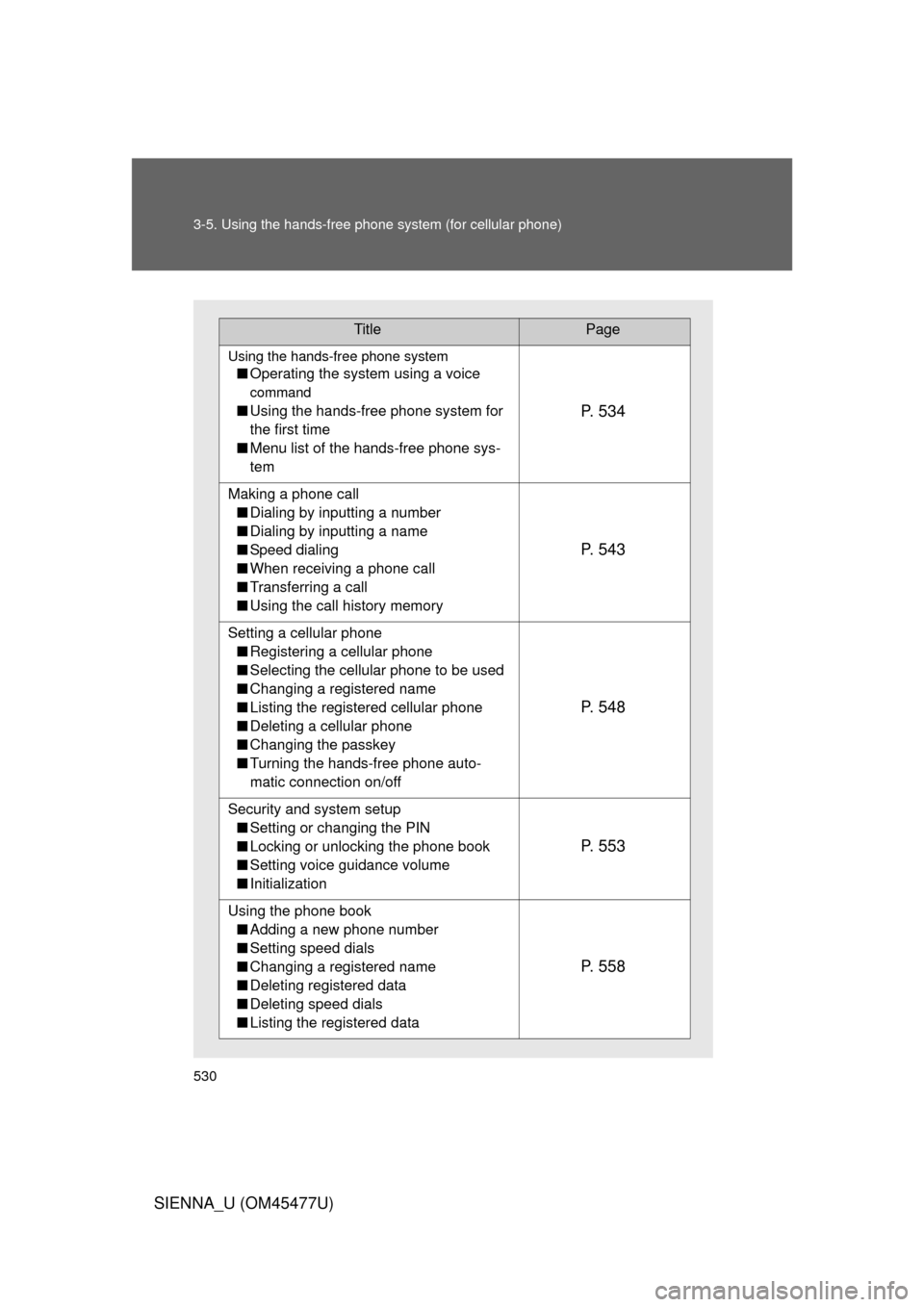
Using the hands-free phone system
■Operating the system using a voice
command
■Using the hands-free phone system for
the first time
■ Menu list of the hands-free phone sys-
temP. 5 3 4
Making a phone call
■ Dialing by inputting a number
■ Dialing by inputting a name
■ Speed dialing
■ When receiving a phone call
■ Transferring a call
■ Using the call history memory
P. 5 4 3
Setting a cellular phone
■ Registering a cellular phone
■ Selecting the cellular phone to be used
■ Changing a registered name
■ Listing the registered cellular phone
■ Deleting a cellular phone
■ Changing the passkey
■ Turning the hands-free phone auto-
matic connection on/off
P. 5 4 8
Security and system setup
■ Setting or changing the PIN
■ Locking or unlocking the phone book
■ Setting voice guidance volume
■ Initialization
P. 5 5 3
Using the phone book
■ Adding a new phone number
■ Setting speed dials
■ Changing a registered name
■ Deleting registered data
■ Deleting speed dials
■ Listing the registered data
P. 5 5 8
Page 531 of 860
531
3-5. Using the hand
s-free phone system (for cellular phone)
3
Interior features
SIENNA_U (OM45477U)
■Conditions under which th e system will not operate
● If using a mobile phone that does not support Bluetooth
®
●If the mobile phone is switched off
● If you are outside service range
● If the mobile phone is not connected
● If the mobile phone’s battery is low
● If the mobile phone is behind the seat or in the glove box or console box
● If metal is covering or touching the phone
■ When using the hands-free system
● The audio system and voice guidance are muted when making a call.
● If both parties speak at the same time, it may be difficult to hear.
● If the incoming call volume is overly loud, an echo may be heard.
● Try to face toward the microphone as much as possible when speaking.
● In the following circumstances, it may be difficult to hear the other party:
• When driving on unpaved roads
• When driving at high speeds
• When a window is open
• When the air conditioning is blowing directly on the microphone
• When the air conditioning is set to high
■ When transferring ownership of the vehicle
Be sure to initialize the system to prevent personal data from being improp-
erly accessed.
Page 532 of 860
532 3-5. Using the hands-free phone system (for cellular phone)
SIENNA_U (OM45477U)
■About Bluetooth®
■Compatible models
Compatible with HFP (Hands Free Profile) Ver. 1.5 and OPP (Object Push
Profile) Ver. 1.1.
If your cellular phone does not support HFP, you cannot enter the Bluetooth
®
phone. If your cellular phone supports OPP alone, you cannot use the
Bluetooth® phone.
■ Certification for the hands-free phone system
FCC ID: AJDK025
IC ID: 775E-K025
MADE IN THAILAND
This device complies with Part 15 of the FCC Rules and RSS-Gen of IC
Rules. Operation is subject to the following two conditions: (1) This device
may not cause harmful interference, and (2) This device must accept any
interference received, including interference that may cause undesired oper-
ation.
Bluetooth is a registered trademark of
Bluetooth SIG. Inc.
Page 533 of 860
533
3-5. Using the hand
s-free phone system (for cellular phone)
3
Interior features
SIENNA_U (OM45477U)
CAUTION
■FCC WARNING
Changes or modifications not expressly approved by the party responsible
for compliance could void the user’s authority to operate the equipment.
Radio Frequency Radiation Exposure. This equipment complies with FCC/
IC radiation exposure limits set forth for uncontrolled equipment and meets
the FCC radio frequency (RF) Exposure Guidelines in Supplement C to
OET65 and RSS-102 of the IC radio frequency (RF) Exposure rules. This
equipment has very low levels of RF energy that it deemed to comply with-
out maximum permissive exposure evaluation (MPE). But it is desirable that
it should be installed and operated with at least 7.9 in. (20 cm) and more
between the radiator and person’s body (excluding extremities: hands,
wrists, feet and ankles).
This transmitter must not be co-located or operated in conjunction with any
other antenna or transmitter.
■ Caution while driving
Do not use a cellular phone, or connect the Bluetooth
® phone.
NOTICE
■To prevent damage to a cellular phone
Do not leave a cellular phone in the vehicle. The temperature inside may
become high resulting in damage to the phone.
Page 534 of 860
534
3-5. Using the hands-free phone system (for cellular phone)
SIENNA_U (OM45477U)
Using the hands-free phone system (for cellular phone)
: If equipped
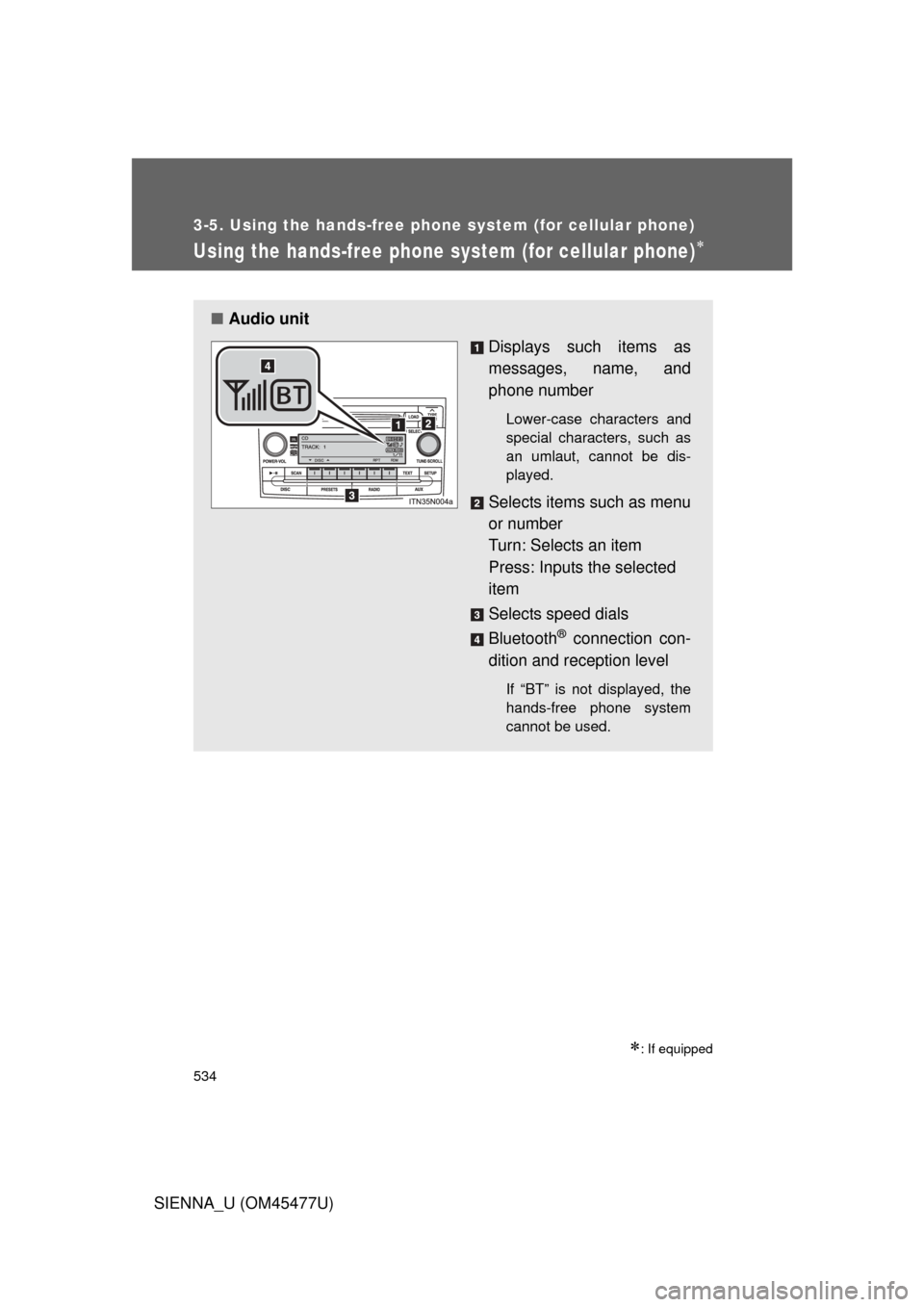
■Audio unit
Displays such items as
messages, name, and
phone number
Lower-case characters and
special characters, such as
an umlaut, cannot be dis-
played.
Selects items such as menu
or number
Turn: Selects an item
Press: Inputs the selected
item
Selects speed dials
Bluetooth
® connection con-
dition and reception level
If “BT” is not displayed, the
hands-free phone system
cannot be used.