Page 494 of 860
494 3-4. Using the rear audio system
SIENNA_U (OM45477U)
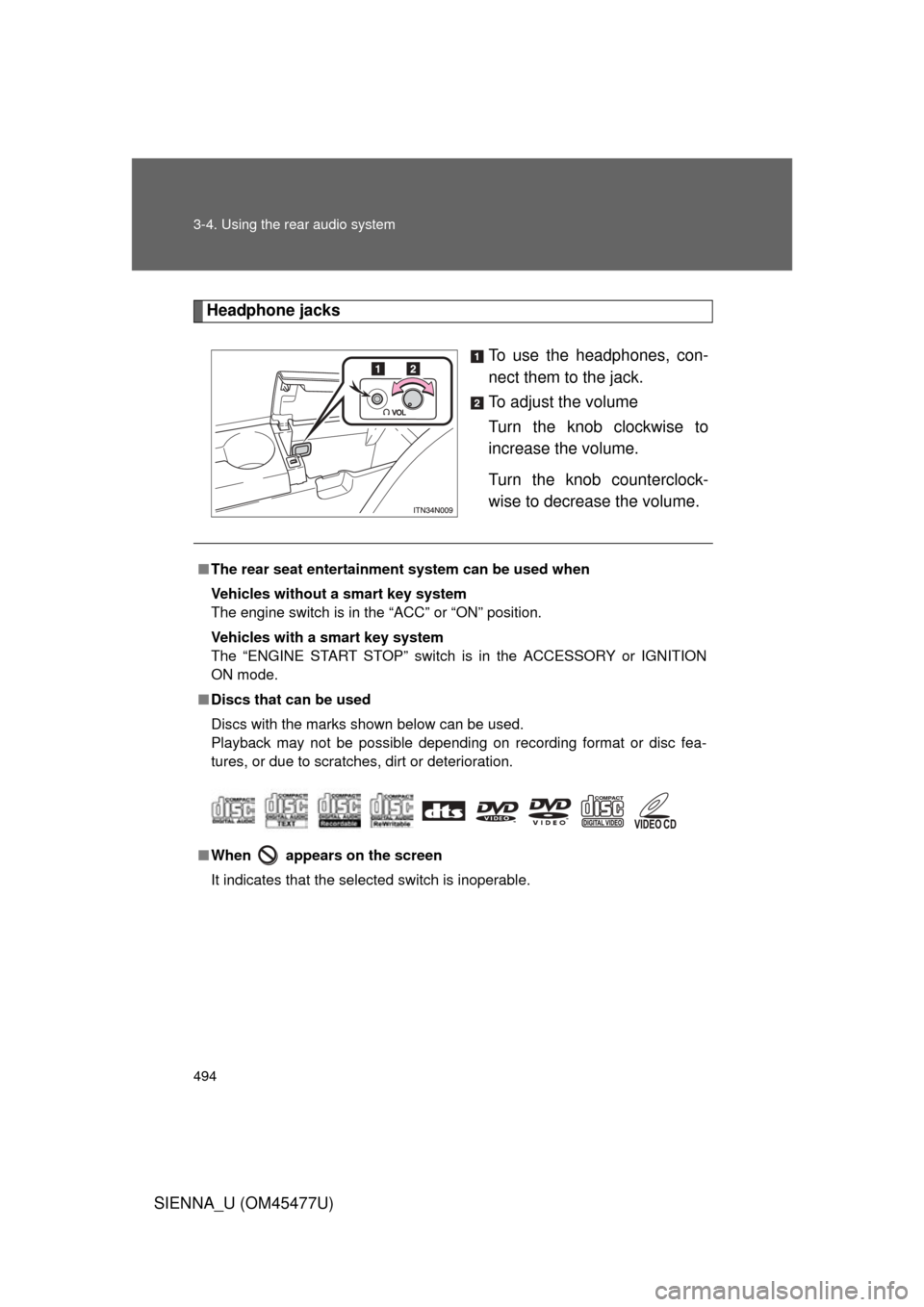
Headphone jacksTo use the headphones, con-
nect them to the jack.
To adjust the volume
Turn the knob clockwise to
increase the volume.
Turn the knob counterclock-
wise to decrease the volume.
■The rear seat entertainmen t system can be used when
Vehicles without a smart key system
The engine switch is in the “ACC” or “ON” position.
Vehicles with a smart key system
The “ENGINE START STOP” switch is in the ACCESSORY or IGNITION
ON mode.
■ Discs that can be used
Discs with the marks shown below can be used.
Playback may not be possible depending on recording format or disc fea-
tures, or due to scratches, dirt or deterioration.
■ When appears on the screen
It indicates that the selected switch is inoperable.
Page 495 of 860
495
3-4. Using the rear audio system
3
Interior features
SIENNA_U (OM45477U)
■
Headphone audio during split screen display
Audio from the left-hand screen will be played through the left headphone,
and audio from the right-hand screen will be played through the right head-
phone.
■ Error messages
MessageCauseCorrection Procedures
No disc found There is no disc in the
DVD player Insert a disc
Check disc• The disc is dirty or dam-
aged
• The disc is inserted upside down • Clean the disc
• Insert the disc correctly
DVD error• There is a malfunction
within the system
• Operation is stopped due to a high tempera-
ture inside the player • Eject the disc and allow
the player to cool down
• If the malfunction still exists, take the vehicle
to your Toyota dealer
No music files
found This indicates that no
playable data is
included in the disc
Eject the disc
Region code
errorThe DVD has an
incompatible DVD
region code Insert a DVD with a
compatible region code
Page 496 of 860
496 3-4. Using the rear audio system
SIENNA_U (OM45477U)
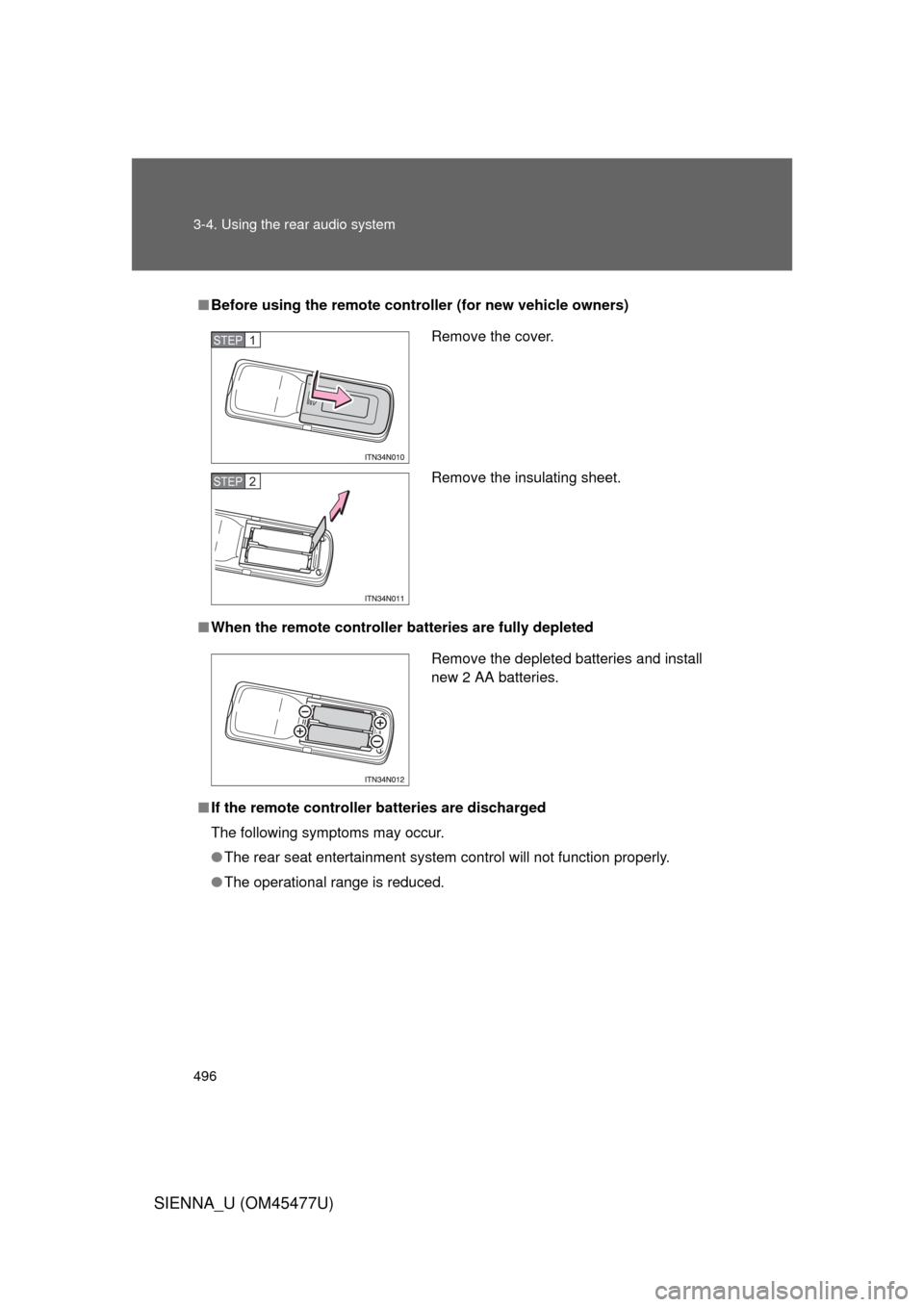
■Before using the remote controller (for new vehicle owners)
■ When the remote controller batteries are fully depleted
■ If the remote controller batteries are discharged
The following symptoms may occur.
● The rear seat entertainment system control will not function properly.
● The operational range is reduced.
Remove the cover.
Remove the insulating sheet.STEP1
STEP2
Remove the depleted batteries and install
new 2 AA batteries.
Page 497 of 860
497
3-4. Using the rear audio system
3
Interior features
SIENNA_U (OM45477U)
■
When using AA batteries
Batteries can be purchased at your Toyota dealer, electric appliance shops,
or camera stores.
Replace only with the same or equivalent type recommended by a Toyota
dealer.
Dispose of used batteries according to the local laws.
■ Headphones
With some headphones generally available on the market, it may be difficult
to receive signals properly. Toyota recommends the use of Toyota genuine
wireless headphones.
Please contact your Toyota dealer for further details.
■ Vo l u m e
● Adjust the volume when you connect the headphones to the jack. Loud
volume from headphones may cause hearing loss or damage.
● Conversational speech on some DVDs is recorded at a low volume to
emphasize the impact of sound effects. If you adjust the volume assum-
ing that the conversations represent the maximum volume level that the
DVD will play, you may be startled by louder sound effects or when you
change to a different audio source. Be sure to adjust the volume with this
in mind.
Page 498 of 860
498 3-4. Using the rear audio system
SIENNA_U (OM45477U)
CAUTION
■While driving
Do not use headphones.
Doing so may cause an accident, resulting in death or serious injury.
■ When the rear seat entert ainment system is not used
Keep the display closed.
In the event of an accident or sudden braking, the opened display may hit an
occupant’s body, resulting in injury.
■ To prevent accidents and electric shock
Do not disassemble or modify the remote controller.
■ When the remote controller is not used
Stow the remote controller.
Injuries may result in the event of an accident or sudden braking.
■ Removed battery and other parts
Keep away from children. These parts are small and if swallowed by a child
they can cause choking. Failure to do so could result in death or serious
injury.
NOTICE
■For normal operation after replacing the battery
Observe the following precautions to prevent accidents.
● Always work with dry hands.
Moisture may cause the battery to rust.
● Do not touch or move any other components inside the remote controller.
● Do not bend either of the battery terminals.
Page 499 of 860
499
3-4. Using the rear audio system
3
Interior features
SIENNA_U (OM45477U)
Using the DVD player (DVD video)
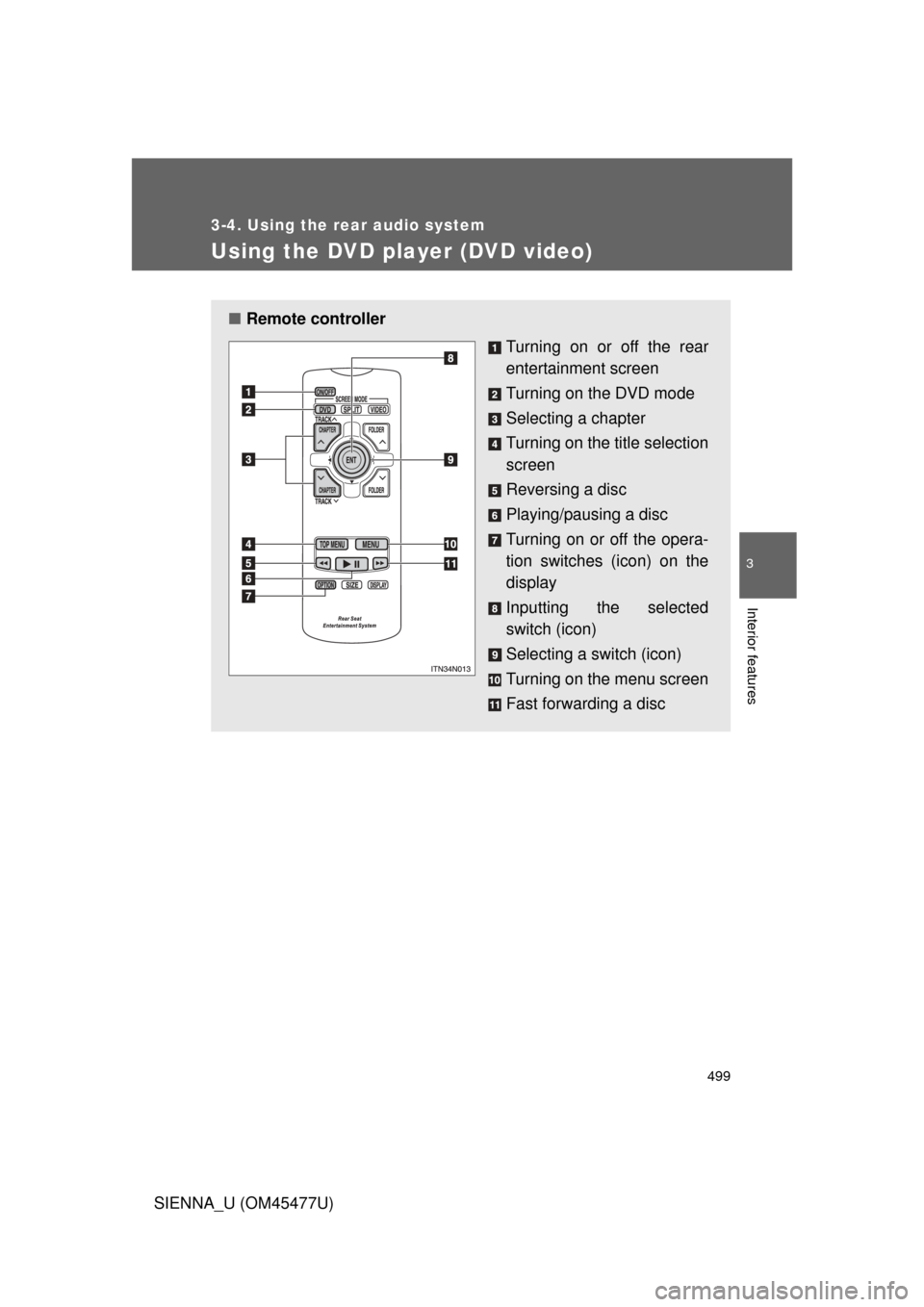
■Remote controller
Turning on or off the rear
entertainment screen
Turning on the DVD mode
Selecting a chapter
Turning on the title selection
screen
Reversing a disc
Playing/pausing a disc
Turning on or off the opera-
tion switches (icon) on the
display
Inputting the selected
switch (icon)
Selecting a switch (icon)
Turning on the menu screen
Fast forwarding a disc
Page 500 of 860
500 3-4. Using the rear audio system
SIENNA_U (OM45477U)
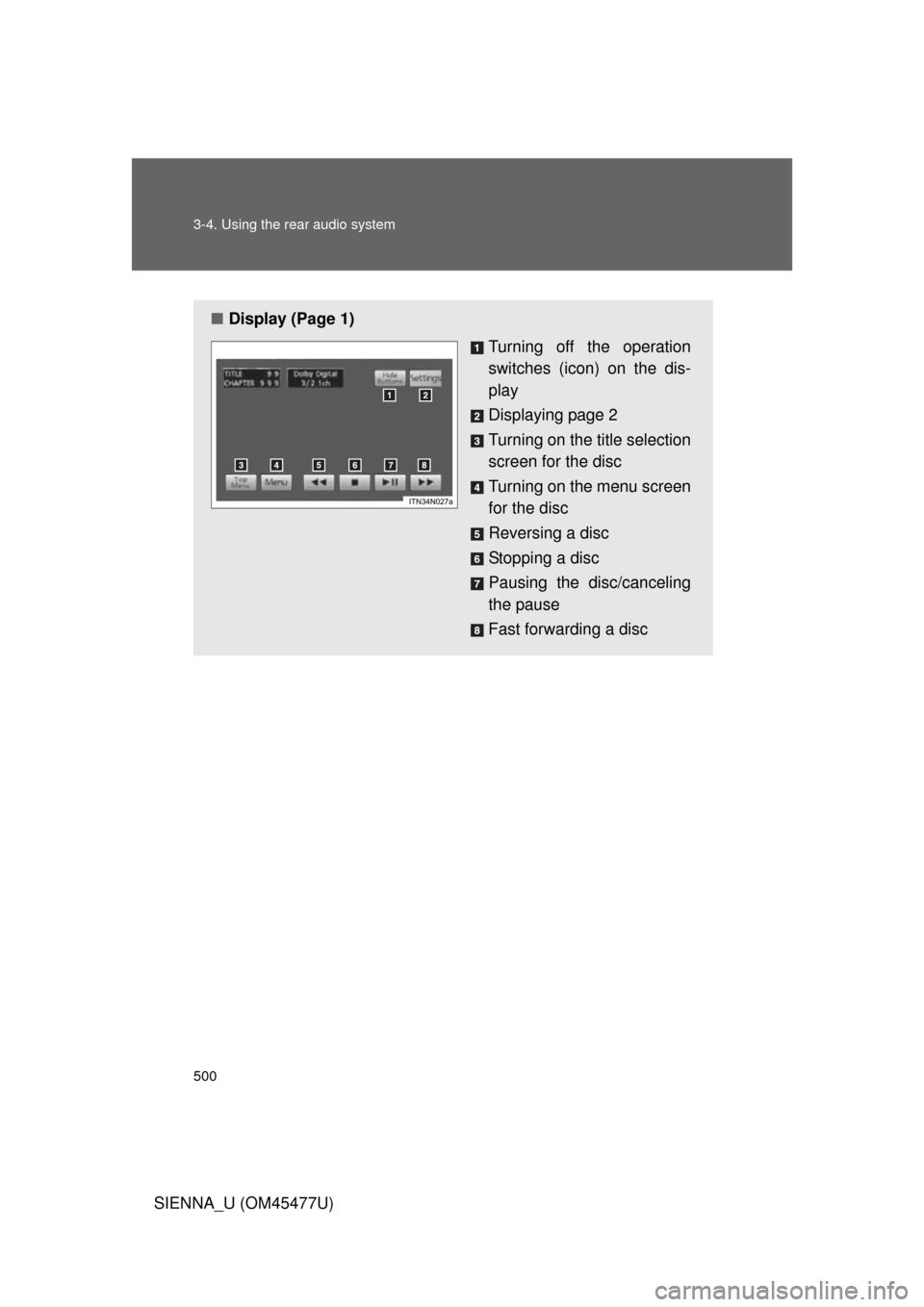
■Display (Page 1)
Turning off the operation
switches (icon) on the dis-
play
Displaying page 2
Turning on the title selection
screen for the disc
Turning on the menu screen
for the disc
Reversing a disc
Stopping a disc
Pausing the disc/canceling
the pause
Fast forwarding a disc
Page 501 of 860
501
3-4. Using the rear audio system
3
Interior features
SIENNA_U (OM45477U)
NOTICE
■
Cleaning the display
Wipe the display with a dry soft cloth.
If the screen is wiped with a rough cloth, the surface of the screen may be
scratched.
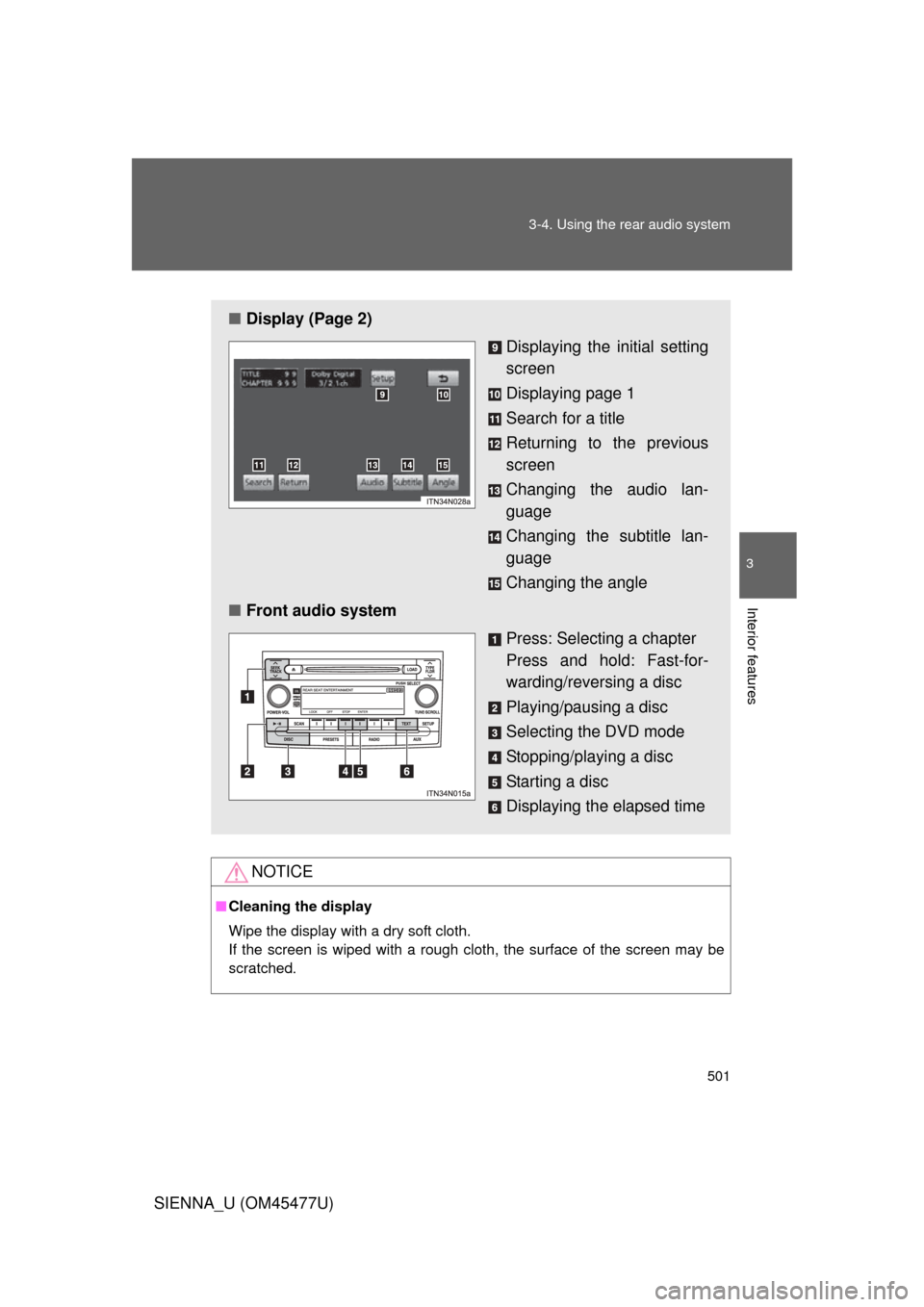
■ Display (Page 2)
Displaying the initial setting
screen
Displaying page 1
Search for a title
Returning to the previous
screen
Changing the audio lan-
guage
Changing the subtitle lan-
guage
Changing the angle
■ Front audio system
Press: Selecting a chapter
Press and hold: Fast-for-
warding/reversing a disc
Playing/pausing a disc
Selecting the DVD mode
Stopping/playing a disc
Starting a disc
Displaying the elapsed time