Page 283 of 357
7
283
1
2
3
4
5
6
7
8
9
PRIUS (US) NAVI 47719U
11.10.26 15:37
1. FUEL CONSUMPTION ................ 284
FUEL CONSUMPTION ....................... 284
2. MAP DATABASE VERSION AND
COVERAGE AREA.................... 285
MAP INFORMATION........................... 285
CERTIFICATION ................................. 286
1. XM SERVICES ............................. 287 1. XM Sports ................................... 288
RECEIVE SPORTS INFORMATION ... 288
XM Sports SETTINGS —
ADD OR
DELETE TEAMS ............................... 289
2. XM Stocks ................................... 291
RECEIVE STOCK DATA ..................... 291
XM Stocks SETTINGS — ADD OR
DELETE STOCKS ............................. 292
3. XM Fuel Prices ........................... 294
SHOW XM Fuel Prices
INFORMATION ................................. 294
VIEW DETAILED FUEL PRICE INFORMATION ................................. 294
XM Fuel Prices SETTINGS.................. 295
4. XM NavWeather™ ...................... 297
SHOW XM NavWeather™ INFORMATION ................................. 297
WEATHER INFORMATION ................. 298
WEATHER WARNINGS ...................... 299
XM NavWeather™ INDICATOR .......... 299
5. XM NavTraffic®........................... 300
SHOW TRAFFIC EVENT..................... 300
SHOW XM NavTraffic®
INFORMATION ................................. 301
1. XM SETTINGS............................. 303
1INFORMATION DISPLAY
2XM FUNCTION-OVERVIEW
3XM FUNCTION OPERATION
4SETUP
INFORMATION
Page 284 of 357
284
PRIUS (US) NAVI 47719U
11.10.26 15:37
1. INFORMATION DISPLAY
1. FUEL CONSUMPTION
Energy monitor
Consumption
FUEL CONSUMPTION
Fuel consumption information, such as
that shown below, can be displayed on
the screen. For details see Section 1-1
of “Owner’s Manual”.
Page 287 of 357
287
7
INFORMATION
PRIUS (US) NAVI 47719U
11.10.26 15:37
2. XM FUNCTION-OVERVIEW
1. XM SERVICES
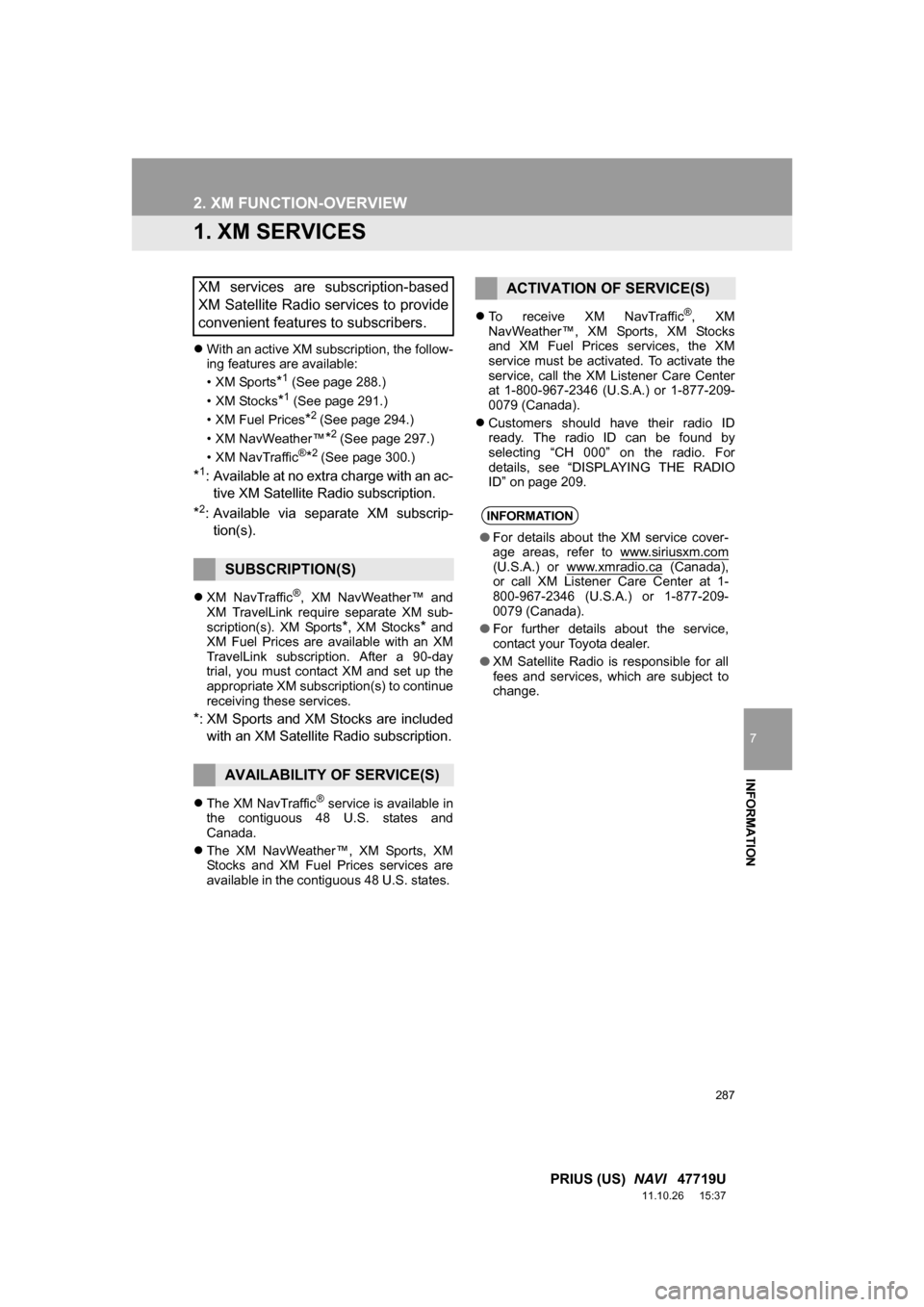
With an active XM subscription, the follow-
ing features are available:
•XM Sports
*1 (See page 288.)
• XM Stocks
*1 (See page 291.)
• XM Fuel Prices
*2 (See page 294.)
• XM NavWeather™
*2 (See page 297.)
•XM NavTraffic®*2 (See page 300.)
*1: Available at no extra charge with an ac- tive XM Satellite Radio subscription.
*2: Available via separate XM subscrip- tion(s).
XM NavTraffic®, XM NavWeather™ and
XM TravelLink require separate XM sub-
scription(s). XM Sports
*, XM Stocks* and
XM Fuel Prices are available with an XM
TravelLink subscription. After a 90-day
trial, you must contact XM and set up the
appropriate XM subscription(s) to continue
receiving these services.
*: XM Sports and XM Stocks are included
with an XM Satellite Radio subscription.
The XM NavTraffic® service is available in
the contiguous 48 U.S. states and
Canada.
The XM NavWeather™, XM Sports, XM
Stocks and XM Fuel Prices services are
available in the contiguous 48 U.S. states.
To receive XM NavTraffic
®, XM
NavWeather™, XM Sports, XM Stocks
and XM Fuel Prices services, the XM
service must be activated. To activate the
service, call the XM Listener Care Center
at 1-800-967-2346 (U.S .A.) or 1-877-209-
0079 (Canada).
Customers should have their radio ID
ready. The radio ID can be found by
selecting “CH 000” on the radio. For
details, see “DISPLAYING THE RADIO
ID” on page 209.
XM services are subscription-based
XM Satellite Radio services to provide
convenient features to subscribers.
SUBSCRIPTION(S)
AVAILABILITY OF SERVICE(S)
ACTIVATION OF SERVICE(S)
INFORMATION
●For details about the XM service cover-
age areas, refer to www.siriusxm.com
(U.S.A.) or www.xmradio.ca (Canada),
or call XM Listener Care Center at 1-
800-967-2346 (U.S.A.) or 1-877-209-
0079 (Canada).
● For further details about the service,
contact your Toyota dealer.
● XM Satellite Radio is responsible for all
fees and services, which are subject to
change.
Page 294 of 357
294
3. XM FUNCTION OPERATION
PRIUS (US) NAVI 47719U
11.10.26 15:37
3. XM Fuel Prices
1Press the “INFO/APPS” button.
2Touch “XM Fuel Prices” .
The “Fuel Price” screen is displayed. Gas station name
Sort
1Press the
“INFO/APPS” button.
2Touch “XM Fuel Prices” on the “Infor-
mation” screen.
3Touch the desired gas station from the
list.
The location of the selected gas station
will be displayed on the map screen.
XM Fuel Prices is a service included
with an XM TravelLink subscription. It
enables the navigation system to dis-
play current fuel prices and gas station
locations, which can be set as a desti-
nation if desired.
SHOW XM Fuel Prices
INFORMATION
XM Fuel Prices SCREEN
VIEW DETAILED FUEL PRICE
INFORMATION
Page 295 of 357
295
3. XM FUNCTION OPERATION
7
INFORMATION
PRIUS (US) NAVI 47719U
11.10.26 15:37
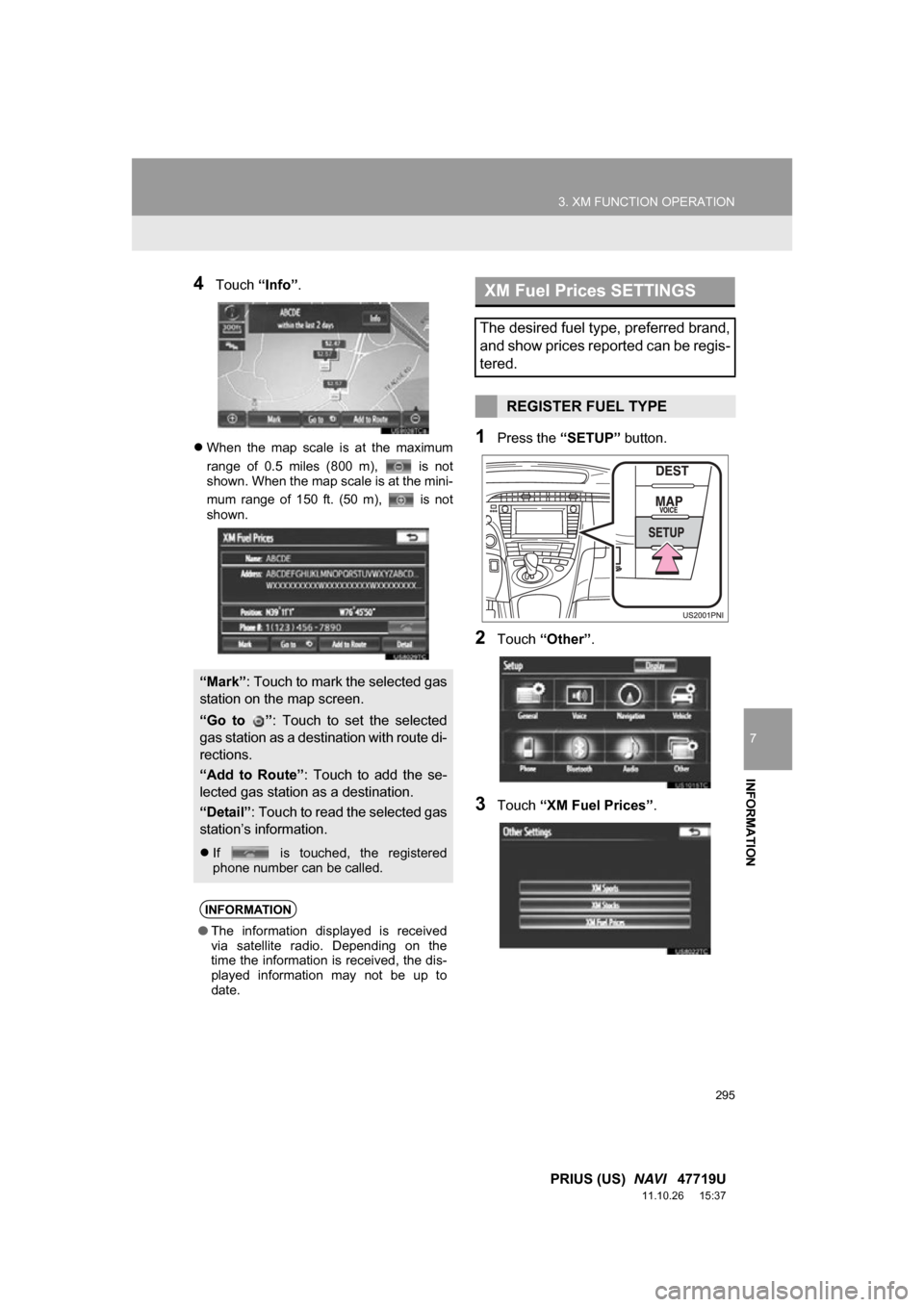
4Touch “Info”.
When the map scale is at the maximum
range of 0.5 miles (800 m), is not
shown. When the map scale is at the mini-
mum range of 150 ft. (50 m), is not
shown.1Press the “SETUP” button.
2Touch “Other” .
3Touch “XM Fuel Prices” .
“Mark”: Touch to mark the selected gas
station on the map screen.
“Go to ” : Touch to set the selected
gas station as a dest ination with route di-
rections.
“Add to Route” : Touch to add the se-
lected gas station as a destination.
“Detail” : Touch to read the selected gas
station’s information.
If is touched, the registered
phone number can be called.
INFORMATION
●The information displayed is received
via satellite radio. Depending on the
time the information is received, the dis-
played information may not be up to
date.
XM Fuel Prices SETTINGS
The desired fuel type, preferred brand,
and show prices reported can be regis-
tered.
REGISTER FUEL TYPE
Page 296 of 357
296
3. XM FUNCTION OPERATION
PRIUS (US) NAVI 47719U
11.10.26 15:37
4Touch “Fuel Type” .
5Touch the desired fuel type.
“Premium”, “Midgrade”, “Regular” or
“Diesel” can be selected.
6Touch “Save” .
1Press the “SETUP” button.
2Touch “Other” on the “Setup” screen.
3Touch “XM Fuel Prices” on the “Other
Settings” screen.
4Touch “Preferred Brand” .
5Touch the preferred brand.
6Touch “Save” .
1Press the “SETUP” button.
2Touch “Other” on the “Setup” screen.
3Touch “XM Fuel Prices” on the “Other
Settings” screen.
4Touch “Show Prices Reported” .
5Touch the desired period.
“Last 24 Hours” , “Last 2 Days” or
“Show All” can be selected.
If “Show All” is selected, information
about gas stations which fuel prices are
not provided is also displayed on the
list.
6Touch “Save” .
REGISTER PREFERRED
BRAND
REGISTER SHOW PRICES
REPORTED
Page 303 of 357
303
7
INFORMATION
PRIUS (US) NAVI 47719U
11.10.26 15:37
4. SETUP
1. XM SETTINGS
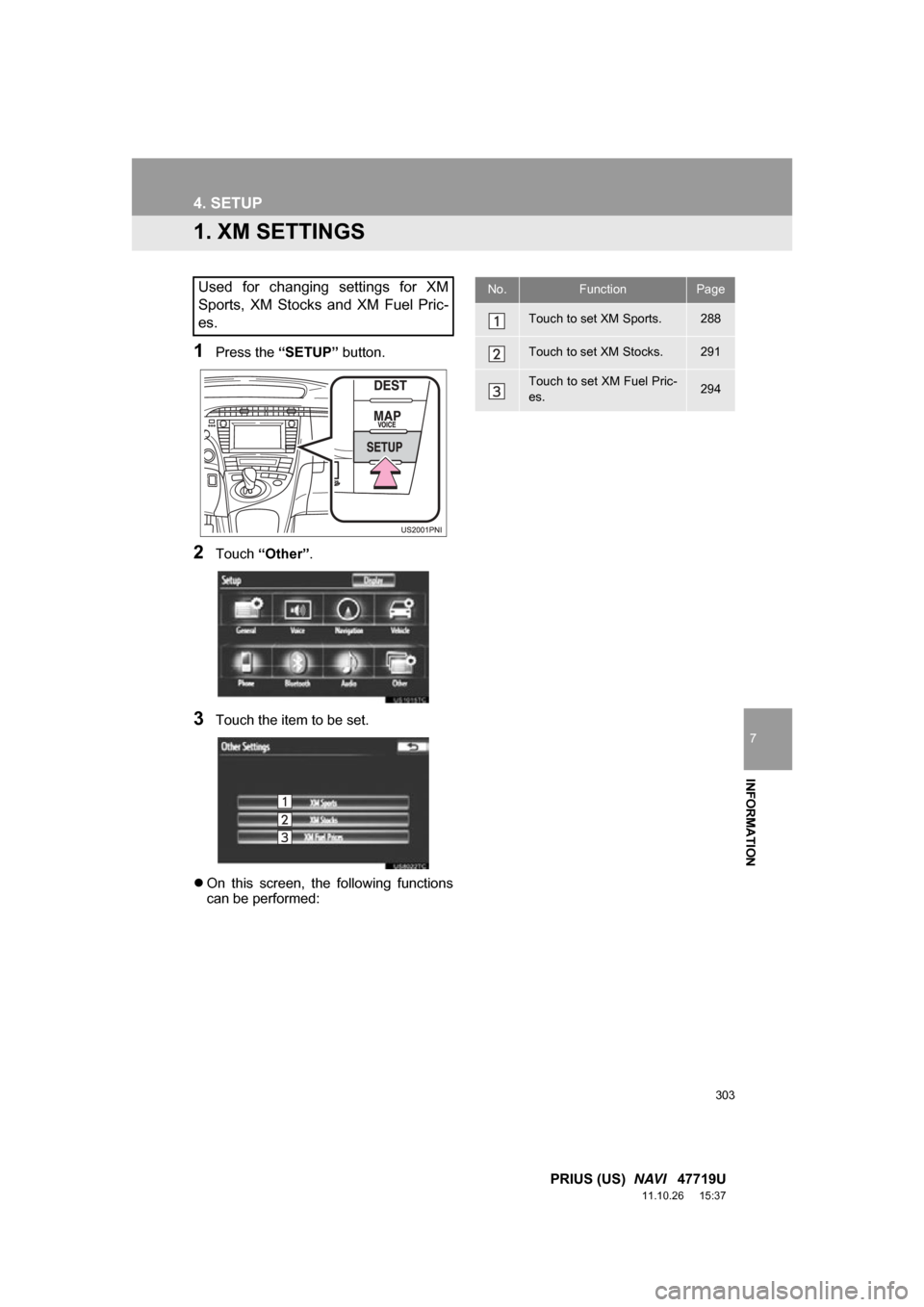
1Press the “SETUP” button.
2Touch “Other” .
3Touch the item to be set.
On this screen, the following functions
can be performed:
Used for changing settings for XM
Sports, XM Stocks and XM Fuel Pric-
es.No.FunctionPage
Touch to set XM Sports.288
Touch to set XM Stocks.291
Touch to set XM Fuel Pric-
es.294
Page 325 of 357

325
PRIUS (US) NAVI 47719U
11.10.26 15:37
D
Deleting destinations ................................ 87
Deleting personal data .............................. 52
Deleting previous destinations ................ 111
Deleting set destinations........................... 74
DEST button ............................................. 10
“Destination” screen.................................. 20
Destination search .................................... 58
By “Address” ......................................... 60
By “Address Book” ................................ 69
By “Coordinates” ................................... 73
By “Emergency” .................................... 70
By home ................................................ 59
By “Intersection & Freeway” .................. 70
By “Map”................................................ 73
By “Point of Interest” ............................. 63
By preset destinations ........................... 59
By “Previous Destinations” .................... 69
Selecting the search area ..................... 58
Detailed navigation settings .................... 113
Detour setting ........................................... 88
Dial.................................................. 143, 147
DISC button ............................................ 192
Distance and time to destination............... 85
DSP control............................................. 197
DVD ........................................................ 215
DVD player ............................................. 215 DVD options ........................................ 224
DVD player and DVD video disc information ............. 233
Ejecting a disc ..................................... 215
If the player malfunctions .................... 233
Inserting a disc .................................... 215
Operating a DVD disc ......................... 222
Playing a disc ...................................... 216
Playing a DVD disc ............................. 223
Playing an audio disc .......................... 217
Playing an MP3/WMA disc .................. 219
E
Emergency ................................................ 70
Entune..................................................... 306
Expanded voice commands .................... 278
F
FM ........................................................... 200
FM button ................................................ 192
Fuel consumption.................................... 284
Function index........................................... 18
G
General settings ........................................ 43
GPS (Global Positioning System) ..... 10, 127
H
HD Radio™ ............................................. 203
Heading-up screen.................................... 41
Home ...................................... 12, 17, 59, 98
I
INFO/APPS (INFO) button ........................ 10
Information .............................................. 284
“Information” screen .................................. 24
Inputting letters and numbers ................... 28
Internet radio broadcast .......................... 214
iPod ......................................................... 241 Connecting iPod .................................. 241
Playing iPod ........................................ 242