2012 TOYOTA PRIUS fuel
[x] Cancel search: fuelPage 7 of 357

7
1
2
3
4
5
6
7
8
9
PRIUS (US) NAVI 47719U
11.10.26 15:37
1. PHONE OPERATION .................... 132
QUICK REFERENCE .......................... 132
PHONE (HANDS-FREE SYSTEM FOR
CELLULAR PHONE)......................... 134
REGISTER A Bluetooth
® PHONE ....... 139
CALL ON THE Bluetooth® PHONE ..... 143
RECEIVE ON THE Bluetooth
® PHONE ........................... 150
TALK ON THE Bluetooth® PHONE ..... 151
Bluetooth® PHONE
MESSAGE FUNCTION ..................... 154
2. SETUP ........................................... 157
PHONE SETTINGS ............................. 157
Bluetooth® SETTINGS ........................ 179
1. AUDIO/VIDEO SYSTEM OPERATION ................
192
QUICK REFERENCE .......................... 192
SOME BASICS .................................... 194
RADIO OPERATION ........................... 200
HD Radio™ TECHNOLOGY
INFORMATION ................................. 203
RADIO OPERATION (XM Satellite Radio BROADCAST) ........................ 208
RADIO OPERATION (INTERNET RADIO BROADCAST) ...................... 214
DVD PLAYER OPERATION................ 215
USB MEMORY OPERATION .............. 236
iPod OPERATION ............................... 241
Bluetooth
® AUDIO OPERATION ......... 245
AUDIO/VIDEO REMOTE CONTROLS (STEERING SWITCHES) ................. 255
AUDIO/VIDEO SYSTEM OPERATING HINTS ......................... 257
2. SETUP ........................................... 267
AUDIO SETTINGS .............................. 267
1. VOICE COMMAND SYSTEM OPERATION................................ 270
VOICE COMMAND SYSTEM .............. 270
NATURAL SPEECH INFORMATION
(ENGLISH ONLY) ............................. 276
EXPANDED VOICE COMMANDS ....... 278
COMMAND LIST ................................. 279
1. INFORMATION DISPLAY ............. 284
FUEL CONSUMPTION ........................ 284
MAP DATABASE VERSION AND COVERAGE AREA ........................... 285
2. XM FUNCTION-O VERVIEW ......... 287
XM SERVICES .................................... 287
3. XM FUNCTION OPERATION ....... 288
XM Sports ............................................ 288
XM Stocks ............................................ 291
XM Fuel Prices..................................... 294
XM NavWeather™ ............................... 297
XM NavTraffic
®.................................... 300
4. SETUP ........................................... 303
XM SETTINGS..................................... 303
4PHONE
5AUDIO/VIDEO SYSTEM
6VOICE COMMAND SYSTEM
7INFORMATION
Page 23 of 357

23
3. QUICK REFERENCE
1
QUICK GUIDE
PRIUS (US) NAVI 47719U
11.10.26 15:37
No.NameFunctionPage
“General”Touch to change the selected language, opera-
tion sound settings, automatic screen change,
etc.43
“Voice”Touch to set the voice guidance settings.53
“Navigation”
Touch to access the page which enables the set-
ting of the average cruising speed, displayed
screen contents, POI categories, etc.
97
“Display”Touch to adjust the contrast and brightness of the
screens, turn the display off, etc.31
“Vehicle”Touch to set vehicle information such as mainte-
nance information.121
“Other”Touch to set XM Sports, XM Stocks and XM Fuel
Prices.303
“Audio”Touch to set iPod and HD Radio channel set-
tings.267
“Bluetooth*”Touch to set Bluetooth® phones and Bluetooth®
audio devices.179
“Phone”Touch to set the phone sound, phonebook and
message settings.157
*: Bluetooth is a registered tr ademark of Bluetooth SIG, Inc.
Page 24 of 357

24
3. QUICK REFERENCE
PRIUS (US) NAVI 47719U
11.10.26 15:37
3. “Information” SCREEN
This screen can be used to display the XM satellite system, fuel consumption, etc.
Press the “INFO/APPS” button to display the “Information” screen.
No.NameFunctionPage
“Apps”Touch to display the “Apps” screen.310, 313
“Fuel Consump-
tion”Touch to display the fuel consumption screen.284
“Traffic Incidents”Touch to display traffic incidents.300
“Map Data”Touch to display mapdata information.285
“XM Fuel Prices”Touch to display current fuel prices and gas sta-
tion locations information.294
“XM
NavWeather”Touch to display weather information.297
“XM Stocks”Touch to display personally selected stocks infor-
mation.291
“XM Sports”Touch to display personally selected sports
teams information.288
Page 38 of 357
38
1. BASIC INFORMATION BEFORE OPERATION
PRIUS (US) NAVI 47719U
11.10.26 15:37
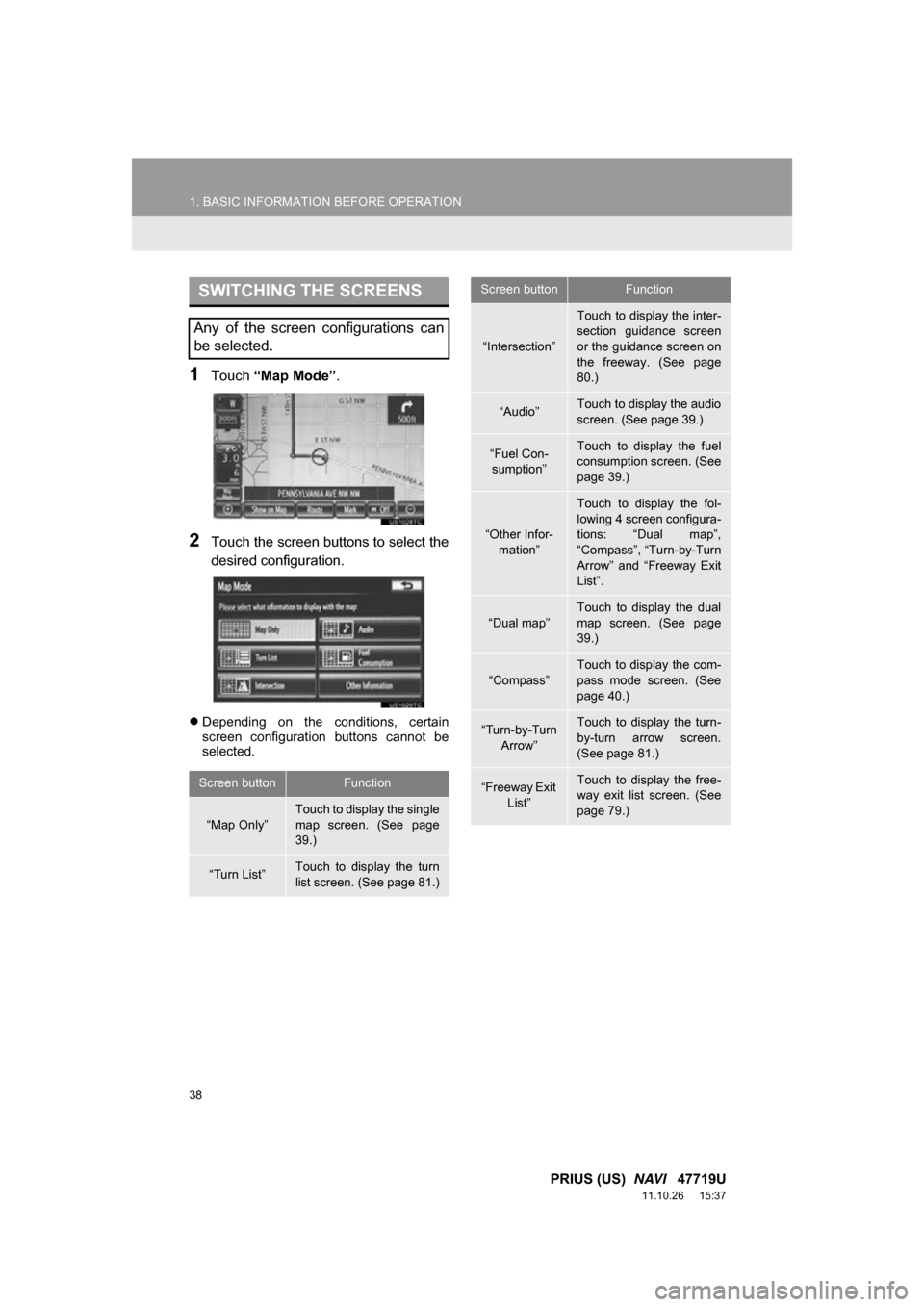
1Touch “Map Mode” .
2Touch the screen buttons to select the
desired configuration.
Depending on the conditions, certain
screen configuration buttons cannot be
selected.
SWITCHING THE SCREENS
Any of the screen configurations can
be selected.
Screen buttonFunction
“Map Only”
Touch to display the single
map screen. (See page
39.)
“Turn List”Touch to display the turn
list screen. (See page 81.)
“Intersection”
Touch to display the inter-
section guidance screen
or the guidance screen on
the freeway. (See page
80.)
“Audio”Touch to display the audio
screen. (See page 39.)
“Fuel Con-
sumption”Touch to display the fuel
consumption screen. (See
page 39.)
“Other Infor- mation”
Touch to display the fol-
lowing 4 screen configura-
tions: “Dual map”,
“Compass”, “Turn-by-Turn
Arrow” and “Freeway Exit
List”.
“Dual map”
Touch to display the dual
map screen. (See page
39.)
“Compass”Touch to display the com-
pass mode screen. (See
page 40.)
“Turn-by-Turn Arrow”Touch to display the turn-
by-turn arrow screen.
(See page 81.)
“Freeway Exit
List”Touch to display the free-
way exit list screen. (See
page 79.)
Screen buttonFunction
Page 39 of 357
39
1. BASIC INFORMATION BEFORE OPERATION
2
BASIC FUNCTION
PRIUS (US) NAVI 47719U
11.10.26 15:37
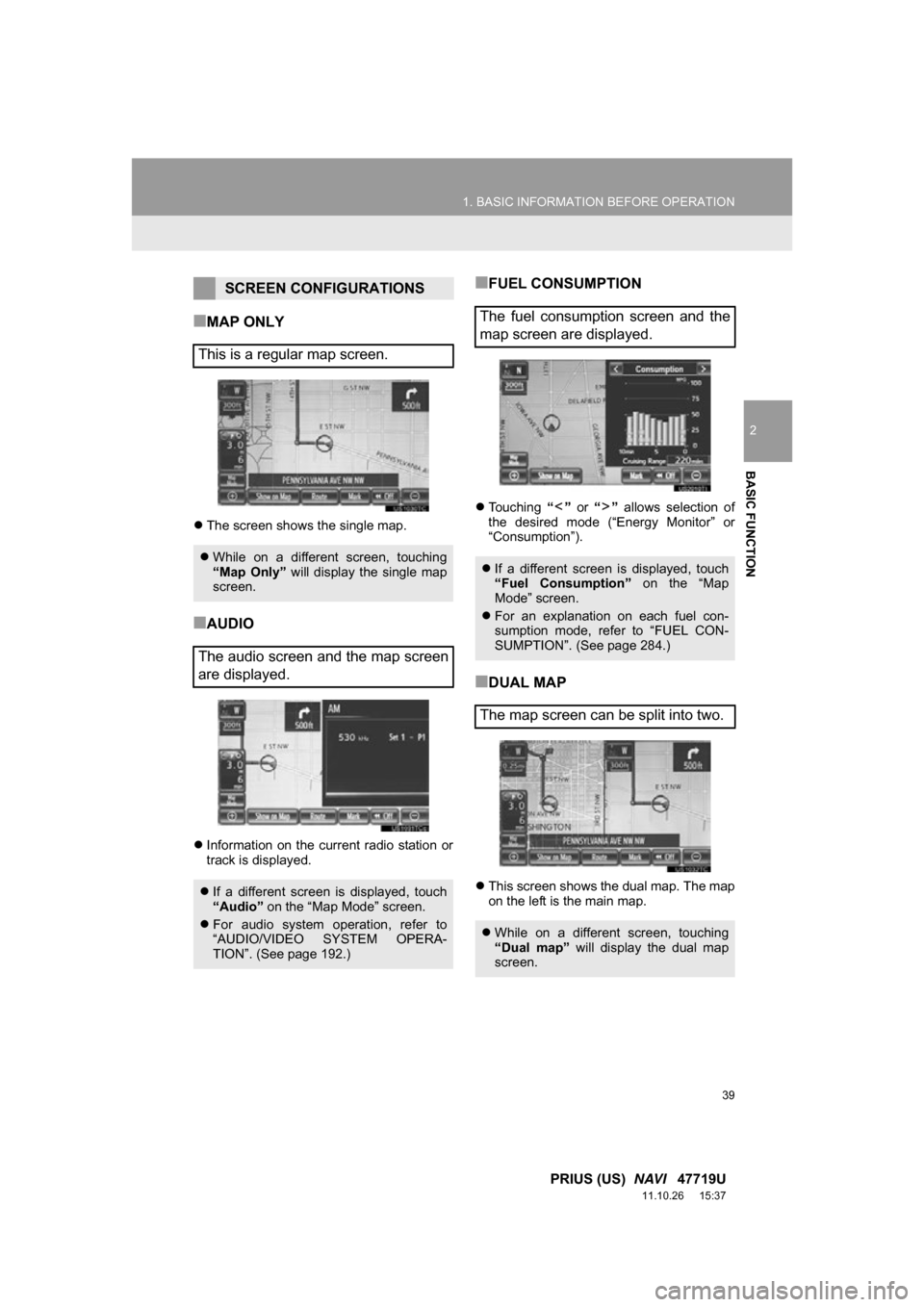
■MAP ONLY
The screen shows the single map.
■AUDIO
Information on the current radio station or
track is displayed.
■FUEL CONSUMPTION
Touching “” or “” allows selection of
the desired mode (“Energy Monitor” or
“Consumption”).
■DUAL MAP
This screen shows the dual map. The map
on the left is the main map.
SCREEN CONFIGURATIONS
This is a regular map screen.
While on a different screen, touching
“Map Only” will display the single map
screen.
The audio screen and the map screen
are displayed.
If a different screen is displayed, touch
“Audio” on the “Map Mode” screen.
For audio system operation, refer to
“AUDIO/VIDEO SYSTEM OPERA-
TION”. (See page 192.)
The fuel consumption screen and the
map screen are displayed.
If a different screen is displayed, touch
“Fuel Consumption” on the “Map
Mode” screen.
For an explanation on each fuel con-
sumption mode, refer to “FUEL CON-
SUMPTION”. (See page 284.)
The map screen can be split into two.
While on a different screen, touching
“Dual map” will display the dual map
screen.
Page 149 of 357

149
1. PHONE OPERATION
4
PHONE
PRIUS (US) NAVI 47719U
11.10.26 15:37
1Touch “Messages” .
When “Message Transfer” is set to
“Off” , a confirmation screen will be dis-
played. Touch “Yes”.
2Touch the “SMS/MMS” tab and then
touch the desired received message
from the list.
The tab display may vary depending on
the type of cellular phone.
3Touch or press the switch
on the steering wheel.
CALLING USING AN
SMS/MMS MESSAGE
Calls can be made to an SMS (Short
Message Service)/MMS (Multimedia
Messaging Service) message sender’s
phone number.
This can be operated while driving.
BY POI CALL
A call can be made by touching
when it is displayed on the screen from
the navigation system. (See “TO SEE
INFORMATION ABOUT THE ICON
WHERE THE CURSOR IS SET” on
page 35 and “VIEW DETAILED FUEL
PRICE INFORMATION” on page 294.)
Page 277 of 357

277
1. VOICE COMMAND SYSTEM OPERATION
6
VOICE COMMAND SYSTEM
PRIUS (US) NAVI 47719U
11.10.27 15:59
CommandExpression examples
“Traffic”How’s the traffic?
Check the traffic.
“Weather”What’s the weather
like?
Let’s get a forecast.
“Sports Scores”
Team scores.
How are my favorite
teams doing?
“Stock Quotes”
Stock quotes.
How are my stocks do-
ing?
“Fuel Prices”Let’s check fuel prices.
Find the cheapest gas
prices.
INFORMATION
●Commands that are not displayed in the
“Shortcut Menu” screen can be
accessed from the main menu.
● For example, to make an “International
Call”, say “Main menu” while the
“Shortcut Menu” screen is being dis-
played. Then say “Use the phone” fol-
lowed by saying the desired number,
e.g. “123456789” .
Page 281 of 357
281
1. VOICE COMMAND SYSTEM OPERATION
6
VOICE COMMAND SYSTEM
PRIUS (US) NAVI 47719U
11.10.27 15:59
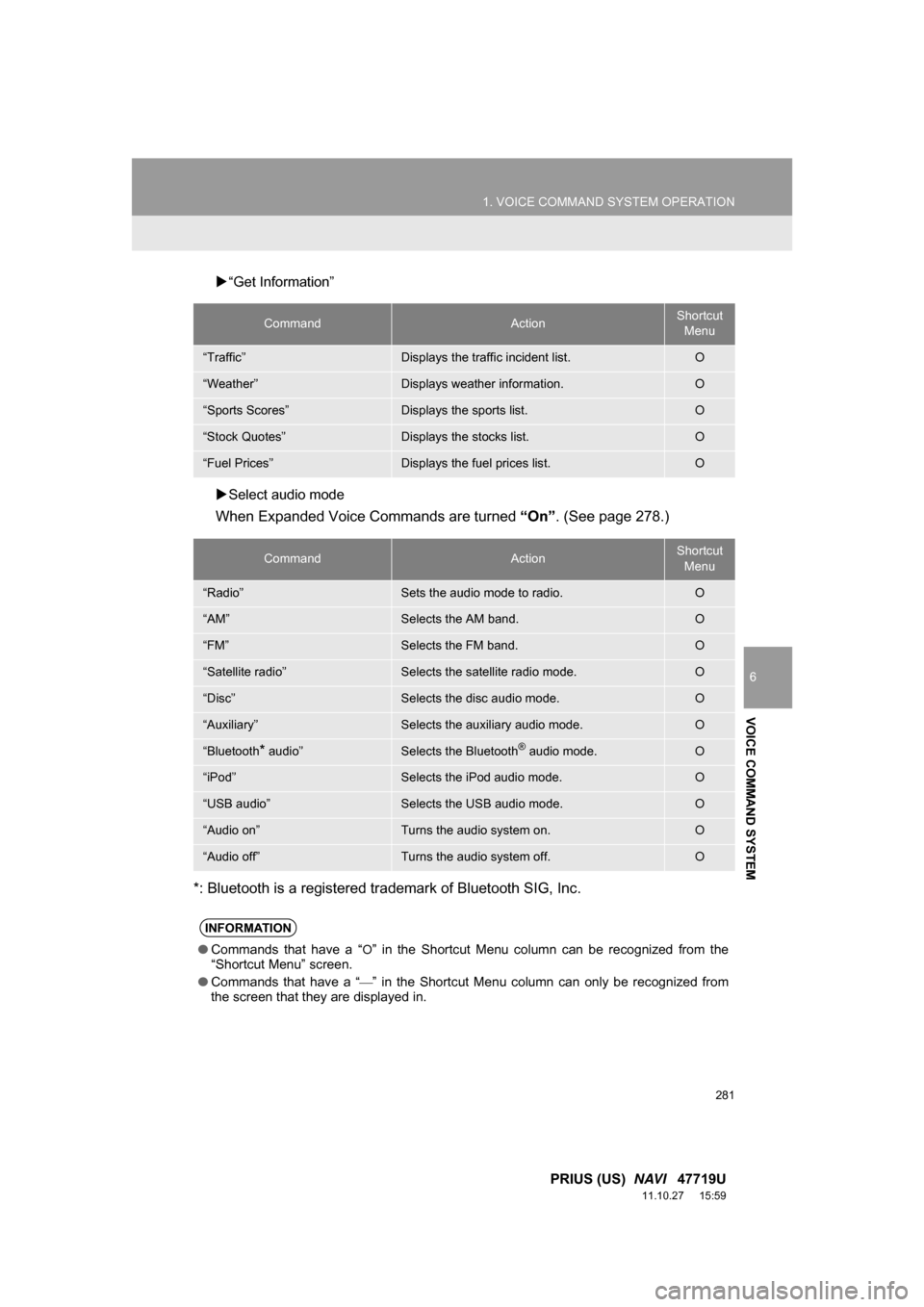
“Get Information”
Select audio mode
When Expanded Voice Commands are turned “On”. (See page 278.)
*: Bluetooth is a registered trademark of Bluetooth SIG, Inc.
CommandActionShortcut Menu
“Traffic”Displays the traffic incident list.O
“Weather”Displays weather information.O
“Sports Scores”Displays the sports list.O
“Stock Quotes”Displays the stocks list.O
“Fuel Prices”Displays the fuel prices list.O
CommandActionShortcut Menu
“Radio”Sets the audio mode to radio.O
“AM”Selects the AM band.O
“FM”Selects the FM band.O
“Satellite radio”Selects the satellite radio mode.O
“Disc”Selects the disc audio mode.O
“Auxiliary”Selects the auxiliary audio mode.O
“Bluetooth* audio”Selects the Bluetooth® audio mode.O
“iPod”Selects the iPod audio mode.O
“USB audio”Selects the USB audio mode.O
“Audio on”Turns the audio system on.O
“Audio off”Turns the audio system off.O
INFORMATION
● Commands that have a “O” in the Shortcut Menu column can be recognized from the
“Shortcut Menu” screen.
● Commands that have a “
” in the Shortcut Menu column can only be recognized from
the screen that they are displayed in.