Page 276 of 636
276 3-1. Using the air conditioning system and defogger
Using the automatic mode
Press .The air conditioning system b egins to operate. Air outlets
and fan speed are automatically adjusted according to the
temperature setting.
“AUTO” will be displayed on the multi-information display.
Turn the temperature control dial clockwise (warm) or coun-
terclockwise (cool).
Air outlets and fan speed for the right-hand and left-hand seats may
be set separately depending on the temperature setting.
Multi-informat ion display
Front passenger’s side
temperature setting display Fan speed
display
Airflow display
Driver’s side
temperature
setting
display Temperature setting display
for rear passengers
STEP1
STEP2
Page 277 of 636

277
3-1. Using the air conditioning system
and defogger
3
Interior features
Adjusting the settings
■ Adjusting the temperature setting
Turn the temperature control dial clockwise (warm) or counter-
clockwise (cool).
The air conditioning system sw itches between individual and
simultaneous modes each time (w ithout rear air conditioning
system) or (with rear air condi tioning system) is pressed.
Simultaneous mode: Only the driver’s side temperature control dial
can be used to adjust the temperature for all seats.
The indicator status will be as follows:
Without rear air conditioning system: (off)
With rear air conditioning system: (on)
Individual mode: The temperatur e for the driver’s, front passen-
ger’s and rear seats ( P. 286) can be adjusted separately. Operat-
ing the passenger's side or rear (with rear air conditioning system)
temperature control will enter individual mode.
The indicator status will be as follows:
Without rear air conditioning system: (on)
With rear air conditioning system: (off)
■ Adjusting the fan speed
Press “ ” (increase) or “ ” (decrease) on or .
The fan speed is shown on the multi-information display. (7 levels)
Press to turn the fan off.
Page 278 of 636
278 3-1. Using the air conditioning system and defogger
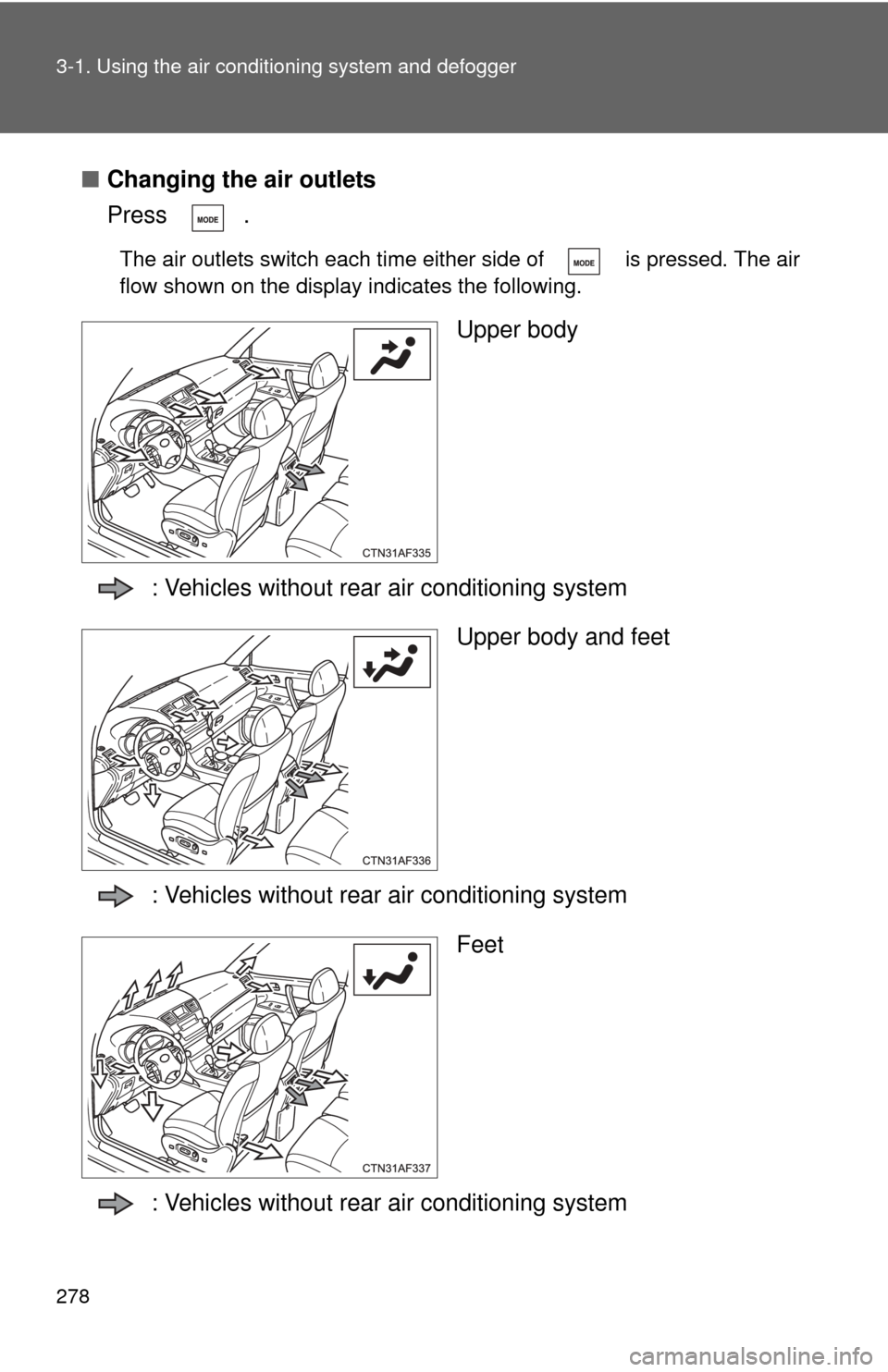
■Changing the air outlets
Press .
The air outlets switch each time either side of is pressed. The air
flow shown on the display indicates the following.
Upper body
: Vehicles without rear air conditioning system Upper body and feet
: Vehicles without rear air conditioning system Feet
: Vehicles without rear air conditioning system
Page 286 of 636
286
3-1. Using the air conditioning system and defogger
Rear automatic air conditioning system
Using the automatic modePress .The air conditioning system will operate, and air outlets
and fan speed will be set automatically.
“AUTO” will be displayed on the control panel.
Turn the temperature control dial clockwise (warm) or coun-
terclockwise (cool).
Airflow and outlets are automatica lly adjusted according to the tem-
perature setting.
Airflow display Fan speed display
Temperature setting display
Fan speed
control dial
OffAutomatic mode Changes the air
outlets used
Temperature
control dial
STEP1
STEP2
: If equipped
Page 292 of 636
292
3-1. Using the air conditioning system and defogger
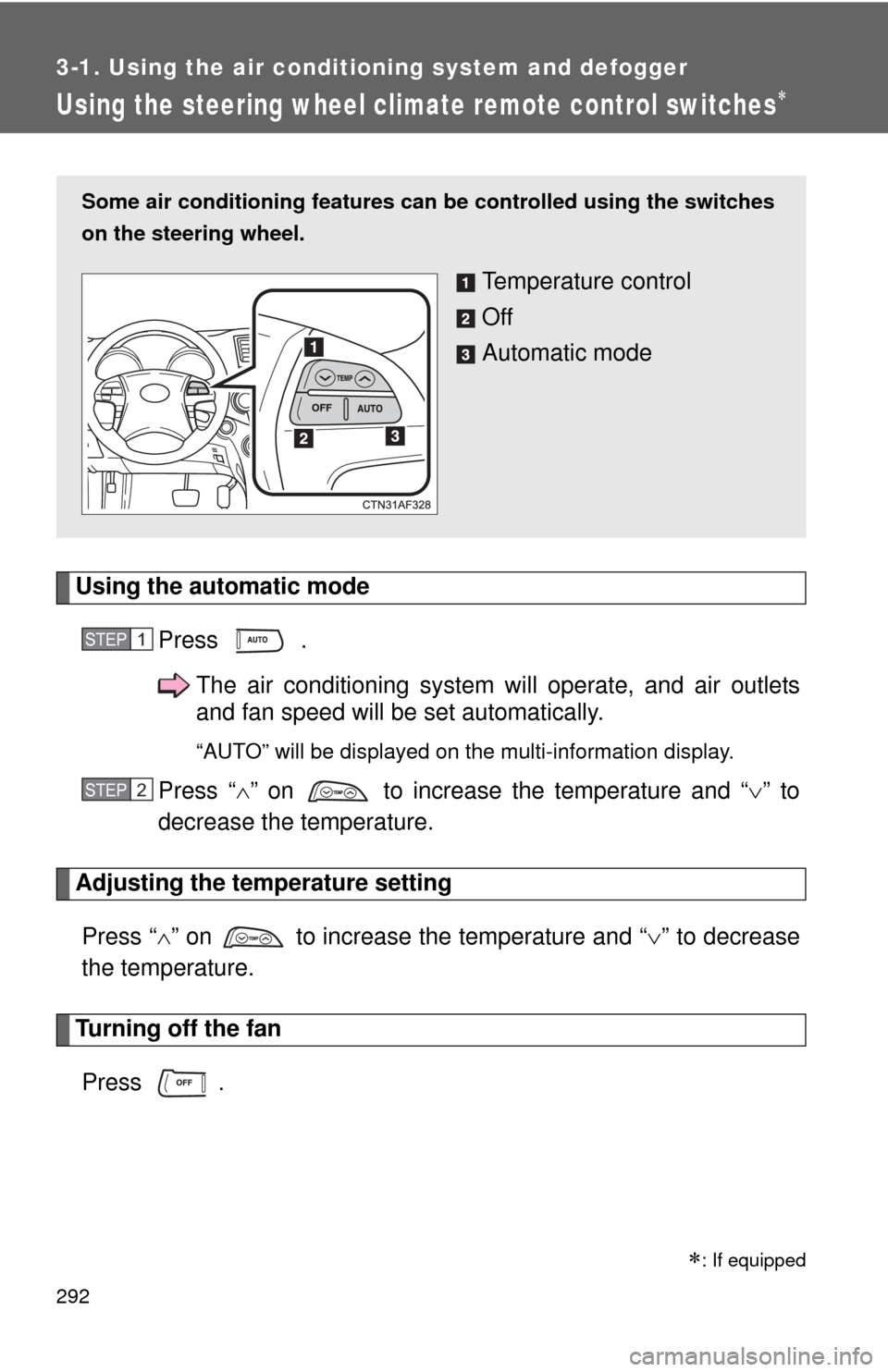
Using the steering wheel climate remote control switches
Using the automatic modePress .The air conditioning system will operate, and air outlets
and fan speed will be set automatically.
“AUTO” will be displayed on the multi-information display.
Press “” on to increase the temperature and “ ” to
decrease the temperature.
Adjusting the temperature setting
Press “ ” on to increase the temperature and “ ” to decrease
the temperature.
Turning off the fan
Press .
Some air conditioning features can be controlled using the switches
on the steering wheel.
Temperature control
Off
Automatic mode
STEP1
STEP2
: If equipped
Page 297 of 636
297
3-2. Using the audio system
3
Interior features
Using the radio
Ty p e A
Type B and C
Vo lu m e
Seeking the
frequency Station selector
AM/FM
mode buttons Adjusting the
frequency Power
Scanning for receivable stations
Changing the program type
Mute
Power Volume
Adjusting the frequency
(AM, FM mode) or
channel (SAT mode)
Seeking a frequency Displaying radio
text messages
AM/FM/SAT
mode button
Scanning for
receivable stations
Station selector
Setting preset buttons Changing the
channel category
Mute
Page 298 of 636

298 3-2. Using the audio system
Setting station presets (excluding XM® Satellite Radio)
Search for desired stations by turning or , or
pressing “
”or “ ” on .
Press and hold the button (from to ) the station
is to be set to until you hear a beep.
Type B and C: Each time is pressed, station pages are
changed. There are a total of 6 pages.
Scanning radio stations (excluding XM® Satellite Radio)
■ Scanning the preset radio stations
Press and hold until you hear a beep.
Preset stations will be played for 5 seconds each.
When the desired station is reached, press once again.
■ Scanning all radio stations within range
Press
.
All stations with reception will be played for 5 seconds each.
When the desired station is reached, press once again.
■ Displaying radio text messages (for type B and C, FM mode
only)
When a new radio text message is received, “MSG” is shown on
the display. To display the message, press .
If the text continues past the end of the display, “ ” is displayed. Press
and hold until you hear a beep.
Text messages are not displayed while driving.
STEP1
STEP2
STEP1
STEP2
STEP1
STEP2
Page 299 of 636
299
3-2. Using the audio system
3
Interior features
XM® Satellite Radio (type B and C)
■ Receiving XM
® Satellite Radio
Press .
The display changes as follows each time is pressed.
AM FM XM
Turn to select the desired channel in all the categories,
or press “ ” or “ ” on to select the desired channel in
the current category.
■ Setting XM
® Satellite Radio channel presets
Select the desired channel. Press and hold a button
(from to ) until you hear a beep.
■ Changing the channel category
Press “ ” or “ ” on the .
■ Scanning XM
® Satellite Radio channels
● Scanning channels in the current category
Press .
When the desired channel is reached, press again.
● Scanning preset channels
Press and hold until you hear a beep.
When the desired channel is reached, press again.
STEP1
STEP2
STEP1
STEP2
STEP1
STEP2