Page 196 of 636
196 2-2. Instrument cluster
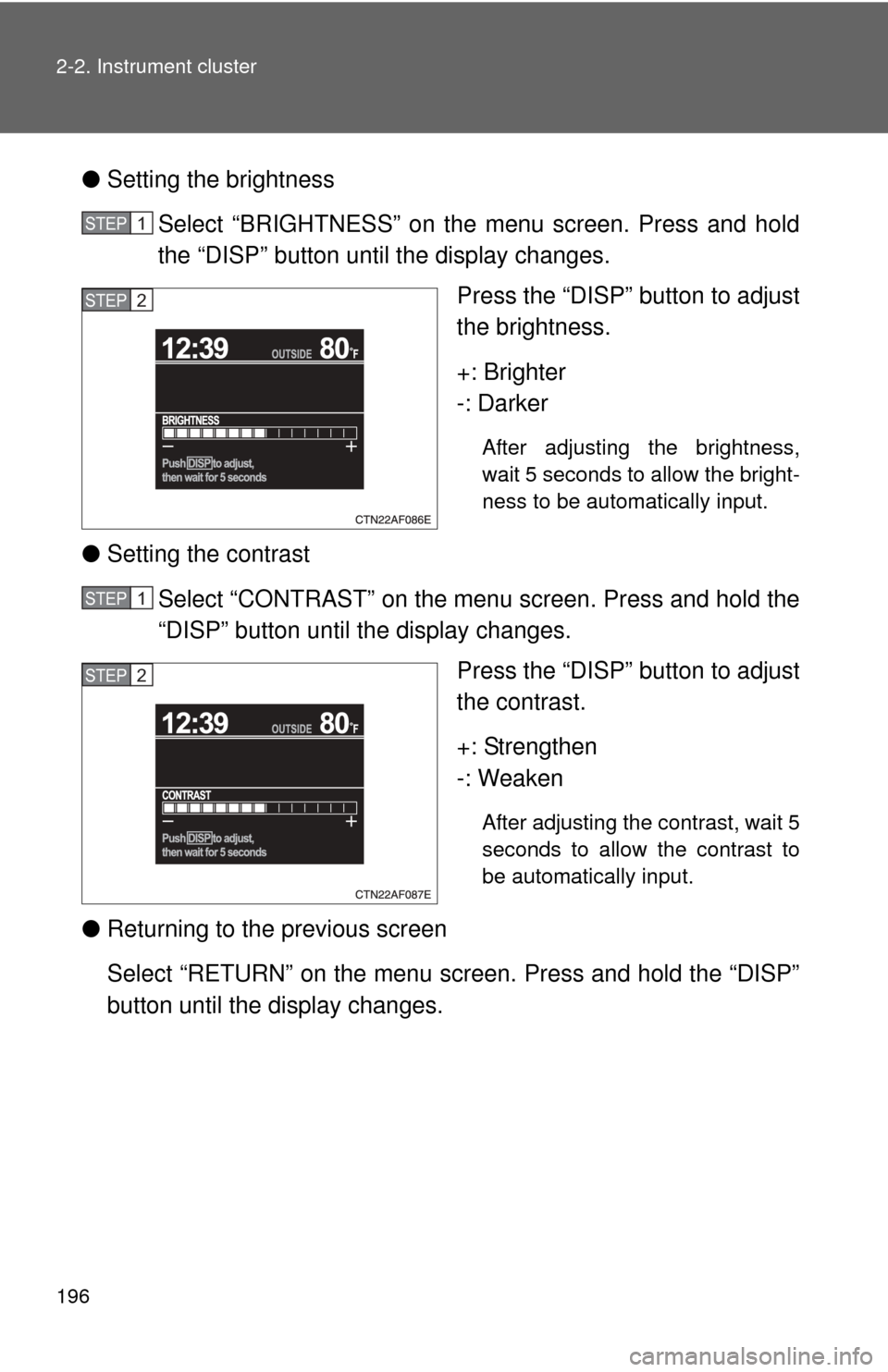
●Setting the brightness
Select “BRIGHTNESS” on the menu screen. Press and hold
the “DISP” button until the display changes. Press the “DISP” button to adjust
the brightness.
+: Brighter
-: Darker
After adjusting the brightness,
wait 5 seconds to allow the bright-
ness to be automatically input.
●Setting the contrast
Select “CONTRAST” on the menu screen. Press and hold the
“DISP” button until the display changes. Press the “DISP” button to adjust
the contrast.
+: Strengthen
-: Weaken
After adjusting the contrast, wait 5
seconds to allow the contrast to
be automatically input.
●Returning to the previous screen
Select “RETURN” on the menu screen. Press and hold the “DISP”
button until the display changes.
STEP1
STEP2
STEP1
STEP2
Page 197 of 636
197
2-2. Instrument cluster
2
When driving
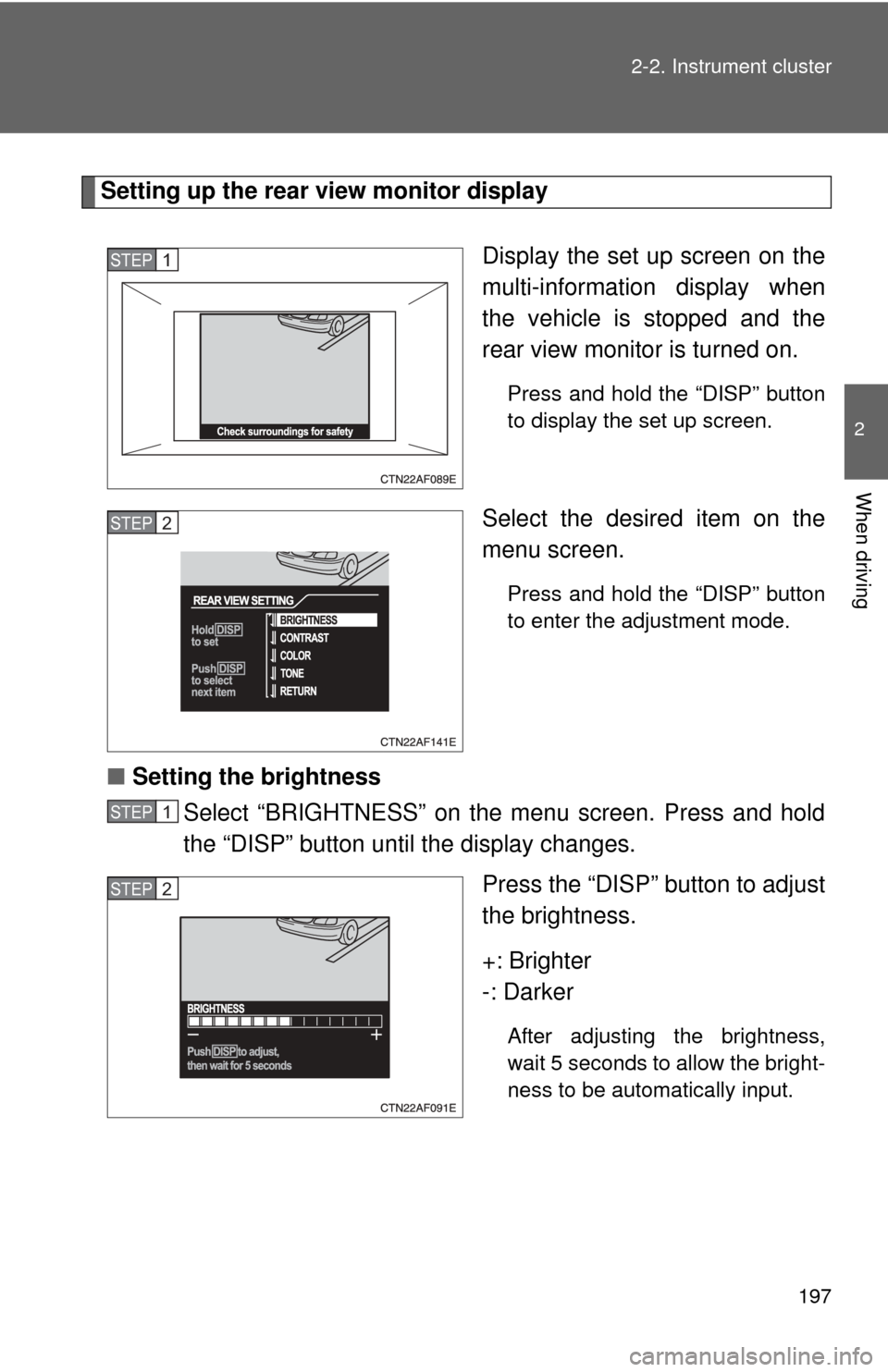
Setting up the rear view monitor display
Display the set up screen on the
multi-information display when
the vehicle is stopped and the
rear view monitor is turned on.
Press and hold the “DISP” button
to display the set up screen.
Select the desired item on the
menu screen.
Press and hold the “DISP” button
to enter the adjustment mode.
■Setting the brightness
Select “BRIGHTNESS” on the menu screen. Press and hold
the “DISP” button until the display changes.
Press the “DISP” button to adjust
the brightness.
+: Brighter
-: Darker
After adjusting the brightness,
wait 5 seconds to allow the bright-
ness to be automatically input.
STEP1
STEP2
STEP1
STEP2
Page 198 of 636
198 2-2. Instrument cluster
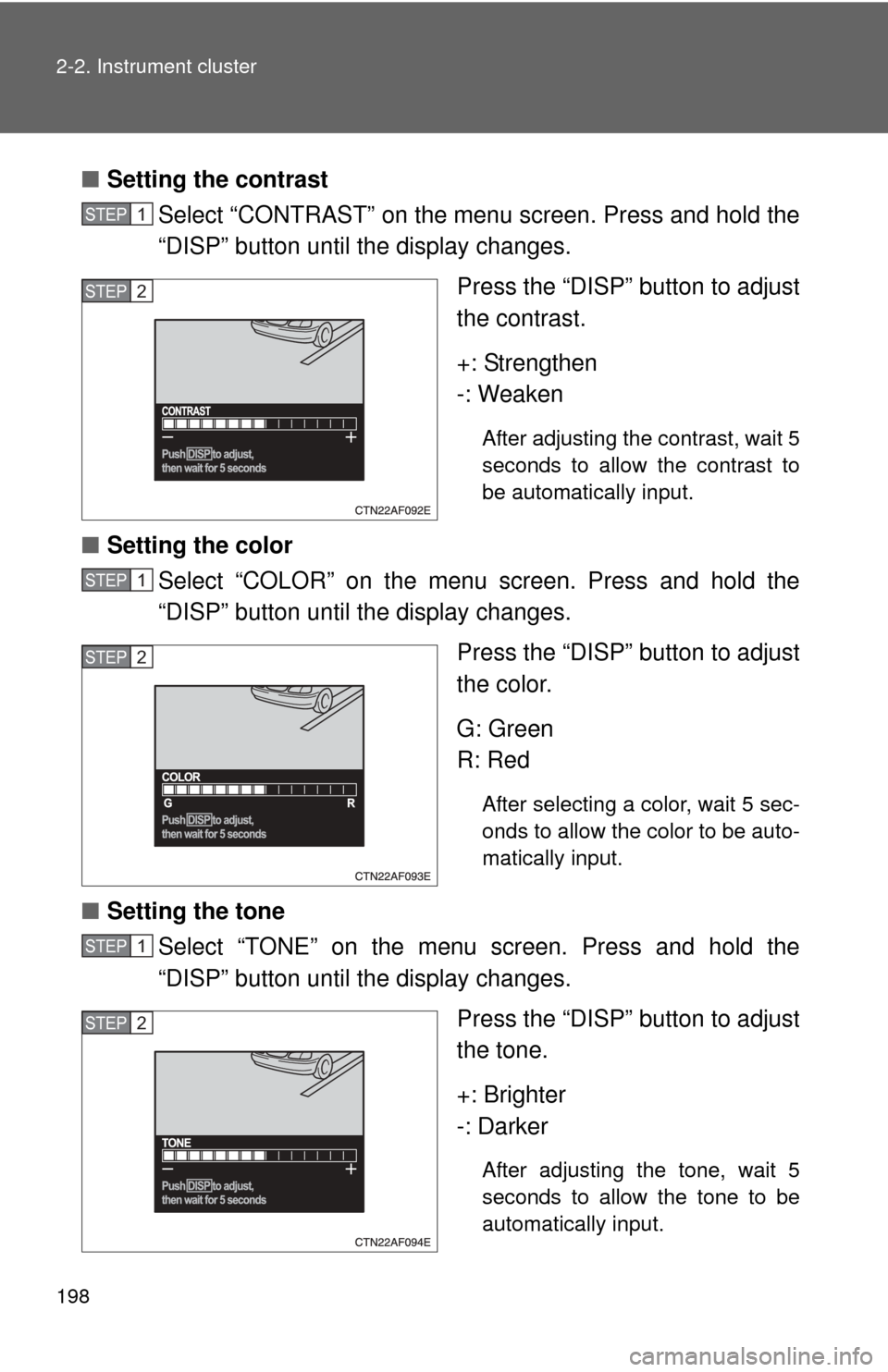
■Setting the contrast
Select “CONTRAST” on the menu screen. Press and hold the
“DISP” button until the display changes.
Press the “DISP” button to adjust
the contrast.
+: Strengthen
-: Weaken
After adjusting the contrast, wait 5
seconds to allow the contrast to
be automatically input.
■Setting the color
Select “COLOR” on the menu screen. Press and hold the
“DISP” button until the display changes.
Press the “DISP” button to adjust
the color.
G: Green
R: Red
After selecting a color, wait 5 sec-
onds to allow the color to be auto-
matically input.
■Setting the tone
Select “TONE” on the menu screen. Press and hold the
“DISP” button until the display changes.
Press the “DISP” button to adjust
the tone.
+: Brighter
-: Darker
After adjusting the tone, wait 5
seconds to allow the tone to be
automatically input.
STEP1
STEP2
STEP1
STEP2
STEP1
STEP2
Page 199 of 636

199
2-2. Instrument cluster
2
When driving
■
Returning to the previous screen
Select “RETURN” on the menu screen. Press and hold the “DISP”
button until the display changes.
■System check display
Vehicles without smart key system
After the engine switch is turned to the “ON” position, “SYSTEM CHECK” is
displayed while system operation is checked. When the system check is
complete, the normal screen will return.
Vehicles with smart key system
After the “ENGINE START STOP” switch is turned to IGNITION ON mode,
“SYSTEM CHECK” is displayed while system operation is checked. When
the system check is complete, the normal screen will return.
■ Liquid crystal display
Small bright spots or dots may appear on the liquid crystal display. This is a
particular characteristic of liquid crystal displays and does not indicate a mal-
function. No action is required.
■ Outside temperature display
When stopped, or driving at low speeds (less than 12 mph [20 km/h]), the
correct outside temperature may not be displayed, or the display may take
longer than normal to change.
■ Customization that can be co nfigured at Toyota dealer
Setting of language selection can be changed.
(Customizable features P. 602)
NOTICE
■The multi-information disp lay at low temperatures
Allow the interior of the vehicle to warm up before using the liquid crystal
information display. At extremely low temperatures, the information display
monitor may respond slowly, and display changes may be delayed.
Page 219 of 636
219
2-4. Using other driving systems
2
When driving
Rear view monitor system (vehicles with multi-infor mation display)
Vehicles with navigation system
Refer to the “Navigation System Owner's Manual”.
Vehicles without navigation system
The rear view monitor system assists the driver by displaying an
image of the area behind the vehicle. The image is displayed in
reverse on the screen. This reversed im age is a similar image to the
one on the inside rear view mirror.
The rear view image is dis-
played when the shift lever is
in the R position.
If the shift lever is shifted out of
R, the screen returns to the
previous one.
Page 220 of 636
220 2-4. Using other driving systems
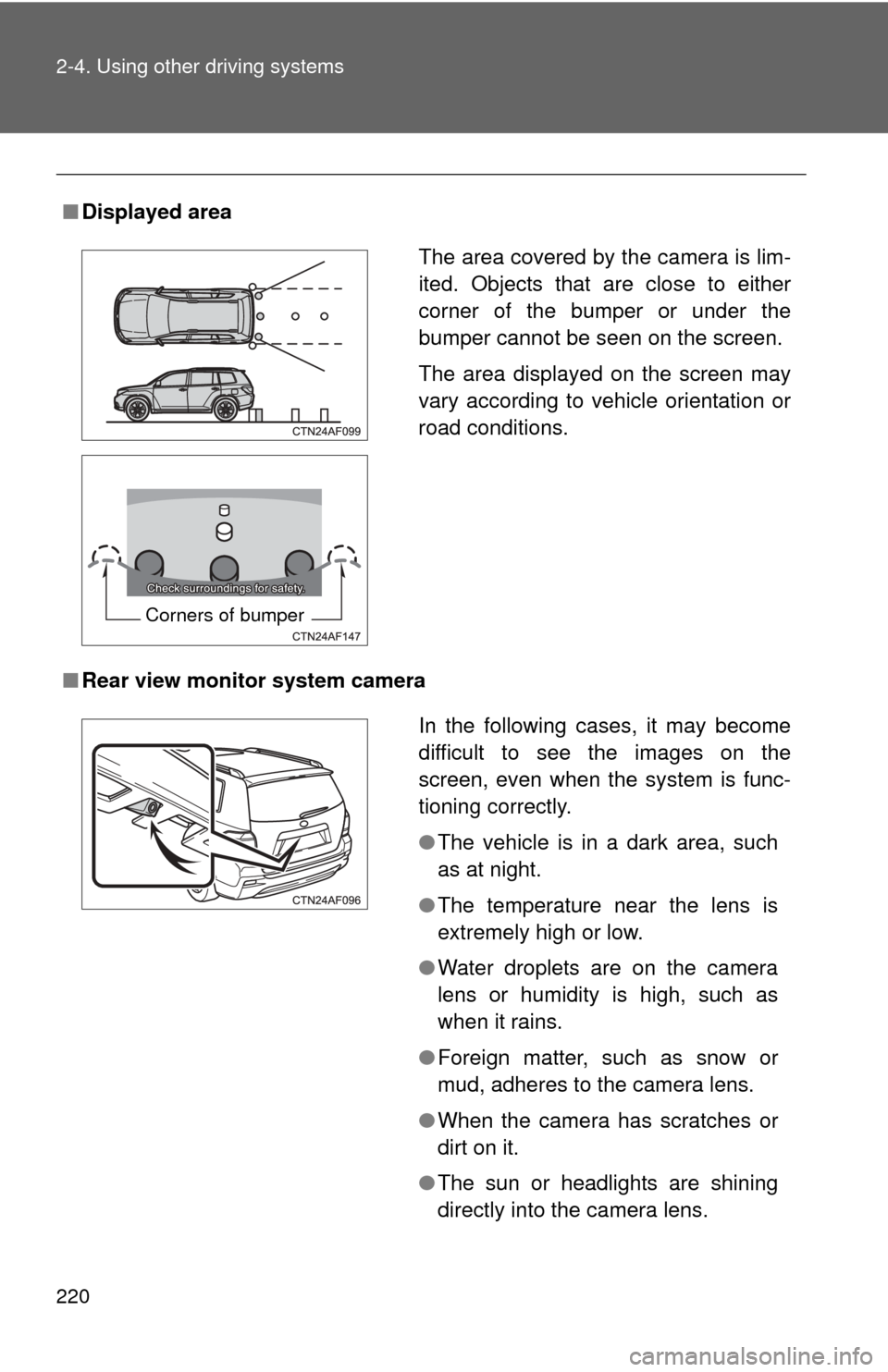
■Displayed area
■ Rear view monitor system camera
The area covered by the camera is lim-
ited. Objects that are close to either
corner of the bumper or under the
bumper cannot be seen on the screen.
The area displayed on the screen may
vary according to vehicle orientation or
road conditions.
Corners of bumper
In the following cases, it may become
difficult to see the images on the
screen, even when the system is func-
tioning correctly.
●The vehicle is in a dark area, such
as at night.
● The temperature near the lens is
extremely high or low.
● Water droplets are on the camera
lens or humidity is high, such as
when it rains.
● Foreign matter, such as snow or
mud, adheres to the camera lens.
● When the camera has scratches or
dirt on it.
● The sun or headlights are shining
directly into the camera lens.
Page 221 of 636
221
2-4. Using other
driving systems
2
When driving
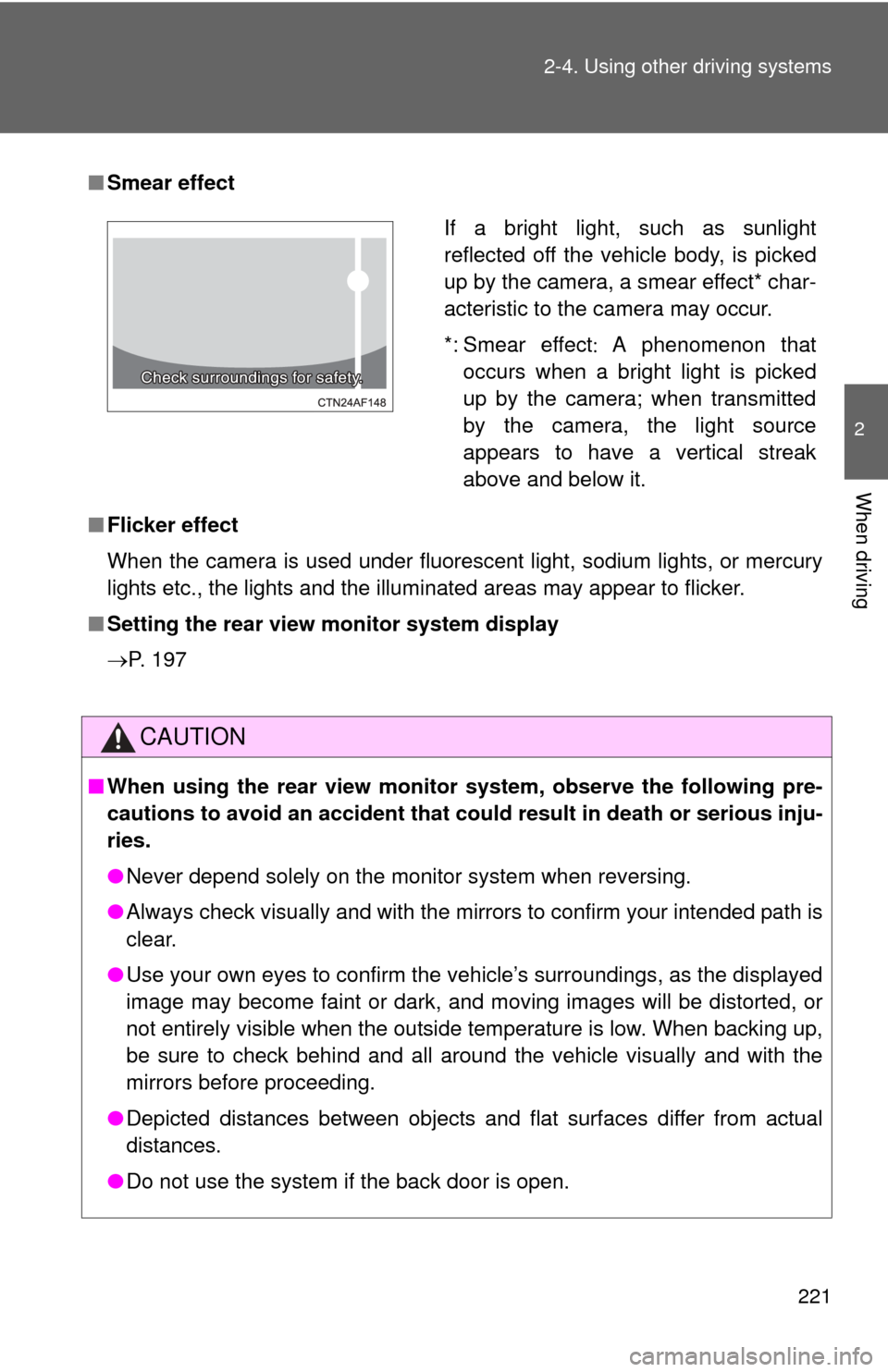
■Smear effect
■ Flicker effect
When the camera is used under fluorescent light, sodium lights, or mercury
lights etc., the lights and the illuminated areas may appear to flicker.
■ Setting the rear view monitor system display
P. 197
CAUTION
■ When using the rear view monito r system, observe the following pre-
cautions to avoid an accident that coul d result in death or serious inju-
ries.
● Never depend solely on the monitor system when reversing.
● Always check visually and with the mirrors to confirm your intended path is
clear.
● Use your own eyes to confirm the vehicle’s surroundings, as the displayed
image may become faint or dark, and moving images will be distorted, or
not entirely visible when the outside temperature is low. When backing up,
be sure to check behind and all around the vehicle visually and with the
mirrors before proceeding.
● Depicted distances between objects and flat surfaces differ from actual
distances.
● Do not use the system if the back door is open.
If a bright light, such as sunlight
reflected off the vehicle body, is picked
up by the camera, a smear effect* char-
acteristic to the camera may occur.
*: Smear effect A phenomenon that
occurs when a bright light is picked
up by the camera; when transmitted
by the camera, the light source
appears to have a vertical streak
above and below it.
Page 222 of 636
222 2-4. Using other driving systems
NOTICE
■Conditions which may affect the rear view monitor system
● If the back of the vehicle has been hit, the camera’s position and mounting
angle may have changed. Have the vehicle inspected by your Toyota
dealer.
● Rapid temperature changes, such as when hot water is poured on the
vehicle in cold weather, may cause the system to function abnormally.
● If the camera lens is dirty, it cannot transmit a clear image. Rinse with
water and wipe with a soft cloth. If extremely dirty, wash with a mild
cleanser and rinse.
● The displayed image may be darker and moving images may be slightly
distorted when the system is cold.
■ Camera precautions
●As the camera has a water proof construction, do not detach, disassemble
or modify it. This may cause incorrect operation.
● Do not subject the camera to a strong impact.
● If the camera lens becomes dirty, it cannot transmit a clear image. If water
droplets, snow, or mud adhere to the lens, rinse with water and wipe with a
soft cloth. If the lens is extremely dirty, wash it with a mild cleanser and
rinse. Do not rub hard.
● Do not allow organic solvent, car wax, window cleaner or glass coat to
adhere to the camera. If this happens, wipe it off as soon as possible.
● Do not strongly rub the camera lens. If the camera lens is scratched, it
cannot transmit a clear image.
● When washing the vehicle, do not apply intensive bursts of water to the
camera or camera area. Doing so may result in the camera malfunction-
ing.
● When replacing tires, please consult your Toyota dealer. If you replace the
tires, the area displayed on the screen may change.