Page 336 of 636
336 3-2. Using the audio system
Using the audio control function■ Changing sound quality modes
Type A
Pressing selects the mode to be changed in the following
order.
“BAS” “TRE” “FAD” “BAL” “ASL” “RSE”*
*: Vehicles with rear seat entertainment system
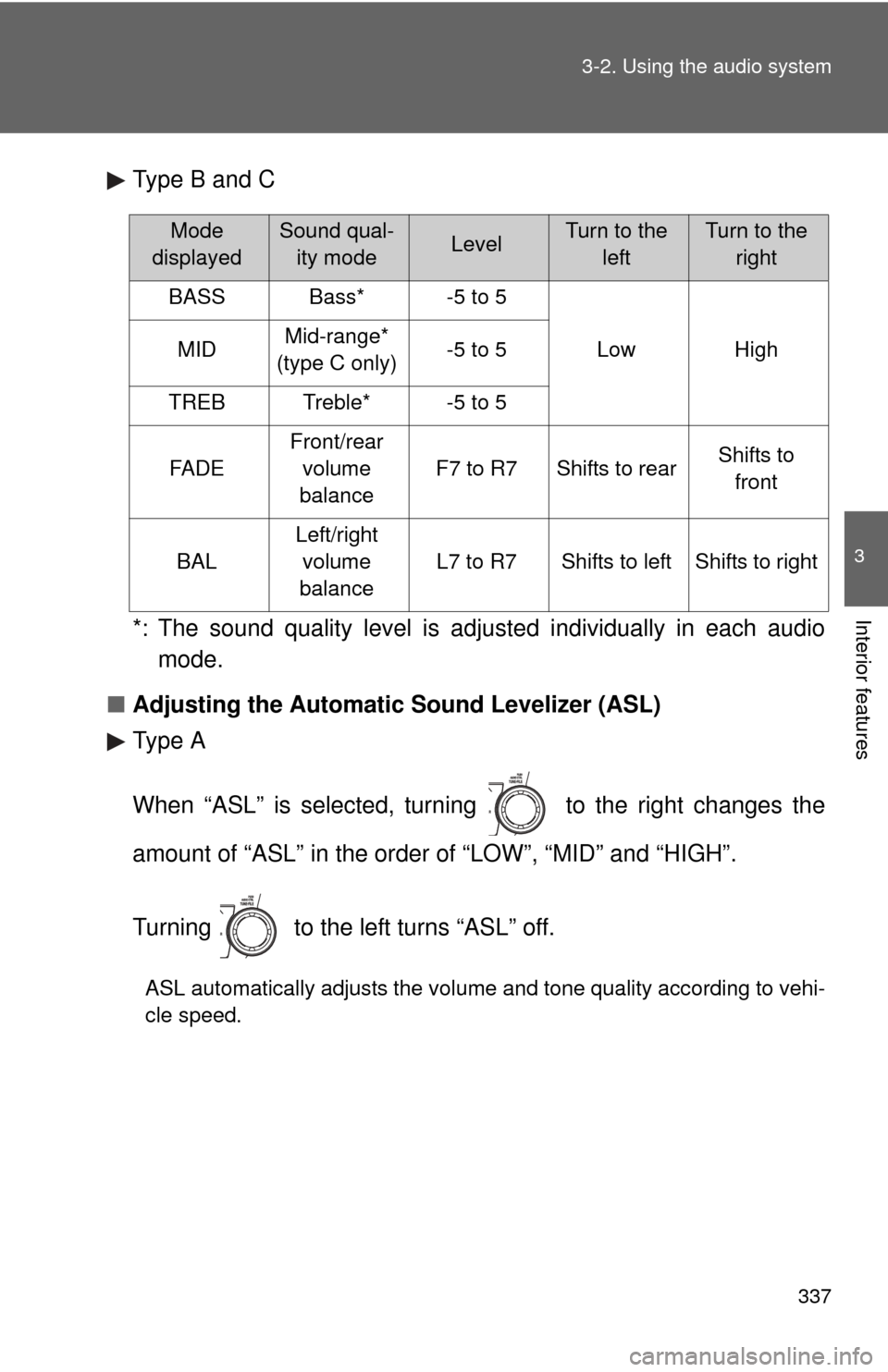
Type B and C
Press .
Press the that corresponds to the desired mode.
“BASS”, “MID” (type C only), “TREB”, “FADE”, or “BAL”
■ Adjusting sound quality
Turning or adjusts the level.
Type A
*: The sound quality level is adjusted individually in each radio mode or
CD mode.
STEP1
STEP2
Mode
displayedSound qual- ity modeLevelTurn to the leftTurn to the right
BASBass*-5 to 5LowHighTRETreble*-5 to 5
FA D
Front/rear volume
balance
R7 to F7Shifts to rearShifts to front
BAL
Left/right volume
balance
L7 to R7Shifts to leftShifts to right
Page 337 of 636
337
3-2. Using the audio system
3
Interior features
Type B and C
*: The sound quality level is adjusted individually in each audio
mode.
■ Adjusting the Automatic Sound Levelizer (ASL)
Type A
When “ASL” is selected, turning to the right changes the
amount of “ASL” in the order of “LOW”, “MID” and “HIGH”.
Turning to the left turns “ASL” off.
ASL automatically adjusts the volume and tone quality according to vehi-
cle speed.
Mode
displayedSound qual- ity modeLevelTurn to the leftTurn to the right
BASSBass*-5 to 5
LowHighMIDMid-range*
(type C only)-5 to 5
TREBTreble*-5 to 5
FA D E
Front/rear volume
balance
F7 to R7Shifts to rearShifts to front
BAL
Left/right volume
balance
L7 to R7Shifts to leftShifts to right
Page 350 of 636
350
3-3. Using the Bluetooth® audio system
Using the Bluetooth® audio system
■Audio unit
Display
Track title, Artist name,
Album name, Elapsed time,
“Streaming Audio”, etc. is
displayed.
Selects items such as menu
and number
Turn: Selects an item
Press: Inputs the selected
item
Bluetooth-Audio connec-
tion condition
If “BT” is not displayed, the
Bluetooth® audio system
cannot be used.
■ Microphone
Page 351 of 636
351
3-3. Using the Bluetooth
® audio system
3
Interior features
Operating the system using voice commands
By following voice guidance inst ructions output from the speaker,
voice commands enable the operation of the Bluetooth
® audio sys-
tem without the need to check the display or operate .
■ Operation procedure when using voice commands
Press the talk switch and follo w voice guidance instructions.
■ Auxiliary commands when using voice commands
The following auxiliary commands can be used when operating the
system using a voice command:
“Cancel”: Exits the Bluetooth
® audio setup
“Repeat”: Repeats the previous voice guidance instruction
“Go back”: Returns to the previous procedure
“Help”: Reads aloud the function summary if a help comment is
registered for the selected function
Page 352 of 636
352 3-3. Using the Bluetooth
® audio system
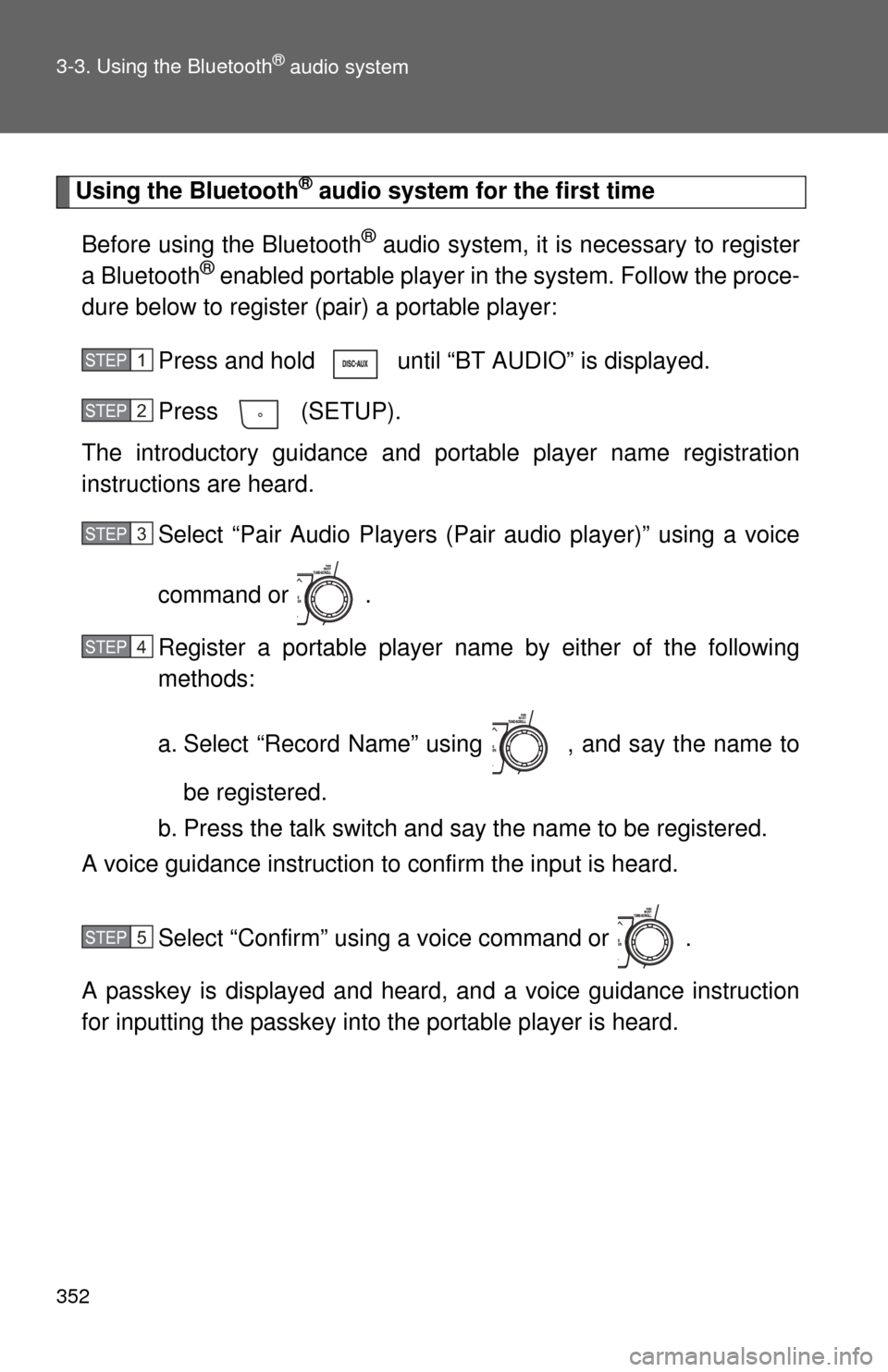
Using the Bluetooth® audio system for the first time
Before using the Bluetooth
® audio system, it is necessary to register
a Bluetooth® enabled portable player in the system. Follow the proce-
dure below to register (pair) a portable player:
Press and hold until “BT AUDIO” is displayed.
Press (SETUP).
The introductory guidance and port able player name registration
instructions are heard.
Select “Pair Audio Players (Pair audio player)” using a voice
command or .
Register a portable player nam e by either of the following
methods:
a. Select “Record Name” using , and say the name to
be registered.
b. Press the talk switch and say the name to be registered.
A voice guidance instruction to confirm the input is heard.
Select “Confirm” using a voice command or .
A passkey is displayed and heard, and a voice guidance instruction
for inputting the passkey into the portable player is heard.
STEP1
STEP2
STEP3
STEP4
STEP5
Page 353 of 636
353
3-3. Using the Bluetooth
® audio system
3
Interior features
Input the passkey into the portable player.
Refer to the manual that comes with the portable player for the oper-
ation of the portable player.
Guidance for registration completion is heard.
If the portable player has a Bluetooth
® phone, the phone can be reg-
istered at the same time. ( P. 370)
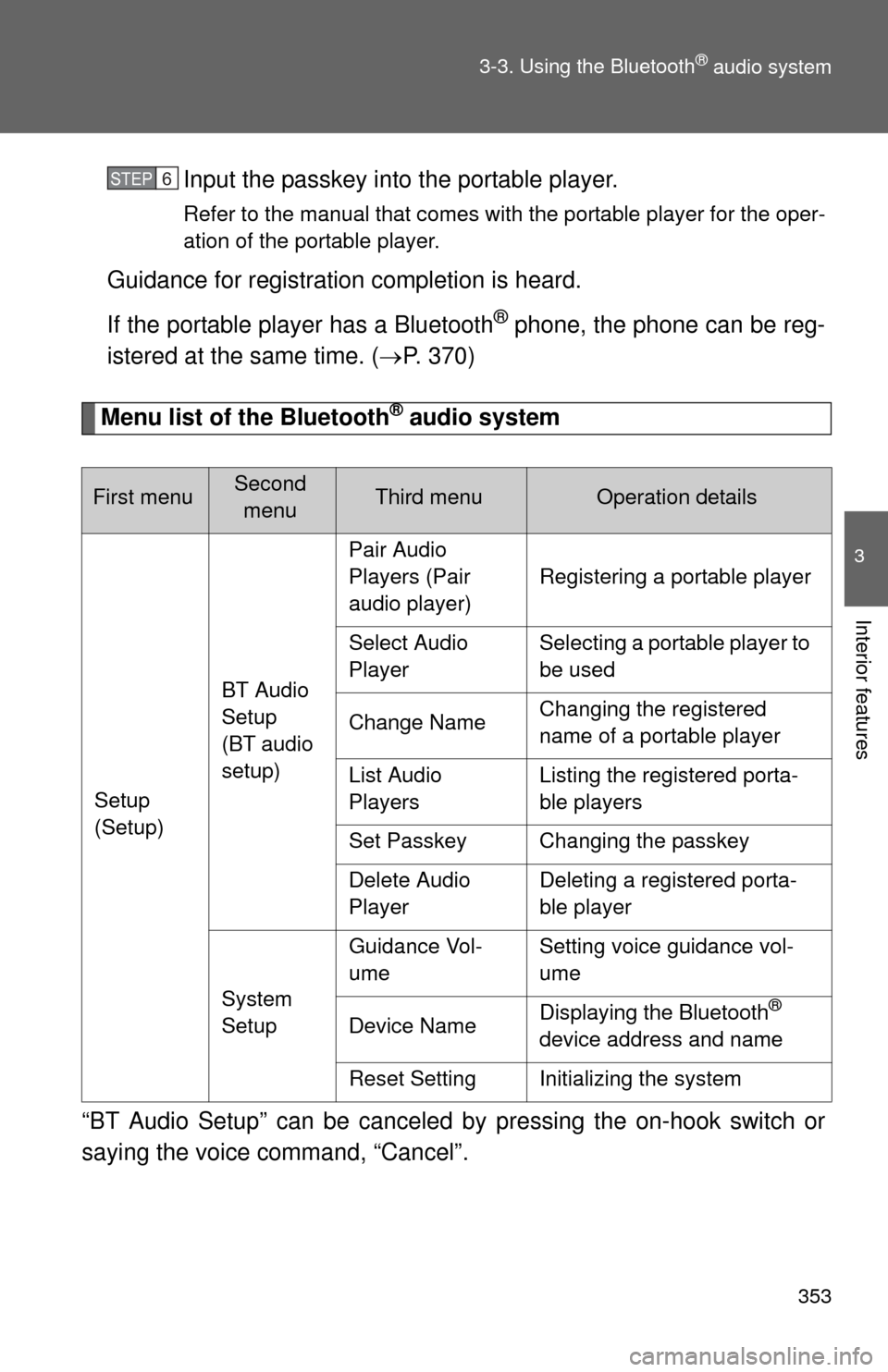
Menu list of the Bluetooth® audio system
“BT Audio Setup” can be canceled by pressing the on-hook switch or
saying the voice command, “Cancel”.
First menuSecond menuThird menuOperation details
Setup
(Setup) BT Audio
Setup
(BT audio
setup)Pair Audio
Players (Pair
audio player)
Registering a portable player
Select Audio
Player Selecting a portable player to
be used
Change Name Changing the registered
name of a portable player
List Audio
Players Listing the registered porta-
ble players
Set Passkey Changing the passkey
Delete Audio
Player Deleting a registered porta-
ble player
System
Setup Guidance Vol-
ume
Setting voice guidance vol-
ume
Device Name Displaying the Bluetooth
®
device address and name
Reset Setting Initializing the system
STEP6
Page 355 of 636
355
3-3. Using the Bluetooth® audio system
3
Interior features
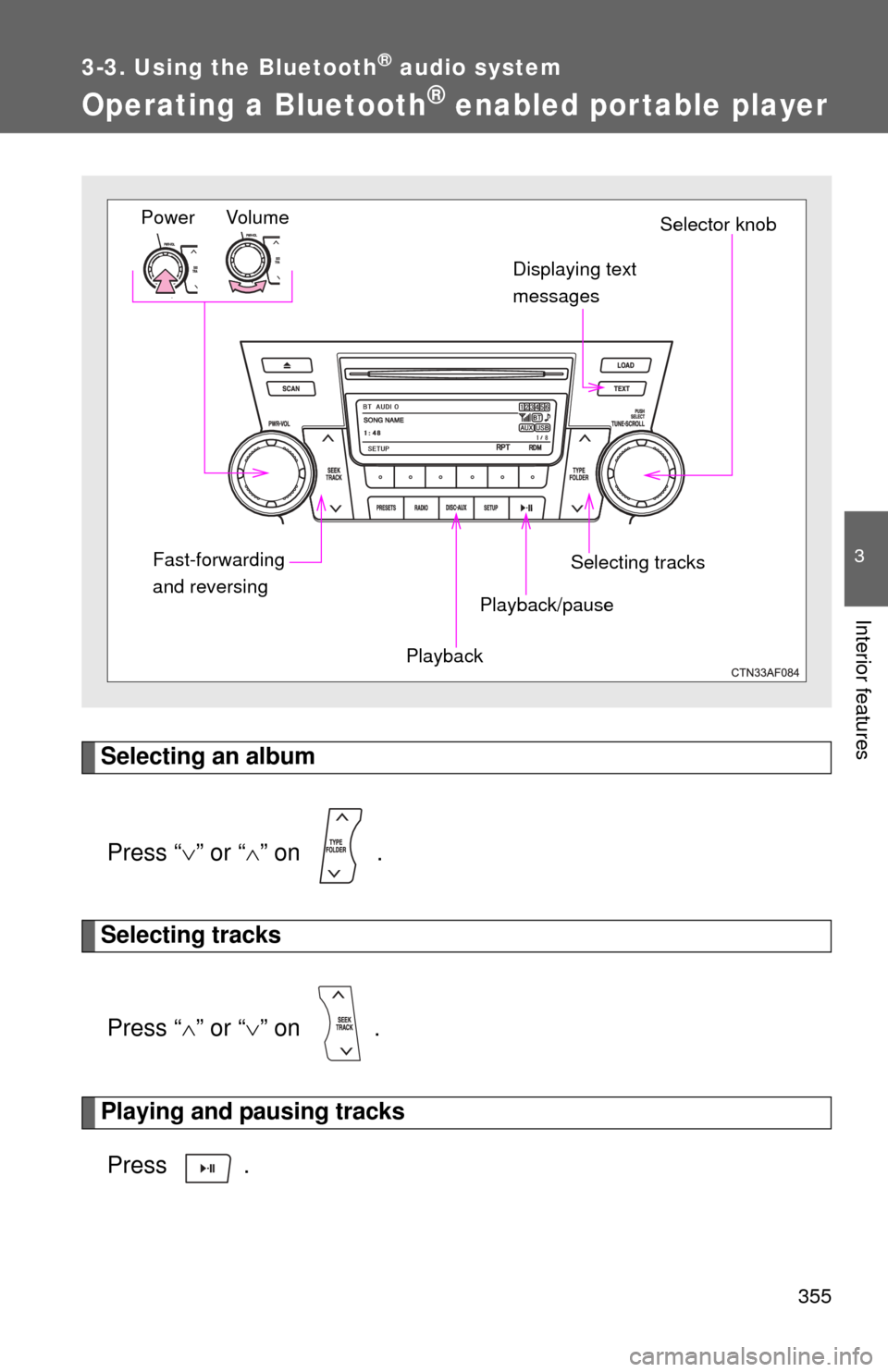
Operating a Bluetooth® enabled portable player
Selecting an albumPress “ ” or “ ” on .
Selecting tracks
Press “ ” or “ ” on .
Playing and pausing tracks
Press .
Vo lu m e
Power
Playback/pauseDisplaying text
messages
Selector knob
Selecting tracks
Fast-forwarding
and reversing
Playback
Page 356 of 636
356 3-3. Using the Bluetooth
® audio system
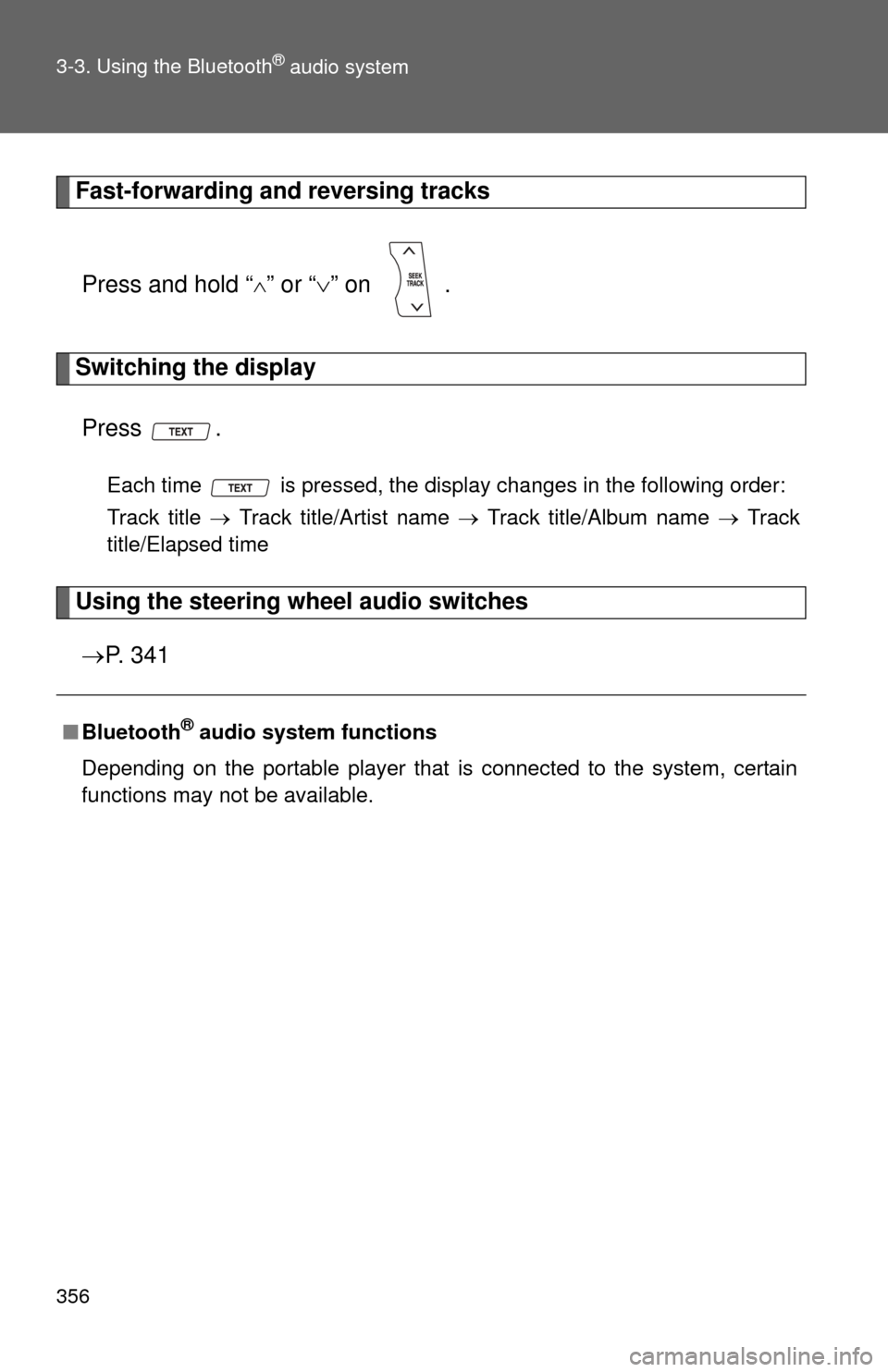
Fast-forwarding and reversing tracksPress and hold “
” or “ ” on .
Switching the display
Press .
Each time is pressed, the display changes in the following order:
Track title Track title/Artist name Track title/Album name Track
title/Elapsed time
Using the steering wheel audio switches
P. 3 4 1
■Bluetooth® audio system functions
Depending on the portable player that is connected to the system, certain
functions may not be available.