Page 435 of 636
435
3-7. Other interior features
3
Interior features
Compass
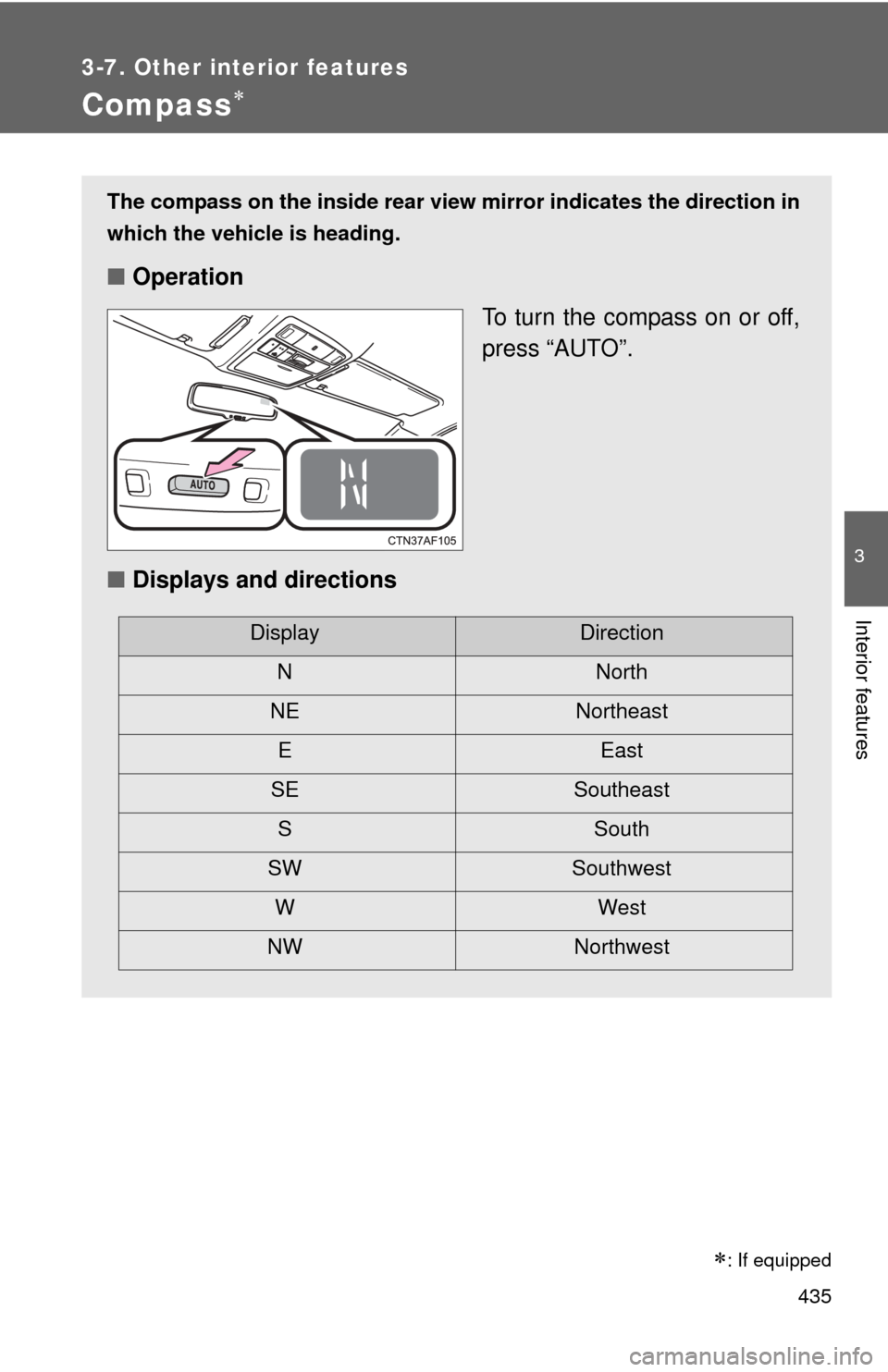
The compass on the inside rear view mirror indicates the direction in
which the vehicle is heading.
■ Operation
To turn the compass on or off,
press “AUTO”.
■ Displays and directions
DisplayDirection
NNorth
NE Northeast EEast
SE Southeast S South
SW Southwest
WWest
NW Northwest
: If equipped
Page 436 of 636
436 3-7. Other interior features
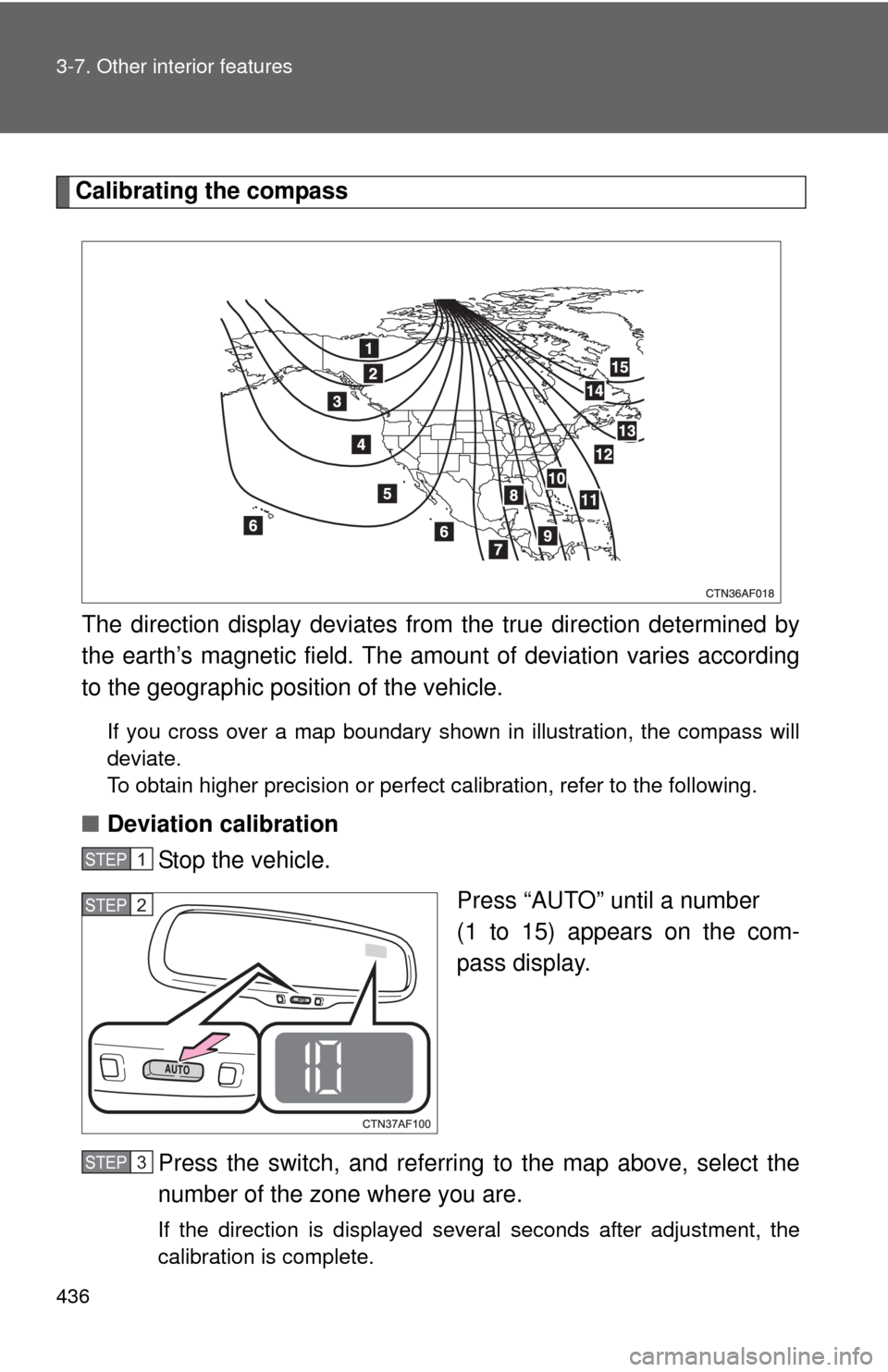
Calibrating the compassThe direction display deviates fr om the true direction determined by
the earth’s magnetic field. The amoun t of deviation varies according
to the geographic position of the vehicle.
If you cross over a map boundary shown in illustration, the compass will
deviate.
To obtain higher precision or perfect calibration, refer to the following.
■Deviation calibration
Stop the vehicle.
Press “AUTO” until a number
(1 to 15) appears on the com-
pass display.
Press the switch, and referring to the map above, select the
number of the zone where you are.
If the direction is displayed several seconds after adjustment, the
calibration is complete.
STEP1
STEP2
STEP3
Page 437 of 636
437
3-7. Other interior features
3
Interior features
■
Circling calibration
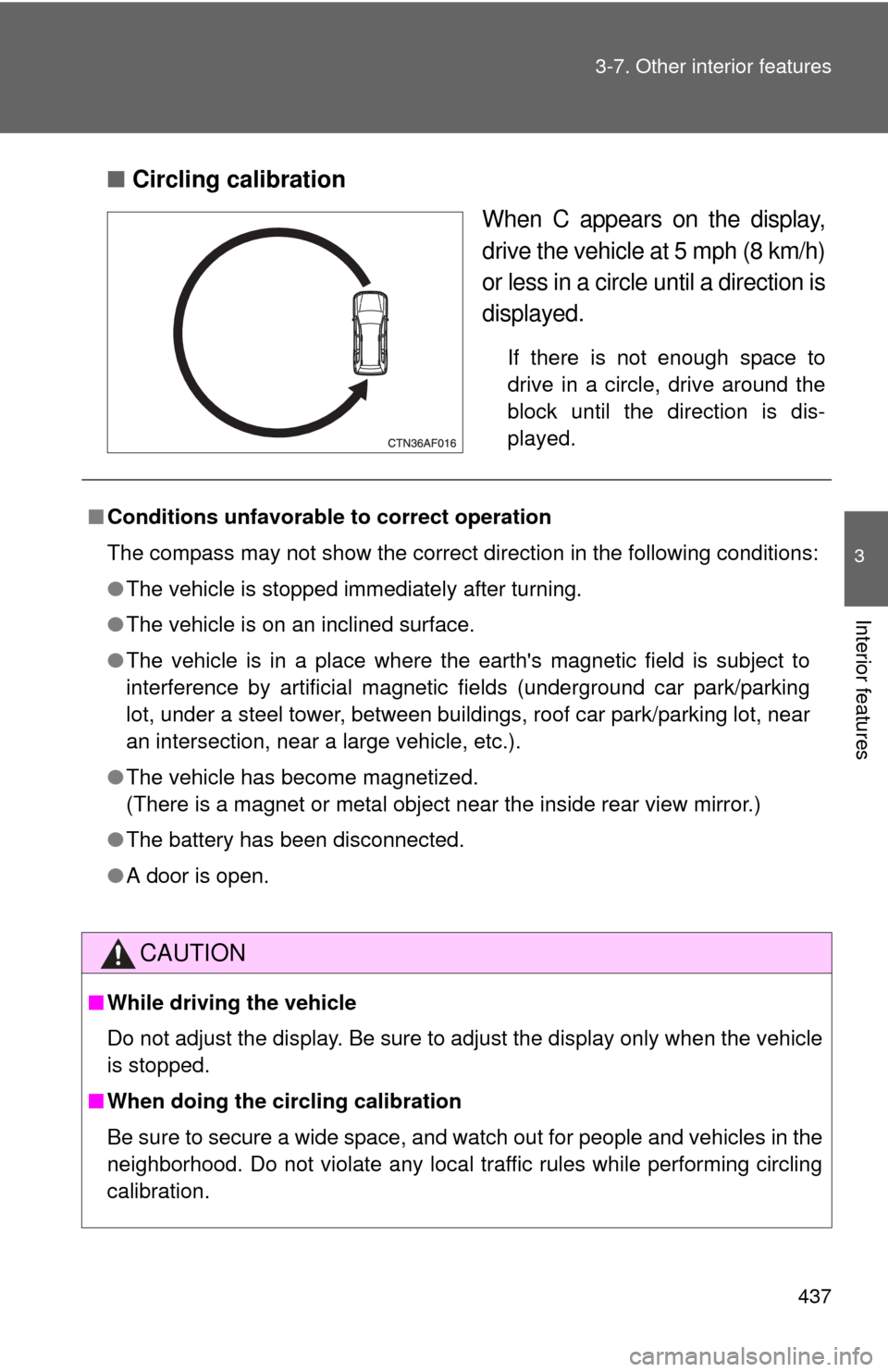
When C appears on the display,
drive the vehicle at 5 mph (8 km/h)
or less in a circle until a direction is
displayed.
If there is not enough space to
drive in a circle, drive around the
block until the direction is dis-
played.
■Conditions unfavorable to correct operation
The compass may not show the correct direction in the following conditions:
●The vehicle is stopped immediately after turning.
● The vehicle is on an inclined surface.
● The vehicle is in a place where the earth's magnetic field is subject to
interference by artificial magnetic fields (underground car park/parking
lot, under a steel tower, between buildings, roof car park/parking lot, near
an intersection, near a large vehicle, etc.).
● The vehicle has become magnetized.
(There is a magnet or metal object near the inside rear view mirror.)
● The battery has been disconnected.
● A door is open.
CAUTION
■While driving the vehicle
Do not adjust the display. Be sure to adjust the display only when the vehicle
is stopped.
■ When doing the circling calibration
Be sure to secure a wide space, and watch out for people and vehicles in the
neighborhood. Do not violate any local traffic rules while performing circling
calibration.
Page 447 of 636

447
4-2. Maintenance
4
Maintenance and care
■
Reset the maintenance data (U.S.A. only)
After the required maintenance is performed according to the maintenance
schedule, please reset the maintenance data.
To reset the data, follow the procedures described below:
Vehicles without smart key system Set the engine switch to the “LOCK” position with the trip meter A
reading shown. ( P. 185)
While pressing the trip meter reset button, set the engine switch to
the “ON” position.
Vehicles with smart key system Set the “ENGINE START STOP” switch OFF with the trip meter A
reading shown. ( P. 185)
While pressing the trip meter reset button, set the “ENGINE START
STOP” switch to the IGNITION ON mode.
Without multi-information display: Continue to press and hold the
button until the trip meter displays “000000”.
With multi-information display: Continue to press and hold the but-
ton until “COMPLETE” appears on the multi-information display.
■ Allow inspection and repairs to be performed by a Toyota dealer
● Toyota technicians are well-trained specialists and are kept up to date
with the latest service information. They are well informed about the
operations of all systems on your vehicle.
● Keep a copy of the repair order. It proves that the maintenance that has
been performed is under warranty coverage. If any problem should arise
while your vehicle is under warranty, your Toyota dealer will promptly
take care of it.
STEP1
STEP2
STEP1
STEP2
STEP3
Page 477 of 636
477
4-3. Do-it-yourself maintenance
4
Maintenance and care
Washer fluid
Add washer fluid in the following
situations.
●Any washer does not work.
● The low washer fluid warning
light comes on (vehicles with-
out multi-information display).
● The warning message
appears on the multi-informa-
tion display (vehicles with
multi-information display).
CAUTION
■When adding washer fluid
Do not add the washer fluid when the engine is hot or running, as the washer
fluid contains alcohol and may catch fire if spilled on the engine etc.
NOTICE
■Do not use any fluid other than washer fluid
Do not use soapy water or engine antifreeze instead of washer fluid.
Doing so may cause streaking on the vehicle’s painted surfaces.
■ Diluting washer fluid
Dilute washer fluid with water as necessary.
Refer to the freezing temperatures listed on the label of the washer fluid bot-
tle.
Page 504 of 636

504 4-3. Do-it-yourself maintenance
23 EPS80 A Electric power steering
24 ST 30 A Starting system
25 CRT 10 ARear seat entertainment system,
audio system
26 RADIO NO.1 20 A Audio system
27 ECU-B NO.1 10 A Steering sensor, gauges and
meters, clock, main body ECU,
wireless remote control, smart key
system, power back door, multi-
information display, front passen-
ger occupant classification system
28 DOME 10 AVanity lights, personal lights, inte-
rior light, gauges and meters,
engine switch light, door courtesy
lights
29 TOWING 30 A Trailer lights
30 STR LOCK 20 A Steering lock system
31 EFI MAIN 25 AMultiport fuel injection system/
sequential multiport fuel injection
system, EFI NO.2, EFI NO.3
32 HAZ 15 A Turn signal lights
33 IG2 25 AINJ NO.1, INJ NO.2, IGN, GAUGE
NO.2
34 AMP 15 A Audio system
35 RR FOG 7.5 A No circuit
36 DEICER 15 A Windshield wiper de-icer
37 G/H 10 AGlass hatch, multiplex communica-
tion system, outer foot lights
38 ALT-S 7.5 A Charging system
39 AM2 7.5 A Multiplex communication system
40 H-LP LH HI 15 A Left-hand headlight (high beam)
FuseAmpereCircuit
Page 517 of 636
When trouble arises5
517
5-1. Essential informationEmergency flashers ......... 518
If your vehicle needs to be towed ........................ 519
If you think something is wrong ............................. 526
Fuel pump shut off system ........................... 527
5-2. Steps to take in an emergency
If a warning light turns on or a warning buzzer
sounds... ....................... 528
If a warning message is displayed........................ 539
If you have a flat tire......... 540
If the engine will not start ................................ 554
If the shift lever cannot be shifted from P............ 556
If you lose your keys/ wireless remote control
transmitter ...................... 557 If the electronic key does
not operate properly....... 558
If the battery is discharged ..................... 560
If your vehicle overheats ....................... 564
If the vehicle becomes stuck .............................. 567
If your vehicle has to be stopped in an
emergency ..................... 569
Page 529 of 636
5
When trouble arises
529
5-2. Steps to take in an emergency
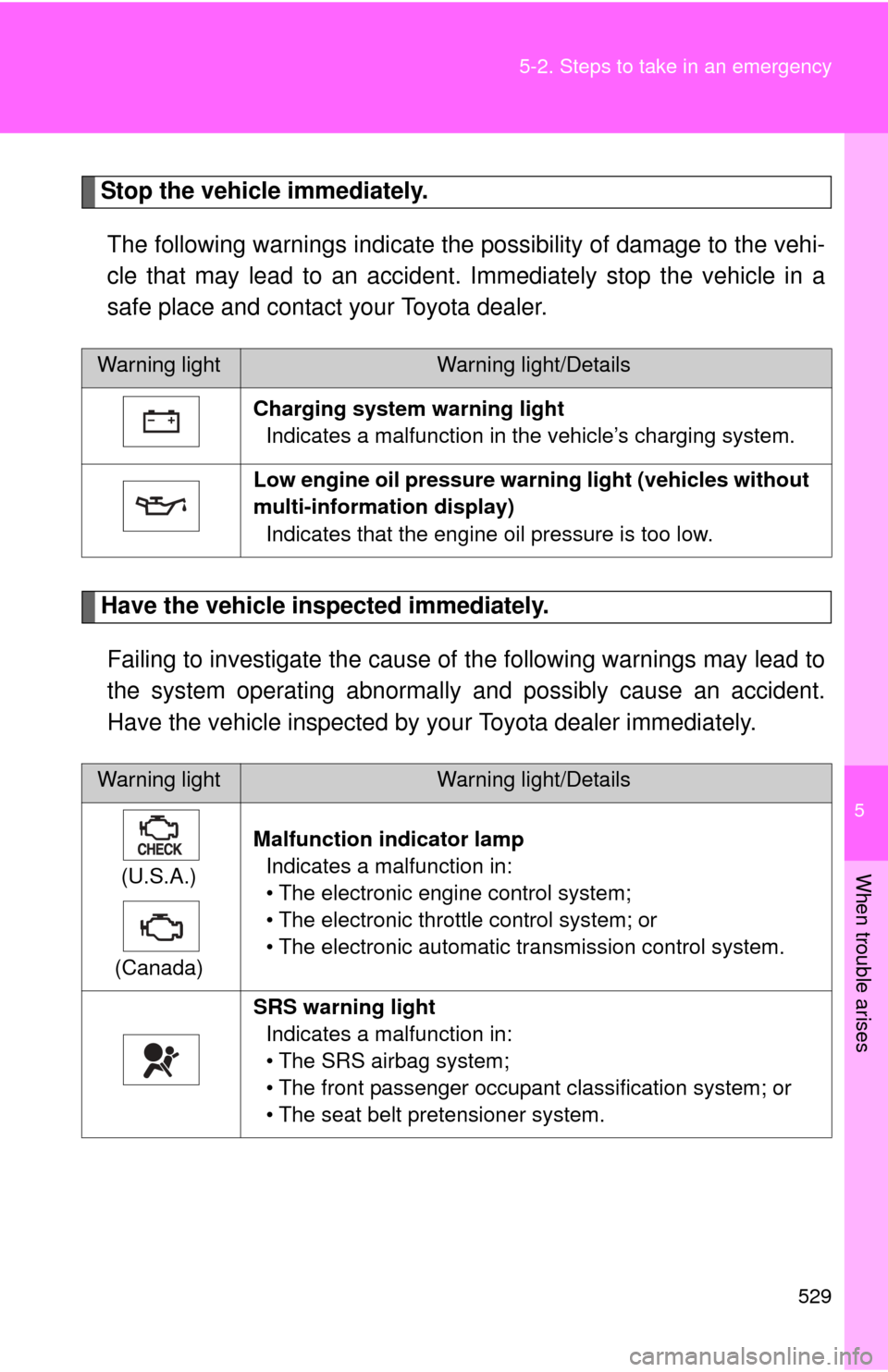
Stop the vehicle immediately.
The following warnings indicate the possibility of damage to the vehi-
cle that may lead to an accident. Immediately stop the vehicle in a
safe place and contact your Toyota dealer.
Have the vehicle inspected immediately.Failing to investigate the cause of the following warnings may lead to
the system operating abnormally and possibly cause an accident.
Have the vehicle inspected by your Toyota dealer immediately.
Warning lightWarning light/Details
Charging system warning light Indicates a malfunction in the vehicle’s charging system.
Low engine oil pressure warn ing light (vehicles without
multi-information display) Indicates that the engine oil pressure is too low.
Warning lightWarning light/Details
(U.S.A.)
(Canada) Malfunction indicator lamp
Indicates a malfunction in:
• The electronic engine control system;
• The electronic throttle control system; or
• The electronic automatic transmission control system.
SRS warning light Indicates a malfunction in:
• The SRS airbag system;
• The front passenger occupant classification system; or
• The seat belt pretensioner system.