Page 185 of 636
185
2
When driving
2-2. Instrument cluster
Gauges and meters
Vehicles without smart key system
The following gauges and meters illuminate when the engine
switch is in the “ON” position.
Vehicles with smart key system
The following gauges and meters illuminate when the “ENGINE
START STOP” switch is in IGNITION ON mode.
Tachometer
Displays the engine speed in revolutions per minute.
Engine coolant temperature gauge
Displays the engine coolant temperature.
Fuel gauge
Displays the quantity of fuel remaining in the tank.
Speedometer
Displays the vehicle speed.
Odometer/trip meter switching and trip meter resetting button
Switches between odometer and trip meter displays. Pushing and hold-
ing the button will reset the trip meter when the trip meter is being dis-
played.
Page 186 of 636
186 2-2. Instrument cluster
Instrument panel light controlThe brightness of the instrument panel lights can be adjusted.
Brighter
Darker
When the headlight switch is
turned on, the brightness will
be reduced slightly unless the
control dial is turned fully up.
Odometer/Trip meterOdometer
Displays the total distance the vehicle has been driven.
Trip meter
Displays the distance the vehi cle has been driven since the
meter was last reset. Trip meters A and B can be used to
record and display different distances independently.
NOTICE
■ To prevent damage to the engine and its components
●Do not let the indicator needle of the tachometer enter the red zone, which
indicates the maximum engine speed.
● The engine may be overheating if the temperature gauge is in the red
zone (H). In this case, immediately stop the vehicle in a safe place, and
check the engine after it has cooled completely. (
P. 564)
Page 190 of 636

190 2-2. Instrument cluster
CAUTION
■If a safety system warning light does not come on
Should a safety system light such as the ABS and SRS airbag warning light
not come on when you start the engine, this could mean that these systems
are not available to help protect you in an accident, which could result in
death or serious injury. Have the vehicle inspected by your Toyota dealer
immediately if this occurs.
*1: These lights turn on when the engine switch is turned to the “ON”
position (vehicles without smart key system) or the “ENGINE
START STOP” switch is turned to IGNITION ON mode (vehicles
with smart key system) to indicate that a system check is being per-
formed. They will turn off after the engine is started, or after a few
seconds. There may be a malfunction in a system if a light does not
come on, or if the lights do not turn off. Have the vehicle inspected
by your Toyota dealer for details.
*2: Vehicles without multi-information display
*3: Vehicles with multi-information display
*4: Vehicles without navigation system
*5: Vehicles with navigation system
*6: The light flashes to indicate a malfunction.
Page 191 of 636
191
2-2. Instrument cluster
2
When driving
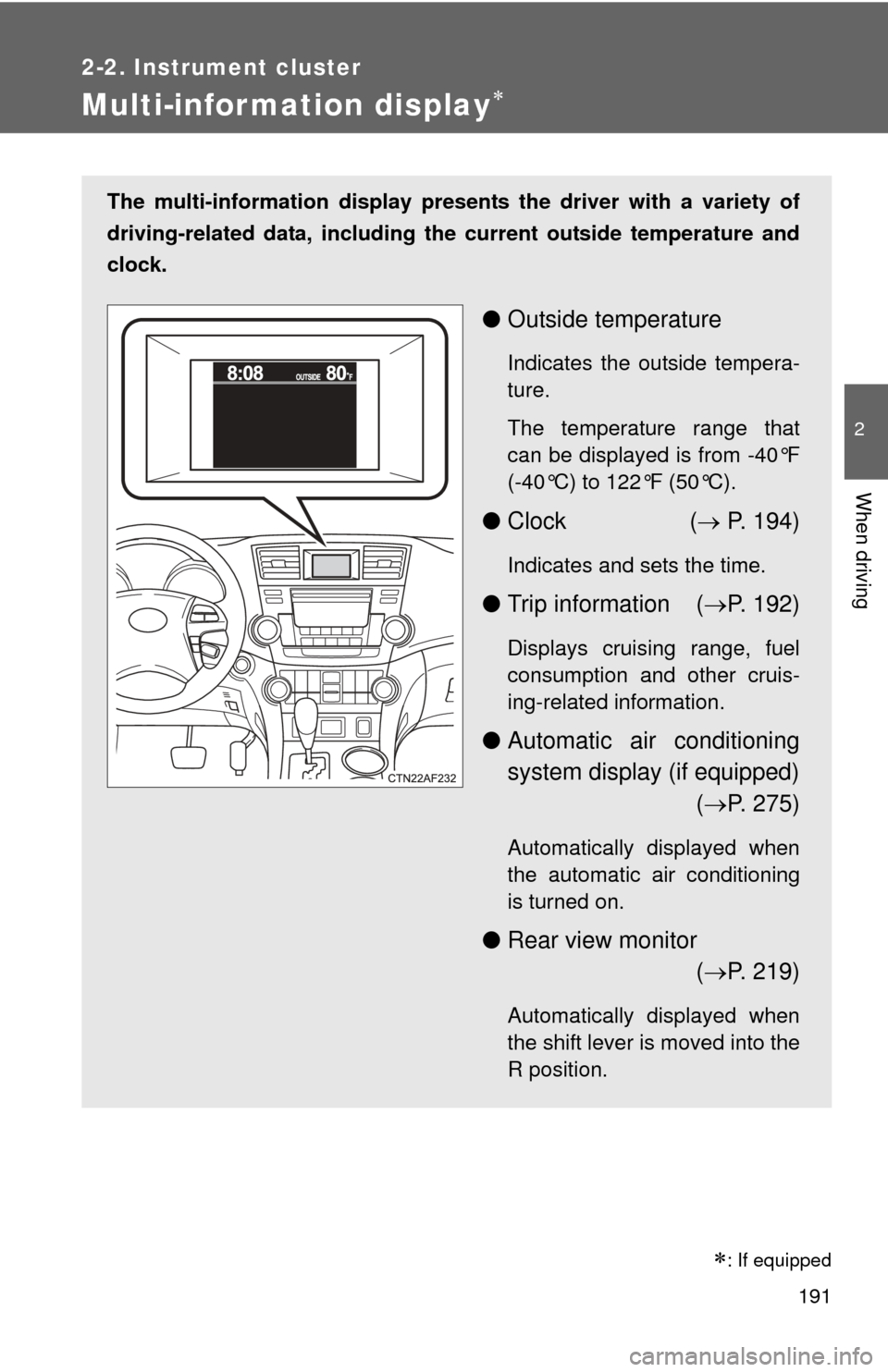
Multi-information display
The multi-information display presents the driver with a variety of
driving-related data, including th e current outside temperature and
clock.
● Outside temperature
Indicates the outside tempera-
ture.
The temperature range that
can be displayed is from -40°F
(-40°C) to 122°F (50°C).
●Clock ( P. 194)
Indicates and sets the time.
● Trip information ( P. 192)
Displays cruising range, fuel
consumption and other cruis-
ing-related information.
● Automatic air conditioning
system display (if equipped)
( P. 275)
Automatically displayed when
the automatic air conditioning
is turned on.
● Rear view monitor
( P. 219)
Automatically displayed when
the shift lever is moved into the
R position.
: If equipped
Page 192 of 636
192 2-2. Instrument cluster
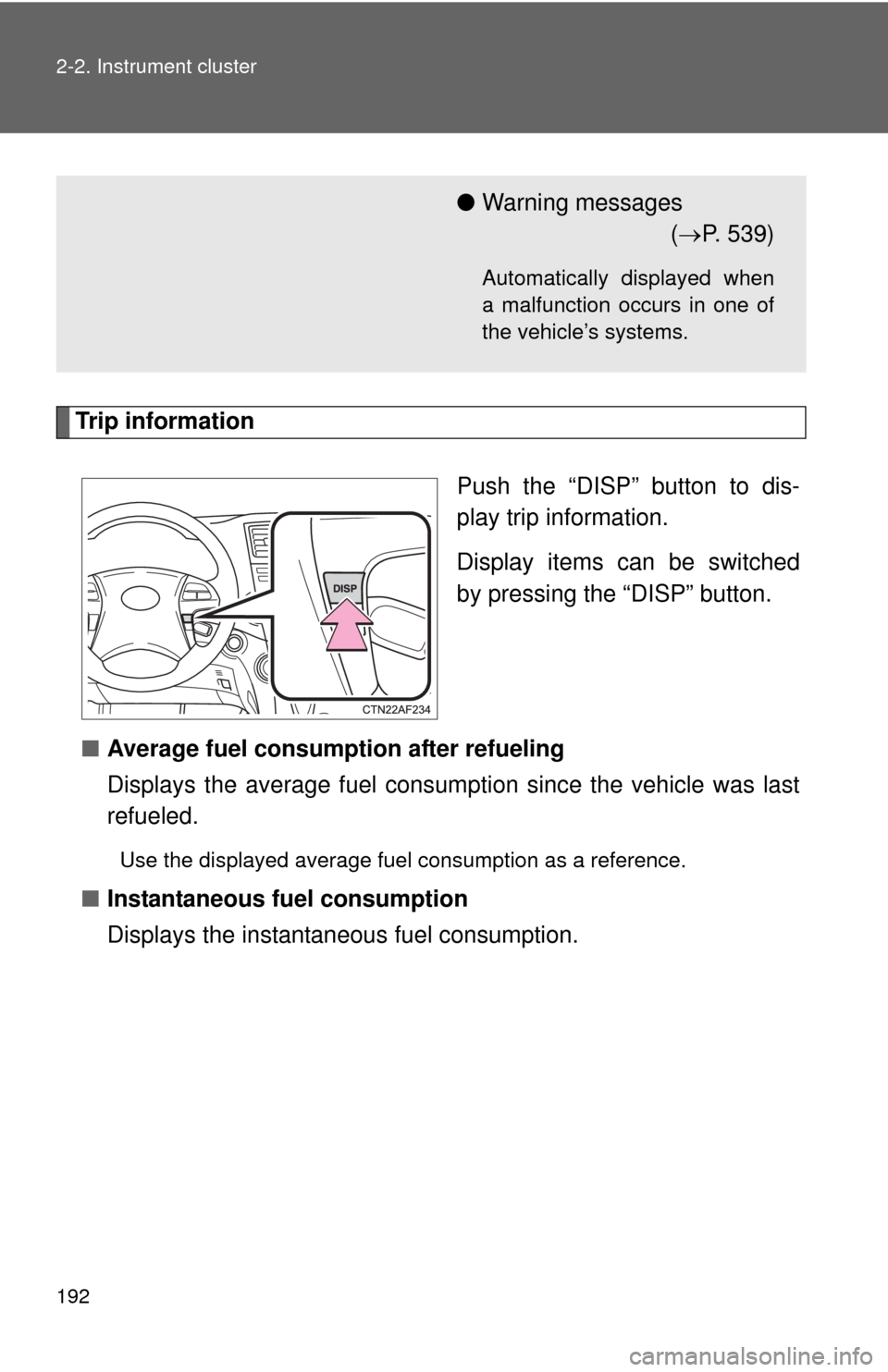
Trip informationPush the “DISP” button to dis-
play trip information.
Display items can be switched
by pressing the “DISP” button.
■ Average fuel consumption after refueling
Displays the average fuel consumption since the vehicle was last
refueled.
Use the displayed average fuel consumption as a reference.
■Instantaneous fuel consumption
Displays the instantan eous fuel consumption.
●Warning messages
( P. 539)
Automatically displayed when
a malfunction occurs in one of
the vehicle’s systems.
Page 193 of 636

193
2-2. Instrument cluster
2
When driving
■
Cruising range
Displays the estimated maximum di stance that can be driven with
the quantity of fuel remaining.
• This distance is computed based on your average fuel consumption.
As a result, the actual distance that can be driven may differ from
that displayed.
• Vehicles without smart key system: When only a small amount of fuel is added to the tank, the display may not be updated.
When adding fuel, turn the engine switch OFF. In case fuel is added
without turning the engine switch OFF, the display may not be
updated.
• Vehicles with smart key system: When only a small amount of fuel is added to the tank, the display may not be updated.
When adding fuel, turn the “ENGINE START STOP” switch OFF. In
case fuel is added without turning the “ENGINE START STOP”
switch OFF, the display may not be updated.
■Driving distance
Displays the driving distance since the engine was started.
■ Average fuel consumption
Displays the average fuel cons umption since the function was
reset.
• This function can be reset by pressing the “DISP” button for longer
than one second when the average fuel consumption is displayed.
When the function is reset, the previous five average fuel consump-
tion values will automatically be displayed for six seconds.
• Use the displayed average fuel consumption as a reference.
■ Average fuel consumption history
Displays the previous five av erage fuel consumption values.
Page 194 of 636
194 2-2. Instrument cluster
Setting up the displaysDisplay the set up screen on the
multi-information display when
the vehicle is stopped.
Press and hold the “DISP” button
to display the set up screen.
Select the desired item on the
menu screen.
Press and hold the “DISP” button
to enter the setting mode.
■Setting the clock
Select “CLOCK” on the menu screen. Press and hold the
“DISP” button until the display changes.
Press the “DISP” button to adjust
the hours.
After adjusting the hours, wait 5
seconds to allow the hours to be
automatically input.
STEP1
STEP2
STEP1
STEP2
Page 195 of 636
195
2-2. Instrument cluster
2
When driving
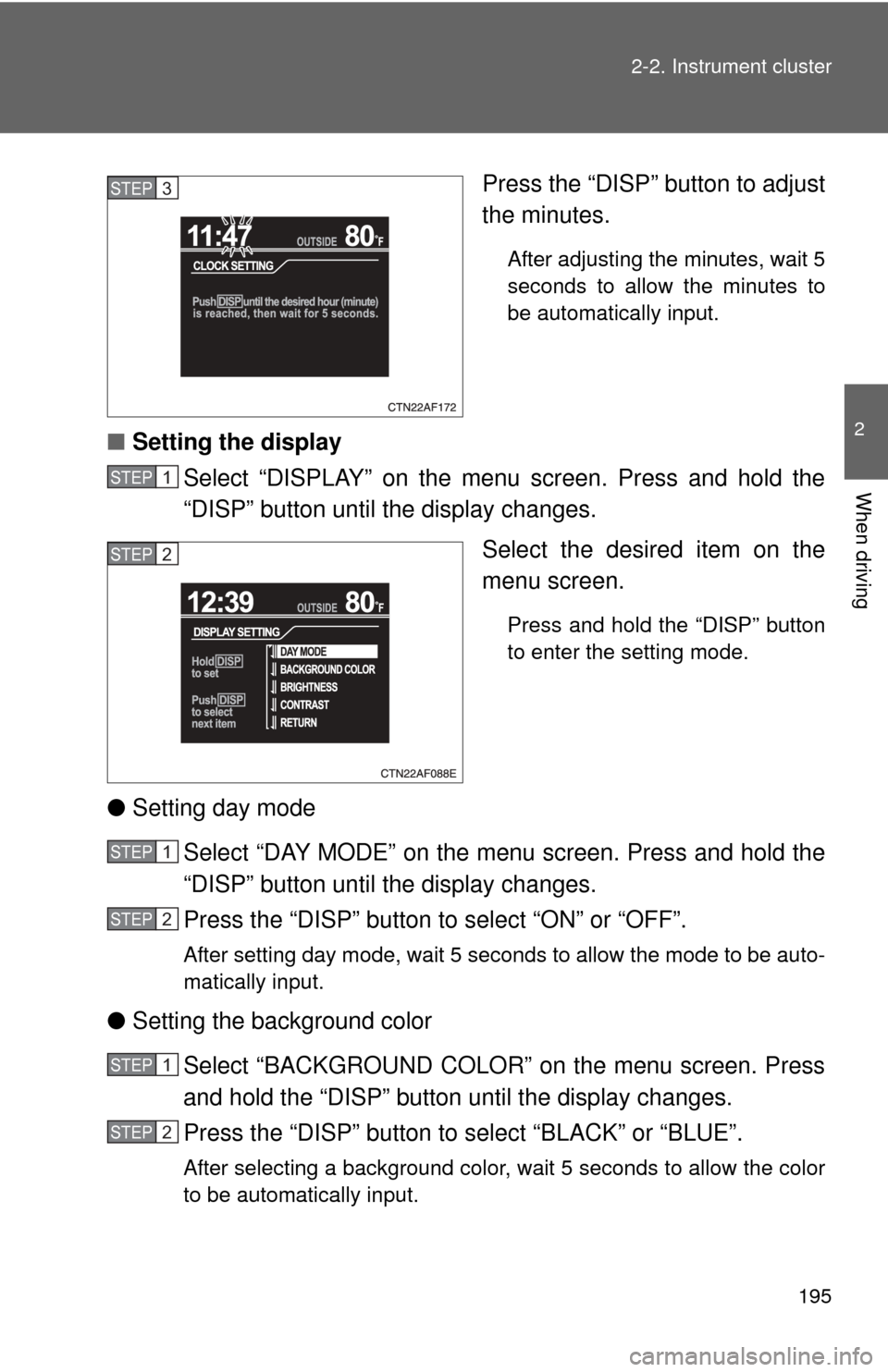
Press the “DISP” button to adjust
the minutes.
After adjusting the minutes, wait 5
seconds to allow the minutes to
be automatically input.
■
Setting the display
Select “DISPLAY” on the menu screen. Press and hold the
“DISP” button until the display changes.
Select the desired item on the
menu screen.
Press and hold the “DISP” button
to enter the setting mode.
●Setting day mode
Select “DAY MODE” on the menu screen. Press and hold the
“DISP” button until the display changes.
Press the “DISP” button to select “ON” or “OFF”.
After setting day mode, wait 5 seconds to allow the mode to be auto-
matically input.
●Setting the background color
Select “BACKGROUND COLOR” on the menu screen. Press
and hold the “DISP” button until the display changes.
Press the “DISP” button to select “BLACK” or “BLUE”.
After selecting a background color, wait 5 seconds to allow the color
to be automatically input.
STEP3
STEP1
STEP2
STEP1
STEP2
STEP1
STEP2